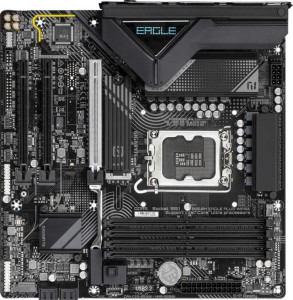
Gigabyte B860M Eagle Plus WiFi6E
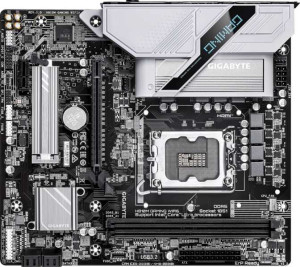
Gigabyte H810M Gaming Wi-Fi6

Gigabyte B860M Eagle Plus WiFi6E Gigabyte H810M Gaming Wi-Fi6

Overview

When choosing between the Gigabyte B860M Eagle Plus WiFi6E and the Gigabyte H810M Gaming Wi-Fi6, buyers face a nuanced decision across several key areas including wireless connectivity, memory capacity, expansion options, and storage flexibility. Both boards share the LGA 1851 socket and Micro-ATX form factor, yet they diverge meaningfully in overclocking support, PCIe generation, and overall expandability. Read on to see how every specification stacks up before making your choice.

Common Features

  • Both products use the LGA 1851 CPU socket.
  • Both products have a Micro-ATX form factor.
  • Wi-Fi connectivity is available on both products.
  • Bluetooth is available on both products, with version 5.3 on each.
  • Both products support HDMI 2.1.
  • Easy BIOS reset is not available on either product.
  • aptX is not supported on either product.
  • Both products support DDR5 memory with a maximum speed of 6400 MHz.
  • Both products have 2 memory channels.
  • ECC memory is not supported on either product.
  • Neither product has USB 3.2 Gen 2 ports in USB-C format.
  • Neither product has USB 3.2 Gen 1 ports in USB-C format.
  • Neither product has USB 3.2 Gen 2x2 ports.
  • Neither product has USB 4 or Thunderbolt ports.
  • Both products have an HDMI output.
  • Both products provide 2 USB 3.2 Gen 1 ports through expansion and 4 USB 2.0 ports through expansion.
  • Both products have 4 SATA 3 connectors and no SATA 2 connectors.
  • A TPM connector is present on both products.
  • mSATA connectivity is not available on either product.
  • Both products support 7.1 audio channels with 3 audio connectors.
  • S/PDIF Out is not available on either product.
  • Both products support RAID 0, RAID 1, RAID 5, and RAID 10, but neither supports RAID 0+1.

Main Differences

  • Wi-Fi 6E (802.11ax) support is present on Gigabyte B860M Eagle Plus WiFi6E but not available on Gigabyte H810M Gaming Wi-Fi6.
  • Overclocking support is available on Gigabyte B860M Eagle Plus WiFi6E but not on Gigabyte H810M Gaming Wi-Fi6.
  • RGB lighting is present on Gigabyte H810M Gaming Wi-Fi6 but not on Gigabyte B860M Eagle Plus WiFi6E.
  • Dual BIOS is available on Gigabyte B860M Eagle Plus WiFi6E but not on Gigabyte H810M Gaming Wi-Fi6.
  • The board height is 244 mm on Gigabyte B860M Eagle Plus WiFi6E and 215 mm on Gigabyte H810M Gaming Wi-Fi6.
  • Maximum supported memory is 256 GB on Gigabyte B860M Eagle Plus WiFi6E and 128 GB on Gigabyte H810M Gaming Wi-Fi6.
  • Memory slots number 4 on Gigabyte B860M Eagle Plus WiFi6E and 2 on Gigabyte H810M Gaming Wi-Fi6.
  • USB 3.2 Gen 2 ports (USB-A) count is 1 on Gigabyte B860M Eagle Plus WiFi6E and 0 on Gigabyte H810M Gaming Wi-Fi6.
  • USB 3.2 Gen 1 ports (USB-A) count is 2 on Gigabyte B860M Eagle Plus WiFi6E and 1 on Gigabyte H810M Gaming Wi-Fi6.
  • USB 2.0 ports count is 3 on Gigabyte B860M Eagle Plus WiFi6E and 5 on Gigabyte H810M Gaming Wi-Fi6.
  • DisplayPort outputs number 2 on Gigabyte B860M Eagle Plus WiFi6E and 1 on Gigabyte H810M Gaming Wi-Fi6.
  • Fan headers number 4 on Gigabyte B860M Eagle Plus WiFi6E and 3 on Gigabyte H810M Gaming Wi-Fi6.
  • M.2 sockets number 2 on Gigabyte B860M Eagle Plus WiFi6E and 1 on Gigabyte H810M Gaming Wi-Fi6.
  • A PCIe 5.0 x16 slot is present on Gigabyte B860M Eagle Plus WiFi6E, while Gigabyte H810M Gaming Wi-Fi6 offers a PCIe 4.0 x16 slot instead.
  • PCIe x1 slots number 2 on Gigabyte B860M Eagle Plus WiFi6E and 1 on Gigabyte H810M Gaming Wi-Fi6.
Specs Comparison
Gigabyte B860M Eagle Plus WiFi6E

Gigabyte B860M Eagle Plus WiFi6E

Gigabyte H810M Gaming Wi-Fi6

Gigabyte H810M Gaming Wi-Fi6

General info:
CPU socket LGA 1851 LGA 1851
form factor Micro-ATX Micro-ATX
release date January 2025 March 2025
supports Wi-Fi
Wi-Fi version Wi-Fi 4 (802.11n), Wi-Fi 5 (802.11ac), Wi-Fi 6 (802.11ax), Wi-Fi 6E (802.11ax) Wi-Fi 4 (802.11n), Wi-Fi 5 (802.11ac), Wi-Fi 6 (802.11ax)
Has Bluetooth
Bluetooth version 5.3 5.3
HDMI version HDMI 2.1 HDMI 2.1
Easy to overclock
has RGB lighting
Easy to reset BIOS
Has dual BIOS
has aptX
CPU sockets 1 1
Has integrated graphics
warranty period 3 years 3 years
height 244 mm 215 mm
width 244 mm 244 mm
Has integrated CPU

Both the Gigabyte B860M Eagle Plus WiFi6E and the Gigabyte H810M Gaming Wi-Fi6 share the same LGA 1851 socket, Micro-ATX form factor, Bluetooth 5.3, HDMI 2.1 output, and a 3-year warranty — making them comparable in their foundational platform. However, the Eagle Plus is slightly taller at 244 mm versus the H810M's 215 mm, which could matter in tighter Micro-ATX cases with limited vertical clearance.

The most meaningful differentiators lie in feature depth. The Eagle Plus supports Wi-Fi 6E, adding access to the uncongested 6 GHz band for lower latency and less interference in dense environments — a real advantage over the H810M's Wi-Fi 6-only support. The Eagle Plus also supports overclocking and includes a dual BIOS, the latter acting as a hardware safety net if a firmware update goes wrong. The H810M, by contrast, offers neither, but counters with RGB lighting — purely aesthetic, but relevant to builders prioritizing case aesthetics.

For users focused on performance headroom and platform resilience, the Eagle Plus has a clear edge: Wi-Fi 6E, overclocking support, and dual BIOS represent tangible functional advantages. The H810M is better suited for builders who prioritize visual customization and a more compact board height, but it concedes meaningful ground on connectivity and reliability features.

Memory:
maximum memory amount 256GB 128GB
RAM speed (max) 6400 MHz 6400 MHz
memory slots 4 2
DDR memory version 5 5
memory channels 2 2
Supports ECC memory

On the memory front, both boards run DDR5 at up to 6400 MHz and operate in dual-channel mode — so day-to-day bandwidth and latency characteristics are identical when configured equivalently. The real divergence is in physical slot count and capacity ceiling: the Eagle Plus offers 4 slots and supports up to 256 GB, while the H810M Gaming provides just 2 slots capped at 128 GB.

Those differences carry practical weight beyond raw numbers. Four slots give builders the flexibility to start with two modules and expand later without discarding existing RAM — a cost-efficient upgrade path. Two slots force an all-or-nothing swap once you hit the ceiling. The 256 GB ceiling on the Eagle Plus also makes it a more viable long-term platform for memory-intensive workloads like large virtual machines, video editing, or professional-grade multitasking, whereas 128 GB on the H810M, while still substantial for most users today, leaves less runway.

The Eagle Plus holds a clear advantage here. The additional slots and doubled capacity ceiling represent genuine scalability benefits, particularly for power users planning to grow their system over time. For a typical home or gaming build that will never exceed 64 GB, the H810M's limitations are largely irrelevant — but for anyone with ambitions beyond that threshold, the Eagle Plus is the more future-proof choice.

Ports:
USB 3.2 Gen 2 ports (USB-A) 1 0
USB 3.2 Gen 1 ports (USB-A) 2 1
USB 3.2 Gen 2 ports (USB-C) 0 0
USB 3.2 Gen 1 ports (USB-C) 0 0
USB 2.0 ports 3 5
USB 3.2 Gen 2x2 ports 0 0
USB 4 40Gbps ports 0 0
USB 4 20Gbps ports 0 0
Thunderbolt 4 ports 0 0
Thunderbolt 3 ports 0 0
has an HDMI output
DisplayPort outputs 2 1
RJ45 ports 1 1
Has USB Type-C
eSATA ports 0 0
DVI outputs 0 0
has a VGA connector
PS/2 ports 1 1

Shared ground between the two boards includes HDMI output, a single RJ45 ethernet port, and a PS/2 port — a legacy inclusion that still sees use with certain keyboards and mice. Neither board offers USB-C, Thunderbolt, or USB 4, so high-speed peripheral connectivity via those standards is off the table for both. The divergence, however, shows up clearly in USB speed tiers and display output count.

The Eagle Plus brings a USB 3.2 Gen 2 port (10 Gbps) alongside two USB 3.2 Gen 1 ports (5 Gbps), totaling three high-speed USB-A connections at the rear. The H810M Gaming manages just a single USB 3.2 Gen 1 port (5 Gbps), compensating with five USB 2.0 ports — which top out at 480 Mbps and are increasingly inadequate for fast storage devices or rapid data transfers. On display outputs, the Eagle Plus adds a second DisplayPort, enabling a three-screen setup via its two DisplayPorts and HDMI simultaneously, while the H810M is limited to two display outputs total.

The Eagle Plus has a meaningful edge in this category. Faster USB throughput matters for anyone connecting external SSDs, high-resolution webcams, or other bandwidth-hungry peripherals, and the extra DisplayPort is a tangible benefit for multi-monitor users. The H810M's heavier reliance on USB 2.0 reflects a more entry-level connectivity profile that suits basic builds but falls short for demanding setups.

Connectors:
USB 3.2 Gen 1 ports (through expansion) 2 2
USB 2.0 ports (through expansion) 4 4
SATA 3 connectors 4 4
fan headers 4 3
USB 3.0 ports (through expansion) 2 2
M.2 sockets 2 1
Has TPM connector
U.2 sockets 0 0
Has mSATA connector
SATA 2 connectors 0 0

Internal connectors tell a lot about how a board handles storage and thermal management — two areas that directly affect long-term usability. Here, the two boards share a common baseline: identical expansion USB headers, 4 SATA 3 connectors, and a TPM header on both, which satisfies Windows 11's security requirements without any workaround.

Where they diverge is in M.2 sockets and fan headers. The Eagle Plus includes 2 M.2 sockets, allowing simultaneous installation of a primary NVMe boot drive and a secondary NVMe storage drive — no SATA slots consumed, no adapters needed. The H810M Gaming offers just 1 M.2 socket, meaning a second fast storage device would require falling back to SATA, which delivers significantly lower sequential throughput. On thermal control, the Eagle Plus also provides 4 fan headers versus the H810M's 3, giving builders one additional point of direct fan or pump control — a modest but real advantage in managing airflow or a liquid cooler alongside case fans.

The Eagle Plus edges ahead in this group. The second M.2 socket is the standout differentiator: for anyone building a system where speed and storage capacity matter, being able to run two NVMe drives natively is a genuine practical benefit. The extra fan header is a smaller but welcome addition for thermal flexibility. The H810M is adequate for single-drive builds with standard cooling, but it offers less room to grow.

Expansion slots:
PCIe 4.0 x16 slots 0 1
PCIe 5.0 x16 slots 1 0
PCIe 3.0 x16 slots 0 0
PCIe x1 slots 2 1
PCI slots 0 0
PCIe 2.0 x16 slots 0 0
PCIe x4 slots 0 0
PCIe x8 slots 0 0

The primary GPU slot is where these two boards take notably different directions. The Eagle Plus provides a PCIe 5.0 x16 slot, while the H810M Gaming tops out at PCIe 4.0 x16. PCIe 5.0 doubles the available bandwidth over PCIe 4.0 — a distinction that is largely academic for current-generation graphics cards, which rarely saturate even PCIe 4.0, but becomes meaningful for next-generation GPUs or high-throughput add-in cards designed to exploit that headroom.

Beyond the primary slot, the Eagle Plus also includes 2 PCIe x1 slots compared to the H810M's single x1 slot. These smaller slots are typically used for expansion cards such as sound cards, capture cards, or additional network adapters. Having two rather than one provides modest but real flexibility for builders who need more than one such peripheral without occupying SATA or M.2 resources.

The Eagle Plus holds the advantage in this group on both counts. The PCIe 5.0 primary slot offers greater forward compatibility as the platform matures, and the extra x1 slot adds expandability for more complex builds. The H810M's PCIe 4.0 slot is perfectly capable for today's hardware, but it concedes future-proofing potential that the Eagle Plus preserves.

Audio:
audio channels 7.1 7.1
Has S/PDIF Out port
audio connectors 3 3

Audio is the one category where these two boards are in complete lockstep. Both offer 7.1-channel surround sound support, 3 analog audio connectors, and no S/PDIF optical output — an identical specification across every data point provided.

The 7.1-channel configuration is capable of driving a full surround sound speaker setup or a high-end headset, which covers the needs of most gaming and multimedia use cases. The absence of S/PDIF on both boards means users who require digital optical output for an AV receiver or external DAC will need to source that via a discrete sound card or USB audio device regardless of which board they choose.

This group is a complete tie. Neither board differentiates itself in any meaningful way on audio, and the choice between them should rest entirely on the advantages identified in other specification categories.

Storage:
Supports RAID 1
Supports RAID 10 (1+0)
Supports RAID 5
Supports RAID 0
Supports RAID 0+1

RAID support is identical across both boards. Each supports RAID 0 (striping for performance), RAID 1 (mirroring for redundancy), RAID 5 (striping with parity for a balance of speed and fault tolerance), and RAID 10 (a combined mirror-and-stripe configuration). Neither supports RAID 0+1, though in practice that omission is inconsequential — RAID 10 is generally preferred over RAID 0+1 for its superior fault tolerance anyway.

The presence of RAID 5 is worth noting for both boards, as it enables multi-drive setups where a single drive failure can be survived and recovered without data loss — a configuration relevant to small workstation or home server builds. That said, the practical utility of these RAID options is tied directly to available drive slots, where differences between the two boards were already noted in the Connectors category.

Strictly within the storage specification group, this is a complete tie. Both boards offer the same RAID capabilities with no differentiation, and neither holds any advantage over the other on this dimension alone.

Comparison Summary & Verdict

After examining every specification, these two Micro-ATX boards serve clearly different audiences. The Gigabyte B860M Eagle Plus WiFi6E stands out for builders who demand more headroom: its Wi-Fi 6E support, dual BIOS, overclocking capability, PCIe 5.0 x16 slot, 4 memory slots with up to 256 GB RAM, 2 M.2 sockets, and extra USB ports make it the stronger choice for performance-oriented or future-proof builds. The Gigabyte H810M Gaming Wi-Fi6, on the other hand, appeals to those who want a compact, budget-conscious board with RGB lighting and a PCIe 4.0 x16 slot, accepting fewer expansion options in exchange for a smaller footprint and more USB 2.0 ports. Neither board is universally superior; the right pick depends entirely on your priorities around expandability versus simplicity.

Gigabyte B860M Eagle Plus WiFi6E
Buy Gigabyte B860M Eagle Plus WiFi6E if...

Buy the Gigabyte B860M Eagle Plus WiFi6E if you want Wi-Fi 6E, overclocking support, dual BIOS, a PCIe 5.0 x16 slot, and room for up to 4 memory sticks with 256 GB of RAM.

Gigabyte H810M Gaming Wi-Fi6
Buy Gigabyte H810M Gaming Wi-Fi6 if...

Buy the Gigabyte H810M Gaming Wi-Fi6 if you prefer a more compact board with RGB lighting and a PCIe 4.0 x16 slot for a straightforward, no-frills build.