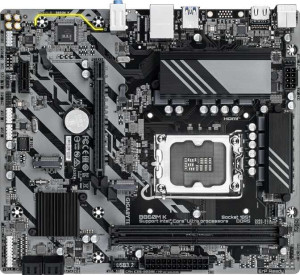
Gigabyte B860M K
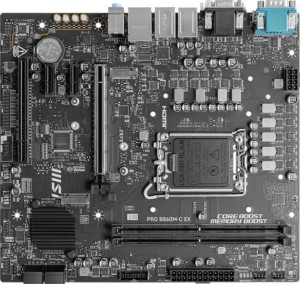
MSI Pro B860M-C Ex

Gigabyte B860M K MSI Pro B860M-C Ex

Overview

Welcome to our detailed spec comparison between the Gigabyte B860M K and the MSI Pro B860M-C Ex, two Micro-ATX motherboards sharing the B860 chipset and LGA 1851 socket. While they agree on many fundamentals, key battlegrounds emerge around PCIe generation support, rear panel connectivity, and expansion slot configurations. Read on to discover which board better suits your next build.

Common Features

  • Both boards use the LGA 1851 CPU socket.
  • Both boards are based on the B860 chipset.
  • Both boards come in a Micro-ATX form factor.
  • Neither board includes Wi-Fi support.
  • Neither board includes Bluetooth support.
  • Both boards feature HDMI 2.1 output.
  • Both boards support memory overclocking.
  • Neither board has RGB lighting.
  • Both boards support a maximum of 128GB of RAM.
  • Both boards support a maximum RAM speed of 6400 MHz.
  • Both boards support overclocked RAM speeds up to 8800 MHz.
  • Both boards have 2 memory slots.
  • Both boards use DDR5 memory.
  • Both boards support dual-channel memory.
  • Neither board supports ECC memory.
  • Both boards provide 4 USB 3.2 Gen 1 Type-A ports.
  • Neither board includes a USB 3.2 Gen 1 Type-C port.
  • Both boards provide 2 USB 2.0 ports.
  • Neither board includes USB 3.2 Gen 2x2, USB 4, Thunderbolt 3, or Thunderbolt 4 ports.
  • Both boards offer 2 USB 3.2 Gen 1 ports and 4 USB 2.0 ports through expansion headers.
  • Both boards include 2 USB 3.0 ports through expansion.
  • Both boards have 4 SATA 3 connectors.
  • Both boards have 3 fan headers.
  • Both boards include 2 M.2 sockets.
  • Both boards include a TPM connector.
  • Neither board has U.2 sockets.
  • Both boards offer 7.1-channel audio.
  • Neither board has an S/PDIF Out port.
  • Both boards have 3 audio connectors.
  • Both boards support RAID 0, RAID 1, RAID 5, and RAID 10.
  • Neither board supports RAID 0+1.

Main Differences

  • Board height is 215 mm on Gigabyte B860M K and 220 mm on MSI Pro B860M-C Ex.
  • Board width is 244 mm on Gigabyte B860M K and 243.8 mm on MSI Pro B860M-C Ex.
  • USB 3.2 Gen 2 Type-A ports total 0 on Gigabyte B860M K and 1 on MSI Pro B860M-C Ex.
  • USB 3.2 Gen 2 Type-C ports total 0 on Gigabyte B860M K and 1 on MSI Pro B860M-C Ex.
  • A USB Type-C connector is present on MSI Pro B860M-C Ex but not available on Gigabyte B860M K.
  • DisplayPort outputs total 0 on Gigabyte B860M K and 1 on MSI Pro B860M-C Ex.
  • A DVI output is present on MSI Pro B860M-C Ex but not available on Gigabyte B860M K.
  • A VGA connector is present on MSI Pro B860M-C Ex but not available on Gigabyte B860M K.
  • PCIe 4.0 x16 slots total 1 on Gigabyte B860M K and 0 on MSI Pro B860M-C Ex.
  • PCIe 5.0 x16 slots total 0 on Gigabyte B860M K and 1 on MSI Pro B860M-C Ex.
  • PCIe x1 slots total 1 on Gigabyte B860M K and 2 on MSI Pro B860M-C Ex.
  • PCI slots total 0 on Gigabyte B860M K and 1 on MSI Pro B860M-C Ex.
Specs Comparison
Gigabyte B860M K

Gigabyte B860M K

MSI Pro B860M-C Ex

MSI Pro B860M-C Ex

General info:
CPU socket LGA 1851 LGA 1851
chipset B860 B860
form factor Micro-ATX Micro-ATX
release date January 2025 January 2025
supports Wi-Fi
Has Bluetooth
HDMI version HDMI 2.1 HDMI 2.1
Easy to overclock
has RGB lighting
Easy to reset BIOS
Has dual BIOS
CPU sockets 1 1
Has integrated graphics
warranty period 3 years 3 years
height 215 mm 220 mm
width 244 mm 243.8 mm
Has integrated CPU

At their core, the Gigabyte B860M K and MSI Pro B860M-C Ex are built on identical foundations: both use the LGA 1851 socket with the B860 chipset, adopt the Micro-ATX form factor, and share the same HDMI 2.1 output, dual BIOS protection, and a 3-year warranty. Neither board includes Wi-Fi, Bluetooth, RGB lighting, or an integrated CPU or GPU, so buyers needing wireless connectivity will require a separate adapter regardless of which they choose.

The only measurable difference between the two lies in physical dimensions. The Gigabyte measures 215 × 244 mm while the MSI comes in at 220 × 243.8 mm — a difference of just 5 mm in height and a negligible 0.2 mm in width. In practice, both fit comfortably in any case that supports Micro-ATX, so this gap has no real-world impact on build compatibility.

For this spec group, the two boards are effectively tied. Every feature and limitation that matters — chipset, socket, form factor, display output, BIOS resilience, and warranty coverage — is identical. Neither product offers a meaningful general-info advantage over the other, and the buying decision should rest entirely on differences in other spec categories such as memory support, connectivity, or pricing.

Memory:
maximum memory amount 128GB 128GB
RAM speed (max) 6400 MHz 6400 MHz
overclocked RAM speed 8800 MHz 8800 MHz
memory slots 2 2
DDR memory version 5 5
memory channels 2 2
Supports ECC memory

Both the Gigabyte B860M K and the MSI Pro B860M-C Ex have identical specifications in terms of memory. Both motherboards support a maximum memory capacity of 128GB and feature two memory slots. They support DDR5 memory and operate with dual memory channels. The maximum supported RAM speed is 6400 MHz, while the overclocked RAM speed is 8800 MHz on both models. Additionally, neither motherboard supports ECC memory.

Given that all memory-related specifications match exactly between the two products, there are no differences to highlight in this category.

Ports:
USB 3.2 Gen 2 ports (USB-A) 0 1
USB 3.2 Gen 1 ports (USB-A) 4 4
USB 3.2 Gen 2 ports (USB-C) 0 1
USB 3.2 Gen 1 ports (USB-C) 0 0
USB 2.0 ports 2 2
USB 3.2 Gen 2x2 ports 0 0
USB 4 40Gbps ports 0 0
USB 4 20Gbps ports 0 0
Thunderbolt 4 ports 0 0
Thunderbolt 3 ports 0 0
has an HDMI output
DisplayPort outputs 0 1
RJ45 ports 1 1
Has USB Type-C
eSATA ports 0 0
DVI outputs 0 1
has a VGA connector
PS/2 ports 1 1

The Gigabyte B860M K and MSI Pro B860M-C Ex differ slightly in terms of available ports. Both motherboards feature 4 USB 3.2 Gen 1 ports (USB-A) and 2 USB 2.0 ports. The Gigabyte B860M K does not include any USB 3.2 Gen 2 ports (USB-A or USB-C), USB 4 ports, or Thunderbolt ports, while the MSI Pro B860M-C Ex offers 1 USB 3.2 Gen 2 port (USB-A) and 1 USB 3.2 Gen 2 port (USB-C), as well as a USB Type-C port.

Additionally, both motherboards have an HDMI output and 1 RJ45 Ethernet port. However, the MSI Pro B860M-C Ex includes more display options with a DisplayPort output and a DVI output, while the Gigabyte B860M K does not have DisplayPort or DVI outputs. The MSI Pro B860M-C Ex also provides a VGA connector, which the Gigabyte B860M K lacks.

In terms of legacy connections, both motherboards include 1 PS/2 port. The Gigabyte B860M K has no eSATA ports or Thunderbolt 3/4 support, which is consistent with the MSI Pro B860M-C Ex, though the MSI motherboard includes more display output options.

Connectors:
USB 3.2 Gen 1 ports (through expansion) 2 2
USB 2.0 ports (through expansion) 4 4
SATA 3 connectors 4 4
fan headers 3 3
USB 3.0 ports (through expansion) 2 2
M.2 sockets 2 2
Has TPM connector
U.2 sockets 0 0
Has mSATA connector
SATA 2 connectors 0 0

The Gigabyte B860M K and MSI Pro B860M-C Ex share identical specifications when it comes to connectors. Both motherboards offer 2 USB 3.2 Gen 1 ports (through expansion), 4 USB 2.0 ports (through expansion), 2 USB 3.0 ports (through expansion), and 4 SATA 3 connectors. They also feature 3 fan headers and 2 M.2 sockets, which are the same for both models.

Both motherboards are equipped with a TPM connector, but neither supports U.2 or mSATA connectors, and both have 0 SATA 2 connectors.

Given that the connector specifications are identical between the two motherboards, there are no differences to highlight in this category.

Expansion slots:
PCIe 4.0 x16 slots 1 0
PCIe 5.0 x16 slots 0 1
PCIe 3.0 x16 slots 0 0
PCIe x1 slots 1 2
PCI slots 0 1
PCIe 2.0 x16 slots 0 0
PCIe x4 slots 0 0
PCIe x8 slots 0 0

The Gigabyte B860M K and MSI Pro B860M-C Ex differ in their expansion slot configurations. The Gigabyte B860M K is equipped with 1 PCIe 4.0 x16 slot and 1 PCIe x1 slot, with no PCI slots or other types of PCIe slots available. In contrast, the MSI Pro B860M-C Ex features 1 PCIe 5.0 x16 slot, 2 PCIe x1 slots, and 1 PCI slot, while it does not include any PCIe 2.0 x16, PCIe x4, or PCIe x8 slots.

While both motherboards provide a PCIe x1 slot, the Gigabyte B860M K supports only PCIe 4.0 for its x16 slot, whereas the MSI Pro B860M-C Ex opts for PCIe 5.0 in that position. Additionally, the MSI board offers a PCI slot that the Gigabyte board lacks.

Overall, while both motherboards offer basic expansion options, the MSI Pro B860M-C Ex has more variety with an additional PCI slot and a more advanced PCIe 5.0 x16 slot compared to the Gigabyte B860M K's single PCIe 4.0 x16 slot.

Audio:
audio channels 7.1 7.1
Has S/PDIF Out port
audio connectors 3 3

Both the Gigabyte B860M K and the MSI Pro B860M-C Ex offer the same audio features. Both motherboards support 7.1 audio channels, include 3 audio connectors, and do not feature an S/PDIF Out port.

With identical audio specifications, there are no differences between the two products in this category.

Storage:
Supports RAID 1
Supports RAID 10 (1+0)
Supports RAID 5
Supports RAID 0
Supports RAID 0+1

The Gigabyte B860M K and MSI Pro B860M-C Ex share the same storage capabilities when it comes to RAID support. Both motherboards support RAID 1, RAID 10 (1+0), and RAID 5 configurations. Neither motherboard supports RAID 0+1, but both do support RAID 0.

There are no differences between the two motherboards in terms of RAID functionality.

Comparison Summary & Verdict

Both the Gigabyte B860M K and the MSI Pro B860M-C Ex are solid Micro-ATX boards built on the B860 chipset with identical memory support up to 128GB of DDR5 at 6400 MHz. The Gigabyte B860M K stands out with its PCIe 4.0 x16 slot, making it a straightforward, no-frills choice for builders who do not yet need next-gen GPU bandwidth. The MSI Pro B860M-C Ex, however, pulls ahead on connectivity with a PCIe 5.0 x16 slot, additional USB 3.2 Gen 2 ports including a Type-C, plus DisplayPort, DVI, and VGA outputs, offering noticeably greater versatility for feature-conscious builders.

Gigabyte B860M K
Buy Gigabyte B860M K if...

Buy the Gigabyte B860M K if you want a compact, no-frills B860 board and a PCIe 4.0 x16 slot is sufficient for your current GPU.

MSI Pro B860M-C Ex
Buy MSI Pro B860M-C Ex if...

Buy the MSI Pro B860M-C Ex if you want future-ready PCIe 5.0 x16 support, more USB connectivity including Type-C, and a wider range of display output options.