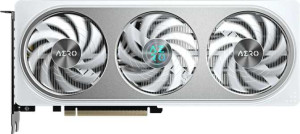
Gigabyte GeForce RTX 5060 Ti Aero OC 16GB
Nvidia GeForce RTX 5060 Ti 8GB

Gigabyte GeForce RTX 5060 Ti Aero OC 16GB Nvidia GeForce RTX 5060 Ti 8GB

Common Features

  • Both products have a GPU memory speed of 1750 MHz.
  • Both products have 4608 shading units.
  • Both products have 144 texture mapping units (TMUs).
  • Both products have 48 render output units (ROPs).
  • Both products support Double Precision Floating Point (DPFP).
  • Both products have an effective memory speed of 28000 MHz.
  • Both products have a maximum memory bandwidth of 448 GB/s.
  • Both products use GDDR7 memory.
  • Both products have a memory bus width of 128-bit.
  • Both products support ECC memory.
  • Both products support DirectX 12 Ultimate.
  • Both products support OpenGL version 4.6.
  • Both products support OpenCL version 3.
  • Both products support multi-display technology.
  • Both products support ray tracing.
  • Both products support 3D.
  • Both products support DLSS.
  • Both products have one HDMI output.
  • Both products have DisplayPort outputs.
  • Both products use PCI Express version 5.

Main Differences

  • GPU clock speed is 2407 MHz on Gigabyte GeForce RTX 5060 Ti Aero OC 16GB and 2410 MHz on Nvidia GeForce RTX 5060 Ti 8GB.
  • GPU turbo is 2647 MHz on Gigabyte GeForce RTX 5060 Ti Aero OC 16GB and 2570 MHz on Nvidia GeForce RTX 5060 Ti 8GB.
  • Pixel rate is 127.1 GPixel/s on Gigabyte GeForce RTX 5060 Ti Aero OC 16GB and 123.4 GPixel/s on Nvidia GeForce RTX 5060 Ti 8GB.
  • Floating-point performance is 24.39 TFLOPS on Gigabyte GeForce RTX 5060 Ti Aero OC 16GB and 23.69 TFLOPS on Nvidia GeForce RTX 5060 Ti 8GB.
  • Texture rate is 381.2 GTexels/s on Gigabyte GeForce RTX 5060 Ti Aero OC 16GB and 370.1 GTexels/s on Nvidia GeForce RTX 5060 Ti 8GB.
  • VRAM is 16GB on Gigabyte GeForce RTX 5060 Ti Aero OC 16GB and 8GB on Nvidia GeForce RTX 5060 Ti 8GB.
  • RGB lighting is present on Gigabyte GeForce RTX 5060 Ti Aero OC 16GB but not available on Nvidia GeForce RTX 5060 Ti 8GB.
Specs Comparison
Gigabyte GeForce RTX 5060 Ti Aero OC 16GB

Gigabyte GeForce RTX 5060 Ti Aero OC 16GB

Nvidia GeForce RTX 5060 Ti 8GB

Nvidia GeForce RTX 5060 Ti 8GB

Performance:
GPU clock speed 2407 MHz 2410 MHz
GPU turbo 2647 MHz 2570 MHz
pixel rate 127.1 GPixel/s 123.4 GPixel/s
floating-point performance 24.39 TFLOPS 23.69 TFLOPS
texture rate 381.2 GTexels/s 370.1 GTexels/s
GPU memory speed 1750 MHz 1750 MHz
shading units 4608 4608
texture mapping units (TMUs) 144 144
render output units (ROPs) 48 48
Has Double Precision Floating Point (DPFP)

When comparing the performance of the Gigabyte GeForce RTX 5060 Ti Aero OC 16GB and the Nvidia GeForce RTX 5060 Ti 8GB, both share similar core specifications, but with some key differences. The Gigabyte model has a GPU clock speed of 2407 MHz and can boost up to 2647 MHz, while the Nvidia model has a slightly higher base clock at 2410 MHz but a lower boost clock of 2570 MHz. These differences in clock speeds are minor but could influence peak performance in specific tasks.

In terms of pixel rate, the Gigabyte GeForce RTX 5060 Ti Aero OC delivers 127.1 GPixel/s, which is slightly higher than the Nvidia card’s 123.4 GPixel/s. This means the Gigabyte model can handle more pixels per second, which could result in better performance in rendering-intensive applications.

Both cards have identical floating-point performance of 24.39 TFLOPS for the Gigabyte card and 23.69 TFLOPS for the Nvidia card, as well as identical texture rates at 381.2 GTexels/s for the Gigabyte and 370.1 GTexels/s for the Nvidia card. Other specifications, like shading units (4608), texture mapping units (TMUs) (144), render output units (ROPs) (48), and the inclusion of Double Precision Floating Point (DPFP) support, are also the same across both products.

Memory:
effective memory speed 28000 MHz 28000 MHz
maximum memory bandwidth 448 GB/s 448 GB/s
VRAM 16GB 8GB
GDDR version GDDR7 GDDR7
memory bus width 128-bit 128-bit
Supports ECC memory

The Gigabyte GeForce RTX 5060 Ti Aero OC 16GB and the Nvidia GeForce RTX 5060 Ti 8GB both feature the same memory specifications in several key areas. Both cards have an effective memory speed of 28000 MHz, a maximum memory bandwidth of 448 GB/s, and utilize the same GDDR7 memory type with a 128-bit memory bus width.

However, the major difference between the two models lies in their VRAM. The Gigabyte card is equipped with 16GB of VRAM, while the Nvidia card has 8GB of VRAM. This difference in memory capacity could affect performance in memory-intensive tasks, with the Gigabyte model having the advantage for larger workloads or higher-resolution gaming.

Both cards support ECC memory, ensuring error-correcting capabilities for more reliable performance, with no differences between the two in this aspect.

Features:
DirectX version DirectX 12 Ultimate DirectX 12 Ultimate
OpenGL version 4.6 4.6
OpenCL version 3 3
Supports multi-display technology
supports ray tracing
Supports 3D
supports DLSS
has XeSS (XMX)
AMD SAM / Intel Resizable BAR Intel Resizable BAR Intel Resizable BAR
has LHR
has RGB lighting
supported displays 4 4

The Gigabyte GeForce RTX 5060 Ti Aero OC 16GB and the Nvidia GeForce RTX 5060 Ti 8GB offer a very similar feature set across the board. Both cards support DirectX 12 Ultimate, OpenGL 4.6, and OpenCL 3, making them well-suited for modern gaming and creative workloads. They also both support multi-display technology, ray tracing, 3D, and DLSS, which means they are fully equipped for high-end gaming and immersive visual experiences.

Both models also share the same Intel Resizable BAR support and lack of LHR (Low Hash Rate), meaning neither has restrictions for cryptocurrency mining. However, there is a noticeable difference in the presence of RGB lighting. The Gigabyte model comes with RGB lighting, while the Nvidia card does not.

Both cards support up to four displays, making them ideal for multi-monitor setups, but again, the key difference is the RGB lighting feature, exclusive to the Gigabyte model.

Ports:
has an HDMI output
HDMI ports 1 1
HDMI version HDMI 2.1b HDMI 2.1b
DisplayPort outputs 3 3
USB-C ports 0 0
DVI outputs 0 0
mini DisplayPort outputs 0 0

When it comes to ports, the Gigabyte GeForce RTX 5060 Ti Aero OC 16GB and the Nvidia GeForce RTX 5060 Ti 8GB are identical. Both cards feature one HDMI output with HDMI 2.1b support, and three DisplayPort outputs. Neither card offers USB-C, DVI, or mini DisplayPort outputs. In terms of HDMI and DisplayPort configurations, the two models are the same.

There are no differences between these two models regarding the port setup, as both have the same number and types of video outputs.

General info:
GPU architecture Blackwell Blackwell
release date April 2025 April 2025
Thermal Design Power (TDP) 180W 180W
PCI Express (PCIe) version 5 5
semiconductor size 5 nm 5 nm
number of transistors 21900 million 21900 million
Has air-water cooling

The Gigabyte GeForce RTX 5060 Ti Aero OC 16GB and the Nvidia GeForce RTX 5060 Ti 8GB are identical in their general specifications. Both cards utilize the Blackwell GPU architecture and are built using a 5 nm semiconductor size. They share the same number of transistors, with 21900 million, and both have a Thermal Design Power (TDP) of 180W.

Additionally, both cards support PCI Express (PCIe) version 5 and lack air-water cooling systems. There are no differences in these general features between the two models.

Comparison Summary

This is a specification comparison between Gigabyte GeForce RTX 5060 Ti Aero OC 16GB and Nvidia GeForce RTX 5060 Ti 8GB. Both products share a GPU memory speed of 1750 MHz, shading units at 4608, and support ray tracing and multi-display technology. However, the Gigabyte model has 16GB of VRAM, while the Nvidia model has only 8GB. Additionally, the Gigabyte model features RGB lighting, a higher GPU turbo of 2647 MHz, and a faster pixel rate at 127.1 GPixel/s compared to Nvidia’s 123.4 GPixel/s. Lastly, the floating-point performance is 24.39 TFLOPS for the Gigabyte model and 23.69 TFLOPS for the Nvidia model.