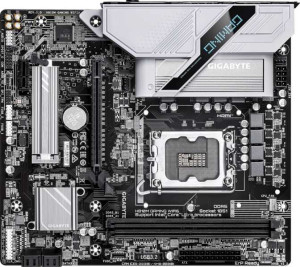
Gigabyte H810M Gaming Wi-Fi6
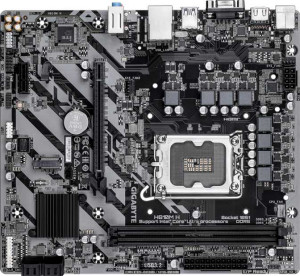
Gigabyte H810M H

Gigabyte H810M Gaming Wi-Fi6 Gigabyte H810M H

Overview

Welcome to our in-depth specification comparison between the Gigabyte H810M Gaming Wi-Fi6 and the Gigabyte H810M H. Both boards share the same LGA 1851 socket and Micro-ATX form factor, making them close rivals on paper — but a closer look reveals meaningful differences in wireless connectivity and display output options that could steer your buying decision in very different directions.

Common Features

  • Both products use the LGA 1851 CPU socket.
  • Both products have a Micro-ATX form factor.
  • Both products support HDMI 2.1.
  • Neither product supports overclocking easily.
  • Both products feature RGB lighting.
  • Neither product supports easy BIOS reset.
  • Neither product has dual BIOS.
  • Both products have 1 CPU socket.
  • Both products support a maximum memory amount of 128GB.
  • Both products support a maximum RAM speed of 6400 MHz.
  • Both products have 2 memory slots.
  • Both products use DDR5 memory.
  • Both products support 2 memory channels.
  • Neither product supports ECC memory.
  • Neither product has USB 3.2 Gen 2 ports (USB-A).
  • Both products have 1 USB 3.2 Gen 1 port (USB-A).
  • Neither product has USB 3.2 Gen 2 ports (USB-C).
  • Both products have 5 USB 2.0 ports.
  • Both products have 2 USB 3.2 Gen 1 ports through expansion.
  • Both products have 4 SATA 3 connectors.
  • Both products have 3 fan headers.
  • Both products have 1 M.2 socket.
  • Both products include a TPM connector.
  • Neither product has an mSATA connector.
  • Both products have 1 PCIe 4.0 x16 slot.
  • Neither product has PCIe 5.0 x16 slots.
  • Both products have 1 PCIe x1 slot.
  • Both products support 7.1 audio channels.
  • Neither product has an S/PDIF Out port.
  • Both products have 3 audio connectors.
  • Both products support RAID 0, RAID 1, RAID 5, and RAID 10.
  • Neither product supports RAID 0+1.

Main Differences

  • Wi-Fi support is present on Gigabyte H810M Gaming Wi-Fi6 but not available on Gigabyte H810M H.
  • Bluetooth support is present on Gigabyte H810M Gaming Wi-Fi6 but not available on Gigabyte H810M H.
  • DisplayPort outputs number 1 on Gigabyte H810M Gaming Wi-Fi6 and 0 on Gigabyte H810M H.
  • A VGA connector is present on Gigabyte H810M H but not available on Gigabyte H810M Gaming Wi-Fi6.
  • USB 2.0 ports through expansion number 4 on Gigabyte H810M Gaming Wi-Fi6 and 2 on Gigabyte H810M H.
Specs Comparison
Gigabyte H810M Gaming Wi-Fi6

Gigabyte H810M Gaming Wi-Fi6

Gigabyte H810M H

Gigabyte H810M H

General info:
CPU socket LGA 1851 LGA 1851
form factor Micro-ATX Micro-ATX
release date March 2025 March 2025
supports Wi-Fi
Has Bluetooth
HDMI version HDMI 2.1 HDMI 2.1
Easy to overclock
has RGB lighting
Easy to reset BIOS
Has dual BIOS
CPU sockets 1 1
Has integrated graphics
warranty period 3 years 3 years
height 215 mm 215 mm
width 244 mm 244 mm
Has integrated CPU

Both the Gigabyte H810M Gaming Wi-Fi6 and the Gigabyte H810M H share the same foundational profile: Micro-ATX form factor (215 × 244 mm), a single LGA 1851 CPU socket, HDMI 2.1 output, RGB lighting, and a 3-year warranty. Neither board supports overclocking, dual BIOS, integrated graphics, or an integrated CPU, so both target the same general-purpose build segment within the Intel 800 series ecosystem.

The only meaningful differentiator in this group is wireless connectivity. The Gaming Wi-Fi6 includes both Wi-Fi and Bluetooth, while the H810M H offers neither. In practice, this means the H810M H requires a dedicated PCIe Wi-Fi card or a USB adapter to achieve wireless networking — adding cost, consuming an expansion slot, and complicating cable management. For builds in locations where running an Ethernet cable is impractical, or for users who rely on Bluetooth peripherals, this gap is genuinely significant.

The Gaming Wi-Fi6 holds a clear edge in this group purely on the strength of its integrated wireless stack. The H810M H is not a weaker board in terms of platform capability, but buyers who need wireless connectivity will pay extra elsewhere to compensate, potentially erasing any price advantage the H810M H might offer at purchase.

Memory:
maximum memory amount 128GB 128GB
RAM speed (max) 6400 MHz 6400 MHz
memory slots 2 2
DDR memory version 5 5
memory channels 2 2
Supports ECC memory

On memory, the Gigabyte H810M Gaming Wi-Fi6 and the Gigabyte H810M H are identical across every spec: two DDR5 slots, dual-channel configuration, a maximum capacity of 128 GB, and a peak supported speed of 6400 MHz. Neither board supports ECC memory, which is expected at this segment — ECC is typically reserved for workstation and server platforms.

The specifications themselves reflect a capable but focused memory subsystem. DDR5 brings higher bandwidth and lower operating voltage compared to DDR4, and the 6400 MHz ceiling is competitive for the Intel 800 series, enabling meaningful performance gains in memory-sensitive workloads like video editing and gaming when paired with fast kits. Dual-channel operation across two slots is the standard sweet spot — enough bandwidth for most use cases, though it does mean there is no room to expand beyond two physical modules.

This group is a complete tie. Buyers choosing between these two boards will find zero differentiation in memory capability, so the decision should rest entirely on other specification groups.

Ports:
USB 3.2 Gen 2 ports (USB-A) 0 0
USB 3.2 Gen 1 ports (USB-A) 1 1
USB 3.2 Gen 2 ports (USB-C) 0 0
USB 3.2 Gen 1 ports (USB-C) 0 0
USB 2.0 ports 5 5
USB 3.2 Gen 2x2 ports 0 0
USB 4 40Gbps ports 0 0
USB 4 20Gbps ports 0 0
Thunderbolt 4 ports 0 0
Thunderbolt 3 ports 0 0
has an HDMI output
DisplayPort outputs 1 0
RJ45 ports 1 1
Has USB Type-C
eSATA ports 0 0
DVI outputs 0 0
has a VGA connector
PS/2 ports 1 1

The rear I/O on these two boards is largely identical — both offer the same USB lineup (one USB 3.2 Gen 1 Type-A, five USB 2.0 ports), a single RJ45 Ethernet jack, an HDMI output, and a legacy PS/2 port. Neither board includes USB-C, Thunderbolt, or eSATA, which is consistent with their entry-to-mid-range positioning. The shared absence of high-speed USB-C is worth noting for users who rely on modern peripherals or external SSDs that benefit from Gen 2 or USB4 bandwidth.

Where the boards diverge is in display output selection. The Gaming Wi-Fi6 adds a DisplayPort output alongside HDMI, enabling true dual-monitor setups directly from the rear panel — a genuinely useful feature for productivity or multi-display gaming without needing a discrete GPU. The H810M H, by contrast, drops DisplayPort and instead includes a VGA connector. VGA is an analog interface with no support for high refresh rates or resolutions beyond 1080p in most implementations, making it relevant only for connecting older monitors or projectors.

The Gaming Wi-Fi6 has a clear edge here. A DisplayPort output is a forward-looking addition that expands multi-monitor capability, while VGA is a legacy concession with shrinking real-world utility. Users with modern displays will find the Gaming Wi-Fi6's port selection more versatile; the H810M H's VGA serves a narrow niche of legacy hardware compatibility.

Connectors:
USB 3.2 Gen 1 ports (through expansion) 2 2
USB 2.0 ports (through expansion) 4 2
SATA 3 connectors 4 4
fan headers 3 3
USB 3.0 ports (through expansion) 2 2
M.2 sockets 1 1
Has TPM connector
U.2 sockets 0 0
Has mSATA connector
SATA 2 connectors 0 0

Internal connectors tell an important story about a board's expandability, and here the two boards are nearly identical: both provide four SATA 3 connectors, one M.2 socket, three fan headers, two USB 3.2 Gen 1 headers for front-panel expansion, and a TPM connector — the last being relevant for Windows 11 compliance and hardware-based security. This shared foundation means storage build-out potential is essentially the same on either board.

The sole differentiator is the number of internal USB 2.0 expansion headers: the Gaming Wi-Fi6 offers four ports through expansion versus two on the H810M H. In practice, these headers feed front-panel USB ports on the case, as well as internal devices like USB-connected RGB controllers, fan hubs, or all-in-one cooler modules. Having double the USB 2.0 internal capacity gives the Gaming Wi-Fi6 more headroom for feature-rich cases and component ecosystems without resorting to splitter adapters.

The Gaming Wi-Fi6 takes a narrow edge here. For a straightforward build with a basic case, two USB 2.0 headers on the H810M H will suffice — but users assembling systems with multiple internal USB devices will appreciate the extra capacity without compromise.

Expansion slots:
PCIe 4.0 x16 slots 1 1
PCIe 5.0 x16 slots 0 0
PCIe 3.0 x16 slots 0 0
PCIe x1 slots 1 1
PCI slots 0 0
PCIe 2.0 x16 slots 0 0
PCIe x8 slots 0 0

Expansion slot configurations are identical on both boards: one PCIe 4.0 x16 slot and one PCIe x1 slot, with no legacy PCI, PCIe 2.0, or PCIe 5.0 options on either. This is a compact but functional layout consistent with the Micro-ATX form factor, where physical space constrains how many slots can realistically be offered.

The single PCIe 4.0 x16 slot is the primary workhorse — it will seat a discrete GPU and deliver sufficient bandwidth for current-generation graphics cards, as most mid-range GPUs do not yet saturate PCIe 4.0 x16 throughput. The absence of PCIe 5.0 is worth flagging for users considering future high-bandwidth GPUs or add-in cards that specifically leverage Gen 5 speeds, though practical impact remains limited for the vast majority of workloads today. The x1 slot covers single-purpose add-in cards such as sound cards, Wi-Fi adapters, or capture cards.

This group is a complete tie — there is no differentiation whatsoever between the Gaming Wi-Fi6 and the H810M H on expansion slots. Buyers who need more than one full-length slot or PCIe 5.0 support will need to look beyond either board, but for single-GPU builds with one auxiliary card, both serve equally well.

Audio:
audio channels 7.1 7.1
Has S/PDIF Out port
audio connectors 3 3

Audio is another category where the Gigabyte H810M Gaming Wi-Fi6 and the Gigabyte H810M H offer precisely the same specifications: 7.1-channel onboard audio, three analog connectors, and no S/PDIF optical output. There is nothing to separate them here.

The 7.1-channel capability is a reasonable offering for this class of board, supporting surround sound configurations for home theater or gaming setups that use analog multi-channel audio. Three analog connectors — typically line-in, line-out, and mic — cover the essentials for headsets and stereo speakers, though users wanting to physically wire a full 7.1 speaker array through analog jacks would need additional rear-panel connectors than what is provided. The absence of S/PDIF out on both boards means users who prefer to route audio digitally to an external DAC or AV receiver via optical will need a discrete sound card or a USB DAC instead.

This group is a straight tie. Neither board offers any audio advantage over the other, so this category should carry no weight in the buying decision between these two models.

Storage:
Supports RAID 1
Supports RAID 10 (1+0)
Supports RAID 5
Supports RAID 0
Supports RAID 0+1

RAID support is identical across both boards. The Gigabyte H810M Gaming Wi-Fi6 and the Gigabyte H810M H both support RAID 0, 1, 5, and 10, while neither supports RAID 0+1 — a distinction that is largely academic since RAID 10 achieves the same outcome more efficiently in most implementations.

The supported RAID modes cover the most practically useful configurations: RAID 0 for striped performance gains, RAID 1 for mirrored redundancy, RAID 5 for a balance of performance and fault tolerance across three or more drives, and RAID 10 for combined striping and mirroring in four-drive setups. For a board with four SATA 3 connectors and one M.2 slot, these options give users meaningful flexibility in how they structure storage — whether prioritizing speed, redundancy, or capacity efficiency.

There is no differentiation here whatsoever — this group is a complete tie. Storage configuration capability will not factor into a decision between these two boards.

Comparison Summary & Verdict

After examining the full specification breakdown, it is clear that both the Gigabyte H810M Gaming Wi-Fi6 and the Gigabyte H810M H share a strong common foundation: DDR5 support, 128GB max memory, PCIe 4.0, and robust RAID options. However, their differences are targeted and meaningful. The Gaming Wi-Fi6 stands out with built-in Wi-Fi 6 and Bluetooth, a DisplayPort output, and more USB 2.0 expansion headers, making it the stronger choice for modern wireless-first builds. The H810M H, on the other hand, offers a legacy VGA connector, which gives it an edge for users relying on older display hardware. Choose based on your specific connectivity needs rather than raw horsepower, as both boards are closely matched in core performance features.

Gigabyte H810M Gaming Wi-Fi6
Buy Gigabyte H810M Gaming Wi-Fi6 if...

Buy the Gigabyte H810M Gaming Wi-Fi6 if you need built-in Wi-Fi 6 and Bluetooth for a wireless build, or want a DisplayPort output and more USB 2.0 expansion options.

Gigabyte H810M H
Buy Gigabyte H810M H if...

Buy the Gigabyte H810M H if you rely on a legacy VGA monitor and do not require wireless connectivity, making it a practical choice for basic or budget-conscious setups.