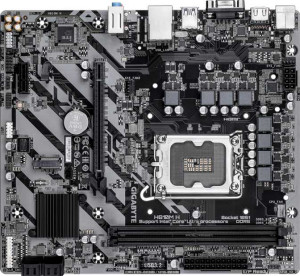
Gigabyte H810M H
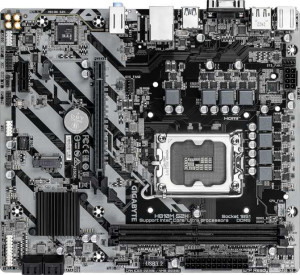
Gigabyte H810M S2H

Gigabyte H810M H Gigabyte H810M S2H

Overview

Welcome to our detailed specification comparison between the Gigabyte H810M H and the Gigabyte H810M S2H, two Micro-ATX motherboards built around the LGA 1851 socket with DDR5 memory support. At first glance, these two boards share a remarkably similar feature set, making the choice between them surprisingly focused. In this comparison, we examine their display output capabilities and the full breadth of shared specifications to help you decide which board best suits your build.

Common Features

  • Both boards use the LGA 1851 CPU socket.
  • Both boards have a Micro-ATX form factor.
  • Neither board supports Wi-Fi.
  • Neither board has Bluetooth.
  • Both boards have HDMI 2.1 output.
  • Neither board is easy to overclock.
  • Both boards feature RGB lighting.
  • Neither board has an easy BIOS reset feature.
  • Both boards support a maximum memory amount of 128GB.
  • Both boards have a maximum RAM speed of 6400 MHz.
  • Both boards have 2 memory slots.
  • Both boards use DDR5 memory.
  • Both boards support 2 memory channels.
  • Neither board supports ECC memory.
  • Both boards have 0 USB 3.2 Gen 2 ports (USB-A).
  • Both boards have 1 USB 3.2 Gen 1 port (USB-A).
  • Both boards have 0 USB 3.2 Gen 2 ports (USB-C).
  • Both boards have 5 USB 2.0 ports.
  • Both boards have 2 USB 3.2 Gen 1 ports through expansion.
  • Both boards have 2 USB 2.0 ports through expansion.
  • Both boards have 4 SATA 3 connectors.
  • Both boards have 3 fan headers.
  • Both boards have 1 M.2 socket.
  • Both boards include a TPM connector.
  • Both boards have 0 U.2 sockets.
  • Both boards have 1 PCIe 4.0 x16 slot.
  • Both boards have 1 PCIe x1 slot.
  • Both boards support 7.1 audio channels.
  • Neither board has an S/PDIF Out port.
  • Both boards have 3 audio connectors.
  • Both boards support RAID 0, RAID 1, RAID 5, and RAID 10.
  • Neither board supports RAID 0+1.

Main Differences

  • DisplayPort outputs total 0 on Gigabyte H810M H but 1 on Gigabyte H810M S2H.
Specs Comparison
Gigabyte H810M H

Gigabyte H810M H

Gigabyte H810M S2H

Gigabyte H810M S2H

General info:
CPU socket LGA 1851 LGA 1851
form factor Micro-ATX Micro-ATX
release date March 2025 April 2025
supports Wi-Fi
Has Bluetooth
HDMI version HDMI 2.1 HDMI 2.1
Easy to overclock
has RGB lighting
Easy to reset BIOS
Has dual BIOS
CPU sockets 1 1
Has integrated graphics
warranty period 3 years 3 years
height 215 mm 215 mm
width 244 mm 244 mm
Has integrated CPU

In terms of general characteristics, the Gigabyte H810M H and the Gigabyte H810M S2H are remarkably close siblings. Both share the same Micro-ATX form factor at identical dimensions (244 × 215 mm), use the LGA 1851 socket, and carry a 3-year warranty — meaning neither board offers a size or longevity advantage out of the box.

On the feature side, the two boards are equally matched as well: both include RGB lighting and HDMI 2.1 output, while neither supports Wi-Fi, Bluetooth, overclocking, dual BIOS, easy BIOS reset, integrated graphics, or an integrated CPU. The absence of wireless connectivity on both means users who need Wi-Fi or Bluetooth will need to budget for an add-in card or USB adapter regardless of which board they choose.

Based strictly on the general specs provided, these two boards are identical in every measured category. There is no advantage for either product in this group — the differentiators, if any exist, will need to be found in other specification areas such as connectivity, memory support, or audio features.

Memory:
maximum memory amount 128GB 128GB
RAM speed (max) 6400 MHz 6400 MHz
memory slots 2 2
DDR memory version 5 5
memory channels 2 2
Supports ECC memory

Both the H810M H and the H810M S2H offer an identical memory configuration: DDR5 support across 2 slots running in dual-channel mode, with a ceiling of 128GB and a maximum rated speed of 6400 MHz. For most users — whether gaming, content creation, or everyday productivity — this headroom is more than adequate, and the dual-channel setup ensures memory bandwidth is fully utilized by the processor.

The 6400 MHz maximum speed is notably capable for this class of board, allowing users to take advantage of faster DDR5 kits without bottlenecking at the platform level. That said, the 2-slot design does impose a practical constraint: there is no room to expand by adding more sticks later, so users should plan their memory purchase carefully from the start, ideally opting for a single 64GB or 2×64GB kit if maximum capacity is a future concern.

Neither board supports ECC memory, which rules both out for workstation or server use cases that demand error-correcting RAM. As a tie-breaker, there is simply none to be found here — the memory specifications are completely identical across both boards, and this group offers no basis for choosing one over the other.

Ports:
USB 3.2 Gen 2 ports (USB-A) 0 0
USB 3.2 Gen 1 ports (USB-A) 1 1
USB 3.2 Gen 2 ports (USB-C) 0 0
USB 3.2 Gen 1 ports (USB-C) 0 0
USB 2.0 ports 5 5
USB 3.2 Gen 2x2 ports 0 0
USB 4 40Gbps ports 0 0
USB 4 20Gbps ports 0 0
Thunderbolt 4 ports 0 0
Thunderbolt 3 ports 0 0
has an HDMI output
DisplayPort outputs 0 1
RJ45 ports 1 1
Has USB Type-C
eSATA ports 0 0
DVI outputs 0 0
has a VGA connector
PS/2 ports 1 1

The rear I/O on these two boards is nearly identical — both offer the same mix of USB 2.0 and a single USB 3.2 Gen 1 (USB-A) port, one RJ45 ethernet jack, a legacy PS/2 port, and video outputs that include both HDMI and VGA. The USB lineup is modest by modern standards, with no USB-C, no high-speed Gen 2 ports, and no Thunderbolt of any kind — something worth noting for users who rely heavily on fast external storage or newer peripherals.

The one meaningful split between the two boards is display output: the H810M S2H adds a DisplayPort output, while the H810M H has none. In practice, this matters most for multi-monitor setups — with both HDMI and DisplayPort available, the S2H can drive two displays simultaneously without any adapter, while the H is limited to a single digital output alongside the legacy VGA connector.

The H810M S2H holds a clear edge in this group. The additional DisplayPort output meaningfully expands display flexibility, particularly for users wanting a clean dual-monitor setup using integrated graphics. For single-display users, the difference is negligible — but for anyone planning to run two screens, the S2H is the more capable choice based on these specs alone.

Connectors:
USB 3.2 Gen 1 ports (through expansion) 2 2
USB 2.0 ports (through expansion) 2 2
SATA 3 connectors 4 4
fan headers 3 3
USB 3.0 ports (through expansion) 2 2
M.2 sockets 1 1
Has TPM connector
U.2 sockets 0 0
Has mSATA connector
SATA 2 connectors 0 0

Internally, the H810M H and H810M S2H offer an identical connector layout. Storage is handled by 4 SATA 3 ports and a single M.2 socket — a practical combination that covers most build scenarios, allowing one fast NVMe drive alongside up to four traditional SATA devices such as HDDs or SSDs. The absence of any SATA 2 or U.2 connectors is inconsequential for modern builds.

Expansion USB is equally matched: both boards provide headers supporting 2 USB 3.2 Gen 1 and 2 USB 2.0 ports via front-panel or bracket connections, giving the finished build a reasonable internal USB budget. The 3 fan headers on each board offer adequate cooling control for a compact Micro-ATX chassis, and the presence of a TPM connector on both is a quiet but important detail — it ensures straightforward compatibility with hardware-based security features like Windows 11's TPM 2.0 requirement.

With every connector spec lining up perfectly across both boards, this group is a complete tie. Neither the H810M H nor the H810M S2H holds any internal connectivity advantage, and a buyer's decision should rest entirely on the differences surfaced in other specification groups.

Expansion slots:
PCIe 4.0 x16 slots 1 1
PCIe 5.0 x16 slots 0 0
PCIe 3.0 x16 slots 0 0
PCIe x1 slots 1 1
PCI slots 0 0
PCIe 2.0 x16 slots 0 0
PCIe x8 slots 0 0

Expansion slot configurations on both boards are identical: one PCIe 4.0 x16 slot and one PCIe x1 slot, with no legacy PCI or additional x16 slots of any generation. For a Micro-ATX board targeting mainstream builds, this is a sensible layout — the full-bandwidth x16 slot comfortably accommodates a dedicated GPU, and the x1 slot covers lower-bandwidth add-in cards like sound cards or network adapters.

The notable absence is PCIe 5.0 support. While the platform's top-tier boards may offer PCIe 5.0 x16 for next-generation GPUs and storage, neither of these boards provides it — a trade-off typical at this price segment. For current-generation discrete graphics cards, however, PCIe 4.0 x16 delivers ample bandwidth with no meaningful real-world performance penalty.

As with the previous groups, this category is a dead heat. The H810M H and H810M S2H offer exactly the same expansion slot topology, and neither board presents an advantage here. Users requiring more than one x16 slot or PCIe 5.0 connectivity would need to look beyond both of these options.

Audio:
audio channels 7.1 7.1
Has S/PDIF Out port
audio connectors 3 3

Audio capabilities are matched exactly on both boards: 7.1-channel surround sound support with 3 analog audio connectors on the rear I/O. The 7.1 channel configuration is a solid offering for onboard audio, capable of feeding a full surround sound speaker setup or a high-quality stereo headset without needing a discrete sound card for most users.

The 3-connector layout — typically line-in, line-out, and microphone — is a streamlined approach that covers everyday audio needs. Neither board includes an S/PDIF optical output, which means users who want to pass digital audio to an external DAC or AV receiver via optical cable will need a workaround, such as a dedicated sound card or a USB DAC.

There is no differentiator to call out here — the audio specifications of the H810M H and H810M S2H are identical in every regard. This group, like several before it, offers no basis for choosing one board over the other.

Storage:
Supports RAID 1
Supports RAID 10 (1+0)
Supports RAID 5
Supports RAID 0
Supports RAID 0+1

RAID support on both boards covers the four most practical configurations: RAID 0, RAID 1, RAID 5, and RAID 10. This is a well-rounded set for a mainstream board — RAID 0 delivers striped performance gains, RAID 1 provides straightforward mirroring for redundancy, and the inclusion of both RAID 5 and RAID 10 gives more advanced users meaningful options for balancing speed, capacity, and fault tolerance across multiple drives.

Neither board supports RAID 0+1, though this is rarely a practical concern — RAID 10 is generally preferred over RAID 0+1 for the same drive count and offers better fault tolerance, so its absence is not a meaningful limitation for the typical user considering these boards.

Once again, the H810M H and H810M S2H are in lockstep — every supported and unsupported RAID mode is identical across both. This group provides no differentiating factor between the two, and the choice between them continues to hinge on the distinctions found elsewhere — most notably the DisplayPort output advantage held by the S2H.

Comparison Summary & Verdict

After a thorough side-by-side review, the Gigabyte H810M H and the Gigabyte H810M S2H prove to be nearly identical boards, sharing the same LGA 1851 socket, DDR5 support up to 6400 MHz, 128GB maximum memory, HDMI 2.1, 7.1 audio, and a full suite of RAID options. The sole distinguishing factor is that the S2H includes a DisplayPort output, while the H810M H does not. If your monitor or display setup relies exclusively on HDMI, the H810M H is a perfectly capable and likely more affordable option. However, if you need the flexibility of a secondary or dedicated DisplayPort connection for a multi-monitor setup or a DisplayPort-only display, the S2H is the clear and obvious choice. Both boards are equally well-matched for everyday builds that do not require Wi-Fi, Bluetooth, or overclocking.

Gigabyte H810M H
Buy Gigabyte H810M H if...

Buy the Gigabyte H810M H if your display setup relies solely on HDMI and you have no need for a dedicated DisplayPort output, making it a streamlined, no-frills choice.

Gigabyte H810M S2H
Buy Gigabyte H810M S2H if...

Buy the Gigabyte H810M S2H if you need a DisplayPort output in addition to HDMI, giving you greater flexibility for multi-monitor setups or DisplayPort-only displays.