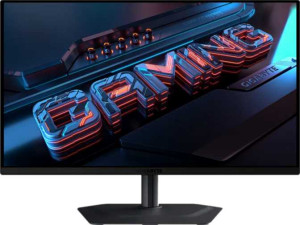
Gigabyte MO27Q2 27"
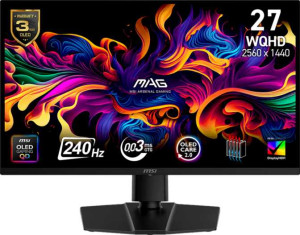
MSI MAG 273QP QD-OLED X24 27"

Gigabyte MO27Q2 27" MSI MAG 273QP QD-OLED X24 27"

Overview

Welcome to our in-depth specification face-off between the Gigabyte MO27Q2 27″ and the MSI MAG 273QP QD-OLED X24 27″ — two 27-inch gaming monitors sharing the same 240Hz refresh rate and QHD resolution, yet taking notably different paths when it comes to brightness, connectivity, and ergonomics. Whether you are chasing peak visual performance or a versatile desktop setup, this comparison breaks down everything you need to know before making your decision.

Common Features

  • Both monitors have a response time of 0.03 ms.
  • Both monitors have a resolution of 2560 x 1440 px.
  • Both monitors feature an anti-glare coating.
  • Both monitors have a refresh rate of 240Hz.
  • Both monitors have a maximum horizontal viewing angle of 178º.
  • Both monitors have a maximum vertical viewing angle of 178º.
  • Both monitors have a matte panel.
  • Both monitors are classified as Gaming type.
  • Both monitors support tilt adjustment.
  • Both monitors have a swivel stand.
  • Both monitors support VESA mounting.
  • Both monitors weigh 6700 g.
  • Both monitors support color calibration.
  • Both monitors display 1070 million colors.
  • Both monitors have a bit depth of 10-bit.
  • Both monitors have 2 HDMI ports.
  • Both monitors do not support Thunderbolt.
  • Both monitors have 1 DisplayPort output using DisplayPort 1.4.
  • Both monitors have a 3.5 mm audio jack.
  • Both monitors do not have a DVI connector.
  • Both monitors use HDMI version 2.1.
  • Both monitors do not support Ethernet.
  • Picture-in-Picture is not available on either monitor.
  • Built-in smart TV functionality is not present on either monitor.
  • Neither monitor includes a remote control.
  • Dolby Digital support is not available on either monitor.
  • Dolby Digital Plus support is not available on either monitor.
  • DTS Surround is not available on either monitor.
  • Neither monitor has an ambient light sensor.
  • Neither monitor has a front camera.
  • Both monitors have a contrast ratio of 1500:1.

Main Differences

  • Display type is OLED/AMOLED on Gigabyte MO27Q2 27″ and QD-OLED, OLED/AMOLED on MSI MAG 273QP QD-OLED X24 27″.
  • Screen size is 27″ on Gigabyte MO27Q2 27″ and 26.5″ on MSI MAG 273QP QD-OLED X24 27″.
  • Pixel density is 108 ppi on Gigabyte MO27Q2 27″ and 110 ppi on MSI MAG 273QP QD-OLED X24 27″.
  • Adaptive synchronization is AMD FreeSync on Gigabyte MO27Q2 27″ and VESA Adaptive Sync on MSI MAG 273QP QD-OLED X24 27″.
  • Height is 356.4 mm on Gigabyte MO27Q2 27″ and 358 mm on MSI MAG 273QP QD-OLED X24 27″.
  • Width is 610.3 mm on Gigabyte MO27Q2 27″ and 610 mm on MSI MAG 273QP QD-OLED X24 27″.
  • Thickness is 64.2 mm on Gigabyte MO27Q2 27″ and 54 mm on MSI MAG 273QP QD-OLED X24 27″.
  • Portrait mode is supported on Gigabyte MO27Q2 27″ but not available on MSI MAG 273QP QD-OLED X24 27″.
  • Volume is 13964.201064 cm³ on Gigabyte MO27Q2 27″ and 11792.52 cm³ on MSI MAG 273QP QD-OLED X24 27″.
  • Typical brightness is 250 nits on Gigabyte MO27Q2 27″ and 450 nits on MSI MAG 273QP QD-OLED X24 27″.
  • Contrast ratio is 1500:1 on Gigabyte MO27Q2 27″ and 1500000:1 on MSI MAG 273QP QD-OLED X24 27″.
  • USB ports count is 4 on Gigabyte MO27Q2 27″ and 0 on MSI MAG 273QP QD-OLED X24 27″.
  • USB Type-C is present on Gigabyte MO27Q2 27″ but not available on MSI MAG 273QP QD-OLED X24 27″.
  • Operating power consumption is 41W on Gigabyte MO27Q2 27″ and 25W on MSI MAG 273QP QD-OLED X24 27″.
  • Stereo speakers are present on Gigabyte MO27Q2 27″ but not available on MSI MAG 273QP QD-OLED X24 27″.
Specs Comparison
Gigabyte MO27Q2 27"

Gigabyte MO27Q2 27"

MSI MAG 273QP QD-OLED X24 27"

MSI MAG 273QP QD-OLED X24 27"

Display:
Display type OLED/AMOLED QD-OLED, OLED/AMOLED
response time 0.03 ms 0.03 ms
screen size 27" 26.5"
resolution 2560 x 1440 px 2560 x 1440 px
pixel density 108 ppi 110 ppi
Adaptive synchronization AMD FreeSync VESA Adaptive Sync
has anti-glare coating
refresh rate 240Hz 240Hz
maximum horizontal viewing angle 178º 178º
maximum vertical viewing angle 178º 178º
has a matte panel
has a glossy panel
has a touch screen

Both monitors share a remarkably similar foundation: 2560×1440 resolution, a 240Hz refresh rate, and an ultrafast 0.03ms response time, meaning neither has a practical edge in sharpness, motion clarity, or smoothness for everyday use or competitive gaming. Viewing angles are identical at 178° on both axes, and both feature a matte anti-glare panel — an uncommon choice on OLED displays that reduces reflections at the cost of some color vibrancy.

The most meaningful differentiator lies in panel technology. The Gigabyte MO27Q2 uses a standard OLED/AMOLED panel, while the MSI MAG 273QP uses a QD-OLED panel — a hybrid that layers quantum dots over an OLED substrate. In practice, QD-OLED typically delivers significantly higher peak brightness and a wider color volume, especially in saturated reds and greens, making it a notable advantage for HDR content and color-critical work. This is a real-world difference that raw spec numbers alone don't fully capture. On adaptive sync, the Gigabyte offers AMD FreeSync, which is AMD-specific, while the MSI uses VESA Adaptive Sync, a broader standard with wider GPU compatibility — a slight edge for users on non-AMD hardware.

Overall, the MSI MAG 273QP holds a clear display quality edge thanks to its QD-OLED panel technology and more universal adaptive sync support. The Gigabyte MO27Q2 is not far behind in core specs, but buyers prioritizing color performance and HDR impact will find the MSI the stronger choice based strictly on the provided data.
General info:
Type Gaming Gaming
release date January 2025 February 2025
supports total tilt
Has a swivel stand
Supports VESA mount
height 356.4 mm 358 mm
width 610.3 mm 610 mm
thickness 64.2 mm 54 mm
weight 6700 g 6700 g
supports portrait mode
volume 13964.201064 cm³ 11792.52 cm³

Both monitors are positioned as gaming displays and share an identical ergonomic baseline: tilt, swivel, and VESA mount support are all present on each. At a matched 6700g, neither has a weight advantage — both sit on the heavier end for 27-inch class monitors, which is worth noting if the stand will be frequently repositioned or replaced with an arm mount.

Where they diverge is in physical footprint and flexibility. The Gigabyte MO27Q2 is notably thicker at 64.2mm versus the MSI's 54mm, translating to a ~16% larger volume — a tangible difference in how much desk space the chassis occupies, especially relevant in tight setups. The MSI's slimmer profile also gives it a cleaner aesthetic on a desk. More importantly, the Gigabyte supports portrait mode rotation while the MSI does not — a meaningful functional advantage for users who want to pivot the display for coding, document reading, or multi-monitor vertical stacking.

On balance, the Gigabyte MO27Q2 holds a practical ergonomic edge due to its portrait mode support, which the MSI MAG 273QP entirely lacks. The MSI counters with a slimmer, less voluminous chassis, but for users who value display orientation flexibility, the Gigabyte is the clear choice in this category.

Colors:
brightness (typical) 250 nits 450 nits
supports color calibration
display colors 1070 million 1070 million
bit depth 10-bit 10-bit
contrast ratio 1500:1 1500000:1

Shared ground here includes 10-bit color depth and 1.07 billion displayable colors on both monitors, along with factory color calibration support — meaning neither has an advantage in raw color precision or out-of-box accuracy potential. For professional color work, both clear the baseline competently.

The divergence, however, is dramatic. The MSI MAG 273QP's typical brightness of 450 nits versus the Gigabyte's 250 nits is an 80% advantage — practically, this means the MSI handles bright, well-lit rooms far more comfortably and delivers significantly more impactful HDR highlights. More striking still is the contrast ratio gap: the Gigabyte lists 1500:1, a figure typical of conventional LCD panels, while the MSI posts 1,500,000:1 — a thousand times higher. That extraordinary figure reflects true per-pixel light control, producing blacks that are virtually indistinguishable from the panel being off, and a depth of image that a 1500:1 ratio simply cannot approach.

The MSI MAG 273QP holds a decisive color performance edge in this category. The brightness and contrast advantages are not marginal — they represent a fundamentally different class of visual experience, particularly for HDR content, dark scene detail, and use in varied lighting environments.

Connectivity:
HDMI ports 2 2
supports Thunderbolt
DisplayPort outputs 1 1
DisplayPort version DisplayPort 1.4 DisplayPort 1.4
has a socket for a 3.5 mm audio jack
has a DVI connector
USB ports 4 0
Has USB Type-C
HDMI version HDMI 2.1 HDMI 2.1
supports Ethernet
supports Wi-Fi
has AirPlay
mini DisplayPort outputs 0 0
has a VGA connector

Video input options are identical across both monitors: dual HDMI 2.1 ports and a single DisplayPort 1.4 output cover all modern GPU connections, and both include a 3.5mm audio jack. Neither supports Thunderbolt, Wi-Fi, Ethernet, or legacy connectors — so for signal connectivity alone, these two are a perfect tie.

The gap opens up sharply when it comes to peripheral connectivity. The Gigabyte MO27Q2 includes 4 USB ports and a USB-C connection, effectively turning the monitor into a USB hub — useful for plugging in keyboards, mice, headsets, or drives without reaching around to a PC. The MSI MAG 273QP offers zero USB ports and no USB-C, meaning it functions purely as a display with no downstream device support whatsoever.

For connectivity, the Gigabyte MO27Q2 holds a clear and uncontested advantage. The addition of USB-C and a four-port USB hub adds genuine daily utility, reducing cable clutter and desk complexity — a meaningful quality-of-life difference that the MSI simply does not offer.

Power:
operating power consumption 41W 25W

With only a single data point available for each monitor, the comparison is straightforward but still telling. The Gigabyte MO27Q2 draws 41W during operation, while the MSI MAG 273QP runs at just 25W — a 64% higher power draw for the Gigabyte. Over long daily sessions, that difference compounds: running both monitors for eight hours a day, the Gigabyte would consume roughly 120kWh more per year, which translates to a noticeable gap in electricity costs over the monitor's lifespan.

The MSI's lower consumption is also worth contextualizing against its significantly higher brightness and contrast specs noted in the color group — it delivers a more capable image while using less power, which points to a more efficient panel implementation. The Gigabyte's higher draw may be partly attributable to its USB hub powering connected peripherals, but the operating consumption figure as listed covers the monitor itself.

On power efficiency, the MSI MAG 273QP holds a clear advantage. For users mindful of energy costs or running setups where heat and power load matter — such as compact desk builds — the MSI's 25W footprint is the more favorable result in this category.

Features:
has PiP
has stereo speakers
has built-in smart TV
has a remote control
supports Dolby Digital
supports Dolby Digital Plus
has DTS Surround
has an ambient light sensor
has a front camera

Across nearly every feature in this category, both monitors are identical — neither offers PiP, smart TV functionality, a remote control, ambient light sensing, a front camera, or any audio format like Dolby or DTS. For gaming monitors at this tier, that is largely expected; these features are more common in consumer TV-oriented displays than in performance-focused panels.

The one distinguishing factor is audio output: the Gigabyte MO27Q2 includes built-in stereo speakers, while the MSI MAG 273QP has none. For users without a separate speaker setup or headset, this matters — the Gigabyte can produce sound directly without any additional hardware. That said, both monitors provide a 3.5mm audio jack (noted in the connectivity group), so external audio is accessible on either.

The Gigabyte holds a narrow edge here solely due to its stereo speakers. It is not a decisive advantage for most gaming setups where dedicated audio is the norm, but for users seeking a simpler, self-contained workstation arrangement, it adds convenience the MSI cannot match in this category.

Comparison Summary & Verdict

Both monitors are strong contenders in the 27-inch QHD gaming space, sharing an ultra-fast 0.03 ms response time, a 240Hz refresh rate, and a 10-bit matte OLED panel — but each caters to a different type of user. The MSI MAG 273QP QD-OLED X24 27″ pulls ahead on visual impact with a dramatically superior 1,500,000:1 contrast ratio and a much higher typical brightness of 450 nits, making it ideal for users who prioritize immersive image quality. On the other hand, the Gigabyte MO27Q2 27″ offers a richer connectivity suite with 4 USB ports, a USB Type-C port, built-in stereo speakers, and portrait mode support — making it the more practical all-rounder for a fully equipped workstation or multi-use gaming desk. Your choice ultimately comes down to whether pure visual performance or everyday versatility matters most.

Gigabyte MO27Q2 27
Buy Gigabyte MO27Q2 27" if...

Buy the Gigabyte MO27Q2 27″ if you need a feature-rich setup with USB connectivity, USB Type-C, built-in stereo speakers, and the flexibility of portrait mode rotation.

MSI MAG 273QP QD-OLED X24 27
Buy MSI MAG 273QP QD-OLED X24 27" if...

Buy the MSI MAG 273QP QD-OLED X24 27″ if you prioritize outstanding contrast, higher brightness at 450 nits, and lower power consumption over peripheral connectivity.