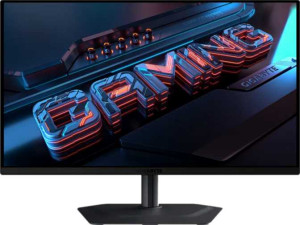
Gigabyte MO27Q2 27"
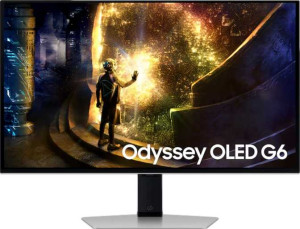
Samsung Odyssey OLED G6 27" (G61SD)

Gigabyte MO27Q2 27" Samsung Odyssey OLED G6 27" (G61SD)

Common Features

  • Both products have a 27″ screen size.
  • Both products have a resolution of 2560 x 1440 px.
  • Both products have a pixel density of 108 ppi.
  • Both products have an anti-glare coating.
  • Both products support a refresh rate of 240Hz.
  • Both products have a maximum horizontal viewing angle of 178º.
  • Both products support AMD FreeSync.
  • Both products are designed for gaming.
  • Both products support tilt adjustment.
  • Both products support a swivel stand.
  • Both products support VESA mounting.
  • Both products support portrait mode.
  • Both products have a brightness of 250 nits.
  • Both products support color calibration.
  • Both products have HDMI 2.1 ports.
  • Both products have 2 HDMI ports.
  • Both products have 1 DisplayPort 1.4 output.
  • Both products have a socket for a 3.5 mm audio jack.
  • Both products consume 0.5W in standby power.

Main Differences

  • Adaptive synchronization is AMD FreeSync on Gigabyte MO27Q2 27″ and Nvidia G-Sync, AMD FreeSync, Nvidia G-Sync Compatible on Samsung Odyssey OLED G6 27″ (G61SD).
  • Height is 356.4 mm on Gigabyte MO27Q2 27″ and 353.8 mm on Samsung Odyssey OLED G6 27″ (G61SD).
  • Width is 610.3 mm on Gigabyte MO27Q2 27″ and 611.7 mm on Samsung Odyssey OLED G6 27″ (G61SD).
  • Thickness is 64.2 mm on Gigabyte MO27Q2 27″ and 49.2 mm on Samsung Odyssey OLED G6 27″ (G61SD).
  • Weight is 6700 g on Gigabyte MO27Q2 27″ and 6900 g on Samsung Odyssey OLED G6 27″ (G61SD).
  • Volume is 13964.201064 cm³ on Gigabyte MO27Q2 27″ and 10647.837432 cm³ on Samsung Odyssey OLED G6 27″ (G61SD).
  • Contrast ratio is 1500:1 on Gigabyte MO27Q2 27″ and 1000000:1 on Samsung Odyssey OLED G6 27″ (G61SD).
  • USB ports are 4 on Gigabyte MO27Q2 27″ and 3 on Samsung Odyssey OLED G6 27″ (G61SD).
  • Gigabyte MO27Q2 27″ has USB Type-C, but Samsung Odyssey OLED G6 27″ (G61SD) does not.
  • Operating power consumption is 41W on Gigabyte MO27Q2 27″ and 28W on Samsung Odyssey OLED G6 27″ (G61SD).
  • Samsung Odyssey OLED G6 27″ (G61SD) supports PiP, while Gigabyte MO27Q2 27″ does not.
  • Gigabyte MO27Q2 27″ has stereo speakers, while Samsung Odyssey OLED G6 27″ (G61SD) does not.
Specs Comparison
Gigabyte MO27Q2 27"

Gigabyte MO27Q2 27"

Samsung Odyssey OLED G6 27" (G61SD)

Samsung Odyssey OLED G6 27" (G61SD)

Display:
Display type OLED/AMOLED OLED/AMOLED
response time 0.03 ms 0.03 ms
screen size 27" 27"
resolution 2560 x 1440 px 2560 x 1440 px
pixel density 108 ppi 108 ppi
Adaptive synchronization AMD FreeSync Nvidia G-Sync, AMD FreeSync, Nvidia G-Sync Compatible
has anti-glare coating
refresh rate 240Hz 240Hz
maximum horizontal viewing angle 178º 178º
maximum vertical viewing angle 178º 178º
has a matte panel
has a glossy panel
has a touch screen

The display specifications of the Gigabyte MO27Q2 27″ and the Samsung Odyssey OLED G6 27″ are quite similar, though there are a few differences. Both monitors feature OLED/AMOLED display technology, 27″ screen size, 2560 x 1440 px resolution, and 108 ppi pixel density, which means they provide sharp, detailed images at a similar level of visual quality. Both also offer a 240Hz refresh rate, ensuring smooth motion for fast-paced content, and have a matte panel finish with anti-glare coating, which helps reduce reflections.

In terms of adaptive synchronization, the Gigabyte MO27Q2 supports AMD FreeSync, while the Samsung Odyssey OLED G6 27″ offers broader compatibility with both Nvidia G-Sync and AMD FreeSync, as well as being Nvidia G-Sync Compatible. This gives the Samsung monitor a slight edge in terms of flexibility for users with different GPU brands.

Regarding viewing angles, both monitors provide identical specifications with a maximum horizontal and vertical viewing angle of 178º. Neither of these monitors includes a glossy panel or a touch screen, maintaining a clean, non-interactive display setup for both. The response time for both products is the same, clocking in at an impressive 0.03 ms, ensuring minimal motion blur during fast action scenes.

General info:
Type Gaming Gaming
release date January 2025 April 2025
supports total tilt
Has a swivel stand
Supports VESA mount
height 356.4 mm 353.8 mm
width 610.3 mm 611.7 mm
thickness 64.2 mm 49.2 mm
weight 6700 g 6900 g
supports portrait mode
volume 13964.201064 cm³ 10647.837432 cm³

The Gigabyte MO27Q2 27″ and the Samsung Odyssey OLED G6 27″ (G61SD) share several common features when it comes to general design and functionality. Both monitors are designed for gaming, support total tilt, come with a swivel stand, and are compatible with VESA mounts. These features ensure flexibility in adjusting the display for different viewing angles and installation setups. Additionally, both models support portrait mode for users who prefer vertical orientation.

In terms of physical dimensions, the two monitors are very similar. The Gigabyte MO27Q2 is slightly taller at 356.4 mm compared to the Samsung’s 353.8 mm. The Samsung monitor is a bit wider at 611.7 mm, while the Gigabyte is 610.3 mm. The difference in height and width is minimal and unlikely to affect their performance in most setups. The thickness of the Samsung Odyssey OLED G6 is 49.2 mm, which is thinner than the Gigabyte’s 64.2 mm. This may make the Samsung model slightly more streamlined.

Weight-wise, the Samsung Odyssey OLED G6 weighs 6900 g, which is 200 g heavier than the Gigabyte MO27Q2 at 6700 g. The difference is relatively small, but it might matter slightly if you’re moving the monitor frequently. The total volume of the Gigabyte MO27Q2 is 13964.201064 cm³, while the Samsung’s volume is 10647.837432 cm³, indicating that the Gigabyte is slightly larger in overall size.

Colors:
brightness (typical) 250 nits 250 nits
supports color calibration
contrast ratio 1500:1 1000000:1

When comparing the color specifications of the Gigabyte MO27Q2 27″ and the Samsung Odyssey OLED G6 27″, both monitors have the same typical brightness of 250 nits, which is suitable for most indoor environments. Additionally, both models support color calibration, allowing for more accurate color reproduction.

However, there is a significant difference in their contrast ratios. The Gigabyte MO27Q2 has a contrast ratio of 1500:1, while the Samsung Odyssey OLED G6 boasts a much higher contrast ratio of 1000000:1. This substantial difference means that the Samsung monitor is capable of producing much deeper blacks and more vibrant colors, contributing to a more visually striking image overall.

Both monitors share the same brightness and color calibration support, but the Samsung's significantly higher contrast ratio may provide a more impressive visual experience, especially in darker scenes or environments.

Connectivity:
HDMI ports 2 2
supports Thunderbolt
DisplayPort outputs 1 1
DisplayPort version DisplayPort 1.4 DisplayPort 1.4
has a socket for a 3.5 mm audio jack
has a DVI connector
USB ports 4 3
Has USB Type-C
HDMI version HDMI 2.1 HDMI 2.1
supports Ethernet
supports Wi-Fi
has AirPlay
mini DisplayPort outputs 0 0
has a VGA connector

In terms of connectivity, both the Gigabyte MO27Q2 27″ and the Samsung Odyssey OLED G6 27″ are fairly similar. Both monitors offer two HDMI ports and a single DisplayPort 1.4 output, which ensures compatibility with a wide range of devices. Additionally, both monitors have a socket for a 3.5 mm audio jack, but neither includes a DVI connector or VGA connector.

One key difference is that the Gigabyte MO27Q2 features 4 USB ports and supports USB Type-C, while the Samsung Odyssey OLED G6 offers only 3 USB ports and lacks USB Type-C support. Both monitors feature HDMI 2.1, which supports higher bandwidth for modern gaming and video applications. Neither monitor supports Ethernet, Wi-Fi, or AirPlay, so wireless connections and internet connectivity are not available on either model.

Overall, the connectivity options are quite similar between the two models, with the main difference being that the Gigabyte MO27Q2 offers one more USB port and USB Type-C support, which may be beneficial for users with certain peripheral devices.

Power:
operating power consumption 41W 28W
standby power consumption 0.5W 0.5W

When it comes to power consumption, the Gigabyte MO27Q2 27″ and the Samsung Odyssey OLED G6 27″ have some differences. The Gigabyte MO27Q2 has an operating power consumption of 41W, while the Samsung Odyssey OLED G6 consumes only 28W during operation. Both monitors have the same standby power consumption of 0.5W, so there is no difference in their energy use when idle.

This makes the Samsung Odyssey OLED G6 more energy-efficient in terms of operating power, using 13W less than the Gigabyte MO27Q2. Both monitors are relatively power-efficient, with low standby consumption, but the Samsung offers an advantage in terms of its lower operating power draw.

Features:
has PiP
has stereo speakers
has built-in smart TV
has a remote control
supports Dolby Digital
supports Dolby Digital Plus
has DTS Surround
has an ambient light sensor
has a front camera

The Gigabyte MO27Q2 27″ and the Samsung Odyssey OLED G6 27″ offer a few distinct features in their functionality. The Gigabyte MO27Q2 includes stereo speakers, while the Samsung Odyssey OLED G6 does not have any built-in speakers. On the other hand, the Samsung model supports Picture-in-Picture (PiP), a feature that the Gigabyte monitor lacks. Neither model includes built-in smart TV capabilities, remote control support, or any form of advanced audio technologies like Dolby Digital, Dolby Digital Plus, or DTS Surround.

Both monitors also lack an ambient light sensor and front camera, so these features are not present on either product. The key difference in this group is the presence of PiP on the Samsung Odyssey OLED G6, which could be useful for multitasking, whereas the Gigabyte MO27Q2 provides built-in stereo speakers for basic sound output.

Comparison Summary

This is a specification comparison between Gigabyte MO27Q2 27″ and Samsung Odyssey OLED G6 27″ (G61SD). Both monitors have a 27″ screen size, a resolution of 2560 x 1440 px, and support 240Hz refresh rate. They also share features like VESA mount support and anti-glare coating. However, there are several differences: the Gigabyte model has a 1500:1 contrast ratio, while the Samsung model features a 1000000:1 contrast ratio. The Samsung monitor supports Nvidia G-Sync, in addition to AMD FreeSync, unlike the Gigabyte model, which only supports AMD FreeSync. Additionally, the operating power consumption is 41W for the Gigabyte model, compared to 28W for the Samsung model. Finally, the Gigabyte MO27Q2 includes stereo speakers, while the Samsung Odyssey OLED G6 does not.