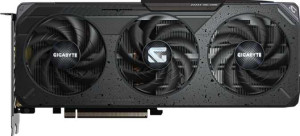
Gigabyte Radeon RX 9060 XT Gaming 16GB
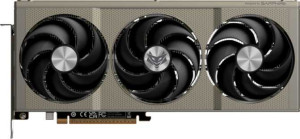
Sapphire Nitro+ Radeon RX 9060 XT 16GB

Gigabyte Radeon RX 9060 XT Gaming 16GB Sapphire Nitro+ Radeon RX 9060 XT 16GB

Overview

Welcome to this in-depth specification comparison between the Gigabyte Radeon RX 9060 XT Gaming 16GB and the Sapphire Nitro+ Radeon RX 9060 XT 16GB. Both cards share the same RDNA 4.0 architecture, 16GB of GDDR6 memory, and a rich feature set including ray tracing and FSR4, making their clock speeds and thermal profiles the decisive battlegrounds in this head-to-head matchup.

Common Features

  • Both cards share a GPU memory speed of 2518 MHz.
  • Both cards have 2048 shading units.
  • Both cards feature 128 texture mapping units (TMUs).
  • Both cards have 64 render output units (ROPs).
  • Double Precision Floating Point (DPFP) is supported on both cards.
  • Both cards have an effective memory speed of 20000 MHz.
  • Both cards offer a maximum memory bandwidth of 322.3 GB/s.
  • Both cards come with 16GB of VRAM.
  • Both cards use GDDR6 memory.
  • Both cards have a 128-bit memory bus width.
  • ECC memory is supported on both cards.
  • Both cards support DirectX 12 Ultimate.
  • Both cards support OpenGL version 4.6.
  • Both cards support OpenCL version 2.2.
  • Multi-display technology is supported on both cards.
  • Ray tracing is supported on both cards.
  • 3D support is available on both cards.
  • DLSS is not supported on either card.
  • FSR4 is available on both cards.
  • Both cards feature one HDMI 2.1b port and two DisplayPort outputs, with no USB-C or DVI outputs.
  • Both cards are built on the RDNA 4.0 GPU architecture.
  • Both cards use PCIe version 5.
  • Both cards are manufactured on a 4 nm semiconductor process.
  • Both cards contain 29700 million transistors.
  • Neither card offers air-water cooling.

Main Differences

  • GPU base clock speed is 1700 MHz on Gigabyte Radeon RX 9060 XT Gaming 16GB and 1900 MHz on Sapphire Nitro+ Radeon RX 9060 XT 16GB.
  • GPU turbo clock speed is 3230 MHz on Gigabyte Radeon RX 9060 XT Gaming 16GB and 3320 MHz on Sapphire Nitro+ Radeon RX 9060 XT 16GB.
  • Pixel rate is 206.7 GPixel/s on Gigabyte Radeon RX 9060 XT Gaming 16GB and 212.5 GPixel/s on Sapphire Nitro+ Radeon RX 9060 XT 16GB.
  • Floating-point performance is 26.46 TFLOPS on Gigabyte Radeon RX 9060 XT Gaming 16GB and 27.2 TFLOPS on Sapphire Nitro+ Radeon RX 9060 XT 16GB.
  • Texture rate is 413.4 GTexels/s on Gigabyte Radeon RX 9060 XT Gaming 16GB and 425 GTexels/s on Sapphire Nitro+ Radeon RX 9060 XT 16GB.
  • Thermal Design Power (TDP) is 160W on Gigabyte Radeon RX 9060 XT Gaming 16GB and 182W on Sapphire Nitro+ Radeon RX 9060 XT 16GB.
  • Card width is 281 mm on Gigabyte Radeon RX 9060 XT Gaming 16GB and 300 mm on Sapphire Nitro+ Radeon RX 9060 XT 16GB.
  • Card height is 118 mm on Gigabyte Radeon RX 9060 XT Gaming 16GB and 131 mm on Sapphire Nitro+ Radeon RX 9060 XT 16GB.
Specs Comparison
Gigabyte Radeon RX 9060 XT Gaming 16GB

Gigabyte Radeon RX 9060 XT Gaming 16GB

Sapphire Nitro+ Radeon RX 9060 XT 16GB

Sapphire Nitro+ Radeon RX 9060 XT 16GB

Performance:
GPU clock speed 1700 MHz 1900 MHz
GPU turbo 3230 MHz 3320 MHz
pixel rate 206.7 GPixel/s 212.5 GPixel/s
floating-point performance 26.46 TFLOPS 27.2 TFLOPS
texture rate 413.4 GTexels/s 425 GTexels/s
GPU memory speed 2518 MHz 2518 MHz
shading units 2048 2048
texture mapping units (TMUs) 128 128
render output units (ROPs) 64 64
Has Double Precision Floating Point (DPFP)

Both cards share the same fundamental GPU architecture: identical 2048 shading units, 128 TMUs, 64 ROPs, and the same 2518 MHz memory speed. This means any performance difference between them comes down entirely to clock speeds — and that is precisely where the Sapphire Nitro+ pulls ahead.

The Nitro+ runs a noticeably higher base clock of 1900 MHz versus the Gigabyte Gaming's 1700 MHz, and its boost clock reaches 3320 MHz compared to 3230 MHz. While a 90 MHz boost difference may sound small in isolation, the base clock gap is more meaningful: a higher base means the card sustains elevated performance more consistently under mixed or prolonged workloads, not just during brief peak bursts. This translates directly into the compute figures — the Nitro+ delivers 27.2 TFLOPS of floating-point performance and a texture rate of 425 GTexels/s, versus 26.46 TFLOPS and 413.4 GTexels/s for the Gigabyte. That is roughly a 2–3% advantage across the board.

In real-world terms, this gap is unlikely to produce dramatic frame-rate differences in most games, but the Sapphire Nitro+ holds a clear, consistent edge across every performance metric in this group. For users who want the higher-clocked, slightly more capable card out of the box — without any manual overclocking — the Nitro+ is the stronger performer here.

Memory:
effective memory speed 20000 MHz 20000 MHz
maximum memory bandwidth 322.3 GB/s 322.3 GB/s
VRAM 16GB 16GB
GDDR version GDDR6 GDDR6
memory bus width 128-bit 128-bit
Supports ECC memory

Memory is the one area where these two cards are completely indistinguishable. Every single spec — 16GB of GDDR6, a 128-bit bus, 20000 MHz effective speed, and 322.3 GB/s of bandwidth — is identical across both the Gigabyte Gaming and the Sapphire Nitro+.

The numbers themselves are worth contextualizing. A 128-bit bus is on the narrower side for a modern mid-to-high-range GPU, but the fast GDDR6 clocks compensate meaningfully, pushing bandwidth to a respectable 322.3 GB/s. The 16GB VRAM is the real headline here: it comfortably handles high-resolution texture packs, 4K asset streaming, and AI-assisted workloads that would choke a card with half the capacity. ECC memory support is a bonus for users doing compute or content creation work where data integrity matters.

This group is a dead tie. Neither card has any memory advantage whatsoever, and purchasing decisions in this category should rest entirely on the performance and design differences examined elsewhere.

Features:
DirectX version DirectX 12 Ultimate DirectX 12 Ultimate
OpenGL version 4.6 4.6
OpenCL version 2.2 2.2
Supports multi-display technology
supports ray tracing
Supports 3D
supports DLSS
has FSR4
has XeSS (XMX)
AMD SAM / Intel Resizable BAR AMD SAM AMD SAM
has LHR
has RGB lighting
supported displays 3 3

Feature parity is total here. The Gigabyte Gaming and the Sapphire Nitro+ share every capability in this group without exception — from DirectX 12 Ultimate and ray tracing support to FSR4, AMD SAM, and a maximum of 3 simultaneous displays. There is no differentiator to speak of.

A few of these shared features are worth highlighting for buyers evaluating the broader AMD ecosystem. FSR4 is AMD's latest upscaling technology and a meaningful asset — it allows both cards to render at lower resolutions and reconstruct a sharper image, boosting frame rates in supported titles. The absence of DLSS is expected on AMD hardware, and the lack of XeSS (XMX) is irrelevant in practice since FSR4 covers the same upscaling role. DirectX 12 Ultimate ensures full compatibility with modern rendering features including hardware-accelerated ray tracing, mesh shaders, and variable rate shading.

As with the memory group, this is an absolute tie. No feature gives either card an edge, and buyers should look to performance figures or physical design factors to make their choice.

Ports:
has an HDMI output
HDMI ports 1 1
HDMI version HDMI 2.1b HDMI 2.1b
DisplayPort outputs 2 2
USB-C ports 0 0
DVI outputs 0 0
mini DisplayPort outputs 0 0

Connector layouts are identical on both cards: one HDMI 2.1b port and two DisplayPort outputs, totaling three physical connections — which aligns with the three-display maximum noted in their feature specs. Neither card offers USB-C or any legacy outputs.

The port selection is practical and modern. HDMI 2.1b supports 4K at high refresh rates and 8K output, making it well-suited for current TVs and high-end monitors alike. The two DisplayPort outputs are the preferred choice for high-refresh-rate PC monitors, particularly in multi-monitor desktop setups. The absence of USB-C is worth noting for users who own USB-C or Thunderbolt-based displays, as an adapter would be required — but this is a common trade-off at this product tier.

Another complete tie. The port configurations are a carbon copy of each other, and neither card offers any connectivity advantage over the other.

General info:
GPU architecture RDNA 4.0 RDNA 4.0
release date June 2025 June 2025
Thermal Design Power (TDP) 160W 182W
PCI Express (PCIe) version 5 5
semiconductor size 4 nm 4 nm
number of transistors 29700 million 29700 million
Has air-water cooling
width 281 mm 300 mm
height 118 mm 131 mm

Underneath, both cards are built on the same foundation: identical RDNA 4.0 architecture, a 4nm process node, and 29.7 billion transistors. PCIe 5.0 support is shared as well, ensuring neither card is bottlenecked by modern motherboard connectivity. The differences that matter here are TDP and physical dimensions.

The Sapphire Nitro+ draws 182W versus the Gigabyte Gaming's 160W — a 22W gap that directly funds its higher clock speeds. That extra power consumption is a real consideration: it demands more from the PSU and will generate slightly more heat in the case. The trade-off is the performance edge the Nitro+ demonstrated in raw GPU metrics. The Gigabyte Gaming's lower 160W TDP makes it a more power-efficient option, delivering strong performance per watt — an advantage for smaller builds or efficiency-conscious buyers.

Size is the other divergence. The Nitro+ is a notably larger card at 300 × 131 mm compared to the Gigabyte's 281 × 118 mm, which could be a deciding factor in compact or mid-tower cases with tight GPU clearance. For buyers with spacious full-tower builds who want maximum clock speeds, the Nitro+ fits comfortably; for those prioritizing a smaller footprint and lower power draw, the Gigabyte Gaming holds a genuine practical advantage.

Comparison Summary & Verdict

After examining all specifications, these two cards are closely matched at their core, sharing identical memory configurations, feature sets, and port layouts. The key differentiators come down to performance headroom and physical footprint. The Sapphire Nitro+ pulls ahead with a higher boost clock of 3320 MHz, 27.2 TFLOPS of floating-point performance, and a superior texture rate of 425 GTexels/s, making it the stronger choice for enthusiasts chasing every last frame. However, this performance advantage comes at the cost of a 182W TDP and a noticeably larger 300 x 131 mm body. The Gigabyte, with its 160W power draw and more compact 281 x 118 mm dimensions, is the better fit for smaller builds or efficiency-conscious users who still want a capable, feature-complete card.

Gigabyte Radeon RX 9060 XT Gaming 16GB
Buy Gigabyte Radeon RX 9060 XT Gaming 16GB if...

Buy the Gigabyte Radeon RX 9060 XT Gaming 16GB if you want a more compact card with a lower 160W power draw, making it ideal for smaller cases or builds where efficiency and size matter.

Sapphire Nitro+ Radeon RX 9060 XT 16GB
Buy Sapphire Nitro+ Radeon RX 9060 XT 16GB if...

Buy the Sapphire Nitro+ Radeon RX 9060 XT 16GB if you want maximum performance, with higher clock speeds, a 27.2 TFLOPS compute rating, and a superior texture rate, and have the space and power budget to accommodate it.