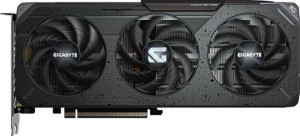
Gigabyte Radeon RX 9060 XT Gaming 8GB
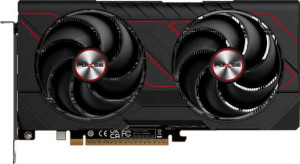
Sapphire Pulse Radeon RX 9060 XT 16GB

Gigabyte Radeon RX 9060 XT Gaming 8GB Sapphire Pulse Radeon RX 9060 XT 16GB

Common Features

  • Both products have a GPU clock speed of 1700 MHz.
  • Both products have a GPU memory speed of 2518 MHz.
  • Both products have 2048 shading units.
  • Both products have 128 texture mapping units (TMUs).
  • Both products have 64 render output units (ROPs).
  • Both products support double precision floating point (DPFP).
  • Both products have an effective memory speed of 20000 MHz.
  • Both products have a maximum memory bandwidth of 322.3 GB/s.
  • Both products use GDDR6 memory.
  • Both products have a memory bus width of 128-bit.
  • Both products support ECC memory.
  • Both products support DirectX 12 Ultimate.
  • Both products support OpenGL version 4.6.
  • Both products support OpenCL version 2.2.
  • Both products support multi-display technology.
  • Both products support ray tracing.
  • Both products support 3D.
  • Both products have one HDMI output.
  • Both products have two DisplayPort outputs.
  • Both products use PCI Express version 5.

Main Differences

  • GPU turbo is 3130 MHz on Gigabyte Radeon RX 9060 XT Gaming 8GB and 3290 MHz on Sapphire Pulse Radeon RX 9060 XT 16GB.
  • Pixel rate is 200.3 GPixel/s on Gigabyte Radeon RX 9060 XT Gaming 8GB and 210.6 GPixel/s on Sapphire Pulse Radeon RX 9060 XT 16GB.
  • Floating-point performance is 25.64 TFLOPS on Gigabyte Radeon RX 9060 XT Gaming 8GB and 26.95 TFLOPS on Sapphire Pulse Radeon RX 9060 XT 16GB.
  • Texture rate is 400.6 GTexels/s on Gigabyte Radeon RX 9060 XT Gaming 8GB and 421.1 GTexels/s on Sapphire Pulse Radeon RX 9060 XT 16GB.
  • VRAM is 8GB on Gigabyte Radeon RX 9060 XT Gaming 8GB and 16GB on Sapphire Pulse Radeon RX 9060 XT 16GB.
  • RGB lighting is present on Gigabyte Radeon RX 9060 XT Gaming 8GB but not available on Sapphire Pulse Radeon RX 9060 XT 16GB.
  • Thermal Design Power (TDP) is 150W on Gigabyte Radeon RX 9060 XT Gaming 8GB and 170W on Sapphire Pulse Radeon RX 9060 XT 16GB.
  • Width is 281 mm on Gigabyte Radeon RX 9060 XT Gaming 8GB and 240 mm on Sapphire Pulse Radeon RX 9060 XT 16GB.
  • Height is 118 mm on Gigabyte Radeon RX 9060 XT Gaming 8GB and 124 mm on Sapphire Pulse Radeon RX 9060 XT 16GB.
Specs Comparison
Gigabyte Radeon RX 9060 XT Gaming 8GB

Gigabyte Radeon RX 9060 XT Gaming 8GB

Sapphire Pulse Radeon RX 9060 XT 16GB

Sapphire Pulse Radeon RX 9060 XT 16GB

Performance:
GPU clock speed 1700 MHz 1700 MHz
GPU turbo 3130 MHz 3290 MHz
pixel rate 200.3 GPixel/s 210.6 GPixel/s
floating-point performance 25.64 TFLOPS 26.95 TFLOPS
texture rate 400.6 GTexels/s 421.1 GTexels/s
GPU memory speed 2518 MHz 2518 MHz
shading units 2048 2048
texture mapping units (TMUs) 128 128
render output units (ROPs) 64 64
Has Double Precision Floating Point (DPFP)

Both the Gigabyte Radeon RX 9060 XT Gaming 8GB and the Sapphire Pulse Radeon RX 9060 XT 16GB feature the same GPU clock speed of 1700 MHz, ensuring similar base performance. However, they differ in their GPU turbo speeds. The Gigabyte model reaches a turbo of 3130 MHz, while the Sapphire model has a higher turbo speed of 3290 MHz, giving it a slight edge in peak performance.

When it comes to pixel rate, the Sapphire Pulse Radeon RX 9060 XT 16GB outperforms the Gigabyte model with a rate of 210.6 GPixel/s compared to 200.3 GPixel/s. Similarly, the texture rate of the Sapphire card is higher, at 421.1 GTexels/s, while the Gigabyte card achieves 400.6 GTexels/s. These differences suggest that the Sapphire card may handle textured graphics slightly better.

Both cards deliver impressive floating-point performance, with the Gigabyte model reaching 25.64 TFLOPS and the Sapphire model slightly ahead at 26.95 TFLOPS. Both models share identical GPU memory speed at 2518 MHz, shading units at 2048, texture mapping units at 128, and render output units at 64. Additionally, both support Double Precision Floating Point (DPFP) functionality.

Memory:
effective memory speed 20000 MHz 20000 MHz
maximum memory bandwidth 322.3 GB/s 322.3 GB/s
VRAM 8GB 16GB
GDDR version GDDR6 GDDR6
memory bus width 128-bit 128-bit
Supports ECC memory

The Gigabyte Radeon RX 9060 XT Gaming 8GB and the Sapphire Pulse Radeon RX 9060 XT 16GB share identical specifications in several key memory aspects. Both have an effective memory speed of 20000 MHz, maximum memory bandwidth of 322.3 GB/s, and use GDDR6 memory with a 128-bit memory bus width. Additionally, both models support ECC memory, ensuring data integrity during operation.

The main difference between the two lies in the VRAM capacity. The Gigabyte Radeon RX 9060 XT Gaming has 8GB of VRAM, while the Sapphire Pulse Radeon RX 9060 XT comes with a larger 16GB of VRAM, offering more memory for handling demanding applications and larger textures.

Despite the difference in VRAM, the rest of the memory specifications remain identical, indicating that both cards should perform similarly in terms of bandwidth and speed, with the Sapphire card having the advantage when it comes to memory capacity.

Features:
DirectX version DirectX 12 Ultimate DirectX 12 Ultimate
OpenGL version 4.6 4.6
OpenCL version 2.2 2.2
Supports multi-display technology
supports ray tracing
Supports 3D
supports DLSS
has FSR4
has XeSS (XMX)
AMD SAM / Intel Resizable BAR AMD SAM AMD SAM
has LHR
has RGB lighting
supported displays 3 3

The Gigabyte Radeon RX 9060 XT Gaming 8GB and the Sapphire Pulse Radeon RX 9060 XT 16GB share many key features, including support for DirectX 12 Ultimate, OpenGL 4.6, and OpenCL 2.2. Both cards support multi-display technology, ray tracing, and 3D rendering, providing a robust set of features for modern gaming and graphical tasks. Neither model supports DLSS, but both support FSR4 for improving image quality.

In terms of display and design, both cards support up to 3 displays. The major difference here is that the Gigabyte model features RGB lighting, while the Sapphire model does not include this feature. Additionally, both cards support AMD SAM (Smart Access Memory) and neither has LHR (Lite Hash Rate) functionality, making them both suitable for cryptocurrency mining.

Both models also lack XeSS (XMX) support, so there are no notable differences in that area. Overall, these two cards are quite similar in features, with the primary distinction being the presence of RGB lighting on the Gigabyte model.

Ports:
has an HDMI output
HDMI ports 1 1
HDMI version HDMI 2.1b HDMI 2.1b
DisplayPort outputs 2 2
USB-C ports 0 0
DVI outputs 0 0
mini DisplayPort outputs 0 0

The Gigabyte Radeon RX 9060 XT Gaming 8GB and the Sapphire Pulse Radeon RX 9060 XT 16GB share identical port configurations. Both cards feature one HDMI output with HDMI 2.1b support, two DisplayPort outputs, and do not include USB-C ports, DVI outputs, or mini DisplayPort outputs.

There are no differences in terms of connectivity options between the two models. Both cards offer the same number and types of outputs, ensuring similar compatibility with modern displays and monitors.

Overall, the port offerings are the same, with both cards supporting HDMI 2.1b and DisplayPort for versatile display setups, without any additional specialized ports like USB-C or mini DisplayPort.

General info:
GPU architecture RDNA 4.0 RDNA 4.0
release date June 2025 June 2025
Thermal Design Power (TDP) 150W 170W
PCI Express (PCIe) version 5 5
semiconductor size 4 nm 4 nm
number of transistors 29700 million 29700 million
Has air-water cooling
width 281 mm 240 mm
height 118 mm 124 mm

Both the Gigabyte Radeon RX 9060 XT Gaming 8GB and the Sapphire Pulse Radeon RX 9060 XT 16GB are built on the RDNA 4.0 GPU architecture, with a semiconductor size of 4 nm and 29,700 million transistors, offering a similar level of processing power. Both cards also support PCIe 5.0, ensuring high-speed communication with compatible motherboards.

The two models differ in their thermal design power (TDP), with the Gigabyte card having a lower TDP of 150W compared to the Sapphire model's 170W. This suggests that the Sapphire card might generate more heat under load and could require more cooling effort. In terms of physical dimensions, the Gigabyte card is slightly larger, measuring 281 mm in width and 118 mm in height, whereas the Sapphire card is more compact, at 240 mm in width and 124 mm in height.

Neither card features air-water cooling, both relying on traditional air-based cooling solutions. Overall, the key differences between these models are the TDP and physical size, with the Sapphire card being smaller but requiring a bit more power.

Comparison Summary

This is a specification comparison between Gigabyte Radeon RX 9060 XT Gaming 8GB and Sapphire Pulse Radeon RX 9060 XT 16GB. Both products share a GPU clock speed of 1700 MHz, effective memory speed of 20000 MHz, and support multi-display technology. However, the Sapphire model has 16GB of VRAM compared to the Gigabyte's 8GB. The GPU turbo speed is 3130 MHz on the Gigabyte and 3290 MHz on the Sapphire. The thermal design power (TDP) is 150W for the Gigabyte and 170W for the Sapphire. Additionally, the Gigabyte features RGB lighting, which the Sapphire lacks.