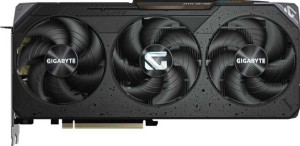
Gigabyte Radeon RX 9070 Gaming OC
PowerColor Hellhound Radeon RX 9070

Gigabyte Radeon RX 9070 Gaming OC PowerColor Hellhound Radeon RX 9070

Overview

Welcome to our detailed specification comparison between the Gigabyte Radeon RX 9070 Gaming OC and the PowerColor Hellhound Radeon RX 9070 — two RDNA 4.0-based graphics cards built around the same core silicon. While they share a common foundation in memory configuration, power envelope, and feature support, key battlegrounds emerge around clock speeds and raw performance throughput, physical dimensions, port layouts, and a few notable feature-level distinctions. Read on to discover which card best suits your setup.

Common Features

  • Both cards have a GPU memory speed of 2518 MHz.
  • Both cards feature 3584 shading units.
  • Both cards have 224 texture mapping units (TMUs).
  • Both cards have 128 render output units (ROPs).
  • Double Precision Floating Point (DPFP) is supported on both cards.
  • Both cards have an effective memory speed of 20000 MHz.
  • Both cards offer a maximum memory bandwidth of 644.6 GB/s.
  • Both cards come with 16GB of VRAM.
  • Both cards use GDDR6 memory.
  • Both cards have a 256-bit memory bus width.
  • ECC memory is supported on both cards.
  • Both cards support OpenGL version 4.6.
  • Both cards support OpenCL version 2.2.
  • Multi-display technology is supported on both cards.
  • Ray tracing is supported on both cards.
  • 3D support is available on both cards.
  • DLSS is not supported on either card.
  • FSR4 is available on both cards.
  • XeSS (XMX) is not supported on either card.
  • Both cards have an HDMI 2.1b output.
  • Neither card has USB-C ports, DVI outputs, or mini DisplayPort outputs.
  • Both cards are built on the RDNA 4.0 architecture.
  • Both cards have a Thermal Design Power (TDP) of 220W.
  • Both cards use PCIe version 5.
  • Both cards are manufactured on a 5 nm process.
  • Both cards have 53900 million transistors.
  • Air-water cooling is not available on either card.

Main Differences

  • GPU base clock speed is 1440 MHz on Gigabyte Radeon RX 9070 Gaming OC and 1330 MHz on PowerColor Hellhound Radeon RX 9070.
  • GPU turbo clock speed is 2700 MHz on Gigabyte Radeon RX 9070 Gaming OC and 2590 MHz on PowerColor Hellhound Radeon RX 9070.
  • Pixel rate is 345.6 GPixel/s on Gigabyte Radeon RX 9070 Gaming OC and 331.5 GPixel/s on PowerColor Hellhound Radeon RX 9070.
  • Floating-point performance is 38.71 TFLOPS on Gigabyte Radeon RX 9070 Gaming OC and 37.13 TFLOPS on PowerColor Hellhound Radeon RX 9070.
  • Texture rate is 604.8 GTexels/s on Gigabyte Radeon RX 9070 Gaming OC and 580.2 GTexels/s on PowerColor Hellhound Radeon RX 9070.
  • DirectX 12 Ultimate is supported on Gigabyte Radeon RX 9070 Gaming OC, while PowerColor Hellhound Radeon RX 9070 supports DirectX 12.
  • Resizable BAR is implemented as Intel Resizable BAR on Gigabyte Radeon RX 9070 Gaming OC and as AMD SAM on PowerColor Hellhound Radeon RX 9070.
  • HDMI port count is 2 on Gigabyte Radeon RX 9070 Gaming OC and 1 on PowerColor Hellhound Radeon RX 9070.
  • DisplayPort output count is 2 on Gigabyte Radeon RX 9070 Gaming OC and 3 on PowerColor Hellhound Radeon RX 9070.
  • Card width is 288 mm on Gigabyte Radeon RX 9070 Gaming OC and 340 mm on PowerColor Hellhound Radeon RX 9070.
  • Card height is 132 mm on Gigabyte Radeon RX 9070 Gaming OC and 142 mm on PowerColor Hellhound Radeon RX 9070.
Specs Comparison
Gigabyte Radeon RX 9070 Gaming OC

Gigabyte Radeon RX 9070 Gaming OC

PowerColor Hellhound Radeon RX 9070

PowerColor Hellhound Radeon RX 9070

Performance:
GPU clock speed 1440 MHz 1330 MHz
GPU turbo 2700 MHz 2590 MHz
pixel rate 345.6 GPixel/s 331.5 GPixel/s
floating-point performance 38.71 TFLOPS 37.13 TFLOPS
texture rate 604.8 GTexels/s 580.2 GTexels/s
GPU memory speed 2518 MHz 2518 MHz
shading units 3584 3584
texture mapping units (TMUs) 224 224
render output units (ROPs) 128 128
Has Double Precision Floating Point (DPFP)

Both cards share the same underlying GPU silicon — identical 3584 shading units, 224 TMUs, and 128 ROPs — meaning any performance gap between them comes down entirely to clock speeds. And that gap is consistent: the Gigabyte Radeon RX 9070 Gaming OC runs at a base clock of 1440 MHz and boosts to 2700 MHz, while the PowerColor Hellhound starts at 1330 MHz and peaks at 2590 MHz. That's a 110 MHz advantage at both ends of the clock range for the Gigabyte.

Because pixel rate, texture rate, and floating-point throughput are all direct derivatives of clock speed on identical hardware, the Gigabyte leads across every computed performance metric: 38.71 TFLOPS vs 37.13 TFLOPS in FP32, and 604.8 GTexels/s vs 580.2 GTexels/s in texture throughput. In practice, this translates to a roughly 4% performance advantage in clock-sensitive workloads — noticeable in synthetic benchmarks, but likely marginal in real gaming scenarios where the GPU is often memory- or API-bound. Memory speed is identical at 2518 MHz on both cards, so bandwidth is not a differentiator here.

The Gigabyte Gaming OC holds a clear, if modest, edge in raw performance for this group. Buyers prioritizing peak throughput will favor it, but the PowerColor Hellhound's lower clocks may come with thermal or acoustic benefits not captured in these specs alone — something worth weighing alongside this data.

Memory:
effective memory speed 20000 MHz 20000 MHz
maximum memory bandwidth 644.6 GB/s 644.6 GB/s
VRAM 16GB 16GB
GDDR version GDDR6 GDDR6
memory bus width 256-bit 256-bit
Supports ECC memory

When it comes to memory, these two cards are carbon copies of each other. Both carry 16GB of GDDR6 across a 256-bit bus, running at an effective speed of 20000 MHz and delivering 644.6 GB/s of peak bandwidth. There is no tiebreaker to find here — the memory subsystem is completely identical.

That said, the configuration itself is worth contextualizing. A 256-bit bus paired with 16GB is a well-balanced setup for this GPU tier, providing enough bandwidth headroom for high-resolution textures and demanding rasterization workloads without bottlenecking the shader array. The 644.6 GB/s figure comfortably supports 4K gaming and content creation tasks where large assets need to be streamed rapidly to the GPU. ECC memory support is also present on both cards — a feature more relevant to professional and compute workloads than gaming, but a meaningful bonus for users who occasionally run mixed workloads.

This group is a definitive tie. Neither the Gigabyte Gaming OC nor the PowerColor Hellhound holds any memory advantage — buyers can set this category aside entirely and focus on other differentiators like clock speeds, cooling, or pricing when making their decision.

Features:
DirectX version DirectX 12 Ultimate DirectX 12
OpenGL version 4.6 4.6
OpenCL version 2.2 2.2
Supports multi-display technology
supports ray tracing
Supports 3D
supports DLSS
has FSR4
has XeSS (XMX)
AMD SAM / Intel Resizable BAR Intel Resizable BAR AMD SAM
has LHR
has RGB lighting
supported displays 4 4

For the most part, these two cards are feature-equivalent — both support ray tracing, FSR4, DirectX 12, OpenGL 4.6, and up to four simultaneous displays. The shared support for FSR4 is worth highlighting: AMD's latest upscaling generation offers meaningful image quality and performance gains in supported titles, and having it on both cards means neither buyer is left behind on this front.

The two meaningful differences here are DirectX version and the Resizable BAR implementation. The Gigabyte Gaming OC lists DirectX 12 Ultimate, while the PowerColor Hellhound lists only DirectX 12. DirectX 12 Ultimate is a superset that formally certifies support for features like hardware-accelerated ray tracing tiers, mesh shaders, and variable-rate shading — capabilities increasingly used by modern game engines. On the BAR side, the Gigabyte lists Intel Resizable BAR and the PowerColor lists AMD SAM, which are functionally equivalent technologies that allow the CPU to access the full GPU frame buffer, improving performance in supported titles. This distinction is primarily about branding and the ecosystem each card is marketed toward, not a real-world performance gap.

The Gigabyte Gaming OC holds a narrow but tangible edge in this group, strictly due to its DirectX 12 Ultimate designation. Whether that translates to any observable difference in practice depends entirely on the titles a user runs — but as a feature specification, it represents a broader formal capability set than the PowerColor's listing.
Ports:
has an HDMI output
HDMI ports 2 1
HDMI version HDMI 2.1b HDMI 2.1b
DisplayPort outputs 2 3
USB-C ports 0 0
DVI outputs 0 0
mini DisplayPort outputs 0 0

Both cards top out at four total display outputs and share the same HDMI 2.1b standard — capable of driving 4K at high refresh rates or even 8K output — so the version parity means neither card is at a disadvantage for any modern display connection. The real difference is how that four-port budget is divided.

The Gigabyte Gaming OC splits its outputs 2 HDMI + 2 DisplayPort, while the PowerColor Hellhound goes 1 HDMI + 3 DisplayPort. For users running a mixed setup — say, a gaming monitor over HDMI and a secondary TV or capture device also on HDMI — the Gigabyte's dual HDMI configuration is a practical convenience that eliminates the need for an adapter. Conversely, users building a triple-monitor DisplayPort setup will find the PowerColor's three DP outputs a cleaner, adapter-free solution.

There is no objectively superior layout here — the edge belongs to whichever card matches the user's specific display ecosystem. Those with multiple HDMI-native devices will prefer the Gigabyte's 2-HDMI configuration, while multi-monitor users relying on DisplayPort will find the PowerColor's 3-DP arrangement more convenient. Neither card penalizes the user in terms of maximum connected displays.

General info:
GPU architecture RDNA 4.0 RDNA 4.0
release date March 2025 March 2025
Thermal Design Power (TDP) 220W 220W
PCI Express (PCIe) version 5 5
semiconductor size 5 nm 5 nm
number of transistors 53900 million 53900 million
Has air-water cooling
width 288 mm 340 mm
height 132 mm 142 mm

At a foundational level, these two cards are built from the same blueprint: identical RDNA 4.0 architecture, the same 5nm process node, the same 53.9 billion transistors, and a shared 220W TDP over PCIe 5.0. The power envelope being equal is significant — it means both cards make the same demands on your PSU and case airflow, and neither has a thermal or efficiency advantage baked into its design specification.

The one concrete differentiator in this group is physical size. The Gigabyte Gaming OC measures 288 × 132 mm, while the PowerColor Hellhound is notably larger at 340 × 142 mm — a full 52mm longer and 10mm taller. That difference is non-trivial. In smaller mid-tower or compact ATX cases, the Hellhound's length could create clearance conflicts with front-panel fans, storage drives, or cable routing, whereas the Gigabyte's shorter footprint gives it broader chassis compatibility.

For this group, the Gigabyte Gaming OC holds a practical edge purely on the basis of its more compact dimensions. Users with spacious full-tower builds will find the size gap irrelevant, but anyone working within tighter case constraints should treat the Hellhound's 340mm length as a hard compatibility check before purchasing.

Comparison Summary & Verdict

Both cards deliver the same memory configuration — 16GB of GDDR6 at 644.6 GB/s bandwidth — and share an identical 220W TDP, RDNA 4.0 architecture, and support for ray tracing and FSR4. However, the differences matter depending on your priorities. The Gigabyte Radeon RX 9070 Gaming OC pulls ahead with higher clock speeds (up to 2700 MHz boost), better floating-point performance at 38.71 TFLOPS, DirectX 12 Ultimate support, a more compact 288 mm length, and two HDMI ports — ideal for dual-display living room or multi-monitor setups. The PowerColor Hellhound Radeon RX 9070, while slightly slower in raw throughput, offers three DisplayPort outputs, making it a strong choice for productivity-oriented or triple-monitor configurations. Both are compelling options within the same power and price tier.

Gigabyte Radeon RX 9070 Gaming OC
Buy Gigabyte Radeon RX 9070 Gaming OC if...

Buy the Gigabyte Radeon RX 9070 Gaming OC if you want higher clock speeds, better raw performance, DirectX 12 Ultimate support, a more compact card, and dual HDMI outputs for multi-display use.

PowerColor Hellhound Radeon RX 9070
Buy PowerColor Hellhound Radeon RX 9070 if...

Buy the PowerColor Hellhound Radeon RX 9070 if you need three DisplayPort outputs for a triple-monitor or high-refresh-rate productivity setup and AMD SAM support out of the box.