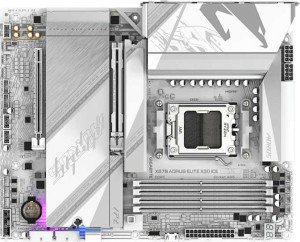
Gigabyte X870 Aorus Elite X3D Ice
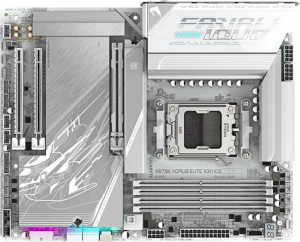
Gigabyte X870E Aorus Elite X3D Ice

Gigabyte X870 Aorus Elite X3D Ice Gigabyte X870E Aorus Elite X3D Ice

Overview

Welcome to our detailed spec comparison of the Gigabyte X870 Aorus Elite X3D Ice and the Gigabyte X870E Aorus Elite X3D Ice — two AM5 motherboards that share a remarkably similar foundation yet diverge in meaningful ways. Both target enthusiast builders, but differences in USB port configuration and SATA connectivity may tip the scales depending on your build requirements. Read on to discover which board best matches your needs.

Common Features

  • Both boards use the AM5 CPU socket.
  • Both boards feature the X870 chipset.
  • Both boards have an ATX form factor.
  • Wi-Fi is available on both boards, with support for Wi-Fi 4, Wi-Fi 5, Wi-Fi 6, Wi-Fi 6E, and Wi-Fi 7.
  • Bluetooth 5.4 is present on both boards.
  • Both boards include an HDMI 2.1 output.
  • Both boards support a maximum memory amount of 256GB.
  • The maximum native RAM speed is 5200 MHz on both boards.
  • The maximum overclocked RAM speed is 9000 MHz on both boards.
  • Both boards have 4 memory slots and support 2 memory channels.
  • Both boards use DDR5 memory.
  • ECC memory is not supported on either board.
  • Both boards include 1 USB 3.2 Gen 2 port (USB-C) and no USB 3.2 Gen 1 ports (USB-C).
  • Both boards have 2 USB 4 40Gbps ports and no USB 4 20Gbps ports.
  • Both boards include 2 Thunderbolt 4 ports and no Thunderbolt 3 ports.
  • Both boards offer 4 M.2 sockets and no U.2 sockets.
  • Both boards have 8 fan headers.
  • A TPM connector is present on both boards.
  • Both boards feature 1 PCIe 5.0 x16 slot and 1 PCIe x4 slot.
  • The audio subsystem on both boards delivers a 120 dB signal-to-noise ratio with 7.1 channel support, 2 audio connectors, and an S/PDIF Out port.
  • Both boards support RAID 0, RAID 1, RAID 5, and RAID 10, but neither supports RAID 0+1.

Main Differences

  • USB 3.2 Gen 2 ports (USB-A) count is 2 on Gigabyte X870 Aorus Elite X3D Ice and 5 on Gigabyte X870E Aorus Elite X3D Ice.
  • USB 3.2 Gen 1 ports (USB-A) count is 4 on Gigabyte X870 Aorus Elite X3D Ice and 3 on Gigabyte X870E Aorus Elite X3D Ice.
  • USB 2.0 port is present on Gigabyte X870 Aorus Elite X3D Ice with 1 port, but no USB 2.0 ports are available on Gigabyte X870E Aorus Elite X3D Ice.
  • SATA 3 connectors number 2 on Gigabyte X870 Aorus Elite X3D Ice and 4 on Gigabyte X870E Aorus Elite X3D Ice.
Specs Comparison
Gigabyte X870 Aorus Elite X3D Ice

Gigabyte X870 Aorus Elite X3D Ice

Gigabyte X870E Aorus Elite X3D Ice

Gigabyte X870E Aorus Elite X3D Ice

General info:
CPU socket AM5 AM5
chipset X870 X870
form factor ATX ATX
release date September 2025 September 2025
supports Wi-Fi
Wi-Fi version Wi-Fi 4 (802.11n), Wi-Fi 5 (802.11ac), Wi-Fi 6 (802.11ax), Wi-Fi 6E (802.11ax), Wi-Fi 7 (802.11be) Wi-Fi 4 (802.11n), Wi-Fi 5 (802.11ac), Wi-Fi 6 (802.11ax), Wi-Fi 6E (802.11ax), Wi-Fi 7 (802.11be)
Has Bluetooth
Bluetooth version 5.4 5.4
HDMI version HDMI 2.1 HDMI 2.1
Easy to overclock
has RGB lighting
Easy to reset BIOS
Has dual BIOS
has aptX
CPU sockets 1 1
Has integrated graphics
warranty period 3 years 3 years
height 244 mm 244 mm
width 305 mm 305 mm
Has integrated CPU

In terms of general specifications, the Gigabyte X870 Aorus Elite X3D Ice and the Gigabyte X870E Aorus Elite X3D Ice are virtually identical across every measured attribute in this group. Both boards use the AM5 socket with an X870 chipset, adopt the standard ATX form factor at exactly 244 × 305 mm, and carry a 3-year warranty. Connectivity extras — Wi-Fi 7, Bluetooth 5.4, and HDMI 2.1 — are present and matched spec-for-spec on both models, as are quality-of-life features like easy overclocking, easy BIOS reset, and RGB lighting.

From a real-world perspective, the shared Wi-Fi 7 (802.11be) support is the headline connectivity feature here: it offers substantially higher throughput and lower latency than Wi-Fi 6E, future-proofing both boards for next-generation routers. Bluetooth 5.4 similarly ensures stable, low-energy wireless peripheral connections. Neither board includes a dual BIOS — a minor but notable omission for users who frequently experiment with firmware, as a backup BIOS provides a safety net against failed flashing.

Based strictly on the general info specs provided, these two motherboards are in a complete tie. There is no differentiating factor in this category whatsoever — every attribute, from physical dimensions to wireless standards to warranty length, is identical. Buyers will need to look beyond this spec group — such as PCIe lane configuration, USB port density, or power delivery — to find meaningful distinctions between the two models.
Memory:
maximum memory amount 256GB 256GB
RAM speed (max) 5200 MHz 5200 MHz
overclocked RAM speed 9000 MHz 9000 MHz
memory slots 4 4
DDR memory version 5 5
memory channels 2 2
Supports ECC memory

Both the X870 Aorus Elite X3D Ice and the X870E Aorus Elite X3D Ice share an identical memory profile across every measured dimension. Each board supports DDR5 memory across 4 slots in a dual-channel configuration, with a maximum capacity of 256 GB — enough headroom for even the most demanding workstation or content creation builds for years to come.

The native RAM speed tops out at 5200 MHz, which aligns with the JEDEC standard for DDR5 and ensures broad compatibility out of the box. More interesting is the overclocked ceiling of 9000 MHz, which is exceptionally high and signals strong signal integrity on both boards' memory traces — a meaningful advantage for enthusiasts chasing peak memory bandwidth in latency-sensitive workloads like gaming or video encoding. Neither board supports ECC memory, which rules them both out for mission-critical server or professional workstation use cases where data integrity is paramount, but this is entirely expected for consumer-grade AM5 platforms.

As with the general info group, this category results in a complete tie. The memory subsystem is point-for-point identical between the two models, so this spec group offers no basis for choosing one over the other.

Ports:
USB 3.2 Gen 2 ports (USB-A) 2 5
USB 3.2 Gen 1 ports (USB-A) 4 3
USB 3.2 Gen 2 ports (USB-C) 1 1
USB 3.2 Gen 1 ports (USB-C) 0 0
USB 2.0 ports 1 0
USB 3.2 Gen 2x2 ports 0 0
USB 4 40Gbps ports 2 2
USB 4 20Gbps ports 0 0
Thunderbolt 4 ports 2 2
Thunderbolt 3 ports 0 0
has an HDMI output
DisplayPort outputs 0 0
RJ45 ports 1 1
Has USB Type-C
eSATA ports 0 0
DVI outputs 0 0
has a VGA connector
PS/2 ports 0 0

The ports category is where the first genuine — if modest — divergence between these two boards emerges. The high-end connectivity is identical: both offer 2× USB 4 40Gbps ports, 2× Thunderbolt 4, and a single USB 3.2 Gen 2 Type-C, forming a strong foundation for fast external SSDs, docks, and next-gen peripherals. The real difference lies in the USB-A rear panel distribution.

The X870E Aorus Elite X3D Ice gives you 5× USB 3.2 Gen 2 (10Gbps) Type-A ports compared to just on the X870 Aorus Elite X3D Ice. In practical terms, this means the X870E can simultaneously saturate more high-speed peripherals — external drives, capture cards, high-polling-rate hubs — without a bottleneck at the port level. The X870, by contrast, compensates slightly with 4× USB 3.2 Gen 1 (5Gbps) ports versus the X870E's 3, and even includes a legacy USB 2.0 port, which the X870E drops entirely. That USB 2.0 port has negligible real-world value for modern peripherals, so it does little to close the gap.

The X870E holds a clear edge in this group. Having three additional Gen 2 Type-A ports significantly raises the throughput ceiling of the rear panel, benefiting users who regularly connect multiple fast peripherals without relying on a hub. For most builders, this is a meaningful quality-of-life advantage.

Connectors:
USB 3.2 Gen 1 ports (through expansion) 4 4
USB 3.2 Gen 2x2 ports (through expansion) 1 1
USB 2.0 ports (through expansion) 4 4
SATA 3 connectors 2 4
fan headers 8 8
USB 3.0 ports (through expansion) 4 4
M.2 sockets 4 4
Has TPM connector
U.2 sockets 0 0
Has mSATA connector
SATA 2 connectors 0 0

Internal connectivity is nearly a mirror image between these two boards — 4× M.2 sockets, 8 fan headers, identical internal USB expansion headers, and a TPM connector are shared across both. For modern builds leaning heavily on NVMe storage, four M.2 slots provide ample room to saturate bandwidth without any compromise.

The single differentiator in this group is SATA 3 connectors: the X870E Aorus Elite X3D Ice offers 4 ports versus just 2 on the X870 Aorus Elite X3D Ice. While NVMe has largely displaced traditional SATA drives for primary storage, SATA remains widely used for high-capacity HDDs, budget SSDs, and optical drives in content-heavy or archival builds. Two additional SATA ports meaningfully expand the X870E's ability to accommodate these devices without requiring an add-in controller card.

The X870E takes the edge here, and the advantage is straightforward — double the SATA connectivity translates directly to more storage flexibility for builders who still rely on a mix of SATA and NVMe drives. For a purely NVMe-based build, the gap is irrelevant; but for anyone planning to add multiple HDDs or SATA SSDs, the X870E is the more accommodating platform.

Expansion slots:
PCIe 4.0 x16 slots 0 0
PCIe 5.0 x16 slots 1 1
PCIe 3.0 x16 slots 0 0
PCIe x1 slots 0 0
PCI slots 0 0
PCIe 2.0 x16 slots 0 0
PCIe x4 slots 1 1
PCIe x8 slots 0 0

Expansion slot configurations are identical on both boards: a single PCIe 5.0 x16 slot for the primary GPU, accompanied by one PCIe x4 slot for secondary cards or add-in controllers. The absence of any PCIe 4.0 or older x16 slots keeps the layout clean but limits multi-GPU or dual-full-bandwidth-card scenarios — though this is entirely standard practice on modern consumer ATX boards.

The PCIe 5.0 x16 primary slot is the headline here. It delivers up to 128 GB/s of bidirectional bandwidth, doubling what PCIe 4.0 offered, and ensures full compatibility with current and next-generation discrete GPUs without any bottlenecking at the slot level. The secondary x4 slot is well-suited for a capture card, 10GbE NIC, or additional M.2 expansion card, covering most auxiliary expansion needs for a high-end build.

This group is a complete tie. The slot layout is point-for-point identical, and both boards offer the same forward-looking PCIe 5.0 primary slot. Expansion capability will not be a deciding factor between these two models.

Audio:
Signal-to-Noise ratio (DAC) 120 dB 120 dB
audio channels 7.1 7.1
Has S/PDIF Out port
audio connectors 2 2

Audio hardware is matched exactly on both boards. A 120 dB signal-to-noise ratio on the DAC is a strong result for onboard audio — sitting well above the threshold where most listeners can perceive distortion or noise floor intrusion, and competitive with many dedicated sound cards at the entry level. Paired with 7.1 channel support, both boards are well-equipped for immersive surround sound setups without any additional hardware.

The inclusion of an S/PDIF optical output on both models is a welcome touch for users routing audio to an external DAC, AV receiver, or home theater system — it keeps the signal in the digital domain and avoids any analog interference from the motherboard environment. With only 2 analog audio connectors on the rear panel, users with complex multi-channel analog setups may find the physical port count limiting, but for the majority of headphone and stereo speaker users, two connectors cover all practical needs.

Audio is another complete tie between these two models. Every measurable attribute — DAC quality, channel count, digital output, and connector count — is identical, so this group contributes nothing to the decision between them.

Storage:
Supports RAID 1
Supports RAID 10 (1+0)
Supports RAID 5
Supports RAID 0
Supports RAID 0+1

RAID support is identical across both boards, covering the most practically relevant configurations: RAID 0 for striped performance, RAID 1 for mirroring and redundancy, RAID 5 for distributed parity across three or more drives, and RAID 10 for a combined stripe-and-mirror setup. Neither board supports RAID 0+1, but this omission is inconsequential in practice — RAID 10 achieves a functionally equivalent result with better fault tolerance and is the preferred standard.

The coverage of RAID 5 is worth noting for prosumer or small workstation builds: it allows useful capacity and redundancy to be balanced across multiple drives without the 50% storage overhead of pure mirroring, making it attractive for media storage or archival arrays. That said, the real-world utility of any RAID configuration on these boards is constrained by the physical drive count each board supports — a factor addressed in the Connectors group rather than here.

Unsurprisingly, this group is a complete tie. Both boards offer the same RAID modes and share the same single omission. Storage redundancy strategy will not differentiate these two models.

Comparison Summary & Verdict

The Gigabyte X870 Aorus Elite X3D Ice and Gigabyte X870E Aorus Elite X3D Ice are nearly identical at their core, sharing DDR5 support, Wi-Fi 7, Bluetooth 5.4, PCIe 5.0, and a rich USB 4 and Thunderbolt 4 port lineup. The distinction comes down to connectivity: the X870E pulls ahead with 5 USB 3.2 Gen 2 Type-A ports and 4 SATA 3 connectors, making it the stronger choice for storage-heavy builds and high-speed peripheral setups. The standard X870, by contrast, offers 4 USB 3.2 Gen 1 Type-A ports and retains a USB 2.0 port for legacy device compatibility. Neither board is objectively superior — your ideal pick depends entirely on whether modern high-speed storage expansion or legacy peripheral support matters more to your specific build.

Gigabyte X870 Aorus Elite X3D Ice
Buy Gigabyte X870 Aorus Elite X3D Ice if...

Buy the Gigabyte X870 Aorus Elite X3D Ice if you rely on legacy USB 2.0 peripherals or prefer having more USB 3.2 Gen 1 Type-A ports in your build.

Gigabyte X870E Aorus Elite X3D Ice
Buy Gigabyte X870E Aorus Elite X3D Ice if...

Buy the Gigabyte X870E Aorus Elite X3D Ice if you need more high-speed USB 3.2 Gen 2 Type-A ports or plan to connect multiple SATA storage drives, as it offers 5 such ports and 4 SATA 3 connectors.