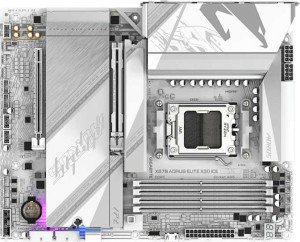
Gigabyte X870 Aorus Elite X3D Ice
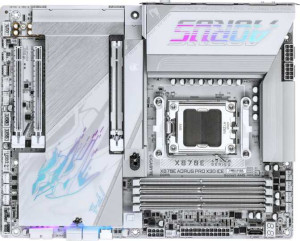
Gigabyte X870E Aorus Pro X3D Ice

Gigabyte X870 Aorus Elite X3D Ice Gigabyte X870E Aorus Pro X3D Ice

Overview

Welcome to this head-to-head comparison of the Gigabyte X870 Aorus Elite X3D Ice and the Gigabyte X870E Aorus Pro X3D Ice, two high-performance AM5 motherboards sharing a strong foundation of features. While both boards align closely on memory, expansion, and audio capabilities, the real battleground lies in their rear USB port configurations and SATA 3 connectivity — details that can meaningfully influence your build depending on your storage and peripheral needs.

Common Features

  • Both products use the AM5 CPU socket.
  • Both products feature the X870 chipset.
  • Both products have an ATX form factor.
  • Wi-Fi is supported on both products, covering Wi-Fi 4, Wi-Fi 5, Wi-Fi 6, Wi-Fi 6E, and Wi-Fi 7.
  • Bluetooth 5.4 is available on both products.
  • Both products include an HDMI 2.1 output.
  • Both products support a maximum memory amount of 256GB.
  • Both products have a maximum native RAM speed of 5200 MHz and an overclocked RAM speed of 9000 MHz.
  • Both products feature 4 memory slots across 2 memory channels using DDR5.
  • ECC memory support is not available on either product.
  • Both products provide 2 USB 4 40Gbps ports and 2 Thunderbolt 4 ports.
  • Neither product includes USB 3.2 Gen 2x2, USB 4 20Gbps, Thunderbolt 3, or DisplayPort outputs.
  • Both products offer 4 M.2 sockets and a TPM connector, with no U.2 sockets.
  • Both products include 8 fan headers.
  • Both products provide 4 USB 3.2 Gen 1, 4 USB 3.0, 1 USB 3.2 Gen 2x2, and 4 USB 2.0 ports through expansion.
  • Both products feature 1 PCIe 5.0 x16 slot and 1 PCIe x4 slot, with no PCIe 4.0, 3.0, 2.0, x1, x8 slots, or legacy PCI slots.
  • Both products deliver a 120 dB signal-to-noise ratio on the DAC with 7.1 audio channels, an S/PDIF output, and 2 audio connectors.
  • Both products support RAID 0, RAID 1, RAID 5, and RAID 10, but neither supports RAID 0+1.

Main Differences

  • USB 3.2 Gen 2 ports (USB-A) number 2 on the Gigabyte X870 Aorus Elite X3D Ice and 5 on the Gigabyte X870E Aorus Pro X3D Ice.
  • USB 3.2 Gen 1 ports (USB-A) number 4 on the Gigabyte X870 Aorus Elite X3D Ice and 3 on the Gigabyte X870E Aorus Pro X3D Ice.
  • USB 3.2 Gen 2 ports (USB-C) number 1 on the Gigabyte X870 Aorus Elite X3D Ice and 2 on the Gigabyte X870E Aorus Pro X3D Ice.
  • A USB 2.0 port is present on the Gigabyte X870 Aorus Elite X3D Ice but not available on the Gigabyte X870E Aorus Pro X3D Ice.
  • SATA 3 connectors number 2 on the Gigabyte X870 Aorus Elite X3D Ice and 4 on the Gigabyte X870E Aorus Pro X3D Ice.
Specs Comparison
Gigabyte X870 Aorus Elite X3D Ice

Gigabyte X870 Aorus Elite X3D Ice

Gigabyte X870E Aorus Pro X3D Ice

Gigabyte X870E Aorus Pro X3D Ice

General info:
CPU socket AM5 AM5
chipset X870 X870
form factor ATX ATX
release date September 2025 September 2025
supports Wi-Fi
Wi-Fi version Wi-Fi 4 (802.11n), Wi-Fi 5 (802.11ac), Wi-Fi 6 (802.11ax), Wi-Fi 6E (802.11ax), Wi-Fi 7 (802.11be) Wi-Fi 4 (802.11n), Wi-Fi 5 (802.11ac), Wi-Fi 6 (802.11ax), Wi-Fi 6E (802.11ax), Wi-Fi 7 (802.11be)
Has Bluetooth
Bluetooth version 5.4 5.4
HDMI version HDMI 2.1 HDMI 2.1
Easy to overclock
has RGB lighting
Easy to reset BIOS
Has dual BIOS
has aptX
CPU sockets 1 1
Has integrated graphics
warranty period 3 years 3 years
height 244 mm 244 mm
width 305 mm 305 mm
Has integrated CPU

In terms of general specifications, the Gigabyte X870 Aorus Elite X3D Ice and the Gigabyte X870E Aorus Pro X3D Ice are, remarkably, identical across every provided data point in this group. Both boards use the AM5 socket with an X870 chipset, adopt the standard ATX form factor at exactly 305 × 244 mm, and carry a 3-year warranty. From a platform perspective, this means both target the same generation of AMD Ryzen processors and offer the same physical compatibility with standard ATX cases.

On the connectivity front, both boards are equally equipped: Wi-Fi 7 (802.11be) with backward compatibility down to Wi-Fi 4, Bluetooth 5.4, and HDMI 2.1 output. Wi-Fi 7 is a meaningful inclusion here — it supports multi-link operation and significantly higher throughput than Wi-Fi 6E, which matters for users on a capable router. Bluetooth 5.4 similarly ensures stable, low-latency peripheral connections. Both boards also share overclocking-friendly features such as easy BIOS reset, and both include RGB lighting, while neither offers dual BIOS or aptX audio.

Based strictly on the general info specs provided, these two motherboards are in a complete tie — there is not a single differentiating data point in this group. A buyer cannot use general info alone to choose between them; the decision will need to hinge on specs from other categories such as memory support, expansion slots, or I/O.

Memory:
maximum memory amount 256GB 256GB
RAM speed (max) 5200 MHz 5200 MHz
overclocked RAM speed 9000 MHz 9000 MHz
memory slots 4 4
DDR memory version 5 5
memory channels 2 2
Supports ECC memory

The memory specifications for both the X870 Aorus Elite X3D Ice and the X870E Aorus Pro X3D Ice are once again perfectly mirrored. Both boards support DDR5 memory exclusively, with 4 slots across a dual-channel configuration and a ceiling of 256GB total capacity. For most users — even demanding content creators or workstation users — 256GB is more than sufficient headroom, and the dual-channel setup ensures bandwidth is properly utilized across all four slots.

Where the numbers get interesting is in the RAM frequency support. The native JEDEC speed tops out at 5200 MHz, which is standard for DDR5 on the AM5 platform. However, both boards push overclocked memory support all the way to 9000 MHz — a notably high ceiling that caters to enthusiasts chasing maximum memory bandwidth for latency-sensitive workloads like competitive gaming or heavily threaded applications. Reaching those speeds in practice depends heavily on the memory kit itself, but the headroom is there on both boards equally.

Neither board supports ECC memory, which is expected at this tier — ECC is generally reserved for server or professional workstation platforms. Across every memory specification provided, these two motherboards are an exact match, resulting in another complete tie for this group. Memory compatibility and performance potential will be identical regardless of which board a buyer chooses.

Ports:
USB 3.2 Gen 2 ports (USB-A) 2 5
USB 3.2 Gen 1 ports (USB-A) 4 3
USB 3.2 Gen 2 ports (USB-C) 1 2
USB 3.2 Gen 1 ports (USB-C) 0 0
USB 2.0 ports 1 0
USB 3.2 Gen 2x2 ports 0 0
USB 4 40Gbps ports 2 2
USB 4 20Gbps ports 0 0
Thunderbolt 4 ports 2 2
Thunderbolt 3 ports 0 0
has an HDMI output
DisplayPort outputs 0 0
RJ45 ports 1 1
Has USB Type-C
eSATA ports 0 0
DVI outputs 0 0
has a VGA connector
PS/2 ports 0 0

This is the first group in this comparison where a meaningful difference emerges. Both boards share the same high-end foundation: 2× USB4 40Gbps ports and 2× Thunderbolt 4 ports, delivering up to 40Gbps throughput for fast external storage, docking stations, and displays. A single RJ45 ethernet port and HDMI 2.1 output round out the shared core, making both viable for wired networking and basic display output without a discrete GPU.

The divergence lies in the mid-tier and legacy USB lineup. The X870E Aorus Pro X3D Ice offers 5× USB 3.2 Gen 2 (USB-A) and 2× USB 3.2 Gen 2 (USB-C) at the rear — all running at 10Gbps — giving it a noticeably more capable and modern port array. The X870 Aorus Elite X3D Ice, by contrast, provides only 2× USB 3.2 Gen 2 (USB-A) and 1× USB 3.2 Gen 2 (USB-C), compensating with 4× USB 3.2 Gen 1 ports (5Gbps) and even a single USB 2.0 port — a legacy inclusion that reflects a less modernized rear I/O layout.

For users with multiple high-speed peripherals — external SSDs, capture cards, or USB-C hubs — the Pro X3D Ice's denser 10Gbps port selection is a tangible real-world advantage. The Elite's inclusion of USB 2.0 is unlikely to be missed, but it signals a less premium rear I/O design. The X870E Aorus Pro X3D Ice takes a clear edge in this group on the strength of its superior mid-tier USB density and the absence of legacy ports.

Connectors:
USB 3.2 Gen 1 ports (through expansion) 4 4
USB 3.2 Gen 2x2 ports (through expansion) 1 1
USB 2.0 ports (through expansion) 4 4
SATA 3 connectors 2 4
fan headers 8 8
USB 3.0 ports (through expansion) 4 4
M.2 sockets 4 4
Has TPM connector
U.2 sockets 0 0
Has mSATA connector
SATA 2 connectors 0 0

Internal connectivity is largely a wash between these two boards, with both offering 4× M.2 sockets, 8 fan headers, a full set of expansion USB headers, and a TPM connector. The four M.2 slots are particularly significant — they allow a user to run multiple NVMe drives simultaneously without touching any SATA ports at all, which is the preferred storage approach in modern high-performance builds.

The one concrete difference in this group is SATA 3 connector count. The X870E Aorus Pro X3D Ice provides 4× SATA 3 ports, while the X870 Aorus Elite X3D Ice offers only 2. For builders who rely exclusively on NVMe storage, this gap is irrelevant. However, users planning to connect multiple SATA SSDs, traditional hard drives, or optical drives will find the Pro's additional two ports meaningfully more accommodating — particularly in a NAS-adjacent or media storage build where SATA devices still play a role.

Every other internal connector spec is identical, so the verdict here is straightforward: the X870E Aorus Pro X3D Ice holds a narrow but practical edge, solely due to its doubled SATA 3 capacity. For NVMe-only builds the two boards are functionally equivalent in this category, but the Pro offers more flexibility for mixed or legacy storage configurations.

Expansion slots:
PCIe 4.0 x16 slots 0 0
PCIe 5.0 x16 slots 1 1
PCIe 3.0 x16 slots 0 0
PCIe x1 slots 0 0
PCI slots 0 0
PCIe 2.0 x16 slots 0 0
PCIe x4 slots 1 1
PCIe x8 slots 0 0

Expansion slot configurations are identical across both boards: a single PCIe 5.0 x16 slot for the primary GPU, paired with one PCIe x4 slot for secondary expansion cards. The PCIe 5.0 x16 slot is the headline here — it delivers up to 128GB/s of bandwidth, which is future-proofing at its most practical, ensuring compatibility with current and next-generation graphics cards without any bandwidth bottleneck.

The solitary PCIe x4 slot offers enough bandwidth for add-in cards like capture cards, high-speed networking adapters, or additional storage controllers, though it does limit multi-GPU or heavy multi-card configurations. The complete absence of legacy PCIe slots (x1, x8, older generations) keeps the layout clean but means users with older expansion cards will need adapters or alternatives. For the vast majority of enthusiast single-GPU builds, however, this layout is entirely appropriate.

With no differences whatsoever between the two boards in this category, expansion slots result in another complete tie. Neither the X870 Aorus Elite X3D Ice nor the X870E Aorus Pro X3D Ice holds any advantage here — buyers with specialized multi-card expansion needs should look elsewhere regardless of which model they consider.

Audio:
Signal-to-Noise ratio (DAC) 120 dB 120 dB
audio channels 7.1 7.1
Has S/PDIF Out port
audio connectors 2 2

Audio capabilities are once again perfectly matched between the two boards. Both deliver a 120 dB signal-to-noise ratio (SNR) from their onboard DAC — a figure that sits firmly in the high-fidelity range for integrated audio, meaning background noise and interference are kept well below audible thresholds for most listening environments. Users who rely on onboard audio for headphones or powered speakers will find this more than adequate for critical listening, gaming, and content consumption.

Supporting 7.1 channel surround sound output alongside an S/PDIF optical out port gives both boards flexibility for home theater setups or external DAC/receiver connections. S/PDIF is particularly useful for passing lossless digital audio to an AV receiver without analog signal degradation. The two analog audio connectors keep the rear I/O lean, which is typical at this tier — users needing more analog jacks would generally route through a dedicated audio interface instead.

Every audio specification provided is identical, making this group a complete tie. Neither the X870 Aorus Elite X3D Ice nor the X870E Aorus Pro X3D Ice holds any advantage in onboard audio — both offer a competitive integrated solution that will satisfy most users short of dedicated audiophile or professional recording use cases.

Storage:
Supports RAID 1
Supports RAID 10 (1+0)
Supports RAID 5
Supports RAID 0
Supports RAID 0+1

RAID support is identical across both boards, with each offering RAID 0, 1, 5, and 10 configurations. This covers the most practically useful modes: RAID 0 for striped performance gains across multiple drives, RAID 1 for straightforward mirrored redundancy, RAID 5 for a balance of performance and fault tolerance across three or more drives, and RAID 10 for the combined benefits of striping and mirroring in larger arrays. For a home power user or small workstation operator, this set of options is comprehensive.

Neither board supports RAID 0+1, though this omission is largely inconsequential — RAID 10 is generally considered its functional superior, offering equivalent redundancy with better fault recovery characteristics. The absence of RAID 0+1 is unlikely to matter to any realistic buyer of these boards, making it a non-issue in practice.

With every supported and unsupported RAID mode matching exactly, this group is a complete tie. The X870 Aorus Elite X3D Ice and the X870E Aorus Pro X3D Ice offer identical storage array flexibility — the choice between them remains unaffected by RAID capability considerations.

Comparison Summary & Verdict

Both the Gigabyte X870 Aorus Elite X3D Ice and the Gigabyte X870E Aorus Pro X3D Ice are well-matched boards, sharing identical chipsets, DDR5 memory support, PCIe 5.0 expansion, and a rich wireless feature set including Wi-Fi 7 and Bluetooth 5.4. The distinctions come down to connectivity specifics: the Gigabyte X870E Aorus Pro X3D Ice pulls ahead with 5 USB 3.2 Gen 2 Type-A ports, 2 USB 3.2 Gen 2 Type-C ports, and 4 SATA 3 connectors, making it the stronger choice for users with demanding storage arrays or numerous high-speed peripherals. The Gigabyte X870 Aorus Elite X3D Ice, meanwhile, offers 4 USB 3.2 Gen 1 Type-A ports and retains a USB 2.0 port for legacy device compatibility, suiting builders who value broad peripheral support without requiring maximum SATA capacity.

Gigabyte X870 Aorus Elite X3D Ice
Buy Gigabyte X870 Aorus Elite X3D Ice if...

Buy the Gigabyte X870 Aorus Elite X3D Ice if you need broader legacy peripheral compatibility, including a USB 2.0 port, and do not require more than two SATA 3 connectors.

Gigabyte X870E Aorus Pro X3D Ice
Buy Gigabyte X870E Aorus Pro X3D Ice if...

Buy the Gigabyte X870E Aorus Pro X3D Ice if you need a greater number of high-speed USB 3.2 Gen 2 ports and four SATA 3 connectors for more extensive storage configurations.