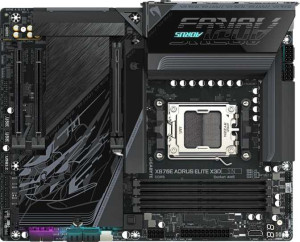
Gigabyte X870E Aorus Elite X3D
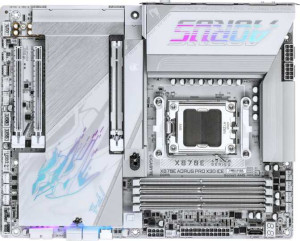
Gigabyte X870E Aorus Pro X3D Ice

Gigabyte X870E Aorus Elite X3D Gigabyte X870E Aorus Pro X3D Ice

Overview

Welcome to our in-depth specification comparison between the Gigabyte X870E Aorus Elite X3D and the Gigabyte X870E Aorus Pro X3D Ice. Both are high-end AM5 motherboards built on the X870 chipset, sharing an impressive array of features including Wi-Fi 7, DDR5 memory support, and Thunderbolt 4 connectivity. In this comparison, we examine how closely these two boards align — and where their USB-C connectivity becomes the key differentiating factor for discerning builders.

Common Features

  • Both boards use the AM5 CPU socket.
  • Both boards feature the X870 chipset.
  • Both boards have an ATX form factor.
  • Wi-Fi is supported on both boards, covering Wi-Fi 4, Wi-Fi 5, Wi-Fi 6, Wi-Fi 6E, and Wi-Fi 7.
  • Bluetooth 5.4 is available on both boards.
  • Both boards include an HDMI 2.1 port.
  • Both boards support a maximum memory amount of 256GB.
  • Both boards support a maximum RAM speed of 5200 MHz, with overclocked speeds up to 9000 MHz.
  • Both boards have 4 memory slots across 2 memory channels using DDR5.
  • ECC memory is not supported on either board.
  • Both boards offer 5 USB 3.2 Gen 2 ports (USB-A), 3 USB 3.2 Gen 1 ports (USB-A), 2 USB 4 40Gbps ports, and 2 Thunderbolt 4 ports.
  • Neither board includes USB 3.2 Gen 1 ports (USB-C), USB 2.0 ports, or USB 4 20Gbps ports on the rear panel.
  • Both boards provide 4 USB 2.0 ports, 4 USB 3.2 Gen 1 ports, and 1 USB 3.2 Gen 2x2 port through internal expansion headers.
  • Both boards include 4 SATA 3 connectors and 4 M.2 sockets.
  • Both boards feature 8 fan headers.
  • A TPM connector is present on both boards.
  • Both boards have 1 PCIe 5.0 x16 slot and 1 PCIe x4 slot, with no PCIe 4.0, 3.0, 2.0, x1, x8, or PCI slots.
  • Both boards deliver a 120 dB signal-to-noise ratio (DAC) with 7.1 audio channels, an S/PDIF Out port, and 2 audio connectors.
  • Both boards support RAID 0, RAID 1, RAID 5, and RAID 10 (1+0).
  • RAID 0+1 is not supported on either board.

Main Differences

  • USB 3.2 Gen 2 ports (USB-C) count is 1 on the Gigabyte X870E Aorus Elite X3D and 2 on the Gigabyte X870E Aorus Pro X3D Ice.
Specs Comparison
Gigabyte X870E Aorus Elite X3D

Gigabyte X870E Aorus Elite X3D

Gigabyte X870E Aorus Pro X3D Ice

Gigabyte X870E Aorus Pro X3D Ice

General info:
CPU socket AM5 AM5
chipset X870 X870
form factor ATX ATX
release date September 2025 September 2025
supports Wi-Fi
Wi-Fi version Wi-Fi 4 (802.11n), Wi-Fi 5 (802.11ac), Wi-Fi 6 (802.11ax), Wi-Fi 6E (802.11ax), Wi-Fi 7 (802.11be) Wi-Fi 4 (802.11n), Wi-Fi 5 (802.11ac), Wi-Fi 6 (802.11ax), Wi-Fi 6E (802.11ax), Wi-Fi 7 (802.11be)
Has Bluetooth
Bluetooth version 5.4 5.4
HDMI version HDMI 2.1 HDMI 2.1
Easy to overclock
has RGB lighting
Easy to reset BIOS
Has dual BIOS
has aptX
CPU sockets 1 1
Has integrated graphics
warranty period 3 years 3 years
height 244 mm 244 mm
width 305 mm 305 mm
Has integrated CPU

In terms of general specifications, the Gigabyte X870E Aorus Elite X3D and the Gigabyte X870E Aorus Pro X3D Ice are virtually identical. Both use the AM5 socket with the X870 chipset, share the same ATX form factor (244 mm × 305 mm), and come with a 3-year warranty. Neither board includes an integrated CPU or integrated graphics, which is standard for enthusiast-class AM5 motherboards intended to pair with a discrete AMD Ryzen processor and a dedicated GPU.

Connectivity features are also a perfect match: both boards support Wi-Fi 7 (802.11be) and all prior Wi-Fi generations, Bluetooth 5.4, and HDMI 2.1. They both offer easy overclocking, easy BIOS reset, and RGB lighting, while neither includes dual BIOS or aptX audio support. These shared traits confirm that both boards target the same high-performance, enthusiast audience without meaningful divergence at the platform level.

Based strictly on the general info group, these two motherboards are completely tied — every single specification is identical. No advantage can be declared for either product from this data alone. Buyers will need to look at other specification groups — such as power delivery, storage connectivity, or audio — to find meaningful differentiators between the two models.

Memory:
maximum memory amount 256GB 256GB
RAM speed (max) 5200 MHz 5200 MHz
overclocked RAM speed 9000 MHz 9000 MHz
memory slots 4 4
DDR memory version 5 5
memory channels 2 2
Supports ECC memory

Both the Aorus Elite X3D and the Aorus Pro X3D Ice offer identical memory configurations across every measured dimension. Each board provides 4 DDR5 slots across a dual-channel architecture, supporting up to 256 GB of total RAM — a ceiling that comfortably accommodates even the most demanding workstation and content creation workloads alongside high-end gaming scenarios.

The native 5200 MHz JEDEC speed is the standard baseline for DDR5 on AM5, but the more telling figure is the 9000 MHz overclocked ceiling. Reaching that threshold requires carefully binned memory kits and solid EXPO/XMP profile support, and both boards are positioned identically to take advantage of it. Neither board supports ECC memory, which is consistent with consumer-grade X870 platforms not targeting mission-critical or server use cases.

Much like the general info group, the memory specifications produce a dead tie. Every figure — capacity, speed, slot count, channel count, and ECC support — is shared between the two models. Prospective buyers seeking a differentiator will need to look beyond memory configuration entirely.

Ports:
USB 3.2 Gen 2 ports (USB-A) 5 5
USB 3.2 Gen 1 ports (USB-A) 3 3
USB 3.2 Gen 2 ports (USB-C) 1 2
USB 3.2 Gen 1 ports (USB-C) 0 0
USB 2.0 ports 0 0
USB 3.2 Gen 2x2 ports 0 0
USB 4 40Gbps ports 2 2
USB 4 20Gbps ports 0 0
Thunderbolt 4 ports 2 2
Thunderbolt 3 ports 0 0
has an HDMI output
DisplayPort outputs 0 0
RJ45 ports 1 1
Has USB Type-C
eSATA ports 0 0
DVI outputs 0 0
has a VGA connector
PS/2 ports 0 0

The port layouts of the Aorus Elite X3D and the Aorus Pro X3D Ice are nearly identical, sharing a generous rear I/O that includes 2 USB4 40Gbps ports, 2 Thunderbolt 4 ports, 5 USB 3.2 Gen 2 Type-A ports, 3 USB 3.2 Gen 1 Type-A ports, an HDMI output, and a single RJ45 ethernet jack. The high-bandwidth USB4 and Thunderbolt 4 presence is particularly noteworthy — these ports support daisy-chaining, external GPU enclosures, and ultra-fast external storage at up to 40 Gbps, making both boards well-suited for creative professionals and power users.

The one concrete difference lies in the USB 3.2 Gen 2 Type-C count: the Aorus Pro X3D Ice provides 2 of these ports, while the Aorus Elite X3D offers just 1. At 10 Gbps each, these ports are the go-to connection for modern peripherals, fast external SSDs, and newer displays that rely on USB-C rather than USB4 or Thunderbolt. Having a second one eliminates the need for a hub or adapter when multiple such devices are in use simultaneously.

The Aorus Pro X3D Ice holds a narrow but real edge in this group. For users who regularly connect multiple high-speed USB-C peripherals — external drives, capture cards, docking stations — that extra port removes a practical bottleneck. It is a modest advantage, but it is the only differentiator the port specs reveal.

Connectors:
USB 3.2 Gen 1 ports (through expansion) 4 4
USB 3.2 Gen 2x2 ports (through expansion) 1 1
USB 2.0 ports (through expansion) 4 4
SATA 3 connectors 4 4
fan headers 8 8
USB 3.0 ports (through expansion) 4 4
M.2 sockets 4 4
Has TPM connector
U.2 sockets 0 0
Has mSATA connector
SATA 2 connectors 0 0

Internally, both the Aorus Elite X3D and the Aorus Pro X3D Ice present an identical connector layout. The 4 M.2 sockets stand out as the headline figure — this allows for multiple high-speed NVMe drives simultaneously, enabling configurations like a dedicated OS drive, a games drive, and additional storage without touching a single SATA port. The 4 SATA 3 connectors further extend storage flexibility for those still relying on SSDs or HDDs in traditional form factors.

Thermal management headroom is equally matched, with 8 fan headers on each board — enough to support a comprehensive cooling setup including multiple case fans, a CPU cooler, and AIO pump headers without needing a separate fan controller. The inclusion of a TPM connector on both boards is a practical checkbox for users running Windows 11 or enterprise security configurations. Expansion USB connectivity through headers is also identical, covering USB 2.0, 3.0, and a single Gen 2x2 header for front-panel or add-in use.

This group results in another complete tie. The connector specifications are a mirror image across both boards, meaning internal build flexibility — storage capacity, cooling control, and expansion — is exactly the same regardless of which model a buyer chooses.

Expansion slots:
PCIe 4.0 x16 slots 0 0
PCIe 5.0 x16 slots 1 1
PCIe 3.0 x16 slots 0 0
PCIe x1 slots 0 0
PCI slots 0 0
PCIe 2.0 x16 slots 0 0
PCIe x4 slots 1 1
PCIe x8 slots 0 0

Expansion slot configurations are lean but purposeful on both the Aorus Elite X3D and the Aorus Pro X3D Ice. Each board provides a single PCIe 5.0 x16 slot as the primary GPU lane — the current top-tier standard for discrete graphics cards, delivering double the bandwidth of PCIe 4.0 and ensuring these boards are not a bottleneck even for the most demanding next-generation GPUs. Alongside it sits one PCIe x4 slot, suitable for add-in cards such as capture cards, 10GbE NICs, or additional storage controllers.

The absence of any PCIe 4.0, 3.0, or x1 slots reflects a deliberate, modern design philosophy — fewer slots keeps the layout cleaner and avoids bandwidth conflicts, while the PCIe 5.0 primary slot future-proofs the GPU connection. Users who need a large array of expansion cards may find the single secondary slot limiting, but for the mainstream enthusiast running one GPU and one add-in card, this layout is entirely sufficient.

As with several prior groups, the expansion slot specs are perfectly matched across both boards. Neither product offers any advantage here — the slot count, generations, and configurations are identical, leaving no basis for differentiation in this category.

Audio:
Signal-to-Noise ratio (DAC) 120 dB 120 dB
audio channels 7.1 7.1
Has S/PDIF Out port
audio connectors 2 2

Audio capabilities on both the Aorus Elite X3D and the Aorus Pro X3D Ice are anchored by a 120 dB signal-to-noise ratio on the DAC — a figure that places both boards firmly in the upper tier of motherboard onboard audio. In practical terms, a 120 dB SNR means the analog output is exceptionally clean, with very little audible hiss or interference even at high volumes, making it genuinely capable for critical listening through quality headphones or desktop speakers without an external DAC.

Both boards deliver 7.1-channel surround support alongside an S/PDIF optical output, the latter being useful for routing digital audio to an AV receiver or external DAC while bypassing the motherboard's analog stage entirely. The 2 analog audio connectors are a modest count, though typical for this class of board where the expectation is that serious audiophiles will use S/PDIF or a USB audio device.

Audio is yet another category where the two boards are completely identical. Every measurable specification — SNR, channel count, S/PDIF availability, and connector count — matches precisely. Neither product holds any sonic advantage over the other based on the provided data.

Storage:
Supports RAID 1
Supports RAID 10 (1+0)
Supports RAID 5
Supports RAID 0
Supports RAID 0+1

RAID support on both the Aorus Elite X3D and the Aorus Pro X3D Ice covers the most practical configurations: RAID 0 for striped performance, RAID 1 for mirrored redundancy, RAID 5 for a balanced blend of performance and fault tolerance across three or more drives, and RAID 10 for those who want both speed and redundancy simultaneously. This range is sufficient for the vast majority of enthusiast and prosumer use cases, from fast scratch disk setups to basic data protection without a dedicated NAS.

Neither board supports RAID 0+1, though this omission is largely inconsequential in practice — RAID 10 achieves a functionally similar outcome and is generally considered the superior implementation, making the absence of 0+1 a non-issue for most users.

Storage redundancy options are a complete tie across both boards. The supported RAID modes are identical, and the one unsupported mode — RAID 0+1 — is absent on both equally. Users prioritizing storage configuration flexibility will find no reason to favor one board over the other based on this group alone.

Comparison Summary & Verdict

After a thorough side-by-side analysis, the Gigabyte X870E Aorus Elite X3D and the Gigabyte X870E Aorus Pro X3D Ice are remarkably similar boards. Both offer Wi-Fi 7, Bluetooth 5.4, DDR5 support up to 9000 MHz, four M.2 sockets, dual USB 4 40Gbps ports, and twin Thunderbolt 4 ports. The sole distinction lies in USB 3.2 Gen 2 Type-C rear panel ports: the Elite X3D provides one, while the Pro X3D Ice steps up with two. If you frequently connect modern USB-C peripherals or high-speed external storage directly to the rear panel, the Pro X3D Ice holds a tangible edge. For builders who rely primarily on USB-A connections or do not require that extra USB-C port, the Elite X3D delivers an equally capable platform without compromise.

Gigabyte X870E Aorus Elite X3D
Buy Gigabyte X870E Aorus Elite X3D if...

Buy the Gigabyte X870E Aorus Elite X3D if you do not need more than one rear-panel USB 3.2 Gen 2 Type-C port and want an equally feature-rich X870E platform at potentially lower cost.

Gigabyte X870E Aorus Pro X3D Ice
Buy Gigabyte X870E Aorus Pro X3D Ice if...

Buy the Gigabyte X870E Aorus Pro X3D Ice if you require two rear-panel USB 3.2 Gen 2 Type-C ports to accommodate multiple modern USB-C peripherals or external devices simultaneously.