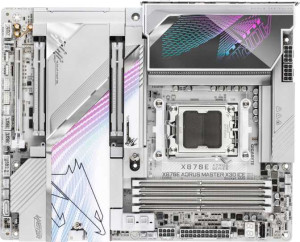
Gigabyte X870E Aorus Master X3D Ice
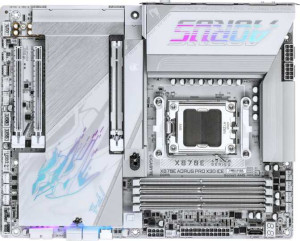
Gigabyte X870E Aorus Pro X3D Ice

Gigabyte X870E Aorus Master X3D Ice Gigabyte X870E Aorus Pro X3D Ice

Overview

When choosing between the Gigabyte X870E Aorus Master X3D Ice and the Gigabyte X870E Aorus Pro X3D Ice, enthusiasts will find two high-end AM5 motherboards sharing a strong foundation but diverging in some meaningful ways. This comparison dives into the key battlegrounds: USB connectivity, storage expansion, PCIe slot configuration, and audio capabilities — areas where the two boards take notably different approaches despite their shared X870 chipset heritage.

Common Features

  • Both products use the AM5 CPU socket.
  • Both products feature the X870 chipset.
  • Both products have an ATX form factor.
  • Wi-Fi is supported on both products, covering Wi-Fi 4, Wi-Fi 5, Wi-Fi 6, Wi-Fi 6E, and Wi-Fi 7.
  • Bluetooth 5.4 is present on both products.
  • Both products have an HDMI 2.1 output.
  • Both products support up to 256GB of maximum memory.
  • Both products support a maximum RAM speed of 5200 MHz, with overclocking up to 9000 MHz.
  • Both products have 4 memory slots and 2 memory channels.
  • Both products use DDR5 memory.
  • ECC memory is not supported on either product.
  • Neither product has USB 3.2 Gen 1 ports (USB-C), USB 2.0 ports, USB 4 20Gbps ports, or Thunderbolt 3 ports.
  • Both products have 2 USB 4 40Gbps ports and 2 Thunderbolt 4 ports.
  • DisplayPort output is not available on either product.
  • Both products provide 4 USB 3.2 Gen 1 ports, 1 USB 3.2 Gen 2x2 port, 4 USB 2.0 ports, and 4 USB 3.0 ports through expansion.
  • Both products have 8 fan headers.
  • A TPM connector is present on both products.
  • Neither product has an mSATA connector or U.2 sockets.
  • Both products have a signal-to-noise ratio (DAC) of 120 dB, an S/PDIF Out port, and 2 audio connectors.
  • Both products support RAID 0, RAID 1, RAID 5, and RAID 10 (1+0), but neither supports RAID 0+1.
  • Both products have 1 PCIe x4 slot and no PCIe x1, x8, 2.0 x16, 3.0 x16, or 4.0 x16 slots.

Main Differences

  • USB 3.2 Gen 2 ports (USB-A) count is 7 on Gigabyte X870E Aorus Master X3D Ice and 5 on Gigabyte X870E Aorus Pro X3D Ice.
  • USB 3.2 Gen 1 ports (USB-A) count is 0 on Gigabyte X870E Aorus Master X3D Ice and 3 on Gigabyte X870E Aorus Pro X3D Ice.
  • USB 3.2 Gen 2 ports (USB-C) count is 1 on Gigabyte X870E Aorus Master X3D Ice and 2 on Gigabyte X870E Aorus Pro X3D Ice.
  • A USB 3.2 Gen 2x2 port is present on Gigabyte X870E Aorus Master X3D Ice but not available on Gigabyte X870E Aorus Pro X3D Ice.
  • RJ45 ports count is 2 on Gigabyte X870E Aorus Master X3D Ice and 1 on Gigabyte X870E Aorus Pro X3D Ice.
  • SATA 3 connectors count is 2 on Gigabyte X870E Aorus Master X3D Ice and 4 on Gigabyte X870E Aorus Pro X3D Ice.
  • M.2 sockets count is 5 on Gigabyte X870E Aorus Master X3D Ice and 4 on Gigabyte X870E Aorus Pro X3D Ice.
  • PCIe 5.0 x16 slots count is 2 on Gigabyte X870E Aorus Master X3D Ice and 1 on Gigabyte X870E Aorus Pro X3D Ice.
  • Audio channels supported are 5.1 on Gigabyte X870E Aorus Master X3D Ice and 7.1 on Gigabyte X870E Aorus Pro X3D Ice.
Specs Comparison
Gigabyte X870E Aorus Master X3D Ice

Gigabyte X870E Aorus Master X3D Ice

Gigabyte X870E Aorus Pro X3D Ice

Gigabyte X870E Aorus Pro X3D Ice

General info:
CPU socket AM5 AM5
chipset X870 X870
form factor ATX ATX
release date September 2025 September 2025
supports Wi-Fi
Wi-Fi version Wi-Fi 4 (802.11n), Wi-Fi 5 (802.11ac), Wi-Fi 6 (802.11ax), Wi-Fi 6E (802.11ax), Wi-Fi 7 (802.11be) Wi-Fi 4 (802.11n), Wi-Fi 5 (802.11ac), Wi-Fi 6 (802.11ax), Wi-Fi 6E (802.11ax), Wi-Fi 7 (802.11be)
Has Bluetooth
Bluetooth version 5.4 5.4
HDMI version HDMI 2.1 HDMI 2.1
Easy to overclock
has RGB lighting
Easy to reset BIOS
Has dual BIOS
has aptX
CPU sockets 1 1
Has integrated graphics
warranty period 3 years 3 years
height 244 mm 244 mm
width 305 mm 305 mm
Has integrated CPU

In terms of general specifications, the Gigabyte X870E Aorus Master X3D Ice and the Gigabyte X870E Aorus Pro X3D Ice are virtually identical. Both boards share the same AM5 socket and X870 chipset, come in the standard ATX form factor (305 × 244 mm), and offer the same wireless connectivity stack — spanning Wi-Fi 7 (802.11be) down through Wi-Fi 4, paired with Bluetooth 5.4. For users building a modern AMD Ryzen platform, both boards deliver a complete and future-proof connectivity foundation right out of the box.

Every quality-of-life and convenience feature is also mirrored across both products: both support easy overclocking, include RGB lighting, offer a straightforward BIOS reset mechanism, and carry a 3-year warranty. Neither board features dual BIOS, aptX audio, integrated graphics, or an integrated CPU — all expected omissions for high-end desktop motherboards in this class.

Based strictly on the general info group, these two boards are in a complete tie. There is not a single differentiating specification in this category. Users will need to look to other spec groups — such as power delivery, I/O, or storage capabilities — to find meaningful distinctions between the Master X3D Ice and the Pro X3D Ice.

Memory:
maximum memory amount 256GB 256GB
RAM speed (max) 5200 MHz 5200 MHz
overclocked RAM speed 9000 MHz 9000 MHz
memory slots 4 4
DDR memory version 5 5
memory channels 2 2
Supports ECC memory

Both the Aorus Master X3D Ice and the Aorus Pro X3D Ice share an identical memory specification sheet. Each board provides 4 DIMM slots across a dual-channel DDR5 configuration, supporting up to 256GB of total RAM — enough headroom for even the most memory-hungry workloads, from large-scale video editing to professional virtualization tasks.

The native 5200 MHz JEDEC speed is the standard out-of-the-box baseline for DDR5, but the more telling figure is the overclocked ceiling of 9000 MHz. Pushing RAM to that range can yield measurable gains in bandwidth-sensitive workloads and gaming frame rates, particularly on AMD's Zen 5 platform where memory latency plays a more prominent role. Neither board supports ECC memory, which is a standard exclusion for consumer-grade motherboards and not a practical concern for the target audience.

As with the general info group, this category results in a complete tie. Every memory specification is identical across both boards, so memory subsystem performance alone will not be a deciding factor between the two.

Ports:
USB 3.2 Gen 2 ports (USB-A) 7 5
USB 3.2 Gen 1 ports (USB-A) 0 3
USB 3.2 Gen 2 ports (USB-C) 1 2
USB 3.2 Gen 1 ports (USB-C) 0 0
USB 2.0 ports 0 0
USB 3.2 Gen 2x2 ports 1 0
USB 4 40Gbps ports 2 2
USB 4 20Gbps ports 0 0
Thunderbolt 4 ports 2 2
Thunderbolt 3 ports 0 0
has an HDMI output
DisplayPort outputs 0 0
RJ45 ports 2 1
Has USB Type-C
eSATA ports 0 0
DVI outputs 0 0
has a VGA connector
PS/2 ports 0 0

The port configuration is where the first real divergence between these two boards emerges. Both share a strong high-speed foundation — 2× USB 4 40Gbps and 2× Thunderbolt 4 ports apiece — but the details surrounding those anchors tell different stories. The Aorus Master X3D Ice adds a USB 3.2 Gen 2x2 port (delivering 20Gbps over USB-A), which the Pro X3D Ice omits entirely. For users connecting high-speed external SSDs or other bandwidth-hungry peripherals that don't require Thunderbolt, that extra port is a meaningful bonus.

Networking is another point of separation. The Master X3D Ice offers 2× RJ45 Ethernet ports versus the Pro's single port. Dual LAN opens up useful scenarios such as simultaneously connecting to two separate networks, enabling link aggregation for doubled throughput, or dedicating one port to a NAS — flexibility the Pro simply cannot match. On the USB-C front, the Pro edges ahead with 2× USB 3.2 Gen 2 Type-C ports compared to the Master's one, though three of the Pro's USB-A ports are the slower Gen 1 standard (5Gbps) rather than Gen 2 (10Gbps), making the Pro's overall USB-A bandwidth pool shallower in practice.

The Aorus Master X3D Ice holds a clear edge in this category. The combination of dual Ethernet and an additional Gen 2x2 port makes it the stronger choice for power users who demand maximum I/O flexibility, while the Pro's trade-off of slower USB-A ports for an extra USB-C is a less compelling bargain.

Connectors:
USB 3.2 Gen 1 ports (through expansion) 4 4
USB 3.2 Gen 2x2 ports (through expansion) 1 1
USB 2.0 ports (through expansion) 4 4
SATA 3 connectors 2 4
fan headers 8 8
USB 3.0 ports (through expansion) 4 4
M.2 sockets 5 4
Has TPM connector
U.2 sockets 0 0
Has mSATA connector
SATA 2 connectors 0 0

Internal connector layouts reveal a deliberate trade-off between the two boards. The Aorus Master X3D Ice steps ahead with 5 M.2 sockets compared to the Pro's 4 — a meaningful difference for builders who want to maximize NVMe storage capacity or run multiple high-speed drives without resorting to add-in cards. For content creators, prosumers, or anyone running large NVMe arrays, that extra slot can matter.

The Aorus Pro X3D Ice counters with 4 SATA 3 connectors versus the Master's 2. Users with existing SATA SSDs or large-capacity HDD arrays — common in home servers or media storage builds — will find the Pro more accommodating without needing an expansion card. It's a classic NVMe-first versus legacy-storage balance, and which side wins depends entirely on the user's existing hardware ecosystem. All other internal connectors are identical: both boards offer the same USB expansion headers, 8 fan headers for thorough cooling control, and a TPM connector for security platform support.

This category is a contextual tie with no universal winner. The Master X3D Ice is the stronger pick for all-NVMe builds that prioritize speed and future storage expansion, while the Pro X3D Ice suits builders who still rely on multiple SATA devices and want native connectivity without compromise.

Expansion slots:
PCIe 4.0 x16 slots 0 0
PCIe 5.0 x16 slots 2 1
PCIe 3.0 x16 slots 0 0
PCIe x1 slots 0 0
PCI slots 0 0
PCIe 2.0 x16 slots 0 0
PCIe x4 slots 1 1
PCIe x8 slots 0 0

Expansion slot configuration is where the Aorus Master X3D Ice pulls ahead in a concrete, hard-to-ignore way. It features 2× PCIe 5.0 x16 slots versus the Pro's single slot — and at PCIe 5.0 bandwidth levels, that distinction is significant. A second full-bandwidth x16 slot opens the door to multi-GPU setups, high-end PCIe 5.0 capture cards, or professional accelerator cards running alongside a primary GPU, all without any bandwidth compromise.

For the overwhelming majority of single-GPU gaming builds, the Pro's 1× PCIe 5.0 x16 slot is entirely sufficient — current graphics cards don't come close to saturating PCIe 5.0 x16 bandwidth. However, for workstation-oriented users, content creators running dedicated compute accelerators, or enthusiasts future-proofing against next-generation multi-card scenarios, the Master's extra slot represents genuine, usable headroom. Both boards share an identical PCIe x4 slot, rounding out the expansion options equally at the lower end.

The Aorus Master X3D Ice wins this category outright. The second PCIe 5.0 x16 slot is a clear structural advantage for anyone whose workflow extends beyond a single discrete GPU, making it the more versatile and forward-looking platform of the two.

Audio:
Signal-to-Noise ratio (DAC) 120 dB 120 dB
audio channels 5.1 7.1
Has S/PDIF Out port
audio connectors 2 2

Audio quality is evenly matched at the foundational level — both boards deliver a 120 dB signal-to-noise ratio (SNR) from their onboard DAC, which is a strong figure for integrated audio. A higher SNR means less audible hiss and background noise, and at 120 dB, both boards are well-suited for critical listening, high-impedance headphones, and studio monitor use without an external sound card.

The single differentiator here is channel support. The Aorus Pro X3D Ice supports 7.1 surround sound, while the Master X3D Ice tops out at 5.1. For users with a full surround speaker setup — particularly home theater or immersive gaming configurations — 7.1 delivers two additional rear surround channels that meaningfully improve spatial audio depth and directional accuracy. Both boards share the same number of analog audio connectors and include S/PDIF out, so the 7.1 capability on the Pro is delivered within the same physical connector count, likely through software channel remapping.

The Aorus Pro X3D Ice takes a narrow but clear win in this category. For users invested in multi-speaker surround setups, the jump from 5.1 to 7.1 is a tangible upgrade. For headphone users or those routing audio through an external DAC or S/PDIF, the difference is effectively irrelevant and both boards perform equally.

Storage:
Supports RAID 1
Supports RAID 10 (1+0)
Supports RAID 5
Supports RAID 0
Supports RAID 0+1

RAID support is identical across both boards. Each offers RAID 0, 1, 5, and 10 — covering the full practical spectrum of consumer and prosumer storage configurations. RAID 0 stripes data for maximum throughput, RAID 1 mirrors for redundancy, RAID 5 balances performance with fault tolerance across three or more drives, and RAID 10 combines mirroring and striping for both speed and resilience. Neither board supports RAID 0+1, though this is a rare omission in practice given that RAID 10 is generally preferred and functionally overlapping.

For most users, RAID 5 and RAID 10 support are the headline capabilities here — they're the configurations most relevant to NAS-adjacent builds, content archives, and workstation setups where data integrity and sustained read performance both matter. Having these modes available natively, without additional hardware, adds real value for storage-focused builders on either platform.

This category is a complete tie. The RAID feature set is identical on both the Master X3D Ice and the Pro X3D Ice, and neither holds any advantage over the other in terms of storage array configuration flexibility.

Comparison Summary & Verdict

Both the Gigabyte X870E Aorus Master X3D Ice and the Gigabyte X870E Aorus Pro X3D Ice are well-matched X870 ATX motherboards offering DDR5 support, Wi-Fi 7, Bluetooth 5.4, and a robust set of shared features. However, their differences point each board toward a distinct type of builder. The Aorus Master X3D Ice stands out with 2 PCIe 5.0 x16 slots, 5 M.2 sockets, dual RJ45 ports, and a USB 3.2 Gen 2x2 port — making it the stronger pick for power users running multi-GPU or multi-NVMe workloads. The Aorus Pro X3D Ice counters with 4 SATA 3 connectors, 7.1 audio channels, and a more balanced USB layout including 3 USB 3.2 Gen 1 Type-A ports, making it a compelling choice for users who prioritize traditional storage and richer audio output.

Gigabyte X870E Aorus Master X3D Ice
Buy Gigabyte X870E Aorus Master X3D Ice if...

Buy the Gigabyte X870E Aorus Master X3D Ice if you need maximum PCIe 5.0 bandwidth with 2 full x16 slots, 5 M.2 sockets, dual LAN ports, and a USB 3.2 Gen 2x2 port for demanding multi-device or high-throughput storage builds.

Gigabyte X870E Aorus Pro X3D Ice
Buy Gigabyte X870E Aorus Pro X3D Ice if...

Buy the Gigabyte X870E Aorus Pro X3D Ice if you rely on more SATA 3 connectors for traditional drive setups, want 7.1 surround audio output, or prefer a more versatile USB Type-A layout including USB 3.2 Gen 1 ports.