array(28) {
["_id"]=>
object(MongoDB\BSON\ObjectId)#38 (1) {
["oid"]=>
string(24) "693474909c36d5c86400d65d"
}
["name"]=>
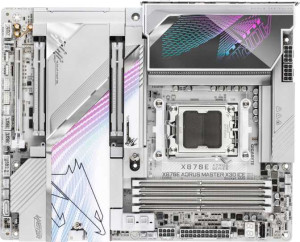
string(35) "Gigabyte X870E Aorus Master X3D Ice"
["name_url"]=>
string(35) "gigabyte-x870e-aorus-master-x3d-ice"
["uniqueDisplayName"]=>
string(35) "Gigabyte X870E Aorus Master X3D Ice"
["image"]=>
string(68) "/gigabyte-x870e-aorus-master-x3d-ice.front.variety.1759247248481.jpg"
["release_date"]=>
int(20250912)
["release_date_2"]=>
object(MongoDB\BSON\UTCDateTime)#39 (1) {
["milliseconds"]=>
string(13) "1757635200000"
}
["status"]=>
int(10)
["sku"]=>
array(1) {
[0]=>
int(834)
}
["id"]=>
int(6203)
["images"]=>
array(2) {
["main"]=>
string(13) "/530/6203.jpg"
["small"]=>
string(17) "/530/6203_300.jpg"
}
["manufacturer"]=>
string(8) "Gigabyte"
["manufacturer_id"]=>
object(MongoDB\BSON\ObjectId)#40 (1) {
["oid"]=>
string(24) "693868d26f8a79415e0d300a"
}
["manufacturer_slug"]=>
string(8) "gigabyte"
["slug"]=>
string(31) "gigabyte-x870e-aorus-master-x3d"
["specs"]=>
array(7) {
["General info"]=>
array(21) {
["_id"]=>
string(24) "693477646e6b8cde36023368"
["cpu_socket"]=>
array(6) {
["_id"]=>
string(24) "6934ba8fc451c776b606a2c2"
["label"]=>
string(10) "CPU socket"
["value"]=>
string(3) "AM5"
["unit"]=>
string(0) ""
["kind"]=>
string(6) "ranked"
["desc"]=>
string(27) "The CPU socket/s supported."
}
["compatible_chipsets"]=>
array(6) {
["_id"]=>
string(24) "6934babc013867ad680ec23f"
["label"]=>
string(7) "chipset"
["value"]=>
string(4) "X870"
["unit"]=>
string(0) ""
["kind"]=>
string(6) "ranked"
["desc"]=>
string(36) "The motherboard chipset/s supported."
}
["form_factor"]=>
array(6) {
["_id"]=>
string(24) "6934ba8fc451c776b606a263"
["label"]=>
string(11) "form factor"
["value"]=>
string(3) "ATX"
["unit"]=>
string(0) ""
["kind"]=>
string(6) "ranked"
["desc"]=>
string(35) "The form factor of the motherboard."
}
["release_date"]=>
array(6) {
["_id"]=>
string(24) "693477646e6b8cde3602336a"
["label"]=>
string(12) "release date"
["value"]=>
int(20250912)
["unit"]=>
string(0) ""
["kind"]=>
string(6) "number"
["desc"]=>
string(57) "The date the product first became available for purchase."
}
["wlan_toggle"]=>
array(6) {
["_id"]=>
string(24) "693477646e6b8cde3602338b"
["label"]=>
string(14) "supports Wi-Fi"
["value"]=>
bool(true)
["unit"]=>
string(0) ""
["kind"]=>
string(7) "boolean"
["desc"]=>
string(32) "The device can connect to Wi-Fi."
}
["wifi"]=>
array(6) {
["_id"]=>
string(24) "693477646e6b8cde3602338c"
["label"]=>
string(13) "Wi-Fi version"
["value"]=>
string(98) "Wi-Fi 4 (802.11n), Wi-Fi 5 (802.11ac), Wi-Fi 6 (802.11ax), Wi-Fi 6E (802.11ax), Wi-Fi 7 (802.11be)"
["unit"]=>
string(0) ""
["kind"]=>
string(6) "ranked"
["desc"]=>
string(43) "The Wi-Fi versions supported by the device."
}
["built_in_bluetooth"]=>
array(6) {
["_id"]=>
string(24) "6934ba8fc451c776b606a2a3"
["label"]=>
string(13) "Has Bluetooth"
["value"]=>
bool(true)
["unit"]=>
string(0) ""
["kind"]=>
string(7) "boolean"
["desc"]=>
string(145) "Bluetooth is a wireless technology that allows you to easily transfer data between different devices, such as smartphones, tablets and computers."
}
["bluetooth"]=>
array(6) {
["_id"]=>
string(24) "693477646e6b8cde3602338d"
["label"]=>
string(17) "Bluetooth version"
["value"]=>
float(5.4)
["unit"]=>
string(0) ""
["kind"]=>
string(6) "number"
["desc"]=>
string(217) "Bluetooth is a wireless technology standard that allows data transfers between devices placed in close proximity, using short-wavelength, ultra-high frequency radio waves. Newer versions provide faster data transfers."
}
["hdmi_version_r"]=>
array(6) {
["_id"]=>
string(24) "693477646e6b8cde36023389"
["label"]=>
string(12) "HDMI version"
["value"]=>
string(8) "HDMI 2.1"
["unit"]=>
string(0) ""
["kind"]=>
string(6) "ranked"
["desc"]=>
string(101) "Newer versions of HDMI support higher bandwidth, which allows for higher resolutions and frame rates."
}
["easy_overclock"]=>
array(6) {
["_id"]=>
string(24) "69353c9deadcbcc1fd06b9d5"
["label"]=>
string(17) "Easy to overclock"
["value"]=>
bool(true)
["unit"]=>
string(0) ""
["kind"]=>
string(7) "boolean"
["desc"]=>
string(214) "Overclocking your system is normally quite a complicated procedure, but some manufacturers provide a button or a program where one click will automatically overclock your computer, giving you increased performance."
}
["rgb_lighting"]=>
array(6) {
["_id"]=>
string(24) "6934ba8fc451c776b606a29c"
["label"]=>
string(16) "has RGB lighting"
["value"]=>
bool(true)
["unit"]=>
string(0) ""
["kind"]=>
string(7) "boolean"
["desc"]=>
string(122) "RGB lighting allows you to choose between millions of colors and customize the look of your PC components and peripherals."
}
["clear_cmos"]=>
array(6) {
["_id"]=>
string(24) "69353c9deadcbcc1fd06b9d6"
["label"]=>
string(18) "Easy to reset BIOS"
["value"]=>
bool(true)
["unit"]=>
string(0) ""
["kind"]=>
string(7) "boolean"
["desc"]=>
string(289) "The motherboard has a button or switch on the rear panel to clear the CMOS, which resets the BIOS to factory settings. This is useful if something goes wrong with the BIOS which stops your computer from booting, as you can reset the BIOS without opening the case to access the CMOS jumper."
}
["dual_bios"]=>
array(6) {
["_id"]=>
string(24) "69353c9deadcbcc1fd06b9d7"
["label"]=>
string(13) "Has dual BIOS"
["value"]=>
bool(false)
["unit"]=>
string(0) ""
["kind"]=>
string(7) "boolean"
["desc"]=>
string(181) "The motherboard supports dual BIOS. If you flash a new BIOS to your motherboard and something goes wrong, you can switch to the backup BIOS so that you can still boot your computer."
}
["bluetooth_aptx"]=>
array(6) {
["_id"]=>
string(24) "6934e489b4f997e7b10ba7b3"
["label"]=>
string(8) "has aptX"
["value"]=>
bool(false)
["unit"]=>
string(0) ""
["kind"]=>
string(7) "boolean"
["desc"]=>
string(151) "aptX is a codec used for transmitting audio wirelessly with Bluetooth. It is developed by Qualcomm, and supports 16-bit audio at a bit rate of 384kbps."
}
["cpu_sockets"]=>
array(6) {
["_id"]=>
string(24) "69353c9deadcbcc1fd06b9d8"
["label"]=>
string(11) "CPU sockets"
["value"]=>
int(1)
["unit"]=>
string(0) ""
["kind"]=>
string(6) "number"
["desc"]=>
string(82) "The motherboard has more CPU sockets. Multiple CPUs are typically used in servers."
}
["int_graphics"]=>
array(6) {
["_id"]=>
string(24) "6934ba8fc451c776b606a26b"
["label"]=>
string(23) "Has integrated graphics"
["value"]=>
bool(false)
["unit"]=>
string(0) ""
["kind"]=>
string(7) "boolean"
["desc"]=>
string(74) "With integrated graphics you don’t need to buy a separate graphics card."
}
["warranty_time"]=>
array(6) {
["_id"]=>
string(24) "693493df013867ad680ec103"
["label"]=>
string(15) "warranty period"
["value"]=>
string(7) "3 years"
["unit"]=>
string(6) " years"
["kind"]=>
string(6) "number"
["desc"]=>
string(145) "When covered under the manufacturer’s warranty it is possible to get a replacement in the case of a malfunction. Note: This may vary by region."
}
["height"]=>
array(6) {
["_id"]=>
string(24) "693477646e6b8cde3602336f"
["label"]=>
string(6) "height"
["value"]=>
string(6) "244 mm"
["unit"]=>
string(3) " mm"
["kind"]=>
string(6) "number"
["desc"]=>
string(60) "The height represents the vertical dimension of the product."
}
["width"]=>
array(6) {
["_id"]=>
string(24) "693477646e6b8cde36023370"
["label"]=>
string(5) "width"
["value"]=>
string(6) "305 mm"
["unit"]=>
string(3) " mm"
["kind"]=>
string(6) "number"
["desc"]=>
string(61) "The width represents the horizontal dimension of the product."
}
["integrated_cpu"]=>
array(6) {
["_id"]=>
string(24) "69353c9deadcbcc1fd06b9d9"
["label"]=>
string(18) "Has integrated CPU"
["value"]=>
bool(false)
["unit"]=>
string(0) ""
["kind"]=>
string(7) "boolean"
["desc"]=>
string(160) "The motherboard comes with a processor built in. They are normally not very powerful but are great if you are looking to make a PC with minimal cost and effort."
}
}
["Memory"]=>
array(8) {
["_id"]=>
string(24) "6934ba8fc451c776b606a29e"
["max_mem_size"]=>
array(6) {
["_id"]=>
string(24) "6934ba8fc451c776b606a2c0"
["label"]=>
string(21) "maximum memory amount"
["value"]=>
string(5) "256GB"
["unit"]=>
string(2) "GB"
["kind"]=>
string(6) "number"
["desc"]=>
string(45) "The maximum amount of memory (RAM) supported."
}
["ram_speed_mb_max"]=>
array(6) {
["_id"]=>
string(24) "69353c9deadcbcc1fd06b9da"
["label"]=>
string(15) "RAM speed (max)"
["value"]=>
string(8) "5200 MHz"
["unit"]=>
string(4) " MHz"
["kind"]=>
string(6) "number"
["desc"]=>
string(62) "The maximum speed of RAM that is supported by the motherboard."
}
["ram_speed_oc"]=>
array(6) {
["_id"]=>
string(24) "69353c9deadcbcc1fd06b9db"
["label"]=>
string(21) "overclocked RAM speed"
["value"]=>
string(8) "9000 MHz"
["unit"]=>
string(4) " MHz"
["kind"]=>
string(6) "number"
["desc"]=>
string(162) "The motherboard supports overclocking the RAM to a higher speed. By increasing the speed at which the memory runs, you can boost the performance of your computer."
}
["memory_slots"]=>
array(6) {
["_id"]=>
string(24) "6934ba8fc451c776b606a2a2"
["label"]=>
string(12) "memory slots"
["value"]=>
int(4)
["unit"]=>
string(0) ""
["kind"]=>
string(6) "number"
["desc"]=>
string(206) "More memory slots (also known as DIMM slots) allow you to add more RAM to your computer. It is also useful when upgrading, as you can add RAM to an empty slot instead of replacing an existing memory module."
}
["ddr_version"]=>
array(6) {
["_id"]=>
string(24) "6934ba8fc451c776b606a2a1"
["label"]=>
string(18) "DDR memory version"
["value"]=>
int(5)
["unit"]=>
string(0) ""
["kind"]=>
string(6) "number"
["desc"]=>
string(151) "DDR (Double Data Rate) memory is the most common type of RAM. Newer versions of DDR memory support higher maximum speeds and are more energy-efficient."
}
["mem_channels"]=>
array(6) {
["_id"]=>
string(24) "6934ba8fc451c776b606a2c6"
["label"]=>
string(15) "memory channels"
["value"]=>
int(2)
["unit"]=>
string(0) ""
["kind"]=>
string(6) "number"
["desc"]=>
string(89) "More memory channels increases the speed of data transfer between the memory and the CPU."
}
["mem_eec"]=>
array(6) {
["_id"]=>
string(24) "6934ba8fc451c776b606a2c5"
["label"]=>
string(19) "Supports ECC memory"
["value"]=>
bool(false)
["unit"]=>
string(0) ""
["kind"]=>
string(7) "boolean"
["desc"]=>
string(176) "Error-correcting code memory can detect and correct data corruption. It is used when is it essential to avoid corruption, such as scientific computing or when running a server."
}
}
["Ports"]=>
array(19) {
["_id"]=>
string(24) "69353c9deadcbcc1fd06b9dc"
["usb_3_2_gen2_a_ports"]=>
array(6) {
["_id"]=>
string(24) "6934ba8fc451c776b606a2a5"
["label"]=>
string(27) "USB 3.2 Gen 2 ports (USB-A)"
["value"]=>
int(7)
["unit"]=>
string(0) ""
["kind"]=>
string(6) "number"
["desc"]=>
string(129) "USB 3.2 Gen 2 supports speeds of up to 10Gbps. It was formerly known as USB 3.1 Gen 2. These ports use the older USB-A connector."
}
["usb_3_2_gen1_a_ports"]=>
array(6) {
["_id"]=>
string(24) "6934ba8fc451c776b606a2a6"
["label"]=>
string(27) "USB 3.2 Gen 1 ports (USB-A)"
["value"]=>
int(0)
["unit"]=>
string(0) ""
["kind"]=>
string(6) "number"
["desc"]=>
string(140) "USB 3.2 Gen 1 supports speeds of up to 5Gbps. It was formerly known as USB 3.1 Gen 1 and USB 3.0. These ports use the older USB-A connector."
}
["usb_3_2_gen2_c_ports"]=>
array(6) {
["_id"]=>
string(24) "6934ba8fc451c776b606a2a7"
["label"]=>
string(27) "USB 3.2 Gen 2 ports (USB-C)"
["value"]=>
int(1)
["unit"]=>
string(0) ""
["kind"]=>
string(6) "number"
["desc"]=>
string(123) "USB 3.2 Gen 2 supports speeds of up to 10Gbps. It was formerly known as USB 3.1 Gen 2. These ports use the USB-C connector."
}
["usb_3_2_gen1_c_ports"]=>
array(6) {
["_id"]=>
string(24) "6934ba8fc451c776b606a2ab"
["label"]=>
string(27) "USB 3.2 Gen 1 ports (USB-C)"
["value"]=>
int(0)
["unit"]=>
string(0) ""
["kind"]=>
string(6) "number"
["desc"]=>
string(134) "USB 3.2 Gen 1 supports speeds of up to 5Gbps. It was formerly known as USB 3.1 Gen 1 and USB 3.0. These ports use the USB-C connector."
}
["ports_usb2"]=>
array(6) {
["_id"]=>
string(24) "6934ba8fc451c776b606a2a4"
["label"]=>
string(13) "USB 2.0 ports"
["value"]=>
int(0)
["unit"]=>
string(0) ""
["kind"]=>
string(6) "number"
["desc"]=>
string(91) "More USB 2.0 ports allow you to connect more devices to your computer that support USB 2.0."
}
["usb_3_2_gen2x2_c_ports"]=>
array(6) {
["_id"]=>
string(24) "6934ba8fc451c776b606a2aa"
["label"]=>
string(21) "USB 3.2 Gen 2x2 ports"
["value"]=>
int(1)
["unit"]=>
string(0) ""
["kind"]=>
string(6) "number"
["desc"]=>
string(104) "USB 3.2 Gen 2x2 was introduced in 2019. It supports speeds of up to 20Gbps and uses the USB-C connector."
}
["usb_4_40_ports"]=>
array(6) {
["_id"]=>
string(24) "6934ba8fc451c776b606a2a8"
["label"]=>
string(18) "USB 4 40Gbps ports"
["value"]=>
int(2)
["unit"]=>
string(0) ""
["kind"]=>
string(6) "number"
["desc"]=>
string(177) "This version of USB 4 supports very high speeds of up to 40Gbps. Unlike USB 3.2, USB 4 can dynamically allocate bandwidth to video and data. These ports use the USB-C connector."
}
["usb_4_20_ports"]=>
array(6) {
["_id"]=>
string(24) "6934ba8fc451c776b606a2a9"
["label"]=>
string(18) "USB 4 20Gbps ports"
["value"]=>
int(0)
["unit"]=>
string(0) ""
["kind"]=>
string(6) "number"
["desc"]=>
string(167) "This version of USB 4 supports speeds of up to 20Gbps. Unlike USB 3.2, USB 4 can dynamically allocate bandwidth to video and data. These ports use the USB-C connector."
}
["thunderbolt4_ports"]=>
array(6) {
["_id"]=>
string(24) "6934ba8fc451c776b606a2ac"
["label"]=>
string(19) "Thunderbolt 4 ports"
["value"]=>
int(2)
["unit"]=>
string(0) ""
["kind"]=>
string(6) "number"
["desc"]=>
string(206) "The number of USB ports that are compatible with Thunderbolt 4. These ports support a total bandwidth of up to 40 Gbps. This guarantees that it can support two 4K (60 Hz) displays or one 8K (30 Hz) display."
}
["thunderbolt3_ports"]=>
array(6) {
["_id"]=>
string(24) "6934ba8fc451c776b606a2ad"
["label"]=>
string(19) "Thunderbolt 3 ports"
["value"]=>
int(0)
["unit"]=>
string(0) ""
["kind"]=>
string(6) "number"
["desc"]=>
string(204) "The number of USB ports that are compatible with Thunderbolt 3. These ports support speeds of up to 40Gbps, including a minimum of PCIe 16Gbps. This guarantees that it can support one external 4K display."
}
["hdmi"]=>
array(6) {
["_id"]=>
string(24) "6934babc013867ad680ec23e"
["label"]=>
string(18) "has an HDMI output"
["value"]=>
bool(true)
["unit"]=>
string(0) ""
["kind"]=>
string(7) "boolean"
["desc"]=>
string(148) "You can output high definition video and audio to a display. This could be through an HDMI port, Mini HDMI port, or a USB-C port that supports HDMI."
}
["displayport"]=>
array(6) {
["_id"]=>
string(24) "693477646e6b8cde36023382"
["label"]=>
string(19) "DisplayPort outputs"
["value"]=>
int(0)
["unit"]=>
string(0) ""
["kind"]=>
string(6) "number"
["desc"]=>
string(53) "Allows you to connect to a display using DisplayPort."
}
["rj45_ports"]=>
array(6) {
["_id"]=>
string(24) "6934ba8fc451c776b606a2ae"
["label"]=>
string(10) "RJ45 ports"
["value"]=>
int(2)
["unit"]=>
string(0) ""
["kind"]=>
string(6) "number"
["desc"]=>
string(245) "RJ-45 ports are used for LAN (Local Area Network) connections. With more ports you can achieve increased bandwidth across a LAN, or connect to multiple networks. It also has the added benefit of not losing connection to the network if one fails."
}
["usb_type_c"]=>
array(6) {
["_id"]=>
string(24) "693477646e6b8cde36023388"
["label"]=>
string(14) "Has USB Type-C"
["value"]=>
bool(true)
["unit"]=>
string(0) ""
["kind"]=>
string(7) "boolean"
["desc"]=>
string(72) "The USB Type-C features reversible plug orientation and cable direction."
}
["ports_esata"]=>
array(6) {
["_id"]=>
string(24) "69353c9deadcbcc1fd06b9dd"
["label"]=>
string(11) "eSATA ports"
["value"]=>
int(0)
["unit"]=>
string(0) ""
["kind"]=>
string(6) "number"
["desc"]=>
string(130) "eSATA is an external version of SATA, an interface designed for connecting a computer to mass storage devices such as hard drives."
}
["dvi"]=>
array(6) {
["_id"]=>
string(24) "6934ba8fc451c776b606a2b0"
["label"]=>
string(11) "DVI outputs"
["value"]=>
int(0)
["unit"]=>
string(0) ""
["kind"]=>
string(6) "number"
["desc"]=>
string(45) "Allows you to connect to a display using DVI."
}
["vga_connector"]=>
array(6) {
["_id"]=>
string(24) "693477646e6b8cde36023390"
["label"]=>
string(19) "has a VGA connector"
["value"]=>
bool(false)
["unit"]=>
string(0) ""
["kind"]=>
string(7) "boolean"
["desc"]=>
string(118) "VGA connector is a widespread connector and is found on many video cards, computer monitors, and some television sets."
}
["ports_ps2"]=>
array(6) {
["_id"]=>
string(24) "69353c9deadcbcc1fd06b9de"
["label"]=>
string(10) "PS/2 ports"
["value"]=>
int(0)
["unit"]=>
string(0) ""
["kind"]=>
string(6) "number"
["desc"]=>
string(190) "PS/2 ports are used to connect mice and keyboards. Although they have been replaced by USB, they are still useful in corporate environments where USB ports are disabled for security reasons."
}
}
["Connectors"]=>
array(12) {
["_id"]=>
string(24) "69353c9deadcbcc1fd06b9df"
["usb_3_2_gen1_connectors"]=>
array(6) {
["_id"]=>
string(24) "69353c9deadcbcc1fd06b9e0"
["label"]=>
string(39) "USB 3.2 Gen 1 ports (through expansion)"
["value"]=>
int(4)
["unit"]=>
string(0) ""
["kind"]=>
string(6) "number"
["desc"]=>
string(109) "The number of USB 3.2 Gen 1 ports that can be added by using the USB headers (connectors) on the motherboard."
}
["usb_3_2_gen2x2_connectors"]=>
array(6) {
["_id"]=>
string(24) "69353c9deadcbcc1fd06b9e2"
["label"]=>
string(41) "USB 3.2 Gen 2x2 ports (through expansion)"
["value"]=>
int(1)
["unit"]=>
string(0) ""
["kind"]=>
string(6) "number"
["desc"]=>
string(111) "The number of USB 3.2 Gen 2x2 ports that can be added by using the USB headers (connectors) on the motherboard."
}
["additional_usb2"]=>
array(6) {
["_id"]=>
string(24) "69353c9deadcbcc1fd06b9e4"
["label"]=>
string(33) "USB 2.0 ports (through expansion)"
["value"]=>
int(4)
["unit"]=>
string(0) ""
["kind"]=>
string(6) "number"
["desc"]=>
string(103) "The number of USB 2.0 ports that can be added by using the USB headers (connectors) on the motherboard."
}
["sata3_connectors"]=>
array(6) {
["_id"]=>
string(24) "69353c9deadcbcc1fd06b9e5"
["label"]=>
string(17) "SATA 3 connectors"
["value"]=>
int(2)
["unit"]=>
string(0) ""
["kind"]=>
string(6) "number"
["desc"]=>
string(283) "SATA is an interface used to connect mass storage devices such as hard drives and Blu-ray drives. SATA 3 has a native transfer rate of 6 Gbit/s, which is twice as fast as SATA 2, the previous revision. This is particularly useful if you use an SSD as it can perform at higher speeds."
}
["fan_headers"]=>
array(6) {
["_id"]=>
string(24) "69353c9deadcbcc1fd06b9e6"
["label"]=>
string(11) "fan headers"
["value"]=>
int(8)
["unit"]=>
string(0) ""
["kind"]=>
string(6) "number"
["desc"]=>
string(242) "Fan headers are connection points on the motherboard that cooling fans can be connected to. Fans can also be connected straight to the power supply, but when connected to the motherboard you gain much finer control over them through software."
}
["additional_usb3"]=>
array(6) {
["_id"]=>
string(24) "69353c9deadcbcc1fd06b9e7"
["label"]=>
string(33) "USB 3.0 ports (through expansion)"
["value"]=>
int(4)
["unit"]=>
string(0) ""
["kind"]=>
string(6) "number"
["desc"]=>
string(108) "The motherboard has USB 3.0 headers, which are pin connections that you can connect additional USB ports to."
}
["m2_sockets"]=>
array(6) {
["_id"]=>
string(24) "69353c9deadcbcc1fd06b9e8"
["label"]=>
string(11) "M.2 sockets"
["value"]=>
int(5)
["unit"]=>
string(0) ""
["kind"]=>
string(6) "number"
["desc"]=>
string(181) "M.2 is an interface used to connect different types of devices, mainly mass storage devices like M.2 SSDs. It is a revision of mSATA and can support much higher data transfer rates."
}
["tp_module"]=>
array(6) {
["_id"]=>
string(24) "69353c9deadcbcc1fd06b9e9"
["label"]=>
string(17) "Has TPM connector"
["value"]=>
bool(true)
["unit"]=>
string(0) ""
["kind"]=>
string(7) "boolean"
["desc"]=>
string(216) "Trusted Platform Module (TPM) is a component that significantly increases security. One example is that it allows encryption keys to be created in a secure environment, minimizing the risk of a hacker gaining access."
}
["u2_sockets"]=>
array(6) {
["_id"]=>
string(24) "69353c9deadcbcc1fd06b9ea"
["label"]=>
string(11) "U.2 sockets"
["value"]=>
int(0)
["unit"]=>
string(0) ""
["kind"]=>
string(6) "number"
["desc"]=>
string(256) "U.2 is an interface used to connect different types of devices, mainly mass storage devices. It has the same performance as M.2, but U.2 SSDs come in the form of regular 2.5" SATA drives and could therefore support much higher capacities than mSATA drives."
}
["msata"]=>
array(6) {
["_id"]=>
string(24) "69353c9deadcbcc1fd06b9eb"
["label"]=>
string(19) "Has mSATA connector"
["value"]=>
bool(false)
["unit"]=>
string(0) ""
["kind"]=>
string(7) "boolean"
["desc"]=>
string(285) "If a motherboard has an mSATA connector, you can connect an mSATA SSD drive to it that acts as a cache between the motherboard and your primary hard drive. This gives increased performance when using a traditional hard disk drive (HDD) instead of an SSD as your primary storage device."
}
["sata2_connectors"]=>
array(6) {
["_id"]=>
string(24) "69353c9deadcbcc1fd06b9ec"
["label"]=>
string(17) "SATA 2 connectors"
["value"]=>
int(0)
["unit"]=>
string(0) ""
["kind"]=>
string(6) "number"
["desc"]=>
string(144) "SATA is an interface used to connect mass storage devices such as hard drives and Blu-ray drives. SATA 2 has a native transfer rate of 3 Gbit/s."
}
}
["Expansion slots"]=>
array(9) {
["_id"]=>
string(24) "69353c9deadcbcc1fd06b9ed"
["pcie4_x16_slots"]=>
array(6) {
["_id"]=>
string(24) "69353c9deadcbcc1fd06b9ee"
["label"]=>
string(18) "PCIe 4.0 x16 slots"
["value"]=>
int(0)
["unit"]=>
string(0) ""
["kind"]=>
string(6) "number"
["desc"]=>
string(302) "PCIe slots allow you to connect various components to the motherboard, such as graphics cards and SSDs. The number of data-transmission lanes (specified by the number after the 'x') determines the data transfer rate. PCIe 4.0 provides a 16 GT/s bit rate that doubles the bandwidth provided by PCIe 3.0."
}
["pcie5_x16_slots"]=>
array(6) {
["_id"]=>
string(24) "69353c9deadcbcc1fd06b9ef"
["label"]=>
string(18) "PCIe 5.0 x16 slots"
["value"]=>
int(2)
["unit"]=>
string(0) ""
["kind"]=>
string(6) "number"
["desc"]=>
string(216) "PCIe slots allow you to connect various components to the motherboard, such as graphics cards and SSDs. The number of data-transmission lanes (specified by the number after the 'x') determines the data transfer rate."
}
["pcie3_x16_slots"]=>
array(6) {
["_id"]=>
string(24) "69353c9deadcbcc1fd06b9f0"
["label"]=>
string(18) "PCIe 3.0 x16 slots"
["value"]=>
int(0)
["unit"]=>
string(0) ""
["kind"]=>
string(6) "number"
["desc"]=>
string(294) "PCIe slots allow you to connect various components to the motherboard, such as graphics cards and sound cards. The number after the 'x' represents the number of lanes, with more lanes supporting higher data transfer rates. PCI Express 3.0 has a bit rate of 8 GT/s, delivering 985 MB/s per lane."
}
["pcie_x1_slots"]=>
array(6) {
["_id"]=>
string(24) "69353c9deadcbcc1fd06b9f1"
["label"]=>
string(13) "PCIe x1 slots"
["value"]=>
int(0)
["unit"]=>
string(0) ""
["kind"]=>
string(6) "number"
["desc"]=>
string(306) "Using PCIe slots, you can connect different components to your motherboard, such as graphics cards and RAID cards. The number after the 'x' represents the number of data-transmission lanes. More lanes result in faster data transfer rates. A PCIe x1 slot has one lane and can move data at one bit per cycle."
}
["pci_l_slots"]=>
array(6) {
["_id"]=>
string(24) "69353c9deadcbcc1fd06b9f2"
["label"]=>
string(9) "PCI slots"
["value"]=>
int(0)
["unit"]=>
string(0) ""
["kind"]=>
string(6) "number"
["desc"]=>
string(262) "PCI slots allow you to connect peripherals to the motherboard, most commonly graphics cards but also others such as sound cards and network cards. PCI has been superseded by PCI Express which offers faster data transfer rates, but many cards today still use PCI."
}
["pcie2_slots"]=>
array(6) {
["_id"]=>
string(24) "69353c9deadcbcc1fd06b9f3"
["label"]=>
string(18) "PCIe 2.0 x16 slots"
["value"]=>
int(0)
["unit"]=>
string(0) ""
["kind"]=>
string(6) "number"
["desc"]=>
string(282) "PCIe slots allow you to connect graphics cards, SSDs, and other components to the motherboard. The number after the 'x' represents the number of lanes, with more lanes supporting higher data transfer rates. PCI Express 2.0 has a transfer rate of 5 GT/s, providing 500 MB/s per lane."
}
["pcie_x4_slots"]=>
array(6) {
["_id"]=>
string(24) "69353c9deadcbcc1fd06b9f4"
["label"]=>
string(13) "PCIe x4 slots"
["value"]=>
int(1)
["unit"]=>
string(0) ""
["kind"]=>
string(6) "number"
["desc"]=>
string(294) "PCIe slots enable you to connect various components to your motherboard, for example, graphics cards, RAID cards, SSDs. The number of data-transmission lanes (specified by the number following 'x') determines the data transfer rate. A PCIe x4 slot has 4 lanes, with a speed of 4 bits per cycle."
}
["pcie_x8_slots"]=>
array(6) {
["_id"]=>
string(24) "69353c9deadcbcc1fd06b9f5"
["label"]=>
string(13) "PCIe x8 slots"
["value"]=>
int(0)
["unit"]=>
string(0) ""
["kind"]=>
string(6) "number"
["desc"]=>
string(290) "PCIe slots allow you to connect components such as graphics cards and sound cards to the motherboard. The number after the 'x' represents the number of data-transmission lanes. More lanes result in faster data transfer rates. A PCIe x8 slot has 8 lanes and can move data at 8 bit per cycle."
}
}
["Audio"]=>
array(5) {
["_id"]=>
string(24) "6934e489b4f997e7b10ba7b2"
["signal_to_noise"]=>
array(6) {
["_id"]=>
string(24) "69353c9deadcbcc1fd06b9f6"
["label"]=>
string(27) "Signal-to-Noise ratio (DAC)"
["value"]=>
string(6) "120 dB"
["unit"]=>
string(3) " dB"
["kind"]=>
string(6) "number"
["desc"]=>
string(245) "When a digital signal is converted to an analog one (for example when playing audio through speakers or headphones), a certain amount of noise is carried in the signal. A higher SNR means that there is less noise and the audio quality is better."
}
["audio_channels"]=>
array(6) {
["_id"]=>
string(24) "69353c9deadcbcc1fd06b9f7"
["label"]=>
string(14) "audio channels"
["value"]=>
float(5.1)
["unit"]=>
string(0) ""
["kind"]=>
string(6) "number"
["desc"]=>
string(144) "Each channel is a separate stream of audio information. More channels can provide a more realistic experience, such as providing surround sound."
}
["spdif"]=>
array(6) {
["_id"]=>
string(24) "6934ba8fc451c776b606a2b1"
["label"]=>
string(19) "Has S/PDIF Out port"
["value"]=>
bool(true)
["unit"]=>
string(0) ""
["kind"]=>
string(7) "boolean"
["desc"]=>
string(73) "S/PDIF is an interface used to transmit digital audio with high fidelity."
}
["audio_connectors"]=>
array(6) {
["_id"]=>
string(24) "69353c9deadcbcc1fd06b9f8"
["label"]=>
string(16) "audio connectors"
["value"]=>
int(2)
["unit"]=>
string(0) ""
["kind"]=>
string(6) "number"
["desc"]=>
string(95) "More connectors means that more audio devices such as speakers or microphones can be connected."
}
}
["Storage"]=>
array(6) {
["_id"]=>
string(24) "69353c9deadcbcc1fd06b9f9"
["raid_1"]=>
array(6) {
["_id"]=>
string(24) "69353c9deadcbcc1fd06b9fa"
["label"]=>
string(15) "Supports RAID 1"
["value"]=>
bool(true)
["unit"]=>
string(0) ""
["kind"]=>
string(7) "boolean"
["desc"]=>
string(223) "RAID is a storage technology that combines multiple disks into one unit. RAID 1 mirrors the data across the drives. This gives you greater data security as if one drive fails, the data will still be accessible from another."
}
["raid_10"]=>
array(6) {
["_id"]=>
string(24) "69353c9deadcbcc1fd06b9fb"
["label"]=>
string(22) "Supports RAID 10 (1+0)"
["value"]=>
bool(true)
["unit"]=>
string(0) ""
["kind"]=>
string(7) "boolean"
["desc"]=>
string(315) "RAID is a storage technology that combines multiple disks into one unit. RAID 10 (1+0) stripes and mirrors the data across the drives. It gives increased capacity and performance compared to a single disk. It also provides greater data security as if one drive fails, the data will still be accessible from another."
}
["raid_5"]=>
array(6) {
["_id"]=>
string(24) "69353c9deadcbcc1fd06b9fc"
["label"]=>
string(15) "Supports RAID 5"
["value"]=>
bool(true)
["unit"]=>
string(0) ""
["kind"]=>
string(7) "boolean"
["desc"]=>
string(306) "RAID is a storage technology that combines multiple disks into one unit. RAID 5 stripes the data across the drives, giving increased performance compared to a single disk. It also provides greater data security as if one drive fails, the data will still be accessible from another due to the use of parity."
}
["raid_0"]=>
array(6) {
["_id"]=>
string(24) "69353c9deadcbcc1fd06b9fd"
["label"]=>
string(15) "Supports RAID 0"
["value"]=>
bool(true)
["unit"]=>
string(0) ""
["kind"]=>
string(7) "boolean"
["desc"]=>
string(259) "RAID is a storage technology that combines multiple disks into one unit. RAID 0 stripes the data across the drives, giving increased performance and capacity compared to a single drive. The drawback is that if one drive fails, you lose the data on all drives."
}
["raid_0plus1"]=>
array(6) {
["_id"]=>
string(24) "69353c9deadcbcc1fd06b9fe"
["label"]=>
string(17) "Supports RAID 0+1"
["value"]=>
bool(false)
["unit"]=>
string(0) ""
["kind"]=>
string(7) "boolean"
["desc"]=>
string(317) "RAID is a storage technology that combines multiple disks into one unit. RAID 0+1 stripes and mirrors the data across the drives. This gives increased capacity and performance compared to a single disk. It also provides greater data security in case one drive fails, as the data will still be accessible from another."
}
}
}
["specs_clean"]=>
array(7) {
["General info"]=>
array(21) {
["cpu_socket"]=>
array(2) {
["label"]=>
string(10) "CPU socket"
["value"]=>
string(3) "AM5"
}
["compatible_chipsets"]=>
array(2) {
["label"]=>
string(7) "chipset"
["value"]=>
string(4) "X870"
}
["form_factor"]=>
array(2) {
["label"]=>
string(11) "form factor"
["value"]=>
string(3) "ATX"
}
["release_date"]=>
array(2) {
["label"]=>
string(12) "release date"
["value"]=>
int(20250912)
}
["wlan_toggle"]=>
array(2) {
["label"]=>
string(14) "supports Wi-Fi"
["value"]=>
bool(true)
}
["wifi"]=>
array(2) {
["label"]=>
string(13) "Wi-Fi version"
["value"]=>
string(98) "Wi-Fi 4 (802.11n), Wi-Fi 5 (802.11ac), Wi-Fi 6 (802.11ax), Wi-Fi 6E (802.11ax), Wi-Fi 7 (802.11be)"
}
["built_in_bluetooth"]=>
array(2) {
["label"]=>
string(13) "Has Bluetooth"
["value"]=>
bool(true)
}
["bluetooth"]=>
array(2) {
["label"]=>
string(17) "Bluetooth version"
["value"]=>
float(5.4)
}
["hdmi_version_r"]=>
array(2) {
["label"]=>
string(12) "HDMI version"
["value"]=>
string(8) "HDMI 2.1"
}
["easy_overclock"]=>
array(2) {
["label"]=>
string(17) "Easy to overclock"
["value"]=>
bool(true)
}
["rgb_lighting"]=>
array(2) {
["label"]=>
string(16) "has RGB lighting"
["value"]=>
bool(true)
}
["clear_cmos"]=>
array(2) {
["label"]=>
string(18) "Easy to reset BIOS"
["value"]=>
bool(true)
}
["dual_bios"]=>
array(2) {
["label"]=>
string(13) "Has dual BIOS"
["value"]=>
bool(false)
}
["bluetooth_aptx"]=>
array(2) {
["label"]=>
string(8) "has aptX"
["value"]=>
bool(false)
}
["cpu_sockets"]=>
array(2) {
["label"]=>
string(11) "CPU sockets"
["value"]=>
int(1)
}
["int_graphics"]=>
array(2) {
["label"]=>
string(23) "Has integrated graphics"
["value"]=>
bool(false)
}
["warranty_time"]=>
array(2) {
["label"]=>
string(15) "warranty period"
["value"]=>
string(7) "3 years"
}
["height"]=>
array(2) {
["label"]=>
string(6) "height"
["value"]=>
string(6) "244 mm"
}
["width"]=>
array(2) {
["label"]=>
string(5) "width"
["value"]=>
string(6) "305 mm"
}
["integrated_cpu"]=>
array(2) {
["label"]=>
string(18) "Has integrated CPU"
["value"]=>
bool(false)
}
["section_description"]=>
string(608) "
The Gigabyte X870E Aorus Master X3D Ice motherboard is equipped with an AM5 CPU socket and supports the X870 chipset, making it suitable for a variety of high-performance builds. It features Wi-Fi 7 for modern wireless connectivity, along with Bluetooth 5.4 for seamless pairing with compatible devices. The board also offers RGB lighting for aesthetic customization and easy overclocking capabilities for enhanced performance. With a 3-year warranty, it also includes convenient features like an HDMI 2.1 output and a clear CMOS button for BIOS reset, though it lacks dual BIOS support.
The Gigabyte X870E Aorus Master X3D Ice motherboard supports up to 256GB of DDR5 memory, ensuring ample capacity for demanding applications and multitasking. It features a maximum RAM speed of 5200 MHz, which can be overclocked to 9000 MHz for enhanced performance. With four memory slots and dual-channel support, this motherboard offers flexibility for memory upgrades and optimization, although it does not support ECC memory for error correction.
The Gigabyte X870E Aorus Master X3D Ice motherboard offers a wide range of connectivity options, including 7 USB 3.2 Gen 2 USB-A ports and 2 USB 4 40Gbps ports for high-speed data transfer. It also supports Thunderbolt 4 with two ports, providing excellent support for external devices and displays. Additionally, this motherboard features an HDMI output, 2 RJ45 ports for networking, and USB Type-C, while lacking older ports like PS/2, VGA, and DVI.
The Gigabyte X870E Aorus Master X3D Ice motherboard provides extensive connectivity options, including 5 M.2 sockets for high-speed storage expansion and 8 fan headers to support multiple cooling solutions. It also offers additional USB ports through expansion, such as 4 USB 3.2 Gen 1 ports, 4 USB 3.0 ports, and 1 USB 3.2 Gen 2x2 port. For secure booting, it features a TPM connector, while lacking mSATA and U.2 sockets.
The Gigabyte X870E Aorus Master X3D Ice motherboard features a variety of expansion slots, including 2 PCIe 5.0 x16 slots for high-performance GPUs and one PCIe x4 slot for additional expansion cards. It lacks PCIe 4.0, PCIe 3.0, and PCI slots, offering a more streamlined selection for modern hardware needs. With no PCIe x1 or PCIe 2.0 slots, the board focuses on higher-bandwidth slots for demanding applications.
The Gigabyte X870E Aorus Master X3D Ice motherboard features a 120 dB signal-to-noise ratio for high-quality audio output. It supports 5.1 audio channels, providing a surround sound experience, and includes an S/PDIF Out port for digital audio connectivity. The board also offers two audio connectors, making it suitable for connecting external audio devices.
The Gigabyte X870E Aorus Master X3D Ice motherboard offers robust storage options, supporting RAID 1, RAID 5, and RAID 10 configurations for enhanced data redundancy and performance. It also supports RAID 0 for maximum speed, while RAID 0+1 is not supported. These RAID options provide flexibility for a variety of storage needs, from simple setups to more advanced, fault-tolerant configurations.
"
}
}
["description"]=>
string(608) "
The Gigabyte X870E Aorus Master X3D Ice is a high-end motherboard designed for AM5 CPUs, offering advanced connectivity and expansion options. It supports Wi-Fi 7 and Bluetooth 5.4, providing modern wireless capabilities for demanding setups.
This motherboard features up to 256GB of DDR5 memory with speeds up to 5200 MHz, and supports RAM overclocking to 9000 MHz. It offers multiple USB 3.2 Gen 2, USB 4, and Thunderbolt 4 ports, along with five M.2 sockets for extensive storage expansion. Additionally, it supports RAID 0, 1, and 10 configurations for flexible storage setups.
"
["meta_description"]=>
string(177) "The Gigabyte X870E Aorus Master X3D Ice motherboard supports AM5 CPUs, Wi-Fi 7, and offers up to 256GB of DDR5 memory, making it a versatile option for high-performance systems."
["cons"]=>
array(4) {
[0]=>
string(98) "Lacks support for PCIe 4.0 x16 and PCIe 3.0 x16 slots, limiting compatibility with older hardware."
[1]=>
string(114) "Does not support ECC memory, which may be important for users requiring error correction in critical applications."
[2]=>
string(74) "No integrated graphics support, requiring a discrete GPU for video output."
[3]=>
string(77) "Does not support RAID 0+1, which may limit certain redundancy configurations."
}
["pros"]=>
array(5) {
[0]=>
string(90) "Supports up to 256GB of DDR5 memory, allowing for high capacity in demanding applications."
[1]=>
string(94) "Features 2 PCIe 5.0 x16 slots, providing excellent bandwidth for modern high-performance GPUs."
[2]=>
string(125) "Offers multiple RAID configurations, including RAID 1, RAID 5, and RAID 10, for flexible storage and data protection options."
[3]=>
string(94) "Includes Thunderbolt 4 support, providing fast external device connectivity and data transfer."
[4]=>
string(59) "Has RGB lighting, adding visual customization to the build."
}
["not_suitable_for"]=>
string(431) "
This motherboard may not be the best option for users who require integrated graphics or need to build a more compact system. With no integrated GPU and a relatively large ATX form factor, it’s not ideal for budget builds or small form factor setups. Additionally, those requiring ECC memory for mission-critical applications may find this motherboard lacking, as it does not support error-correcting memory.
"
["suitable_for"]=>
string(571) "
This motherboard is well-suited for high-performance users who need a versatile and powerful platform for gaming, content creation, or heavy computing tasks. With support for up to 256GB of DDR5 memory and multiple RAID configurations for improved data management, it’s ideal for users requiring large memory capacities and robust storage options. Additionally, the inclusion of Thunderbolt 4 and PCIe 5.0 slots ensures that the system can handle modern GPUs and fast external devices, making it a great choice for performance-driven builds.
"
["final_verdict"]=>
string(628) "
The motherboard provides excellent performance and versatility for high-demand users, especially those focusing on RAID configurations and large memory capacities. With support for up to 256GB of DDR5 RAM, multiple PCIe 5.0 slots, and advanced connectivity options like Thunderbolt 4, it's a solid choice for building a future-proof system for gaming, content creation, or data-intensive tasks. However, it may not suit those looking for integrated graphics or compact builds. Overall, this motherboard is a powerful choice for users who require top-tier performance and flexibility in a larger form factor.
"
["last_views_at"]=>
object(MongoDB\BSON\UTCDateTime)#41 (1) {
["milliseconds"]=>
string(13) "1766174485642"
}
["views"]=>
array(2) {
["total"]=>
int(3)
["users"]=>
int(3)
}
["specs_count"]=>
int(73)
["specs_group_count"]=>
int(7)
}
array(28) {
["_id"]=>
object(MongoDB\BSON\ObjectId)#42 (1) {
["oid"]=>
string(24) "693474909c36d5c86400d652"
}
["name"]=>
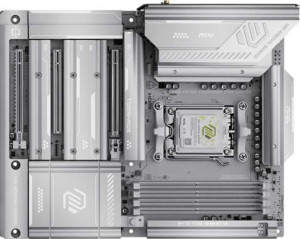
string(35) "MSI MAG X870E Tomahawk Max Wi-Fi PZ"
["name_url"]=>
string(35) "msi-mag-x870e-tomahawk-max-wi-fi-pz"
["uniqueDisplayName"]=>
string(35) "MSI MAG X870E Tomahawk Max Wi-Fi PZ"
["image"]=>
string(68) "/msi-mag-x870e-tomahawk-max-wi-fi-pz.front.variety.1760583496780.jpg"
["release_date"]=>
int(20251010)
["release_date_2"]=>
object(MongoDB\BSON\UTCDateTime)#43 (1) {
["milliseconds"]=>
string(13) "1760054400000"
}
["status"]=>
int(11)
["sku"]=>
array(1) {
[0]=>
int(834)
}
["id"]=>
int(1736)
["images"]=>
array(2) {
["main"]=>
string(13) "/458/1736.jpg"
["small"]=>
string(17) "/458/1736_300.jpg"
}
["manufacturer"]=>
string(3) "MSI"
["manufacturer_id"]=>
object(MongoDB\BSON\ObjectId)#44 (1) {
["oid"]=>
string(24) "693868251b5f3b80760d5f72"
}
["manufacturer_slug"]=>
string(3) "msi"
["slug"]=>
string(26) "msi-mag-x870e-tomahawk-max"
["specs"]=>
array(7) {
["General info"]=>
array(21) {
["_id"]=>
string(24) "693477646e6b8cde36023368"
["cpu_socket"]=>
array(6) {
["_id"]=>
string(24) "6934ba8fc451c776b606a2c2"
["label"]=>
string(10) "CPU socket"
["value"]=>
string(3) "AM5"
["unit"]=>
string(0) ""
["kind"]=>
string(6) "ranked"
["desc"]=>
string(27) "The CPU socket/s supported."
}
["compatible_chipsets"]=>
array(6) {
["_id"]=>
string(24) "6934babc013867ad680ec23f"
["label"]=>
string(7) "chipset"
["value"]=>
string(4) "X870"
["unit"]=>
string(0) ""
["kind"]=>
string(6) "ranked"
["desc"]=>
string(36) "The motherboard chipset/s supported."
}
["form_factor"]=>
array(6) {
["_id"]=>
string(24) "6934ba8fc451c776b606a263"
["label"]=>
string(11) "form factor"
["value"]=>
string(3) "ATX"
["unit"]=>
string(0) ""
["kind"]=>
string(6) "ranked"
["desc"]=>
string(35) "The form factor of the motherboard."
}
["release_date"]=>
array(6) {
["_id"]=>
string(24) "693477646e6b8cde3602336a"
["label"]=>
string(12) "release date"
["value"]=>
int(20251010)
["unit"]=>
string(0) ""
["kind"]=>
string(6) "number"
["desc"]=>
string(57) "The date the product first became available for purchase."
}
["wlan_toggle"]=>
array(6) {
["_id"]=>
string(24) "693477646e6b8cde3602338b"
["label"]=>
string(14) "supports Wi-Fi"
["value"]=>
bool(true)
["unit"]=>
string(0) ""
["kind"]=>
string(7) "boolean"
["desc"]=>
string(32) "The device can connect to Wi-Fi."
}
["wifi"]=>
array(6) {
["_id"]=>
string(24) "693477646e6b8cde3602338c"
["label"]=>
string(13) "Wi-Fi version"
["value"]=>
string(98) "Wi-Fi 4 (802.11n), Wi-Fi 5 (802.11ac), Wi-Fi 6 (802.11ax), Wi-Fi 6E (802.11ax), Wi-Fi 7 (802.11be)"
["unit"]=>
string(0) ""
["kind"]=>
string(6) "ranked"
["desc"]=>
string(43) "The Wi-Fi versions supported by the device."
}
["built_in_bluetooth"]=>
array(6) {
["_id"]=>
string(24) "6934ba8fc451c776b606a2a3"
["label"]=>
string(13) "Has Bluetooth"
["value"]=>
bool(true)
["unit"]=>
string(0) ""
["kind"]=>
string(7) "boolean"
["desc"]=>
string(145) "Bluetooth is a wireless technology that allows you to easily transfer data between different devices, such as smartphones, tablets and computers."
}
["bluetooth"]=>
array(6) {
["_id"]=>
string(24) "693477646e6b8cde3602338d"
["label"]=>
string(17) "Bluetooth version"
["value"]=>
float(5.4)
["unit"]=>
string(0) ""
["kind"]=>
string(6) "number"
["desc"]=>
string(217) "Bluetooth is a wireless technology standard that allows data transfers between devices placed in close proximity, using short-wavelength, ultra-high frequency radio waves. Newer versions provide faster data transfers."
}
["hdmi_version_r"]=>
array(6) {
["_id"]=>
string(24) "693477646e6b8cde36023389"
["label"]=>
string(12) "HDMI version"
["value"]=>
string(8) "HDMI 2.1"
["unit"]=>
string(0) ""
["kind"]=>
string(6) "ranked"
["desc"]=>
string(101) "Newer versions of HDMI support higher bandwidth, which allows for higher resolutions and frame rates."
}
["easy_overclock"]=>
array(6) {
["_id"]=>
string(24) "69353c9deadcbcc1fd06b9d5"
["label"]=>
string(17) "Easy to overclock"
["value"]=>
bool(true)
["unit"]=>
string(0) ""
["kind"]=>
string(7) "boolean"
["desc"]=>
string(214) "Overclocking your system is normally quite a complicated procedure, but some manufacturers provide a button or a program where one click will automatically overclock your computer, giving you increased performance."
}
["rgb_lighting"]=>
array(6) {
["_id"]=>
string(24) "6934ba8fc451c776b606a29c"
["label"]=>
string(16) "has RGB lighting"
["value"]=>
bool(true)
["unit"]=>
string(0) ""
["kind"]=>
string(7) "boolean"
["desc"]=>
string(122) "RGB lighting allows you to choose between millions of colors and customize the look of your PC components and peripherals."
}
["clear_cmos"]=>
array(6) {
["_id"]=>
string(24) "69353c9deadcbcc1fd06b9d6"
["label"]=>
string(18) "Easy to reset BIOS"
["value"]=>
bool(true)
["unit"]=>
string(0) ""
["kind"]=>
string(7) "boolean"
["desc"]=>
string(289) "The motherboard has a button or switch on the rear panel to clear the CMOS, which resets the BIOS to factory settings. This is useful if something goes wrong with the BIOS which stops your computer from booting, as you can reset the BIOS without opening the case to access the CMOS jumper."
}
["dual_bios"]=>
array(6) {
["_id"]=>
string(24) "69353c9deadcbcc1fd06b9d7"
["label"]=>
string(13) "Has dual BIOS"
["value"]=>
bool(false)
["unit"]=>
string(0) ""
["kind"]=>
string(7) "boolean"
["desc"]=>
string(181) "The motherboard supports dual BIOS. If you flash a new BIOS to your motherboard and something goes wrong, you can switch to the backup BIOS so that you can still boot your computer."
}
["bluetooth_aptx"]=>
array(6) {
["_id"]=>
string(24) "6934e489b4f997e7b10ba7b3"
["label"]=>
string(8) "has aptX"
["value"]=>
bool(false)
["unit"]=>
string(0) ""
["kind"]=>
string(7) "boolean"
["desc"]=>
string(151) "aptX is a codec used for transmitting audio wirelessly with Bluetooth. It is developed by Qualcomm, and supports 16-bit audio at a bit rate of 384kbps."
}
["cpu_sockets"]=>
array(6) {
["_id"]=>
string(24) "69353c9deadcbcc1fd06b9d8"
["label"]=>
string(11) "CPU sockets"
["value"]=>
int(1)
["unit"]=>
string(0) ""
["kind"]=>
string(6) "number"
["desc"]=>
string(82) "The motherboard has more CPU sockets. Multiple CPUs are typically used in servers."
}
["int_graphics"]=>
array(6) {
["_id"]=>
string(24) "6934ba8fc451c776b606a26b"
["label"]=>
string(23) "Has integrated graphics"
["value"]=>
bool(false)
["unit"]=>
string(0) ""
["kind"]=>
string(7) "boolean"
["desc"]=>
string(74) "With integrated graphics you don’t need to buy a separate graphics card."
}
["warranty_time"]=>
array(6) {
["_id"]=>
string(24) "693493df013867ad680ec103"
["label"]=>
string(15) "warranty period"
["value"]=>
string(7) "3 years"
["unit"]=>
string(6) " years"
["kind"]=>
string(6) "number"
["desc"]=>
string(145) "When covered under the manufacturer’s warranty it is possible to get a replacement in the case of a malfunction. Note: This may vary by region."
}
["height"]=>
array(6) {
["_id"]=>
string(24) "693477646e6b8cde3602336f"
["label"]=>
string(6) "height"
["value"]=>
string(8) "243.8 mm"
["unit"]=>
string(3) " mm"
["kind"]=>
string(6) "number"
["desc"]=>
string(60) "The height represents the vertical dimension of the product."
}
["width"]=>
array(6) {
["_id"]=>
string(24) "693477646e6b8cde36023370"
["label"]=>
string(5) "width"
["value"]=>
string(8) "304.8 mm"
["unit"]=>
string(3) " mm"
["kind"]=>
string(6) "number"
["desc"]=>
string(61) "The width represents the horizontal dimension of the product."
}
["integrated_cpu"]=>
array(6) {
["_id"]=>
string(24) "69353c9deadcbcc1fd06b9d9"
["label"]=>
string(18) "Has integrated CPU"
["value"]=>
bool(false)
["unit"]=>
string(0) ""
["kind"]=>
string(7) "boolean"
["desc"]=>
string(160) "The motherboard comes with a processor built in. They are normally not very powerful but are great if you are looking to make a PC with minimal cost and effort."
}
}
["Memory"]=>
array(8) {
["_id"]=>
string(24) "6934ba8fc451c776b606a29e"
["max_mem_size"]=>
array(6) {
["_id"]=>
string(24) "6934ba8fc451c776b606a2c0"
["label"]=>
string(21) "maximum memory amount"
["value"]=>
string(5) "256GB"
["unit"]=>
string(2) "GB"
["kind"]=>
string(6) "number"
["desc"]=>
string(45) "The maximum amount of memory (RAM) supported."
}
["ram_speed_mb_max"]=>
array(6) {
["_id"]=>
string(24) "69353c9deadcbcc1fd06b9da"
["label"]=>
string(15) "RAM speed (max)"
["value"]=>
string(8) "5600 MHz"
["unit"]=>
string(4) " MHz"
["kind"]=>
string(6) "number"
["desc"]=>
string(62) "The maximum speed of RAM that is supported by the motherboard."
}
["ram_speed_oc"]=>
array(6) {
["_id"]=>
string(24) "69353c9deadcbcc1fd06b9db"
["label"]=>
string(21) "overclocked RAM speed"
["value"]=>
string(8) "8400 MHz"
["unit"]=>
string(4) " MHz"
["kind"]=>
string(6) "number"
["desc"]=>
string(162) "The motherboard supports overclocking the RAM to a higher speed. By increasing the speed at which the memory runs, you can boost the performance of your computer."
}
["memory_slots"]=>
array(6) {
["_id"]=>
string(24) "6934ba8fc451c776b606a2a2"
["label"]=>
string(12) "memory slots"
["value"]=>
int(4)
["unit"]=>
string(0) ""
["kind"]=>
string(6) "number"
["desc"]=>
string(206) "More memory slots (also known as DIMM slots) allow you to add more RAM to your computer. It is also useful when upgrading, as you can add RAM to an empty slot instead of replacing an existing memory module."
}
["ddr_version"]=>
array(6) {
["_id"]=>
string(24) "6934ba8fc451c776b606a2a1"
["label"]=>
string(18) "DDR memory version"
["value"]=>
int(5)
["unit"]=>
string(0) ""
["kind"]=>
string(6) "number"
["desc"]=>
string(151) "DDR (Double Data Rate) memory is the most common type of RAM. Newer versions of DDR memory support higher maximum speeds and are more energy-efficient."
}
["mem_channels"]=>
array(6) {
["_id"]=>
string(24) "6934ba8fc451c776b606a2c6"
["label"]=>
string(15) "memory channels"
["value"]=>
int(2)
["unit"]=>
string(0) ""
["kind"]=>
string(6) "number"
["desc"]=>
string(89) "More memory channels increases the speed of data transfer between the memory and the CPU."
}
["mem_eec"]=>
array(6) {
["_id"]=>
string(24) "6934ba8fc451c776b606a2c5"
["label"]=>
string(19) "Supports ECC memory"
["value"]=>
bool(false)
["unit"]=>
string(0) ""
["kind"]=>
string(7) "boolean"
["desc"]=>
string(176) "Error-correcting code memory can detect and correct data corruption. It is used when is it essential to avoid corruption, such as scientific computing or when running a server."
}
}
["Ports"]=>
array(19) {
["_id"]=>
string(24) "69353c9deadcbcc1fd06b9dc"
["usb_3_2_gen2_a_ports"]=>
array(6) {
["_id"]=>
string(24) "6934ba8fc451c776b606a2a5"
["label"]=>
string(27) "USB 3.2 Gen 2 ports (USB-A)"
["value"]=>
int(2)
["unit"]=>
string(0) ""
["kind"]=>
string(6) "number"
["desc"]=>
string(129) "USB 3.2 Gen 2 supports speeds of up to 10Gbps. It was formerly known as USB 3.1 Gen 2. These ports use the older USB-A connector."
}
["usb_3_2_gen1_a_ports"]=>
array(6) {
["_id"]=>
string(24) "6934ba8fc451c776b606a2a6"
["label"]=>
string(27) "USB 3.2 Gen 1 ports (USB-A)"
["value"]=>
int(3)
["unit"]=>
string(0) ""
["kind"]=>
string(6) "number"
["desc"]=>
string(140) "USB 3.2 Gen 1 supports speeds of up to 5Gbps. It was formerly known as USB 3.1 Gen 1 and USB 3.0. These ports use the older USB-A connector."
}
["usb_3_2_gen2_c_ports"]=>
array(6) {
["_id"]=>
string(24) "6934ba8fc451c776b606a2a7"
["label"]=>
string(27) "USB 3.2 Gen 2 ports (USB-C)"
["value"]=>
int(1)
["unit"]=>
string(0) ""
["kind"]=>
string(6) "number"
["desc"]=>
string(123) "USB 3.2 Gen 2 supports speeds of up to 10Gbps. It was formerly known as USB 3.1 Gen 2. These ports use the USB-C connector."
}
["usb_3_2_gen1_c_ports"]=>
array(6) {
["_id"]=>
string(24) "6934ba8fc451c776b606a2ab"
["label"]=>
string(27) "USB 3.2 Gen 1 ports (USB-C)"
["value"]=>
int(0)
["unit"]=>
string(0) ""
["kind"]=>
string(6) "number"
["desc"]=>
string(134) "USB 3.2 Gen 1 supports speeds of up to 5Gbps. It was formerly known as USB 3.1 Gen 1 and USB 3.0. These ports use the USB-C connector."
}
["ports_usb2"]=>
array(6) {
["_id"]=>
string(24) "6934ba8fc451c776b606a2a4"
["label"]=>
string(13) "USB 2.0 ports"
["value"]=>
int(4)
["unit"]=>
string(0) ""
["kind"]=>
string(6) "number"
["desc"]=>
string(91) "More USB 2.0 ports allow you to connect more devices to your computer that support USB 2.0."
}
["usb_3_2_gen2x2_c_ports"]=>
array(6) {
["_id"]=>
string(24) "6934ba8fc451c776b606a2aa"
["label"]=>
string(21) "USB 3.2 Gen 2x2 ports"
["value"]=>
int(0)
["unit"]=>
string(0) ""
["kind"]=>
string(6) "number"
["desc"]=>
string(104) "USB 3.2 Gen 2x2 was introduced in 2019. It supports speeds of up to 20Gbps and uses the USB-C connector."
}
["usb_4_40_ports"]=>
array(6) {
["_id"]=>
string(24) "6934ba8fc451c776b606a2a8"
["label"]=>
string(18) "USB 4 40Gbps ports"
["value"]=>
int(2)
["unit"]=>
string(0) ""
["kind"]=>
string(6) "number"
["desc"]=>
string(177) "This version of USB 4 supports very high speeds of up to 40Gbps. Unlike USB 3.2, USB 4 can dynamically allocate bandwidth to video and data. These ports use the USB-C connector."
}
["usb_4_20_ports"]=>
array(6) {
["_id"]=>
string(24) "6934ba8fc451c776b606a2a9"
["label"]=>
string(18) "USB 4 20Gbps ports"
["value"]=>
int(0)
["unit"]=>
string(0) ""
["kind"]=>
string(6) "number"
["desc"]=>
string(167) "This version of USB 4 supports speeds of up to 20Gbps. Unlike USB 3.2, USB 4 can dynamically allocate bandwidth to video and data. These ports use the USB-C connector."
}
["thunderbolt4_ports"]=>
array(6) {
["_id"]=>
string(24) "6934ba8fc451c776b606a2ac"
["label"]=>
string(19) "Thunderbolt 4 ports"
["value"]=>
int(2)
["unit"]=>
string(0) ""
["kind"]=>
string(6) "number"
["desc"]=>
string(206) "The number of USB ports that are compatible with Thunderbolt 4. These ports support a total bandwidth of up to 40 Gbps. This guarantees that it can support two 4K (60 Hz) displays or one 8K (30 Hz) display."
}
["thunderbolt3_ports"]=>
array(6) {
["_id"]=>
string(24) "6934ba8fc451c776b606a2ad"
["label"]=>
string(19) "Thunderbolt 3 ports"
["value"]=>
int(0)
["unit"]=>
string(0) ""
["kind"]=>
string(6) "number"
["desc"]=>
string(204) "The number of USB ports that are compatible with Thunderbolt 3. These ports support speeds of up to 40Gbps, including a minimum of PCIe 16Gbps. This guarantees that it can support one external 4K display."
}
["hdmi"]=>
array(6) {
["_id"]=>
string(24) "6934babc013867ad680ec23e"
["label"]=>
string(18) "has an HDMI output"
["value"]=>
bool(true)
["unit"]=>
string(0) ""
["kind"]=>
string(7) "boolean"
["desc"]=>
string(148) "You can output high definition video and audio to a display. This could be through an HDMI port, Mini HDMI port, or a USB-C port that supports HDMI."
}
["displayport"]=>
array(6) {
["_id"]=>
string(24) "693477646e6b8cde36023382"
["label"]=>
string(19) "DisplayPort outputs"
["value"]=>
int(0)
["unit"]=>
string(0) ""
["kind"]=>
string(6) "number"
["desc"]=>
string(53) "Allows you to connect to a display using DisplayPort."
}
["rj45_ports"]=>
array(6) {
["_id"]=>
string(24) "6934ba8fc451c776b606a2ae"
["label"]=>
string(10) "RJ45 ports"
["value"]=>
int(1)
["unit"]=>
string(0) ""
["kind"]=>
string(6) "number"
["desc"]=>
string(245) "RJ-45 ports are used for LAN (Local Area Network) connections. With more ports you can achieve increased bandwidth across a LAN, or connect to multiple networks. It also has the added benefit of not losing connection to the network if one fails."
}
["usb_type_c"]=>
array(6) {
["_id"]=>
string(24) "693477646e6b8cde36023388"
["label"]=>
string(14) "Has USB Type-C"
["value"]=>
bool(true)
["unit"]=>
string(0) ""
["kind"]=>
string(7) "boolean"
["desc"]=>
string(72) "The USB Type-C features reversible plug orientation and cable direction."
}
["ports_esata"]=>
array(6) {
["_id"]=>
string(24) "69353c9deadcbcc1fd06b9dd"
["label"]=>
string(11) "eSATA ports"
["value"]=>
int(0)
["unit"]=>
string(0) ""
["kind"]=>
string(6) "number"
["desc"]=>
string(130) "eSATA is an external version of SATA, an interface designed for connecting a computer to mass storage devices such as hard drives."
}
["dvi"]=>
array(6) {
["_id"]=>
string(24) "6934ba8fc451c776b606a2b0"
["label"]=>
string(11) "DVI outputs"
["value"]=>
int(0)
["unit"]=>
string(0) ""
["kind"]=>
string(6) "number"
["desc"]=>
string(45) "Allows you to connect to a display using DVI."
}
["vga_connector"]=>
array(6) {
["_id"]=>
string(24) "693477646e6b8cde36023390"
["label"]=>
string(19) "has a VGA connector"
["value"]=>
bool(false)
["unit"]=>
string(0) ""
["kind"]=>
string(7) "boolean"
["desc"]=>
string(118) "VGA connector is a widespread connector and is found on many video cards, computer monitors, and some television sets."
}
["ports_ps2"]=>
array(6) {
["_id"]=>
string(24) "69353c9deadcbcc1fd06b9de"
["label"]=>
string(10) "PS/2 ports"
["value"]=>
int(0)
["unit"]=>
string(0) ""
["kind"]=>
string(6) "number"
["desc"]=>
string(190) "PS/2 ports are used to connect mice and keyboards. Although they have been replaced by USB, they are still useful in corporate environments where USB ports are disabled for security reasons."
}
}
["Connectors"]=>
array(14) {
["_id"]=>
string(24) "69353c9deadcbcc1fd06b9df"
["usb_3_2_gen1_connectors"]=>
array(6) {
["_id"]=>
string(24) "69353c9deadcbcc1fd06b9e0"
["label"]=>
string(39) "USB 3.2 Gen 1 ports (through expansion)"
["value"]=>
int(4)
["unit"]=>
string(0) ""
["kind"]=>
string(6) "number"
["desc"]=>
string(109) "The number of USB 3.2 Gen 1 ports that can be added by using the USB headers (connectors) on the motherboard."
}
["usb_3_2_gen2_connectors"]=>
array(6) {
["_id"]=>
string(24) "69353c9deadcbcc1fd06b9e1"
["label"]=>
string(39) "USB 3.2 Gen 2 ports (through expansion)"
["value"]=>
int(0)
["unit"]=>
string(0) ""
["kind"]=>
string(6) "number"
["desc"]=>
string(109) "The number of USB 3.2 Gen 2 ports that can be added by using the USB headers (connectors) on the motherboard."
}
["usb_3_2_gen2x2_connectors"]=>
array(6) {
["_id"]=>
string(24) "69353c9deadcbcc1fd06b9e2"
["label"]=>
string(41) "USB 3.2 Gen 2x2 ports (through expansion)"
["value"]=>
int(1)
["unit"]=>
string(0) ""
["kind"]=>
string(6) "number"
["desc"]=>
string(111) "The number of USB 3.2 Gen 2x2 ports that can be added by using the USB headers (connectors) on the motherboard."
}
["usb_3_2_gen2_c_connectors"]=>
array(6) {
["_id"]=>
string(24) "69353c9deadcbcc1fd06b9e3"
["label"]=>
string(41) "USB-C 3.2 Gen 2 ports (through expansion)"
["value"]=>
int(0)
["unit"]=>
string(0) ""
["kind"]=>
string(6) "number"
["desc"]=>
string(111) "The number of USB-C 3.2 Gen 2 ports that can be added by using the USB headers (connectors) on the motherboard."
}
["additional_usb2"]=>
array(6) {
["_id"]=>
string(24) "69353c9deadcbcc1fd06b9e4"
["label"]=>
string(33) "USB 2.0 ports (through expansion)"
["value"]=>
int(4)
["unit"]=>
string(0) ""
["kind"]=>
string(6) "number"
["desc"]=>
string(103) "The number of USB 2.0 ports that can be added by using the USB headers (connectors) on the motherboard."
}
["sata3_connectors"]=>
array(6) {
["_id"]=>
string(24) "69353c9deadcbcc1fd06b9e5"
["label"]=>
string(17) "SATA 3 connectors"
["value"]=>
int(4)
["unit"]=>
string(0) ""
["kind"]=>
string(6) "number"
["desc"]=>
string(283) "SATA is an interface used to connect mass storage devices such as hard drives and Blu-ray drives. SATA 3 has a native transfer rate of 6 Gbit/s, which is twice as fast as SATA 2, the previous revision. This is particularly useful if you use an SSD as it can perform at higher speeds."
}
["fan_headers"]=>
array(6) {
["_id"]=>
string(24) "69353c9deadcbcc1fd06b9e6"
["label"]=>
string(11) "fan headers"
["value"]=>
int(8)
["unit"]=>
string(0) ""
["kind"]=>
string(6) "number"
["desc"]=>
string(242) "Fan headers are connection points on the motherboard that cooling fans can be connected to. Fans can also be connected straight to the power supply, but when connected to the motherboard you gain much finer control over them through software."
}
["additional_usb3"]=>
array(6) {
["_id"]=>
string(24) "69353c9deadcbcc1fd06b9e7"
["label"]=>
string(33) "USB 3.0 ports (through expansion)"
["value"]=>
int(4)
["unit"]=>
string(0) ""
["kind"]=>
string(6) "number"
["desc"]=>
string(108) "The motherboard has USB 3.0 headers, which are pin connections that you can connect additional USB ports to."
}
["m2_sockets"]=>
array(6) {
["_id"]=>
string(24) "69353c9deadcbcc1fd06b9e8"
["label"]=>
string(11) "M.2 sockets"
["value"]=>
int(4)
["unit"]=>
string(0) ""
["kind"]=>
string(6) "number"
["desc"]=>
string(181) "M.2 is an interface used to connect different types of devices, mainly mass storage devices like M.2 SSDs. It is a revision of mSATA and can support much higher data transfer rates."
}
["tp_module"]=>
array(6) {
["_id"]=>
string(24) "69353c9deadcbcc1fd06b9e9"
["label"]=>
string(17) "Has TPM connector"
["value"]=>
bool(true)
["unit"]=>
string(0) ""
["kind"]=>
string(7) "boolean"
["desc"]=>
string(216) "Trusted Platform Module (TPM) is a component that significantly increases security. One example is that it allows encryption keys to be created in a secure environment, minimizing the risk of a hacker gaining access."
}
["u2_sockets"]=>
array(6) {
["_id"]=>
string(24) "69353c9deadcbcc1fd06b9ea"
["label"]=>
string(11) "U.2 sockets"
["value"]=>
int(0)
["unit"]=>
string(0) ""
["kind"]=>
string(6) "number"
["desc"]=>
string(256) "U.2 is an interface used to connect different types of devices, mainly mass storage devices. It has the same performance as M.2, but U.2 SSDs come in the form of regular 2.5" SATA drives and could therefore support much higher capacities than mSATA drives."
}
["msata"]=>
array(6) {
["_id"]=>
string(24) "69353c9deadcbcc1fd06b9eb"
["label"]=>
string(19) "Has mSATA connector"
["value"]=>
bool(false)
["unit"]=>
string(0) ""
["kind"]=>
string(7) "boolean"
["desc"]=>
string(285) "If a motherboard has an mSATA connector, you can connect an mSATA SSD drive to it that acts as a cache between the motherboard and your primary hard drive. This gives increased performance when using a traditional hard disk drive (HDD) instead of an SSD as your primary storage device."
}
["sata2_connectors"]=>
array(6) {
["_id"]=>
string(24) "69353c9deadcbcc1fd06b9ec"
["label"]=>
string(17) "SATA 2 connectors"
["value"]=>
int(0)
["unit"]=>
string(0) ""
["kind"]=>
string(6) "number"
["desc"]=>
string(144) "SATA is an interface used to connect mass storage devices such as hard drives and Blu-ray drives. SATA 2 has a native transfer rate of 3 Gbit/s."
}
}
["Expansion slots"]=>
array(9) {
["_id"]=>
string(24) "69353c9deadcbcc1fd06b9ed"
["pcie4_x16_slots"]=>
array(6) {
["_id"]=>
string(24) "69353c9deadcbcc1fd06b9ee"
["label"]=>
string(18) "PCIe 4.0 x16 slots"
["value"]=>
int(0)
["unit"]=>
string(0) ""
["kind"]=>
string(6) "number"
["desc"]=>
string(302) "PCIe slots allow you to connect various components to the motherboard, such as graphics cards and SSDs. The number of data-transmission lanes (specified by the number after the 'x') determines the data transfer rate. PCIe 4.0 provides a 16 GT/s bit rate that doubles the bandwidth provided by PCIe 3.0."
}
["pcie5_x16_slots"]=>
array(6) {
["_id"]=>
string(24) "69353c9deadcbcc1fd06b9ef"
["label"]=>
string(18) "PCIe 5.0 x16 slots"
["value"]=>
int(1)
["unit"]=>
string(0) ""
["kind"]=>
string(6) "number"
["desc"]=>
string(216) "PCIe slots allow you to connect various components to the motherboard, such as graphics cards and SSDs. The number of data-transmission lanes (specified by the number after the 'x') determines the data transfer rate."
}
["pcie3_x16_slots"]=>
array(6) {
["_id"]=>
string(24) "69353c9deadcbcc1fd06b9f0"
["label"]=>
string(18) "PCIe 3.0 x16 slots"
["value"]=>
int(0)
["unit"]=>
string(0) ""
["kind"]=>
string(6) "number"
["desc"]=>
string(294) "PCIe slots allow you to connect various components to the motherboard, such as graphics cards and sound cards. The number after the 'x' represents the number of lanes, with more lanes supporting higher data transfer rates. PCI Express 3.0 has a bit rate of 8 GT/s, delivering 985 MB/s per lane."
}
["pcie_x1_slots"]=>
array(6) {
["_id"]=>
string(24) "69353c9deadcbcc1fd06b9f1"
["label"]=>
string(13) "PCIe x1 slots"
["value"]=>
int(1)
["unit"]=>
string(0) ""
["kind"]=>
string(6) "number"
["desc"]=>
string(306) "Using PCIe slots, you can connect different components to your motherboard, such as graphics cards and RAID cards. The number after the 'x' represents the number of data-transmission lanes. More lanes result in faster data transfer rates. A PCIe x1 slot has one lane and can move data at one bit per cycle."
}
["pci_l_slots"]=>
array(6) {
["_id"]=>
string(24) "69353c9deadcbcc1fd06b9f2"
["label"]=>
string(9) "PCI slots"
["value"]=>
int(0)
["unit"]=>
string(0) ""
["kind"]=>
string(6) "number"
["desc"]=>
string(262) "PCI slots allow you to connect peripherals to the motherboard, most commonly graphics cards but also others such as sound cards and network cards. PCI has been superseded by PCI Express which offers faster data transfer rates, but many cards today still use PCI."
}
["pcie2_slots"]=>
array(6) {
["_id"]=>
string(24) "69353c9deadcbcc1fd06b9f3"
["label"]=>
string(18) "PCIe 2.0 x16 slots"
["value"]=>
int(0)
["unit"]=>
string(0) ""
["kind"]=>
string(6) "number"
["desc"]=>
string(282) "PCIe slots allow you to connect graphics cards, SSDs, and other components to the motherboard. The number after the 'x' represents the number of lanes, with more lanes supporting higher data transfer rates. PCI Express 2.0 has a transfer rate of 5 GT/s, providing 500 MB/s per lane."
}
["pcie_x4_slots"]=>
array(6) {
["_id"]=>
string(24) "69353c9deadcbcc1fd06b9f4"
["label"]=>
string(13) "PCIe x4 slots"
["value"]=>
int(1)
["unit"]=>
string(0) ""
["kind"]=>
string(6) "number"
["desc"]=>
string(294) "PCIe slots enable you to connect various components to your motherboard, for example, graphics cards, RAID cards, SSDs. The number of data-transmission lanes (specified by the number following 'x') determines the data transfer rate. A PCIe x4 slot has 4 lanes, with a speed of 4 bits per cycle."
}
["pcie_x8_slots"]=>
array(6) {
["_id"]=>
string(24) "69353c9deadcbcc1fd06b9f5"
["label"]=>
string(13) "PCIe x8 slots"
["value"]=>
int(0)
["unit"]=>
string(0) ""
["kind"]=>
string(6) "number"
["desc"]=>
string(290) "PCIe slots allow you to connect components such as graphics cards and sound cards to the motherboard. The number after the 'x' represents the number of data-transmission lanes. More lanes result in faster data transfer rates. A PCIe x8 slot has 8 lanes and can move data at 8 bit per cycle."
}
}
["Audio"]=>
array(5) {
["_id"]=>
string(24) "6934e489b4f997e7b10ba7b2"
["signal_to_noise"]=>
array(6) {
["_id"]=>
string(24) "69353c9deadcbcc1fd06b9f6"
["label"]=>
string(27) "Signal-to-Noise ratio (DAC)"
["value"]=>
string(6) "120 dB"
["unit"]=>
string(3) " dB"
["kind"]=>
string(6) "number"
["desc"]=>
string(245) "When a digital signal is converted to an analog one (for example when playing audio through speakers or headphones), a certain amount of noise is carried in the signal. A higher SNR means that there is less noise and the audio quality is better."
}
["audio_channels"]=>
array(6) {
["_id"]=>
string(24) "69353c9deadcbcc1fd06b9f7"
["label"]=>
string(14) "audio channels"
["value"]=>
float(7.1)
["unit"]=>
string(0) ""
["kind"]=>
string(6) "number"
["desc"]=>
string(144) "Each channel is a separate stream of audio information. More channels can provide a more realistic experience, such as providing surround sound."
}
["spdif"]=>
array(6) {
["_id"]=>
string(24) "6934ba8fc451c776b606a2b1"
["label"]=>
string(19) "Has S/PDIF Out port"
["value"]=>
bool(true)
["unit"]=>
string(0) ""
["kind"]=>
string(7) "boolean"
["desc"]=>
string(73) "S/PDIF is an interface used to transmit digital audio with high fidelity."
}
["audio_connectors"]=>
array(6) {
["_id"]=>
string(24) "69353c9deadcbcc1fd06b9f8"
["label"]=>
string(16) "audio connectors"
["value"]=>
int(2)
["unit"]=>
string(0) ""
["kind"]=>
string(6) "number"
["desc"]=>
string(95) "More connectors means that more audio devices such as speakers or microphones can be connected."
}
}
["Storage"]=>
array(6) {
["_id"]=>
string(24) "69353c9deadcbcc1fd06b9f9"
["raid_1"]=>
array(6) {
["_id"]=>
string(24) "69353c9deadcbcc1fd06b9fa"
["label"]=>
string(15) "Supports RAID 1"
["value"]=>
bool(true)
["unit"]=>
string(0) ""
["kind"]=>
string(7) "boolean"
["desc"]=>
string(223) "RAID is a storage technology that combines multiple disks into one unit. RAID 1 mirrors the data across the drives. This gives you greater data security as if one drive fails, the data will still be accessible from another."
}
["raid_10"]=>
array(6) {
["_id"]=>
string(24) "69353c9deadcbcc1fd06b9fb"
["label"]=>
string(22) "Supports RAID 10 (1+0)"
["value"]=>
bool(true)
["unit"]=>
string(0) ""
["kind"]=>
string(7) "boolean"
["desc"]=>
string(315) "RAID is a storage technology that combines multiple disks into one unit. RAID 10 (1+0) stripes and mirrors the data across the drives. It gives increased capacity and performance compared to a single disk. It also provides greater data security as if one drive fails, the data will still be accessible from another."
}
["raid_5"]=>
array(6) {
["_id"]=>
string(24) "69353c9deadcbcc1fd06b9fc"
["label"]=>
string(15) "Supports RAID 5"
["value"]=>
bool(true)
["unit"]=>
string(0) ""
["kind"]=>
string(7) "boolean"
["desc"]=>
string(306) "RAID is a storage technology that combines multiple disks into one unit. RAID 5 stripes the data across the drives, giving increased performance compared to a single disk. It also provides greater data security as if one drive fails, the data will still be accessible from another due to the use of parity."
}
["raid_0"]=>
array(6) {
["_id"]=>
string(24) "69353c9deadcbcc1fd06b9fd"
["label"]=>
string(15) "Supports RAID 0"
["value"]=>
bool(true)
["unit"]=>
string(0) ""
["kind"]=>
string(7) "boolean"
["desc"]=>
string(259) "RAID is a storage technology that combines multiple disks into one unit. RAID 0 stripes the data across the drives, giving increased performance and capacity compared to a single drive. The drawback is that if one drive fails, you lose the data on all drives."
}
["raid_0plus1"]=>
array(6) {
["_id"]=>
string(24) "69353c9deadcbcc1fd06b9fe"
["label"]=>
string(17) "Supports RAID 0+1"
["value"]=>
bool(false)
["unit"]=>
string(0) ""
["kind"]=>
string(7) "boolean"
["desc"]=>
string(317) "RAID is a storage technology that combines multiple disks into one unit. RAID 0+1 stripes and mirrors the data across the drives. This gives increased capacity and performance compared to a single disk. It also provides greater data security in case one drive fails, as the data will still be accessible from another."
}
}
}
["specs_clean"]=>
array(7) {
["General info"]=>
array(21) {
["cpu_socket"]=>
array(2) {
["label"]=>
string(10) "CPU socket"
["value"]=>
string(3) "AM5"
}
["compatible_chipsets"]=>
array(2) {
["label"]=>
string(7) "chipset"
["value"]=>
string(4) "X870"
}
["form_factor"]=>
array(2) {
["label"]=>
string(11) "form factor"
["value"]=>
string(3) "ATX"
}
["release_date"]=>
array(2) {
["label"]=>
string(12) "release date"
["value"]=>
int(20251010)
}
["wlan_toggle"]=>
array(2) {
["label"]=>
string(14) "supports Wi-Fi"
["value"]=>
bool(true)
}
["wifi"]=>
array(2) {
["label"]=>
string(13) "Wi-Fi version"
["value"]=>
string(98) "Wi-Fi 4 (802.11n), Wi-Fi 5 (802.11ac), Wi-Fi 6 (802.11ax), Wi-Fi 6E (802.11ax), Wi-Fi 7 (802.11be)"
}
["built_in_bluetooth"]=>
array(2) {
["label"]=>
string(13) "Has Bluetooth"
["value"]=>
bool(true)
}
["bluetooth"]=>
array(2) {
["label"]=>
string(17) "Bluetooth version"
["value"]=>
float(5.4)
}
["hdmi_version_r"]=>
array(2) {
["label"]=>
string(12) "HDMI version"
["value"]=>
string(8) "HDMI 2.1"
}
["easy_overclock"]=>
array(2) {
["label"]=>
string(17) "Easy to overclock"
["value"]=>
bool(true)
}
["rgb_lighting"]=>
array(2) {
["label"]=>
string(16) "has RGB lighting"
["value"]=>
bool(true)
}
["clear_cmos"]=>
array(2) {
["label"]=>
string(18) "Easy to reset BIOS"
["value"]=>
bool(true)
}
["dual_bios"]=>
array(2) {
["label"]=>
string(13) "Has dual BIOS"
["value"]=>
bool(false)
}
["bluetooth_aptx"]=>
array(2) {
["label"]=>
string(8) "has aptX"
["value"]=>
bool(false)
}
["cpu_sockets"]=>
array(2) {
["label"]=>
string(11) "CPU sockets"
["value"]=>
int(1)
}
["int_graphics"]=>
array(2) {
["label"]=>
string(23) "Has integrated graphics"
["value"]=>
bool(false)
}
["warranty_time"]=>
array(2) {
["label"]=>
string(15) "warranty period"
["value"]=>
string(7) "3 years"
}
["height"]=>
array(2) {
["label"]=>
string(6) "height"
["value"]=>
string(8) "243.8 mm"
}
["width"]=>
array(2) {
["label"]=>
string(5) "width"
["value"]=>
string(8) "304.8 mm"
}
["integrated_cpu"]=>
array(2) {
["label"]=>
string(18) "Has integrated CPU"
["value"]=>
bool(false)
}
["section_description"]=>
string(701) "
The MSI MAG X870E Tomahawk Max Wi-Fi PZ is an ATX motherboard that features an AM5 CPU socket and supports the X870 chipset. It offers a wide range of wireless capabilities with support for Wi-Fi 4, Wi-Fi 5, Wi-Fi 6, Wi-Fi 6E, and Wi-Fi 7, ensuring excellent connectivity. The motherboard includes Bluetooth 5.4, but does not support aptX. For visuals, it comes with RGB lighting and has an HDMI 2.1 output. With a height of 243.8 mm and width of 304.8 mm, it fits standard ATX cases. Additionally, it supports easy overclocking and features a clear CMOS button for quick BIOS resets. The product is covered by a 3-year warranty and does not have dual BIOS or integrated graphics.
The MSI MAG X870E Tomahawk Max Wi-Fi PZ motherboard supports a maximum memory size of 256GB with DDR5 RAM and a dual-channel configuration. It can handle RAM speeds up to 5600 MHz, and with overclocking, speeds can reach up to 8400 MHz. The motherboard includes four memory slots, providing flexibility for memory expansion, but it does not support ECC memory.
The MSI MAG X870E Tomahawk Max Wi-Fi PZ offers a variety of connectivity options with multiple USB ports, including USB 3.2 Gen 2 ports (USB-A), USB 3.2 Gen 1 ports, and a USB 3.2 Gen 2 port (USB-C). It also supports Thunderbolt 4 ports for high-speed data transfer, as well as USB 4 40Gbps ports. The motherboard includes an HDMI output for video connections and features a single RJ45 Ethernet port for networking. Notably, it does not include VGA, DVI, or PS/2 ports.
The MSI MAG X870E Tomahawk Max Wi-Fi PZ offers a comprehensive range of connectors for expansion and customization. It features four USB 3.2 Gen 1 ports and one USB 3.2 Gen 2x2 connector for high-speed data transfer, as well as four additional USB 2.0 ports. For storage, it includes four SATA 3 connectors and four M.2 sockets. The motherboard is equipped with eight fan headers for efficient cooling, and it also supports a TPM connector. It does not include mSATA or U.2 sockets.
The MSI MAG X870E Tomahawk Max Wi-Fi PZ provides a solid set of expansion slots for various components. It features one PCIe 5.0 x16 slot, allowing for the latest GPU and expansion cards, as well as one PCIe x4 slot for additional devices. The motherboard also includes one PCIe x1 slot for smaller add-ons, but does not support PCIe 2.0 x16, PCIe 3.0 x16, or PCI slots.
The MSI MAG X870E Tomahawk Max Wi-Fi PZ offers high-quality audio features with a 120 dB signal-to-noise ratio for clear and detailed sound output. It supports 7.1 audio channels, providing immersive surround sound. The motherboard also includes an S/PDIF Out port for digital audio connections and two audio connectors for additional setup options.
The MSI MAG X870E Tomahawk Max Wi-Fi PZ supports multiple RAID configurations, offering flexibility for users looking to optimize storage performance or redundancy. It includes support for RAID 1, RAID 10 (1+0), RAID 5, and RAID 0, providing a range of options for data protection and speed. However, it does not support RAID 0+1.
"
}
}
["description"]=>
string(522) "
The MSI MAG X870E Tomahawk Max Wi-Fi PZ is a feature-rich ATX motherboard designed for modern builds. It offers Wi-Fi 7 support, ensuring a fast and stable wireless connection for various computing needs.
Technical specifications include up to 256GB of DDR5 memory with speeds up to 5600 MHz, with overclocking potential to 8400 MHz. It features a PCIe 5.0 x16 slot, multiple USB 3.2 ports, and seven audio channels with a 120 dB signal-to-noise ratio, delivering high-quality sound for immersive experiences.
"
["meta_description"]=>
string(162) "The MSI MAG X870E Tomahawk Max Wi-Fi PZ is an ATX motherboard with support for Wi-Fi 7, Bluetooth 5.4, and up to 256GB of DDR5 memory in the motherboard category."
["cons"]=>
array(3) {
[0]=>
string(80) "Does not support integrated graphics, requiring a discrete GPU for video output."
[1]=>
string(98) "Lacks support for RAID 0+1, limiting some RAID configuration options for users seeking that setup."
[2]=>
string(73) "No DisplayPort outputs, limiting display connection options to HDMI only."
}
["pros"]=>
array(5) {
[0]=>
string(121) "Supports multiple Wi-Fi standards, including Wi-Fi 4, 5, 6, 6E, and 7, providing versatile wireless connectivity options."
[1]=>
string(151) "Equipped with a variety of USB ports, including USB 3.2 Gen 2, USB 4, and Thunderbolt 4 for high-speed data transfer and external device compatibility."
[2]=>
string(122) "Offers flexible storage options with support for RAID 1, RAID 10 (1+0), RAID 5, and RAID 0 for performance and redundancy."
[3]=>
string(112) "Includes 7.1 audio channels and a high 120 dB signal-to-noise ratio, delivering detailed and high-quality sound."
[4]=>
string(106) "Has easy overclocking capabilities and built-in RGB lighting for customizability and enhanced performance."
}
["not_suitable_for"]=>
string(415) "
This motherboard may not be the best choice for users who need integrated graphics, as it does not support integrated GPU, necessitating a discrete graphics card. Additionally, those looking for a wider range of display options may find the lack of DisplayPort outputs limiting. Users who require RAID 0+1 support will also be disappointed, as this configuration is not available on this board.
"
["suitable_for"]=>
string(536) "
This motherboard is ideal for users who need advanced connectivity and performance, such as gaming enthusiasts or content creators. With support for multiple Wi-Fi standards including Wi-Fi 7, it ensures high-speed wireless connectivity, while the inclusion of RAID configurations like RAID 0, 1, 5, and 10 makes it suitable for users who require reliable storage management. Its overclocking capabilities and RGB lighting also cater to users seeking customizability and enhanced performance in their builds.
"
["final_verdict"]=>
string(766) "
The motherboard offers robust performance and flexibility, making it an excellent choice for gamers and power users looking to build a high-performance system. With advanced connectivity options like Wi-Fi 7 and a wide range of RAID configurations, it caters to users who demand both speed and reliability. Additionally, its overclocking support and customizable RGB lighting enhance its appeal for those seeking performance tuning and aesthetic personalization. However, it may not be the best option for those who need integrated graphics or specific display ports. Overall, this board is well-suited for high-performance builds, though it may not meet all requirements for users seeking more basic functionality or additional display options.
"
["last_views_at"]=>
object(MongoDB\BSON\UTCDateTime)#45 (1) {
["milliseconds"]=>
string(13) "1766752617350"
}
["views"]=>
array(2) {
["total"]=>
int(3)
["users"]=>
int(3)
}
["specs_count"]=>
int(75)
["specs_group_count"]=>
int(7)
}
string(35) "gigabyte-x870e-aorus-master-x3d-ice"
string(35) "msi-mag-x870e-tomahawk-max-wi-fi-pz"
string(35) "gigabyte-x870e-aorus-master-x3d-ice"
string(35) "msi-mag-x870e-tomahawk-max-wi-fi-pz"
Warning: http_response_code(): Cannot set response code - headers already sent (output started at /home/main/domains/turbovs.com/public_html/app/Controllers/VsController.php:24) in /home/main/domains/turbovs.com/public_html/app/Controllers/BaseController.php on line 19 Gigabyte X870E Aorus Master X3D Ice vs MSI MAG X870E Tomahawk Max Wi-Fi PZ | TurboVS
✓Both products support Wi-Fi with multiple versions including Wi-Fi 6E and Wi-Fi 7.
✓Both products have Bluetooth version 5.4.
✓Both products support HDMI 2.1.
✓Both products support a maximum of 256GB of memory.
✓Both products have 4 memory slots.
✓Both products support DDR5 memory.
✓Both products support two memory channels.
✓Neither product supports ECC memory.
✓Both products feature USB 3.2 Gen 2 ports (USB-C).
✓Both products have an HDMI output.
✓Both products have fan headers.
✓Both products have a TPM connector.
✓Both products support RAID 1, RAID 5, and RAID 10.
✓Both products support USB 3.2 Gen 1 ports through expansion.
✓Both products have 120 dB signal-to-noise ratio DAC.
✓Both products feature S/PDIF Out port.
✓Both products have two audio connectors.
Main Differences
•The height of Gigabyte X870E Aorus Master X3D Ice is 244 mm, while the height of MSI MAG X870E Tomahawk Max Wi-Fi PZ is 243.8 mm.
•The width of Gigabyte X870E Aorus Master X3D Ice is 305 mm, while the width of MSI MAG X870E Tomahawk Max Wi-Fi PZ is 304.8 mm.
•The maximum RAM speed of Gigabyte X870E Aorus Master X3D Ice is 5200 MHz, while the maximum RAM speed of MSI MAG X870E Tomahawk Max Wi-Fi PZ is 5600 MHz.
•The overclocked RAM speed of Gigabyte X870E Aorus Master X3D Ice is 9000 MHz, while the overclocked RAM speed of MSI MAG X870E Tomahawk Max Wi-Fi PZ is 8400 MHz.
•Gigabyte X870E Aorus Master X3D Ice has 7 USB 3.2 Gen 2 (USB-A) ports, while MSI MAG X870E Tomahawk Max Wi-Fi PZ has 2.
•Gigabyte X870E Aorus Master X3D Ice has 0 USB 3.2 Gen 1 (USB-A) ports, while MSI MAG X870E Tomahawk Max Wi-Fi PZ has 3.
•Gigabyte X870E Aorus Master X3D Ice has 0 USB 2.0 ports, while MSI MAG X870E Tomahawk Max Wi-Fi PZ has 4.
•Gigabyte X870E Aorus Master X3D Ice has 1 USB 3.2 Gen 2x2 port, while MSI MAG X870E Tomahawk Max Wi-Fi PZ has 0.
•Gigabyte X870E Aorus Master X3D Ice has 2 RJ45 ports, while MSI MAG X870E Tomahawk Max Wi-Fi PZ has 1.
•Gigabyte X870E Aorus Master X3D Ice has 2 SATA 3 connectors, while MSI MAG X870E Tomahawk Max Wi-Fi PZ has 4.
•Gigabyte X870E Aorus Master X3D Ice has 5 M.2 sockets, while MSI MAG X870E Tomahawk Max Wi-Fi PZ has 4.
•Gigabyte X870E Aorus Master X3D Ice has 2 PCIe 5.0 x16 slots, while MSI MAG X870E Tomahawk Max Wi-Fi PZ has 1.
•Gigabyte X870E Aorus Master X3D Ice has 0 PCIe x1 slots, while MSI MAG X870E Tomahawk Max Wi-Fi PZ has 1.
Both the Gigabyte X870E Aorus Master X3D Ice and the MSI MAG X870E Tomahawk Max Wi-Fi PZ share many similarities in their general specifications. Both motherboards feature an AM5 CPU socket, the X870 chipset, and an ATX form factor. They also offer Wi-Fi support with the same range of versions, including Wi-Fi 4 (802.11n), Wi-Fi 5 (802.11ac), Wi-Fi 6 (802.11ax), Wi-Fi 6E (802.11ax), and Wi-Fi 7 (802.11be), along with Bluetooth 5.4 connectivity. Furthermore, both support HDMI 2.1, are easy to overclock, and include RGB lighting. They also have an easy BIOS reset function and lack dual BIOS functionality. Additionally, neither product has aptX support, and both are designed without integrated graphics.
The two products are identical in terms of CPU sockets (1), chipset (X870), Wi-Fi versions, Bluetooth version, HDMI version, and key features such as overclocking ease, RGB lighting, and BIOS reset. They both come with a 3-year warranty period, which matches across the two boards. However, the physical dimensions differ slightly: the Gigabyte X870E Aorus Master X3D Ice has a height of 244 mm and width of 305 mm, while the MSI MAG X870E Tomahawk Max Wi-Fi PZ measures 243.8 mm in height and 304.8 mm in width, with only minor differences between the two.
In terms of integrated components, neither motherboard includes integrated graphics or an integrated CPU. Both products are highly similar overall, with no significant variances outside the minor differences in their dimensions.
Memory:
maximum memory amount
256GB
256GB
RAM speed (max)
5200 MHz
5600 MHz
overclocked RAM speed
9000 MHz
8400 MHz
memory slots
4
4
DDR memory version
5
5
memory channels
2
2
Supports ECC memory
✕
✕
When comparing memory specifications, the Gigabyte X870E Aorus Master X3D Ice and MSI MAG X870E Tomahawk Max Wi-Fi PZ are quite similar, with a few key differences. Both motherboards support a maximum memory amount of 256GB and feature four memory slots. They also both support DDR5 memory and have dual memory channels, which is typical for modern high-performance boards.
The main difference between the two products lies in their RAM speed capabilities. The Gigabyte X870E Aorus Master X3D Ice supports a maximum RAM speed of 5200 MHz, while the MSI MAG X870E Tomahawk Max Wi-Fi PZ can handle slightly faster RAM at 5600 MHz. The overclocked RAM speed also differs: the Gigabyte model supports up to 9000 MHz, while the MSI model can overclock to 8400 MHz. While both boards support high-performance overclocking, the Gigabyte motherboard offers a higher overclocked speed.
Neither motherboard supports ECC (Error-Correcting Code) memory, so both are aimed at consumer-grade builds rather than workstations that require ECC support.
Ports:
USB 3.2 Gen 2 ports (USB-A)
7
2
USB 3.2 Gen 1 ports (USB-A)
0
3
USB 3.2 Gen 2 ports (USB-C)
1
1
USB 3.2 Gen 1 ports (USB-C)
0
0
USB 2.0 ports
0
4
USB 3.2 Gen 2x2 ports
1
0
USB 4 40Gbps ports
2
2
USB 4 20Gbps ports
0
0
Thunderbolt 4 ports
2
2
Thunderbolt 3 ports
0
0
has an HDMI output
✓
✓
DisplayPort outputs
0
0
RJ45 ports
2
1
Has USB Type-C
✓
✓
eSATA ports
0
0
DVI outputs
0
0
has a VGA connector
✕
✕
PS/2 ports
0
0
The Gigabyte X870E Aorus Master X3D Ice and MSI MAG X870E Tomahawk Max Wi-Fi PZ offer a range of port options, but with some notable differences. Both motherboards feature a mix of USB 3.2 Gen 2 and USB 3.2 Gen 1 ports, with the Gigabyte model having 7 USB 3.2 Gen 2 ports (USB-A) and the MSI model offering just 2. However, the MSI board has 3 USB 3.2 Gen 1 (USB-A) ports, whereas the Gigabyte board has none. Both boards include 1 USB 3.2 Gen 2 (USB-C) port.
In terms of USB 3.2 Gen 2x2 ports, the Gigabyte board has 1, while the MSI board does not include any. Both products have 2 USB 4 40Gbps ports and 2 Thunderbolt 4 ports, matching each other in these high-speed data transfer options. As for traditional display outputs, both motherboards have an HDMI output but lack DisplayPort outputs, DVI outputs, or VGA connectors.
When it comes to network connections, the Gigabyte X870E Aorus Master X3D Ice has 2 RJ45 ports, while the MSI MAG X870E Tomahawk Max Wi-Fi PZ only has 1. Both boards include USB Type-C ports and do not feature eSATA ports, PS/2 ports, or VGA connectors.
Connectors:
USB 3.2 Gen 1 ports (through expansion)
4
4
USB 3.2 Gen 2x2 ports (through expansion)
1
1
USB 2.0 ports (through expansion)
4
4
SATA 3 connectors
2
4
fan headers
8
8
USB 3.0 ports (through expansion)
4
4
M.2 sockets
5
4
Has TPM connector
✓
✓
U.2 sockets
0
0
Has mSATA connector
✕
✕
SATA 2 connectors
0
0
The Gigabyte X870E Aorus Master X3D Ice and MSI MAG X870E Tomahawk Max Wi-Fi PZ are quite similar in terms of connectors, with only a few differences. Both motherboards offer 4 USB 3.2 Gen 1 ports, 4 USB 3.0 ports (through expansion), and 4 USB 2.0 ports (through expansion). They also each provide 1 USB 3.2 Gen 2x2 port (through expansion) and 8 fan headers, offering plenty of connectivity and cooling options for high-performance builds.
Where the two boards differ slightly is in the number of SATA 3 connectors. The Gigabyte board includes 2 SATA 3 connectors, while the MSI board has 4. Additionally, the Gigabyte board features 5 M.2 sockets, compared to 4 on the MSI model. Both products support a TPM connector and do not include any mSATA connectors. Neither product has any U.2 sockets or SATA 2 connectors.
Overall, both motherboards offer robust connector options, with the Gigabyte X870E Aorus Master X3D Ice providing a slight edge in terms of M.2 sockets, while the MSI MAG X870E Tomahawk Max Wi-Fi PZ offers more SATA 3 connectors.
Expansion slots:
PCIe 4.0 x16 slots
0
0
PCIe 5.0 x16 slots
2
1
PCIe 3.0 x16 slots
0
0
PCIe x1 slots
0
1
PCI slots
0
0
PCIe 2.0 x16 slots
0
0
PCIe x4 slots
1
1
PCIe x8 slots
0
0
When comparing the expansion slots of the Gigabyte X870E Aorus Master X3D Ice and MSI MAG X870E Tomahawk Max Wi-Fi PZ, the two motherboards offer a similar set of options, with some differences in their configurations. Both boards feature no PCIe 4.0 x16 slots and no PCIe 3.0 x16 slots. However, the Gigabyte board offers 2 PCIe 5.0 x16 slots, while the MSI model provides just 1 PCIe 5.0 x16 slot.
Both products include 1 PCIe x4 slot and 1 PCIe x1 slot, but the MSI board offers an additional PCIe x1 slot compared to the Gigabyte board, which has none. Neither motherboard includes any PCI slots or PCIe 2.0 x16 slots, and both are focused on modern PCIe standards for expansion.
Overall, the Gigabyte X870E Aorus Master X3D Ice has a slight edge in terms of PCIe 5.0 x16 slots, while the MSI MAG X870E Tomahawk Max Wi-Fi PZ offers more PCIe x1 slots for expansion cards.
Audio:
Signal-to-Noise ratio (DAC)
120 dB
120 dB
audio channels
5.1
7.1
Has S/PDIF Out port
✓
✓
audio connectors
2
2
In terms of audio specifications, both the Gigabyte X870E Aorus Master X3D Ice and MSI MAG X870E Tomahawk Max Wi-Fi PZ offer similar features. Both motherboards provide a 120 dB Signal-to-Noise ratio (DAC), ensuring high-quality audio output. Additionally, both products include 2 audio connectors and support an S/PDIF Out port for digital audio transmission.
The key difference between the two boards is in the number of audio channels. The Gigabyte X870E Aorus Master X3D Ice supports 5.1 audio channels, while the MSI MAG X870E Tomahawk Max Wi-Fi PZ offers a 7.1 audio channel configuration, allowing for more immersive surround sound on the MSI model.
Overall, the two motherboards are quite similar in audio performance, with the MSI model having a slight advantage in terms of audio channel support.
Storage:
Supports RAID 1
✓
✓
Supports RAID 10 (1+0)
✓
✓
Supports RAID 5
✓
✓
Supports RAID 0
✓
✓
Supports RAID 0+1
✕
✕
Both the Gigabyte X870E Aorus Master X3D Ice and MSI MAG X870E Tomahawk Max Wi-Fi PZ offer robust RAID support, with identical RAID configurations. Both motherboards support RAID 1, RAID 10 (1+0), RAID 5, and RAID 0, providing flexibility for various storage setups. Neither motherboard supports RAID 0+1.
Since the RAID capabilities are the same for both models, there are no differences in this area. Users of either product will have the same RAID options for their storage configurations.
Overall, the storage features of both boards are identical, offering the same RAID support without any significant distinctions between them.
Comparison Summary
This is a specification comparison between Gigabyte X870E Aorus Master X3D Ice and MSI MAG X870E Tomahawk Max Wi-Fi PZ. Both products share common features such as support for AM5 CPU socket, 256GB maximum memory, and Bluetooth 5.4. However, there are differences between the two: Gigabyte X870E Aorus Master X3D Ice supports a higher overclocked RAM speed of 9000 MHz compared to MSI MAG X870E Tomahawk Max Wi-Fi PZ’s 8400 MHz, and it has 7 USB 3.2 Gen 2 (USB-A) ports versus MSI’s 2. The Gigabyte model also offers 5 M.2 sockets, while the MSI version has 4. Additionally, the audio channel configuration differs, with Gigabyte supporting 5.1 audio channels and MSI offering 7.1.