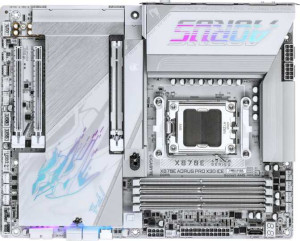
Gigabyte X870E Aorus Pro X3D Ice
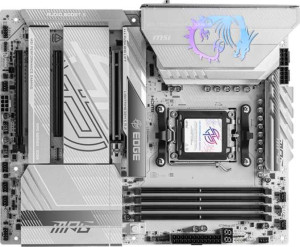
MSI MPG X870E Edge TI WiFi

Gigabyte X870E Aorus Pro X3D Ice MSI MPG X870E Edge TI WiFi

Overview

Welcome to our in-depth specification comparison between the Gigabyte X870E Aorus Pro X3D Ice and the MSI MPG X870E Edge TI WiFi, two high-end AM5 motherboards built on the X870 chipset. Both boards share a strong feature foundation, yet they diverge in meaningful ways across memory overclocking headroom, rear USB port configuration, expansion slot variety, and audio capabilities. Read on to discover which board aligns best with your build goals.

Common Features

  • Both boards use the AM5 CPU socket.
  • Both boards feature the X870 chipset.
  • Both boards have an ATX form factor.
  • Wi-Fi is supported on both boards, covering Wi-Fi 4, Wi-Fi 5, Wi-Fi 6, Wi-Fi 6E, and Wi-Fi 7.
  • Bluetooth 5.4 is present on both boards.
  • Both boards support a maximum memory amount of 256GB across 4 memory slots.
  • Both boards use DDR5 memory with 2 memory channels.
  • ECC memory support is not available on either board.
  • Both boards have 5 USB 3.2 Gen 2 Type-A ports.
  • Neither board has any USB 3.2 Gen 1 Type-C ports.
  • Neither board has any USB 3.2 Gen 2x2 ports on the rear panel.
  • Both boards include 2 USB 4 40Gbps ports and 2 Thunderbolt 4 ports.
  • An HDMI 2.1 output is present on both boards.
  • Both boards provide 4 USB 3.2 Gen 1 ports through internal expansion headers.
  • Both boards include 1 USB 3.2 Gen 2x2 port through expansion.
  • Both boards offer 4 USB 2.0 ports through internal expansion headers.
  • Both boards have 4 SATA 3 connectors, 4 M.2 sockets, and 8 fan headers.
  • A TPM connector is present on both boards.
  • Both boards feature 1 PCIe 5.0 x16 slot and no PCIe 3.0 x16, PCIe 2.0 x16, or PCI slots.
  • Both boards have a 120 dB signal-to-noise ratio DAC, 7.1 audio channels, an S/PDIF Out port, and 2 audio connectors.
  • RAID 0, RAID 1, and RAID 10 are supported on both boards, while RAID 0+1 is not supported on either.

Main Differences

  • aptX support is present on MSI MPG X870E Edge TI WiFi but not available on Gigabyte X870E Aorus Pro X3D Ice.
  • The height is 244 mm on Gigabyte X870E Aorus Pro X3D Ice and 243.8 mm on MSI MPG X870E Edge TI WiFi.
  • The width is 305 mm on Gigabyte X870E Aorus Pro X3D Ice and 304.8 mm on MSI MPG X870E Edge TI WiFi.
  • Maximum native RAM speed is 5200 MHz on Gigabyte X870E Aorus Pro X3D Ice and 5600 MHz on MSI MPG X870E Edge TI WiFi.
  • Maximum overclocked RAM speed is 9000 MHz on Gigabyte X870E Aorus Pro X3D Ice and 8400 MHz on MSI MPG X870E Edge TI WiFi.
  • USB 3.2 Gen 1 Type-A ports total 3 on Gigabyte X870E Aorus Pro X3D Ice while MSI MPG X870E Edge TI WiFi has none.
  • USB 3.2 Gen 2 Type-C ports number 2 on Gigabyte X870E Aorus Pro X3D Ice and 1 on MSI MPG X870E Edge TI WiFi.
  • USB 2.0 ports are absent on Gigabyte X870E Aorus Pro X3D Ice, while MSI MPG X870E Edge TI WiFi includes 4.
  • Gigabyte X870E Aorus Pro X3D Ice has no PCIe 4.0 x16 slot, while MSI MPG X870E Edge TI WiFi includes 1.
  • Gigabyte X870E Aorus Pro X3D Ice has no PCIe x1 slot, while MSI MPG X870E Edge TI WiFi includes 1.
  • Gigabyte X870E Aorus Pro X3D Ice includes 1 PCIe x4 slot, while MSI MPG X870E Edge TI WiFi has none.
  • RAID 5 support is present on Gigabyte X870E Aorus Pro X3D Ice but not available on MSI MPG X870E Edge TI WiFi.
Specs Comparison
Gigabyte X870E Aorus Pro X3D Ice

Gigabyte X870E Aorus Pro X3D Ice

MSI MPG X870E Edge TI WiFi

MSI MPG X870E Edge TI WiFi

General info:
CPU socket AM5 AM5
chipset X870 X870
form factor ATX ATX
release date September 2025 January 2025
supports Wi-Fi
Wi-Fi version Wi-Fi 4 (802.11n), Wi-Fi 5 (802.11ac), Wi-Fi 6 (802.11ax), Wi-Fi 6E (802.11ax), Wi-Fi 7 (802.11be) Wi-Fi 4 (802.11n), Wi-Fi 5 (802.11ac), Wi-Fi 6 (802.11ax), Wi-Fi 6E (802.11ax), Wi-Fi 7 (802.11be)
Has Bluetooth
Bluetooth version 5.4 5.4
HDMI version HDMI 2.1 HDMI 2.1
Easy to overclock
has RGB lighting
Easy to reset BIOS
Has dual BIOS
has aptX
CPU sockets 1 1
Has integrated graphics
warranty period 3 years 3 years
height 244 mm 243.8 mm
width 305 mm 304.8 mm
Has integrated CPU

At the platform level, the Gigabyte X870E Aorus Pro X3D Ice and the MSI MPG X870E Edge TI WiFi are nearly identical twins. Both use the AM5 socket with an X870 chipset, adopt the standard ATX form factor, and share the same wireless stack — Wi-Fi 7 (802.11be) with Bluetooth 5.4 — ensuring future-proof connectivity and low-latency pairing with peripherals. Overclocking accessibility, RGB lighting, easy BIOS reset, and a 3-year warranty are common to both, as is HDMI 2.1 output for high-bandwidth display support. Physical dimensions are virtually the same (sub-millimeter differences), so case compatibility is a non-issue.

The one tangible differentiator in this group is aptX support: the MSI carries it, the Gigabyte does not. aptX is a Bluetooth audio codec developed by Qualcomm that delivers higher-quality, lower-latency audio over Bluetooth compared to the standard SBC codec. For users who rely on wireless headphones or speakers for music production, gaming audio, or general high-fidelity listening, this is a genuine functional advantage — provided their audio device also supports aptX.

Overall, these two boards are essentially tied on general platform credentials. The MSI MPG X870E Edge TI WiFi earns a narrow edge in this group solely due to its aptX audio codec support, which adds real value for wireless audio enthusiasts. If Bluetooth audio quality is not a priority, both boards stand on equal footing here.
Memory:
maximum memory amount 256GB 256GB
RAM speed (max) 5200 MHz 5600 MHz
overclocked RAM speed 9000 MHz 8400 MHz
memory slots 4 4
DDR memory version 5 5
memory channels 2 2
Supports ECC memory

Both boards share the same DDR5 foundation — 4 slots, dual-channel architecture, and a 256GB maximum capacity — meaning day-to-day memory configuration flexibility is identical for both platforms. The interesting story, however, is in the speed specifications, where the two boards diverge in opposite directions depending on whether you prioritize out-of-the-box performance or extreme overclocking headroom.

At stock JEDEC speeds, the MSI MPG X870E Edge TI WiFi supports up to 5600 MHz, compared to 5200 MHz on the Gigabyte X870E Aorus Pro X3D Ice. That 400 MHz gap matters in practice for users running memory at rated XMP/EXPO profiles without further tuning — the MSI simply accommodates faster kits natively, which can translate to measurable gains in memory-bandwidth-sensitive workloads like video editing, data processing, and certain games. Flip to the overclocking ceiling, though, and the Gigabyte pulls ahead significantly: it supports overclocked speeds up to 9000 MHz versus the MSI's 8400 MHz. That 600 MHz overhead gives hardcore overclockers more room to push DDR5 kits to their limits.

The winner here depends entirely on the user's profile. For the vast majority who run XMP/EXPO-rated kits and call it a day, the MSI holds the edge with its higher native speed ceiling. For enthusiasts who manually tune memory timings and voltages chasing benchmark records, the Gigabyte's superior overclocked ceiling is the more compelling specification. Neither board supports ECC memory, so workstation use cases requiring error correction are off the table for both.

Ports:
USB 3.2 Gen 2 ports (USB-A) 5 5
USB 3.2 Gen 1 ports (USB-A) 3 0
USB 3.2 Gen 2 ports (USB-C) 2 1
USB 3.2 Gen 1 ports (USB-C) 0 0
USB 2.0 ports 0 4
USB 3.2 Gen 2x2 ports 0 0
USB 4 40Gbps ports 2 2
USB 4 20Gbps ports 0 0
Thunderbolt 4 ports 2 2
Thunderbolt 3 ports 0 0
has an HDMI output
DisplayPort outputs 0 0
RJ45 ports 1 1
Has USB Type-C
eSATA ports 0 0
DVI outputs 0 0
has a VGA connector
PS/2 ports 0 0

The high-speed backbone is identical between these two boards: 5x USB 3.2 Gen 2 (USB-A), 2x USB 4 40Gbps, and 2x Thunderbolt 4 ports are present on both. That shared Thunderbolt 4 and USB4 pairing is significant — it enables daisy-chaining high-bandwidth peripherals, eGPUs, and fast external NVMe drives at up to 40Gbps, making both boards equally capable for demanding creative and power-user workflows.

Where they diverge is in the secondary port composition. The Gigabyte X870E Aorus Pro X3D Ice offers 2x USB 3.2 Gen 2 (USB-C) versus just 1x on the MSI MPG X870E Edge TI WiFi — a meaningful difference as modern peripherals and displays increasingly rely on USB-C. The Gigabyte also provides 3x USB 3.2 Gen 1 (USB-A) ports for legacy devices, whereas the MSI substitutes these with 4x USB 2.0 ports. USB 2.0 is limited to 480Mbps — roughly 10 times slower than Gen 1's 5Gbps — making those MSI ports adequate only for mice, keyboards, and other low-bandwidth devices, not for storage or fast data transfer.

The Gigabyte holds a clear edge in this group. Its extra USB-C Gen 2 port and the replacement of USB 2.0 with the faster Gen 1 standard give it a more modern and versatile rear I/O panel. Users with multiple USB-C peripherals or those who occasionally transfer data through legacy USB-A ports will find the Gigabyte's configuration meaningfully more capable.

Connectors:
USB 3.2 Gen 1 ports (through expansion) 4 4
USB 3.2 Gen 2x2 ports (through expansion) 1 1
USB 2.0 ports (through expansion) 4 4
SATA 3 connectors 4 4
fan headers 8 8
USB 3.0 ports (through expansion) 4 4
M.2 sockets 4 4
Has TPM connector
U.2 sockets 0 0
Has mSATA connector
SATA 2 connectors 0 0

Rare in a head-to-head comparison, the internal connector specifications for the Gigabyte X870E Aorus Pro X3D Ice and the MSI MPG X870E Edge TI WiFi are a perfect match across every single data point. Both boards offer 4x M.2 sockets, 4x SATA 3 connectors, and 8 fan headers — a well-rounded set of internals that supports multi-drive NVMe storage arrays, legacy SATA devices, and comprehensive cooling control in equal measure.

The 8 fan headers deserve particular attention as a shared strength: this count is generous enough to manage a full tower build with multiple case fans, a CPU cooler, and supplemental radiator fans simultaneously — all from the board itself, without requiring an external fan hub. Similarly, 4 M.2 slots provides ample runway for high-speed NVMe drives, which is increasingly the storage medium of choice for OS, applications, and game libraries alike. The TPM connector, present on both, ensures compatibility with platform security requirements without needing an add-in module.

This group is a complete tie. There is no differentiating factor whatsoever between these two boards on internal connectors — a builder's experience and upgrade potential on this axis will be identical regardless of which board they choose.

Expansion slots:
PCIe 4.0 x16 slots 0 1
PCIe 5.0 x16 slots 1 1
PCIe 3.0 x16 slots 0 0
PCIe x1 slots 0 1
PCI slots 0 0
PCIe 2.0 x16 slots 0 0
PCIe x4 slots 1 0
PCIe x8 slots 0 0

For the primary GPU slot, both boards are on equal footing — each provides a single PCIe 5.0 x16 slot, delivering the full bandwidth ceiling currently available for discrete graphics cards. This ensures neither board creates a bottleneck for even the most demanding modern GPUs, and both are positioned for next-generation cards as the PCIe 5.0 ecosystem matures.

Beyond the primary slot, the layouts diverge meaningfully. The MSI MPG X870E Edge TI WiFi adds a PCIe 4.0 x16 slot alongside a PCIe x1 slot, giving users two additional expansion options. The secondary x16 physical slot — even if it runs at fewer lanes electrically — is valuable for multi-GPU compute setups, capture cards, or high-bandwidth add-in cards that benefit from a full-size connector. The x1 slot covers simpler add-ins like sound cards or network adapters. The Gigabyte X870E Aorus Pro X3D Ice, by contrast, offers a single PCIe x4 slot as its only secondary expansion, which is adequate for NVMe adapters or certain capture cards but leaves fewer options for users with broader expansion needs.

The MSI earns a clear edge here. Its combination of a secondary PCIe 4.0 x16 slot and a dedicated x1 slot provides greater build flexibility than the Gigabyte's lone x4 slot — particularly relevant for users who plan to populate the board with multiple add-in cards over the system's lifetime.

Audio:
Signal-to-Noise ratio (DAC) 120 dB 120 dB
audio channels 7.1 7.1
Has S/PDIF Out port
audio connectors 2 2

Audio is another category where these two boards refuse to be separated. Both deliver a 120 dB signal-to-noise ratio from their onboard DACs — a figure that sits comfortably in the upper tier of motherboard audio, indicating very low background noise and clean analog output that most users, including casual audiophiles, will find genuinely satisfying through quality headphones or speakers without needing a discrete sound card.

The remaining specs follow suit: 7.1 surround channel support, an S/PDIF optical output for connecting to external receivers or DACs via digital passthrough, and 2 rear audio connectors each. The S/PDIF port in particular is a valued addition for home theater setups, as it allows lossless digital audio transmission to AV receivers while bypassing the onboard analog stage entirely.

This group is an unambiguous tie. Every measurable and functional audio specification is identical across both boards, so neither holds any advantage here. Audio quality and connectivity will be indistinguishable in real-world use between the Gigabyte X870E Aorus Pro X3D Ice and the MSI MPG X870E Edge TI WiFi.

Storage:
Supports RAID 1
Supports RAID 10 (1+0)
Supports RAID 5
Supports RAID 0
Supports RAID 0+1

RAID support is largely consistent across both boards, with RAID 0 (striping for maximum speed), RAID 1 (mirroring for redundancy), and RAID 10 (a combined stripe-and-mirror configuration balancing both performance and fault tolerance) available on each. For the overwhelming majority of desktop users, these three modes cover every practical multi-drive scenario they are likely to encounter.

The single differentiator is RAID 5 support, which the Gigabyte X870E Aorus Pro X3D Ice provides and the MSI MPG X870E Edge TI WiFi does not. RAID 5 distributes parity data across three or more drives, allowing the array to survive a single drive failure while using storage capacity more efficiently than RAID 1 — making it a preferred configuration in small NAS-like or workstation setups where both redundancy and usable space matter. Its absence on the MSI is a genuine functional gap for users who specifically need that configuration.

The Gigabyte takes a narrow edge here on the strength of its RAID 5 support. That said, this distinction is relevant only to a specific subset of users — those building multi-drive redundant arrays with an emphasis on storage efficiency. For everyone else running a straightforward single-drive or basic RAID 0/1 setup, both boards are effectively identical in this category.

Comparison Summary & Verdict

After examining every specification, both boards prove to be capable X870 platforms, but each caters to a distinct type of builder. The Gigabyte X870E Aorus Pro X3D Ice stands out for its exceptional overclocked RAM ceiling of 9000 MHz, broader rear USB Type-A and Type-C selection, a dedicated PCIe x4 slot, and RAID 5 support, making it the stronger choice for power users who demand maximum memory performance and flexible storage configurations. The MSI MPG X870E Edge TI WiFi, on the other hand, offers a higher native RAM speed of 5600 MHz, an additional PCIe 4.0 x16 and PCIe x1 slot for greater expansion flexibility, aptX audio support, and four rear USB 2.0 ports for legacy device compatibility. Choose the Gigabyte board if peak overclocking and advanced storage options are your priorities, and opt for the MSI if you value broader expansion slots and out-of-the-box audio and connectivity versatility.

Gigabyte X870E Aorus Pro X3D Ice
Buy Gigabyte X870E Aorus Pro X3D Ice if...

Buy the Gigabyte X870E Aorus Pro X3D Ice if you want the highest possible overclocked RAM speeds at up to 9000 MHz, need RAID 5 storage support, or prefer a more versatile rear USB Type-A and Type-C port layout.

MSI MPG X870E Edge TI WiFi
Buy MSI MPG X870E Edge TI WiFi if...

Buy the MSI MPG X870E Edge TI WiFi if you prioritize a higher native RAM speed of 5600 MHz, want an extra PCIe 4.0 x16 slot for additional expansion cards, or need aptX audio support and rear USB 2.0 ports for legacy devices.