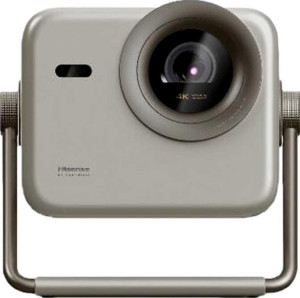
Hisense M2 Pro
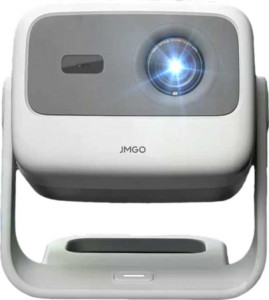
JMGO N1S 4K

Hisense M2 Pro JMGO N1S 4K

Overview

Welcome to our in-depth spec comparison between the Hisense M2 Pro and the JMGO N1S 4K, two laser projectors that take notably different approaches to the home cinema experience. Both share a solid common foundation — including laser light sources, HDR10 support, and comprehensive wireless connectivity — but they diverge sharply when it comes to resolution, image refinement tools, and overall form factor. Read on to see how these two projectors stack up across every key specification.

Common Features

  • Both projectors use a laser light source.
  • Both projectors have a dedicated smartphone app.
  • Both projectors can display 3D content with glasses.
  • The maximum projection size is 200″ on both projectors.
  • Neither projector has a motorized zoom.
  • HDR10+ support is not available on either projector.
  • Both projectors have a 60Hz refresh rate.
  • HDR10 support is available on both projectors.
  • Both projectors have one HDMI port.
  • AirPlay is supported on both projectors.
  • Wi-Fi is supported on both projectors.
  • Both projectors have one USB port.
  • Chromecast is built into both projectors.
  • Neither projector has a VGA connector.
  • Neither projector has a DVI connector.
  • Miracast is supported on both projectors.
  • Both projectors have stereo speakers.
  • Neither projector has vertical lens shift.
  • Neither projector has horizontal lens shift.
  • Both projectors come with a remote control.
  • Both projectors have a built-in smart TV platform.
  • Both projectors have a built-in speaker.
  • Both projectors include a 3.5mm audio jack socket.
  • Neither projector has an external memory slot.

Main Differences

  • Output resolution is 1080p on Hisense M2 Pro and 4K on JMGO N1S 4K.
  • Contrast ratio is 1000:1 on Hisense M2 Pro and 1600:1 on JMGO N1S 4K.
  • Motorized focus is available on JMGO N1S 4K but not on Hisense M2 Pro.
  • Manual focus is available on Hisense M2 Pro but not on JMGO N1S 4K.
  • Minimum throw distance is 1.9m on Hisense M2 Pro and 1.6m on JMGO N1S 4K.
  • Dolby Vision support is present on Hisense M2 Pro but not available on JMGO N1S 4K.
  • HLG support is present on Hisense M2 Pro but not available on JMGO N1S 4K.
  • Audio output power is 2 x 10W on Hisense M2 Pro and 2 x 5W on JMGO N1S 4K.
  • Dolby Atmos support is present on JMGO N1S 4K but not available on Hisense M2 Pro.
  • Width is 190mm on Hisense M2 Pro and 170mm on JMGO N1S 4K.
  • Height is 230mm on Hisense M2 Pro and 190mm on JMGO N1S 4K.
  • Thickness is 220mm on Hisense M2 Pro and 190mm on JMGO N1S 4K.
  • Weight is 3900g on Hisense M2 Pro and 2000g on JMGO N1S 4K.
  • Volume is 9614cm³ on Hisense M2 Pro and 6137cm³ on JMGO N1S 4K.
Specs Comparison
Hisense M2 Pro

Hisense M2 Pro

JMGO N1S 4K

JMGO N1S 4K

General info:
has laser light source
release date June 2025 April 2025
width 190 mm 170 mm
height 230 mm 190 mm
thickness 220 mm 190 mm
weight 3900 g 2000 g
Has a dedicated smartphone app
volume 9614 cm³ 6137 cm³

Both the Hisense M2 Pro and the JMGO N1S 4K share a laser light source and a dedicated smartphone app, placing them in the same premium projector tier in terms of core technology and ecosystem connectivity.

Where they diverge significantly is in physical footprint and weight. The M2 Pro is a noticeably larger unit — 3900 g versus the N1S 4K's 2000 g — and its volume of 9614 cm³ is roughly 57% larger than the N1S 4K's 6137 cm³. In practical terms, this means the M2 Pro demands considerably more shelf or table space and is far less convenient to move between rooms or pack for travel. The N1S 4K, being nearly half the weight, is meaningfully more portable and easier to reposition.

For users who prioritize a compact, lightweight setup or plan to use their projector in multiple locations, the JMGO N1S 4K holds a clear physical advantage. The M2 Pro's larger chassis may hint at additional internal hardware or thermal headroom, but based solely on the general specs provided, the N1S 4K is the stronger choice for portability and space efficiency.

Projection quality:
output resolution 1080p 4K
contrast ratio 1000:1 1600:1
has motorized focus
displays 3D with glasses
maximum projection size 200" 200"
has motorized zoom
supports HDR10+
has manual focus
minimum throw distance 1.9 m 1.6 m
refresh rate 60Hz 60Hz
supports Dolby Vision
supports HDR10
supports HLG

The most consequential difference here is output resolution: the JMGO N1S 4K projects at native 4K, while the Hisense M2 Pro tops out at 1080p. On large screens — and both projectors max out at 200″ — that gap is visible, with 4K delivering noticeably sharper detail, finer text, and more texture in content. Paired with a higher contrast ratio of 1600:1 versus the M2 Pro's 1000:1, the N1S 4K produces deeper perceived blacks and more image dimensionality.

HDR format support tells a more nuanced story. The M2 Pro counters with Dolby Vision and HLG compatibility — two formats the N1S 4K lacks entirely — alongside HDR10. Dolby Vision in particular is a dynamic, scene-by-scene HDR format found on premium streaming platforms, and its absence on the N1S 4K is a real trade-off for users heavily invested in that ecosystem. The N1S 4K supports HDR10 only, which, while widely available, is less sophisticated. On usability, the N1S 4K offers motorized focus, making setup easier without manual adjustment, while the M2 Pro relies on manual focus alone.

On balance, the N1S 4K leads on raw image sharpness and contrast, but the M2 Pro's Dolby Vision support adds meaningful value for streaming-focused users. Viewers prioritizing resolution and setup convenience lean toward the N1S 4K; those who stream Dolby Vision content regularly will find the M2 Pro's format support harder to overlook.

Connectivity:
HDMI ports 1 1
has AirPlay
supports Wi-Fi
USB ports 1 1
has Chromecast built-in
has a VGA connector
has a DVI connector
supports Miracast
RJ45 ports 0 0
Has S/PDIF Out port

Connectivity is a straight tie between the Hisense M2 Pro and the JMGO N1S 4K — every single spec in this group is identical. Both offer 1 HDMI port, 1 USB port, and Wi-Fi, and both support the full trifecta of wireless casting: AirPlay, Chromecast built-in, and Miracast. That combination covers virtually every device ecosystem — Apple, Android, and Windows — without needing additional hardware or adapters.

Neither projector includes an RJ45 Ethernet port, meaning both are reliant on wireless networking for internet-based content. The absence of S/PDIF output on both units also means users needing to route audio to an external AV receiver via optical will need an alternative solution. These are shared limitations, not differentiators.

Since no connectivity advantage exists on either side, this category should not influence a purchasing decision between the two. Buyers can expect an identical wired and wireless feature set regardless of which model they choose.

Features:
has stereo speakers
has lens shift (vertical)
has lens shift (horizontal)
has a remote control
has built-in smart TV
has a built-in speaker
audio output power 2 x 10W 2 x 5W
has a socket for a 3.5 mm audio jack
has Dolby Atmos
has an external memory slot
has voice commands

Audio output power is the sharpest dividing line in this category. The Hisense M2 Pro delivers 2 × 10W of stereo output, doubling the 2 × 5W found in the JMGO N1S 4K. In a projector context — where built-in speakers are often an afterthought — that difference is meaningful. The M2 Pro's higher wattage translates to greater headroom for filling larger rooms with sound before distortion sets in, making it more viable as a standalone audio solution without an external speaker system.

The N1S 4K punches back with Dolby Atmos support, a feature the M2 Pro lacks. Dolby Atmos is an object-based audio format that adds spatial depth to compatible content, and its presence on the N1S 4K is notable — though its real benefit depends on whether the built-in speakers can meaningfully render that spatial information, which compact 5W drivers typically struggle to do. Its value is more apparent when audio is passed through to an external Atmos-capable sound system via the 3.5mm jack.

Beyond audio, both projectors are feature-identical: built-in smart TV, remote control, voice commands, stereo speakers, and a 3.5mm audio output — with neither offering lens shift or an external memory slot. The M2 Pro holds the edge for users who rely primarily on built-in audio, while the N1S 4K's Dolby Atmos support appeals more to those pairing the projector with an external audio setup.

Comparison Summary & Verdict

After examining every specification, it is clear that both projectors serve distinct audiences. The Hisense M2 Pro stands out with its support for Dolby Vision and HLG, more powerful 2 x 10W stereo audio, and manual focus control, making it a compelling choice for users who value a richer HDR ecosystem and louder built-in sound. On the other hand, the JMGO N1S 4K impresses with its native 4K resolution, higher 1600:1 contrast ratio, motorized focus, shorter minimum throw distance of 1.6m, and a significantly lighter 2000g body — advantages that appeal to those prioritizing image sharpness, setup flexibility, and portability. Neither projector is a universal winner; the right choice ultimately depends on whether you value the Hisense M2 Pro's HDR format breadth and audio power, or the JMGO N1S 4K's superior resolution and sleek, compact design.

Hisense M2 Pro
Buy Hisense M2 Pro if...

Buy the Hisense M2 Pro if you want broader HDR format support including Dolby Vision and HLG, and prefer a more powerful 2 x 10W built-in audio output.

JMGO N1S 4K
Buy JMGO N1S 4K if...

Buy the JMGO N1S 4K if native 4K resolution, a higher contrast ratio, motorized focus, a shorter throw distance, and a lighter and more compact build are your top priorities.