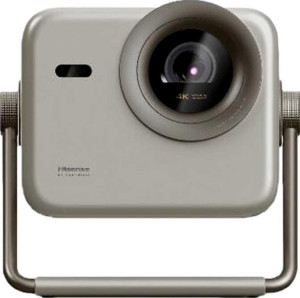
Hisense M2 Pro
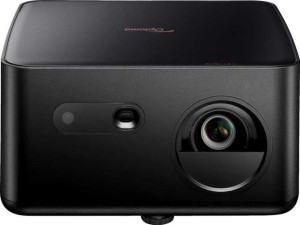
Optoma Photon Life PK32

Hisense M2 Pro Optoma Photon Life PK32

Common Features

  • Both products have a thickness of 220 mm.
  • Both products do not have a motorized zoom.
  • Both products support HDR10.
  • Both products support HLG.
  • Both products do not have a VGA connector.
  • Both products do not have a DVI connector.
  • Both products have no RJ45 ports.
  • Both products do not have an S/PDIF Out port.
  • Both products have stereo speakers.
  • Both products do not have lens shift (vertical).
  • Both products do not have lens shift (horizontal).
  • Both products have a remote control.
  • Both products have a built-in speaker.
  • Both products have a socket for a 3.5 mm audio jack.
  • Both products do not have Dolby Atmos.
  • Both products do not have an external memory slot.
  • Both products have a minimum throw distance of 1.9 m.
  • Both products have a maximum projection size of 200″.

Main Differences

  • Hisense M2 Pro has a laser light source, while Optoma Photon Life PK32 does not.
  • Lamp life (eco mode) is 25000 h on Hisense M2 Pro and 30000 h on Optoma Photon Life PK32.
  • Hisense M2 Pro is 190 mm wide, while Optoma Photon Life PK32 is 240 mm wide.
  • Hisense M2 Pro has a height of 230 mm, while Optoma Photon Life PK32 is 130 mm high.
  • Hisense M2 Pro weighs 3900 g, while Optoma Photon Life PK32 weighs 2200 g.
  • Hisense M2 Pro has a dedicated smartphone app, while Optoma Photon Life PK32 does not.
  • Hisense M2 Pro has a volume of 9614 cm³, while Optoma Photon Life PK32 has a volume of 6864 cm³.
  • Hisense M2 Pro supports 1080p resolution, while Optoma Photon Life PK32 supports 4K resolution.
  • Hisense M2 Pro does not have motorized focus, while Optoma Photon Life PK32 does.
  • Hisense M2 Pro has a maximum projection size of 200″, while Optoma Photon Life PK32 has a maximum projection size of 150″.
  • Hisense M2 Pro has manual focus, while Optoma Photon Life PK32 does not.
  • Hisense M2 Pro has a refresh rate of 60Hz, while Optoma Photon Life PK32 has a refresh rate of 240Hz.
  • Hisense M2 Pro supports Dolby Vision, while Optoma Photon Life PK32 does not.
  • Hisense M2 Pro has 1 HDMI port, while Optoma Photon Life PK32 has 2 HDMI ports.
  • Hisense M2 Pro has AirPlay support, while Optoma Photon Life PK32 does not.
  • Hisense M2 Pro supports Wi-Fi, while Optoma Photon Life PK32 does not.
  • Hisense M2 Pro has 1 USB port, while Optoma Photon Life PK32 has 2 USB ports.
  • Hisense M2 Pro has Chromecast built-in, while Optoma Photon Life PK32 does not.
  • Hisense M2 Pro supports Miracast, while Optoma Photon Life PK32 does not.
  • Hisense M2 Pro has built-in smart TV features, while Optoma Photon Life PK32 does not.
Specs Comparison
Hisense M2 Pro

Hisense M2 Pro

Optoma Photon Life PK32

Optoma Photon Life PK32

General info:
has laser light source
release date June 2025 October 2025
lamp life (eco mode) 25000 h 30000 h
width 190 mm 240 mm
height 230 mm 130 mm
thickness 220 mm 220 mm
weight 3900 g 2200 g
Has a dedicated smartphone app
volume 9614 cm³ 6864 cm³

The Hisense M2 Pro features a laser light source, while the Optoma Photon Life PK32 does not. In terms of lamp life in eco mode, the Hisense offers 25,000 hours, whereas the Optoma provides a longer 30,000 hours. The dimensions of both products differ slightly: the Hisense M2 Pro has a width of 190 mm, height of 230 mm, and thickness of 220 mm, while the Optoma Photon Life PK32 is wider at 240 mm but shorter in height, measuring 130 mm, with the same thickness of 220 mm. Additionally, the Hisense M2 Pro is heavier, weighing 3900 g, compared to the Optoma's 2200 g.

Another key difference is the Hisense M2 Pro’s dedicated smartphone app, which the Optoma Photon Life PK32 lacks. When it comes to volume, the Hisense has a larger volume of 9614 cm³, while the Optoma is more compact, with a volume of 6864 cm³.

Overall, the Hisense M2 Pro and Optoma Photon Life PK32 differ in their design, weight, and app features, with the Optoma having a longer lamp life but a smaller form factor and fewer features.

Projection quality:
output resolution 1080p 4K
has motorized focus
maximum projection size 200" 150"
has motorized zoom
supports HDR10+
has manual focus
minimum throw distance 1.9 m 1.9 m
refresh rate 60Hz 240Hz
supports Dolby Vision
supports HDR10
supports HLG

The Hisense M2 Pro and Optoma Photon Life PK32 differ significantly in their output resolution. The Hisense M2 Pro supports 1080p resolution, while the Optoma Photon Life PK32 supports 4K resolution. Both projectors have manual focus, though the Hisense does not feature motorized focus, while the Optoma includes motorized focus. The maximum projection size for the Hisense is 200″, compared to the Optoma’s 150″. Neither projector includes motorized zoom or support for HDR10+.

When it comes to refresh rate, the Optoma Photon Life PK32 has a much higher refresh rate of 240Hz, while the Hisense M2 Pro offers 60Hz. Both projectors support HDR10 and HLG, but the Hisense is the only one to support Dolby Vision. The minimum throw distance is identical for both, at 1.9 m.

Overall, the Hisense M2 Pro and Optoma Photon Life PK32 differ in resolution, focus capabilities, projection size, and refresh rate, with each offering unique features based on these specifications.

Connectivity:
HDMI ports 1 2
has AirPlay
supports Wi-Fi
USB ports 1 2
has Chromecast built-in
has a VGA connector
has a DVI connector
supports Miracast
RJ45 ports 0 0
Has S/PDIF Out port

In terms of connectivity, the Hisense M2 Pro and Optoma Photon Life PK32 differ in several key areas. The Hisense M2 Pro offers one HDMI port, while the Optoma Photon Life PK32 has two HDMI ports. The Hisense also supports AirPlay and has Chromecast built-in, which the Optoma lacks. The M2 Pro supports Wi-Fi, while the Optoma does not.

When it comes to USB ports, the Hisense has one, and the Optoma offers two. Neither projector includes a VGA or DVI connector, nor do they have an S/PDIF Out port or RJ45 ports. The Hisense M2 Pro does support Miracast, whereas the Optoma Photon Life PK32 does not.

Overall, the Hisense M2 Pro offers more modern wireless connectivity options, such as AirPlay, Wi-Fi, and Miracast, while the Optoma Photon Life PK32 provides additional HDMI ports and a second USB port, but lacks these wireless features.

Features:
has stereo speakers
has lens shift (vertical)
has lens shift (horizontal)
has a remote control
has built-in smart TV
has a built-in speaker
audio output power 2 x 10W 2 x 5W
has a socket for a 3.5 mm audio jack
has Dolby Atmos
has an external memory slot
has voice commands

Both the Hisense M2 Pro and Optoma Photon Life PK32 come with stereo speakers and remote controls. However, the audio output power differs: the Hisense M2 Pro offers 2 x 10W speakers, while the Optoma Photon Life PK32 has smaller 2 x 5W speakers. Both projectors lack lens shift capabilities, both vertical and horizontal, and neither has an external memory slot or Dolby Atmos support.

The Hisense M2 Pro is equipped with a built-in smart TV feature and voice command functionality, while the Optoma Photon Life PK32 lacks a smart TV feature and does not support voice commands. Both projectors have a built-in speaker and a socket for a 3.5 mm audio jack, allowing for audio output options beyond the internal speakers.

In summary, the Hisense M2 Pro offers more advanced features such as built-in smart TV and voice commands, while the Optoma Photon Life PK32 provides a more basic feature set with smaller audio output power and fewer smart capabilities.

Comparison Summary

This is a specification comparison between the Hisense M2 Pro and Optoma Photon Life PK32. Both projectors share features such as a thickness of 220 mm, support for HDR10, and stereo speakers. However, there are key differences: the Hisense M2 Pro uses a laser light source, while the Optoma Photon Life PK32 does not; the Hisense M2 Pro has a 1080p resolution compared to the 4K resolution of the Optoma; and the Hisense M2 Pro offers manual focus, while the Optoma has motorized focus. Additionally, the Hisense M2 Pro has 1 HDMI port and built-in smart TV features, unlike the Optoma Photon Life PK32.