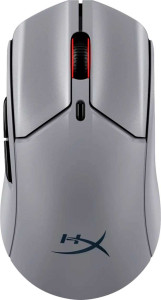
HyperX Pulsefire Haste 2 Pro
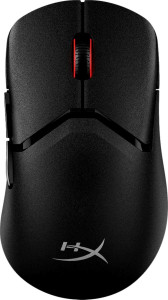
HyperX Pulsefire Saga Pro

HyperX Pulsefire Haste 2 Pro HyperX Pulsefire Saga Pro

Overview

Welcome to our detailed spec comparison between the HyperX Pulsefire Haste 2 Pro and the HyperX Pulsefire Saga Pro — two high-performance wireless gaming mice from HyperX sharing the same powerful 26K sensor. While both deliver identical core performance metrics, this face-off digs into the key areas where they diverge, including design orientation, weight, and physical dimensions, to help you determine which mouse best fits your hand and playstyle.

Common Features

  • Both mice have a polling rate of 4000 Hz.
  • Both mice have a maximum speed of 650 IPS.
  • Both mice have a maximum acceleration of 50G.
  • Both mice have a maximum DPI of 26000.
  • Both mice have a minimum DPI of 400.
  • Both mice support adjustable DPI.
  • Both mice are gaming-type devices.
  • Both mice support 2.4GHz wireless, USB, and Bluetooth connectivity.
  • Both mice use the HyperX 26K sensor.
  • Both mice have 1 onboard memory profile.
  • Neither mouse supports gesture control.
  • Both mice offer a battery life of 90 hours.
  • Both mice can be used while charging.
  • Both mice have a rechargeable battery.
  • Both mice have 6 buttons in total.
  • Both mice have 2 side buttons.
  • Both mice have 6 programmable buttons.
  • Both mice include a DPI switching button.
  • Neither mouse has a profile switching button.
  • Both mice feature RGB lighting.
  • Neither mouse has a tilting scroll wheel.
  • Neither mouse has a thumb scroll wheel.
  • Neither mouse supports extra weights.
  • Both mice have a cable length of 1.8 m.

Main Differences

  • Bluetooth version is 5.1 on HyperX Pulsefire Haste 2 Pro and 5.0 on HyperX Pulsefire Saga Pro.
  • The HyperX Pulsefire Haste 2 Pro is ambidextrous, while the HyperX Pulsefire Saga Pro is designed for right-handed users.
  • Weight is 59 g on HyperX Pulsefire Haste 2 Pro and 73 g on HyperX Pulsefire Saga Pro.
  • Volume is 317.183768 cm³ on HyperX Pulsefire Haste 2 Pro and 320.144832 cm³ on HyperX Pulsefire Saga Pro.
  • Thickness is 38.2 mm on HyperX Pulsefire Haste 2 Pro and 39.8 mm on HyperX Pulsefire Saga Pro.
  • Height is 124.3 mm on HyperX Pulsefire Haste 2 Pro and 119.7 mm on HyperX Pulsefire Saga Pro.
  • Width is 66.8 mm on HyperX Pulsefire Haste 2 Pro and 67.2 mm on HyperX Pulsefire Saga Pro.
Specs Comparison
HyperX Pulsefire Haste 2 Pro

HyperX Pulsefire Haste 2 Pro

HyperX Pulsefire Saga Pro

HyperX Pulsefire Saga Pro

Performance:
polling rate 4000 Hz 4000 Hz
maximum speed 650 IPS 650 IPS
maximum acceleration 50G 50G
maximum DPI 26000 DPI 26000 DPI
minimum DPI 400 DPI 400 DPI
has adjustable DPI

In the Performance category, the HyperX Pulsefire Haste 2 Pro and the HyperX Pulsefire Saga Pro are a perfect match across every measured specification. Both mice share a 4000 Hz polling rate, a 650 IPS maximum tracking speed, and a 50G maximum acceleration — figures that place them firmly in the upper tier of competitive gaming mice.

The 4000 Hz polling rate is worth highlighting: standard gaming mice report their position to the PC 1000 times per second, but at 4000 Hz that interval is quartered, resulting in significantly lower input latency and smoother cursor movement at high speeds. Combined with 650 IPS tracking and 50G acceleration, both mice can handle even the most aggressive flick shots without losing tracking accuracy. The 26000 DPI ceiling and 400 DPI floor, shared by both, offer a wide tuning range that accommodates everything from ultra-low-sensitivity tactical play to high-sensitivity fast-paced styles.

Because every performance specification is identical between the two, there is no advantage on either side in this category. Buyers who prioritize raw sensor performance and polling responsiveness can choose between these two models without compromise — the decision will need to be made on other grounds such as design, weight, or ergonomics.

General info:
Type Gaming Gaming
connection type 2.4GHz wireless, USB, Bluetooth 2.4GHz wireless, USB, Bluetooth
sensor HyperX 26K HyperX 26K
onboard memory profiles 1 1
Bluetooth version 5.1 5
has gesture support
Battery life 90 hours 90 hours
can use while charging
has a rechargeable battery
has a removable battery
warranty period 2 years 2 years
release date January 2025 January 2025

Across most of the General Info category, these two mice are virtually identical: both are dedicated gaming mice using the same HyperX 26K sensor, the same triple-connection setup (2.4GHz wireless, USB, and Bluetooth), a 90-hour battery life, pass-through charging support, and a 2-year warranty. For buyers weighing connectivity flexibility or longevity, neither has a structural advantage.

The sole differentiator here is the Bluetooth version — the Haste 2 Pro ships with Bluetooth 5.1 while the Saga Pro uses Bluetooth 5.0. In practical terms, 5.1 introduced direction-finding capabilities and minor improvements to connection stability and power efficiency over 5.0. For a gaming mouse, this gap is subtle rather than transformative — neither version will bottleneck the mouse during 2.4GHz gameplay — but when using Bluetooth specifically (e.g., paired to a laptop or secondary device), the Haste 2 Pro's newer standard offers a marginally more reliable and efficient link.

The Haste 2 Pro holds a narrow edge in this group solely on the strength of its newer Bluetooth revision. Every other general specification is a dead tie, so unless Bluetooth reliability in multi-device setups is a priority, the difference is unlikely to influence most purchasing decisions.

Buttons:
number of buttons 6 6
number of side buttons 2 2
number of programmable buttons 6 6
has a DPI switching button
has a profile switching button

When it comes to button layout, the Haste 2 Pro and the Saga Pro are carbon copies of each other. Both offer 6 total buttons, including 2 side buttons, with all 6 being fully programmable — a setup that covers the essentials for most gaming genres without veering into the cluttered territory of MMO-style mice.

The inclusion of a dedicated DPI switching button on both models is a practical asset, letting users cycle through sensitivity presets on the fly — useful when switching between tasks like sniping and close-quarters combat. The absence of a profile switching button on either mouse is a minor limitation for users who maintain multiple distinct configuration profiles, though with only one onboard memory profile available on each (as noted in General Info), this omission is consistent rather than surprising.

This category is a complete tie. There is no differentiator between the two mice in terms of button count, programmability, or layout — the choice between them cannot be made on button specs alone.

Design:
Orientation Ambidextrous Right-handed
weight 59 g 73 g
has RGB lighting
has a tilting scroll wheel
has a thumb scroll wheel
has extra weights
cable length 1.8 m 1.8 m
volume 317.183768 cm³ 320.144832 cm³
thickness 38.2 mm 39.8 mm
height 124.3 mm 119.7 mm
width 66.8 mm 67.2 mm

Design is where these two mice finally diverge in meaningful ways. The most immediately impactful difference is weight: the Haste 2 Pro comes in at 59g versus the Saga Pro's 73g — a 14-gram gap that is genuinely noticeable during extended sessions. Lighter mice reduce wrist fatigue and allow faster directional changes, making the Haste 2 Pro the more agile option on paper for fast-paced, low-sensitivity play styles.

Equally significant is the orientation split. The Haste 2 Pro is ambidextrous, meaning it is usable by both right- and left-handed players, while the Saga Pro is strictly right-handed. For left-handed users, this alone makes the Haste 2 Pro the only viable option of the two. For right-handed users, the ergonomic shaping of the Saga Pro may offer a more naturally contoured grip, though that distinction is not quantifiable from the provided specs alone. The two mice are dimensionally close — the Haste 2 Pro is slightly taller (124.3 mm vs 119.7 mm) while the Saga Pro is marginally thicker (39.8 mm vs 38.2 mm) — meaning overall hand feel will differ slightly but neither is dramatically larger or smaller.

The Haste 2 Pro holds the clearer advantage in this category. Its significantly lower weight and ambidextrous design give it broader appeal and a tangible edge for users who prioritize swift, low-fatigue movement. The Saga Pro's right-handed form factor may suit ergonomic preferences for some, but the weight and versatility advantages of the Haste 2 Pro are the more objectively quantifiable wins here.

Comparison Summary & Verdict

After a thorough look at the specs, both mice are remarkably well-matched on performance, offering the same 4000 Hz polling rate, 650 IPS tracking, HyperX 26K sensor, and a strong 90-hour battery life. The decision ultimately comes down to design. The HyperX Pulsefire Haste 2 Pro stands out with its ambidextrous shape and notably lighter 59 g weight, making it an excellent pick for left- and right-handed users who prize a featherlight feel. The HyperX Pulsefire Saga Pro, at 73 g with a dedicated right-handed ergonomic design, suits players who prefer a more substantial, contoured grip. Both are equally competitive on connectivity and programmability, so your choice should hinge on hand orientation and preferred mouse weight.

HyperX Pulsefire Haste 2 Pro
Buy HyperX Pulsefire Haste 2 Pro if...

Buy the HyperX Pulsefire Haste 2 Pro if you want a lighter, ambidextrous mouse with a slightly newer Bluetooth 5.1 connection — ideal for left-handed players or those who prefer a featherlight feel.

HyperX Pulsefire Saga Pro
Buy HyperX Pulsefire Saga Pro if...

Buy the HyperX Pulsefire Saga Pro if you are a right-handed player who prefers a heavier, more substantial mouse body with a classic ergonomic right-handed shape.