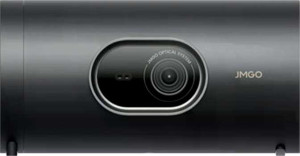
JMGO PicoPlay
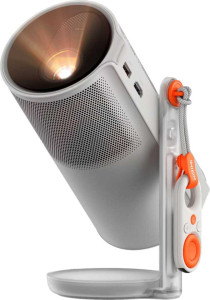
XGIMI MoGo 4

JMGO PicoPlay XGIMI MoGo 4

Common Features

  • Both products have a dedicated smartphone app.
  • Both products come with a 1-year warranty period.
  • Both products have a maximum projection size of 200″.
  • Both products support HDR10.
  • Both products have 1 HDMI port.
  • Both products have AirPlay support.
  • Both products have Bluetooth support.
  • Both products support Wi-Fi.
  • Both products have 2 USB ports.
  • Both products have Chromecast built-in.
  • Both products do not have a VGA connector.
  • Both products have Bluetooth version 5.1.
  • Both products lack lens shift (vertical).
  • Both products lack lens shift (horizontal).
  • Both products come with a remote control.
  • Both products have built-in smart TV functionality.
  • Both products have a built-in speaker.
  • Both products lack an external memory slot.

Main Differences

  • The width of JMGO PicoPlay is 170 mm, while XGIMI MoGo 4 is 96.5 mm.
  • The height of JMGO PicoPlay is 80 mm, while XGIMI MoGo 4 is 207.6 mm.
  • The thickness of JMGO PicoPlay is 80 mm, while XGIMI MoGo 4 is 96.5 mm.
  • JMGO PicoPlay weighs 1000 g, while XGIMI MoGo 4 weighs 1310 g.
  • The volume of JMGO PicoPlay is 1088 cm³, while XGIMI MoGo 4 is 1933.2231 cm³.
  • Stereo speakers are not available on JMGO PicoPlay, while XGIMI MoGo 4 has stereo speakers.
  • The audio output power is 1 x 8W on JMGO PicoPlay, while it is 2 x 6W on XGIMI MoGo 4.
  • JMGO PicoPlay does not have a socket for a 3.5 mm audio jack, while XGIMI MoGo 4 has a socket for a 3.5 mm audio jack.
  • Dolby Atmos is not supported on JMGO PicoPlay, while XGIMI MoGo 4 supports Dolby Atmos.
Specs Comparison
JMGO PicoPlay

JMGO PicoPlay

XGIMI MoGo 4

XGIMI MoGo 4

General info:
has laser light source
release date July 2025 June 2025
width 170 mm 96.5 mm
height 80 mm 207.6 mm
thickness 80 mm 96.5 mm
weight 1000 g 1310 g
Has a dedicated smartphone app
volume 1088 cm³ 1933.2231 cm³
warranty period 1 years 1 years

The JMGO PicoPlay and XGIMI MoGo 4 share some similarities in their general features, but they also have a few differences in size and design. Both devices do not use a laser light source, which means they rely on traditional projection technology. In terms of physical dimensions, the JMGO PicoPlay has a width of 170 mm, a height of 80 mm, and a thickness of 80 mm, while the XGIMI MoGo 4 is more compact in width at 96.5 mm but taller, standing at 207.6 mm with a thickness of 96.5 mm. The XGIMI MoGo 4 is also slightly heavier, weighing 1310 g compared to the JMGO PicoPlay's 1000 g.

Both devices come with a dedicated smartphone app, providing additional control and functionality for users. However, the volume of the two products differs significantly. The JMGO PicoPlay has a volume of 1088 cm³, while the XGIMI MoGo 4 is considerably larger with a volume of 1933.2231 cm³.

As for warranty periods, both the JMGO PicoPlay and XGIMI MoGo 4 offer a 1-year warranty, providing the same level of coverage for the user.

Projection quality:
output resolution 1080p 1080p
maximum projection size 200" 200"
supports HDR10+
supports Dolby Vision
supports HDR10

The JMGO PicoPlay and XGIMI MoGo 4 both offer 1080p output resolution, ensuring sharp image quality for users. When it comes to maximum projection size, both products are capable of displaying up to 200 inches, meaning they provide similar large-screen experiences.

In terms of HDR support, both devices lack support for Dolby Vision and HDR10+, but they do support HDR10. This means that both products can deliver enhanced color and contrast when playing HDR10 content, without offering the advanced features of Dolby Vision or HDR10+.

Overall, the projection quality specifications are nearly identical for both products, with both supporting 1080p resolution, a 200″ maximum projection size, and HDR10 support.

Connectivity:
HDMI ports 1 1
has AirPlay
Has Bluetooth
supports Wi-Fi
USB ports 2 2
has Chromecast built-in
has a VGA connector
Bluetooth version 5.1 5.1
has a DVI connector
supports Miracast
RJ45 ports 0 0
Has S/PDIF Out port

The JMGO PicoPlay and XGIMI MoGo 4 offer similar connectivity features, making both products well-equipped for wireless and wired connections. Both devices include 1 HDMI port, support AirPlay, have Bluetooth (version 5.1), and support Wi-Fi. Additionally, they both come with 2 USB ports and have Chromecast built-in, allowing for easy streaming from compatible devices.

Neither device includes a VGA or DVI connector, and neither supports an S/PDIF Out port. Both also support Miracast, providing another wireless screen mirroring option. In terms of wired network connections, both devices lack an RJ45 port.

Overall, the connectivity features are identical across both the JMGO PicoPlay and XGIMI MoGo 4, with no differences in the specifications provided.

Features:
has stereo speakers
has lens shift (vertical)
has lens shift (horizontal)
has a remote control
has built-in smart TV
has a built-in speaker
audio output power 1 x 8W 2 x 6W
has a socket for a 3.5 mm audio jack
has Dolby Atmos
has an external memory slot

The JMGO PicoPlay and XGIMI MoGo 4 both offer a variety of useful features, but there are some notable differences between them. The JMGO PicoPlay does not have stereo speakers, while the XGIMI MoGo 4 is equipped with stereo speakers. Additionally, the XGIMI MoGo 4 has Dolby Atmos support, which the JMGO PicoPlay lacks.

Both products include a remote control, have built-in smart TV functionality, and feature a built-in speaker. However, the audio output power differs slightly: the JMGO PicoPlay has a single 8W audio output, whereas the XGIMI MoGo 4 has two 6W outputs. The XGIMI MoGo 4 also includes a socket for a 3.5 mm audio jack, which the JMGO PicoPlay does not have.

Neither product offers lens shift (either vertical or horizontal) or an external memory slot. Both also lack support for Dolby Atmos on the JMGO PicoPlay, while the XGIMI MoGo 4 does support it.

Comparison Summary

This is a specification comparison between JMGO PicoPlay and XGIMI MoGo 4. Both models offer a maximum projection size of 200″ and support HDR10, with a 1-year warranty and dedicated smartphone app. However, they differ in key aspects such as size and weight, with the JMGO PicoPlay being smaller and lighter at 170 mm width and 1000 g, compared to the XGIMI MoGo 4’s 96.5 mm width and 1310 g. The XGIMI MoGo 4 features stereo speakers and supports Dolby Atmos, whereas the JMGO PicoPlay does not. Additionally, the audio output power is 1 x 8W on the JMGO PicoPlay and 2 x 6W on the XGIMI MoGo 4.