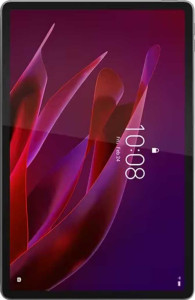
Lenovo Idea Tab Pro
Lenovo Yoga Tab

Lenovo Idea Tab Pro Lenovo Yoga Tab

Overview

When choosing between the Lenovo Idea Tab Pro and the Lenovo Yoga Tab, buyers face a fascinating set of trade-offs across display quality, raw performance, and everyday versatility. Both tablets share a 144Hz IPS LCD panel, a bundled stylus, and 256GB of storage, yet they diverge sharply in areas like screen size, processing power, and productivity-focused features. This in-depth specification comparison will help you identify which device best fits your needs.

Common Features

  • A stylus is included with both the Lenovo Idea Tab Pro and the Lenovo Yoga Tab.
  • Neither the Lenovo Idea Tab Pro nor the Lenovo Yoga Tab has a backlit keyboard.
  • Water resistance is not available on either the Lenovo Idea Tab Pro or the Lenovo Yoga Tab.
  • Tilt sensitivity is not supported on either the Lenovo Idea Tab Pro or the Lenovo Yoga Tab.
  • Both the Lenovo Idea Tab Pro and the Lenovo Yoga Tab feature an LCD IPS display.
  • Both the Lenovo Idea Tab Pro and the Lenovo Yoga Tab have a 144Hz refresh rate.
  • Touch screen support is available on both the Lenovo Idea Tab Pro and the Lenovo Yoga Tab.
  • Sapphire glass is not featured on either the Lenovo Idea Tab Pro or the Lenovo Yoga Tab.
  • HDR10+ support is not available on either the Lenovo Idea Tab Pro or the Lenovo Yoga Tab.
  • Both the Lenovo Idea Tab Pro and the Lenovo Yoga Tab offer 256GB of internal storage.
  • Both devices are built on a 4nm semiconductor process.
  • Both the Lenovo Idea Tab Pro and the Lenovo Yoga Tab use DDR5 memory.
  • Stereo speakers are present on both the Lenovo Idea Tab Pro and the Lenovo Yoga Tab.
  • Neither the Lenovo Idea Tab Pro nor the Lenovo Yoga Tab has a 3.5mm audio jack.
  • Wireless charging is not supported on either the Lenovo Idea Tab Pro or the Lenovo Yoga Tab.
  • Both the Lenovo Idea Tab Pro and the Lenovo Yoga Tab have a non-removable rechargeable battery.
  • On-device machine learning is supported on both the Lenovo Idea Tab Pro and the Lenovo Yoga Tab.
  • Split screen support is available on both the Lenovo Idea Tab Pro and the Lenovo Yoga Tab.
  • Both the Lenovo Idea Tab Pro and the Lenovo Yoga Tab include a front camera.
  • Built-in HDR mode is available on both the Lenovo Idea Tab Pro and the Lenovo Yoga Tab.

Main Differences

  • Weight is 620g on the Lenovo Idea Tab Pro and 458g on the Lenovo Yoga Tab.
  • Thickness is 6.9mm on the Lenovo Idea Tab Pro and 8.3mm on the Lenovo Yoga Tab.
  • A detachable keyboard is available on the Lenovo Yoga Tab but not on the Lenovo Idea Tab Pro.
  • Screen size is 12.7″ on the Lenovo Idea Tab Pro and 11.1″ on the Lenovo Yoga Tab.
  • Resolution is 2944x1840px on the Lenovo Idea Tab Pro and 3200x2000px on the Lenovo Yoga Tab.
  • Pixel density is 273 ppi on the Lenovo Idea Tab Pro and 340 ppi on the Lenovo Yoga Tab.
  • Damage-resistant branded glass is present on the Lenovo Yoga Tab but not on the Lenovo Idea Tab Pro.
  • HDR10 support is available on the Lenovo Idea Tab Pro but not on the Lenovo Yoga Tab.
  • Typical brightness is 400 nits on the Lenovo Idea Tab Pro and 650 nits on the Lenovo Yoga Tab.
  • Dolby Vision support is present on the Lenovo Yoga Tab but not on the Lenovo Idea Tab Pro.
  • RAM is 8GB on the Lenovo Idea Tab Pro and 12GB on the Lenovo Yoga Tab.
  • The GPU is Mali G615 MP6 on the Lenovo Idea Tab Pro and Adreno 750 on the Lenovo Yoga Tab.
  • Geekbench 6 multi-core score is 4610 on the Lenovo Idea Tab Pro and 7325 on the Lenovo Yoga Tab.
  • Geekbench 6 single-core score is 1485 on the Lenovo Idea Tab Pro and 2213 on the Lenovo Yoga Tab.
  • An external memory slot is available on the Lenovo Idea Tab Pro but not on the Lenovo Yoga Tab.
  • Android version is Android 14 on the Lenovo Idea Tab Pro and Android 15 on the Lenovo Yoga Tab.
  • Battery capacity is 10200 mAh on the Lenovo Idea Tab Pro and 8860 mAh on the Lenovo Yoga Tab.
  • Fast charging is supported on the Lenovo Idea Tab Pro but not on the Lenovo Yoga Tab.
  • The Lenovo Yoga Tab supports Wi-Fi 7 (802.11be) while the Lenovo Idea Tab Pro tops out at Wi-Fi 6E (802.11ax).
  • GPS is available on the Lenovo Idea Tab Pro but not on the Lenovo Yoga Tab.
  • Bluetooth version is 5.3 on the Lenovo Idea Tab Pro and 5.4 on the Lenovo Yoga Tab.
  • The front camera is 8MP on the Lenovo Idea Tab Pro and 13MP on the Lenovo Yoga Tab.
  • Slow-motion video recording is supported on the Lenovo Idea Tab Pro but not on the Lenovo Yoga Tab.
  • Maximum memory bandwidth is 68.2 GB/s on the Lenovo Idea Tab Pro and 76.6 GB/s on the Lenovo Yoga Tab.
Specs Comparison
Lenovo Idea Tab Pro

Lenovo Idea Tab Pro

Lenovo Yoga Tab

Lenovo Yoga Tab

Design:
weight 620 g 458 g
thickness 6.9 mm 8.3 mm
width 291.18 mm 255.5 mm
height 189.1 mm 165.8 mm
volume 379.9287522 cm³ 351.60377 cm³
Stylus included
Has a detachable keyboard
Has a backlit keyboard
water resistance None None
Has tilt sensitivity

The most striking physical difference between these two tablets is weight. The Lenovo Idea Tab Pro weighs 620 g compared to the Yoga Tab's 458 g — a difference of 162 g, which is substantial during extended handheld use. That said, the Idea Tab Pro is notably thinner at 6.9 mm versus 8.3 mm, giving it a sleeker profile despite its larger footprint. Its wider and taller frame (291.18 × 189.1 mm vs 255.5 × 165.8 mm) suggests it likely houses a bigger display, which may justify the added bulk for users prioritizing screen real estate.

On the accessories front, both tablets ship with a stylus included — a meaningful perk at any price point. However, the Yoga Tab holds an exclusive advantage: it supports a detachable keyboard, making it a more credible productivity or hybrid-use device out of the box. Neither model offers a backlit keyboard (the Yoga Tab's keyboard lacks backlighting), water resistance, or stylus tilt sensitivity, so those features are a wash.

Overall, the Yoga Tab has a clear design edge for portability and versatility — it is significantly lighter and adds detachable keyboard support, making it better suited for users on the move or those who want a tablet-plus-laptop experience. The Idea Tab Pro, while thinner and larger, demands more from the user in terms of weight tolerance, appealing more to those who prioritize a bigger canvas over day-to-day handling comfort.

Display:
screen size 12.7" 11.1"
resolution 2944 x 1840 px 3200 x 2000 px
pixel density 273 ppi 340 ppi
Display type LCD, IPS LCD, IPS
refresh rate 144Hz 144Hz
has branded damage-resistant glass
supports HDR10
brightness (typical) 400 nits 650 nits
has a touch screen
Has sapphire glass display
supports HDR10+
supports Dolby Vision
Has an e-paper display

Screen size is where these two tablets diverge most visibly: the Idea Tab Pro offers a larger 12.7″ panel, while the Yoga Tab works with an 11.1″ screen. Yet despite its smaller canvas, the Yoga Tab actually delivers a sharper image — its 340 ppi pixel density noticeably exceeds the Idea Tab Pro's 273 ppi, and its higher native resolution of 3200 × 2000 px means finer text and crisper detail in everyday use. Both panels are IPS LCD type with a 144Hz refresh rate, so neither has an edge in smoothness or panel technology.

Brightness tells a compelling story in the Yoga Tab's favor. At 650 nits typical brightness versus the Idea Tab Pro's 400 nits, the Yoga Tab is significantly more legible in well-lit or outdoor environments — a 60% brightness advantage that is genuinely noticeable in practice. The Yoga Tab also ships with branded damage-resistant glass and supports Dolby Vision, adding both durability and a wider HDR ecosystem for streaming content. The Idea Tab Pro counters with HDR10 support, but lacks Dolby Vision, which is increasingly the dominant HDR standard on major platforms like Netflix and Apple TV+.

On balance, the Yoga Tab holds a clear display edge. It wins on pixel density, brightness, screen protection, and HDR format support — all meaningful real-world advantages. The Idea Tab Pro's larger screen is its primary differentiator here, which may appeal to users who prioritize raw viewing area, but on pure display quality metrics, the Yoga Tab comes out ahead.

Performance:
internal storage 256GB 256GB
RAM 8GB 12GB
GPU name Mali G615 MP6 Adreno 750
CPU speed 1 x 3.35 & 3 x 3 & 4 x 2.2 GHz 3 x 3.15 & 2 x 2.96 & 2 x 2.26 & 1 x 3.3 GHz
Geekbench 6 result (multi) 4610 7325
Geekbench 6 result (single) 1485 2213
has an external memory slot
semiconductor size 4 nm 4 nm
Supports 64-bit
Uses big.LITTLE technology
DirectX version DirectX 12 DirectX 12
Has integrated graphics
GPU clock speed 1400 MHz 900 MHz
L2 cache 1 MB 1 MB
CPU threads 8 threads 8 threads
RAM speed 8533 MHz 4800 MHz
Has TrustZone
maximum memory amount 24GB 24GB
Android version Android 14 Android 15
Thermal Design Power (TDP) 6W 12.5W
Uses HMP
L3 cache 4 MB 12 MB
maximum memory bandwidth 68.2 GB/s 76.6 GB/s
memory channels 4 2
OpenCL version 2 2

Raw processing power decisively favors the Yoga Tab. Its Geekbench 6 multi-core score of 7325 is roughly 59% higher than the Idea Tab Pro's 4610, and the single-core gap — 2213 vs 1485 — is nearly as wide. Single-core performance matters most for everyday responsiveness, so users will likely feel that difference in app launches, UI fluidity, and real-time tasks. The Yoga Tab also pairs its chip with 12 GB of RAM versus 8 GB, and a substantially larger 12 MB L3 cache against the Idea Tab Pro's 4 MB — more cache means the processor fetches data faster, reducing bottlenecks during demanding workloads. Its higher TDP of 12.5W (vs 6W) confirms this is a more powerful, more thermally assertive chip.

The Idea Tab Pro fights back in a couple of areas. Its RAM operates at 8533 MHz — nearly double the Yoga Tab's 4800 MHz — though the Yoga Tab compensates with wider memory bandwidth (76.6 GB/s vs 68.2 GB/s) and more memory channels aren't a clear advantage here given the raw throughput numbers. More practically, the Idea Tab Pro supports an external memory slot, while the Yoga Tab does not — a meaningful flexibility win for users who need to expand beyond the shared 256 GB base storage. The Yoga Tab also ships with Android 15 versus Android 14 on the Idea Tab Pro, giving it a slight software freshness edge.

The Yoga Tab holds a commanding performance advantage in this category. The benchmark gap is too large to dismiss, and the combination of more RAM, a bigger cache, and a newer OS makes it the stronger choice for multitasking, demanding apps, or anything compute-intensive. The Idea Tab Pro's expandable storage is a genuine differentiator, but it cannot offset the processing deficit for performance-focused users.

Cameras:
megapixels (main camera) 13 MP 13 & 2 MP
megapixels (front camera) 8MP 13MP
has a flash
has a front camera
has a built-in HDR mode
can create panoramas in-camera
supports slow-motion video recording
has touch autofocus
optical zoom 0x 0x
has a BSI sensor
has manual white balance
has a CMOS sensor
supports HDR10 recording
has continuous autofocus when recording movies
supports Dolby Vision recording
Has a front-facing LED flash
number of flash LEDs 1 1
has manual ISO
has a video light
Shoots 360° panorama
has a serial shot mode
has built-in optical image stabilization
has 3D photo/video recording capabilities
Has a dual-tone LED flash
has manual focus
Has a RGB LED flash
has manual exposure
has manual shutter speed

Camera systems on tablets rarely headline purchase decisions, but the differences here are worth noting. Both tablets share a 13 MP main rear sensor, so still image capability from the back is roughly on par. Where they diverge is the Yoga Tab's addition of a secondary 2 MP rear camera — typically used for depth sensing to aid portrait-style shots — and a significantly upgraded 13 MP front camera compared to the Idea Tab Pro's 8 MP. For a device category where video calls and selfies are primary use cases, that front camera gap is the more meaningful difference in day-to-day use.

The Idea Tab Pro counters with one notable exclusive: slow-motion video recording, which the Yoga Tab lacks entirely. For users who want creative video flexibility, that is a real omission on the Yoga Tab. Beyond that, the two tablets are functionally identical in their camera feature sets — both offer manual controls (ISO, white balance, focus, exposure), touch autofocus, continuous autofocus during video, HDR photo mode, and a video light, with neither supporting optical zoom or optical image stabilization.

On balance, the Yoga Tab has a modest camera edge for most users, driven by its superior front camera — the lens that tablet owners use most. The Idea Tab Pro's slow-motion capability is a meaningful counterpoint, but it appeals to a narrower audience. For video conferencing, which is a primary tablet use case, the Yoga Tab's 13 MP selfie camera is the more broadly useful advantage.

Audio:
has aptX
has aptX HD
has LDAC
has aptX Low Latency
has aptX Adaptive
has aptX Lossless
has stereo speakers
has a socket for a 3.5 mm audio jack
Has a radio

Audio is one area where these two tablets are in complete lockstep. Both feature stereo speakers and both drop the 3.5 mm headphone jack, meaning wired audio requires a USB-C adapter on either device. Neither supports advanced Bluetooth audio codecs — no aptX, no LDAC, no aptX Adaptive — so wireless headphone users relying on high-quality codec passthrough will find the same limitation on both tablets.

The absence of lossless or high-resolution Bluetooth codecs is worth flagging for audiophiles: without LDAC or aptX HD, Bluetooth audio is limited to standard SBC or AAC quality, regardless of how capable the headphones are. That said, this is a common trade-off in the tablet segment and unlikely to be a dealbreaker for most users.

Based strictly on the provided specs, this category is a complete tie. Every audio feature — and every omission — is shared identically between the Idea Tab Pro and the Yoga Tab. Neither holds any advantage here, and the choice between them should rest entirely on the differentiators found in other specification groups.

Battery:
battery power 10200 mAh 8860 mAh
Supports fast charging
has wireless charging
has a battery level indicator
has a rechargeable battery
has a removable battery

Battery capacity swings clearly in the Idea Tab Pro's favor. Its 10200 mAh cell outpaces the Yoga Tab's 8860 mAh by a meaningful 1340 mAh — roughly a 15% larger reserve. All else being equal, that translates to noticeably more time between charges, which matters especially given that the Idea Tab Pro's larger display will draw more power during use.

Charging is where the dynamic flips. The Idea Tab Pro supports fast charging, while the Yoga Tab does not — a significant practical difference. A larger battery that refills quickly is a strong combination; a smaller battery that also charges slowly is a compounding inconvenience for users who depend on their tablet throughout the day. Neither device offers wireless charging, so both require a wired connection regardless.

The Idea Tab Pro holds a clear battery advantage in this category. It carries more capacity and replenishes it faster — two independently useful traits that together make a meaningful real-world difference for longevity and convenience. The Yoga Tab's lack of fast charging is a particularly notable omission given that its smaller battery would benefit from it most.

Connectivity & Features:
release date March 2025 September 2025
Wi-Fi version Wi-Fi 4 (802.11n), Wi-Fi 5 (802.11ac), Wi-Fi 6 (802.11ax), Wi-Fi 6E (802.11ax) Wi-Fi 4 (802.11n), Wi-Fi 6 (802.11ax), Wi-Fi 5 (802.11ac), Wi-Fi 7 (802.11be)
has Mail Privacy Protection
has on-device machine learning
has clipboard warnings
has location privacy options
has camera/microphone privacy options
can block app tracking
blocks cross-site tracking
supports split screen
has Live Text
has notification permissions
has full-page screenshots
has Quick Start
has theme customization
has Wi-Fi password sharing
has PiP
Can play games while they download
has an extra dim mode
can offload apps
has focus modes
has media picker
has dynamic theming
has dark mode
has battery health check
Has USB Type-C
has a cellular module
has 5G support
is a multi-user system
gets direct OS updates
has GPS
has a child lock
has an HDMI output
has NFC
Has a fingerprint scanner
USB version 3.2 3.2
Supports widgets
Bluetooth version 5.3 5.4
download speed 7900 MBits/s 10000 MBits/s
has a gyroscope
Is free and open source
Has offline voice recognition
has a compass
upload speed 4200 MBits/s 3500 MBits/s
supports Wi-Fi
Has sharing intents
Has customizable notifications
Uses 3D facial recognition
supports Galileo
Has a barometer
has an accelerometer
has voice commands
Has an iris scanner
Has a built-in projector
supports Ethernet
Has an infrared sensor
Tracks the current position of a mobile device

Wireless connectivity is where the Yoga Tab pulls ahead most clearly. It supports Wi-Fi 7 (802.11be), the latest generation, compared to the Idea Tab Pro's top-tier Wi-Fi 6E. Wi-Fi 7 brings higher theoretical throughput, and the specs reflect this — the Yoga Tab's peak download speed of 10,000 Mbits/s significantly exceeds the Idea Tab Pro's 7,900 Mbits/s. The Idea Tab Pro does edge ahead on upload speeds (4,200 vs 3,500 Mbits/s), but for most users — streaming, downloading, cloud sync — download headroom matters far more. The Yoga Tab also carries a marginally newer Bluetooth 5.4 versus 5.3, a negligible difference in practice.

Navigation capability, however, belongs entirely to the Idea Tab Pro. It includes both GPS and a compass, while the Yoga Tab lacks both. For users who rely on their tablet for mapping, location-based apps, or outdoor navigation, this is a concrete functional gap — the Yoga Tab simply cannot provide on-device positioning. The Idea Tab Pro also cannot offload unused apps to free up storage, while the Yoga Tab can — a small but useful storage management advantage for the Yoga Tab.

This category does not have a single clear winner — it depends on the user's priorities. The Yoga Tab is the stronger connectivity device with its Wi-Fi 7 support and faster download speeds. The Idea Tab Pro is the only viable choice for anyone who needs GPS and compass functionality. For pure wireless performance, the Yoga Tab leads; for location-aware use cases, the Idea Tab Pro is the only option.

Miscellaneous:
DDR memory version 5 5

This group contains a single data point, and it is identical across both devices: both the Lenovo Idea Tab Pro and the Lenovo Yoga Tab use DDR5 memory. DDR5 is the current-generation memory standard, offering improved bandwidth and power efficiency over DDR4, and its presence on both tablets means neither has a structural advantage at the memory technology level.

This is a complete tie. With only one shared spec in this group, there is no differentiator to analyze, and no advantage to assign to either product. Any meaningful distinction between these two tablets must be drawn from the other specification groups.

Comparison Summary & Verdict

After examining every specification, it is clear that these two tablets target different kinds of users. The Lenovo Idea Tab Pro stands out with its larger 12.7-inch screen, bigger 10200 mAh battery with fast charging support, expandable storage, built-in GPS, and HDR10 compatibility, making it an excellent companion for media consumption and users who need all-day endurance on the go. The Lenovo Yoga Tab, on the other hand, dominates in raw power thanks to its Snapdragon-class Adreno 750 GPU, higher 340 ppi display sharpness, 650-nit brightness, Dolby Vision, a sharper 13MP front camera, detachable keyboard support, Wi-Fi 7, and a notably higher Geekbench 6 score. For productivity-driven users and those who want a sharper, brighter, more future-proof tablet, the Yoga Tab is the stronger pick, while the Idea Tab Pro rewards users who value a bigger canvas and longer battery life.

Lenovo Idea Tab Pro
Buy Lenovo Idea Tab Pro if...

Buy the Lenovo Idea Tab Pro if you want a larger 12.7-inch display, longer battery life with fast charging, expandable storage, and built-in GPS for use on the go.

Lenovo Yoga Tab
Buy Lenovo Yoga Tab if...

Buy the Lenovo Yoga Tab if you prioritize sharper display quality, significantly higher processing performance, a detachable keyboard, Wi-Fi 7 support, and a brighter screen for productivity and creative work.