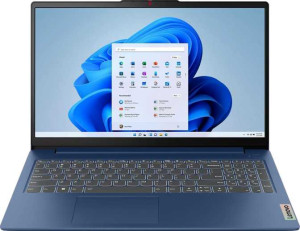
Lenovo IdeaPad Slim 3 Gen 8 15.6"
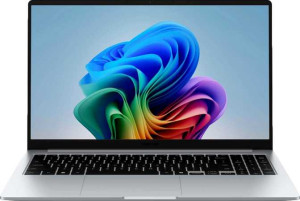
Samsung Galaxy Book5 15.6"

Lenovo IdeaPad Slim 3 Gen 8 15.6" Samsung Galaxy Book5 15.6"

Common Features

  • Both products have a 15.6″ screen size.
  • Both products do not have a touch screen.
  • Both products have a 60Hz refresh rate.
  • Both products have an anti-reflection coating on the display.
  • Both products support 4 displays.
  • Both products have 16GB of RAM.
  • Both products use flash storage.
  • Both products have an NVMe SSD.
  • Both products use multithreading.
  • Both products have a maximum memory amount of 16GB.
  • Both products use DDR5 memory.
  • Both products have no memory slots.
  • Both products use PCIe 4.0.
  • Both products support Wi-Fi.
  • Both products have an HDMI output.
  • Both products have a USB Type-C port.
  • Both products have an external memory slot.
  • Both products have stereo speakers.
  • Both products have a 3.5 mm audio jack.
  • Both products have 2 microphones.

Main Differences

  • The resolution is 1080 x 1920 px on Lenovo IdeaPad Slim 3 Gen 8 15.6″ and 1920 x 1080 px on Samsung Galaxy Book5 15.6″.
  • Internal storage is 1024GB on Lenovo IdeaPad Slim 3 Gen 8 15.6″ and 512GB on Samsung Galaxy Book5 15.6″.
  • The CPU speed is 6 x 2.4 & 4 x 1.8 GHz on Lenovo IdeaPad Slim 3 Gen 8 15.6″ and 2 x 2 & 8 x 1.7 GHz on Samsung Galaxy Book5 15.6″.
  • The CPU has 16 threads on Lenovo IdeaPad Slim 3 Gen 8 15.6″ and 14 threads on Samsung Galaxy Book5 15.6″.
  • DirectX version is DirectX 12 on Lenovo IdeaPad Slim 3 Gen 8 15.6″ and DirectX 12 Ultimate on Samsung Galaxy Book5 15.6″.
  • The turbo clock speed is 4.9GHz on Lenovo IdeaPad Slim 3 Gen 8 15.6″ and 5.2GHz on Samsung Galaxy Book5 15.6″.
  • The GPU turbo speed is 1500 MHz on Lenovo IdeaPad Slim 3 Gen 8 15.6″ and 2100 MHz on Samsung Galaxy Book5 15.6″.
  • The semiconductor size is 10 nm on Lenovo IdeaPad Slim 3 Gen 8 15.6″ and 3 nm on Samsung Galaxy Book5 15.6″.
  • The PassMark result is 23805 on Lenovo IdeaPad Slim 3 Gen 8 15.6″ and 18555 on Samsung Galaxy Book5 15.6″.
  • The PassMark result (single) is 3569 on Lenovo IdeaPad Slim 3 Gen 8 15.6″ and 3732 on Samsung Galaxy Book5 15.6″.
  • Lenovo IdeaPad Slim 3 Gen 8 15.6″ does not have an RJ45 port, while Samsung Galaxy Book5 15.6″ has one.
  • Lenovo IdeaPad Slim 3 Gen 8 15.6″ has a VGA connector, but Samsung Galaxy Book5 15.6″ does not.
  • Battery size is 47 Wh on Lenovo IdeaPad Slim 3 Gen 8 15.6″ and 61.2 Wh on Samsung Galaxy Book5 15.6″.
  • Lenovo IdeaPad Slim 3 Gen 8 15.6″ has sleep-and-charge USB ports, but Samsung Galaxy Book5 15.6″ does not.
  • Dolby Atmos is not available on Lenovo IdeaPad Slim 3 Gen 8 15.6″, but it is available on Samsung Galaxy Book5 15.6″.
  • Lenovo IdeaPad Slim 3 Gen 8 15.6″ does not have a fingerprint scanner, while Samsung Galaxy Book5 15.6″ does.
  • The clock multiplier is 24 on Lenovo IdeaPad Slim 3 Gen 8 15.6″ and 20 on Samsung Galaxy Book5 15.6″.
  • The CPU temperature is 100 °C on Lenovo IdeaPad Slim 3 Gen 8 15.6″ and 110 °C on Samsung Galaxy Book5 15.6″.
  • Thermal Design Power (TDP) is 45W on Lenovo IdeaPad Slim 3 Gen 8 15.6″ and 15W on Samsung Galaxy Book5 15.6″.
  • RAM speed (max) is 5200 MHz on Lenovo IdeaPad Slim 3 Gen 8 15.6″ and 8400 MHz on Samsung Galaxy Book5 15.6″.
Specs Comparison
Lenovo IdeaPad Slim 3 Gen 8 15.6"

Lenovo IdeaPad Slim 3 Gen 8 15.6"

Samsung Galaxy Book5 15.6"

Samsung Galaxy Book5 15.6"

Design:
Uses a fanless design
Has a backlit keyboard
is weather-sealed (splashproof)
has a rugged build

Both the Lenovo IdeaPad Slim 3 Gen 8 15.6″ and the Samsung Galaxy Book5 15.6″ share identical design specifications. Neither model features a fanless design, with both utilizing conventional cooling methods. Additionally, neither device comes with a backlit keyboard, so users may find it harder to type in low-light environments. Neither laptop is weather-sealed (splashproof), meaning they are not designed for exposure to moisture. Both devices also lack a rugged build, which suggests that they are intended for general use rather than extreme conditions or heavy-duty tasks.

In conclusion, the design features of these two laptops are quite similar, offering standard builds without specialized protection or enhanced typing features. There is no clear distinction between the Lenovo IdeaPad Slim 3 Gen 8 and the Samsung Galaxy Book5 in terms of design elements.

Display:
screen size 15.6" 15.6"
resolution 1080 x 1920 px 1920 x 1080 px
has a touch screen
refresh rate 60Hz 60Hz
has anti-reflection coating
supported displays 4 4

The display specifications of the Lenovo IdeaPad Slim 3 Gen 8 15.6″ and the Samsung Galaxy Book5 15.6″ are almost identical. Both models feature a 15.6″ screen size, and the resolution for both is 1080 x 1920 px (Full HD), ensuring clear and sharp visuals. Neither device includes a touch screen, so users will rely on the traditional keyboard and trackpad for interaction. The refresh rate for both screens is 60Hz, which is standard for most everyday computing tasks, providing smooth enough visuals for typical use.

Both the Lenovo and the Samsung models are equipped with an anti-reflection coating, helping to reduce glare and improve visibility in bright environments. Additionally, both devices support up to four external displays, making them suitable for users who require multi-monitor setups for productivity or entertainment.

In summary, the display features of both laptops are nearly identical, offering similar performance in terms of screen size, resolution, and additional features like anti-reflection coating and multi-display support.

Performance:
RAM 16GB 16GB
Uses flash storage
internal storage 1024GB 512GB
CPU speed 6 x 2.4 & 4 x 1.8 GHz 2 x 2 & 8 x 1.7 GHz
CPU threads 16 threads 14 threads
Is an NVMe SSD
DirectX version DirectX 12 DirectX 12 Ultimate
uses multithreading
maximum memory amount 16GB 16GB
DDR memory version 5 5
turbo clock speed 4.9GHz 5.2GHz
GPU turbo 1500 MHz 2100 MHz
memory slots 0 0
PCI Express (PCIe) version 4 4
semiconductor size 10 nm 3 nm
Supports 64-bit

The performance specifications of the Lenovo IdeaPad Slim 3 Gen 8 15.6″ and the Samsung Galaxy Book5 15.6″ show some key differences. Both laptops feature 16GB of RAM and use flash storage with NVMe SSDs. However, the Lenovo IdeaPad Slim 3 has 1024GB of internal storage, while the Samsung Galaxy Book5 has 512GB of storage. Both devices support multithreading, and they both support a maximum memory amount of 16GB with DDR5 memory.

The CPU specifications also differ: the Lenovo model has a combination of 6 cores at 2.4 GHz and 4 cores at 1.8 GHz, totaling 16 threads. In contrast, the Samsung model has 2 cores at 2.0 GHz and 8 cores at 1.7 GHz, totaling 14 threads. Despite these differences, both processors support multithreading, and both devices have turbo clock speeds—4.9GHz for the Lenovo and 5.2GHz for the Samsung. The Lenovo’s GPU turbo speed is 1500 MHz, while the Samsung’s GPU turbo is higher at 2100 MHz.

In terms of semiconductor size, the Lenovo features a 10 nm process, while the Samsung uses a more advanced 3 nm process. Both laptops support 64-bit systems and PCIe 4.0 for faster data transfer speeds. Additionally, both devices are compatible with DirectX 12, though the Samsung supports the newer DirectX 12 Ultimate, which offers some enhancements over the standard version found on the Lenovo.

Benchmarks:
PassMark result 23805 18555
PassMark result (single) 3569 3732

The benchmark results for the Lenovo IdeaPad Slim 3 Gen 8 15.6″ and the Samsung Galaxy Book5 15.6″ show some notable differences. The Lenovo model has a higher overall PassMark result of 23805, compared to the Samsung's 18555. This suggests that the Lenovo performs better in overall benchmark tests. However, the single-threaded performance shows a different picture, with the Samsung Galaxy Book5 slightly outperforming the Lenovo with a single-thread PassMark score of 3732, compared to the Lenovo's 3569.

These results indicate that while the Lenovo IdeaPad Slim 3 excels in multi-threaded performance, the Samsung Galaxy Book5 has a slightly stronger single-threaded performance. This could make the Samsung model better suited for tasks that rely more heavily on single-core processing, while the Lenovo may be more efficient in tasks that take advantage of multiple cores.

Overall, both laptops show solid performance in their respective categories, with the Lenovo offering stronger multi-thread performance and the Samsung offering slightly better single-thread performance.

Connectivity:
USB 4 20Gbps ports 0 0
USB 4 40Gbps ports 0 0
Thunderbolt 4 ports 0 0
Thunderbolt 3 ports 0 0
has an HDMI output
Has USB Type-C
supports Wi-Fi
has an external memory slot
RJ45 ports 0 1
HDMI ports 1 1
DisplayPort outputs 0 0
has AirPlay
mini DisplayPort outputs 0 0
has a VGA connector

The connectivity features of the Lenovo IdeaPad Slim 3 Gen 8 15.6″ and the Samsung Galaxy Book5 15.6″ are largely similar, with a few key differences. Both models do not feature USB 4 ports (either 20Gbps or 40Gbps), nor do they include Thunderbolt 4 or 3 ports. Both devices also offer one HDMI output, USB Type-C support, and Wi-Fi connectivity. Additionally, both laptops have an external memory slot and support AirPlay for wireless streaming.

However, the Lenovo model includes a VGA connector, which is absent on the Samsung Galaxy Book5. The Samsung, on the other hand, is equipped with an RJ45 Ethernet port, while the Lenovo does not have this port. Both devices lack DisplayPort outputs and mini DisplayPort outputs, limiting their video output options to HDMI. Overall, these laptops offer similar connectivity features, with the main differences being the inclusion of a VGA connector on the Lenovo and an RJ45 port on the Samsung.

Battery:
battery size 47 Wh 61.2 Wh
Has sleep-and-charge USB ports
Has a MagSafe power adapter

The battery specifications for the Lenovo IdeaPad Slim 3 Gen 8 15.6″ and the Samsung Galaxy Book5 15.6″ differ in a couple of areas. The Lenovo model comes with a 47 Wh battery, while the Samsung model is equipped with a larger 61.2 Wh battery, which could potentially offer longer usage times. Both devices do not have a MagSafe power adapter, so users will need to rely on standard charging methods.

In terms of additional features, the Lenovo model has sleep-and-charge USB ports, allowing users to charge devices while the laptop is in sleep mode. The Samsung model, however, does not feature this capability.

Overall, while the Samsung offers a larger battery, the Lenovo provides the added convenience of sleep-and-charge USB ports. These differences may influence user experience depending on the importance of charging convenience versus battery life.

Features:
release date July 2025 January 2025
has stereo speakers
has a socket for a 3.5 mm audio jack
supports ray tracing
supports DLSS
has Dolby Atmos
Has a fingerprint scanner
number of microphones 2 2
Uses 3D facial recognition
has voice commands
has a front camera
Has S/PDIF Out port
has a gyroscope
has GPS
has an accelerometer
has a compass
Has an optical disc drive

The features of the Lenovo IdeaPad Slim 3 Gen 8 15.6″ and the Samsung Galaxy Book5 15.6″ are quite similar, with a few distinct differences. Both laptops come equipped with stereo speakers, a 3.5 mm audio jack, and two microphones for audio input. They also both feature a front camera. Neither model supports ray tracing, DLSS, or has S/PDIF Out ports, gyroscopes, GPS, accelerometers, compasses, or optical disc drives.

The Lenovo IdeaPad Slim 3 lacks Dolby Atmos, a fingerprint scanner, and 3D facial recognition. On the other hand, the Samsung Galaxy Book5 offers Dolby Atmos for enhanced audio and includes a fingerprint scanner for added security, making it more suitable for users who prioritize biometric authentication.

In summary, while both laptops offer similar basic features, the Samsung Galaxy Book5 stands out with its Dolby Atmos audio and fingerprint scanner, which are absent from the Lenovo IdeaPad Slim 3.

Miscellaneous:
clock multiplier 24 20
Type Laptop Laptop
Has an unlocked multiplier
Uses big.LITTLE technology
Has NX bit
CPU temperature 100 °C 110 °C
OpenCL version 3 3
OpenGL version 4.6 4.6
Has integrated graphics
Supports ECC memory
memory channels 2 2
Thermal Design Power (TDP) 45W 15W
instruction sets SSE 4.2, SSE 4.1, AVX, AES, FMA3, F16C, MMX F16C, MMX, FMA3, AES, AVX, AVX2, SSE 4.1, SSE 4.2
RAM speed (max) 5200 MHz 8400 MHz

The miscellaneous specifications for the Lenovo IdeaPad Slim 3 Gen 8 15.6″ and the Samsung Galaxy Book5 15.6″ show some differences in terms of performance and power characteristics. Both laptops use big.LITTLE technology and have the NX bit for enhanced security. The Lenovo model has a clock multiplier of 24, while the Samsung model has a slightly lower clock multiplier of 20. This difference indicates that the Lenovo may have more potential for higher performance in certain tasks.

In terms of CPU temperature, the Lenovo IdeaPad Slim 3 has a maximum temperature of 100 °C, while the Samsung Galaxy Book5 runs hotter, with a maximum temperature of 110 °C. Both devices have integrated graphics, but neither supports ECC memory. The Lenovo has a higher Thermal Design Power (TDP) of 45W, compared to the Samsung’s 15W, meaning the Lenovo may require more power but potentially deliver more processing capacity as well.

Finally, the Lenovo IdeaPad Slim 3 supports a maximum RAM speed of 5200 MHz, while the Samsung Galaxy Book5 supports a higher maximum RAM speed of 8400 MHz. Both laptops feature dual memory channels, but the Samsung’s faster RAM speed could lead to improved performance in memory-intensive tasks.

Comparison Summary

This is a specification comparison between the Lenovo IdeaPad Slim 3 Gen 8 15.6″ and Samsung Galaxy Book5 15.6″. Both products feature a 15.6″ screen size, 60Hz refresh rate, and 16GB of RAM. They also support Wi-Fi and have a 3.5 mm audio jack. Key differences include the internal storage with 1024GB on Lenovo and 512GB on Samsung, the CPU speed with 6 x 2.4 & 4 x 1.8 GHz on Lenovo versus 2 x 2 & 8 x 1.7 GHz on Samsung, and the battery size with 47 Wh on Lenovo and 61.2 Wh on Samsung. Additionally, the GPU turbo is 1500 MHz on Lenovo and 2100 MHz on Samsung, while the PassMark result is higher on Lenovo at 23805 compared to Samsung's 18555.