Lenovo IdeaPad Slim 5 Gen 10 16"
Lenovo IdeaPad Slim 5 Gen 10 16" (Ryzen AI 5 340 / 16GB RAM / 1TB)

Lenovo IdeaPad Slim 5 Gen 10 16" Lenovo IdeaPad Slim 5 Gen 10 16" (Ryzen AI 5 340 / 16GB RAM / 1TB)

Overview

Choosing between two variants of the same laptop family can be surprisingly nuanced. In this head-to-head comparison, we examine the Lenovo IdeaPad Slim 5 Gen 10 16″ against the Lenovo IdeaPad Slim 5 Gen 10 16″ (Ryzen AI 5 340 / 16GB RAM / 1TB), diving into the meaningful distinctions across display technology, memory capacity, processor power, GPU capability, and battery endurance — so you can confidently pick the configuration that fits your lifestyle and workflow.

Common Features

  • Both laptops weigh 1760 g.
  • Neither laptop uses a fanless design.
  • Both laptops have a backlit keyboard.
  • Both laptops come with a 2-year warranty.
  • Both laptops have a volume of 1460 cm³.
  • Both laptops measure 365 mm in width, 250 mm in height, and 16 mm in thickness.
  • Both laptops feature a 16″ screen.
  • Neither laptop has a touch screen.
  • Both laptops support up to 4 external displays.
  • Both laptops have RAM running at 5600 MHz.
  • Both laptops use flash storage with an NVMe SSD of 1024 GB.
  • Both laptops have a GPU base clock speed of 400 MHz.
  • Both laptops support multithreading.
  • Both laptops support a maximum memory amount of 32 GB.
  • Both laptops use DDR5 memory.
  • Both laptops include 2 USB 3.2 Gen 2 ports (USB-C) and 2 USB 3.2 Gen 1 ports (USB-A).
  • Both laptops have sleep-and-charge USB ports.
  • Neither laptop has a MagSafe power adapter.
  • Both laptops have stereo speakers, a 3.5 mm audio jack socket, and 2 microphones.
  • Neither laptop supports ray tracing, DLSS, or Dolby Atmos, and neither includes a stylus or fingerprint scanner.

Main Differences

  • Display resolution is 2880 x 1800 px on Lenovo IdeaPad Slim 5 Gen 10 16″ and 1920 x 1200 px on Lenovo IdeaPad Slim 5 Gen 10 16″ (Ryzen AI 5 340 / 16GB RAM / 1TB).
  • Pixel density is 212 ppi on Lenovo IdeaPad Slim 5 Gen 10 16″ and 141 ppi on Lenovo IdeaPad Slim 5 Gen 10 16″ (Ryzen AI 5 340 / 16GB RAM / 1TB).
  • Display type is OLED/AMOLED on Lenovo IdeaPad Slim 5 Gen 10 16″ and LCD, LED-backlit, IPS on Lenovo IdeaPad Slim 5 Gen 10 16″ (Ryzen AI 5 340 / 16GB RAM / 1TB).
  • Typical brightness is 500 nits on Lenovo IdeaPad Slim 5 Gen 10 16″ and 300 nits on Lenovo IdeaPad Slim 5 Gen 10 16″ (Ryzen AI 5 340 / 16GB RAM / 1TB).
  • Refresh rate is 120Hz on Lenovo IdeaPad Slim 5 Gen 10 16″ and 60Hz on Lenovo IdeaPad Slim 5 Gen 10 16″ (Ryzen AI 5 340 / 16GB RAM / 1TB).
  • Anti-reflection coating is present on Lenovo IdeaPad Slim 5 Gen 10 16″ (Ryzen AI 5 340 / 16GB RAM / 1TB) but not available on Lenovo IdeaPad Slim 5 Gen 10 16″.
  • RAM is 32 GB on Lenovo IdeaPad Slim 5 Gen 10 16″ and 16 GB on Lenovo IdeaPad Slim 5 Gen 10 16″ (Ryzen AI 5 340 / 16GB RAM / 1TB).
  • CPU speed is 4 x 2 & 4 x 2 GHz on Lenovo IdeaPad Slim 5 Gen 10 16″ and 3 x 2 & 3 x 2 GHz on Lenovo IdeaPad Slim 5 Gen 10 16″ (Ryzen AI 5 340 / 16GB RAM / 1TB).
  • CPU threads count is 16 on Lenovo IdeaPad Slim 5 Gen 10 16″ and 12 on Lenovo IdeaPad Slim 5 Gen 10 16″ (Ryzen AI 5 340 / 16GB RAM / 1TB).
  • DirectX version is DirectX 12 on Lenovo IdeaPad Slim 5 Gen 10 16″ and DirectX 12 Ultimate on Lenovo IdeaPad Slim 5 Gen 10 16″ (Ryzen AI 5 340 / 16GB RAM / 1TB).
  • Turbo clock speed is 5 GHz on Lenovo IdeaPad Slim 5 Gen 10 16″ and 4.8 GHz on Lenovo IdeaPad Slim 5 Gen 10 16″ (Ryzen AI 5 340 / 16GB RAM / 1TB).
  • GPU turbo speed is 3000 MHz on Lenovo IdeaPad Slim 5 Gen 10 16″ and 2900 MHz on Lenovo IdeaPad Slim 5 Gen 10 16″ (Ryzen AI 5 340 / 16GB RAM / 1TB).
  • Geekbench 6 multi-core result is 11247 on Lenovo IdeaPad Slim 5 Gen 10 16″ and 8951 on Lenovo IdeaPad Slim 5 Gen 10 16″ (Ryzen AI 5 340 / 16GB RAM / 1TB).
  • Geekbench 6 single-core result is 2467 on Lenovo IdeaPad Slim 5 Gen 10 16″ and 2280 on Lenovo IdeaPad Slim 5 Gen 10 16″ (Ryzen AI 5 340 / 16GB RAM / 1TB).
  • PassMark result is 34459 on Lenovo IdeaPad Slim 5 Gen 10 16″ and 20210 on Lenovo IdeaPad Slim 5 Gen 10 16″ (Ryzen AI 5 340 / 16GB RAM / 1TB).
  • PassMark single-core result is 3878 on Lenovo IdeaPad Slim 5 Gen 10 16″ and 3882 on Lenovo IdeaPad Slim 5 Gen 10 16″ (Ryzen AI 5 340 / 16GB RAM / 1TB).
  • Battery size is 80 Wh on Lenovo IdeaPad Slim 5 Gen 10 16″ and 60 Wh on Lenovo IdeaPad Slim 5 Gen 10 16″ (Ryzen AI 5 340 / 16GB RAM / 1TB).
  • PassMark overclocked result is 24477 on Lenovo IdeaPad Slim 5 Gen 10 16″ and 22769 on Lenovo IdeaPad Slim 5 Gen 10 16″ (Ryzen AI 5 340 / 16GB RAM / 1TB).
  • L2 cache is 8 MB on Lenovo IdeaPad Slim 5 Gen 10 16″ and 6 MB on Lenovo IdeaPad Slim 5 Gen 10 16″ (Ryzen AI 5 340 / 16GB RAM / 1TB).
  • GPU is the Radeon 860M on Lenovo IdeaPad Slim 5 Gen 10 16″ and the Radeon 840M on Lenovo IdeaPad Slim 5 Gen 10 16″ (Ryzen AI 5 340 / 16GB RAM / 1TB).
Specs Comparison
Lenovo IdeaPad Slim 5 Gen 10 16"

Lenovo IdeaPad Slim 5 Gen 10 16"

Lenovo IdeaPad Slim 5 Gen 10 16" (Ryzen AI 5 340 / 16GB RAM / 1TB)

Lenovo IdeaPad Slim 5 Gen 10 16" (Ryzen AI 5 340 / 16GB RAM / 1TB)

Design:
weight 1760 g 1760 g
Uses a fanless design
Has a backlit keyboard
warranty period 2 years 2 years
volume 1460 cm³ 1460 cm³
width 365 mm 365 mm
height 250 mm 250 mm
thickness 16 mm 16 mm
is weather-sealed (splashproof)
has a rugged build

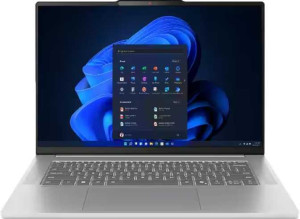
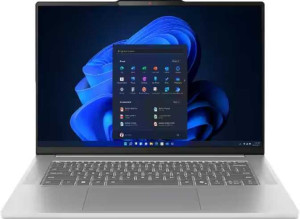
In terms of design, the Lenovo IdeaPad Slim 5 Gen 10 16″ and its Ryzen AI 5 340 variant are, for all practical purposes, identical twins. Both share the exact same physical footprint — 365 × 250 × 16 mm — and the same 1760 g weight, resulting in an identical volume of 1460 cm³. At 16 mm thin and under 1.8 kg, the chassis strikes a reasonable balance between portability and the structural demands of a 16-inch form factor, making it manageable for daily commutes without being ultrabook-slim.

Neither model offers weather sealing or a rugged build, so both are standard consumer laptops intended for everyday indoor use rather than demanding environments. On the positive side, both include a backlit keyboard and use an active cooling system (not fanless), which is expected given the performance-oriented nature of these configurations and helps sustain workloads without thermal throttling concerns.

With a 2-year warranty covering both units equally, there is no design-based advantage to choosing one over the other. These two variants are a complete tie in this category — any decision between them should rest entirely on internal hardware differences, as the physical design offers no differentiating factor whatsoever.

Display:
screen size 16" 16"
resolution 2880 x 1800 px 1920 x 1200 px
pixel density 212 ppi 141 ppi
Display type OLED/AMOLED LCD, LED-backlit, IPS
has a touch screen
brightness (typical) 500 nits 300 nits
refresh rate 120Hz 60Hz
has anti-reflection coating
supported displays 4 4

The display is where these two configurations diverge most dramatically. The base model ships with an OLED/AMOLED panel at 2880 × 1800 resolution (212 ppi), while the Ryzen AI 5 340 variant uses an IPS LCD at 1920 × 1200 (141 ppi). The pixel density gap — 71 ppi — is visually meaningful at typical laptop viewing distances, translating to noticeably sharper text and finer image detail on the OLED model. Beyond resolution, OLED technology delivers perfect blacks, near-infinite contrast, and more saturated colors by nature of its per-pixel lighting, advantages that no IPS panel can replicate regardless of tuning.

Brightness and refresh rate compound the gap further. The OLED unit peaks at 500 nits versus 300 nits on the IPS — a difference that matters in moderately lit rooms and near windows. Meanwhile, a 120Hz refresh rate makes scrolling, cursor movement, and light animation feel perceptibly smoother compared to the standard 60Hz of the IPS panel. The IPS model does counter with an anti-reflection coating, which can reduce glare in bright environments — a practical advantage the OLED version lacks — but this is a narrow consolation given the breadth of the OLED′s strengths.

The base model holds a clear and decisive edge in this category. Unless the anti-reflection coating is a hard requirement for a specific bright-light work environment, the OLED configuration outclasses the IPS variant across every other display dimension — resolution, contrast, brightness, and fluidity.

Performance:
RAM 32GB 16GB
RAM speed 5600 MHz 5600 MHz
Uses flash storage
internal storage 1024GB 1024GB
CPU speed 4 x 2 & 4 x 2 GHz 3 x 2 & 3 x 2 GHz
CPU threads 16 threads 12 threads
Is an NVMe SSD
DirectX version DirectX 12 DirectX 12 Ultimate
GPU clock speed 400 MHz 400 MHz
uses multithreading
maximum memory amount 32GB 32GB
DDR memory version 5 5
turbo clock speed 5GHz 4.8GHz
GPU turbo 3000 MHz 2900 MHz
memory slots 2 2
PCI Express (PCIe) version 4 4
semiconductor size 4 nm 4 nm
Supports 64-bit

RAM is the most immediately practical differentiator here. The base model comes equipped with 32GB of DDR5 memory, double the 16GB found in the Ryzen AI 5 340 variant. Both run at the same 5600 MHz speed and share a two-slot configuration with a 32GB maximum, meaning the Ryzen AI 5 340 unit is upgradeable to parity — but out of the box, 32GB offers significantly more headroom for memory-intensive workloads like large browser sessions, video editing timelines, or running virtual machines without slowdown.

On the CPU side, the base model also holds an edge: 16 threads across its cores versus 12 threads, and a higher turbo clock of 5 GHz compared to 4.8 GHz. The additional threads improve throughput in parallelized tasks — compilation, rendering, batch processing — while the turbo advantage benefits single-threaded performance bursts. The GPU turbo similarly favors the base model at 3000 MHz versus 2900 MHz, a modest but consistent gap. Both share the same 4 nm process node, PCIe 4 interface, and 1TB NVMe SSD, so storage performance is equal. The Ryzen AI 5 340 variant does list DirectX 12 Ultimate support versus standard DirectX 12, though this distinction is relevant only for specific graphics feature sets.

The base Lenovo IdeaPad Slim 5 Gen 10 16″ holds a clear performance advantage as configured — more RAM, more CPU threads, and higher clock ceilings across both processor and GPU. The Ryzen AI 5 340 model can close the RAM gap via upgrade, but the CPU and GPU differences are fixed hardware characteristics.

Benchmarks:
Geekbench 6 result (multi) 11247 8951
Geekbench 6 result (single) 2467 2280
PassMark result 34459 20210
PassMark result (single) 3878 3882

Benchmark results quantify what the spec sheet implied: the base model outperforms the Ryzen AI 5 340 variant in sustained, multi-core workloads by a substantial margin. Its Geekbench 6 multi-core score of 11,247 beats the Ryzen AI 5 340′s 8,951 — a roughly 26% gap — while the PassMark multi-threaded result tells an even starker story: 34,459 versus 20,210, a difference of over 70%. These are not marginal wins; they reflect the real-world consequence of having more CPU threads and higher turbo clocks, tasks like video exports, large file compressions, and multi-app workflows will complete meaningfully faster on the base configuration.

Single-core performance, however, tells a different story. The Geekbench 6 single-core scores are close — 2,467 versus 2,280 — and the PassMark single-core results are virtually identical at 3,878 and 3,882 respectively. This means that for everyday tasks driven by a single thread — web browsing, document editing, launching applications — both machines feel essentially equivalent. The Ryzen AI 5 340 variant is not a slow machine; it simply hits a ceiling sooner when workloads scale across cores.

The base Lenovo IdeaPad Slim 5 Gen 10 16″ wins this category convincingly for multi-threaded use cases, which is where modern productivity and creative workloads increasingly live. For users whose work is predominantly single-threaded, the gap effectively disappears — but as a measure of overall computational ceiling, the base model is the stronger performer.
Connectivity:
USB 3.2 Gen 2 ports (USB-C) 2 2
USB 3.2 Gen 2 ports (USB-A) 0 0
USB 4 20Gbps ports 0 0
USB 4 40Gbps ports 0 0
Thunderbolt 4 ports 0 0
USB 3.2 Gen 1 ports (USB-C) 0 0
USB 3.2 Gen 1 ports (USB-A) 2 2
Thunderbolt 3 ports 0 0
has an HDMI output
Has USB Type-C
supports Wi-Fi
Wi-Fi version Wi-Fi 7 (802.11be), Wi-Fi 6E (802.11ax), Wi-Fi 6 (802.11ax), Wi-Fi 5 (802.11ac), Wi-Fi 4 (802.11n) Wi-Fi 7 (802.11be), Wi-Fi 6E (802.11ax), Wi-Fi 6 (802.11ax), Wi-Fi 5 (802.11ac), Wi-Fi 4 (802.11n)
has an external memory slot
Bluetooth version 5.4 5.4
RJ45 ports 0 0
HDMI ports 1 1
HDMI version HDMI 2.1 HDMI 2.1
DisplayPort outputs 0 0
has AirPlay
mini DisplayPort outputs 0 0
has a VGA connector

Both configurations share an identical connectivity suite, and it is a well-rounded one for a mainstream 16-inch laptop. The port selection includes two USB 3.2 Gen 2 Type-C ports and two USB 3.2 Gen 1 Type-A ports, covering the majority of modern peripherals without requiring adapters. An HDMI 2.1 output adds full-bandwidth external display support — useful for 4K or high-refresh-rate monitors — and an external memory card slot provides convenient direct media access that many slim laptops omit.

Wireless connectivity is equally matched and genuinely current: both support Wi-Fi 7 (802.11be), the latest standard, which offers improved throughput and reduced latency in congested environments compared to Wi-Fi 6E. Bluetooth 5.4 rounds out the wireless stack, bringing better connection stability and efficiency for peripherals. The absence of an RJ45 ethernet port is the one notable omission, meaning wired network connections require a USB-C adapter on either model.

This category is a complete tie — every port, wireless standard, and feature is shared identically across both variants. Connectivity should play no role in choosing between them.

Battery:
battery size 80 Wh 60 Wh
Has sleep-and-charge USB ports
Has a MagSafe power adapter

Battery capacity is the sole differentiator here, and it is a meaningful one. The base model carries an 80 Wh battery, while the Ryzen AI 5 340 variant ships with a noticeably smaller 60 Wh cell — a 33% reduction in stored energy. All else being equal, a larger battery directly translates to more time between charges, and a gap of this size is typically felt in real-world use, potentially amounting to one to several additional hours depending on workload.

Both models share sleep-and-charge USB ports, which allow connected devices to be charged even when the laptop is powered off — a practical convenience for keeping phones or accessories topped up. Neither uses a MagSafe-style connector, so both rely on standard charging through their USB-C ports.

The base Lenovo IdeaPad Slim 5 Gen 10 16″ has a clear advantage in this category. The 20 Wh difference is substantial enough to matter for users who work away from an outlet for extended periods, making the base model the more capable option for untethered use.

Features:
release date July 2025 June 2025
has stereo speakers
has a socket for a 3.5 mm audio jack
supports ray tracing
supports DLSS
has Dolby Atmos
Stylus included
Has a fingerprint scanner
number of microphones 2 2
Uses 3D facial recognition
has voice commands
has a front camera
Has S/PDIF Out port
has a gyroscope
has GPS
has an accelerometer
has a compass
Has an optical disc drive

Feature sets across both configurations are entirely identical, and they reflect a thoughtful selection for a mainstream productivity laptop. The inclusion of 3D facial recognition is a highlight — it offers a more secure and convenient login experience than a standard 2D camera-based solution, bringing Windows Hello authentication closer to the depth-sensing standard associated with premium devices. Paired with a front camera and dual microphones, both units are well-equipped for video calls out of the box.

Stereo speakers and a 3.5 mm audio jack cover everyday audio needs, and the absence of features like GPS, gyroscope, or an optical disc drive is entirely expected for a laptop in this category — their omission is not a drawback. The lack of a fingerprint scanner is worth noting given that 3D facial recognition is the sole biometric option; in low-light conditions or when wearing a mask, users on either model would fall back to a PIN.

Since every feature is shared across both variants, this category is a complete tie. Neither configuration offers any functional advantage over the other in terms of features, and this group should carry no weight in the purchasing decision.

Miscellaneous:
clock multiplier 20 20
PassMark result (overclocked) 24477 22769
render output units (ROPs) 8 8
texture mapping units (TMUs) 32 32
shading units 512 512
OpenGL version 4.6 4.6
GPU execution units 8 8
OpenCL version 2.1 2.1
Type Laptop, Desktop Laptop, Desktop
instruction sets MMX, F16C, FMA3, AES, AVX, AVX2, SSE 4.1, SSE 4.2 MMX, F16C, FMA3, AES, AVX, AVX2, SSE 4.1, SSE 4.2
Has an unlocked multiplier
Has NX bit
L3 cache 16 MB 16 MB
L2 cache 8 MB 6 MB
GPU name Radeon 860M Radeon 840M
Has integrated graphics
Supports ECC memory
memory channels 2 2
RAM speed (max) 8000 MHz 8000 MHz
CPU temperature 100 °C 100 °C
Thermal Design Power (TDP) 28W 28W
Uses big.LITTLE technology

Digging into the silicon details, the two variants diverge in a couple of meaningful ways. The base model features the Radeon 860M integrated GPU versus the Radeon 840M in the Ryzen AI 5 340 unit — a generational step up within AMD′s integrated graphics lineup. This is reinforced by the overclocked PassMark result: 24,477 for the base model versus 22,769, an approximately 7% lead that aligns with the GPU tier difference. For light gaming, GPU-accelerated creative tasks, or driving the base model′s higher-resolution OLED display, the 860M carries a tangible if not transformative advantage.

The L2 cache also differs: 8 MB on the base model versus 6 MB on the Ryzen AI 5 340 variant, while both share an identical 16 MB L3 cache. More L2 cache reduces latency for frequently accessed data and can improve performance in cache-sensitive workloads, complementing the thread and clock advantages already noted in the performance group. Both chips operate under the same 28W TDP, share the same thermal ceiling, and support identical instruction sets — meaning the efficiency envelope and software compatibility are equal across both.

The base model edges ahead in this category as well, courtesy of its superior integrated GPU and larger L2 cache. These are not dramatic gaps, but they consistently point in the same direction: the base configuration offers more capable silicon across both CPU-adjacent and graphics-adjacent metrics.

Comparison Summary & Verdict

Both laptops share the same chassis, connectivity, and core build quality, but diverge significantly where it counts most. The Lenovo IdeaPad Slim 5 Gen 10 16″ impresses with its OLED display running at 2880x1800 resolution, a 120Hz refresh rate, and 500 nits of brightness, complemented by 32GB of RAM, the faster Radeon 860M GPU, an 80Wh battery, and notably higher multi-core benchmark scores — making it the stronger pick for creative professionals, power users, and anyone who spends long hours on visually demanding tasks. The Lenovo IdeaPad Slim 5 Gen 10 16″ (Ryzen AI 5 340 / 16GB RAM / 1TB), meanwhile, counters with an anti-reflection IPS panel better suited to bright office or outdoor settings, DirectX 12 Ultimate support, and a lighter spec profile that handles everyday productivity tasks with ease. Choose according to whether display quality and raw performance or glare reduction and practicality matter more to you.

Lenovo IdeaPad Slim 5 Gen 10 16
Buy Lenovo IdeaPad Slim 5 Gen 10 16" if...

Buy the Lenovo IdeaPad Slim 5 Gen 10 16″ if you want a superior OLED screen with higher resolution, a faster 120Hz refresh rate, 32GB of RAM, a bigger 80Wh battery, and stronger overall benchmark performance.

Lenovo IdeaPad Slim 5 Gen 10 16
Buy Lenovo IdeaPad Slim 5 Gen 10 16" (Ryzen AI 5 340 / 16GB RAM / 1TB) if...

Buy the Lenovo IdeaPad Slim 5 Gen 10 16″ (Ryzen AI 5 340 / 16GB RAM / 1TB) if you prefer an anti-reflection display for use in bright environments and need a capable everyday laptop without requiring top-tier memory or display specs.