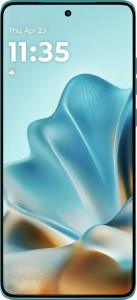
Motorola Edge 60 Fusion
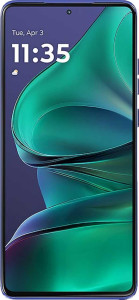
Motorola Edge 60 Stylus

Motorola Edge 60 Fusion Motorola Edge 60 Stylus

Common Features

  • Both products are waterproof with an IP68 rating.
  • Neither product has a rugged build.
  • Neither product can be folded.
  • Both displays are OLED/AMOLED.
  • Both displays have a resolution of 1220 x 2712 px.
  • Both displays have a 120Hz refresh rate.
  • Both displays have branded damage-resistant glass.
  • Both displays support HDR10.
  • Neither product has an Always-On Display.
  • Neither product supports Dolby Vision.
  • Neither product has a secondary screen.
  • Both products have a 32MP front camera.
  • Both products have built-in optical image stabilization for the main camera.
  • Both products can record 2160 x 30 fps video with the main camera.
  • Both products use Android 15 as the operating system.
  • Both products support clipboard warnings.
  • Both products support location privacy options.
  • Both products support camera/microphone privacy options.
  • Both products support fast charging at 68W.
  • Both products come with a charger.

Main Differences

  • Motorola Edge 60 Fusion weighs 180.1 g, while Motorola Edge 60 Stylus weighs 191 g.
  • Motorola Edge 60 Fusion is 8.25 mm thick, while Motorola Edge 60 Stylus is 8.3 mm thick.
  • Motorola Edge 60 Fusion is 73.08 mm wide, while Motorola Edge 60 Stylus is 74.8 mm wide.
  • Motorola Edge 60 Fusion is 161.2 mm tall, while Motorola Edge 60 Stylus is 162.2 mm tall.
  • Motorola Edge 60 Fusion has a volume of 97.189092 cm³, while Motorola Edge 60 Stylus has a volume of 100.700248 cm³.
  • Motorola Edge 60 Fusion has a 6.67″ display, while Motorola Edge 60 Stylus has a 6.7″ display.
  • Motorola Edge 60 Fusion has a pixel density of 446 ppi, while Motorola Edge 60 Stylus has a pixel density of 444 ppi.
  • Motorola Edge 60 Fusion has a typical brightness of 1500 nits, while Motorola Edge 60 Stylus has a typical brightness of 1400 nits.
  • Motorola Edge 60 Fusion has Gorilla Glass 7i, while Motorola Edge 60 Stylus has Gorilla Glass 3.
  • Motorola Edge 60 Fusion supports HDR10+, while Motorola Edge 60 Stylus does not.
  • Motorola Edge 60 Fusion has 512GB of internal storage, while Motorola Edge 60 Stylus has 256GB of internal storage.
  • Motorola Edge 60 Fusion has 12GB of RAM, while Motorola Edge 60 Stylus has 8GB of RAM.
  • Motorola Edge 60 Fusion uses the MediaTek Dimensity 7300 chipset, while Motorola Edge 60 Stylus uses the Qualcomm Snapdragon 7s Gen 2 chipset.
  • Motorola Edge 60 Fusion has a Mali G615 MC2 GPU, while Motorola Edge 60 Stylus has an Adreno 710 GPU.
  • Motorola Edge 60 Fusion has a CPU clock speed of 4 x 2.5 & 4 x 2 GHz, while Motorola Edge 60 Stylus has a CPU clock speed of 4 x 2.4 & 4 x 1.95 GHz.
  • Motorola Edge 60 Fusion scores 2932 in Geekbench 6 multi-core tests, while Motorola Edge 60 Stylus scores 2970.
  • Motorola Edge 60 Fusion scores 1026 in Geekbench 6 single-core tests, while Motorola Edge 60 Stylus scores 1015.
  • Motorola Edge 60 Fusion has a GPU clock speed of 1047 MHz, while Motorola Edge 60 Stylus has a GPU clock speed of 940 MHz.
  • Motorola Edge 60 Fusion has RAM speed of 6400 MHz, while Motorola Edge 60 Stylus has RAM speed of 3200 MHz.
  • Motorola Edge 60 Fusion can shoot raw photos, while Motorola Edge 60 Stylus cannot.
  • Motorola Edge 60 Fusion has a battery power of 5200 mAh, while Motorola Edge 60 Stylus has a battery power of 5000 mAh.
  • Motorola Edge 60 Fusion does not have wireless charging, while Motorola Edge 60 Stylus supports wireless charging.
  • Motorola Edge 60 Fusion does not have a 3.5 mm audio jack, while Motorola Edge 60 Stylus has a 3.5 mm audio jack.
  • Motorola Edge 60 Fusion has Wi-Fi versions 4, 5, and 6, while Motorola Edge 60 Stylus adds support for Wi-Fi 6E.
  • Motorola Edge 60 Fusion has two SIM slots, while Motorola Edge 60 Stylus has one SIM slot and one eSIM slot.
  • Motorola Edge 60 Fusion has download speeds of 3270 MBits/s, while Motorola Edge 60 Stylus has download speeds of 2900 MBits/s.
  • Motorola Edge 60 Fusion has upload speeds of 3270 MBits/s, while Motorola Edge 60 Stylus has upload speeds of 1500 MBits/s.
  • Motorola Edge 60 Fusion does not have a barometer, while Motorola Edge 60 Stylus has a barometer.
  • Motorola Edge 60 Fusion does not include a stylus, while Motorola Edge 60 Stylus includes a stylus.
  • Motorola Edge 60 Fusion has a curved display, while Motorola Edge 60 Stylus does not.
Specs Comparison
Motorola Edge 60 Fusion

Motorola Edge 60 Fusion

Motorola Edge 60 Stylus

Motorola Edge 60 Stylus

Design:
water resistance Waterproof Waterproof
weight 180.1 g 191 g
thickness 8.25 mm 8.3 mm
width 73.08 mm 74.8 mm
height 161.2 mm 162.2 mm
volume 97.189092 cm³ 100.700248 cm³
Ingress Protection (IP) rating IP68 IP68
has a rugged build
can be folded

Both the Motorola Edge 60 Fusion and the Motorola Edge 60 Stylus are waterproof devices, with an IP68 rating for water resistance. This means both phones are protected against dust and can withstand submersion in water, though the exact depth and duration are not specified.

In terms of size, the Edge 60 Fusion is slightly lighter, weighing 180.1 g, compared to the Edge 60 Stylus, which weighs 191 g. The Fusion is also a bit thinner at 8.25 mm, while the Stylus is marginally thicker at 8.3 mm. The width of the Fusion is 73.08 mm, making it slightly narrower than the Stylus, which measures 74.8 mm. The height of the two models is almost identical, with the Fusion standing at 161.2 mm and the Stylus at 162.2 mm.

In terms of volume, the Edge 60 Fusion has a smaller size, measuring 97.189092 cm³, compared to the Edge 60 Stylus, which has a volume of 100.700248 cm³. Neither device features a rugged build or the ability to fold, so both are similar in that regard.

Display:
Display type OLED/AMOLED OLED/AMOLED
screen size 6.67" 6.7"
pixel density 446 ppi 444 ppi
resolution 1220 x 2712 px 1220 x 2712 px
refresh rate 120Hz 120Hz
brightness (typical) 1500 nits 1400 nits
has branded damage-resistant glass
Gorilla Glass version Gorilla Glass 7i Gorilla Glass 3
supports HDR10
supports HDR10+
Always-On Display
supports Dolby Vision
Has a secondary screen
has a touch screen

Both the Motorola Edge 60 Fusion and the Motorola Edge 60 Stylus feature OLED/AMOLED displays with a screen size that is very close—6.67″ on the Fusion and 6.7″ on the Stylus. The pixel density is also similar, with the Fusion at 446 ppi and the Stylus at 444 ppi, resulting in nearly identical sharpness and clarity.

Both phones share the same resolution of 1220 x 2712 px, offering high detail, and a 120Hz refresh rate, which allows for smooth scrolling and gaming experiences. However, the brightness levels differ slightly, with the Fusion reaching a typical brightness of 1500 nits, while the Stylus peaks at 1400 nits, meaning the Fusion may offer a slightly brighter display in most conditions.

In terms of durability, both models have branded damage-resistant glass, but they use different versions of Gorilla Glass. The Fusion uses the more recent Gorilla Glass 7i, while the Stylus features Gorilla Glass 3. Additionally, while both devices support HDR10, only the Fusion supports HDR10+ for enhanced color and contrast. Neither phone offers Dolby Vision, an Always-On Display, or a secondary screen, and both have touch screens.

Performance:
internal storage 512GB 256GB
RAM 12GB 8GB
Chipset (SoC) name MediaTek Dimensity 7300 Qualcomm Snapdragon 7s Gen 2
GPU name Mali G615 MC2 Adreno 710
CPU speed 4 x 2.5 & 4 x 2 GHz 4 x 2.4 & 4 x 1.95 GHz
Geekbench 6 result (multi) 2932 2970
Geekbench 6 result (single) 1026 1015
GPU clock speed 1047 MHz 940 MHz
Has integrated LTE
RAM speed 6400 MHz 3200 MHz
semiconductor size 4 nm 4 nm
Supports 64-bit
DirectX version DirectX 12 DirectX 12
Has integrated graphics
Uses big.LITTLE technology
CPU threads 8 threads 8 threads
Uses HMP
maximum memory amount 16GB 16GB
DDR memory version 5 5

The Motorola Edge 60 Fusion and the Motorola Edge 60 Stylus both come with powerful chipsets, though the Fusion uses the MediaTek Dimensity 7300, while the Stylus features the Qualcomm Snapdragon 7s Gen 2. The Fusion’s CPU runs at 4 x 2.5 GHz and 4 x 2 GHz, compared to the Stylus's 4 x 2.4 GHz and 4 x 1.95 GHz, meaning the Fusion has slightly faster peak CPU speeds. The Fusion also has a higher GPU clock speed of 1047 MHz, compared to the Stylus's 940 MHz. However, the Stylus achieves a slightly higher Geekbench 6 multi-core result of 2970, compared to the Fusion’s 2932, though the Fusion has a higher single-core score of 1026 versus the Stylus's 1015.

In terms of memory, the Fusion is equipped with 12GB of RAM and has a faster RAM speed of 6400 MHz, while the Stylus has 8GB of RAM and a slower 3200 MHz RAM speed. Both phones support up to 16GB of maximum memory and use DDR5 memory, so they are quite comparable in terms of potential memory expansion.

Both devices use a 4 nm semiconductor size and support 64-bit architecture. They both support DirectX 12, have integrated LTE and graphics, use big.LITTLE technology, and offer 8 CPU threads with HMP support, ensuring that both devices are well-optimized for multitasking and performance efficiency. Neither phone has significant differences in terms of these core processing features.

Cameras:
Has a dual-lens (or multi-lens) main camera
megapixels (front camera) 32MP 32MP
has built-in optical image stabilization
video recording (main camera) 2160 x 30 fps 2160 x 30 fps
Has a dual-tone LED flash
number of flash LEDs 1 1
has a BSI sensor
has a CMOS sensor
has continuous autofocus when recording movies
Has phase-detection autofocus for photos
supports slow-motion video recording
has a built-in HDR mode
has manual exposure
has a flash
optical zoom 0x 0x
has manual ISO
has a serial shot mode
has manual focus
has a front camera
Has laser autofocus
Shoots 360° panorama
has manual white balance
shoots raw
has touch autofocus
has manual shutter speed
can create panoramas in-camera
wide aperture (front camera) 2.2f 2.2f
Has timelapse function
Has a front-facing LED flash
has a dual-lens (or multi-lens) front camera
supports HDR10 recording
supports Dolby Vision recording
has a front-facing camera under the display
Has a RGB LED flash
has 3D photo/video recording capabilities

Both the Motorola Edge 60 Fusion and the Motorola Edge 60 Stylus feature a 32MP front camera with a wide aperture of f/2.2. The front cameras on both models lack a front-facing LED flash and do not offer dual-lens setups. Both phones also support features such as manual exposure, touch autofocus, and the ability to create panoramas in-camera. Additionally, both devices support timelapse and slow-motion video recording, but neither supports HDR10 or Dolby Vision recording.

When it comes to the main camera, both the Fusion and the Stylus include a dual-lens setup, though the specs for the second lens are not provided. Both phones also offer video recording at 2160 x 30 fps and have optical image stabilization, phase-detection autofocus, and a flash with one LED. Neither camera system supports optical zoom or laser autofocus, and both can shoot raw images. However, the Fusion has a slight advantage with a built-in HDR mode, while the Stylus lacks this feature.

Neither device supports features like 3D photo/video recording, RGB LED flash, or a front-facing camera under the display. Both cameras are based on a CMOS sensor, and neither phone includes a BSI sensor. Despite their similarities, the Fusion stands out with its additional HDR capability for photos, while both devices offer solid overall camera performance.

Operating system:
Android version Android 15 Android 15
has clipboard warnings
has location privacy options
has camera/microphone privacy options
has Mail Privacy Protection
has theme customization
can block app tracking
blocks cross-site tracking
has on-device machine learning
has notification permissions
has media picker
Can play games while they download
has dark mode
has Wi-Fi password sharing
has battery health check
has an extra dim mode
has focus modes
has dynamic theming
can offload apps
Has customizable notifications
has Live Text
has full-page screenshots
supports split screen
gets direct OS updates
has PiP
Can be used as a PC
Has sharing intents
has a child lock
Supports widgets
Is free and open source
Has offline voice recognition
has voice commands
Tracks the current position of a mobile device
is a multi-user system
has Quick Start

Both the Motorola Edge 60 Fusion and the Motorola Edge 60 Stylus run Android 15 and include a similar range of features aimed at enhancing privacy and usability. Both devices offer clipboard warnings, location and camera/microphone privacy options, and theme customization. They also support blocking app tracking, have on-device machine learning, and allow for media picker functionality. Neither device includes Mail Privacy Protection or Wi-Fi password sharing.

In terms of customization, both phones offer dynamic theming, customizable notifications, and the ability to offload apps. They both support features like dark mode, Live Text, full-page screenshots, split screen, and picture-in-picture (PiP). Neither device supports direct OS updates, and both lack the Quick Start feature.

Both models are equipped with similar system capabilities, including offline voice recognition, voice commands, tracking the current position of a mobile device, and multi-user support. Neither phone allows for use as a PC, but both support widgets, sharing intents, and have a child lock. Additionally, both are free and open source, ensuring access to a broad set of software functionalities and flexibility.

Battery:
battery power 5200 mAh 5000 mAh
has wireless charging
Supports fast charging
charging speed 68W 68W
comes with a charger
has a removable battery
has a battery level indicator
has a rechargeable battery

The Motorola Edge 60 Fusion has a 5200 mAh battery, slightly larger than the 5000 mAh battery in the Motorola Edge 60 Stylus. Both devices support fast charging at 68W and come with a charger, ensuring quick power-ups. Neither phone features wireless charging, though the Stylus includes this functionality, while the Fusion does not. Both phones also have rechargeable batteries, battery level indicators, and non-removable batteries.

Overall, both devices offer similar charging speeds, but the Edge 60 Stylus adds wireless charging support, while the Fusion's larger battery capacity may offer slightly more endurance overall. Both models are equipped with modern battery management features, providing reliable power for daily use.

Audio:
has a socket for a 3.5 mm audio jack
has stereo speakers
has aptX
has LDAC
has aptX HD
has aptX Adaptive
has aptX Lossless
Has a radio

The Motorola Edge 60 Fusion and the Motorola Edge 60 Stylus both feature stereo speakers, ensuring quality audio output. However, there is a difference in terms of audio connectivity: the Fusion does not have a 3.5 mm audio jack, while the Stylus includes one, offering more flexibility for wired headphones or other audio devices.

Neither phone supports high-end audio codecs like aptX, LDAC, aptX HD, aptX Adaptive, or aptX Lossless, so neither device offers advanced Bluetooth audio features. Additionally, neither phone has an FM radio.

While both phones provide stereo sound for a better listening experience, the key difference lies in the 3.5 mm audio jack, which is available only on the Stylus.

Connectivity & Features:
release date April 2025 April 2025
has 5G support
Wi-Fi version Wi-Fi 4 (802.11n), Wi-Fi 5 (802.11ac), Wi-Fi 6 (802.11ax) Wi-Fi 4 (802.11n), Wi-Fi 5 (802.11ac), Wi-Fi 6 (802.11ax), Wi-Fi 6E (802.11ax)
SIM cards 2 SIM 1 SIM, 1 eSIM
Bluetooth version 5.4 5.4
has an external memory slot
Has USB Type-C
USB version 2 2
has NFC
download speed 3270 MBits/s 2900 MBits/s
upload speed 3270 MBits/s 1500 MBits/s
Has a fingerprint scanner
has emergency SOS via satellite
has crash detection
is DLNA-certified
has a gyroscope
supports ANT+
Has a heart rate monitor
has GPS
has a compass
supports Wi-Fi
Has an infrared sensor
has an accelerometer
has a cellular module
Has a barometer
has an HDMI output
Uses 3D facial recognition
Has an iris scanner
Stylus included
supports Galileo
Has motion tracking
Has optical tracking
Has a built-in projector

Both the Motorola Edge 60 Fusion and the Motorola Edge 60 Stylus support 5G connectivity and include NFC, Bluetooth 5.4, and USB Type-C ports with USB version 2. Both phones offer Wi-Fi 4 (802.11n), Wi-Fi 5 (802.11ac), and Wi-Fi 6 (802.11ax), though the Stylus additionally supports Wi-Fi 6E (802.11ax). The Fusion supports dual SIM cards, while the Stylus has one physical SIM and one eSIM.

In terms of speeds, the Fusion has a faster download speed of 3270 MBit/s compared to the Stylus's 2900 MBit/s, but the Stylus offers a slower upload speed of 1500 MBit/s versus the Fusion's 3270 MBit/s. Both phones include a fingerprint scanner, a gyroscope, accelerometer, GPS, compass, and Galileo support. The Fusion lacks a barometer, which is present in the Stylus.

Neither phone includes an infrared sensor, HDMI output, 3D facial recognition, or an iris scanner. Additionally, neither supports motion or optical tracking, has a built-in projector, or offers emergency SOS via satellite. The Stylus stands out with the inclusion of a stylus, which the Fusion does not have.

Miscellaneous:
has a video light
Has sapphire glass display
Has a curved display
Has an e-paper display

Both the Motorola Edge 60 Fusion and the Motorola Edge 60 Stylus feature a video light, helping improve low-light video recording. Neither device includes sapphire glass for extra screen protection, nor do they feature an e-paper display. The Fusion is equipped with a curved display, while the Stylus does not have this feature, offering a standard flat display instead.

Overall, while both phones share some similarities, such as the inclusion of a video light and lack of sapphire glass and e-paper displays, the curved display is a distinctive feature of the Fusion, setting it apart from the flat-screened Stylus.

Comparison Summary

This is a specification comparison between the Motorola Edge 60 Fusion and Motorola Edge 60 Stylus. Both devices feature a waterproof design with an IP68 rating and an OLED/AMOLED display with a 120Hz refresh rate. The front camera is 32MP on both models, and they both run on Android 15. The Motorola Edge 60 Fusion has a 512GB storage and 12GB RAM, while the Motorola Edge 60 Stylus offers 256GB storage and 8GB RAM. Additionally, the Edge 60 Fusion supports HDR10+ and has a MediaTek Dimensity 7300 chipset, while the Edge 60 Stylus does not support HDR10+ and uses a Qualcomm Snapdragon 7s Gen 2 chipset. The Edge 60 Fusion also has a curved display, while the Edge 60 Stylus does not.