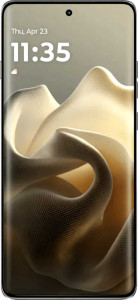
Motorola Edge 60 Pro
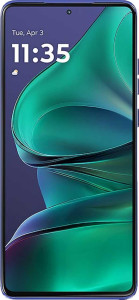
Motorola Edge 60 Stylus

Motorola Edge 60 Pro Motorola Edge 60 Stylus

Overview

Welcome to our in-depth comparison of the Motorola Edge 60 Pro and the Motorola Edge 60 Stylus — two mid-range contenders from Motorola that share a surprising amount of DNA yet diverge in meaningful ways. Both phones arrive with IP68 waterproofing, a 6.7″ OLED display, and 5G connectivity, but key battlegrounds emerge around raw performance, display brightness, battery capacity, and the unique productivity features each device brings to the table. Read on to see how they stack up spec by spec.

Common Features

  • Both phones are waterproof with an IP68 ingress protection rating.
  • Neither phone has a rugged build.
  • Neither phone can be folded.
  • Both phones feature a 6.7″ OLED/AMOLED display.
  • Both phones have a pixel density of 444 ppi and a resolution of 1220 x 2712 px.
  • Both phones support a 120Hz refresh rate.
  • Both phones feature damage-resistant glass.
  • Both phones support HDR10.
  • Dolby Vision support is not available on either phone.
  • Both phones use a 4 nm semiconductor and support 64-bit processing.
  • Both phones have an integrated LTE modem and integrated graphics.
  • Both phones use big.LITTLE technology with HMP and have 8 CPU threads.
  • Both phones feature a multi-lens main camera with built-in optical image stabilization.
  • Both phones can record video at 2160 x 30 fps on the main camera.
  • Both phones run Android 15 and support theme customization.
  • Both phones have clipboard warnings, location privacy options, and camera/microphone privacy options.
  • App tracking can be blocked on both phones, but neither blocks cross-site tracking.
  • Both phones support wireless charging at 15W, fast charging, and come with a charger included.
  • Neither phone has a removable battery or reverse wireless charging.
  • Both phones have stereo speakers, no built-in radio, 5G support, NFC, a fingerprint scanner, and USB Type-C (USB 2.0).
  • Both phones use a 1 SIM + 1 eSIM configuration.
  • Neither phone has emergency SOS via satellite or crash detection.

Main Differences

  • Weight is 186 g on Motorola Edge 60 Pro and 191 g on Motorola Edge 60 Stylus.
  • Thickness is 8.2 mm on Motorola Edge 60 Pro and 8.3 mm on Motorola Edge 60 Stylus.
  • Width is 73.1 mm on Motorola Edge 60 Pro and 74.8 mm on Motorola Edge 60 Stylus.
  • Height is 160.7 mm on Motorola Edge 60 Pro and 162.2 mm on Motorola Edge 60 Stylus.
  • Typical brightness is 4500 nits on Motorola Edge 60 Pro and 1400 nits on Motorola Edge 60 Stylus.
  • The display is protected by Gorilla Glass 7i on Motorola Edge 60 Pro and Gorilla Glass 3 on Motorola Edge 60 Stylus.
  • HDR10+ support is present on Motorola Edge 60 Pro but not available on Motorola Edge 60 Stylus.
  • Internal storage is 512GB on Motorola Edge 60 Pro and 256GB on Motorola Edge 60 Stylus.
  • RAM is 12GB on Motorola Edge 60 Pro and 8GB on Motorola Edge 60 Stylus.
  • The chipset is MediaTek Dimensity 8350 on Motorola Edge 60 Pro and Qualcomm Snapdragon 7s Gen 2 on Motorola Edge 60 Stylus.
  • Geekbench 6 multi-core score is 4700 on Motorola Edge 60 Pro and 2970 on Motorola Edge 60 Stylus.
  • Geekbench 6 single-core score is 1536 on Motorola Edge 60 Pro and 1015 on Motorola Edge 60 Stylus.
  • Maximum memory bandwidth is 68.2 GB/s on Motorola Edge 60 Pro and 25.6 GB/s on Motorola Edge 60 Stylus.
  • Front camera resolution is 50MP on Motorola Edge 60 Pro and 32MP on Motorola Edge 60 Stylus.
  • Optical zoom is 3x on Motorola Edge 60 Pro, while Motorola Edge 60 Stylus has no optical zoom.
  • PC mode functionality is available on Motorola Edge 60 Pro but not on Motorola Edge 60 Stylus.
  • Battery capacity is 6000 mAh on Motorola Edge 60 Pro and 5000 mAh on Motorola Edge 60 Stylus.
  • Wired charging speed is 90W on Motorola Edge 60 Pro and 68W on Motorola Edge 60 Stylus.
  • A 3.5 mm audio jack is available on Motorola Edge 60 Stylus but not on Motorola Edge 60 Pro.
  • aptX Adaptive support is present on Motorola Edge 60 Pro but not available on Motorola Edge 60 Stylus.
  • An external memory slot is available on Motorola Edge 60 Stylus but not on Motorola Edge 60 Pro.
  • A stylus is included with Motorola Edge 60 Stylus but not with Motorola Edge 60 Pro.
  • Motorola Edge 60 Pro features a curved display, while Motorola Edge 60 Stylus has a flat display.
Specs Comparison
Motorola Edge 60 Pro

Motorola Edge 60 Pro

Motorola Edge 60 Stylus

Motorola Edge 60 Stylus

Design:
water resistance Waterproof Waterproof
weight 186 g 191 g
thickness 8.2 mm 8.3 mm
width 73.1 mm 74.8 mm
height 160.7 mm 162.2 mm
volume 96.326794 cm³ 100.700248 cm³
Ingress Protection (IP) rating IP68 IP68
has a rugged build
can be folded

Both the Edge 60 Pro and the Edge 60 Stylus are IP68-rated waterproof devices with no rugged build and no folding mechanism, meaning they share an equivalent level of environmental protection and the same conventional candy-bar form factor. Neither offers a durability advantage over the other in terms of water or dust resistance.

Where they diverge is in physical dimensions. The Edge 60 Stylus is larger across every measurable axis — it is 1.5 mm taller, 1.7 mm wider, and 0.1 mm thicker than the Pro, resulting in a noticeably greater volume of 100.70 cm³ versus 96.33 cm³. That size difference is almost certainly a direct consequence of accommodating the stylus hardware. It also weighs 191 g compared to the Pro's 186 g — a 5 g gap that is minor in isolation but, combined with the wider frame, makes the Stylus the less one-handed-friendly device of the two.

From a pure design and ergonomics standpoint, the Edge 60 Pro holds a clear advantage: it is more compact, lighter, and easier to grip with one hand. The Stylus's larger footprint is an intentional trade-off for its pen input capability, so users who prioritize pocketability and handling comfort should lean toward the Pro, while those who need stylus functionality will simply have to accept the extra bulk.

Display:
Display type OLED/AMOLED OLED/AMOLED
screen size 6.7" 6.7"
pixel density 444 ppi 444 ppi
resolution 1220 x 2712 px 1220 x 2712 px
refresh rate 120Hz 120Hz
brightness (typical) 4500 nits 1400 nits
has branded damage-resistant glass
Gorilla Glass version Gorilla Glass 7i Gorilla Glass 3
supports HDR10
supports HDR10+
supports Dolby Vision
Has a secondary screen
has a touch screen

On paper, the two displays look nearly identical: both are 6.7″ OLED/AMOLED panels running at the same 1220 x 2712 px resolution, 444 ppi pixel density, and 120 Hz refresh rate. For everyday use — scrolling, streaming, browsing — neither screen will feel sharper or smoother than the other.

The divergence becomes significant the moment you look at brightness and glass protection. The Edge 60 Pro peaks at a striking 4500 nits, versus just 1400 nits on the Stylus — a more than threefold difference. In practice, that gap is the difference between a display that remains comfortably legible in direct sunlight and one that can struggle outdoors on a bright day. The Pro also supports HDR10+, an adaptive HDR standard that dynamically adjusts tone-mapping scene by scene, while the Stylus tops out at HDR10. For HDR video content on compatible platforms, the Pro will deliver a more refined picture. On the glass side, the Pro ships with Gorilla Glass 7i compared to the Stylus's Gorilla Glass 3 — two generations newer, meaning meaningfully better resistance to everyday scratches and drops.

The verdict here is unambiguous: the Edge 60 Pro holds a clear display advantage. The Stylus matches it on size, resolution, and refresh rate, but the Pro's vastly superior peak brightness, newer glass protection, and HDR10+ support make it the stronger display choice for anyone who watches a lot of content outdoors or values screen durability.

Performance:
internal storage 512GB 256GB
RAM 12GB 8GB
Chipset (SoC) name MediaTek Dimensity 8350 Qualcomm Snapdragon 7s Gen 2
GPU name Mali G615 MC6 Adreno 710
CPU speed 1 x 3.35 & 3 x 3.2 & 4 x 2.2 GHz 4 x 2.4 & 4 x 1.95 GHz
Geekbench 6 result (multi) 4700 2970
Geekbench 6 result (single) 1536 1015
GPU clock speed 1400 MHz 940 MHz
Has integrated LTE
RAM speed 8533 MHz 3200 MHz
semiconductor size 4 nm 4 nm
Supports 64-bit
DirectX version DirectX 12 DirectX 12
Has integrated graphics
Uses big.LITTLE technology
CPU threads 8 threads 8 threads
Uses HMP
Has TrustZone
maximum memory bandwidth 68.2 GB/s 25.6 GB/s
OpenCL version 2 2
memory channels 4 2
maximum memory amount 24GB 16GB
DDR memory version 5 5

The chipset gap between these two devices is substantial. The Edge 60 Pro runs on the MediaTek Dimensity 8350, while the Stylus uses a Qualcomm Snapdragon 7s Gen 2 — and the Geekbench 6 scores make the performance difference concrete: the Pro scores 4700 multi-core and 1536 single-core, versus 2970 multi-core and 1015 single-core for the Stylus. That is roughly 58% more multi-core throughput, which translates directly into faster app launches, smoother multitasking, and more headroom for demanding workloads like video editing or gaming.

The memory architecture reinforces this hierarchy. The Pro ships with 12 GB of RAM at 8533 MHz across 4 memory channels, yielding a maximum bandwidth of 68.2 GB/s. The Stylus offers 8 GB at 3200 MHz over just 2 channels, capping out at 25.6 GB/s — less than half the Pro's memory throughput. In practice, this means the Pro can keep significantly more apps active in the background without reloading, and GPU-intensive tasks benefit from data being fed to the processor far more quickly. The Pro also doubles down on storage, offering 512 GB versus the Stylus's 256 GB, and its GPU clock speed of 1400 MHz versus 940 MHz further cements its graphics advantage.

There is no ambiguity in this category: the Edge 60 Pro is the clear performance winner by a wide margin. The Stylus is a capable mid-range device, but users who game, multitask heavily, or want their phone to remain fast over a longer ownership cycle will find the Pro's hardware meaningfully more capable across every measurable dimension here.

Cameras:
Has a dual-lens (or multi-lens) main camera
megapixels (front camera) 50MP 32MP
has built-in optical image stabilization
video recording (main camera) 2160 x 30 fps 2160 x 30 fps
Has a dual-tone LED flash
number of flash LEDs 1 1
has a BSI sensor
has a CMOS sensor
has continuous autofocus when recording movies
Has phase-detection autofocus for photos
supports slow-motion video recording
has a built-in HDR mode
has manual exposure
has a flash
optical zoom 3x 0x
has manual ISO
has a serial shot mode
has manual focus
has a front camera
Has laser autofocus
Shoots 360° panorama
has manual white balance
has touch autofocus
has manual shutter speed
can create panoramas in-camera
wide aperture (front camera) 2f 2.2f
Has timelapse function
Has a front-facing LED flash
has a dual-lens (or multi-lens) front camera
supports HDR10 recording
supports Dolby Vision recording
has a front-facing camera under the display
Has a RGB LED flash
has 3D photo/video recording capabilities

Both phones share a solid camera foundation — multi-lens rear systems with OIS, 4K/30fps video, phase-detection autofocus, and an identical set of manual controls. For most everyday shooting scenarios, the experience will feel comparable. The meaningful differences, however, sit in two specific areas that matter quite a bit for certain users.

The most impactful gap is optical zoom: the Edge 60 Pro offers 3x optical zoom, while the Stylus has 0x — meaning no dedicated telephoto lens at all. In real-world terms, the Pro can capture distant subjects with no loss of detail, whereas Stylus users are limited to digital cropping, which degrades image quality. For travel, events, or any shooting where physical distance is a factor, this is a significant capability the Stylus simply cannot replicate. On the selfie side, the Pro also pulls ahead with a 50 MP front camera at f/2.0, compared to the Stylus's 32 MP at f/2.2. The higher resolution captures more detail, and the wider aperture lets in more light — a noticeable advantage for low-light selfies or video calls.

The Edge 60 Pro is the clear winner in this category. The telephoto zoom capability alone is a feature class the Stylus lacks entirely, and the superior front camera adds further separation. Users who shoot frequently beyond arm's reach, or who prioritize selfie quality, will find the Pro's camera system considerably more versatile.

Operating system:
Android version Android 15 Android 15
has clipboard warnings
has location privacy options
has camera/microphone privacy options
has Mail Privacy Protection
has theme customization
can block app tracking
blocks cross-site tracking
has on-device machine learning
has notification permissions
has media picker
Can play games while they download
has dark mode
has Wi-Fi password sharing
has battery health check
has an extra dim mode
has focus modes
has dynamic theming
can offload apps
Has customizable notifications
has Live Text
has full-page screenshots
supports split screen
gets direct OS updates
has PiP
Can be used as a PC
Has sharing intents
has a child lock
Supports widgets
Is free and open source
Has offline voice recognition
has voice commands
Tracks the current position of a mobile device
is a multi-user system
has Quick Start

Running the same version of Android 15, these two phones are virtually identical from a software standpoint. Both offer the same privacy controls, customization options, productivity features like split-screen and Picture-in-Picture, and quality-of-life tools such as dynamic theming, battery health check, and offline voice recognition. For the vast majority of users, the day-to-day software experience will be indistinguishable between the two.

Scanning the entire feature set, only one difference emerges: the Edge 60 Pro supports PC mode — the ability to connect the phone to an external display and use it as a desktop-like computing environment — while the Stylus does not. For users who want to consolidate their devices and occasionally work from a monitor and keyboard using just their phone, that is a genuinely useful capability. It is a niche feature, but not a trivial one for the right user.

Overall, this category is nearly a draw, with the Edge 60 Pro claiming a narrow functional advantage solely due to PC mode support. If desktop convergence is not part of your workflow, both phones deliver an equivalent software experience and neither holds a meaningful edge.

Battery:
battery power 6000 mAh 5000 mAh
has wireless charging
Supports fast charging
charging speed 90W 68W
wireless charging speed 15W 15W
has reverse wireless charging
comes with a charger
has a removable battery
has a battery level indicator
has a rechargeable battery

Battery capacity is one of the clearest separators between these two devices. The Edge 60 Pro packs a 6000 mAh cell versus 5000 mAh in the Stylus — a 20% larger reserve that, all else being equal, translates into meaningfully longer time between charges. For heavy users or those who travel without reliable access to an outlet, that extra 1000 mAh is a tangible comfort margin.

Charging speed follows the same pattern. The Pro supports 90W wired fast charging compared to 68W on the Stylus, meaning the Pro can replenish its larger battery in less time — a double advantage. Wireless charging is identical on both at 15W, and neither supports reverse wireless charging, so that aspect is a complete tie. Both devices also come with a charger included, which is worth noting as it is no longer a given in the industry.

The Edge 60 Pro wins this category convincingly. It carries more battery capacity and charges faster over a wire, making it the stronger choice for anyone prioritizing endurance and quick top-ups. The Stylus's 5000 mAh is respectable for a mid-range device, but it cannot match the Pro's combination of a bigger tank and a faster pump.

Audio:
has a socket for a 3.5 mm audio jack
has stereo speakers
has aptX Adaptive
Has a radio

A classic trade-off defines this category. The Edge 60 Stylus retains a 3.5 mm headphone jack, while the Pro drops it in favor of wireless-only audio output. For users who own wired headphones, prefer zero-latency listening, or simply dislike carrying dongles, the Stylus's jack is a genuine practical advantage that requires no adapters or workarounds.

The Pro counters with aptX Adaptive Bluetooth audio support, which the Stylus lacks. AptX Adaptive is a high-resolution wireless codec that dynamically adjusts bitrate for reduced latency and improved audio quality over compatible Bluetooth headphones. For users already invested in premium wireless audio gear that supports the codec, this is a meaningful perk. Both phones offer stereo speakers and neither includes a radio, so speaker output is level ground.

This category is a genuine draw that comes down to user preference. The Stylus is the stronger choice for wired headphone users, while the Pro appeals more to those using high-end Bluetooth headphones who can benefit from aptX Adaptive. Neither advantage is universal — it entirely depends on how you personally listen to audio.

Connectivity & Features:
release date April 2025 April 2025
has 5G support
Wi-Fi version Wi-Fi 6E (802.11ax) Wi-Fi 4 (802.11n), Wi-Fi 5 (802.11ac), Wi-Fi 6 (802.11ax), Wi-Fi 6E (802.11ax)
SIM cards 1 SIM, 1 eSIM 1 SIM, 1 eSIM
has an external memory slot
Has USB Type-C
USB version 2 2
has NFC
Has a fingerprint scanner
has emergency SOS via satellite
has crash detection
is DLNA-certified
has a gyroscope
supports ANT+
Has a heart rate monitor
has GPS
has a compass
supports Wi-Fi
Has an infrared sensor
has an accelerometer
has a cellular module
Has a barometer
has an HDMI output
Uses 3D facial recognition
Has an iris scanner
Stylus included
supports Galileo
Has motion tracking
Has optical tracking
Has a built-in projector

At their connectivity core, these two phones are well-matched: both support 5G, Wi-Fi 6E, NFC, a hybrid SIM plus eSIM slot, and an identical sensor suite including GPS, gyroscope, and accelerometer. For everyday wireless tasks, neither holds a meaningful edge over the other.

Where the Stylus pulls ahead is in hardware extras. It includes an external memory card slot — absent on the Pro — which is a significant practical advantage given the Pro's non-expandable storage. Users who shoot a lot of video or store large local media libraries will find the Stylus's expandability particularly valuable, especially since it also ships with less base storage as noted in the performance specs. The Stylus also adds a barometer, useful for weather-aware apps and altitude tracking, and most distinctively, it comes with a stylus included — the defining feature of the device and a bundled accessory the Pro cannot offer.

The Edge 60 Stylus takes this category, and by more than just its namesake accessory. The combination of expandable storage, a barometer, and an included stylus gives it three feature advantages the Pro simply lacks. For users who value hardware versatility and built-in expandability, the Stylus is the more fully equipped device in this group.

Miscellaneous:
has a video light
Has sapphire glass display
Has a curved display
Has an e-paper display

This is a compact category with limited data points, and most of them are shared: both phones feature a video light, neither uses sapphire glass, and neither has an e-paper display. The only differentiator is the display curvature — the Edge 60 Pro sports a curved display, while the Stylus uses a flat panel.

Curved displays are largely a matter of aesthetic and ergonomic preference. The gentle edge curve of the Pro contributes to a more premium, sculpted look and can make swiping in from the edges feel more natural. The trade-off is that curved screens are generally more prone to accidental edge touches and can be slightly harder to protect with third-party screen protectors. The Stylus's flat display, by contrast, is easier to fit with standard screen protectors and eliminates edge-touch false positives — a practical consideration for stylus users who rest their palm on the screen while writing.

Given how few specs this group covers, neither phone holds a strong overall advantage here. That said, the Edge 60 Pro has a marginal aesthetic edge with its curved display, while the Stylus's flat screen is arguably the more functional choice for its target use case. This category is effectively a tie decided by personal preference.

Comparison Summary & Verdict

After examining every specification, a clear picture emerges for each device. The Motorola Edge 60 Pro is the stronger performer overall: its MediaTek Dimensity 8350 chipset delivers significantly higher benchmark scores, its display hits a remarkable 4500 nits of brightness with HDR10+ support and Gorilla Glass 7i protection, and its 6000 mAh battery with 90W charging gives it an edge in endurance and speed. It also supports PC mode and aptX Adaptive audio. The Motorola Edge 60 Stylus, on the other hand, carves out its own niche with its built-in stylus, a 3.5 mm headphone jack, expandable storage, and a barometer — making it a more versatile everyday companion for users who value flexibility and creative input. Neither phone is a wrong choice; it simply comes down to whether you prioritize outright power or practical, feature-rich versatility.

Motorola Edge 60 Pro
Buy Motorola Edge 60 Pro if...

Buy the Motorola Edge 60 Pro if you want superior performance, a dramatically brighter display, a larger battery with faster charging, and don't need a headphone jack or stylus.

Motorola Edge 60 Stylus
Buy Motorola Edge 60 Stylus if...

Buy the Motorola Edge 60 Stylus if you value the included stylus, a 3.5 mm audio jack, expandable storage, and a more versatile everyday feature set over raw performance.