MSI B840 Gaming Plus WiFi
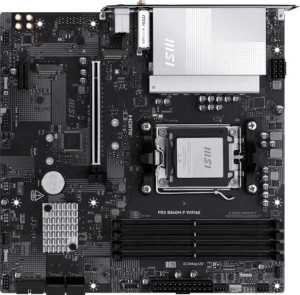
MSI Pro B840M-P Wi-Fi6E

MSI B840 Gaming Plus WiFi MSI Pro B840M-P Wi-Fi6E

Overview

Welcome to our detailed spec comparison between the MSI B840 Gaming Plus WiFi and the MSI Pro B840M-P Wi-Fi6E — two B840-chipset motherboards built around the AM5 platform that share a strong foundation yet diverge in meaningful ways. In this comparison, we examine their key battlegrounds: form factor and physical footprint, wireless connectivity standards, expansion slot configurations, and feature sets like dual BIOS and RAID support, to help you decide which board best suits your next build.

Common Features

  • Both products use the AM5 CPU socket.
  • Both products feature the B840 chipset.
  • Wi-Fi support is available on both products.
  • Bluetooth is available on both products.
  • Both products support HDMI 2.1.
  • Overclocking is supported on both products.
  • RGB lighting is present on both products.
  • Easy BIOS reset is supported on both products.
  • Both products support a maximum memory amount of 256GB.
  • Both products support a maximum RAM speed of 5600 MHz and an overclocked RAM speed of 8000 MHz.
  • Both products have 4 memory slots and support DDR5 memory across 2 channels.
  • ECC memory is not supported on either product.
  • Both products have 1 USB 3.2 Gen 2 USB-A port, 2 USB 3.2 Gen 1 USB-A ports, 1 USB 3.2 Gen 2 USB-C port, and 4 USB 2.0 ports.
  • Neither product has USB 3.2 Gen 2x2, USB 4 40Gbps, or USB 4 20Gbps ports.
  • Both products offer 2 USB 3.2 Gen 1 ports and 4 USB 2.0 ports through expansion.
  • Both products have 4 SATA 3 connectors and 2 M.2 sockets.
  • A TPM connector is present on both products.
  • mSATA connector support is not available on either product.
  • Both products have 1 PCIe 4.0 x16 slot and no PCIe 5.0 x16 slots.
  • Both products support 7.1 audio channels with 3 audio connectors, and S/PDIF Out is not available on either product.
  • Both products support RAID 0 and RAID 1, but neither supports RAID 5 or RAID 0+1.

Main Differences

  • The form factor is ATX on MSI B840 Gaming Plus WiFi and Micro-ATX on MSI Pro B840M-P Wi-Fi6E.
  • Wi-Fi 7 (802.11be) support is present on MSI B840 Gaming Plus WiFi but not available on MSI Pro B840M-P Wi-Fi6E.
  • The Bluetooth version is 5.4 on MSI B840 Gaming Plus WiFi and 5.3 on MSI Pro B840M-P Wi-Fi6E.
  • Dual BIOS is available on MSI B840 Gaming Plus WiFi but not on MSI Pro B840M-P Wi-Fi6E.
  • The width is 304.8 mm on MSI B840 Gaming Plus WiFi and 243.8 mm on MSI Pro B840M-P Wi-Fi6E.
  • The number of fan headers is 6 on MSI B840 Gaming Plus WiFi and 5 on MSI Pro B840M-P Wi-Fi6E.
  • MSI B840 Gaming Plus WiFi has 1 PCIe 3.0 x16 slot, while MSI Pro B840M-P Wi-Fi6E has none.
  • The number of PCIe x1 slots is 3 on MSI B840 Gaming Plus WiFi and 1 on MSI Pro B840M-P Wi-Fi6E.
  • RAID 10 (1+0) support is present on MSI Pro B840M-P Wi-Fi6E but not available on MSI B840 Gaming Plus WiFi.
Specs Comparison
MSI B840 Gaming Plus WiFi

MSI B840 Gaming Plus WiFi

MSI Pro B840M-P Wi-Fi6E

MSI Pro B840M-P Wi-Fi6E

General info:
CPU socket AM5 AM5
chipset B840 B840
form factor ATX Micro-ATX
release date January 2025 September 2025
supports Wi-Fi
Wi-Fi version Wi-Fi 4 (802.11n), Wi-Fi 5 (802.11ac), Wi-Fi 6 (802.11ax), Wi-Fi 6E (802.11ax), Wi-Fi 7 (802.11be) Wi-Fi 4 (802.11n), Wi-Fi 5 (802.11ac), Wi-Fi 6 (802.11ax), Wi-Fi 6E (802.11ax)
Has Bluetooth
Bluetooth version 5.4 5.3
HDMI version HDMI 2.1 HDMI 2.1
Easy to overclock
has RGB lighting
Easy to reset BIOS
Has dual BIOS
has aptX
CPU sockets 1 1
Has integrated graphics
warranty period 3 years 3 years
height 243.8 mm 243.8 mm
width 304.8 mm 243.8 mm
Has integrated CPU

Both boards share a solid common foundation: the same AM5 socket and B840 chipset, identical HDMI 2.1 output, RGB lighting, easy BIOS reset, a 3-year warranty, and support for overclocking — making either a viable platform for a modern AMD build. The real divergence begins with physical size and connectivity ambitions.

The most consequential difference in this group is wireless capability. The Gaming Plus WiFi supports up to Wi-Fi 7 (802.11be), the latest standard offering significantly higher throughput and lower latency than its predecessors — a meaningful advantage for users on a Wi-Fi 7 router or planning to upgrade. The Pro B840M-P tops out at Wi-Fi 6E, which is still strong but falls a generation behind. The Gaming Plus also edges ahead on Bluetooth, with version 5.4 versus 5.3 on the Pro — a minor real-world gap, but newer nonetheless. Additionally, only the Gaming Plus includes dual BIOS, a practical safety net that lets you recover from a failed firmware flash without extra hardware.

On form factor, the Gaming Plus is a full-size ATX board (304.8 × 243.8 mm), while the Pro B840M-P is Micro-ATX (243.8 × 243.8 mm), making it better suited for compact builds. If case size is a constraint, the Pro wins by default. But for users who prioritize the latest wireless standard, resilience via dual BIOS, and a roomier layout for expansion, the Gaming Plus WiFi holds a clear general-info advantage.

Memory:
maximum memory amount 256GB 256GB
RAM speed (max) 5600 MHz 5600 MHz
overclocked RAM speed 8000 MHz 8000 MHz
memory slots 4 4
DDR memory version 5 5
memory channels 2 2
Supports ECC memory

Memory is one area where choosing between these two boards requires zero compromise: every single spec is identical. Both support DDR5 with 4 slots, a native speed cap of 5600 MHz, and a dual-channel configuration — the latter being important because running two or four sticks in tandem nearly doubles memory bandwidth compared to a single-channel setup, noticeably improving performance in memory-sensitive workloads like video editing, simulation, and certain games.

Enthusiasts pushing XMP or EXPO profiles will also find equal ground here. Both boards top out at an overclocked speed of 8000 MHz, which sits at the high end of what current DDR5 kits realistically target, and both cap total capacity at 256 GB — more than sufficient for even the most demanding professional workstations. Neither board supports ECC memory, which is expected at this chipset tier and only relevant for those running error-sensitive server or workstation tasks.

This group is a dead tie. No matter which board you choose, your memory subsystem will behave identically — same bandwidth ceiling, same upgrade path, same kit compatibility. Memory performance should play no role in the decision between these two boards.

Ports:
USB 3.2 Gen 2 ports (USB-A) 1 1
USB 3.2 Gen 1 ports (USB-A) 2 2
USB 3.2 Gen 2 ports (USB-C) 1 1
USB 3.2 Gen 1 ports (USB-C) 0 0
USB 2.0 ports 4 4
USB 3.2 Gen 2x2 ports 0 0
USB 4 40Gbps ports 0 0
USB 4 20Gbps ports 0 0
Thunderbolt 4 ports 0 0
Thunderbolt 3 ports 0 0
has an HDMI output
DisplayPort outputs 0 0
RJ45 ports 1 1
Has USB Type-C
eSATA ports 0 0
DVI outputs 0 0
has a VGA connector
PS/2 ports 0 0

Rear I/O connectivity is another category where these two boards converge completely. Both offer the same USB lineup: one USB 3.2 Gen 2 Type-A (10 Gbps), two USB 3.2 Gen 1 Type-A (5 Gbps), one USB 3.2 Gen 2 Type-C (10 Gbps), and four USB 2.0 ports — a practical mix that covers fast peripheral transfers on the higher-speed ports while leaving the legacy USB 2.0 slots for keyboards, mice, and dongles where bandwidth is irrelevant.

Neither board reaches for USB4 or Thunderbolt, which is typical at this chipset tier and not a meaningful omission for mainstream gaming or productivity builds. For display output, both provide a single HDMI port and no DisplayPort — a modest but functional offering for users relying on integrated graphics. Networking is handled by a single RJ45 Ethernet port on each, with no secondary LAN for link aggregation or redundancy.

With every port count and type matching exactly, this group is a complete tie. Connectivity needs alone cannot differentiate these two boards — the decision remains entirely in the hands of the other spec groups.

Connectors:
USB 3.2 Gen 1 ports (through expansion) 2 2
USB 2.0 ports (through expansion) 4 4
SATA 3 connectors 4 4
fan headers 6 5
USB 3.0 ports (through expansion) 2 2
M.2 sockets 2 2
Has TPM connector
U.2 sockets 0 0
Has mSATA connector
SATA 2 connectors 0 0

Internal connectors tell a similar story of near-parity between these two boards. Storage options are identical: both provide 2 M.2 sockets and 4 SATA 3 connectors, giving users a solid combination of fast NVMe drives alongside traditional SATA SSDs or HDDs. Expansion USB headers match as well, with two USB 3.2 Gen 1 and four USB 2.0 headers on each — enough to populate a modern case's front-panel ports without compromise. Both also include a TPM connector, relevant for users enabling hardware-based security features.

The one tangible difference in this group is fan headers. The Gaming Plus WiFi offers 6 fan headers versus 5 on the Pro B840M-P. In practice, that extra header matters most in larger ATX builds with more elaborate cooling setups — running a CPU cooler, multiple case fans, and optionally a pump header simultaneously. In a compact Micro-ATX build, where the Pro is more naturally at home, five headers will comfortably cover the typical fan count.

The Gaming Plus WiFi holds a narrow edge here solely due to the additional fan header, which offers more flexibility for thermal management in complex builds. For anyone keeping their system simple and cool, however, five headers on the Pro B840M-P is unlikely to be a constraint.

Expansion slots:
PCIe 4.0 x16 slots 1 1
PCIe 5.0 x16 slots 0 0
PCIe 3.0 x16 slots 1 0
PCIe x1 slots 3 1
PCI slots 0 0
PCIe 2.0 x16 slots 0 0
PCIe x4 slots 0 0
PCIe x8 slots 0 0

Expansion slot count is where the ATX form factor of the Gaming Plus WiFi translates into a concrete, practical advantage. Both boards share a single PCIe 4.0 x16 slot — the primary slot where a discrete GPU will live — but the similarity ends there. The Gaming Plus adds a PCIe 3.0 x16 slot and 3 PCIe x1 slots, while the Pro B840M-P offers just 1 PCIe x1 slot alongside its primary x16.

What does that extra real estate mean in practice? The additional x16 physical slot on the Gaming Plus can accommodate larger add-in cards — such as capture cards, high-end sound cards, or older GPUs in a secondary role — that physically require the longer slot even if they don't use all its bandwidth. The three x1 slots further open the door for simultaneous add-in cards like network adapters, USB expansion cards, or audio interfaces. The Pro B840M-P's single x1 slot, a direct consequence of its smaller Micro-ATX footprint, leaves users with little room to expand beyond the primary GPU.

The Gaming Plus WiFi wins this group clearly. Users who anticipate installing multiple add-in cards will find the Pro B840M-P a limiting choice, whereas the Gaming Plus accommodates a much broader range of build configurations without slot conflicts.

Audio:
audio channels 7.1 7.1
Has S/PDIF Out port
audio connectors 3 3

Audio is a straightforward category here: both boards are spec-for-spec identical. Each delivers 7.1-channel surround audio with 3 analog audio connectors on the rear panel — a typical arrangement that covers stereo headphones, front speakers, and a rear surround or microphone input through shared jacks. For most gaming and media setups, this is entirely sufficient.

Neither board includes an S/PDIF optical output, which means users wanting to pipe audio digitally to an AV receiver or external DAC will need to rely on HDMI or a dedicated sound card. This is a common omission at this price tier and rarely a dealbreaker, but worth noting for home theater enthusiasts.

With no differences whatsoever across every provided audio spec, this group is a complete tie. Audio quality and configuration will be indistinguishable between the two boards, and should carry no weight in the buying decision.

Storage:
Supports RAID 1
Supports RAID 10 (1+0)
Supports RAID 5
Supports RAID 0
Supports RAID 0+1

RAID support is largely matched between these two boards, with both handling RAID 0 (striping for maximum speed) and RAID 1 (mirroring for redundancy) — the two configurations the vast majority of consumer users ever actually deploy. Where they diverge is a single but meaningful entry: the Pro B840M-P also supports RAID 10, while the Gaming Plus WiFi does not.

RAID 10 combines striping and mirroring across four drives, delivering both the performance benefits of RAID 0 and the fault tolerance of RAID 1 simultaneously. It is the configuration of choice for users who need speed and data protection at the same time — think small creative studios, local media servers, or anyone storing irreplaceable data without relying purely on backups. Its absence on the Gaming Plus WiFi is a real limitation for that use case, even if it goes unnoticed by typical single-GPU gaming builds.

For storage flexibility, the Pro B840M-P holds a clear edge in this group. The added RAID 10 capability makes it the stronger option for users with multi-drive setups who value both performance and redundancy — a somewhat unexpected advantage for a board otherwise constrained by its smaller form factor.

Comparison Summary & Verdict

Both the MSI B840 Gaming Plus WiFi and the MSI Pro B840M-P Wi-Fi6E deliver a solid AM5 foundation with identical memory support, port configurations, and audio capabilities. However, their differences make each board suited to a distinct type of builder. The MSI B840 Gaming Plus WiFi stands out with its ATX form factor, Wi-Fi 7 support, Bluetooth 5.4, dual BIOS, an extra PCIe 3.0 x16 slot, more PCIe x1 slots, and an additional fan header — making it the stronger choice for enthusiasts who want maximum expandability and future-proof wireless. The MSI Pro B840M-P Wi-Fi6E, on the other hand, offers a compact Micro-ATX footprint and adds RAID 10 support, appealing to users building smaller, space-conscious systems with data redundancy needs. Choose the Gaming Plus WiFi for a feature-rich full-size build; opt for the Pro B840M-P Wi-Fi6E when space efficiency and RAID 10 flexibility are your priorities.

MSI B840 Gaming Plus WiFi
Buy MSI B840 Gaming Plus WiFi if...

Buy the MSI B840 Gaming Plus WiFi if you want a full-size ATX board with Wi-Fi 7, Bluetooth 5.4, dual BIOS, and greater PCIe expansion for a high-end, future-proof build.

MSI Pro B840M-P Wi-Fi6E
Buy MSI Pro B840M-P Wi-Fi6E if...

Buy the MSI Pro B840M-P Wi-Fi6E if you are building a compact Micro-ATX system and need RAID 10 support for added storage redundancy in a smaller footprint.