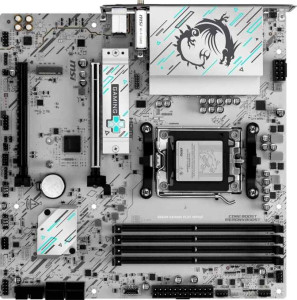
MSI B840M Gaming Plus Wi-Fi6E
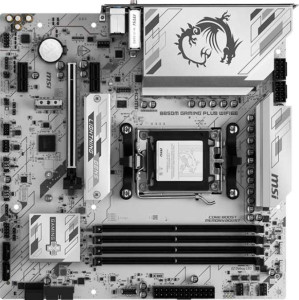
MSI B850M Gaming Plus Wi-Fi6E

MSI B840M Gaming Plus Wi-Fi6E MSI B850M Gaming Plus Wi-Fi6E

Overview

When choosing between the MSI B840M Gaming Plus Wi-Fi6E and the MSI B850M Gaming Plus Wi-Fi6E, both Micro-ATX motherboards share a strong foundation — AM5 socket, DDR5 support, and Wi-Fi 6E connectivity — yet differ in ways that genuinely matter for builders. This comparison dives into their key battlegrounds, including USB connectivity, expansion slot configurations, overclocking headroom, and platform-level features like dual BIOS support.

Common Features

  • Both boards use the AM5 CPU socket.
  • Both boards have a Micro-ATX form factor.
  • Wi-Fi is supported on both boards, covering Wi-Fi 4 (802.11n), Wi-Fi 5 (802.11ac), Wi-Fi 6 (802.11ax), and Wi-Fi 6E (802.11ax).
  • Bluetooth 5.3 is available on both boards.
  • Both boards support HDMI 2.1 output.
  • Overclocking is supported on both boards.
  • Both boards support a maximum of 256GB of RAM.
  • Both boards support DDR5 memory.
  • The maximum standard RAM speed is 5600 MHz on both boards.
  • Both boards have 4 memory slots and 2 memory channels.
  • ECC memory is not supported on either board.
  • Both boards have 1 USB 3.2 Gen 2 port (USB-C) and no USB 3.2 Gen 1 ports (USB-C).
  • Neither board has USB 3.2 Gen 2x2, USB 4, Thunderbolt 3, or Thunderbolt 4 ports.
  • Both boards have 4 SATA 3 connectors, 2 M.2 sockets, and 5 fan headers.
  • Both boards include a TPM connector.
  • Both boards provide 2 USB 3.2 Gen 1 ports and 4 USB 2.0 ports through expansion.
  • Both boards have 1 PCIe 4.0 x16 slot and no PCIe 5.0 x16 slots.
  • Both boards support 7.1 audio channels with 3 audio connectors, but no S/PDIF Out port.
  • Both boards support RAID 0, RAID 1, and RAID 10 (1+0), but not RAID 5 or RAID 0+1.
  • Neither board has any U.2 sockets.

Main Differences

  • The chipset is B840 on the MSI B840M Gaming Plus Wi-Fi6E and B850 on the MSI B850M Gaming Plus Wi-Fi6E.
  • Dual BIOS is present on the MSI B850M Gaming Plus Wi-Fi6E but not available on the MSI B840M Gaming Plus Wi-Fi6E.
  • The maximum overclocked RAM speed is 8000 MHz on the MSI B840M Gaming Plus Wi-Fi6E and 8200 MHz on the MSI B850M Gaming Plus Wi-Fi6E.
  • USB 3.2 Gen 2 ports (USB-A) number 1 on the MSI B840M Gaming Plus Wi-Fi6E and 4 on the MSI B850M Gaming Plus Wi-Fi6E.
  • USB 3.2 Gen 1 ports (USB-A) number 2 on the MSI B840M Gaming Plus Wi-Fi6E and 4 on the MSI B850M Gaming Plus Wi-Fi6E.
  • USB 2.0 ports number 4 on the MSI B840M Gaming Plus Wi-Fi6E and 0 on the MSI B850M Gaming Plus Wi-Fi6E.
  • A DisplayPort output is present on the MSI B850M Gaming Plus Wi-Fi6E but not available on the MSI B840M Gaming Plus Wi-Fi6E.
  • A USB-C 3.2 Gen 2 port through expansion is available on the MSI B850M Gaming Plus Wi-Fi6E but not on the MSI B840M Gaming Plus Wi-Fi6E.
  • PCIe x1 slots number 0 on the MSI B840M Gaming Plus Wi-Fi6E and 2 on the MSI B850M Gaming Plus Wi-Fi6E.
  • PCIe x4 slots number 1 on the MSI B840M Gaming Plus Wi-Fi6E and 0 on the MSI B850M Gaming Plus Wi-Fi6E.
Specs Comparison
MSI B840M Gaming Plus Wi-Fi6E

MSI B840M Gaming Plus Wi-Fi6E

MSI B850M Gaming Plus Wi-Fi6E

MSI B850M Gaming Plus Wi-Fi6E

General info:
CPU socket AM5 AM5
chipset B840 B850
form factor Micro-ATX Micro-ATX
release date June 2025 June 2025
supports Wi-Fi
Wi-Fi version Wi-Fi 4 (802.11n), Wi-Fi 5 (802.11ac), Wi-Fi 6 (802.11ax), Wi-Fi 6E (802.11ax) Wi-Fi 4 (802.11n), Wi-Fi 5 (802.11ac), Wi-Fi 6 (802.11ax), Wi-Fi 6E (802.11ax)
Has Bluetooth
Bluetooth version 5.3 5.3
HDMI version HDMI 2.1 HDMI 2.1
Easy to overclock
has RGB lighting
Easy to reset BIOS
Has dual BIOS
has aptX
CPU sockets 1 1
Has integrated graphics
warranty period 3 years 3 years
height 243.8 mm 243.8 mm
width 243.8 mm 243.8 mm
Has integrated CPU

Both the MSI B840M Gaming Plus Wi-Fi6E and the MSI B850M Gaming Plus Wi-Fi6E share a nearly identical general profile: same AM5 socket, same Micro-ATX form factor (243.8 × 243.8 mm), identical wireless capabilities (Wi-Fi 6E and Bluetooth 5.3), HDMI 2.1 output, RGB lighting, easy BIOS reset, and a 3-year warranty. For the vast majority of builders, day-to-day usage and system compatibility will feel virtually interchangeable between these two boards.

The only meaningful differentiator in this group is the chipset and one feature it enables. The B850M steps up to the B850 chipset, which unlocks dual BIOS — a redundant firmware chip that automatically takes over if the primary BIOS becomes corrupted during a failed update. This is a tangible reliability safeguard, particularly relevant for users who frequently update firmware or experiment with BIOS settings. The B840M lacks this protection entirely.

For general use, both boards are evenly matched. However, the B850M holds a clear edge in this group purely due to dual BIOS: it adds a meaningful safety net at no cost to form factor, connectivity, or warranty coverage. Users who prioritize stability and resilience during firmware management will find the B850M the more prudent choice.

Memory:
maximum memory amount 256GB 256GB
RAM speed (max) 5600 MHz 5600 MHz
overclocked RAM speed 8000 MHz 8200 MHz
memory slots 4 4
DDR memory version 5 5
memory channels 2 2
Supports ECC memory

On paper, these two boards are nearly twins in the memory department: both offer 4 DIMM slots, dual-channel DDR5 support, a 256GB maximum capacity, and a native speed ceiling of 5600 MHz. For mainstream builds running 32GB or 64GB of DDR5 at stock speeds, either board will behave identically.

The gap opens up when pushing memory beyond its rated speed. The B840M tops out at an overclocked ceiling of 8000 MHz, while the B850M edges ahead to 8200 MHz. In isolation, a 200 MHz difference at this frequency tier is unlikely to produce measurable gains in everyday workloads — but for enthusiasts specifically chasing maximum memory bandwidth in benchmarks or memory-sensitive applications like large-scale simulation or high-resolution video processing, the B850M offers marginally more headroom.

The advantage here is real but narrow. The B850M holds a slight edge for overclockers wanting to extract the absolute most from high-speed DDR5 kits, while users building at stock or moderate overclocked speeds will find no practical difference between the two boards in this category.

Ports:
USB 3.2 Gen 2 ports (USB-A) 1 4
USB 3.2 Gen 1 ports (USB-A) 2 4
USB 3.2 Gen 2 ports (USB-C) 1 1
USB 3.2 Gen 1 ports (USB-C) 0 0
USB 2.0 ports 4 0
USB 3.2 Gen 2x2 ports 0 0
USB 4 40Gbps ports 0 0
USB 4 20Gbps ports 0 0
Thunderbolt 4 ports 0 0
Thunderbolt 3 ports 0 0
has an HDMI output
DisplayPort outputs 0 1
RJ45 ports 1 1
Has USB Type-C
eSATA ports 0 0
DVI outputs 0 0
has a VGA connector
PS/2 ports 0 0

This is where the two boards diverge most visibly. The B850M delivers a substantially richer rear I/O: 4× USB 3.2 Gen 2 (USB-A) and 4× USB 3.2 Gen 1 (USB-A) versus the B840M's comparatively lean 1× Gen 2 and 2× Gen 1. In practical terms, that translates to fewer hub workarounds for users connecting multiple high-speed peripherals — external SSDs, capture cards, and high-bandwidth input devices can all share the rear panel without bottlenecking each other down to slower ports.

The B850M also adds a DisplayPort output, giving it two video-out options alongside HDMI 2.1. For users running integrated graphics or a processor with built-in video, having both display standards available means broader monitor compatibility without adapters. The B840M is limited to HDMI only. On the flip side, the B840M includes 4× USB 2.0 ports where the B850M has none — a minor convenience for legacy peripherals like older keyboards or wireless receivers, though USB 2.0 bandwidth is rarely a selling point today.

The B850M holds a clear advantage in this group. More high-speed USB-A ports and the addition of DisplayPort make it the more capable and future-ready choice for connectivity, particularly for users with dense peripheral setups or multi-monitor configurations.

Connectors:
USB 3.2 Gen 1 ports (through expansion) 2 2
USB-C 3.2 Gen 2 ports (through expansion) 0 1
USB 2.0 ports (through expansion) 4 4
SATA 3 connectors 4 4
fan headers 5 5
USB 3.0 ports (through expansion) 2 2
M.2 sockets 2 2
Has TPM connector
U.2 sockets 0 0
Has mSATA connector
SATA 2 connectors 0 0

Internal connectors tell the story of a build's expandability, and here the two boards are remarkably close. Both share identical storage provisioning — 2× M.2 sockets and 4× SATA 3 connectors — which comfortably supports a modern NVMe primary drive plus secondary storage without compromise. The matching 5 fan headers and identical USB expansion headers for legacy devices round out a near-identical internal layout.

The sole differentiator is the B850M's addition of a USB-C 3.2 Gen 2 front-panel header, which the B840M lacks entirely. This matters for cases that feature a front-panel USB-C port — an increasingly common design in mid-range and premium enclosures. Without this header, B840M owners in such cases would have a non-functional front USB-C port, potentially requiring a workaround or case substitution.

Overall, the two boards are essentially tied for internal connectivity, but the B850M earns a narrow edge thanks to that front-panel USB-C header. It's a small but meaningful detail for builders prioritizing case compatibility and convenient front-panel access for modern devices.

Expansion slots:
PCIe 4.0 x16 slots 1 1
PCIe 5.0 x16 slots 0 0
PCIe 3.0 x16 slots 0 0
PCIe x1 slots 0 2
PCI slots 0 0
PCIe 2.0 x16 slots 0 0
PCIe x4 slots 1 0
PCIe x8 slots 0 0

Expansion slot configurations reveal a meaningful trade-off between these two boards. Both provide a single PCIe 4.0 x16 slot as the primary GPU lane — sufficient for any current discrete graphics card — and neither steps up to PCIe 5.0 x16, placing them on equal footing for GPU bandwidth. Where they diverge is in secondary expansion: the B840M offers a PCIe x4 slot, while the B850M replaces that with 2× PCIe x1 slots.

This distinction carries real practical weight depending on intended use. A PCIe x4 slot accommodates higher-bandwidth add-in cards — such as NVMe expansion cards, 10GbE networking adapters, or capture cards that require more than x1 bandwidth. The B850M's two x1 slots, by contrast, suit lower-bandwidth peripherals like sound cards, USB expansion cards, or basic networking adapters, but cannot host anything demanding x4 or higher bandwidth. The B850M does gain flexibility in the number of simultaneous add-in cards, however.

Neither layout is universally superior — the right choice depends on what expansion cards a builder plans to install. That said, the B840M holds a functional edge for users who need x4-bandwidth expansion, since the B850M cannot accommodate such cards at all. Builders with modest, low-bandwidth expansion needs may find the B850M's dual x1 slots adequate or even preferable for running two peripherals simultaneously.

Audio:
audio channels 7.1 7.1
Has S/PDIF Out port
audio connectors 3 3

Audio is a clean draw between these two boards — every spec in this category is identical. Both deliver 7.1-channel surround sound support via 3 analog audio connectors, and neither includes an S/PDIF optical output. The 7.1 configuration means users can drive a full surround sound speaker setup directly from the board, which is a reasonable offering at this tier.

The absence of S/PDIF on both models is worth noting for anyone relying on a digital optical connection to an AV receiver or DAC. Without it, those users would need to route audio through HDMI or invest in a dedicated sound card — a consideration that applies equally to both boards and therefore does not factor into any relative comparison here.

With no differentiating data points between them, the two boards are completely tied in this category. Audio hardware should not influence the buying decision between these two models in any way.

Storage:
Supports RAID 1
Supports RAID 10 (1+0)
Supports RAID 5
Supports RAID 0
Supports RAID 0+1

RAID support is identical across both boards. Each supports RAID 0 (striping for maximum throughput), RAID 1 (mirroring for redundancy), and RAID 10 (a combined stripe-and-mirror array balancing speed and fault tolerance) — while neither supports RAID 5 or RAID 0+1. This covers the configurations most relevant to consumer and prosumer workloads, giving users meaningful flexibility to prioritize either performance or data protection depending on their needs.

The lack of RAID 5 is a minor limitation for users managing larger multi-drive arrays where parity-based redundancy would be useful, but this is equally absent on both boards and reflects typical chipset-level constraints at this market tier rather than a differentiating design choice.

Storage configuration is a complete tie — both boards offer exactly the same RAID capabilities with no distinction whatsoever. This category should carry no weight in the decision between these two models.

Comparison Summary & Verdict

Both the MSI B840M Gaming Plus Wi-Fi6E and the MSI B850M Gaming Plus Wi-Fi6E are capable Micro-ATX boards sharing the same AM5 platform, DDR5 memory support, and Wi-Fi 6E connectivity. However, the B850M Gaming Plus Wi-Fi6E pulls ahead for enthusiasts and power users with its dual BIOS, higher 8200 MHz overclocked RAM speed, a DisplayPort output, significantly more USB-A ports, and an additional USB-C expansion header. The B840M Gaming Plus Wi-Fi6E, on the other hand, offers a PCIe x4 slot absent on its sibling, making it a more practical fit for builders who need that specific expansion and are comfortable with a leaner USB port selection at a likely lower price point.

MSI B840M Gaming Plus Wi-Fi6E
Buy MSI B840M Gaming Plus Wi-Fi6E if...

Buy the MSI B840M Gaming Plus Wi-Fi6E if you need a PCIe x4 expansion slot and can work with a more modest USB port selection, making it a solid budget-friendly AM5 Micro-ATX option.

MSI B850M Gaming Plus Wi-Fi6E
Buy MSI B850M Gaming Plus Wi-Fi6E if...

Buy the MSI B850M Gaming Plus Wi-Fi6E if you want dual BIOS protection, more USB-A ports, a DisplayPort output, and the highest possible overclocked RAM speeds for a more feature-complete build.