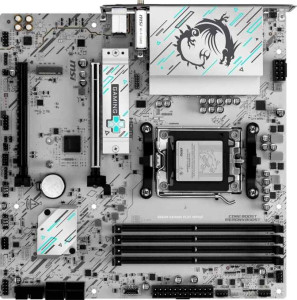
MSI B840M Gaming Plus Wi-Fi6E
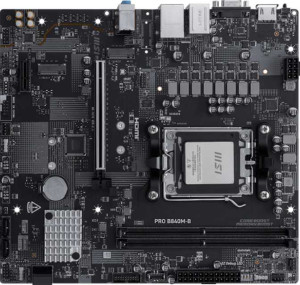
MSI Pro B840M-B

MSI B840M Gaming Plus Wi-Fi6E MSI Pro B840M-B

Overview

Welcome to our in-depth specification comparison between the MSI B840M Gaming Plus Wi-Fi6E and the MSI Pro B840M-B, two Micro-ATX motherboards sharing the same AM5 socket and B840 chipset. While they have a common foundation, the two boards diverge in meaningful ways across connectivity, memory capacity, and expansion options. Read on to see which board best fits your build requirements.

Common Features

  • Both products use the AM5 CPU socket.
  • Both products feature the B840 chipset.
  • Both products use the Micro-ATX form factor.
  • Both products support HDMI 2.1 output.
  • Overclocking is supported on both products.
  • RGB lighting is present on both products.
  • Easy BIOS reset is available on both products.
  • Dual BIOS is not available on either product.
  • Both products support a maximum RAM speed of 5600 MHz.
  • Both products support overclocked RAM speeds up to 8000 MHz.
  • Both products use DDR5 memory.
  • Both products feature 2 memory channels.
  • ECC memory is not supported on either product.
  • Neither product has USB 3.2 Gen 1 ports (USB-C) on the rear panel.
  • Neither product has USB 3.2 Gen 2x2, USB 4, or Thunderbolt ports.
  • Both products have an HDMI output.
  • Neither product has DisplayPort outputs.
  • Both products provide 2 USB 3.2 Gen 1 ports and 4 USB 2.0 ports through expansion.
  • Both products include 4 SATA 3 connectors and 2 M.2 sockets.
  • Both products support 7.1 audio channels with 3 audio connectors.
  • S/PDIF Out port is not available on either product.
  • Both products support RAID 0, RAID 1, and RAID 10, but neither supports RAID 5 or RAID 0+1.
  • Both products feature 1 PCIe 4.0 x16 slot and no PCIe 5.0 x16 slots.

Main Differences

  • Wi-Fi is available on the MSI B840M Gaming Plus Wi-Fi6E but not on the MSI Pro B840M-B.
  • Bluetooth is available on the MSI B840M Gaming Plus Wi-Fi6E but not on the MSI Pro B840M-B.
  • The height is 243.8 mm on the MSI B840M Gaming Plus Wi-Fi6E and 226 mm on the MSI Pro B840M-B.
  • Maximum memory capacity is 256 GB on the MSI B840M Gaming Plus Wi-Fi6E and 128 GB on the MSI Pro B840M-B.
  • The MSI B840M Gaming Plus Wi-Fi6E has 4 memory slots, while the MSI Pro B840M-B has 2 memory slots.
  • USB 3.2 Gen 2 ports (USB-A) count is 1 on the MSI B840M Gaming Plus Wi-Fi6E and 0 on the MSI Pro B840M-B.
  • USB 3.2 Gen 1 ports (USB-A) count is 2 on the MSI B840M Gaming Plus Wi-Fi6E and 4 on the MSI Pro B840M-B.
  • USB 3.2 Gen 2 ports (USB-C) count is 1 on the MSI B840M Gaming Plus Wi-Fi6E and 0 on the MSI Pro B840M-B.
  • USB 2.0 ports count is 4 on the MSI B840M Gaming Plus Wi-Fi6E and 2 on the MSI Pro B840M-B.
  • A VGA connector is present on the MSI Pro B840M-B but not available on the MSI B840M Gaming Plus Wi-Fi6E.
  • Fan headers count is 5 on the MSI B840M Gaming Plus Wi-Fi6E and 3 on the MSI Pro B840M-B.
  • The MSI B840M Gaming Plus Wi-Fi6E has 1 PCIe x4 slot and 0 PCIe x1 slots, while the MSI Pro B840M-B has 1 PCIe x1 slot and 0 PCIe x4 slots.
Specs Comparison
MSI B840M Gaming Plus Wi-Fi6E

MSI B840M Gaming Plus Wi-Fi6E

MSI Pro B840M-B

MSI Pro B840M-B

General info:
CPU socket AM5 AM5
chipset B840 B840
form factor Micro-ATX Micro-ATX
release date June 2025 May 2025
supports Wi-Fi
Has Bluetooth
HDMI version HDMI 2.1 HDMI 2.1
Easy to overclock
has RGB lighting
Easy to reset BIOS
Has dual BIOS
CPU sockets 1 1
Has integrated graphics
warranty period 3 years 3 years
height 243.8 mm 226 mm
width 243.8 mm 243.8 mm
Has integrated CPU

Both boards share the same core platform foundation: the AM5 socket with a B840 chipset in a Micro-ATX form factor, supporting the same Ryzen 7000/8000 series CPUs. They also match on HDMI 2.1 output, easy overclocking, RGB lighting, and a 3-year warranty — so for pure CPU compatibility and build flexibility, neither holds an advantage over the other.

The most significant differentiator in this group is wireless connectivity. The MSI B840M Gaming Plus Wi-Fi 6E includes both Wi-Fi 6E and Bluetooth, while the MSI Pro B840M-B offers neither. In practical terms, this means the Gaming Plus can connect to 6 GHz band networks for lower latency and higher throughput without needing a separate adapter — a real convenience for cable-free desktops. For the Pro B840M-B, users who need wireless connectivity will have to budget for and install a PCIe or USB adapter.

There is also a subtle physical difference: the Gaming Plus measures 243.8 × 243.8 mm (a perfect square footprint), while the Pro B840M-B is slightly shorter at 226 mm tall with the same 243.8 mm width. This could matter in very compact Micro-ATX cases with tight vertical clearance. Overall, the Gaming Plus holds a clear edge in this group purely due to its built-in wireless capabilities — unless the user is building a strictly wired workstation on a tight budget, in which case the Pro B840M-B's smaller height may offer a minor fit advantage in constrained enclosures.
Memory:
maximum memory amount 256GB 128GB
RAM speed (max) 5600 MHz 5600 MHz
overclocked RAM speed 8000 MHz 8000 MHz
memory slots 4 2
DDR memory version 5 5
memory channels 2 2
Supports ECC memory

On the shared fundamentals, both boards run DDR5 memory with an identical native speed of 5600 MHz and the same overclocked ceiling of 8000 MHz via XMP/EXPO profiles. Neither supports ECC, which is expected at this chipset tier. For typical gaming or productivity workloads, these matching speed specs mean no real-world performance difference between the two when using the same RAM kit.

Where the boards diverge significantly is in physical memory configuration. The Gaming Plus offers 4 DIMM slots and supports up to 256 GB of total RAM, while the Pro B840M-B is limited to just 2 slots and a 128 GB maximum. The slot count difference has layered implications: with 4 slots, the Gaming Plus lets users start with a modest 2-stick kit and upgrade later without replacing existing modules — a meaningful cost advantage over time. The Pro B840M-B's 2-slot design forces an all-or-nothing upgrade path.

The Gaming Plus holds a clear advantage here. The doubled slot count and 256 GB ceiling make it far more suitable for memory-intensive workloads like video editing, virtualization, or large dataset processing, and it offers greater long-term upgrade flexibility. The Pro B840M-B is adequate for mainstream builds where 64–128 GB is the target, but users planning to scale their RAM over time will find its 2-slot layout a genuine constraint.

Ports:
USB 3.2 Gen 2 ports (USB-A) 1 0
USB 3.2 Gen 1 ports (USB-A) 2 4
USB 3.2 Gen 2 ports (USB-C) 1 0
USB 3.2 Gen 1 ports (USB-C) 0 0
USB 2.0 ports 4 2
USB 3.2 Gen 2x2 ports 0 0
USB 4 40Gbps ports 0 0
USB 4 20Gbps ports 0 0
Thunderbolt 4 ports 0 0
Thunderbolt 3 ports 0 0
has an HDMI output
DisplayPort outputs 0 0
RJ45 ports 1 1
Has USB Type-C
eSATA ports 0 0
DVI outputs 0 0
has a VGA connector
PS/2 ports 0 0

The rear I/O panel tells a clear story about each board's intended audience. The Gaming Plus prioritizes speed: it includes a USB 3.2 Gen 2 Type-A (10 Gbps) and a USB 3.2 Gen 2 Type-C (10 Gbps) port, making it noticeably faster for transferring data to modern external SSDs or high-speed peripherals. The Pro B840M-B, by contrast, tops out at USB 3.2 Gen 1 (5 Gbps) across all four of its Type-A ports — sufficient for keyboards, mice, and basic drives, but a bottleneck for anything bandwidth-hungry.

The Pro B840M-B does carry one legacy feature the Gaming Plus lacks: a VGA output. This is a niche advantage — relevant only for users pairing the board with an older monitor that has no HDMI input — but it signals the Pro's orientation toward office or institutional environments where aging display hardware is still in use. For any modern display setup, both boards cover the essentials with HDMI and a shared RJ45 Ethernet port.

Taken together, the Gaming Plus has the stronger port configuration for a contemporary build. Its Gen 2 speeds on both Type-A and Type-C outputs deliver real-world throughput advantages that the Pro B840M-B simply cannot match. The Pro's VGA inclusion is too niche to offset this gap for most users, making it relevant only in legacy-display scenarios.

Connectors:
USB 3.2 Gen 1 ports (through expansion) 2 2
USB 3.2 Gen 2 ports (through expansion) 0 0
USB 3.2 Gen 2x2 ports (through expansion) 0 0
USB-C 3.2 Gen 2 ports (through expansion) 0 0
USB 2.0 ports (through expansion) 4 4
SATA 3 connectors 4 4
fan headers 5 3
USB 3.0 ports (through expansion) 2 2
M.2 sockets 2 2
Has TPM connector
U.2 sockets 0 0
Has mSATA connector
SATA 2 connectors 0 0

For internal connectivity, these two boards are nearly identical across the board. Both offer 2 M.2 sockets, 4 SATA 3 connectors, matching internal USB expansion headers, and a TPM connector — meaning storage build-out flexibility is exactly the same on either platform. A dual-M.2 plus four-SATA configuration is genuinely capable for most builds, covering everything from a boot NVMe drive paired with a secondary SSD to multi-drive media or NAS-style setups.

The only meaningful difference in this group is fan header count. The Gaming Plus provides 5 fan headers versus just 3 on the Pro B840M-B. In practice, this matters most for thermally demanding or airflow-focused builds — particularly those running multiple case fans alongside a CPU cooler and perhaps a dedicated pump header for liquid cooling. With only 3 headers, Pro B840M-B users who need more fan connections will have to rely on a fan hub or splitters, adding cost and complexity.

The Gaming Plus edges ahead in this group solely on the strength of its additional fan headers. For a straightforward office or light-workload build, 3 headers on the Pro B840M-B will suffice. But for any enthusiast or performance-cooling configuration, the Gaming Plus's 5-header layout offers meaningfully greater flexibility without needing supplementary hardware.

Expansion slots:
PCIe 4.0 x16 slots 1 1
PCIe 5.0 x16 slots 0 0
PCIe 3.0 x16 slots 0 0
PCIe x1 slots 0 1
PCI slots 0 0
PCIe 2.0 x16 slots 0 0
PCIe x4 slots 1 0
PCIe x8 slots 0 0

Both boards share a single PCIe 4.0 x16 slot as their primary expansion lane — the standard home for a discrete GPU at this tier. Neither steps up to PCIe 5.0, which is expected on a B840 platform, and for current-generation graphics cards the 4.0 x16 interface introduces no meaningful performance penalty. On that front, the two are evenly matched.

The secondary slot is where they diverge. The Gaming Plus includes a PCIe x4 slot, while the Pro B840M-B instead offers a PCIe x1 slot. This is a meaningful architectural choice: an x4 slot can accommodate higher-bandwidth add-in cards such as additional NVMe controllers, 10GbE network cards, or capture cards that saturate x1 bandwidth. An x1 slot, by contrast, is fine for low-throughput peripherals like sound cards or basic network adapters, but will bottleneck anything that genuinely needs more lanes.

The Gaming Plus holds the advantage here for anyone planning to expand beyond a GPU. The x4 secondary slot is simply more versatile and future-proof than the x1 on the Pro B840M-B — particularly relevant given the Gaming Plus's broader enthusiast positioning. For a bare-bones single-GPU office build, the Pro's x1 slot will rarely feel limiting, but users with more ambitious expansion plans will appreciate the headroom the Gaming Plus provides.

Audio:
audio channels 7.1 7.1
Has S/PDIF Out port
audio connectors 3 3

Audio is one area where no comparison is needed: the MSI B840M Gaming Plus Wi-Fi6E and MSI Pro B840M-B are spec-for-spec identical. Both deliver 7.1-channel onboard audio through 3 analog connectors, and neither includes an S/PDIF optical output.

The 7.1-channel support is a reasonable offering for a mid-range motherboard, covering multi-speaker surround setups and quality stereo output alike. The absence of S/PDIF is a minor limitation for users who prefer a digital connection to an external DAC or AV receiver, but this is a common omission at this price tier and rarely a deciding factor for the target audience of either board.

This group is a complete tie. Users with serious audio requirements — studio monitoring, high-fidelity listening, or digital home theater passthrough — will want a dedicated sound card regardless of which board they choose. For everyone else, the onboard audio on both boards is equally capable.

Storage:
Supports RAID 1
Supports RAID 10 (1+0)
Supports RAID 5
Supports RAID 0
Supports RAID 0+1

Storage redundancy and performance configurations are identical across both boards. The MSI B840M Gaming Plus Wi-Fi6E and MSI Pro B840M-B both support RAID 0, RAID 1, and RAID 10, while neither supports RAID 5 or RAID 0+1 — a typical feature set for consumer B-series chipset platforms.

The supported modes cover the most practical use cases: RAID 0 for striped performance across multiple drives, RAID 1 for straightforward mirrored redundancy, and RAID 10 for users who want both speed and fault tolerance across four drives. The absence of RAID 5 is unsurprising at this tier, as parity-based RAID is generally reserved for workstation or server-class platforms where data integrity under heavier I/O loads is a priority.

This group is a complete tie — there is nothing to differentiate the two boards on storage configuration capability. Whichever board a user selects, they will have access to the same range of RAID options for their drive arrays.

Comparison Summary & Verdict

Both boards share a solid B840 chipset foundation with DDR5 support, PCIe 4.0, and 7.1 audio, but their differences reveal distinct target audiences. The MSI B840M Gaming Plus Wi-Fi6E stands out with built-in Wi-Fi 6E and Bluetooth, support for up to 256 GB of RAM across 4 slots, more fan headers, and additional high-speed USB ports, making it the stronger choice for gaming rigs and feature-rich desktop builds. The MSI Pro B840M-B, on the other hand, offers a more compact profile, a VGA output for legacy display compatibility, and a budget-friendly feature set with 4 USB 3.2 Gen 1 ports, making it well-suited for business or office deployments where wireless connectivity is handled externally and simplicity is valued over expandability.

MSI B840M Gaming Plus Wi-Fi6E
Buy MSI B840M Gaming Plus Wi-Fi6E if...

Buy the MSI B840M Gaming Plus Wi-Fi6E if you want built-in Wi-Fi 6E and Bluetooth, need support for up to 256 GB of RAM across 4 slots, and want more fan headers and high-speed USB options for a fully-featured gaming or enthusiast build.

MSI Pro B840M-B
Buy MSI Pro B840M-B if...

Buy the MSI Pro B840M-B if you need a compact, no-frills board for a business or office system, especially if you rely on a legacy VGA display or prefer to handle networking externally while keeping costs down.