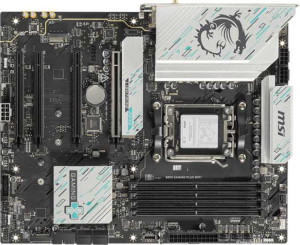
MSI B850 Gaming Plus WiFi
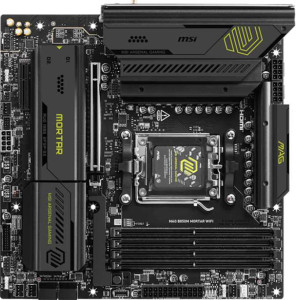
MSI MAG B850M Mortar WiFI

MSI B850 Gaming Plus WiFi MSI MAG B850M Mortar WiFI

Overview

Welcome to our in-depth specification comparison between the MSI B850 Gaming Plus WiFi and the MSI MAG B850M Mortar WiFi. Both boards share the same AM5 socket and B850 chipset, but they diverge in meaningful ways across form factor, rear port selection, and expansion slot configuration. Whether you are building a full-sized ATX rig or a compact Micro-ATX system, this comparison will help you identify which board best fits your build goals.

Common Features

  • Both boards use the AM5 CPU socket.
  • Both boards feature the B850 chipset.
  • Wi-Fi is available on both products, supporting Wi-Fi 4 (802.11n), Wi-Fi 5 (802.11ac), Wi-Fi 6 (802.11ax), Wi-Fi 6E (802.11ax), and Wi-Fi 7 (802.11be).
  • Bluetooth 5.4 is present on both products.
  • Overclocking support is available on both products.
  • RGB lighting is present on both products.
  • Both boards support a maximum memory amount of 256 GB.
  • The maximum native RAM speed is 5600 MHz on both products.
  • The maximum overclocked RAM speed is 8200 MHz on both products.
  • Both boards have 4 memory slots and support 2 memory channels.
  • Both boards use DDR5 memory.
  • ECC memory is not supported on either product.
  • Neither board includes USB 3.2 Gen 1 ports (USB-C), USB 4 40Gbps ports, USB 4 20Gbps ports, Thunderbolt 4, or Thunderbolt 3 ports.
  • Both boards have 1 RJ45 port and include at least one USB Type-C connector.
  • eSATA ports are absent on both products.
  • Both boards provide 4 USB 2.0 ports through internal expansion headers.
  • Both boards include 4 SATA 3 connectors, 6 fan headers, and 3 M.2 sockets.
  • A TPM connector is present on both products.
  • U.2 sockets and mSATA connectors are absent on both products.
  • Both boards offer 1 PCIe 5.0 x16 slot and no PCIe 3.0 x16, PCIe 2.0 x16, PCIe x8, or PCI slots.
  • 7.1-channel audio is supported on both boards, each with an S/PDIF Out port and 2 audio connectors.
  • Both boards support RAID 0 and RAID 1, but neither supports RAID 0+1.

Main Differences

  • The form factor is ATX on MSI B850 Gaming Plus WiFi and Micro-ATX on MSI MAG B850M Mortar WiFI.
  • The board height is 243.8 mm on MSI B850 Gaming Plus WiFi and 244 mm on MSI MAG B850M Mortar WiFI.
  • The board width is 304.8 mm on MSI B850 Gaming Plus WiFi and 244 mm on MSI MAG B850M Mortar WiFI.
  • USB 3.2 Gen 2 ports (USB-A) number 1 on MSI B850 Gaming Plus WiFi and 3 on MSI MAG B850M Mortar WiFI.
  • USB 3.2 Gen 1 ports (USB-A) number 1 on MSI B850 Gaming Plus WiFi and 4 on MSI MAG B850M Mortar WiFI.
  • USB 3.2 Gen 2 ports (USB-C) number 2 on MSI B850 Gaming Plus WiFi and 1 on MSI MAG B850M Mortar WiFI.
  • USB 2.0 rear ports number 4 on MSI B850 Gaming Plus WiFi and 0 on MSI MAG B850M Mortar WiFI.
  • A USB 3.2 Gen 2x2 port is present on MSI MAG B850M Mortar WiFI but not available on MSI B850 Gaming Plus WiFi.
  • An HDMI output is present on MSI MAG B850M Mortar WiFI but not available on MSI B850 Gaming Plus WiFi.
  • DisplayPort outputs number 1 on MSI B850 Gaming Plus WiFi and 0 on MSI MAG B850M Mortar WiFI.
  • USB 3.2 Gen 1 ports available through internal expansion number 4 on MSI B850 Gaming Plus WiFi and 2 on MSI MAG B850M Mortar WiFI.
  • USB 3.0 ports available through internal expansion number 4 on MSI B850 Gaming Plus WiFi and 2 on MSI MAG B850M Mortar WiFI.
  • PCIe 4.0 x16 slots number 1 on MSI B850 Gaming Plus WiFi and 0 on MSI MAG B850M Mortar WiFI.
  • PCIe x1 slots number 2 on MSI B850 Gaming Plus WiFi and 0 on MSI MAG B850M Mortar WiFI.
  • PCIe x4 slots number 0 on MSI B850 Gaming Plus WiFi and 1 on MSI MAG B850M Mortar WiFI.
  • RAID 10 (1+0) support is present on MSI MAG B850M Mortar WiFI but not available on MSI B850 Gaming Plus WiFi.
  • RAID 5 support is present on MSI MAG B850M Mortar WiFI but not available on MSI B850 Gaming Plus WiFi.
Specs Comparison
MSI B850 Gaming Plus WiFi

MSI B850 Gaming Plus WiFi

MSI MAG B850M Mortar WiFI

MSI MAG B850M Mortar WiFI

General info:
CPU socket AM5 AM5
chipset B850 B850
form factor ATX Micro-ATX
release date January 2025 March 2025
supports Wi-Fi
Wi-Fi version Wi-Fi 4 (802.11n), Wi-Fi 5 (802.11ac), Wi-Fi 6 (802.11ax), Wi-Fi 6E (802.11ax), Wi-Fi 7 (802.11be) Wi-Fi 4 (802.11n), Wi-Fi 5 (802.11ac), Wi-Fi 6 (802.11ax), Wi-Fi 6E (802.11ax), Wi-Fi 7 (802.11be)
Has Bluetooth
Bluetooth version 5.4 5.4
Easy to overclock
has RGB lighting
Easy to reset BIOS
Has dual BIOS
has aptX
CPU sockets 1 1
Has integrated graphics
warranty period 3 years 3 years
height 243.8 mm 244 mm
width 304.8 mm 244 mm
Has integrated CPU

At their core, the MSI B850 Gaming Plus WiFi and the MSI MAG B850M Mortar WiFi are built on the same foundation: both use the AM5 socket with the B850 chipset, support overclocking, include dual BIOS, RGB lighting, and easy BIOS reset. Their wireless credentials are also identical, with Wi-Fi 7 (802.11be) and Bluetooth 5.4 on both boards, meaning neither has an edge in connectivity. The shared 3-year warranty and single-socket design round out a remarkably similar feature set.

The one meaningful differentiator in this group is form factor. The Gaming Plus WiFi is a full-size ATX board at 304.8 × 243.8 mm, while the Mortar WiFi is a compact Micro-ATX at 244 × 244 mm. In practice, this means the Gaming Plus WiFi requires a mid-tower or full-tower case and offers more physical space for additional expansion slots and VRM cooling, whereas the Mortar WiFi fits into smaller Micro-ATX or compatible ATX cases, making it the natural pick for space-constrained or compact builds.

For this spec group, the choice comes down entirely to chassis compatibility and build goals. If you are planning a compact or small-footprint system, the Mortar WiFi has a clear practical advantage. If you want the flexibility of a larger board with more room to grow, the Gaming Plus WiFi wins on expandability. Neither board holds a feature advantage over the other in general specs.

Memory:
maximum memory amount 256GB 256GB
RAM speed (max) 5600 MHz 5600 MHz
overclocked RAM speed 8200 MHz 8200 MHz
memory slots 4 4
DDR memory version 5 5
memory channels 2 2
Supports ECC memory

Memory support is a complete dead heat between these two boards. Both the Gaming Plus WiFi and the Mortar WiFi offer 4 DIMM slots, a 256GB maximum capacity, dual-channel DDR5 architecture, and identical native and overclocked speed ceilings of 5600 MHz and 8200 MHz respectively. Neither supports ECC memory, which is expected at this mainstream chipset tier.

The practical takeaway is straightforward: a user upgrading from DDR4 will find the same DDR5 headroom on either board, and enthusiasts chasing high-frequency kits can push equally far on both. The 8200 MHz overclocked ceiling is competitive for the B850 platform and leaves meaningful room above the JEDEC standard for those who want to extract extra memory bandwidth for gaming or creative workloads. The four slots also allow starting with two sticks in dual-channel mode and expanding later without replacing existing modules.

With every memory specification matching exactly, this group is a complete tie. Memory capability should play no role in choosing between these two boards.

Ports:
USB 3.2 Gen 2 ports (USB-A) 1 3
USB 3.2 Gen 1 ports (USB-A) 1 4
USB 3.2 Gen 2 ports (USB-C) 2 1
USB 3.2 Gen 1 ports (USB-C) 0 0
USB 2.0 ports 4 0
USB 3.2 Gen 2x2 ports 0 1
USB 4 40Gbps ports 0 0
USB 4 20Gbps ports 0 0
Thunderbolt 4 ports 0 0
Thunderbolt 3 ports 0 0
has an HDMI output
DisplayPort outputs 1 0
RJ45 ports 1 1
Has USB Type-C
eSATA ports 0 0
DVI outputs 0 0
has a VGA connector
PS/2 ports 0 0

Port selection is where these two boards genuinely diverge. The Mortar WiFi delivers a much stronger USB-A presence on the rear panel — 3 Gen 2 (10Gbps) and 4 Gen 1 (5Gbps) Type-A ports — compared to the Gaming Plus WiFi's modest 1 Gen 2 and 1 Gen 1 Type-A. For users with many peripherals, external drives, or hubs, this is a tangible day-to-day advantage. The Mortar also adds a USB 3.2 Gen 2x2 port, which runs at 20Gbps and is useful for the fastest external NVMe enclosures available today — a feature entirely absent on the Gaming Plus WiFi.

The Gaming Plus WiFi counters with two USB 3.2 Gen 2 Type-C ports versus the Mortar's single one, which is a plus for users with modern USB-C peripherals or who want to charge devices at speed. It also carries 4 USB 2.0 ports, which the Mortar drops entirely — those low-speed ports remain useful for keyboards, mice, and dongles that don't benefit from higher bandwidth. On the video output side, the Gaming Plus WiFi offers a DisplayPort output while the Mortar WiFi provides HDMI instead; neither is objectively superior, but compatibility will depend on the monitor in use.

Overall, the Mortar WiFi holds the edge in this group. Its higher USB-A port count and the inclusion of a Gen 2x2 port make it the more versatile rear panel for most users, particularly those with several high-speed peripherals. The Gaming Plus WiFi's extra USB-C port is a reasonable trade-off for some, but it doesn't offset the Mortar's broader connectivity advantage.

Connectors:
USB 3.2 Gen 1 ports (through expansion) 4 2
USB 2.0 ports (through expansion) 4 4
SATA 3 connectors 4 4
fan headers 6 6
USB 3.0 ports (through expansion) 4 2
M.2 sockets 3 3
Has TPM connector
U.2 sockets 0 0
Has mSATA connector
SATA 2 connectors 0 0

Internal connector layouts are largely aligned between these two boards, but one meaningful gap exists. The Gaming Plus WiFi provides 4 USB 3.2 Gen 1 headers for front-panel and expansion use, while the Mortar WiFi offers only 2. In practical terms, those extra headers on the Gaming Plus WiFi allow connecting more front-panel USB 3.0 ports or internal USB hubs simultaneously without needing adapters — a real advantage in cases with multiple front-panel connectors or for users running several internal USB devices.

Everything else is evenly matched. Both boards share 3 M.2 sockets for NVMe storage, 4 SATA 3 connectors for traditional drives, 6 fan headers for comprehensive cooling control, and identical USB 2.0 expansion headers. The TPM connector is present on both, which matters for Windows 11 compliance and enterprise security configurations. The absence of U.2 and mSATA on either board is entirely expected at this mainstream tier.

The Gaming Plus WiFi takes a narrow but real edge here, solely on the strength of its doubled USB 3.2 Gen 1 internal header count. For builders planning feature-rich cases or multi-device internal setups, that extra bandwidth headroom is genuinely useful. For everyone else, the two boards are functionally identical in this category.

Expansion slots:
PCIe 4.0 x16 slots 1 0
PCIe 5.0 x16 slots 1 1
PCIe 3.0 x16 slots 0 0
PCIe x1 slots 2 0
PCI slots 0 0
PCIe 2.0 x16 slots 0 0
PCIe x4 slots 0 1
PCIe x8 slots 0 0

Both boards share a PCIe 5.0 x16 slot as their primary GPU interface, ensuring neither compromises on graphics card bandwidth for current and next-generation GPUs. Beyond that anchor point, however, the two layouts diverge noticeably. The Gaming Plus WiFi adds a PCIe 4.0 x16 slot alongside two PCIe x1 slots, while the Mortar WiFi substitutes a single PCIe x4 slot with no x1 slots at all.

What this means in practice: the Gaming Plus WiFi's second full-length PCIe 4.0 x16 slot is valuable for users who want to install a secondary card — such as a capture card, high-end NVMe add-in card, or even a secondary GPU for compute tasks — at a bandwidth level that won't bottleneck modern accessories. The two x1 slots further extend this flexibility for sound cards, networking cards, or other low-bandwidth add-ins. The Mortar WiFi's single x4 slot is more limited in throughput and physical compatibility, reflecting the space constraints typical of a Micro-ATX design.

The Gaming Plus WiFi holds a clear advantage here. Its broader mix of slot types and the inclusion of a full PCIe 4.0 x16 secondary slot make it substantially more versatile for multi-card or accessory-heavy builds. The Mortar WiFi covers the essentials for a single-GPU system but leaves little room to grow.

Audio:
audio channels 7.1 7.1
Has S/PDIF Out port
audio connectors 2 2

Audio capabilities are identical across both boards. Each supports 7.1 surround sound, includes an S/PDIF optical output for connecting to external receivers or DACs, and provides 2 rear audio connectors. There is nothing in the provided data to separate them.

The 7.1 channel support is worth noting for users with surround sound speaker setups or high-end headsets, as it covers the full range of mainstream audio configurations without requiring a dedicated sound card. The S/PDIF output is a useful addition for anyone routing audio digitally to an AV receiver or external audio processor, preserving signal quality over longer cable runs.

This group is a complete tie. Audio hardware should have no bearing on the choice between these two boards.

Storage:
Supports RAID 1
Supports RAID 10 (1+0)
Supports RAID 5
Supports RAID 0
Supports RAID 0+1

RAID support is one area where the Mortar WiFi quietly outpaces its sibling. While both boards handle the essentials — RAID 0 for performance striping and RAID 1 for mirroring and redundancy — the Mortar WiFi goes further by also supporting RAID 5 and RAID 10, neither of which is available on the Gaming Plus WiFi.

For most home users and gamers, RAID 0 and RAID 1 are sufficient. But RAID 5 distributes parity data across three or more drives, offering a balance of redundancy and usable capacity that is particularly valuable for small NAS-style setups or workstations where data protection matters without sacrificing too much storage space. RAID 10 combines striping and mirroring across four drives, delivering both speed and fault tolerance — the preferred choice for demanding workloads where both performance and reliability are non-negotiable.

The Mortar WiFi holds a clear edge in this group. Its broader RAID support makes it the more capable option for users who manage larger multi-drive arrays or have data-sensitive workloads. For single-drive or simple two-drive configurations, the difference is irrelevant — but anyone building a more serious storage setup will appreciate the Mortar's added flexibility.

Comparison Summary & Verdict

After examining both boards across every major specification category, a clear picture emerges of two products designed for different builders. The MSI B850 Gaming Plus WiFi is the stronger choice for enthusiasts who want a full ATX form factor, more PCIe expansion flexibility with its additional PCIe 4.0 x16 and two PCIe x1 slots, a dedicated DisplayPort output, and more USB headers for internal expansion. The MSI MAG B850M Mortar WiFi, on the other hand, excels as a compact Micro-ATX build platform, offering a richer rear USB-A port selection, a built-in HDMI output, a USB 3.2 Gen 2x2 port, and broader RAID support including RAID 5 and RAID 10. Both boards are equally matched on memory, audio, Wi-Fi 7, and core storage. Your decision ultimately hinges on available case size and whether rear connectivity or PCIe expandability matters most to your use case.

MSI B850 Gaming Plus WiFi
Buy MSI B850 Gaming Plus WiFi if...

Buy the MSI B850 Gaming Plus WiFi if you need a full ATX build with more PCIe expansion slots, a DisplayPort output, and greater USB internal header capacity.

MSI MAG B850M Mortar WiFI
Buy MSI MAG B850M Mortar WiFI if...

Buy the MSI MAG B850M Mortar WiFi if you prefer a compact Micro-ATX system with more rear USB-A ports, a built-in HDMI output, a USB 3.2 Gen 2x2 port, and extended RAID 5 and RAID 10 storage support.