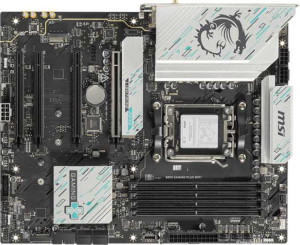
MSI B850 Gaming Plus WiFi
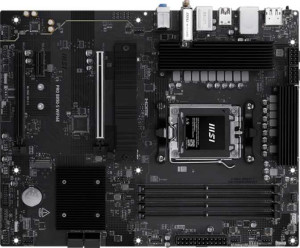
MSI Pro B850-S Wi-Fi6E

MSI B850 Gaming Plus WiFi MSI Pro B850-S Wi-Fi6E

Overview

Welcome to our in-depth spec comparison between the MSI B850 Gaming Plus WiFi and the MSI Pro B850-S Wi-Fi6E — two AM5 motherboards built on the B850 chipset that share a strong common foundation yet diverge in meaningful ways. Both boards support DDR5 memory, PCIe 4.0, and multi-channel audio, but the real story lies in their differences: connectivity options, expansion slot configurations, and storage flexibility set these two apart for different types of builders.

Common Features

  • Both products use the AM5 CPU socket.
  • Both products feature the B850 chipset.
  • Both products use the ATX form factor.
  • Wi-Fi connectivity is available on both products.
  • Bluetooth is available on both products.
  • Overclocking is supported on both products.
  • RGB lighting is present on both products.
  • Easy BIOS reset is available on both products.
  • Both products support a maximum memory amount of 256GB.
  • Both products support a maximum RAM speed of 5600 MHz.
  • Both products support an overclocked RAM speed of 8200 MHz.
  • Both products have 4 memory slots.
  • Both products use DDR5 memory.
  • Both products support 2 memory channels.
  • ECC memory is not supported on either product.
  • Neither product has USB 3.2 Gen 1 ports (USB-C) on the rear panel.
  • Neither product has USB 3.2 Gen 2x2 ports.
  • Neither product has USB 4 40Gbps or 20Gbps ports.
  • Neither product has Thunderbolt 3 or Thunderbolt 4 ports.
  • Both products have 1 DisplayPort output.
  • Both products have 1 RJ45 port.
  • Both products have 4 USB 2.0 ports available through expansion headers.
  • Both products have 4 SATA 3 connectors.
  • Both products have 6 fan headers.
  • A TPM connector is present on both products.
  • Neither product has a U.2 socket.
  • An mSATA connector is not available on either product.
  • Both products have 1 PCIe 4.0 x16 slot.
  • Neither product has PCIe 3.0 x16, PCIe 2.0 x16, PCIe x8, or PCI slots.
  • Both products support 7.1 audio channels.
  • RAID 0 and RAID 1 are supported on both products.
  • RAID 5 and RAID 0+1 are not supported on either product.

Main Differences

  • Wi-Fi 7 (802.11be) support is present on MSI B850 Gaming Plus WiFi but not available on MSI Pro B850-S Wi-Fi6E.
  • Bluetooth version is 5.4 on MSI B850 Gaming Plus WiFi and 5.3 on MSI Pro B850-S Wi-Fi6E.
  • Dual BIOS is present on MSI B850 Gaming Plus WiFi but not available on MSI Pro B850-S Wi-Fi6E.
  • USB 3.2 Gen 2 ports (USB-A) count is 1 on MSI B850 Gaming Plus WiFi and 3 on MSI Pro B850-S Wi-Fi6E.
  • USB 3.2 Gen 1 ports (USB-A) count is 1 on MSI B850 Gaming Plus WiFi and 4 on MSI Pro B850-S Wi-Fi6E.
  • USB 3.2 Gen 2 ports (USB-C) count is 2 on MSI B850 Gaming Plus WiFi and 1 on MSI Pro B850-S Wi-Fi6E.
  • USB 2.0 rear ports count is 4 on MSI B850 Gaming Plus WiFi and none on MSI Pro B850-S Wi-Fi6E.
  • An HDMI output is present on MSI Pro B850-S Wi-Fi6E but not available on MSI B850 Gaming Plus WiFi.
  • USB 3.2 Gen 1 ports available through expansion headers is 4 on MSI B850 Gaming Plus WiFi and 2 on MSI Pro B850-S Wi-Fi6E.
  • USB 3.0 ports available through expansion headers is 4 on MSI B850 Gaming Plus WiFi and 2 on MSI Pro B850-S Wi-Fi6E.
  • M.2 sockets count is 3 on MSI B850 Gaming Plus WiFi and 2 on MSI Pro B850-S Wi-Fi6E.
  • A PCIe 5.0 x16 slot is present on MSI B850 Gaming Plus WiFi but not available on MSI Pro B850-S Wi-Fi6E.
  • PCIe x1 slots count is 2 on MSI B850 Gaming Plus WiFi and 1 on MSI Pro B850-S Wi-Fi6E.
  • A PCIe x4 slot is present on MSI Pro B850-S Wi-Fi6E but not available on MSI B850 Gaming Plus WiFi.
  • An S/PDIF Out port is present on MSI B850 Gaming Plus WiFi but not available on MSI Pro B850-S Wi-Fi6E.
  • Audio connectors count is 2 on MSI B850 Gaming Plus WiFi and 3 on MSI Pro B850-S Wi-Fi6E.
  • RAID 10 (1+0) support is present on MSI Pro B850-S Wi-Fi6E but not available on MSI B850 Gaming Plus WiFi.
Specs Comparison
MSI B850 Gaming Plus WiFi

MSI B850 Gaming Plus WiFi

MSI Pro B850-S Wi-Fi6E

MSI Pro B850-S Wi-Fi6E

General info:
CPU socket AM5 AM5
chipset B850 B850
form factor ATX ATX
release date January 2025 June 2025
supports Wi-Fi
Wi-Fi version Wi-Fi 4 (802.11n), Wi-Fi 5 (802.11ac), Wi-Fi 6 (802.11ax), Wi-Fi 6E (802.11ax), Wi-Fi 7 (802.11be) Wi-Fi 4 (802.11n), Wi-Fi 5 (802.11ac), Wi-Fi 6 (802.11ax), Wi-Fi 6E (802.11ax)
Has Bluetooth
Bluetooth version 5.4 5.3
Easy to overclock
has RGB lighting
Easy to reset BIOS
Has dual BIOS
has aptX
CPU sockets 1 1
Has integrated graphics
warranty period 3 years 3 years
height 243.8 mm 243.8 mm
width 304.8 mm 304.8 mm
Has integrated CPU

Both the MSI B850 Gaming Plus WiFi and the MSI Pro B850-S Wi-Fi6E share the same foundational platform: an AM5 socket, B850 chipset, and standard ATX form factor with identical dimensions of 304.8 × 243.8 mm. Both support overclocking, include RGB lighting, offer an easy BIOS reset mechanism, and come with a 3-year warranty. For the vast majority of build considerations, these two boards start from the same baseline.

The meaningful differences emerge in wireless connectivity and firmware resilience. The Gaming Plus WiFi pulls ahead with Wi-Fi 7 (802.11be) support, while the Pro B850-S tops out at Wi-Fi 6E (802.11ax). In practice, Wi-Fi 7 delivers significantly higher theoretical throughput, lower latency via Multi-Link Operation (MLO), and better performance in congested environments — a tangible advantage for users with a compatible router. The Gaming Plus also carries Bluetooth 5.4 versus the Pro's 5.3, a minor but real improvement in connection stability and energy efficiency. Additionally, the Gaming Plus features dual BIOS, providing a hardware-level safety net that lets the board recover from a failed firmware flash — a notable reliability advantage the Pro B850-S lacks entirely.

For users who prioritize future-proofing their wireless setup or want extra firmware protection, the MSI B850 Gaming Plus WiFi holds a clear edge in this spec group. The Pro B850-S is not deficient — it covers all the essentials — but it concedes ground on Wi-Fi generation, Bluetooth revision, and BIOS redundancy, making the Gaming Plus the stronger choice for anyone who values those features.
Memory:
maximum memory amount 256GB 256GB
RAM speed (max) 5600 MHz 5600 MHz
overclocked RAM speed 8200 MHz 8200 MHz
memory slots 4 4
DDR memory version 5 5
memory channels 2 2
Supports ECC memory

On memory, these two boards are a perfect mirror of each other. Both support DDR5 with up to 256GB across 4 slots in a dual-channel configuration, a native JEDEC speed of 5600 MHz, and an overclocked ceiling of 8200 MHz. That 8200 MHz headroom is notably generous — pushing DDR5 that high can yield meaningful gains in memory-bandwidth-sensitive workloads like video editing, large data processing, and certain games, provided the user pairs the board with high-quality XMP/EXPO kits.

Neither board supports ECC memory, which is expected at this tier — ECC is primarily a workstation and server feature, so its absence is irrelevant for the gaming and prosumer audience these boards target. The dual-channel setup with four physical slots strikes a practical balance: users can start with two sticks and expand later without sacrificing channel bandwidth from day one.

This category is a complete tie. Every memory specification is identical across the Gaming Plus WiFi and the Pro B850-S Wi-Fi6E, so memory capability should play no role in choosing between them.

Ports:
USB 3.2 Gen 2 ports (USB-A) 1 3
USB 3.2 Gen 1 ports (USB-A) 1 4
USB 3.2 Gen 2 ports (USB-C) 2 1
USB 3.2 Gen 1 ports (USB-C) 0 0
USB 2.0 ports 4 0
USB 3.2 Gen 2x2 ports 0 0
USB 4 40Gbps ports 0 0
USB 4 20Gbps ports 0 0
Thunderbolt 4 ports 0 0
Thunderbolt 3 ports 0 0
has an HDMI output
DisplayPort outputs 1 1
RJ45 ports 1 1
Has USB Type-C
eSATA ports 0 0
DVI outputs 0 0
has a VGA connector
PS/2 ports 0 0

The rear I/O layouts of these two boards reflect notably different design philosophies. The Pro B850-S Wi-Fi6E leans heavily into USB-A density, offering 3× USB 3.2 Gen 2 and 4× USB 3.2 Gen 1 Type-A ports — seven high-speed USB-A connections in total — making it far more accommodating for users with large peripheral ecosystems: gaming mice, keyboards, headsets, external drives, and capture cards can all connect without a hub. The Gaming Plus WiFi counters with 2× USB 3.2 Gen 2 Type-C ports versus the Pro's single one, which is a meaningful advantage for users with modern peripherals or who frequently transfer data to USB-C external SSDs at 10 Gbps.

One tradeoff worth flagging on the Gaming Plus is its 4× USB 2.0 ports. While these are fine for low-bandwidth devices like keyboards or dongles, the Pro B850-S eliminates USB 2.0 entirely in favor of Gen 1 and Gen 2 ports — a cleaner, more forward-looking rear panel. On video output, the Pro adds an HDMI port alongside the shared DisplayPort, giving it a dual-display output option that the Gaming Plus lacks. This matters primarily for users running integrated graphics temporarily or using AMD's iGPU-equipped CPUs.

The verdict here depends on use case. For sheer USB-A port count and display output flexibility, the Pro B850-S Wi-Fi6E has a clear practical edge. However, if USB-C connectivity is a priority — particularly for modern peripherals or fast external storage — the Gaming Plus WiFi's dual Gen 2 Type-C ports are a genuine differentiator. Neither board is strictly superior across the board; the right choice hinges on which peripheral mix the user actually runs.

Connectors:
USB 3.2 Gen 1 ports (through expansion) 4 2
USB 2.0 ports (through expansion) 4 4
SATA 3 connectors 4 4
fan headers 6 6
USB 3.0 ports (through expansion) 4 2
M.2 sockets 3 2
Has TPM connector
U.2 sockets 0 0
Has mSATA connector
SATA 2 connectors 0 0

Storage expandability is where the Gaming Plus WiFi pulls ahead most concretely in this group. It offers 3 M.2 sockets compared to the Pro B850-S Wi-Fi6E's 2, which is a tangible advantage for users building NVMe-heavy systems — whether that means a dedicated OS drive, a fast scratch disk for creative workloads, or a high-capacity game library drive, all without touching the 4 SATA 3 ports that both boards share equally. The Pro's two M.2 slots are sufficient for most mainstream builds, but the Gaming Plus offers more headroom for storage expansion down the line.

Internal USB header availability also favors the Gaming Plus. It provides 4 USB 3.2 Gen 1 headers for front-panel and expansion connectivity, while the Pro manages only 2 — a difference that becomes relevant in larger cases with multiple front-panel USB 3.0 ports or when adding a USB hub card. Both boards match on USB 2.0 expansion headers (4 each), fan headers (6 each), SATA 3 count, and TPM connector presence, so thermal management and legacy device support are evenly balanced.

The Gaming Plus WiFi holds a clear edge in this category, driven by its additional M.2 socket and doubled internal USB 3.2 Gen 1 header count. For users planning storage-dense builds or cases with robust front-panel I/O, these differences are practically meaningful rather than merely cosmetic.

Expansion slots:
PCIe 4.0 x16 slots 1 1
PCIe 5.0 x16 slots 1 0
PCIe 3.0 x16 slots 0 0
PCIe x1 slots 2 1
PCI slots 0 0
PCIe 2.0 x16 slots 0 0
PCIe x4 slots 0 1
PCIe x8 slots 0 0

The most significant divergence here is the Gaming Plus WiFi's inclusion of a PCIe 5.0 x16 slot, which the Pro B850-S Wi-Fi6E entirely lacks. PCIe 5.0 doubles the bandwidth of PCIe 4.0, and while current discrete GPUs don't yet saturate even PCIe 4.0 x16, this slot is a meaningful future-proofing asset — next-generation graphics cards and high-end PCIe 5.0 NVMe adapters will be able to exploit that bandwidth fully. For a user planning to hold onto their board for several years, this distinction matters.

Where the Pro B850-S trades off that cutting-edge slot, it compensates slightly with a PCIe x4 slot in place of the Gaming Plus's second PCIe x1 slot. A x4 slot has practical utility for add-in cards that require more lanes — such as NVMe expansion cards, 10GbE network adapters, or professional capture cards — whereas x1 slots are limited to low-bandwidth peripherals like sound cards or basic NICs. So the Pro's slot configuration is not without merit for users with specific expansion card needs.

Taken together, the Gaming Plus WiFi holds the stronger hand in this category. Its PCIe 5.0 x16 slot represents a generational leap that the Pro simply cannot match, and for most users the practical value of a x4 slot over a second x1 slot is unlikely to offset that advantage. Anyone building with longevity in mind — or anticipating next-gen GPU upgrades — will find the Gaming Plus the more capable platform here.

Audio:
audio channels 7.1 7.1
Has S/PDIF Out port
audio connectors 2 3

Audio output capability is evenly matched at a high level — both boards deliver 7.1 channel surround sound, which is the standard for immersive gaming and home theater setups. The practical difference lies in how each board routes that audio to the outside world. The Gaming Plus WiFi includes an S/PDIF optical output, which the Pro B850-S Wi-Fi6E omits entirely. S/PDIF is the preferred connection for users passing digital audio to an AV receiver, soundbar, or external DAC without signal degradation from the analog stage — its absence on the Pro is a real limitation for that specific use case.

The Pro B850-S counters with 3 analog audio connectors versus the Gaming Plus's 2. An additional analog jack allows more simultaneous analog connections — for example, running front speakers, rear speakers, and a microphone input concurrently without an adapter. For users relying purely on analog audio gear this is a modest convenience advantage.

The conclusion depends on the user's audio chain. For anyone routing audio digitally to external equipment, the Gaming Plus WiFi's S/PDIF output is a clear differentiator that the Pro cannot replicate with an extra analog jack. For users committed to an all-analog setup, the Pro's additional connector offers a slight edge. On balance, S/PDIF support is the more specialized and harder-to-workaround feature, giving the Gaming Plus a narrow overall advantage in this category.

Storage:
Supports RAID 1
Supports RAID 10 (1+0)
Supports RAID 5
Supports RAID 0
Supports RAID 0+1

RAID support is nearly identical between these two boards, with one meaningful exception. Both offer RAID 0 (striping for maximum performance) and RAID 1 (mirroring for redundancy) — the two most commonly used configurations in consumer and prosumer builds. The Pro B850-S Wi-Fi6E goes one step further by also supporting RAID 10 (1+0), which the Gaming Plus WiFi does not.

RAID 10 combines striping and mirroring across four drives, delivering both the read/write performance benefits of RAID 0 and the fault tolerance of RAID 1 simultaneously. It is the preferred configuration for users who need fast storage that can survive a drive failure without data loss — a setup relevant to small business NAS-style builds, content creation workstations with large active project files, or any scenario where both speed and redundancy matter. For a purely gaming or single-drive desktop, the omission is irrelevant, but it is a genuine capability gap for more demanding storage architectures.

Neither board supports RAID 5, so parity-based arrays are off the table for both. On balance, the Pro B850-S holds a narrow edge here solely due to its RAID 10 support — a niche but non-trivial advantage for users who would actually leverage it. For everyone else, the two boards are functionally equivalent in this category.

Comparison Summary & Verdict

After a thorough look at both boards, it is clear that each serves a distinct type of builder. The MSI B850 Gaming Plus WiFi stands out for enthusiasts who want the most future-proof and expandable platform: it offers Wi-Fi 7, a PCIe 5.0 x16 slot, dual BIOS, three M.2 sockets, and an S/PDIF output — making it the stronger pick for gamers and power users who demand cutting-edge connectivity and storage headroom. The MSI Pro B850-S Wi-Fi6E, on the other hand, caters to productivity-focused users who prioritize a richer rear USB-A port selection, an HDMI output for easy display connectivity, more audio connectors, and RAID 10 support — all in a cleaner, more professional package. Neither board is a clear universal winner; your ideal choice depends entirely on whether raw gaming expansion or versatile everyday connectivity matters most to you.

MSI B850 Gaming Plus WiFi
Buy MSI B850 Gaming Plus WiFi if...

Buy the MSI B850 Gaming Plus WiFi if you want the latest Wi-Fi 7 support, a PCIe 5.0 x16 slot for next-generation GPUs, dual BIOS protection, and a third M.2 socket for maximum storage expansion.

MSI Pro B850-S Wi-Fi6E
Buy MSI Pro B850-S Wi-Fi6E if...

Buy the MSI Pro B850-S Wi-Fi6E if you need more USB-A ports on the rear panel, a built-in HDMI output, additional audio connectors, and RAID 10 storage support for a productivity-oriented build.