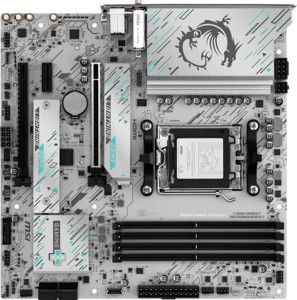
MSI B850M Gaming Plus Wi-Fi
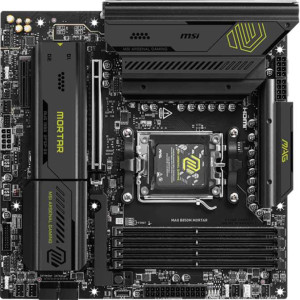
MSI MAG B850M Mortar

MSI B850M Gaming Plus Wi-Fi MSI MAG B850M Mortar

Overview

Welcome to our in-depth specification comparison between the MSI B850M Gaming Plus Wi-Fi and the MSI MAG B850M Mortar, two Micro-ATX motherboards sharing the B850 chipset and AM5 socket. While they align closely on memory support and core platform features, they diverge in areas like wireless connectivity, storage expansion, and rear port configuration — details that can meaningfully shape the experience for different builders.

Common Features

  • Both products use the AM5 CPU socket.
  • Both products feature the B850 chipset.
  • Both products have a Micro-ATX form factor.
  • Both products support HDMI 2.1.
  • Both products support overclocking.
  • RGB lighting is present on both products.
  • Easy BIOS reset is available on both products.
  • Dual BIOS is present on both products.
  • Both products support a maximum of 256GB of RAM.
  • Both products have a maximum native RAM speed of 5600 MHz and an overclocked RAM speed of 8200 MHz.
  • Both products have 4 memory slots and support 2 memory channels.
  • Both products use DDR5 memory.
  • ECC memory is not supported on either product.
  • Both products have 3 USB 3.2 Gen 2 Type-A ports.
  • Neither product has USB 3.2 Gen 1 Type-C, USB 2.0, USB 4, or Thunderbolt ports.
  • Both products have an HDMI output.
  • Both products provide 2 USB 3.2 Gen 1 ports and 2 USB 3.0 ports through expansion, along with 1 USB-C 3.2 Gen 2 and 4 USB 2.0 ports through expansion.
  • Both products have 4 SATA 3 connectors.
  • Both products include a TPM connector and no mSATA connector.
  • Both products have 1 PCIe 5.0 x16 slot, 1 PCIe x4 slot, and no PCIe 3.0, 2.0, or PCI slots.
  • Both products support 7.1 audio channels.
  • Both products support RAID 0, RAID 1, and RAID 10, but neither supports RAID 0+1.

Main Differences

  • Wi-Fi is present on MSI B850M Gaming Plus Wi-Fi but not available on MSI MAG B850M Mortar.
  • Bluetooth is present on MSI B850M Gaming Plus Wi-Fi but not available on MSI MAG B850M Mortar.
  • USB 3.2 Gen 1 Type-A ports number 3 on MSI B850M Gaming Plus Wi-Fi and 4 on MSI MAG B850M Mortar.
  • USB 3.2 Gen 2 Type-C ports number 2 on MSI B850M Gaming Plus Wi-Fi and 1 on MSI MAG B850M Mortar.
  • USB 3.2 Gen 2x2 ports number 0 on MSI B850M Gaming Plus Wi-Fi and 1 on MSI MAG B850M Mortar.
  • DisplayPort outputs number 1 on MSI B850M Gaming Plus Wi-Fi and 0 on MSI MAG B850M Mortar.
  • Fan headers number 5 on MSI B850M Gaming Plus Wi-Fi and 6 on MSI MAG B850M Mortar.
  • M.2 sockets number 2 on MSI B850M Gaming Plus Wi-Fi and 3 on MSI MAG B850M Mortar.
  • PCIe x1 slots number 1 on MSI B850M Gaming Plus Wi-Fi and 0 on MSI MAG B850M Mortar.
  • S/PDIF Out port is present on MSI MAG B850M Mortar but not available on MSI B850M Gaming Plus Wi-Fi.
  • Audio connectors number 3 on MSI B850M Gaming Plus Wi-Fi and 2 on MSI MAG B850M Mortar.
  • RAID 5 support is present on MSI MAG B850M Mortar but not available on MSI B850M Gaming Plus Wi-Fi.
Specs Comparison
MSI B850M Gaming Plus Wi-Fi

MSI B850M Gaming Plus Wi-Fi

MSI MAG B850M Mortar

MSI MAG B850M Mortar

General info:
CPU socket AM5 AM5
chipset B850 B850
form factor Micro-ATX Micro-ATX
release date January 2025 May 2025
supports Wi-Fi
Has Bluetooth
HDMI version HDMI 2.1 HDMI 2.1
Easy to overclock
has RGB lighting
Easy to reset BIOS
Has dual BIOS
CPU sockets 1 1
Has integrated graphics
warranty period 3 years 3 years
height 243.8 mm 243.8 mm
width 243.8 mm 243.8 mm
Has integrated CPU

Both the MSI B850M Gaming Plus Wi-Fi and the MSI MAG B850M Mortar share a strong common foundation: the same AM5 socket, B850 chipset, and Micro-ATX form factor with identical 243.8 × 243.8 mm dimensions. Both support overclocking, feature dual BIOS for recovery safety, offer HDMI 2.1 output, include RGB lighting, and come with a 3-year warranty. For users building an AMD Ryzen platform in a compact case, either board fits the same physical and functional baseline.

The single but meaningful differentiator in this group is wireless connectivity. The Gaming Plus Wi-Fi includes both Wi-Fi and Bluetooth, while the MAG B850M Mortar has neither. In practical terms, this means the Mortar requires a separate PCIe or USB wireless adapter if you need wireless networking or Bluetooth peripherals — an added cost and potentially a slot sacrifice. For builds in living rooms, open shelving, or anywhere running an Ethernet cable is inconvenient, the built-in wireless on the Gaming Plus is a tangible quality-of-life advantage.

For this spec group, the Gaming Plus Wi-Fi holds a clear edge solely due to its integrated Wi-Fi and Bluetooth. Every other general characteristic — platform compatibility, size, feature set, and warranty — is identical between the two boards. Buyers who already plan to use a wired connection and have no need for Bluetooth can treat both boards as equivalent on these specs and let other spec groups drive their decision.
Memory:
maximum memory amount 256GB 256GB
RAM speed (max) 5600 MHz 5600 MHz
overclocked RAM speed 8200 MHz 8200 MHz
memory slots 4 4
DDR memory version 5 5
memory channels 2 2
Supports ECC memory

On memory, these two boards are completely identical across every spec in this group. Both support DDR5 RAM with 4 slots across a dual-channel configuration, a maximum capacity of 256GB, and a native speed ceiling of 5600 MHz — which aligns with the JEDEC standard for DDR5 on the AM5 platform. For most gaming and productivity workloads, this headroom is more than sufficient.

Where enthusiasts will pay closer attention is the overclocked ceiling of 8200 MHz, achievable via EXPO or XMP profiles. Pushing DDR5 beyond the native spec can yield meaningful gains in memory-bandwidth-sensitive tasks like video editing, 3D rendering, and certain games — and having a board that officially supports profiles up to 8200 MHz means users are not artificially limited when pairing high-speed kits. The absence of ECC memory support is shared by both boards and is expected at this consumer tier; ECC is a workstation and server concern, not a gaming or enthusiast one.

This group is an unambiguous tie. There is no differentiator to speak of — the Gaming Plus Wi-Fi and the MAG B850M Mortar offer precisely the same memory platform, ceiling, and configuration options. Memory compatibility and kit selection can be treated as a shared consideration rather than a board-specific one.

Ports:
USB 3.2 Gen 2 ports (USB-A) 3 3
USB 3.2 Gen 1 ports (USB-A) 3 4
USB 3.2 Gen 2 ports (USB-C) 2 1
USB 3.2 Gen 1 ports (USB-C) 0 0
USB 2.0 ports 0 0
USB 3.2 Gen 2x2 ports 0 1
USB 4 40Gbps ports 0 0
USB 4 20Gbps ports 0 0
Thunderbolt 4 ports 0 0
Thunderbolt 3 ports 0 0
has an HDMI output
DisplayPort outputs 1 0
RJ45 ports 1 1
Has USB Type-C
eSATA ports 0 0
DVI outputs 0 0
has a VGA connector
PS/2 ports 0 0

The rear I/O layout is where these two boards diverge most interestingly. The Gaming Plus Wi-Fi pairs its HDMI output with a DisplayPort, giving it two independent video outputs — useful for users relying on AMD integrated graphics or running a dual-monitor setup without a discrete GPU. The MAG B850M Mortar offers only HDMI, which limits display flexibility in those scenarios. On USB-C, the Gaming Plus also leads with two USB 3.2 Gen 2 Type-C ports (10 Gbps each) versus the Mortar's single Gen 2 Type-C — an advantage for desks loaded with modern peripherals, docks, or fast external SSDs.

The Mortar counters with one notable port the Gaming Plus lacks: a USB 3.2 Gen 2x2 connector running at 20 Gbps. That doubled bandwidth over a standard Gen 2 port is meaningful when connecting the latest high-speed NVMe enclosures or docks that can saturate 10 Gbps. So while the Gaming Plus wins on port count and display output breadth, the Mortar offers a higher-ceiling single connection for users with compatible high-throughput devices. The Mortar also has one additional USB-A Gen 1 port, though the practical impact of that extra 5 Gbps slot is minor.

Overall, the Gaming Plus Wi-Fi holds the edge in this group for most users: the added DisplayPort output and second USB-C Gen 2 port address broader everyday needs. The Mortar's Gen 2x2 port is a meaningful advantage only for a narrower set of users with specific high-speed peripherals. Choose the Mortar if that 20 Gbps connection is a priority; otherwise the Gaming Plus offers more versatile rear I/O.

Connectors:
USB 3.2 Gen 1 ports (through expansion) 2 2
USB-C 3.2 Gen 2 ports (through expansion) 1 1
USB 2.0 ports (through expansion) 4 4
SATA 3 connectors 4 4
fan headers 5 6
USB 3.0 ports (through expansion) 2 2
M.2 sockets 2 3
Has TPM connector
U.2 sockets 0 0
Has mSATA connector
SATA 2 connectors 0 0

Internal connectivity tells an interesting story for these two boards. The shared foundation is solid — both offer 4 SATA 3 ports, matching internal USB expansion headers, and a TPM connector. For mid-range builds with a couple of drives and standard front-panel USB needs, either board covers the bases without compromise.

The divergence comes down to two specs that matter for more ambitious builds. The MAG B850M Mortar provides 3 M.2 sockets versus the Gaming Plus Wi-Fi's 2 — a meaningful advantage for users planning an all-NVMe storage array or wanting to add a dedicated M.2 drive for OS, games, and fast scratch storage simultaneously without touching the SATA ports. The Mortar also edges ahead with 6 fan headers compared to 5 on the Gaming Plus, which gives builders running custom cooling loops or multi-fan setups one extra point of direct PWM or DC control without resorting to a splitter.

The MAG B850M Mortar has the clear advantage in this group. The additional M.2 socket is the more impactful differentiator — NVMe slots are a finite and frequently contested resource on Micro-ATX boards, and having three instead of two future-proofs the storage configuration meaningfully. The extra fan header is a smaller but welcome bonus for thermal-conscious builders.

Expansion slots:
PCIe 4.0 x16 slots 0 0
PCIe 5.0 x16 slots 1 1
PCIe 3.0 x16 slots 0 0
PCIe x1 slots 1 0
PCI slots 0 0
PCIe 2.0 x16 slots 0 0
PCIe x4 slots 1 1
PCIe x8 slots 0 0

Expansion slot configurations on Micro-ATX boards are inherently constrained, and neither board breaks that mold. What matters most here is that both offer a PCIe 5.0 x16 slot as their primary GPU interface — the current-generation standard that ensures full bandwidth compatibility with modern discrete graphics cards and eliminates any bottleneck concern for the foreseeable future. Both also share a PCIe x4 slot, useful for add-in cards like high-speed NVMe adapters, capture cards, or 10GbE networking.

The only difference in this group is that the Gaming Plus Wi-Fi includes a PCIe x1 slot, which the Mortar omits. In practice, x1 slots serve a narrow use case — legacy or budget add-in cards such as older sound cards, USB expansion cards, or basic network adapters. For most modern builds, this slot goes unused, but it does provide a fallback option if a specific low-bandwidth card is needed without sacrificing the x4 slot.

This group is effectively a near-tie, with a marginal edge to the Gaming Plus Wi-Fi for the additional x1 slot. The primary PCIe 5.0 x16 and x4 slots — the ones that actually drive build decisions — are identical. The x1 slot is a minor convenience rather than a meaningful architectural advantage, and most buyers will not find it a deciding factor.

Audio:
audio channels 7.1 7.1
Has S/PDIF Out port
audio connectors 3 2

Audio capability is a secondary differentiator on these boards, but the contrast here is worth understanding. Both deliver 7.1 surround sound through their onboard audio, which is the standard for immersive gaming and home-theater PC setups. Where they part ways is in output options and analog connector count.

The MAG B850M Mortar includes an S/PDIF optical output, which the Gaming Plus Wi-Fi lacks entirely. S/PDIF is the preferred connection for routing digital audio to an AV receiver, soundbar, or external DAC without any analog signal degradation — a meaningful advantage for users with a dedicated audio chain or home theater setup. The trade-off is that the Mortar offers only 2 analog audio jacks, compared to 3 on the Gaming Plus. The extra analog connector on the Gaming Plus gives more flexibility for simultaneous headphone, speaker, and microphone connections without an adapter or splitter.

Which board has the edge depends entirely on the user's audio setup. For anyone routing sound through an external receiver or DAC via optical, the Mortar's S/PDIF output is the more valuable feature — it enables a cleaner, interference-free signal path that analog jacks simply cannot match. For users sticking with analog peripherals and no external audio equipment, the Gaming Plus Wi-Fi's extra jack is the more practical advantage. Neither board wins outright; the edge belongs to whichever matches the user's specific audio workflow.

Storage:
Supports RAID 1
Supports RAID 10 (1+0)
Supports RAID 5
Supports RAID 0
Supports RAID 0+1

RAID support is a niche but telling spec for users who manage multi-drive arrays directly through their motherboard. Both boards cover the essentials — RAID 0 for striped performance, RAID 1 for mirrored redundancy, and RAID 10 for a combined stripe-and-mirror setup — which handles the vast majority of consumer and prosumer use cases.

The meaningful separation is the MAG B850M Mortar's support for RAID 5, which the Gaming Plus Wi-Fi does not offer. RAID 5 distributes parity data across three or more drives, providing fault tolerance against a single drive failure while preserving more usable capacity than RAID 1 or RAID 10. It is particularly attractive for small NAS-style setups or workstations where both redundancy and storage efficiency matter — and notably, the Mortar's three M.2 slots noted in the Connectors group make it physically capable of running a three-drive RAID 5 array entirely over NVMe.

The MAG B850M Mortar has the edge here. For most gaming or general-purpose builds, the shared RAID 0/1/10 support is sufficient and this distinction is irrelevant. But for users with more demanding storage architecture needs, the Mortar's RAID 5 capability — especially paired with its additional M.2 socket — represents a genuinely broader and more flexible storage platform.

Comparison Summary & Verdict

Both boards deliver a solid B850 foundation with DDR5 support, PCIe 5.0, and identical memory headroom up to 256GB. However, their differences point to clearly different audiences. The MSI B850M Gaming Plus Wi-Fi stands out with built-in Wi-Fi and Bluetooth, a DisplayPort output, and more USB-C Gen 2 ports, making it the more self-contained and connectivity-ready option for compact desktop builds. The MSI MAG B850M Mortar, on the other hand, edges ahead with an extra M.2 socket, an additional fan header, a USB 3.2 Gen 2x2 port, and RAID 5 support, appealing to builders who prioritize storage scalability and thermal control. Choose the Gaming Plus Wi-Fi if wireless connectivity and display output matter; opt for the Mortar if maximum storage expansion and cooling flexibility are your priorities.

MSI B850M Gaming Plus Wi-Fi
Buy MSI B850M Gaming Plus Wi-Fi if...

Buy the MSI B850M Gaming Plus Wi-Fi if you want built-in Wi-Fi and Bluetooth, a DisplayPort output, and more USB-C Gen 2 rear ports without relying on add-in cards.

MSI MAG B850M Mortar
Buy MSI MAG B850M Mortar if...

Buy the MSI MAG B850M Mortar if you need an extra M.2 socket for storage expansion, more fan headers for advanced cooling, USB 3.2 Gen 2x2 support, and RAID 5 capability.