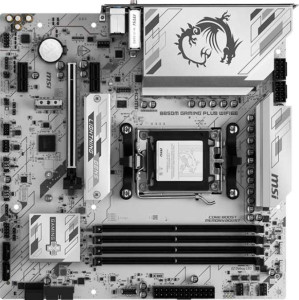
MSI B850M Gaming Plus Wi-Fi6E
MSI MAG B850 Tomahawk Max WiFi

MSI B850M Gaming Plus Wi-Fi6E MSI MAG B850 Tomahawk Max WiFi

Overview

Welcome to our detailed spec comparison between the MSI B850M Gaming Plus Wi-Fi6E and the MSI MAG B850 Tomahawk Max WiFi — two B850-chipset motherboards targeting AMD AM5 platform builders. While they share a strong common foundation, key battlegrounds include form factor and physical footprint, connectivity options, expansion capabilities, and storage headroom. Read on to discover how these two boards stack up across every major specification category.

Common Features

  • Both boards use the AM5 CPU socket.
  • Both boards feature the B850 chipset.
  • Both boards support Wi-Fi.
  • Both boards have Bluetooth.
  • Both boards output HDMI 2.1.
  • Both boards are easy to overclock.
  • Both boards include RGB lighting.
  • Both boards support easy BIOS reset.
  • Both boards support a maximum of 256GB of RAM.
  • Both boards have a maximum standard RAM speed of 5600 MHz.
  • Both boards have 4 memory slots.
  • Both boards use DDR5 memory.
  • Both boards have 2 memory channels.
  • ECC memory is not supported on either board.
  • Neither board has USB 3.2 Gen 1 USB-C ports, USB 3.2 Gen 2x2 ports, USB 4 40Gbps ports, USB 4 20Gbps ports, Thunderbolt 4, or Thunderbolt 3 ports.
  • Both boards have an HDMI output.
  • Both boards have 1 RJ45 port.
  • Both boards have 4 USB 2.0 ports through expansion.
  • Both boards have 4 SATA 3 connectors.
  • Both boards include a TPM connector.
  • Neither board has a U.2 socket or mSATA connector.
  • Both boards have 1 PCIe 4.0 x16 slot.
  • Neither board has PCIe 3.0 x16, PCI, PCIe 2.0 x16, PCIe x4, or PCIe x8 slots.
  • Both boards deliver 7.1 audio channels.
  • Both boards support RAID 0, RAID 1, and RAID 10, but neither supports RAID 5 or RAID 0+1.

Main Differences

  • The MSI B850M Gaming Plus Wi-Fi6E has a Micro-ATX form factor, while the MSI MAG B850 Tomahawk Max WiFi has an ATX form factor.
  • The MSI B850M Gaming Plus Wi-Fi6E is 243.8 mm wide, while the MSI MAG B850 Tomahawk Max WiFi is 304.8 mm wide.
  • Wi-Fi version support goes up to Wi-Fi 6E on the MSI B850M Gaming Plus Wi-Fi6E, while the MSI MAG B850 Tomahawk Max WiFi additionally supports Wi-Fi 7 (802.11be).
  • Bluetooth version is 5.3 on the MSI B850M Gaming Plus Wi-Fi6E and 5.4 on the MSI MAG B850 Tomahawk Max WiFi.
  • Maximum overclocked RAM speed is 8200 MHz on the MSI B850M Gaming Plus Wi-Fi6E and 8400 MHz on the MSI MAG B850 Tomahawk Max WiFi.
  • USB 3.2 Gen 2 USB-A ports number 4 on the MSI B850M Gaming Plus Wi-Fi6E and 2 on the MSI MAG B850 Tomahawk Max WiFi.
  • USB 3.2 Gen 1 USB-A ports number 4 on the MSI B850M Gaming Plus Wi-Fi6E and 1 on the MSI MAG B850 Tomahawk Max WiFi.
  • USB 3.2 Gen 2 USB-C ports number 1 on the MSI B850M Gaming Plus Wi-Fi6E and 3 on the MSI MAG B850 Tomahawk Max WiFi.
  • USB 2.0 ports are absent on the MSI B850M Gaming Plus Wi-Fi6E but number 4 on the MSI MAG B850 Tomahawk Max WiFi.
  • A DisplayPort output is present on the MSI B850M Gaming Plus Wi-Fi6E but not available on the MSI MAG B850 Tomahawk Max WiFi.
  • USB 3.2 Gen 1 ports through expansion number 2 on the MSI B850M Gaming Plus Wi-Fi6E and 4 on the MSI MAG B850 Tomahawk Max WiFi.
  • Fan headers number 5 on the MSI B850M Gaming Plus Wi-Fi6E and 8 on the MSI MAG B850 Tomahawk Max WiFi.
  • USB 3.0 ports through expansion number 2 on the MSI B850M Gaming Plus Wi-Fi6E and 4 on the MSI MAG B850 Tomahawk Max WiFi.
  • M.2 sockets number 2 on the MSI B850M Gaming Plus Wi-Fi6E and 4 on the MSI MAG B850 Tomahawk Max WiFi.
  • PCIe 5.0 x16 slot is absent on the MSI B850M Gaming Plus Wi-Fi6E but present on the MSI MAG B850 Tomahawk Max WiFi.
  • PCIe x1 slots number 2 on the MSI B850M Gaming Plus Wi-Fi6E and 1 on the MSI MAG B850 Tomahawk Max WiFi.
  • S/PDIF Out port is not available on the MSI B850M Gaming Plus Wi-Fi6E but is present on the MSI MAG B850 Tomahawk Max WiFi.
  • Audio connectors number 3 on the MSI B850M Gaming Plus Wi-Fi6E and 2 on the MSI MAG B850 Tomahawk Max WiFi.
Specs Comparison
MSI B850M Gaming Plus Wi-Fi6E

MSI B850M Gaming Plus Wi-Fi6E

MSI MAG B850 Tomahawk Max WiFi

MSI MAG B850 Tomahawk Max WiFi

General info:
CPU socket AM5 AM5
chipset B850 B850
form factor Micro-ATX ATX
release date June 2025 January 2025
supports Wi-Fi
Wi-Fi version Wi-Fi 4 (802.11n), Wi-Fi 5 (802.11ac), Wi-Fi 6 (802.11ax), Wi-Fi 6E (802.11ax) Wi-Fi 4 (802.11n), Wi-Fi 5 (802.11ac), Wi-Fi 6 (802.11ax), Wi-Fi 6E (802.11ax), Wi-Fi 7 (802.11be)
Has Bluetooth
Bluetooth version 5.3 5.4
HDMI version HDMI 2.1 HDMI 2.1
Easy to overclock
has RGB lighting
Easy to reset BIOS
Has dual BIOS
has aptX
CPU sockets 1 1
Has integrated graphics
warranty period 3 years 3 years
height 243.8 mm 243.8 mm
width 243.8 mm 304.8 mm
Has integrated CPU

Both the MSI B850M Gaming Plus Wi-Fi 6E and the MSI MAG B850 Tomahawk Max WiFi share a strong common foundation: the same AM5 socket and B850 chipset, identical HDMI 2.1 output, dual BIOS, easy overclocking, RGB lighting, Bluetooth, Wi-Fi, and a matching 3-year warranty. For a buyer prioritizing platform compatibility or core feature parity, either board delivers essentially the same baseline experience.

The most meaningful differentiators emerge in three areas. First, form factor: the Gaming Plus is Micro-ATX (243.8 × 243.8 mm), while the Tomahawk Max is a full ATX (243.8 × 304.8 mm) — a real-world consequence being that the Tomahawk Max requires a larger case but likely offers more expansion slots and layout breathing room. Second, wireless connectivity: the Tomahawk Max adds Wi-Fi 7 (802.11be) support on top of the shared Wi-Fi 4/5/6/6E stack, which translates to significantly higher theoretical throughput and lower latency on compatible routers — a genuine future-proofing advantage. Third, Bluetooth 5.4 on the Tomahawk Max (vs. 5.3 on the Gaming Plus) brings minor improvements in connection reliability and energy efficiency, though the practical day-to-day difference is marginal.

Overall, the Tomahawk Max holds a clear edge in this group, driven primarily by its Wi-Fi 7 support and ATX form factor. If compact builds are a priority, the Gaming Plus is a capable, space-saving alternative — but users who want the latest wireless standard and greater board real estate should lean toward the Tomahawk Max.
Memory:
maximum memory amount 256GB 256GB
RAM speed (max) 5600 MHz 5600 MHz
overclocked RAM speed 8200 MHz 8400 MHz
memory slots 4 4
DDR memory version 5 5
memory channels 2 2
Supports ECC memory

Memory compatibility is nearly identical across these two boards: both support DDR5 with four slots, dual-channel configuration, a native maximum of 5600 MHz, and a ceiling of 256GB total capacity. For the vast majority of users — gamers, content creators, or general workstation builders — this shared foundation means either board will handle any mainstream DDR5 kit without compromise.

The only differentiator here is the overclocked RAM ceiling: the Gaming Plus tops out at 8200 MHz, while the Tomahawk Max pushes slightly further to 8400 MHz. In practice, this 200 MHz gap sits at the extreme edge of what current DDR5 modules can realistically achieve, and real-world performance differences at those frequencies are negligible for virtually all workloads. It is a spec that matters almost exclusively to enthusiast overclockers chasing benchmark records rather than everyday performance gains.

For this group, the two boards are effectively tied. The Tomahawk Max′s marginally higher overclocking ceiling is a paper advantage that will go unused by the overwhelming majority of buyers. Neither board supports ECC memory, so workstation or server use cases requiring error correction are off the table for both.

Ports:
USB 3.2 Gen 2 ports (USB-A) 4 2
USB 3.2 Gen 1 ports (USB-A) 4 1
USB 3.2 Gen 2 ports (USB-C) 1 3
USB 3.2 Gen 1 ports (USB-C) 0 0
USB 2.0 ports 0 4
USB 3.2 Gen 2x2 ports 0 0
USB 4 40Gbps ports 0 0
USB 4 20Gbps ports 0 0
Thunderbolt 4 ports 0 0
Thunderbolt 3 ports 0 0
has an HDMI output
DisplayPort outputs 1 0
RJ45 ports 1 1
Has USB Type-C
eSATA ports 0 0
DVI outputs 0 0
has a VGA connector
PS/2 ports 0 0

The port layouts on these two boards reflect distinctly different design philosophies. The Gaming Plus leans heavily into USB-A connectivity, offering a total of eight rear USB-A ports — four at Gen 2 (10 Gbps) and four at Gen 1 (5 Gbps) — making it an excellent fit for users with large collections of traditional peripherals, storage drives, or hubs. The Tomahawk Max, by contrast, pivots toward modern USB-C with three rear USB-C Gen 2 ports alongside only three USB-A ports at high speed, signaling a forward-looking approach better suited to newer devices, fast external SSDs, and USB-C monitors or docks.

Two other differences are worth noting. The Gaming Plus includes a DisplayPort output alongside HDMI, giving users with AMD integrated graphics (or APUs on future AM5 refreshes) a second display output option — the Tomahawk Max offers HDMI only, which is a genuine limitation for multi-monitor setups relying on integrated video. Meanwhile, the Tomahawk Max adds four USB 2.0 ports absent on the Gaming Plus; these are low-bandwidth but still useful for keyboards, mice, or dongles, and they free up the faster ports for demanding devices.

On balance, the Gaming Plus holds the edge for users who prioritize raw port count and display flexibility, thanks to its dominant USB-A selection and the added DisplayPort. The Tomahawk Max is the stronger pick for those transitioning to a USB-C-centric peripheral setup, but its lack of DisplayPort is a tangible omission that could matter depending on the use case.

Connectors:
USB 3.2 Gen 1 ports (through expansion) 2 4
USB 2.0 ports (through expansion) 4 4
SATA 3 connectors 4 4
fan headers 5 8
USB 3.0 ports (through expansion) 2 4
M.2 sockets 2 4
Has TPM connector
U.2 sockets 0 0
Has mSATA connector
SATA 2 connectors 0 0

Internal connectivity is where the Tomahawk Max pulls decisively ahead. Its 4 M.2 sockets versus the Gaming Plus's 2 is the headline difference: M.2 is the dominant interface for fast NVMe SSDs, and doubling the available slots means the Tomahawk Max can support significantly more high-speed storage without touching the four shared SATA 3 connectors — a major advantage for content creators, video editors, or anyone building a high-capacity storage array.

Fan and thermal management tells a similar story. The Tomahawk Max provides 8 fan headers compared to the Gaming Plus's 5, which matters considerably in larger ATX builds where more case fans, radiator pumps, and AIO headers need direct motherboard control. Relying on splitters to compensate for fewer headers reduces granular control over individual fan curves — a real trade-off for thermal-conscious builders. Expansion USB headers follow the same pattern, with the Tomahawk Max offering 4 USB 3.0 ports through expansion versus 2 on the Gaming Plus, enabling more front-panel and hub connectivity.

The Tomahawk Max wins this group clearly. Across every scalable internal connector category — M.2 slots, fan headers, and expansion USB — it outpaces the Gaming Plus by a meaningful margin. The Gaming Plus holds its own for compact or simpler builds where two M.2 slots and five fan headers are sufficient, but for users planning feature-rich, storage-heavy, or heavily cooled systems, the Tomahawk Max's internal connector depth is a substantial practical advantage.

Expansion slots:
PCIe 4.0 x16 slots 1 1
PCIe 5.0 x16 slots 0 1
PCIe 3.0 x16 slots 0 0
PCIe x1 slots 2 1
PCI slots 0 0
PCIe 2.0 x16 slots 0 0
PCIe x4 slots 0 0
PCIe x8 slots 0 0

Expansion slot configurations reveal another meaningful gap between these two boards. Both share a single PCIe 4.0 x16 slot — the primary GPU slot on either build — but the Tomahawk Max adds a dedicated PCIe 5.0 x16 slot that the Gaming Plus entirely lacks. PCIe 5.0 doubles the bandwidth of PCIe 4.0, and while current GPUs do not yet saturate even PCIe 4.0 x16, this slot positions the Tomahawk Max for next-generation graphics cards and high-throughput add-in cards without requiring a board upgrade.

The trade-off comes in secondary slots: the Gaming Plus offers 2 PCIe x1 slots versus just 1 on the Tomahawk Max. PCIe x1 slots are used for expansion cards like capture cards, sound cards, or network adapters, so users who rely on multiple such cards will find the Gaming Plus marginally more accommodating in that regard. That said, this is a niche concern for most builds.

The Tomahawk Max holds the edge here. A PCIe 5.0 x16 slot is a substantive future-proofing advantage that the Gaming Plus simply cannot match, and losing one PCIe x1 slot is a minor concession by comparison. For GPU-focused or high-performance builds where longevity matters, the Tomahawk Max's expansion slot lineup is the stronger foundation.

Audio:
audio channels 7.1 7.1
Has S/PDIF Out port
audio connectors 3 2

Audio capabilities on these two boards are closely matched at the top level — both deliver 7.1-channel surround sound, which is the standard for immersive gaming and home theater setups on a motherboard. The practical difference lies in how audio is routed out of the system. The Tomahawk Max includes an S/PDIF optical output, which the Gaming Plus omits entirely. S/PDIF allows a lossless digital audio signal to be sent directly to an AV receiver, soundbar, or external DAC without passing through the motherboard's analog circuitry — a meaningful advantage for users with dedicated audio equipment.

The analog connector count tips the other way: the Gaming Plus provides 3 audio jacks versus 2 on the Tomahawk Max. In a 7.1 analog setup, more jacks allow more speaker channels to be connected simultaneously without adapters, so the Gaming Plus is marginally more convenient for users running a traditional multi-speaker analog configuration.

Which board has the edge depends entirely on the user's audio setup. For anyone connecting to an AV receiver or external DAC via optical, the Tomahawk Max wins outright thanks to its S/PDIF output. For users relying purely on analog multi-speaker setups, the Gaming Plus's extra jack offers a small but real convenience. Casual listeners and headphone users will find no meaningful difference between the two.

Storage:
Supports RAID 1
Supports RAID 10 (1+0)
Supports RAID 5
Supports RAID 0
Supports RAID 0+1

RAID support is identical across both boards. Each supports RAID 0 (striping for maximum performance), RAID 1 (mirroring for redundancy), and RAID 10 (a combined stripe-and-mirror configuration balancing speed and data protection). Neither board supports RAID 5 or RAID 0+1.

In practical terms, this shared feature set covers the needs of the vast majority of home and enthusiast users. RAID 0 suits those chasing peak sequential throughput across multiple drives; RAID 1 is the go-to for simple data redundancy with two drives; and RAID 10 is the preferred choice for users who want both performance and fault tolerance across four drives. The absence of RAID 5 means parity-based redundancy across three or more drives is not an option on either board — but RAID 5 is rarely a priority outside professional NAS or workstation contexts.

This group is a complete tie. Both boards offer the same RAID configurations and the same limitations, giving neither a storage redundancy advantage over the other.

Comparison Summary & Verdict

Both boards are capable AM5 motherboards built on the B850 chipset, but they serve different builder profiles. The MSI B850M Gaming Plus Wi-Fi6E is the stronger pick for compact Micro-ATX builds, offering more USB-A ports and a DisplayPort output, making it well-suited for space-conscious setups with diverse display needs. The MSI MAG B850 Tomahawk Max WiFi, on the other hand, is clearly aimed at power users who want room to grow: it delivers a PCIe 5.0 x16 slot, four M.2 sockets, eight fan headers, Wi-Fi 7 support, and higher overclocked RAM speeds, all in a full ATX footprint. Choose the Tomahawk Max if expandability and future-proofing are your priorities.

MSI B850M Gaming Plus Wi-Fi6E
Buy MSI B850M Gaming Plus Wi-Fi6E if...

Buy the MSI B850M Gaming Plus Wi-Fi6E if you are building a compact Micro-ATX system and want more USB-A ports, a DisplayPort output, and a smaller physical footprint without sacrificing core B850 features.

MSI MAG B850 Tomahawk Max WiFi
Buy MSI MAG B850 Tomahawk Max WiFi if...

Buy the MSI MAG B850 Tomahawk Max WiFi if you want maximum expandability, including a PCIe 5.0 x16 slot, four M.2 sockets, Wi-Fi 7 support, more fan headers, and higher overclocked RAM speeds in a full ATX board.