MSI B850MPower
MSI MAG B850M Mortar WiFI

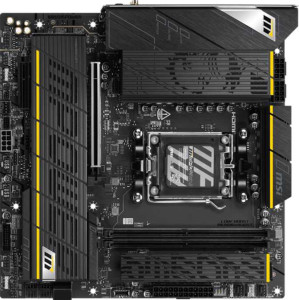
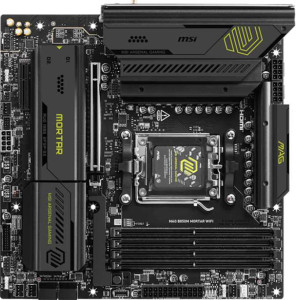
MSI B850MPower MSI MAG B850M Mortar WiFI

Overview

Choosing between the MSI B850MPower and the MSI MAG B850M Mortar WiFi is no simple task: both are Micro-ATX motherboards sharing the AM5 socket and B850 chipset, yet they diverge in meaningful ways. This head-to-head comparison examines their key battlegrounds, including memory capacity and overclocking headroom, storage connectivity, and platform reliability features, to help you identify which board truly fits your build.

Common Features

  • Both boards use the AM5 CPU socket.
  • Both boards feature the B850 chipset.
  • Both boards have a Micro-ATX form factor.
  • Wi-Fi is available on both products, supporting Wi-Fi 4, Wi-Fi 5, Wi-Fi 6, Wi-Fi 6E, and Wi-Fi 7.
  • Bluetooth 5.4 is present on both products.
  • Both boards include an HDMI 2.1 port.
  • Both boards support a maximum RAM speed of 5600 MHz.
  • Both boards use DDR5 memory.
  • Both boards have 2 memory channels.
  • ECC memory support is not available on either product.
  • Both boards provide 3 USB 3.2 Gen 2 Type-A ports, 4 USB 3.2 Gen 1 Type-A ports, 1 USB 3.2 Gen 2 Type-C port, and 1 USB 3.2 Gen 2x2 port.
  • Neither board has USB 2.0 rear ports or USB 4 ports.
  • Both boards offer 2 USB 3.2 Gen 1 headers, 1 USB-C 3.2 Gen 2 header, 4 USB 2.0 headers, and 6 fan headers.
  • A TPM connector is present on both products.
  • mSATA support is not available on either product.
  • Both boards feature 1 PCIe 5.0 x16 slot and 1 PCIe x4 slot, with no PCIe 3.0, 4.0, or legacy slots.
  • Both boards deliver a 120 dB signal-to-noise ratio on the DAC and support 7.1 audio channels.
  • An S/PDIF output port is present on both products.
  • Both boards support RAID 0, RAID 1, RAID 5, and RAID 10, but RAID 0+1 is not supported on either product.

Main Differences

  • Dual BIOS is present on MSI MAG B850M Mortar WiFI but not available on MSI B850MPower.
  • aptX audio support is present on MSI B850MPower but not available on MSI MAG B850M Mortar WiFI.
  • The maximum supported memory amount is 128 GB on MSI B850MPower and 256 GB on MSI MAG B850M Mortar WiFI.
  • The maximum overclocked RAM speed is 10200 MHz on MSI B850MPower and 8200 MHz on MSI MAG B850M Mortar WiFI.
  • MSI B850MPower has 2 memory slots, while MSI MAG B850M Mortar WiFI has 4 memory slots.
  • SATA 3 connectors number 2 on MSI B850MPower and 4 on MSI MAG B850M Mortar WiFI.
  • M.2 sockets number 4 on MSI B850MPower and 3 on MSI MAG B850M Mortar WiFI.
  • The board height is 243.8 mm on MSI B850MPower and 244 mm on MSI MAG B850M Mortar WiFI.
  • The board width is 243.8 mm on MSI B850MPower and 244 mm on MSI MAG B850M Mortar WiFI.
Specs Comparison
MSI B850MPower

MSI B850MPower

MSI MAG B850M Mortar WiFI

MSI MAG B850M Mortar WiFI

General info:
CPU socket AM5 AM5
chipset B850 B850
form factor Micro-ATX Micro-ATX
release date September 2025 March 2025
supports Wi-Fi
Wi-Fi version Wi-Fi 4 (802.11n), Wi-Fi 5 (802.11ac), Wi-Fi 6 (802.11ax), Wi-Fi 6E (802.11ax), Wi-Fi 7 (802.11be) Wi-Fi 4 (802.11n), Wi-Fi 5 (802.11ac), Wi-Fi 6 (802.11ax), Wi-Fi 6E (802.11ax), Wi-Fi 7 (802.11be)
Has Bluetooth
Bluetooth version 5.4 5.4
HDMI version HDMI 2.1 HDMI 2.1
Easy to overclock
has RGB lighting
Easy to reset BIOS
Has dual BIOS
has aptX
CPU sockets 1 1
Has integrated graphics
warranty period 3 years 3 years
height 243.8 mm 244 mm
width 243.8 mm 244 mm
Has integrated CPU

At their core, the MSI B850MPower and the MSI MAG B850M Mortar WiFi are remarkably similar boards: both use the AM5 socket with a B850 chipset, share the same Micro-ATX form factor, and offer identical wireless connectivity up to Wi-Fi 7 with Bluetooth 5.4. Both also support easy overclocking, easy BIOS reset, RGB lighting, and come backed by a 3-year warranty. For most users evaluating general platform features, these two boards are essentially equivalent.

The meaningful differences come down to two specific features. The MAG B850M Mortar WiFi includes dual BIOS, which means a second backup chip can automatically recover a corrupted firmware — a genuine safety net for overclockers or anyone flashing experimental BIOS updates. The B850MPower lacks this, which introduces a small but real risk during BIOS updates. On the flip side, the B850MPower supports aptX audio codec, enabling higher-quality, lower-latency Bluetooth audio with compatible devices and headphones — a perk the Mortar WiFi does not offer.

On balance, the MAG B850M Mortar WiFi holds a slight general-use edge in this category: dual BIOS is a broadly useful safety feature that benefits a wide range of users, whereas aptX support on the B850MPower is only relevant to those specifically using aptX-compatible Bluetooth audio gear. Unless high-fidelity wireless audio is a priority, the Mortar WiFi's redundancy protection is the more universally impactful differentiator here.
Memory:
maximum memory amount 128GB 256GB
RAM speed (max) 5600 MHz 5600 MHz
overclocked RAM speed 10200 MHz 8200 MHz
memory slots 2 4
DDR memory version 5 5
memory channels 2 2
Supports ECC memory

Both boards run DDR5 memory with a native speed ceiling of 5600 MHz and support dual-channel operation — so day-to-day memory bandwidth and latency characteristics are identical out of the box. Where they diverge is in capacity and expandability: the MAG B850M Mortar WiFi offers 4 DIMM slots and a maximum of 256GB, while the B850MPower is limited to 2 DIMM slots and 128GB. For mainstream gaming or office workloads this distinction is largely academic, but for content creators, virtualization users, or anyone future-proofing a workstation build, the Mortar WiFi's headroom is a genuine advantage.

The overclocked RAM speed ceiling flips the advantage back to the B850MPower, which supports XMP/EXPO profiles up to a striking 10200 MHz compared to the Mortar WiFi's 8200 MHz. In practice, running DDR5 at those extremes requires carefully validated memory kits and carries stability trade-offs, so most users will never approach either limit — but enthusiasts chasing peak memory performance have more runway on the B850MPower.

The memory category ultimately comes down to use case. The Mortar WiFi has the clear edge for capacity-driven workloads thanks to its four slots and 256GB ceiling, making it the stronger choice for professional or heavy multitasking builds. The B850MPower counters with a higher overclocking ceiling, appealing to hardcore enthusiasts who prioritize raw memory speed over total capacity. Neither board supports ECC memory, so error-correction is off the table for both.

Ports:
USB 3.2 Gen 2 ports (USB-A) 3 3
USB 3.2 Gen 1 ports (USB-A) 4 4
USB 3.2 Gen 2 ports (USB-C) 1 1
USB 3.2 Gen 1 ports (USB-C) 0 0
USB 2.0 ports 0 0
USB 3.2 Gen 2x2 ports 1 1
USB 4 40Gbps ports 0 0
USB 4 20Gbps ports 0 0
Thunderbolt 4 ports 0 0
Thunderbolt 3 ports 0 0
has an HDMI output
DisplayPort outputs 0 0
RJ45 ports 1 1
Has USB Type-C
eSATA ports 0 0
DVI outputs 0 0
has a VGA connector
PS/2 ports 0 0

Rare in a direct comparison, the port configurations on these two boards are completely identical across every single specification. Both offer a solid rear I/O layout headlined by 3x USB 3.2 Gen 2 (USB-A) and 4x USB 3.2 Gen 1 (USB-A) ports, covering the vast majority of peripherals at high speed. A USB 3.2 Gen 2x2 (20Gbps) port adds fast external storage capability, and a USB 3.2 Gen 2 Type-C rounds out the modern connectivity options.

Neither board includes USB4 or Thunderbolt in any form, which is typical for B-series motherboards and not a surprise at this tier. The single HDMI 2.1 output — noted in the general specs — serves as the sole video output, with no DisplayPort alternative. A single RJ45 port handles wired networking on both. The absence of legacy connectors like PS/2, VGA, or eSATA keeps the I/O panel clean and modern.

This category is a complete tie — there is not a single port-level difference between the two boards. Connectivity should play no role whatsoever in choosing between them.

Connectors:
USB 3.2 Gen 1 ports (through expansion) 2 2
USB-C 3.2 Gen 2 ports (through expansion) 1 1
USB 2.0 ports (through expansion) 4 4
SATA 3 connectors 2 4
fan headers 6 6
USB 3.0 ports (through expansion) 2 2
M.2 sockets 4 3
Has TPM connector
U.2 sockets 0 0
Has mSATA connector
SATA 2 connectors 0 0

Internal storage connectivity is where these two boards make different bets. The B850MPower leads with 4 M.2 sockets, making it the stronger choice for NVMe-centric builds where fast solid-state storage is the priority and traditional drives are an afterthought. The MAG B850M Mortar WiFi counters with 4 SATA 3 connectors versus the B850MPower's 2, giving it a meaningful edge for anyone running multiple HDDs or SSDs — home servers, large media libraries, or storage-heavy workstations all benefit from that extra SATA headroom.

Beyond storage, the two boards are evenly matched on internal expansion. Both provide 6 fan headers — a generous count for Micro-ATX boards that supports thorough case airflow management without needing a separate fan controller. Front-panel USB connectivity is also identical across the board, including a USB-C 3.2 Gen 2 header for modern case compatibility.

The storage trade-off here is genuine and use-case driven. The B850MPower has the edge for pure NVMe builds, while the Mortar WiFi is the better fit for mixed or SATA-heavy storage configurations. Neither is objectively superior — the right choice depends entirely on how many and what type of drives a user plans to connect.

Expansion slots:
PCIe 4.0 x16 slots 0 0
PCIe 5.0 x16 slots 1 1
PCIe 3.0 x16 slots 0 0
PCIe x1 slots 0 0
PCI slots 0 0
PCIe 2.0 x16 slots 0 0
PCIe x4 slots 1 1
PCIe x8 slots 0 0

Expansion slot configurations are identical on both boards: one PCIe 5.0 x16 slot for the primary GPU, complemented by a single PCIe x4 slot for secondary expansion cards. The PCIe 5.0 x16 slot is the headline feature here — it doubles the bandwidth available compared to PCIe 4.0, which is particularly relevant for current and next-generation graphics cards and any NVMe devices that may leverage the primary slot in future builds.

The x4 slot provides a practical secondary option for add-in cards such as capture cards, additional NVMe controllers, or networking cards, though its bandwidth ceiling means it is not suited for a second full-performance GPU. The complete absence of legacy PCIe x1 or older-generation slots keeps the layout lean — a reasonable trade-off on a Micro-ATX board where physical space is constrained.

With no differences whatsoever between the two, this category is a complete tie. Expansion slot layout should carry no weight in the decision between these two boards.

Audio:
Signal-to-Noise ratio (DAC) 120 dB 120 dB
audio channels 7.1 7.1
Has S/PDIF Out port
audio connectors 2 2

Audio specifications are a mirror image across both boards. Each delivers a 120 dB signal-to-noise ratio from its DAC — a strong figure for onboard audio that keeps background hiss and interference well below audible thresholds, making it capable enough for most headphones, speakers, and studio monitors without requiring a dedicated sound card. Both also support 7.1 surround sound, catering to home theater and immersive gaming setups alike.

Connectivity is equally matched: two analog audio connectors on the rear I/O and an S/PDIF optical output on both, the latter being especially useful for passing lossless digital audio to an external receiver or DAC without signal degradation. Neither board has more physical audio jacks or any additional audio-oriented feature that the other lacks.

This is another complete tie — the audio subsystems are functionally identical. Users with demanding audio requirements will find both boards equally suited as a starting point, and neither offers any advantage over the other in this category.

Storage:
Supports RAID 1
Supports RAID 10 (1+0)
Supports RAID 5
Supports RAID 0
Supports RAID 0+1

RAID support is identical on both boards. Each covers the four most practical configurations: RAID 0 for striped performance, RAID 1 for mirrored redundancy, RAID 5 for a balanced mix of performance and fault tolerance across three or more drives, and RAID 10 for the combined benefits of mirroring and striping in larger arrays. Neither board supports RAID 0+1, though this omission is inconsequential in practice since RAID 10 achieves the same goals more efficiently.

The practical value of these RAID options depends heavily on the connector specs discussed earlier — notably, the Mortar WiFi's four SATA ports give it more physical drives to work with in a RAID array, whereas the B850MPower's two SATA ports limit RAID configurations to smaller setups unless M.2 drives are used. But as a standalone storage feature comparison, the RAID capability itself is a wash.

This category is a complete tie at the feature level. Neither board holds any advantage in supported RAID modes, and storage redundancy or performance configuration should not factor into choosing between them.

Comparison Summary & Verdict

Both the MSI B850MPower and the MSI MAG B850M Mortar WiFi share a solid foundation: AM5 socket, B850 chipset, Wi-Fi 7, Bluetooth 5.4, and identical rear USB layouts. However, their differences reveal two distinct audiences. The MSI B850MPower stands out with 4 M.2 sockets and a blistering 10200 MHz overclocked RAM speed, making it the stronger pick for enthusiasts pushing storage and memory performance. It also includes aptX audio support for higher-quality wireless sound. The MSI MAG B850M Mortar WiFi counters with 4 memory slots and up to 256 GB of RAM, 4 SATA 3 connectors, and a dual BIOS for added resilience, making it better suited to workstation builds, content creators, or anyone prioritizing stability and expandability over raw overclocking potential.

MSI B850MPower
Buy MSI B850MPower if...

Buy the MSI B850MPower if you want maximum M.2 storage expansion with 4 sockets and the highest overclocked RAM speeds, and value aptX audio support in your build.

MSI MAG B850M Mortar WiFI
Buy MSI MAG B850M Mortar WiFI if...

Buy the MSI MAG B850M Mortar WiFi if you need 4 memory slots with support for up to 256 GB of RAM, more SATA connectivity, and the added safety of a dual BIOS.