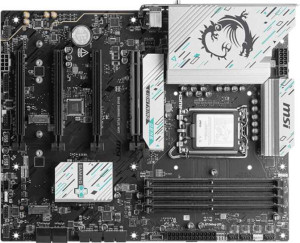
MSI B860 Gaming Plus WiFi
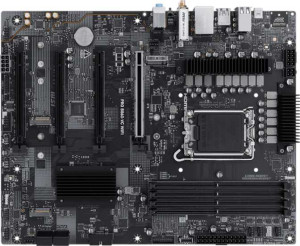
MSI Pro B860-VC Wi-Fi

MSI B860 Gaming Plus WiFi MSI Pro B860-VC Wi-Fi

Overview

When deciding between the MSI B860 Gaming Plus WiFi and the MSI Pro B860-VC Wi-Fi, you are looking at two ATX motherboards built on the same B860 chipset that share a remarkably similar foundation. Both boards support Wi-Fi 7, Bluetooth 5.4, and DDR5 memory, yet they diverge in notable areas including display output options, RGB aesthetics, and overclocked memory ceilings. This comparison breaks down exactly where each board pulls ahead so you can make the right choice for your build.

Common Features

  • Both products use the LGA 1851 CPU socket.
  • Both products feature the B860 chipset.
  • Both products use the ATX form factor.
  • Wi-Fi is supported on both products, covering Wi-Fi 4, Wi-Fi 5, Wi-Fi 6, Wi-Fi 6E, and Wi-Fi 7.
  • Bluetooth 5.4 is available on both products.
  • Both products support easy overclocking.
  • Both products support a maximum memory amount of 256GB.
  • Both products support a maximum RAM speed of 6400 MHz.
  • Both products have 4 memory slots.
  • Both products use DDR5 memory.
  • Both products have 2 memory channels.
  • ECC memory is not supported on either product.
  • Both products have 2 USB 3.2 Gen 2 ports (USB-A).
  • Both products have 2 USB 3.2 Gen 1 ports (USB-A).
  • Both products have 4 USB 2.0 ports.
  • Both products have 1 USB 4 40Gbps port.
  • USB 3.2 Gen 2x2 ports are not present on either product.
  • Both products have 4 SATA 3 connectors.
  • Both products have 3 M.2 sockets.
  • Both products have 6 fan headers.
  • A TPM connector is present on both products.
  • Both products have 1 PCIe 5.0 x16 slot and 1 PCIe 4.0 x16 slot.
  • Both products have 2 PCIe x1 slots.
  • Both products support 7.1 audio channels with 3 audio connectors.
  • S/PDIF Out port is not available on either product.
  • Both products support RAID 0, RAID 1, RAID 5, and RAID 10.

Main Differences

  • RGB lighting is present on MSI B860 Gaming Plus WiFi but not available on MSI Pro B860-VC Wi-Fi.
  • The maximum overclocked RAM speed is 8600 MHz on MSI B860 Gaming Plus WiFi and 8800 MHz on MSI Pro B860-VC Wi-Fi.
  • An HDMI output is present on MSI B860 Gaming Plus WiFi but not available on MSI Pro B860-VC Wi-Fi.
  • DisplayPort outputs number 1 on MSI B860 Gaming Plus WiFi and 0 on MSI Pro B860-VC Wi-Fi.
Specs Comparison
MSI B860 Gaming Plus WiFi

MSI B860 Gaming Plus WiFi

MSI Pro B860-VC Wi-Fi

MSI Pro B860-VC Wi-Fi

General info:
CPU socket LGA 1851 LGA 1851
chipset B860 B860
form factor ATX ATX
release date January 2025 February 2025
supports Wi-Fi
Wi-Fi version Wi-Fi 4 (802.11n), Wi-Fi 5 (802.11ac), Wi-Fi 6 (802.11ax), Wi-Fi 6E (802.11ax), Wi-Fi 7 (802.11be) Wi-Fi 4 (802.11n), Wi-Fi 5 (802.11ac), Wi-Fi 6 (802.11ax), Wi-Fi 6E (802.11ax), Wi-Fi 7 (802.11be)
Has Bluetooth
Bluetooth version 5.4 5.4
Easy to overclock
has RGB lighting
Easy to reset BIOS
Has dual BIOS
has aptX
CPU sockets 1 1
Has integrated graphics
warranty period 3 years 3 years
height 243.8 mm 243.8 mm
width 304.8 mm 304.8 mm
Has integrated CPU

The MSI B860 Gaming Plus WiFi and the MSI Pro B860-VC Wi-Fi share a remarkably similar foundation: both use the LGA 1851 socket with the B860 chipset, adopt the standard ATX form factor (identical 304.8 × 243.8 mm dimensions), and include Wi-Fi 7 connectivity alongside Bluetooth 5.4. Both boards also offer dual BIOS, easy BIOS reset, and a 3-year warranty, making them structurally and functionally equivalent across most general-purpose criteria.

The one meaningful differentiator in this spec group is RGB lighting: the Gaming Plus WiFi includes it, while the Pro B860-VC Wi-Fi does not. For users building a visually themed system, this matters — RGB on the motherboard itself reduces the need for additional lighting components. For those indifferent to aesthetics, it is a non-factor.

In terms of general specs, the Gaming Plus WiFi has a narrow edge for users who value RGB integration, but both boards are otherwise identical in platform support, connectivity generation, and feature set. The choice between them based on this group alone comes down entirely to whether onboard lighting matters to the builder.

Memory:
maximum memory amount 256GB 256GB
RAM speed (max) 6400 MHz 6400 MHz
overclocked RAM speed 8600 MHz 8800 MHz
memory slots 4 4
DDR memory version 5 5
memory channels 2 2
Supports ECC memory

Both boards support DDR5 memory across 4 slots in a dual-channel configuration, with a maximum capacity of 256GB and a native rated speed of 6400 MHz — solid, mainstream specifications for the B860 platform that will comfortably handle gaming, content creation, and general workstation workloads.

The only differentiator here is the maximum overclocked RAM speed: the Gaming Plus WiFi tops out at 8600 MHz, while the Pro B860-VC Wi-Fi reaches 8800 MHz. In practice, the 200 MHz gap is marginal — memory-sensitive workloads like large dataset processing or competitive gaming at high framerates are unlikely to feel any real difference between the two. That said, for enthusiasts who want to push their DDR5 kit to its absolute ceiling, the Pro B860-VC Wi-Fi does hold a technical edge.

Overall, this is a near-tie. The Pro B860-VC Wi-Fi has a slight overclock advantage, but only users specifically chasing extreme memory tuning will notice it. For everyone else, the two boards are functionally identical in this category.

Ports:
USB 3.2 Gen 2 ports (USB-A) 2 2
USB 3.2 Gen 1 ports (USB-A) 2 2
USB 3.2 Gen 2 ports (USB-C) 0 0
USB 3.2 Gen 1 ports (USB-C) 0 0
USB 2.0 ports 4 4
USB 3.2 Gen 2x2 ports 0 0
USB 4 40Gbps ports 1 1
USB 4 20Gbps ports 0 0
Thunderbolt 4 ports 1 1
Thunderbolt 3 ports 0 0
has an HDMI output
DisplayPort outputs 1 0
RJ45 ports 1 1
Has USB Type-C
eSATA ports 0 0
DVI outputs 0 0
has a VGA connector
PS/2 ports 0 0

Across most of the I/O panel, these two boards are identical: both offer the same USB lineup — including a high-bandwidth USB 4 40Gbps port and a Thunderbolt 4 port — along with four USB 2.0 ports, four USB 3.2 ports split between Gen 1 and Gen 2, and a single RJ45 ethernet jack. For connectivity to peripherals, storage, and high-speed devices, neither board holds an advantage.

Where they diverge meaningfully is display output. The Gaming Plus WiFi includes both an HDMI output and a DisplayPort output, while the Pro B860-VC Wi-Fi has neither. This matters when using a processor with integrated graphics — without discrete display outputs on the Pro B860-VC Wi-Fi, users relying solely on iGPU video would have no way to connect a monitor directly to the board. That said, since neither board has integrated graphics per the general specs, this is most relevant for troubleshooting scenarios or lightweight iGPU-capable CPU configurations.

The Gaming Plus WiFi has a clear advantage in this group. The addition of HDMI and DisplayPort outputs provides genuine flexibility — for diagnostics, multi-display setups without a discrete GPU, or future CPU swaps — that the Pro B860-VC Wi-Fi simply cannot match.

Connectors:
USB 3.2 Gen 1 ports (through expansion) 4 4
USB-C 3.2 Gen 2 ports (through expansion) 1 1
USB 2.0 ports (through expansion) 4 4
SATA 3 connectors 4 4
fan headers 6 6
USB 3.0 ports (through expansion) 4 4
M.2 sockets 3 3
Has TPM connector
U.2 sockets 0 0
Has mSATA connector
SATA 2 connectors 0 0

Internal connectors tell the story of a build's expandability, and here the two boards are completely identical. Both provide 3 M.2 sockets for NVMe storage, 4 SATA 3 connectors for traditional drives, and 6 fan headers — enough to support a well-ventilated system without relying on external fan hubs. The M.2 count in particular is a practical highlight, allowing users to run a boot drive plus two additional SSDs without touching a single SATA port.

Expansion USB connectivity is equally matched: both boards expose the same internal headers for additional USB 2.0, USB 3.0/3.2 Gen 1, and a USB-C 3.2 Gen 2 port through the chassis. A TPM connector is present on each, which is relevant for Windows 11 compliance and hardware-based security configurations. Neither board offers U.2 or mSATA, but those interfaces are largely obsolete in modern builds and their absence is not a meaningful limitation.

This group is a complete tie. Every internal connector spec is identical across the Gaming Plus WiFi and the Pro B860-VC Wi-Fi, meaning storage capacity, cooling control, and front-panel expansion potential are indistinguishable between them.

Expansion slots:
PCIe 4.0 x16 slots 1 1
PCIe 5.0 x16 slots 1 1
PCIe 3.0 x16 slots 0 0
PCIe x1 slots 2 2
PCI slots 0 0
PCIe 2.0 x16 slots 0 0
PCIe x4 slots 0 0
PCIe x8 slots 0 0

Expansion slot configurations are identical on both boards: each features one PCIe 5.0 x16 slot, one PCIe 4.0 x16 slot, and two PCIe x1 slots. The PCIe 5.0 primary slot is the headline feature — it doubles the bandwidth of PCIe 4.0, and while current-generation GPUs do not yet saturate even PCIe 4.0 x16 in most workloads, the slot ensures the board is ready for next-generation discrete graphics cards without any bottleneck.

The secondary PCIe 4.0 x16 slot is well-suited for high-speed add-in cards such as capture cards, NVMe expansion cards, or a secondary GPU in compute scenarios. The two x1 slots cover lower-bandwidth peripherals like sound cards or network adapters. The absence of legacy PCIe 3.0 or 2.0 slots is a non-issue for any modern build.

With every slot count and generation matching exactly, this group is a complete tie. Neither the Gaming Plus WiFi nor the Pro B860-VC Wi-Fi offers any expansion advantage over the other.

Audio:
audio channels 7.1 7.1
Has S/PDIF Out port
audio connectors 3 3

Audio capabilities are identical on both boards: each supports 7.1 surround sound and provides 3 analog audio connectors on the rear I/O. The 7.1 channel support is a practical feature for users with surround sound speaker setups or high-end headsets, covering everything from immersive gaming audio to home theater configurations.

Neither board includes an S/PDIF optical output, which means users who rely on digital optical connections to an external DAC, AV receiver, or soundbar will need to look elsewhere — either a discrete sound card or a USB DAC. For the majority of users connecting analog headphones or speakers directly, this omission is inconsequential.

This group is a complete tie. The Gaming Plus WiFi and the Pro B860-VC Wi-Fi are spec-for-spec identical in onboard audio, so neither holds any advantage here.

Storage:
Supports RAID 1
Supports RAID 10 (1+0)
Supports RAID 5
Supports RAID 0
Supports RAID 0+1

RAID support is identical across both boards. Each supports RAID 0, RAID 1, RAID 5, and RAID 10 — covering the full range of practical configurations for consumer and prosumer builds. This means users can stripe drives for maximum throughput, mirror them for redundancy, or combine both strategies for balanced performance and data protection.

Neither board supports RAID 0+1, but this is a negligible omission in practice — RAID 10 achieves functionally equivalent results and is generally considered the superior implementation, making RAID 0+1 redundant in most real-world setups.

With no differences whatsoever in this category, it is a complete tie. The Gaming Plus WiFi and the Pro B860-VC Wi-Fi offer the same storage configuration flexibility, and neither has an edge for users planning RAID arrays.

Comparison Summary & Verdict

The MSI B860 Gaming Plus WiFi and the MSI Pro B860-VC Wi-Fi are closely matched B860-chipset ATX motherboards sharing the same CPU socket, DDR5 support up to 256GB, three M.2 sockets, Wi-Fi 7, Bluetooth 5.4, and a comprehensive RAID feature set. Where they diverge, the distinctions are purposeful. The MSI B860 Gaming Plus WiFi is the stronger choice for gaming and enthusiast builds, thanks to its RGB lighting, built-in HDMI output, and a DisplayPort connector — ideal for users who want direct display connectivity without a discrete GPU or who value an illuminated aesthetic. The MSI Pro B860-VC Wi-Fi, meanwhile, counters with a marginally higher overclocked RAM speed of 8800 MHz and a clean, RGB-free design that suits professional workstations or office systems where understated looks and peak memory tuning matter more than visual flair or onboard display outputs.

MSI B860 Gaming Plus WiFi
Buy MSI B860 Gaming Plus WiFi if...

Buy the MSI B860 Gaming Plus WiFi if you want RGB lighting on your build and need onboard HDMI and DisplayPort outputs to connect monitors directly to your motherboard.

MSI Pro B860-VC Wi-Fi
Buy MSI Pro B860-VC Wi-Fi if...

Choose the MSI Pro B860-VC Wi-Fi if you prefer a clean, no-RGB aesthetic and want to squeeze out a slightly higher overclocked RAM speed ceiling of 8800 MHz for maximum memory performance.