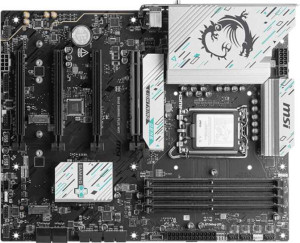
MSI B860 Gaming Plus WiFi
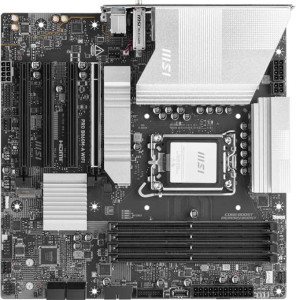
MSI Pro B860M-A WiFi

MSI B860 Gaming Plus WiFi MSI Pro B860M-A WiFi

Overview

Welcome to our in-depth spec comparison between the MSI B860 Gaming Plus WiFi and the MSI Pro B860M-A WiFi. Both boards share the same B860 chipset and LGA 1851 socket, but they take notably different approaches when it comes to form factor, rear-panel connectivity, and expansion headroom. Whether you are building a full-sized gaming rig or a compact productivity workstation, understanding these key battlegrounds will help you make the right choice.

Common Features

  • Both motherboards use the LGA 1851 CPU socket.
  • Both motherboards are built on the B860 chipset.
  • Wi-Fi is supported on both boards, covering Wi-Fi 4 (802.11n), Wi-Fi 5 (802.11ac), Wi-Fi 6 (802.11ax), Wi-Fi 6E (802.11ax), and Wi-Fi 7 (802.11be).
  • Bluetooth is available on both boards at version 5.4.
  • Both boards include an HDMI 2.1 output.
  • Both boards support overclocking.
  • Both boards support a maximum of 256GB of RAM.
  • The maximum standard RAM speed is 6400 MHz on both boards.
  • The maximum overclocked RAM speed is 8600 MHz on both boards.
  • Both boards have 4 memory slots using DDR5 in a dual-channel configuration.
  • ECC memory is not supported on either board.
  • Both boards offer 2 USB 3.2 Gen 1 ports (USB-A), 1 USB 4 40Gbps port, and 1 Thunderbolt 4 port on the rear panel.
  • Neither board has USB 3.2 Gen 2x2 ports, USB 4 20Gbps ports, or Thunderbolt 3 ports.
  • Both boards provide 4 SATA 3 connectors and 3 M.2 sockets.
  • A TPM connector is present on both boards.
  • Both boards feature 1 PCIe 5.0 x16 slot, 1 PCIe 4.0 x16 slot, and 2 PCIe x1 slots, with no PCIe 2.0, 3.0, x4, x8, or PCI slots.
  • Both boards deliver 7.1-channel audio with 3 audio connectors.
  • S/PDIF Out is not available on either board.
  • Both boards support RAID 0, RAID 1, RAID 5, and RAID 10 (1+0), but not RAID 0+1.

Main Differences

  • The form factor is ATX on the MSI B860 Gaming Plus WiFi and Micro-ATX on the MSI Pro B860M-A WiFi.
  • The board width is 304.8 mm on the MSI B860 Gaming Plus WiFi and 243.8 mm on the MSI Pro B860M-A WiFi.
  • The number of USB 3.2 Gen 2 ports (USB-A) is 2 on the MSI B860 Gaming Plus WiFi and 1 on the MSI Pro B860M-A WiFi.
  • A USB 3.2 Gen 1 port (USB-C) is present on the MSI Pro B860M-A WiFi but not available on the MSI B860 Gaming Plus WiFi.
  • The number of USB 2.0 ports is 4 on the MSI B860 Gaming Plus WiFi and 2 on the MSI Pro B860M-A WiFi.
  • A PS/2 port is present on the MSI Pro B860M-A WiFi but not available on the MSI B860 Gaming Plus WiFi.
  • The number of fan headers is 6 on the MSI B860 Gaming Plus WiFi and 5 on the MSI Pro B860M-A WiFi.
Specs Comparison
MSI B860 Gaming Plus WiFi

MSI B860 Gaming Plus WiFi

MSI Pro B860M-A WiFi

MSI Pro B860M-A WiFi

General info:
CPU socket LGA 1851 LGA 1851
chipset B860 B860
form factor ATX Micro-ATX
release date January 2025 January 2025
supports Wi-Fi
Wi-Fi version Wi-Fi 4 (802.11n), Wi-Fi 5 (802.11ac), Wi-Fi 6 (802.11ax), Wi-Fi 6E (802.11ax), Wi-Fi 7 (802.11be) Wi-Fi 4 (802.11n), Wi-Fi 5 (802.11ac), Wi-Fi 6 (802.11ax), Wi-Fi 6E (802.11ax), Wi-Fi 7 (802.11be)
Has Bluetooth
Bluetooth version 5.4 5.4
HDMI version HDMI 2.1 HDMI 2.1
Easy to overclock
has RGB lighting
Easy to reset BIOS
Has dual BIOS
has aptX
CPU sockets 1 1
Has integrated graphics
warranty period 3 years 3 years
height 243.8 mm 243.8 mm
width 304.8 mm 243.8 mm
Has integrated CPU

At their core, the MSI B860 Gaming Plus WiFi and the MSI Pro B860M-A WiFi are built on the same foundation: both use the LGA 1851 socket with the B860 chipset, support up to Wi-Fi 7 (802.11be), carry Bluetooth 5.4, output via HDMI 2.1, and share features like dual BIOS, easy BIOS reset, RGB lighting, and a 3-year warranty. For a user scanning the feature checklist, these two boards are virtually twins.

The one meaningful differentiator in this group is form factor. The Gaming Plus WiFi is a full-size ATX board at 304.8 × 243.8 mm, while the Pro B860M-A WiFi is Micro-ATX at a square 243.8 × 243.8 mm. In practice, the ATX footprint means more room for additional PCIe slots, better component spacing, and compatibility with a wider range of mid-tower and full-tower cases. The Micro-ATX format, being roughly 25% smaller in area, is the right choice for compact or small-form-factor builds where physical space is a constraint — but it may sacrifice some expansion headroom depending on slot layout.

For this spec group, neither board has a clear feature advantage — they are essentially tied on connectivity, platform, and firmware capabilities. The decision comes down entirely to build size: choose the Gaming Plus WiFi if you want a full ATX chassis with maximum expansion flexibility, and the Pro B860M-A WiFi if a smaller, more space-efficient footprint is the priority.

Memory:
maximum memory amount 256GB 256GB
RAM speed (max) 6400 MHz 6400 MHz
overclocked RAM speed 8600 MHz 8600 MHz
memory slots 4 4
DDR memory version 5 5
memory channels 2 2
Supports ECC memory

Both the MSI B860 Gaming Plus WiFi and MSI Pro B860M-A WiFi support a maximum memory amount of 256GB, providing plenty of headroom for high-performance setups. They also share the same maximum RAM speed of 6400 MHz, with both boards supporting overclocked RAM speeds of up to 8600 MHz.

Each motherboard offers 4 memory slots, allowing for flexible configurations and upgrades. Both products are compatible with DDR5 memory and support dual memory channels for improved bandwidth. Neither motherboard supports ECC (Error-Correcting Code) memory, so they are suited for standard use rather than applications requiring error correction.

Overall, the memory specifications of both motherboards are identical, offering the same capacity, speed, and features, with no discernible differences between the two products in this category.

Ports:
USB 3.2 Gen 2 ports (USB-A) 2 1
USB 3.2 Gen 1 ports (USB-A) 2 2
USB 3.2 Gen 2 ports (USB-C) 0 0
USB 3.2 Gen 1 ports (USB-C) 0 1
USB 2.0 ports 4 2
USB 3.2 Gen 2x2 ports 0 0
USB 4 40Gbps ports 1 1
USB 4 20Gbps ports 0 0
Thunderbolt 4 ports 1 1
Thunderbolt 3 ports 0 0
has an HDMI output
DisplayPort outputs 1 1
RJ45 ports 1 1
Has USB Type-C
eSATA ports 0 0
DVI outputs 0 0
has a VGA connector
PS/2 ports 0 1

The MSI B860 Gaming Plus WiFi and MSI Pro B860M-A WiFi differ in their USB port configurations. The Gaming Plus WiFi offers 2 USB 3.2 Gen 2 USB-A ports and 2 USB 3.2 Gen 1 USB-A ports, while the Pro B860M-A WiFi has 1 USB 3.2 Gen 2 USB-A port and 2 USB 3.2 Gen 1 USB-A ports. The Pro B860M-A WiFi adds a USB 3.2 Gen 1 USB-C port, which the Gaming Plus WiFi lacks. Both motherboards have 4 USB 2.0 ports and 1 USB 4 40Gbps port, but the Gaming Plus WiFi does not feature any USB 3.2 Gen 1 USB-C ports, while the Pro B860M-A WiFi includes 1.

Both products also feature an HDMI output, a DisplayPort output, and 1 RJ45 port for network connectivity. However, the Gaming Plus WiFi has no PS/2 ports, while the Pro B860M-A WiFi includes 1 PS/2 port, which is a legacy connector for older peripherals.

In terms of Thunderbolt support, both motherboards feature 1 Thunderbolt 4 port, and neither has Thunderbolt 3 ports. Neither board includes eSATA, DVI, or VGA connectors. Both motherboards include USB Type-C support, but neither offers USB 3.2 Gen 2x2 ports or USB 4 20Gbps ports.

Connectors:
USB 3.2 Gen 1 ports (through expansion) 4 4
USB-C 3.2 Gen 2 ports (through expansion) 1 1
USB 2.0 ports (through expansion) 4 4
SATA 3 connectors 4 4
fan headers 6 5
USB 3.0 ports (through expansion) 4 4
M.2 sockets 3 3
Has TPM connector
U.2 sockets 0 0
Has mSATA connector
SATA 2 connectors 0 0

Both the MSI B860 Gaming Plus WiFi and MSI Pro B860M-A WiFi have identical configurations for many connectors. Both feature 4 USB 3.2 Gen 1 ports through expansion, 1 USB-C 3.2 Gen 2 port through expansion, and 4 USB 2.0 ports through expansion. They also both offer 4 SATA 3 connectors, 4 USB 3.0 ports through expansion, and 3 M.2 sockets, allowing for ample storage and peripheral connectivity.

However, there is a slight difference in fan headers: the Gaming Plus WiFi offers 6 fan headers, while the Pro B860M-A WiFi has 5 fan headers. Both motherboards support a TPM connector, and neither has U.2 or mSATA connectors. Additionally, both products lack SATA 2 connectors, so they only support modern SATA 3 connections.

Overall, the differences in connectors between the two motherboards are minimal, with the main distinction being the additional fan header on the Gaming Plus WiFi.

Expansion slots:
PCIe 4.0 x16 slots 1 1
PCIe 5.0 x16 slots 1 1
PCIe 3.0 x16 slots 0 0
PCIe x1 slots 2 2
PCI slots 0 0
PCIe 2.0 x16 slots 0 0
PCIe x4 slots 0 0
PCIe x8 slots 0 0

Both the MSI B860 Gaming Plus WiFi and MSI Pro B860M-A WiFi motherboards feature the same expansion slot configuration. Each has 1 PCIe 4.0 x16 slot and 1 PCIe 5.0 x16 slot, providing solid support for high-speed graphics cards. Neither motherboard includes any PCIe 3.0 x16 slots, PCIe x4 slots, or PCIe x8 slots, which means both are more focused on PCIe 4.0 and 5.0 connectivity for modern GPUs.

Additionally, both motherboards include 2 PCIe x1 slots for smaller expansion cards like network adapters or sound cards, and neither motherboard includes any PCI slots.

Overall, the expansion slot configurations are identical across both models, offering the same number of high-speed PCIe x16 and PCIe x1 slots with no significant differences in terms of slot types or quantity.

Audio:
audio channels 7.1 7.1
Has S/PDIF Out port
audio connectors 3 3

Both the MSI B860 Gaming Plus WiFi and MSI Pro B860M-A WiFi motherboards offer 7.1 audio channels, ensuring support for high-quality surround sound setups. Neither motherboard includes an S/PDIF Out port, which means digital audio output through an optical connection is not available on either board.

In terms of audio connectors, both motherboards feature 3 audio connectors, allowing for standard audio input and output options for speakers, microphones, and other audio devices.

Overall, the audio specifications are identical between the two models, offering the same audio channels, lack of S/PDIF Out, and the same number of audio connectors.

Storage:
Supports RAID 1
Supports RAID 10 (1+0)
Supports RAID 5
Supports RAID 0
Supports RAID 0+1

Both the MSI B860 Gaming Plus WiFi and MSI Pro B860M-A WiFi support the same RAID configurations. Each motherboard is compatible with RAID 1, RAID 10 (1+0), RAID 5, and RAID 0, allowing users to configure storage arrays for redundancy or performance. Neither motherboard supports RAID 0+1, so users won't be able to set up this particular RAID level on either board.

In summary, the storage features for both products are identical, offering the same RAID support options and limitations.

Comparison Summary & Verdict

After examining every specification, it is clear that both boards are built on a solid, identical foundation: DDR5 memory support up to 256 GB, Wi-Fi 7, Bluetooth 5.4, and identical PCIe slot layouts. However, their differences define distinct audiences. The MSI B860 Gaming Plus WiFi stands out with its full ATX form factor, an extra USB 3.2 Gen 2 Type-A port, more USB 2.0 ports, and a sixth fan header, making it the stronger pick for enthusiast builders who need maximum airflow control and rear-panel flexibility. The MSI Pro B860M-A WiFi, on the other hand, excels in compact builds thanks to its Micro-ATX footprint, and it adds a USB 3.2 Gen 1 Type-C rear port and a legacy PS/2 port, catering well to professional or space-conscious users. Choose the Gaming Plus WiFi for a spacious, feature-rich build; choose the Pro B860M-A WiFi for a smaller, tidier system without sacrificing core performance.

MSI B860 Gaming Plus WiFi
Buy MSI B860 Gaming Plus WiFi if...

Buy the MSI B860 Gaming Plus WiFi if you are building a full-sized ATX system and want more fan headers, additional USB 3.2 Gen 2 Type-A ports, and a greater number of USB 2.0 connections for peripherals.

MSI Pro B860M-A WiFi
Buy MSI Pro B860M-A WiFi if...

Buy the MSI Pro B860M-A WiFi if you need a compact Micro-ATX board that fits smaller cases, and you value having a rear USB 3.2 Gen 1 Type-C port or a legacy PS/2 connector.