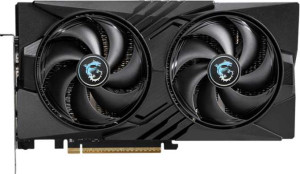
MSI GeForce RTX 5060 Gaming OC
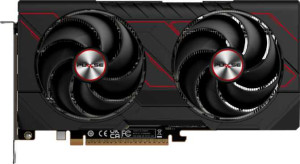
Sapphire Pulse Radeon RX 9060 XT 8GB

MSI GeForce RTX 5060 Gaming OC Sapphire Pulse Radeon RX 9060 XT 8GB

Common Features

  • Both products have Double Precision Floating Point (DPFP) capability.
  • Both products have 8GB of VRAM.
  • Both products use a 128-bit memory bus width.
  • Both products support ECC memory.
  • Both products support DirectX 12 Ultimate.
  • Both products support OpenGL version 4.6.
  • Both products support multi-display technology.
  • Both products support ray tracing.
  • Both products support 3D.
  • Both products do not have XeSS (XMX).
  • Both products do not have LHR.
  • Both products have an HDMI output with 1 HDMI port.
  • Both products use HDMI version 2.1b.
  • Both products do not have USB-C ports.
  • Both products do not have DVI outputs.
  • Both products do not have mini DisplayPort outputs.
  • Both products use PCI Express version 5.
  • Both products do not have air-water cooling.

Main Differences

  • GPU clock speed is 2280 MHz on MSI GeForce RTX 5060 Gaming OC and 1700 MHz on Sapphire Pulse Radeon RX 9060 XT 8GB.
  • GPU turbo is 2625 MHz on MSI GeForce RTX 5060 Gaming OC and 3290 MHz on Sapphire Pulse Radeon RX 9060 XT 8GB.
  • Pixel rate is 126 GPixel/s on MSI GeForce RTX 5060 Gaming OC and 210.6 GPixel/s on Sapphire Pulse Radeon RX 9060 XT 8GB.
  • Floating-point performance is 20.16 TFLOPS on MSI GeForce RTX 5060 Gaming OC and 26.95 TFLOPS on Sapphire Pulse Radeon RX 9060 XT 8GB.
  • Texture rate is 315 GTexels/s on MSI GeForce RTX 5060 Gaming OC and 421.1 GTexels/s on Sapphire Pulse Radeon RX 9060 XT 8GB.
  • GPU memory speed is 1750 MHz on MSI GeForce RTX 5060 Gaming OC and 2518 MHz on Sapphire Pulse Radeon RX 9060 XT 8GB.
  • Shading units are 3840 on MSI GeForce RTX 5060 Gaming OC and 2048 on Sapphire Pulse Radeon RX 9060 XT 8GB.
  • Texture mapping units (TMUs) are 120 on MSI GeForce RTX 5060 Gaming OC and 128 on Sapphire Pulse Radeon RX 9060 XT 8GB.
  • Render output units (ROPs) are 48 on MSI GeForce RTX 5060 Gaming OC and 64 on Sapphire Pulse Radeon RX 9060 XT 8GB.
  • Effective memory speed is 28000 MHz on MSI GeForce RTX 5060 Gaming OC and 20000 MHz on Sapphire Pulse Radeon RX 9060 XT 8GB.
  • Maximum memory bandwidth is 448 GB/s on MSI GeForce RTX 5060 Gaming OC and 322.3 GB/s on Sapphire Pulse Radeon RX 9060 XT 8GB.
  • GDDR version is GDDR7 on MSI GeForce RTX 5060 Gaming OC and GDDR6 on Sapphire Pulse Radeon RX 9060 XT 8GB.
  • OpenCL version is 3 on MSI GeForce RTX 5060 Gaming OC and 2.2 on Sapphire Pulse Radeon RX 9060 XT 8GB.
  • DLSS support is available on MSI GeForce RTX 5060 Gaming OC but not available on Sapphire Pulse Radeon RX 9060 XT 8GB.
  • AMD SAM / Intel Resizable BAR is Intel Resizable BAR on MSI GeForce RTX 5060 Gaming OC and AMD SAM on Sapphire Pulse Radeon RX 9060 XT 8GB.
  • RGB lighting is present on MSI GeForce RTX 5060 Gaming OC but not present on Sapphire Pulse Radeon RX 9060 XT 8GB.
  • Supported displays are 4 on MSI GeForce RTX 5060 Gaming OC and 3 on Sapphire Pulse Radeon RX 9060 XT 8GB.
  • DisplayPort outputs are 3 on MSI GeForce RTX 5060 Gaming OC and 2 on Sapphire Pulse Radeon RX 9060 XT 8GB.
  • GPU architecture is Blackwell on MSI GeForce RTX 5060 Gaming OC and RDNA 4.0 on Sapphire Pulse Radeon RX 9060 XT 8GB.
  • Thermal Design Power (TDP) is 145W on MSI GeForce RTX 5060 Gaming OC and 170W on Sapphire Pulse Radeon RX 9060 XT 8GB.
  • Semiconductor size is 5 nm on MSI GeForce RTX 5060 Gaming OC and 4 nm on Sapphire Pulse Radeon RX 9060 XT 8GB.
  • Number of transistors is 21900 million on MSI GeForce RTX 5060 Gaming OC and 29700 million on Sapphire Pulse Radeon RX 9060 XT 8GB.
  • Width is 248 mm on MSI GeForce RTX 5060 Gaming OC and 240 mm on Sapphire Pulse Radeon RX 9060 XT 8GB.
  • Height is 135 mm on MSI GeForce RTX 5060 Gaming OC and 124 mm on Sapphire Pulse Radeon RX 9060 XT 8GB.
Specs Comparison
MSI GeForce RTX 5060 Gaming OC

MSI GeForce RTX 5060 Gaming OC

Sapphire Pulse Radeon RX 9060 XT 8GB

Sapphire Pulse Radeon RX 9060 XT 8GB

Performance:
GPU clock speed 2280 MHz 1700 MHz
GPU turbo 2625 MHz 3290 MHz
pixel rate 126 GPixel/s 210.6 GPixel/s
floating-point performance 20.16 TFLOPS 26.95 TFLOPS
texture rate 315 GTexels/s 421.1 GTexels/s
GPU memory speed 1750 MHz 2518 MHz
shading units 3840 2048
texture mapping units (TMUs) 120 128
render output units (ROPs) 48 64
Has Double Precision Floating Point (DPFP)

The MSI GeForce RTX 5060 Gaming OC and the Sapphire Pulse Radeon RX 9060 XT 8GB differ in several key performance aspects. The GPU clock speed of the MSI model is 2280 MHz, while the Sapphire model has a lower clock speed at 1700 MHz. However, the Sapphire card has a higher GPU turbo speed of 3290 MHz compared to the MSI's 2625 MHz. This means the Sapphire card can potentially reach higher peak performance under turbo conditions.

Looking at pixel rate, the Sapphire card leads with 210.6 GPixel/s, significantly higher than the MSI's 126 GPixel/s. The floating-point performance also favors the Sapphire model, delivering 26.95 TFLOPS compared to the MSI's 20.16 TFLOPS, which indicates it could handle more complex calculations. For texture rate, the Sapphire card again takes the lead with 421.1 GTexels/s, surpassing the MSI's 315 GTexels/s.

In terms of GPU memory speed, the Sapphire model outperforms the MSI with a faster 2518 MHz compared to the MSI's 1750 MHz. The Sapphire card also has more shading units (2048 vs 3840 on the MSI), though the MSI has more texture mapping units (120 vs 128 on the Sapphire). Lastly, both cards feature double precision floating-point (DPFP) support, so there’s no difference in that regard. The Sapphire card also has more render output units (64 vs 48 on the MSI), which could help with rendering efficiency in certain workloads.

Memory:
effective memory speed 28000 MHz 20000 MHz
maximum memory bandwidth 448 GB/s 322.3 GB/s
VRAM 8GB 8GB
GDDR version GDDR7 GDDR6
memory bus width 128-bit 128-bit
Supports ECC memory

The MSI GeForce RTX 5060 Gaming OC and the Sapphire Pulse Radeon RX 9060 XT 8GB share the same VRAM size of 8GB, but their other memory specifications differ. The MSI card features a faster effective memory speed of 28000 MHz, while the Sapphire model has a lower effective memory speed of 20000 MHz. This difference may affect the speed at which data is accessed by the GPU.

In terms of memory bandwidth, the MSI card offers a higher maximum bandwidth of 448 GB/s, compared to the Sapphire’s 322.3 GB/s, suggesting the MSI card can handle more data throughput in memory-intensive tasks.

Both cards use a 128-bit memory bus width and support ECC (Error-Correcting Code) memory, ensuring that both are capable of error detection and correction during memory operations. The MSI card uses GDDR7 memory, while the Sapphire card uses GDDR6, with GDDR7 generally offering higher performance potential due to its newer design.

Features:
DirectX version DirectX 12 Ultimate DirectX 12 Ultimate
OpenGL version 4.6 4.6
OpenCL version 3 2.2
Supports multi-display technology
supports ray tracing
Supports 3D
supports DLSS
has XeSS (XMX)
AMD SAM / Intel Resizable BAR Intel Resizable BAR AMD SAM
has LHR
has RGB lighting
supported displays 4 3

The MSI GeForce RTX 5060 Gaming OC and the Sapphire Pulse Radeon RX 9060 XT 8GB share several key features, though there are some differences. Both cards support DirectX 12 Ultimate, OpenGL 4.6, and ray tracing, as well as multi-display technology and 3D support. However, the MSI card offers support for OpenCL 3, while the Sapphire card only supports OpenCL 2.2, which may affect performance in certain compute-heavy tasks.

When it comes to additional technologies, the MSI card supports DLSS, which can enhance performance in supported games, while the Sapphire card does not. Both cards do not have XeSS (XMX) support. The MSI card also has RGB lighting, while the Sapphire model lacks this feature.

In terms of display support, the MSI card can handle up to 4 displays, while the Sapphire model supports up to 3 displays. Additionally, the MSI card supports Intel Resizable BAR, whereas the Sapphire card supports AMD SAM, which is similar but tied to different system architectures. Both cards have no LHR (Lite Hash Rate) limitations, ensuring full mining performance.

Ports:
has an HDMI output
HDMI ports 1 1
HDMI version HDMI 2.1b HDMI 2.1b
DisplayPort outputs 3 2
USB-C ports 0 0
DVI outputs 0 0
mini DisplayPort outputs 0 0

Both the MSI GeForce RTX 5060 Gaming OC and the Sapphire Pulse Radeon RX 9060 XT 8GB have an HDMI output, with each featuring 1 HDMI port that supports HDMI 2.1b. However, the MSI card offers 3 DisplayPort outputs, while the Sapphire card has 2 DisplayPort outputs. Neither card has USB-C, DVI, or mini DisplayPort outputs, which means their connectivity options are primarily limited to HDMI and DisplayPort.

Both cards share similar HDMI capabilities and lack USB-C and DVI ports. The main difference lies in the number of DisplayPort outputs, with the MSI offering one more than the Sapphire card, which could be important for users needing to connect multiple DisplayPort monitors.

General info:
GPU architecture Blackwell RDNA 4.0
release date May 2025 June 2025
Thermal Design Power (TDP) 145W 170W
PCI Express (PCIe) version 5 5
semiconductor size 5 nm 4 nm
number of transistors 21900 million 29700 million
Has air-water cooling
width 248 mm 240 mm
height 135 mm 124 mm

The MSI GeForce RTX 5060 Gaming OC and the Sapphire Pulse Radeon RX 9060 XT 8GB differ in several general specifications. The MSI card uses the Blackwell GPU architecture, while the Sapphire card is built on the RDNA 4.0 architecture. The MSI card has a thermal design power (TDP) of 145W, whereas the Sapphire card's TDP is higher at 170W. This suggests the Sapphire card may require more power for its operations.

In terms of semiconductor size, the MSI card is based on a 5 nm process, while the Sapphire card uses a smaller 4 nm process, potentially offering improved efficiency. The number of transistors also differs, with the MSI card having 21,900 million transistors, compared to the Sapphire card's 29,700 million transistors, which may indicate greater computational potential in the Sapphire card.

Both cards support PCIe version 5, and neither has air-water cooling. When comparing physical size, the MSI card is slightly larger at 248 mm in width and 135 mm in height, while the Sapphire card is a bit more compact, measuring 240 mm in width and 124 mm in height.

Comparison Summary

This is a specification comparison between MSI GeForce RTX 5060 Gaming OC and Sapphire Pulse Radeon RX 9060 XT 8GB. Both products have 8GB VRAM, support DirectX 12 Ultimate and OpenGL 4.6, and include multi-display technology and ray tracing. The MSI GeForce RTX 5060 Gaming OC has higher GPU clock speed of 2280 MHz compared to 1700 MHz on the Sapphire Pulse Radeon RX 9060 XT 8GB, while the latter has higher floating-point performance of 26.95 TFLOPS versus 20.16 TFLOPS. The memory type and bandwidth differ with GDDR7 at 448 GB/s for MSI and GDDR6 at 322.3 GB/s for Sapphire. Additionally, the MSI model includes DLSS support and RGB lighting, whereas the Sapphire model uses AMD SAM technology. Other distinctions include GPU architecture, TDP, and transistor count.