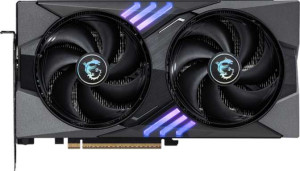
MSI GeForce RTX 5060 Ti Gaming OC 16GB
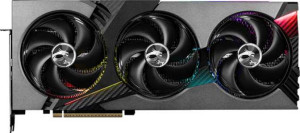
MSI GeForce RTX 5060 Ti Vanguard SOC 16GB

MSI GeForce RTX 5060 Ti Gaming OC 16GB MSI GeForce RTX 5060 Ti Vanguard SOC 16GB

Common Features

  • Both products have a GPU clock speed of 2407 MHz.
  • Both products have a GPU memory speed of 1750 MHz.
  • Both products have 4608 shading units.
  • Both products have 144 texture mapping units (TMUs).
  • Both products have 48 render output units (ROPs).
  • Both products support double precision floating point (DPFP).
  • Both products have an effective memory speed of 28000 MHz.
  • Both products have a maximum memory bandwidth of 448 GB/s.
  • Both products have 16GB of VRAM.
  • Both products use GDDR7 memory.
  • Both products have a memory bus width of 128-bit.
  • Both products support ECC memory.
  • Both products support DirectX 12 Ultimate.
  • Both products support OpenGL version 4.6.
  • Both products support OpenCL version 3.
  • Both products support multi-display technology.
  • Both products support ray tracing.
  • Both products support 3D.
  • Both products support DLSS.
  • Both products are based on the Blackwell GPU architecture.

Main Differences

  • GPU turbo is 2647 MHz on MSI GeForce RTX 5060 Ti Gaming OC 16GB and 2692 MHz on MSI GeForce RTX 5060 Ti Vanguard SOC 16GB.
  • Pixel rate is 127.1 GPixel/s on MSI GeForce RTX 5060 Ti Gaming OC 16GB and 129.2 GPixel/s on MSI GeForce RTX 5060 Ti Vanguard SOC 16GB.
  • Floating-point performance is 24.39 TFLOPS on MSI GeForce RTX 5060 Ti Gaming OC 16GB and 24.81 TFLOPS on MSI GeForce RTX 5060 Ti Vanguard SOC 16GB.
  • Texture rate is 381.2 GTexels/s on MSI GeForce RTX 5060 Ti Gaming OC 16GB and 387.6 GTexels/s on MSI GeForce RTX 5060 Ti Vanguard SOC 16GB.
  • The width is 247 mm on MSI GeForce RTX 5060 Ti Gaming OC 16GB and 337 mm on MSI GeForce RTX 5060 Ti Vanguard SOC 16GB.
  • The height is 135 mm on MSI GeForce RTX 5060 Ti Gaming OC 16GB and 140 mm on MSI GeForce RTX 5060 Ti Vanguard SOC 16GB.
Specs Comparison
MSI GeForce RTX 5060 Ti Gaming OC 16GB

MSI GeForce RTX 5060 Ti Gaming OC 16GB

MSI GeForce RTX 5060 Ti Vanguard SOC 16GB

MSI GeForce RTX 5060 Ti Vanguard SOC 16GB

Performance:
GPU clock speed 2407 MHz 2407 MHz
GPU turbo 2647 MHz 2692 MHz
pixel rate 127.1 GPixel/s 129.2 GPixel/s
floating-point performance 24.39 TFLOPS 24.81 TFLOPS
texture rate 381.2 GTexels/s 387.6 GTexels/s
GPU memory speed 1750 MHz 1750 MHz
shading units 4608 4608
texture mapping units (TMUs) 144 144
render output units (ROPs) 48 48
Has Double Precision Floating Point (DPFP)

The MSI GeForce RTX 5060 Ti Gaming OC 16GB and MSI GeForce RTX 5060 Ti Vanguard SOC 16GB are both equipped with impressive specs, but there are a few key differences in their performance metrics.

Both GPUs feature the same GPU clock speed of 2407 MHz, but the turbo clock speed on the Vanguard SOC is slightly higher at 2692 MHz compared to the Gaming OC's 2647 MHz. This gives the Vanguard SOC a marginal boost in its peak performance. In terms of pixel rate, the Vanguard SOC also leads with 129.2 GPixel/s, surpassing the Gaming OC's 127.1 GPixel/s. The floating-point performance of the Vanguard SOC is also slightly higher, offering 24.81 TFLOPS versus the Gaming OC's 24.39 TFLOPS.

Both models share the same texture rate of 381.2 GTexels/s for the Gaming OC and 387.6 GTexels/s for the Vanguard SOC, along with identical GPU memory speed at 1750 MHz. Each card also offers 4608 shading units, 144 texture mapping units (TMUs), and 48 render output units (ROPs). Notably, both GPUs support Double Precision Floating Point (DPFP), a feature that enhances computational accuracy for certain tasks.

Memory:
effective memory speed 28000 MHz 28000 MHz
maximum memory bandwidth 448 GB/s 448 GB/s
VRAM 16GB 16GB
GDDR version GDDR7 GDDR7
memory bus width 128-bit 128-bit
Supports ECC memory

The MSI GeForce RTX 5060 Ti Gaming OC 16GB and MSI GeForce RTX 5060 Ti Vanguard SOC 16GB share identical memory specifications across the board. Both cards feature an effective memory speed of 28000 MHz and a maximum memory bandwidth of 448 GB/s, ensuring high-speed data transfer and performance. Additionally, both models come equipped with 16GB of VRAM, which is ample for demanding tasks like gaming and professional workloads.

Both GPUs also utilize GDDR7 memory, providing cutting-edge technology for faster performance. The memory bus width on both the Gaming OC and Vanguard SOC is 128-bit, which is typical for cards in this range. Furthermore, both models support ECC memory (Error-Correcting Code), adding a layer of reliability for handling data integrity, especially in intensive applications.

In summary, the memory specifications of these two models are identical in every aspect, offering the same performance and features across both cards.

Features:
DirectX version DirectX 12 Ultimate DirectX 12 Ultimate
OpenGL version 4.6 4.6
OpenCL version 3 3
Supports multi-display technology
supports ray tracing
Supports 3D
supports DLSS
has XeSS (XMX)
AMD SAM / Intel Resizable BAR Intel Resizable BAR Intel Resizable BAR
has LHR
has RGB lighting
supported displays 4 4

The MSI GeForce RTX 5060 Ti Gaming OC 16GB and MSI GeForce RTX 5060 Ti Vanguard SOC 16GB have identical features, offering the same set of capabilities and technologies. Both GPUs support DirectX 12 Ultimate, OpenGL 4.6, and OpenCL 3, ensuring compatibility with modern gaming and professional applications. Additionally, both models support multi-display technology, ray tracing, and 3D rendering, making them highly versatile for a variety of tasks.

Both the Gaming OC and Vanguard SOC also support DLSS, a feature that enhances performance through AI-driven upscaling, and neither model supports XeSS (XMX). Both cards are equipped with Intel Resizable BAR support, and neither has LHR (Low Hash Rate) functionality. Additionally, both models come with RGB lighting, adding a customizable visual element to your system.

Finally, both GPUs are capable of driving up to four displays simultaneously, providing flexibility for multi-monitor setups. In summary, the feature set is identical across both the Gaming OC and Vanguard SOC models.

Ports:
has an HDMI output
HDMI ports 1 1
HDMI version HDMI 2.1b HDMI 2.1b
DisplayPort outputs 3 3
USB-C ports 0 0
DVI outputs 0 0
mini DisplayPort outputs 0 0

The MSI GeForce RTX 5060 Ti Gaming OC 16GB and MSI GeForce RTX 5060 Ti Vanguard SOC 16GB both offer identical port configurations. Both GPUs feature 1 HDMI output, which supports the HDMI 2.1b version. Additionally, each card provides 3 DisplayPort outputs, but neither has USB-C ports, DVI outputs, or mini DisplayPort outputs.

Overall, the port setup is the same on both the Gaming OC and Vanguard SOC models, offering similar connectivity options for modern displays.

These configurations ensure that both cards are well-suited for multi-monitor setups, but there is no difference in the port selection between the two models.

General info:
GPU architecture Blackwell Blackwell
release date April 2025 April 2025
Thermal Design Power (TDP) 180W 180W
PCI Express (PCIe) version 5 5
semiconductor size 5 nm 5 nm
number of transistors 21900 million 21900 million
Has air-water cooling
width 247 mm 337 mm
height 135 mm 140 mm

The MSI GeForce RTX 5060 Ti Gaming OC 16GB and MSI GeForce RTX 5060 Ti Vanguard SOC 16GB share nearly identical general specifications. Both cards utilize the Blackwell GPU architecture and feature a 5 nm semiconductor size, with 21,900 million transistors. They also have the same thermal design power (TDP) of 180W and support PCI Express (PCIe) version 5.

Neither card has air-water cooling, so they both rely on traditional air-based cooling systems. However, the physical dimensions of the cards differ slightly. The Gaming OC has a width of 247 mm and a height of 135 mm, while the Vanguard SOC is larger, with a width of 337 mm and a height of 140 mm.

In summary, while the general specs are largely the same, the Vanguard SOC is noticeably larger than the Gaming OC, but the other attributes remain identical across both models.

Comparison Summary

This is a specification comparison between MSI GeForce RTX 5060 Ti Gaming OC 16GB and MSI GeForce RTX 5060 Ti Vanguard SOC 16GB. Both products share features such as a GPU clock speed of 2407 MHz, 16GB of VRAM, and support for DirectX 12 Ultimate. However, there are several differences: the GPU turbo is 2647 MHz on the Gaming OC and 2692 MHz on the Vanguard SOC, the pixel rate is 127.1 GPixel/s on the Gaming OC and 129.2 GPixel/s on the Vanguard SOC, and the texture rate is 381.2 GTexels/s on the Gaming OC and 387.6 GTexels/s on the Vanguard SOC. Additionally, the width and height of the two models differ, with the Gaming OC being 247 mm wide and 135 mm tall, compared to 337 mm wide and 140 mm tall for the Vanguard SOC.