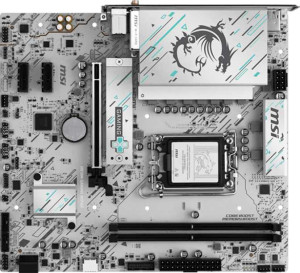
MSI H810M Gaming Wi-Fi6E
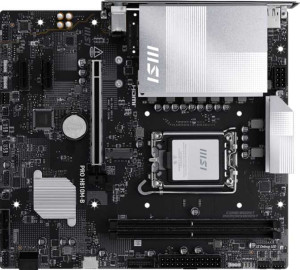
MSI Pro H810M-B

MSI H810M Gaming Wi-Fi6E MSI Pro H810M-B

Overview

Welcome to our detailed specification comparison between the MSI H810M Gaming Wi-Fi6E and the MSI Pro H810M-B, two Micro-ATX motherboards built on the LGA 1851 socket with DDR5 memory support. While these boards share a surprisingly strong foundation, they diverge in key areas such as wireless connectivity, maximum RAM speed, and rear port selection. Whether you are building a feature-rich gaming rig or a streamlined professional workstation, understanding these distinctions will help you make the right choice.

Common Features

  • Both products use the LGA 1851 CPU socket.
  • Both products have a Micro-ATX form factor.
  • Both products support Wi-Fi.
  • Both products feature HDMI 2.1.
  • Neither product is easy to overclock.
  • Both products have RGB lighting.
  • Neither product has an easy BIOS reset feature.
  • Both products have dual BIOS.
  • Both products support a maximum memory amount of 128GB.
  • Both products have 2 memory slots.
  • Both products use DDR5 memory.
  • Both products have 2 memory channels.
  • Neither product supports ECC memory.
  • Both products have 0 USB 3.2 Gen 2 Type-A ports.
  • Both products have 2 USB 3.2 Gen 1 Type-A ports.
  • Both products have 0 USB 3.2 Gen 1 Type-C ports.
  • Both products have 4 USB 2.0 ports.
  • Both products have 0 USB 3.2 Gen 2x2 ports, 0 USB 4 40Gbps ports, 0 USB 4 20Gbps ports, and 0 Thunderbolt 4 ports.
  • Both products have 2 USB 3.2 Gen 1 ports through expansion, 1 USB-C 3.2 Gen 2 port through expansion, 4 USB 2.0 ports through expansion, and 2 USB 3.0 ports through expansion.
  • Both products have 4 SATA 3 connectors.
  • Both products have 3 fan headers.
  • Both products have 1 M.2 socket and 0 U.2 sockets.
  • Both products have 1 PCIe 5.0 x16 slot and 2 PCIe x1 slots, with no PCIe 4.0, 3.0, 2.0, x4, x8, or PCI slots.
  • Both products offer 7.1 audio channels with 3 audio connectors.
  • Neither product has an S/PDIF Out port.
  • Neither product supports RAID 0+1.

Main Differences

  • Bluetooth is available on MSI H810M Gaming Wi-Fi6E but not available on MSI Pro H810M-B.
  • Maximum RAM speed is 4800 MHz on MSI H810M Gaming Wi-Fi6E and 6400 MHz on MSI Pro H810M-B.
  • MSI H810M Gaming Wi-Fi6E has 1 USB 3.2 Gen 2 Type-C port, while MSI Pro H810M-B has none.
  • USB Type-C connectivity is present on MSI H810M Gaming Wi-Fi6E but not available on MSI Pro H810M-B.
  • A TPM connector is present on MSI Pro H810M-B but not available on MSI H810M Gaming Wi-Fi6E.
Specs Comparison
MSI H810M Gaming Wi-Fi6E

MSI H810M Gaming Wi-Fi6E

MSI Pro H810M-B

MSI Pro H810M-B

General info:
CPU socket LGA 1851 LGA 1851
form factor Micro-ATX Micro-ATX
release date May 2025 May 2025
supports Wi-Fi
Has Bluetooth
HDMI version HDMI 2.1 HDMI 2.1
Easy to overclock
has RGB lighting
Easy to reset BIOS
Has dual BIOS
CPU sockets 1 1
Has integrated graphics
warranty period 3 years 3 years
height 220 mm 220 mm
width 243.8 mm 243.8 mm
Has integrated CPU

At the general level, the MSI H810M Gaming Wi-Fi6E and the MSI Pro H810M-B are built on an almost identical foundation: both use the LGA 1851 socket, share the Micro-ATX form factor with identical dimensions (220 × 243.8 mm), include Wi-Fi, output via HDMI 2.1, feature dual BIOS, RGB lighting, and carry the same 3-year warranty. Neither board supports overclocking or easy BIOS reset, and neither has an integrated CPU or GPU — meaning both are squarely aimed at discrete-GPU builds on Intel's current-generation platform.

The only meaningful differentiator in this spec group is Bluetooth: the Gaming Wi-Fi6E includes it, while the Pro H810M-B does not. In practice, Bluetooth unlocks wireless peripherals — headsets, controllers, keyboards — without occupying a USB port or requiring a dongle. For a desktop build where wireless accessories are planned, this is a genuine convenience advantage rather than a cosmetic one.

For this group, the Gaming Wi-Fi6E holds a clear edge solely due to its Bluetooth support. If wireless peripheral connectivity matters to you, it is the straightforward pick. Users who rely exclusively on wired peripherals and want a cleaner, potentially more budget-oriented option will find the Pro H810M-B equally capable in every other general respect.

Memory:
maximum memory amount 128GB 128GB
RAM speed (max) 4800 MHz 6400 MHz
memory slots 2 2
DDR memory version 5 5
memory channels 2 2
Supports ECC memory

Both boards share the same structural memory profile: DDR5, two slots, dual-channel architecture, and a 128 GB ceiling. For the vast majority of builds — gaming, content creation, workstation use — this configuration is more than sufficient, and the dual-channel setup ensures bandwidth is used efficiently regardless of which board you choose.

Where they diverge is maximum supported RAM speed. The Pro H810M-B tops out at 6400 MHz, while the Gaming Wi-Fi6E is capped at 4800 MHz. That 1600 MHz gap is not trivial: DDR5 at 6400 MHz delivers meaningfully higher memory bandwidth, which translates to better performance in bandwidth-sensitive workloads like video editing, large data processing, and — to a lesser but still measurable degree — gaming at high frame rates. It also gives the Pro H810M-B more headroom to pair with faster kits as prices on high-speed DDR5 continue to fall.

Despite its ″Gaming″ branding, the Pro H810M-B holds a clear memory advantage due to its higher RAM speed ceiling. Users planning to invest in fast DDR5 kits will get more out of that investment on the Pro board, making it the stronger pick specifically for memory performance.

Ports:
USB 3.2 Gen 2 ports (USB-A) 0 0
USB 3.2 Gen 1 ports (USB-A) 2 2
USB 3.2 Gen 2 ports (USB-C) 1 0
USB 3.2 Gen 1 ports (USB-C) 0 0
USB 2.0 ports 4 4
USB 3.2 Gen 2x2 ports 0 0
USB 4 40Gbps ports 0 0
USB 4 20Gbps ports 0 0
Thunderbolt 4 ports 0 0
Thunderbolt 3 ports 0 0
has an HDMI output
DisplayPort outputs 1 1
RJ45 ports 1 1
Has USB Type-C
eSATA ports 0 0
DVI outputs 0 0
has a VGA connector
PS/2 ports 0 0

The rear I/O layout of these two boards is nearly identical: both offer 2× USB 3.2 Gen 1 Type-A, 4× USB 2.0, HDMI, a DisplayPort output, and a single RJ45 Ethernet port. For everyday peripherals — keyboard, mouse, external drives, and a wired network connection — neither board leaves users short-handed.

The single differentiator here is the USB 3.2 Gen 2 Type-C port present on the Gaming Wi-Fi6E and entirely absent on the Pro H810M-B. This port delivers 10 Gbps of transfer bandwidth and supports modern devices like high-speed external SSDs, recent smartphones, and compact docks — all over a reversible connector. Its absence on the Pro H810M-B means users would need to rely on a PCIe expansion card or a front-panel header workaround to get equivalent functionality.

For this group, the Gaming Wi-Fi6E has a clear edge thanks to its USB-C Gen 2 port. It is a practical, future-facing addition that the Pro H810M-B simply cannot match at the rear I/O level, making the Gaming board the better choice for anyone regularly connecting modern high-speed peripherals.

Connectors:
USB 3.2 Gen 1 ports (through expansion) 2 2
USB-C 3.2 Gen 2 ports (through expansion) 1 1
USB 2.0 ports (through expansion) 4 4
SATA 3 connectors 4 4
fan headers 3 3
USB 3.0 ports (through expansion) 2 2
M.2 sockets 1 1
Has TPM connector
U.2 sockets 0 0
Has mSATA connector
SATA 2 connectors 0 0

Internally, these two boards are remarkably well-matched. Both provide 4× SATA 3 connectors, 1× M.2 socket, 3 fan headers, and identical expansion headers for USB — leaving builders with the same storage and cooling options on either platform.

The sole differentiator is the TPM connector found on the Pro H810M-B but absent on the Gaming Wi-Fi6E. A dedicated TPM header allows the installation of a discrete Trusted Platform Module chip, which is relevant for enterprise environments, systems requiring hardware-based encryption, or deployments where strict security compliance standards must be met. For mainstream consumer builds this is rarely a concern, but in a business or managed IT context it carries real weight.

This group is essentially a tie for consumer use, but the Pro H810M-B holds a niche edge for security-conscious or enterprise deployments thanks to its TPM connector. Builders focused purely on gaming or home use will find no practical difference between the two boards here.

Expansion slots:
PCIe 4.0 x16 slots 0 0
PCIe 5.0 x16 slots 1 1
PCIe 3.0 x16 slots 0 0
PCIe x1 slots 2 2
PCI slots 0 0
PCIe 2.0 x16 slots 0 0
PCIe x4 slots 0 0
PCIe x8 slots 0 0

Expansion slot configurations are identical across both boards: one PCIe 5.0 x16 slot and two PCIe x1 slots, with no legacy PCI or older PCIe generations present. The PCIe 5.0 x16 slot is the headline feature here — it provides the full bandwidth headroom needed for current and next-generation discrete GPUs, ensuring neither board will bottleneck a high-end graphics card at the primary slot level.

The two PCIe x1 slots serve as practical attachment points for add-in cards such as sound cards, additional USB controllers, or network adapters. Given the Micro-ATX form factor, this count is appropriate and gives builders a reasonable degree of expandability without the bulk of a full ATX board.

This group is a complete tie — the expansion slot layout is spec-for-spec identical, and neither board offers any advantage over the other here. The choice between the two should rest entirely on the differentiators found in other spec groups.

Audio:
audio channels 7.1 7.1
Has S/PDIF Out port
audio connectors 3 3

Audio capabilities are identical on both boards: 7.1-channel surround support with 3 analog audio connectors and no S/PDIF output on either. The 7.1-channel configuration covers the full range of surround sound setups, making both boards equally capable for gaming headsets, stereo speakers, or a multi-channel speaker array routed through analog jacks.

The absence of S/PDIF on both means users who rely on optical or coaxial digital audio output — typically for AV receivers or certain DAC setups — will need a dedicated sound card or USB DAC on either platform. This is a shared limitation rather than a differentiating factor.

Audio is a complete tie between the two boards. Neither holds any advantage here, and this group should carry no weight in the buying decision.

Storage:
Supports RAID 0+1

The only storage-specific data point provided for both boards is RAID 0+1 support, and neither the Gaming Wi-Fi6E nor the Pro H810M-B offers it. This means users cannot configure hardware-level RAID striping or mirroring across drives on either platform — a limitation that is consistent with the H810 chipset's positioning as a mainstream, non-enthusiast option.

For typical consumer and gaming builds, the absence of RAID support is rarely a practical concern, as most users rely on single drives or independent storage volumes rather than arrays. Those with genuine needs for redundancy or striped performance — such as in small workstation or light server contexts — would need to look at a higher-tier chipset platform regardless of which of these two boards they considered.

This group is a complete tie: both boards share the same storage constraint, and it gives neither a meaningful advantage over the other.

Comparison Summary & Verdict

Both the MSI H810M Gaming Wi-Fi6E and the MSI Pro H810M-B are competent Micro-ATX boards sharing the same LGA 1851 platform, DDR5 support, dual BIOS, RGB lighting, and an identical expansion slot layout. However, their differences reveal clearly distinct target audiences. The MSI H810M Gaming Wi-Fi6E stands out with its built-in Bluetooth support and a rear USB 3.2 Gen 2 Type-C port, making it the stronger pick for users who need modern wireless peripherals and versatile connectivity. The MSI Pro H810M-B, on the other hand, counters with a higher maximum RAM speed of 6400 MHz and a dedicated TPM connector, appealing to users who prioritize raw memory performance and enterprise-grade security features. Choose according to your specific workflow and connectivity requirements.

MSI H810M Gaming Wi-Fi6E
Buy MSI H810M Gaming Wi-Fi6E if...

Buy the MSI H810M Gaming Wi-Fi6E if you want built-in Bluetooth and a rear USB 3.2 Gen 2 Type-C port for connecting modern wireless peripherals and USB-C devices directly from the back panel.

MSI Pro H810M-B
Buy MSI Pro H810M-B if...

Buy the MSI Pro H810M-B if you need the highest possible RAM speed at up to 6400 MHz or require a TPM connector for security-focused or business-oriented builds.