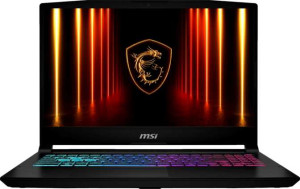
MSI Katana 15 HX B14W (2025) 15.6"
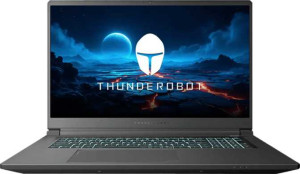
Thunderobot Range 17 G2 Pro 17" (Core i7-13620H / RTX 5060 Laptop / 16GB RAM / 1TB)

MSI Katana 15 HX B14W (2025) 15.6" Thunderobot Range 17 G2 Pro 17" (Core i7-13620H / RTX 5060 Laptop / 16GB RAM / 1TB)

Overview

Welcome to our in-depth spec comparison between the MSI Katana 15 HX B14W (2025) 15.6″ and the Thunderobot Range 17 G2 Pro 17″ (Core i7-13620H / RTX 5060 Laptop / 16GB RAM / 1TB). Both are Blackwell-architecture gaming laptops sharing a 165Hz IPS display and NVMe SSD storage, yet they diverge sharply on raw GPU and CPU performance, display size, RAM capacity, and battery life — making this a genuinely interesting matchup for different types of gamers.

Common Features

  • Both products are gaming laptops.
  • Neither product uses a fanless design.
  • Both products have a backlit keyboard.
  • Neither product is weather-sealed or splashproof.
  • Neither product has a rugged build.
  • Both products feature an LCD, LED-backlit, IPS display type.
  • Neither product has a touch screen.
  • Both products have a 165Hz refresh rate.
  • Neither product has an anti-reflection coating.
  • Both products support up to 4 displays.
  • Both products have RAM running at 5600 MHz.
  • Both products use flash storage.
  • Both products include 1024GB of internal storage.
  • Both products have 8GB of VRAM.
  • Both products use GDDR7 memory.
  • Both products use NVMe SSD storage.
  • Both products support DirectX 12 Ultimate.
  • Both products support multithreading.
  • Both products achieve a PassMark (G3D) result of 19987.
  • Both products include 1 USB 3.2 Gen 2 port (USB-C).
  • Neither product has USB 4 20Gbps ports.
  • Neither product has USB 4 40Gbps ports.
  • Neither product has Thunderbolt 4 ports.
  • Neither product has USB 3.2 Gen 1 ports (USB-C).
  • Neither product has Thunderbolt 3 ports.
  • Both products have an HDMI output.
  • Both products have USB Type-C.
  • Both products have sleep-and-charge USB ports.
  • Neither product has a MagSafe power adapter.
  • Both products have stereo speakers.
  • Both products have a 3.5mm audio jack socket.
  • Both products support ray tracing.
  • Both products support DLSS.
  • Neither product has Dolby Atmos.
  • Neither product includes a stylus.
  • Neither product has a fingerprint scanner.
  • Both products have 1 microphone.
  • Both products use Intel Resizable BAR.
  • Both products feature a Blackwell GPU architecture.
  • Neither product has LHR.
  • Both products support 3D.
  • Both products support multi-display technology.
  • Both products support OpenCL version 3.
  • Both products support OpenGL version 4.6.
  • Both products support ECC memory.

Main Differences

  • Weight is 2400g on MSI Katana 15 HX B14W (2025) 15.6″ and 2650g on Thunderobot Range 17 G2 Pro 17″ (Core i7-13620H / RTX 5060 Laptop / 16GB RAM / 1TB).
  • Volume is 2351.45 cm³ on MSI Katana 15 HX B14W (2025) 15.6″ and 2749.032 cm³ on Thunderobot Range 17 G2 Pro 17″ (Core i7-13620H / RTX 5060 Laptop / 16GB RAM / 1TB).
  • Width is 359mm on MSI Katana 15 HX B14W (2025) 15.6″ and 396mm on Thunderobot Range 17 G2 Pro 17″ (Core i7-13620H / RTX 5060 Laptop / 16GB RAM / 1TB).
  • Height is 262mm on MSI Katana 15 HX B14W (2025) 15.6″ and 267mm on Thunderobot Range 17 G2 Pro 17″ (Core i7-13620H / RTX 5060 Laptop / 16GB RAM / 1TB).
  • Thickness is 25mm on MSI Katana 15 HX B14W (2025) 15.6″ and 26mm on Thunderobot Range 17 G2 Pro 17″ (Core i7-13620H / RTX 5060 Laptop / 16GB RAM / 1TB).
  • Screen size is 15.6″ on MSI Katana 15 HX B14W (2025) 15.6″ and 17.3″ on Thunderobot Range 17 G2 Pro 17″ (Core i7-13620H / RTX 5060 Laptop / 16GB RAM / 1TB).
  • Resolution is 2560 x 1600 px on MSI Katana 15 HX B14W (2025) 15.6″ and 2560 x 1440 px on Thunderobot Range 17 G2 Pro 17″ (Core i7-13620H / RTX 5060 Laptop / 16GB RAM / 1TB).
  • Pixel density is 193 ppi on MSI Katana 15 HX B14W (2025) 15.6″ and 169 ppi on Thunderobot Range 17 G2 Pro 17″ (Core i7-13620H / RTX 5060 Laptop / 16GB RAM / 1TB).
  • RAM is 32GB on MSI Katana 15 HX B14W (2025) 15.6″ and 16GB on Thunderobot Range 17 G2 Pro 17″ (Core i7-13620H / RTX 5060 Laptop / 16GB RAM / 1TB).
  • CPU speed is 8 x 2.2 & 16 x 1.6 GHz on MSI Katana 15 HX B14W (2025) 15.6″ and 6 x 2.4 & 4 x 1.8 GHz on Thunderobot Range 17 G2 Pro 17″ (Core i7-13620H / RTX 5060 Laptop / 16GB RAM / 1TB).
  • CPU threads total 32 on MSI Katana 15 HX B14W (2025) 15.6″ and 16 on Thunderobot Range 17 G2 Pro 17″ (Core i7-13620H / RTX 5060 Laptop / 16GB RAM / 1TB).
  • Floating-point performance is 23.22 TFLOPS on MSI Katana 15 HX B14W (2025) 15.6″ and 9.684 TFLOPS on Thunderobot Range 17 G2 Pro 17″ (Core i7-13620H / RTX 5060 Laptop / 16GB RAM / 1TB).
  • Texture rate is 362.9 GTexels/s on MSI Katana 15 HX B14W (2025) 15.6″ and 151.3 GTexels/s on Thunderobot Range 17 G2 Pro 17″ (Core i7-13620H / RTX 5060 Laptop / 16GB RAM / 1TB).
  • Pixel rate is 121 GPixel/s on MSI Katana 15 HX B14W (2025) 15.6″ and 46.56 GPixel/s on Thunderobot Range 17 G2 Pro 17″ (Core i7-13620H / RTX 5060 Laptop / 16GB RAM / 1TB).
  • GPU clock speed is 2235 MHz on MSI Katana 15 HX B14W (2025) 15.6″ and 952 MHz on Thunderobot Range 17 G2 Pro 17″ (Core i7-13620H / RTX 5060 Laptop / 16GB RAM / 1TB).
  • Maximum memory amount is 96GB on MSI Katana 15 HX B14W (2025) 15.6″ and 64GB on Thunderobot Range 17 G2 Pro 17″ (Core i7-13620H / RTX 5060 Laptop / 16GB RAM / 1TB).
  • Turbo clock speed is 5.8GHz on MSI Katana 15 HX B14W (2025) 15.6″ and 4.9GHz on Thunderobot Range 17 G2 Pro 17″ (Core i7-13620H / RTX 5060 Laptop / 16GB RAM / 1TB).
  • GPU turbo speed is 2520 MHz on MSI Katana 15 HX B14W (2025) 15.6″ and 1455 MHz on Thunderobot Range 17 G2 Pro 17″ (Core i7-13620H / RTX 5060 Laptop / 16GB RAM / 1TB).
  • Semiconductor size is 4nm on MSI Katana 15 HX B14W (2025) 15.6″ and 5nm on Thunderobot Range 17 G2 Pro 17″ (Core i7-13620H / RTX 5060 Laptop / 16GB RAM / 1TB).
  • PassMark result is 45332 on MSI Katana 15 HX B14W (2025) 15.6″ and 23805 on Thunderobot Range 17 G2 Pro 17″ (Core i7-13620H / RTX 5060 Laptop / 16GB RAM / 1TB).
  • PassMark single-core result is 4245 on MSI Katana 15 HX B14W (2025) 15.6″ and 3569 on Thunderobot Range 17 G2 Pro 17″ (Core i7-13620H / RTX 5060 Laptop / 16GB RAM / 1TB).
  • USB 3.2 Gen 2 ports (USB-A) total 3 on MSI Katana 15 HX B14W (2025) 15.6″ and 1 on Thunderobot Range 17 G2 Pro 17″ (Core i7-13620H / RTX 5060 Laptop / 16GB RAM / 1TB).
  • A USB 3.2 Gen 1 port (USB-A) is present on Thunderobot Range 17 G2 Pro 17″ (Core i7-13620H / RTX 5060 Laptop / 16GB RAM / 1TB) but not available on MSI Katana 15 HX B14W (2025) 15.6″.
  • Wi-Fi 6E support is present on MSI Katana 15 HX B14W (2025) 15.6″ but not available on Thunderobot Range 17 G2 Pro 17″ (Core i7-13620H / RTX 5060 Laptop / 16GB RAM / 1TB).
  • Bluetooth version is 5.3 on MSI Katana 15 HX B14W (2025) 15.6″ and 5.2 on Thunderobot Range 17 G2 Pro 17″ (Core i7-13620H / RTX 5060 Laptop / 16GB RAM / 1TB).
  • An RJ45 port is present on Thunderobot Range 17 G2 Pro 17″ (Core i7-13620H / RTX 5060 Laptop / 16GB RAM / 1TB) but not available on MSI Katana 15 HX B14W (2025) 15.6″.
  • A USB 2.0 port is present on Thunderobot Range 17 G2 Pro 17″ (Core i7-13620H / RTX 5060 Laptop / 16GB RAM / 1TB) but not available on MSI Katana 15 HX B14W (2025) 15.6″.
  • A mini DisplayPort output is present on Thunderobot Range 17 G2 Pro 17″ (Core i7-13620H / RTX 5060 Laptop / 16GB RAM / 1TB) but not available on MSI Katana 15 HX B14W (2025) 15.6″.
  • Battery size is 75 Wh on MSI Katana 15 HX B14W (2025) 15.6″ and 53.35 Wh on Thunderobot Range 17 G2 Pro 17″ (Core i7-13620H / RTX 5060 Laptop / 16GB RAM / 1TB).
  • Thermal Design Power (TDP) is 50W on MSI Katana 15 HX B14W (2025) 15.6″ and 45W on Thunderobot Range 17 G2 Pro 17″ (Core i7-13620H / RTX 5060 Laptop / 16GB RAM / 1TB).
  • Effective memory speed is 25400 MHz on MSI Katana 15 HX B14W (2025) 15.6″ and 28000 MHz on Thunderobot Range 17 G2 Pro 17″ (Core i7-13620H / RTX 5060 Laptop / 16GB RAM / 1TB).
  • Maximum memory bandwidth is 405.8 GB/s on MSI Katana 15 HX B14W (2025) 15.6″ and 448 GB/s on Thunderobot Range 17 G2 Pro 17″ (Core i7-13620H / RTX 5060 Laptop / 16GB RAM / 1TB).
  • Render output units (ROPs) total 48 on MSI Katana 15 HX B14W (2025) 15.6″ and 32 on Thunderobot Range 17 G2 Pro 17″ (Core i7-13620H / RTX 5060 Laptop / 16GB RAM / 1TB).
  • Texture mapping units (TMUs) total 144 on MSI Katana 15 HX B14W (2025) 15.6″ and 104 on Thunderobot Range 17 G2 Pro 17″ (Core i7-13620H / RTX 5060 Laptop / 16GB RAM / 1TB).
  • Shading units total 4608 on MSI Katana 15 HX B14W (2025) 15.6″ and 3328 on Thunderobot Range 17 G2 Pro 17″ (Core i7-13620H / RTX 5060 Laptop / 16GB RAM / 1TB).
  • GPU memory speed is 2000 MHz on MSI Katana 15 HX B14W (2025) 15.6″ and 1750 MHz on Thunderobot Range 17 G2 Pro 17″ (Core i7-13620H / RTX 5060 Laptop / 16GB RAM / 1TB).
  • L3 cache is 36MB on MSI Katana 15 HX B14W (2025) 15.6″ and 24MB on Thunderobot Range 17 G2 Pro 17″ (Core i7-13620H / RTX 5060 Laptop / 16GB RAM / 1TB).
  • GPU execution units total 32 on MSI Katana 15 HX B14W (2025) 15.6″ and 64 on Thunderobot Range 17 G2 Pro 17″ (Core i7-13620H / RTX 5060 Laptop / 16GB RAM / 1TB).
  • Maximum RAM speed supported is 5600 MHz on MSI Katana 15 HX B14W (2025) 15.6″ and 5200 MHz on Thunderobot Range 17 G2 Pro 17″ (Core i7-13620H / RTX 5060 Laptop / 16GB RAM / 1TB).
  • Clock multiplier is 22 on MSI Katana 15 HX B14W (2025) 15.6″ and 24 on Thunderobot Range 17 G2 Pro 17″ (Core i7-13620H / RTX 5060 Laptop / 16GB RAM / 1TB).
Specs Comparison
MSI Katana 15 HX B14W (2025) 15.6"

MSI Katana 15 HX B14W (2025) 15.6"

Thunderobot Range 17 G2 Pro 17" (Core i7-13620H / RTX 5060 Laptop / 16GB RAM / 1TB)

Thunderobot Range 17 G2 Pro 17" (Core i7-13620H / RTX 5060 Laptop / 16GB RAM / 1TB)

Design:
Type Gaming Gaming
weight 2400 g 2650 g
Uses a fanless design
Has a backlit keyboard
volume 2351.45 cm³ 2749.032 cm³
width 359 mm 396 mm
height 262 mm 267 mm
thickness 25 mm 26 mm
is weather-sealed (splashproof)
has a rugged build

Both the MSI Katana 15 HX B14W and the Thunderobot Range 17 G2 Pro are Gaming-class laptops sharing several foundational design traits: active cooling (no fanless design), backlit keyboards, and no weather sealing or rugged build certification. These similarities mean neither product has an edge in terms of durability or thermal approach — both are conventional gaming laptops built for performance over resilience.

Where the two diverge is in physical footprint and weight. The Thunderobot is a 17-inch machine with dimensions of 396 × 267 × 26 mm and a weight of 2650 g, while the MSI Katana occupies a noticeably smaller 359 × 262 × 25 mm frame and weighs just 2400 g. That 250 g difference — roughly the weight of a large smartphone — and a smaller volume (2351 cm³ vs 2749 cm³) translate to a meaningfully more portable daily carry experience for the MSI, especially over long commutes or trips.

If portability and desk footprint matter, the MSI Katana 15 HX B14W has a clear design advantage: it is lighter, slimmer, and more compact. The Thunderobot Range 17 G2 Pro's larger chassis may appeal to users who prioritize a bigger screen and potentially more internal thermal headroom, but on raw design ergonomics and portability, the MSI wins this category.

Display:
screen size 15.6" 17.3"
resolution 2560 x 1600 px 2560 x 1440 px
pixel density 193 ppi 169 ppi
Display type LCD, LED-backlit, IPS LCD, LED-backlit, IPS
has a touch screen
refresh rate 165Hz 165Hz
has anti-reflection coating
supported displays 4 4

On paper, the two displays share the same core DNA — both are IPS LCD panels running at 165Hz with no touch support and identical multi-monitor expansion capability. The meaningful story here lies in the resolution and aspect ratio choices. The MSI Katana 15 pairs its 15.6″ screen with a 2560 × 1600 resolution, which is a 16:10 aspect ratio, while the Thunderobot Range 17 uses a more conventional 16:9 ratio at 2560 × 1440 across a larger 17.3″ panel.

The practical impact of this is twofold. First, the MSI's 16:10 format offers more vertical screen real estate — a tangible advantage for productivity tasks, coding, or browsing where extra vertical space reduces scrolling. Second, cramming that resolution into a smaller screen results in a noticeably sharper image: the MSI delivers 193 ppi versus the Thunderobot's 169 ppi. That gap is perceptible at normal viewing distances, meaning text and fine details appear crisper on the MSI despite its smaller size.

The Thunderobot's 17.3″ panel does offer a more immersive canvas for gaming and media consumption, but it trades sharpness to get there. Since both machines are evenly matched on refresh rate and panel technology, the MSI Katana 15 holds the display edge for users who value pixel density and the modern 16:10 format, while the Thunderobot suits those who simply want a larger screen above all else.

Performance:
RAM 32GB 16GB
RAM speed 5600 MHz 5600 MHz
Uses flash storage
internal storage 1024GB 1024GB
CPU speed 8 x 2.2 & 16 x 1.6 GHz 6 x 2.4 & 4 x 1.8 GHz
CPU threads 32 threads 16 threads
VRAM 8GB 8GB
floating-point performance 23.22 TFLOPS 9.684 TFLOPS
GDDR version GDDR7 GDDR7
texture rate 362.9 GTexels/s 151.3 GTexels/s
pixel rate 121 GPixel/s 46.56 GPixel/s
Is an NVMe SSD
DirectX version DirectX 12 Ultimate DirectX 12 Ultimate
GPU clock speed 2235 MHz 952 MHz
uses multithreading
maximum memory amount 96GB 64GB
DDR memory version 5 5
turbo clock speed 5.8GHz 4.9GHz
GPU turbo 2520 MHz 1455 MHz
PCI Express (PCIe) version 4 4
semiconductor size 4 nm 5 nm
has XeSS (XMX)
Supports 64-bit

The raw performance gap between these two machines is substantial, and it is most dramatically visible in the GPU numbers. The MSI Katana 15 delivers 23.22 TFLOPS of floating-point performance alongside a GPU turbo clock of 2520 MHz, while the Thunderobot Range 17 G2 Pro posts 9.684 TFLOPS at a turbo of 1455 MHz. That is more than a 2.4× advantage in raw graphics throughput for the MSI — a difference that directly translates to higher sustainable frame rates, smoother performance at the displays' native resolutions, and significantly more headroom for ray tracing and compute-heavy workloads. Both carry 8GB of GDDR7 VRAM, so memory bandwidth is the equalizer, but the MSI's 4 nm GPU die versus the Thunderobot's 5 nm chip reflects a generational fabrication advantage that underpins its efficiency and clock speed headroom.

The CPU story follows a similar pattern. The MSI's processor fields 32 threads across a 24-core configuration with a turbo ceiling of 5.8 GHz, compared to the Thunderobot's 16 threads and a 4.9 GHz peak. For gaming, the thread count difference matters less, but in multitasking scenarios — streaming while gaming, video editing, or running background applications — the MSI's CPU will sustain higher throughput without throttling. Compounding this, the MSI ships with 32GB of DDR5 RAM versus the Thunderobot's 16GB, meaning the Thunderobot may require a RAM upgrade sooner to handle modern gaming and creative workloads comfortably.

Across every meaningful performance dimension — GPU power, CPU core count, clock speeds, and installed RAM — the MSI Katana 15 HX B14W holds a clear and commanding advantage. The Thunderobot is not a weak machine, but the data places it in a distinctly lower performance tier, making the MSI the unambiguous winner of this category.
Benchmarks:
PassMark (G3D) result 19987 19987
PassMark result 45332 23805
PassMark result (single) 4245 3569

The benchmark results reveal a nuanced split that adds an interesting layer to this comparison. On the GPU side, both machines post an identical PassMark G3D score of 19,987 — a surprising parity given the significant TFLOPS gap seen in the raw specs. This suggests that in standardized graphics benchmark conditions, real-world gaming GPU output lands in the same ballpark for both laptops, which is worth noting for buyers focused purely on gaming frame rates.

The CPU benchmarks, however, tell a very different story. The MSI Katana 15 scores 45,332 in the multi-core PassMark test versus the Thunderobot's 23,805 — nearly double the throughput. This is a direct reflection of the MSI's higher core and thread count, and it carries real weight for anyone who tasks their laptop beyond gaming: video rendering, compilation, data processing, and heavy multitasking will all feel dramatically faster on the MSI. Even in single-core performance, a proxy for everyday responsiveness and gaming latency, the MSI scores 4,245 against the Thunderobot's 3,569 — a meaningful 19% lead.

The takeaway here is a clear split verdict: if gaming GPU performance alone is the benchmark, these two machines are evenly matched in practice. But the moment the workload shifts to the CPU — or involves any parallel processing — the MSI Katana 15 HX B14W holds a decisive and unambiguous advantage, making it the stronger all-around performer by the numbers.

Connectivity:
USB 3.2 Gen 2 ports (USB-C) 1 1
USB 3.2 Gen 2 ports (USB-A) 3 1
USB 4 20Gbps ports 0 0
USB 4 40Gbps ports 0 0
Thunderbolt 4 ports 0 0
USB 3.2 Gen 1 ports (USB-C) 0 0
USB 3.2 Gen 1 ports (USB-A) 0 1
Thunderbolt 3 ports 0 0
has an HDMI output
Has USB Type-C
supports Wi-Fi
Wi-Fi version Wi-Fi 6E (802.11ax), Wi-Fi 6 (802.11ax), Wi-Fi 5 (802.11ac), Wi-Fi 4 (802.11n) Wi-Fi 6 (802.11ax), Wi-Fi 5 (802.11ac), Wi-Fi 4 (802.11n)
has an external memory slot
Bluetooth version 5.3 5.2
RJ45 ports 0 1
HDMI ports 1 1
HDMI version HDMI 2.1 HDMI 2.1
DisplayPort outputs 0 0
USB 2.0 ports 0 1
has AirPlay
mini DisplayPort outputs 0 1
has a VGA connector

Wired peripheral connectivity is where the MSI Katana 15 pulls ahead for most users. It offers three USB-A 3.2 Gen 2 ports — all running at 10Gbps — compared to the Thunderobot's single Gen 2 USB-A port supplemented by slower Gen 1 and USB 2.0 ports. In practical terms, MSI users can simultaneously connect a gaming mouse, keyboard, and external drive at full speed without reaching for a hub, while Thunderobot users may find themselves bottlenecked on transfer speeds with multiple peripherals.

The wireless story also favors the MSI. Its support for Wi-Fi 6E opens access to the less-congested 6GHz band, delivering lower latency and more stable connections in dense wireless environments — a genuine advantage for online gaming. The Thunderobot tops out at Wi-Fi 6, which is still capable but lacks that 6GHz headroom. The Bluetooth gap (5.3 vs 5.2) is marginal and unlikely to matter in daily use. The Thunderobot does counter with a dedicated RJ45 ethernet port and a mini DisplayPort output — the ethernet jack being particularly relevant for competitive gamers who prefer wired network stability, an option the MSI lacks entirely.

This category ends in a split that depends on usage style. The MSI Katana 15 is the better-connected machine for wireless performance and USB throughput, while the Thunderobot Range 17 holds a niche but meaningful edge for users who rely on wired ethernet or need the extra display output via mini DisplayPort. For the majority of users, the MSI's broader high-speed USB selection and Wi-Fi 6E give it a slight overall connectivity advantage.

Battery:
battery size 75 Wh 53.35 Wh
Has sleep-and-charge USB ports
Has a MagSafe power adapter

Battery capacity is one of the starkest divides in this comparison. The MSI Katana 15 packs a 75 Wh battery against the Thunderobot's 53.35 Wh — a 40% larger energy reserve. For gaming laptops, which are power-hungry by nature, this gap is significant: it translates directly to meaningfully longer unplugged sessions, whether that means light productivity work, video playback, or keeping the system alive through a long travel day before hunting for an outlet.

Both machines share sleep-and-charge USB ports, allowing users to charge phones or accessories even when the laptop is off — a convenient and now-expected feature that neither product uses to differentiate itself. Neither supports MagSafe, so both rely on standard barrel or USB-C charging adapters.

With a single shared feature and one very clear numerical difference, this category has an unambiguous winner: the MSI Katana 15 HX B14W holds a substantial battery advantage. For a gaming laptop user who occasionally needs to work away from a power source, that extra ~22 Wh could represent the difference between making it through a flight or a workday versus not.

Features:
release date January 2025 May 2025
has stereo speakers
has a socket for a 3.5 mm audio jack
supports ray tracing
supports DLSS
has Dolby Atmos
Stylus included
Has a fingerprint scanner
number of microphones 1 1
Uses 3D facial recognition
has voice commands
has a front camera
Has S/PDIF Out port
has a gyroscope
has GPS
has an accelerometer
has a compass
Has an optical disc drive

Across the entire features specification group, the MSI Katana 15 HX B14W and the Thunderobot Range 17 G2 Pro are in complete lockstep — every single data point is identical. Both offer stereo speakers, a 3.5mm audio jack, a front camera, and a single microphone, covering the baseline expectations for a gaming laptop used in video calls and media consumption.

On the gaming-specific feature front, both machines support ray tracing and DLSS — NVIDIA's AI-driven upscaling technology that allows games to render at lower resolutions and reconstruct a sharper image, effectively boosting frame rates without a proportional GPU cost. Neither includes Dolby Atmos audio enhancement, biometric security features like fingerprint scanners or facial recognition, or any motion sensors, which is entirely typical for gaming-focused laptops in this segment.

This category is an unambiguous tie. There is no differentiator to call out — both laptops offer the same feature set, and a buyer's decision here will hinge entirely on the other specification groups rather than anything in this one.

Miscellaneous:
clock multiplier 22 24
AMD SAM / Intel Resizable BAR Intel Resizable BAR Intel Resizable BAR
GPU architecture Blackwell Blackwell
has LHR
Thermal Design Power (TDP) 50W 45W
Supports 3D
Supports multi-display technology
OpenCL version 3 3
OpenGL version 4.6 4.6
Supports ECC memory
memory bus width 128-bit 128-bit
effective memory speed 25400 MHz 28000 MHz
maximum memory bandwidth 405.8 GB/s 448 GB/s
render output units (ROPs) 48 32
texture mapping units (TMUs) 144 104
shading units 4608 3328
Has Double Precision Floating Point (DPFP)
GPU memory speed 2000 MHz 1750 MHz
GPU name UHD Graphics 770 UHD Graphics 770
Type Laptop Laptop
instruction sets MMX, F16C, FMA3, AES, AVX2, AVX, SSE 4.1, SSE 4.2 SSE 4.2, SSE 4.1, AVX, AES, FMA3, F16C, MMX
L3 cache 36 MB 24 MB
Has an unlocked multiplier
Has NX bit
CPU temperature 100 °C 100 °C
GPU execution units 32 64
Has integrated graphics
memory channels 2 2
RAM speed (max) 5600 MHz 5200 MHz
Uses big.LITTLE technology

Digging into the architectural internals, the discrete GPU comparison reinforces the performance hierarchy established earlier. The MSI Katana 15 fields 4,608 shading units, 144 TMUs, and 48 ROPs against the Thunderobot's 3,328 shaders, 104 TMUs, and 32 ROPs — these figures directly govern how many parallel rendering operations each GPU can execute per clock cycle, and the MSI's advantage across all three explains its commanding lead in texture and pixel throughput rates. Its higher 50W TDP versus the Thunderobot's 45W also signals that the MSI's GPU is permitted to draw more power, sustaining higher performance under prolonged gaming loads.

One counterintuitive edge belongs to the Thunderobot: its dedicated GPU memory runs at an effective speed of 28,000 MHz with 448 GB/s of bandwidth, compared to the MSI's 25,400 MHz and 405.8 GB/s. Faster memory bandwidth can reduce bottlenecks when the GPU is processing large textures or high-resolution assets, so the Thunderobot does claw back a modest advantage here. On the CPU side, the MSI's larger 36MB L3 cache versus 24MB on the Thunderobot gives it more on-die data storage, reducing costly memory fetches and improving responsiveness in cache-sensitive workloads.

Taken together, this group largely echoes the performance category verdict: the MSI Katana 15 HX B14W holds the broader architectural advantage in rendering muscle and CPU cache, while the Thunderobot's only meaningful counterpoint is its faster GPU memory bus — a real but insufficient offset to close the overall gap.

Comparison Summary & Verdict

After examining every specification, these two gaming laptops serve clearly different audiences. The MSI Katana 15 HX B14W (2025) 15.6″ dominates on pure performance: its higher PassMark score of 45332, 23.22 TFLOPS of floating-point power, 32GB of RAM, and a much larger 75 Wh battery make it the stronger choice for demanding gamers who want sustained performance and longer unplugged sessions in a more portable 15.6″ form factor. The Thunderobot Range 17 G2 Pro 17″, meanwhile, appeals to users who prefer a larger 17.3″ screen, a wider connectivity set including an RJ45 port and mini DisplayPort, and slightly higher memory bandwidth — all at the cost of significantly reduced GPU horsepower and a smaller battery. Neither machine is objectively superior in every area, but the MSI clearly leads on processing and graphics performance, while the Thunderobot edges ahead on screen real estate and port variety.

MSI Katana 15 HX B14W (2025) 15.6
Buy MSI Katana 15 HX B14W (2025) 15.6" if...

Buy the MSI Katana 15 HX B14W (2025) 15.6″ if you want significantly stronger GPU and CPU performance, double the RAM, and a much larger battery in a lighter and more portable chassis.

Thunderobot Range 17 G2 Pro 17
Buy Thunderobot Range 17 G2 Pro 17" (Core i7-13620H / RTX 5060 Laptop / 16GB RAM / 1TB) if...

Buy the Thunderobot Range 17 G2 Pro 17″ (Core i7-13620H / RTX 5060 Laptop / 16GB RAM / 1TB) if you prefer a larger 17.3″ screen, a built-in Ethernet port, mini DisplayPort output, and a broader range of legacy connectivity options.