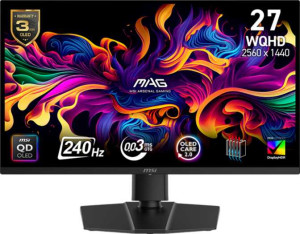
MSI MAG 271QP QD-OLED X24 27"
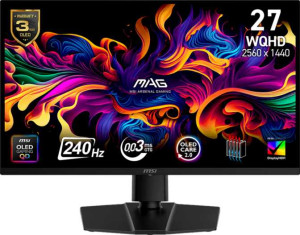
MSI MAG 273QP QD-OLED X24 27"

MSI MAG 271QP QD-OLED X24 27" MSI MAG 273QP QD-OLED X24 27"

Overview

Welcome to our in-depth comparison of the MSI MAG 271QP QD-OLED X24 27-inch and the MSI MAG 273QP QD-OLED X24 27-inch — two premium gaming monitors that share the same stunning QD-OLED panel and blazing 240Hz refresh rate, yet diverge in ways that could matter greatly depending on your setup. From peak brightness to physical footprint and ergonomic flexibility, we break down every specification to help you find your perfect match.

Common Features

  • Both monitors use a QD-OLED, OLED/AMOLED display type.
  • Both have a response time of 0.03 ms.
  • Both feature a screen size of 26.5″.
  • Both have a resolution of 2560 x 1440 px.
  • Both have a pixel density of 110 ppi.
  • Both support VESA Adaptive Sync for adaptive synchronization.
  • Both have a refresh rate of 240Hz.
  • Anti-glare coating is present on both monitors.
  • Both are classified as gaming monitors.
  • Both carry an EU energy label of F.
  • Tilt adjustment is supported on both monitors.
  • A swivel stand is included on both monitors.
  • VESA mount support is available on both monitors.
  • Color calibration is supported on both monitors.
  • Both displays cover 1070 million colors.
  • Both have a bit depth of 10-bit.
  • Both offer a contrast ratio of 1500000:1.
  • Adobe RGB coverage is 98% on both monitors.
  • sRGB coverage is 138% on both monitors.
  • Both monitors include 2 HDMI ports.
  • Both monitors include 1 DisplayPort output using DisplayPort 1.4.
  • Thunderbolt support is not available on either monitor.
  • A 3.5 mm audio jack is present on both monitors.
  • A DVI connector is not available on either monitor.
  • Neither monitor includes USB ports or USB Type-C.
  • Picture-in-Picture is not available on either monitor.
  • Stereo speakers are not included on either monitor.
  • Neither monitor has a built-in smart TV or remote control.

Main Differences

  • Height is 362 mm on MSI MAG 271QP QD-OLED X24 27″ and 358 mm on MSI MAG 273QP QD-OLED X24 27″.
  • Width is 609 mm on MSI MAG 271QP QD-OLED X24 27″ and 610 mm on MSI MAG 273QP QD-OLED X24 27″.
  • Thickness is 72 mm on MSI MAG 271QP QD-OLED X24 27″ and 54 mm on MSI MAG 273QP QD-OLED X24 27″.
  • Weight is 8000 g on MSI MAG 271QP QD-OLED X24 27″ and 6700 g on MSI MAG 273QP QD-OLED X24 27″.
  • Volume is 15872.976 cm³ on MSI MAG 271QP QD-OLED X24 27″ and 11792.52 cm³ on MSI MAG 273QP QD-OLED X24 27″.
  • Portrait mode is supported on MSI MAG 271QP QD-OLED X24 27″ but not available on MSI MAG 273QP QD-OLED X24 27″.
  • Typical brightness is 250 nits on MSI MAG 271QP QD-OLED X24 27″ and 450 nits on MSI MAG 273QP QD-OLED X24 27″.
Specs Comparison
MSI MAG 271QP QD-OLED X24 27"

MSI MAG 271QP QD-OLED X24 27"

MSI MAG 273QP QD-OLED X24 27"

MSI MAG 273QP QD-OLED X24 27"

Display:
Display type QD-OLED, OLED/AMOLED QD-OLED, OLED/AMOLED
response time 0.03 ms 0.03 ms
screen size 26.5" 26.5"
resolution 2560 x 1440 px 2560 x 1440 px
pixel density 110 ppi 110 ppi
Adaptive synchronization VESA Adaptive Sync VESA Adaptive Sync
has anti-glare coating
refresh rate 240Hz 240Hz
maximum horizontal viewing angle 178º 178º
maximum vertical viewing angle 178º 178º
has a matte panel
has a glossy panel
has a touch screen

In terms of display technology, both the MSI MAG 271QP and the MAG 273QP are built on the same QD-OLED panel foundation, sharing every single display specification across the board. Both feature a 2560 x 1440 resolution on a 26.5″ panel, yielding a pixel density of 110 ppi — sharp enough for crisp text and fine detail at typical desktop viewing distances. The 0.03 ms response time is essentially instantaneous, virtually eliminating motion blur and ghosting, which matters most in fast-paced gaming scenarios.

Both monitors refresh at 240Hz and support VESA Adaptive Sync, meaning tear-free gameplay is available across a wide range of compatible GPUs. The 178° horizontal and vertical viewing angles are a hallmark of OLED technology, ensuring color and contrast remain accurate when viewed off-axis — a real advantage over IPS or VA alternatives. The matte anti-glare coating on both panels helps manage reflections in brighter environments, a thoughtful trade-off given that glossy OLED panels can otherwise act like mirrors.

Based strictly on the provided display specifications, these two monitors are completely identical in every measurable display attribute. There is no differentiator in this category — buyers should look to other spec groups such as connectivity, ergonomics, or pricing to distinguish between the two models.

General info:
Type Gaming Gaming
release date February 2025 February 2025
EU energy label F F
supports total tilt
Has a swivel stand
Supports VESA mount
height 362 mm 358 mm
width 609 mm 610 mm
thickness 72 mm 54 mm
weight 8000 g 6700 g
supports portrait mode
volume 15872.976 cm³ 11792.52 cm³

Both monitors are classified as Gaming type displays and share the same ergonomic foundation — tilt adjustment, swivel, and VESA mount compatibility are all present on each. That level of stand flexibility is genuinely useful, allowing users to dial in precise positioning or ditch the stand entirely for an aftermarket arm. However, one notable divergence emerges here: the MAG 271QP supports portrait mode, while the MAG 273QP does not. For productivity-minded users who rotate their monitor for coding, reading, or vertical content, this is a meaningful functional gap.

The physical footprint tells a clear story as well. The MAG 271QP is noticeably bulkier — 72 mm thick versus 54 mm on the 273QP — and its volumetric footprint of roughly 15,873 cm³ dwarfs the 273QP′s 11,793 cm³. More practically, the 271QP weighs 8,000 g compared to the 273QP′s 6,700 g, a difference of 1.3 kg that becomes relevant when repositioning the monitor or mounting it on a lighter-duty arm. The 273QP′s slimmer, lighter build is more desk-friendly and easier to handle during setup.

The MAG 273QP holds a clear edge in this category overall. Its significantly lighter weight, slimmer profile, and smaller physical volume make it the more practical choice for most setups. The only concession it makes is the absence of portrait mode rotation — users who specifically need that capability will find the bulkier MAG 271QP to be the only option between the two.
Colors:
brightness (typical) 250 nits 450 nits
supports color calibration
display colors 1070 million 1070 million
bit depth 10-bit 10-bit
contrast ratio 1500000:1 1500000:1
Adobe RGB coverage 98% 98%
sRGB coverage 138% 138%

Color fidelity is effectively identical across both monitors. Each covers 98% Adobe RGB and an impressive 138% sRGB, backed by a 10-bit panel capable of rendering over 1.07 billion colors. The infinite-black-achieving 1,500,000:1 contrast ratio — a hallmark of OLED technology — ensures that dark scenes retain deep shadow detail while bright elements pop with vivid intensity. Both also support color calibration, which matters for users who need reliable, repeatable color accuracy for creative work.

The one place these two diverge is brightness. The MAG 273QP is rated at 450 nits typical, compared to just 250 nits on the MAG 271QP — a difference of 80%. In practical terms, this gap is significant in well-lit or bright office environments, where a dimmer panel can appear washed out and fatiguing to use for extended periods. The 273QP′s higher luminance also makes HDR content more impactful, as peak highlight rendering benefits directly from a higher brightness ceiling.

The MAG 273QP has a clear advantage in this group, driven entirely by its substantially higher typical brightness. For users working in dimmer, controlled environments, the 271QP′s color reproduction is equally strong — but anyone dealing with ambient light or prioritizing HDR visual impact will find the 273QP the more capable panel.

Connectivity:
HDMI ports 2 2
supports Thunderbolt
DisplayPort outputs 1 1
DisplayPort version DisplayPort 1.4 DisplayPort 1.4
has a socket for a 3.5 mm audio jack
has a DVI connector
USB ports 0 0
Has USB Type-C
HDMI version HDMI 2.1 HDMI 2.1
supports Ethernet
supports Wi-Fi
has AirPlay
mini DisplayPort outputs 0 0
has a VGA connector

Connectivity is a straightforward story here — both monitors offer an identical port selection. Each provides two HDMI 2.1 ports and one DisplayPort 1.4 output, which is a solid combination for gaming-oriented use. HDMI 2.1 is capable of handling the full 2560 x 1440 at 240Hz signal without bandwidth bottlenecks, and having two HDMI inputs makes it convenient to switch between a console and a PC without unplugging cables. The single DisplayPort 1.4 rounds out the package for users on desktop GPU setups that favor DP.

Worth noting is what is absent on both models: there are no USB ports, no USB-C, and no Thunderbolt support. For users expecting a hub-capable monitor — one that can charge a laptop or daisy-chain peripherals through the display — neither option delivers that. The inclusion of a 3.5 mm audio jack on both is a minor but practical touch, useful for routing headphones directly to the monitor when audio is passed through the display connection.

Since every connectivity specification is identical across the two models, this category is a complete tie. Neither monitor holds any advantage here, and the port selection, while functional for its gaming-focused purpose, leaves little room to differentiate between the two.

Features:
has PiP
has stereo speakers
has built-in smart TV
has a remote control
supports Dolby Digital
supports Dolby Digital Plus
has DTS Surround
has an ambient light sensor
has a front camera

Neither the MAG 271QP nor the MAG 273QP includes any of the supplementary features tracked in this category. There are no built-in speakers, no Picture-in-Picture, no ambient light sensor, and no smart TV functionality on either model. For a gaming-focused monitor at this tier, that is largely expected — these are purpose-built display panels, and manufacturers typically omit such additions to keep the focus on core display performance rather than bundling features that dedicated peripherals handle better.

The absence of built-in audio is the only point worth flagging for practical setup planning. Users will need external speakers or a headset routed through the monitor′s 3.5 mm jack, as neither display provides an onboard audio output of its own. Everything else in this category — smart features, camera, remote — is absent on both and unlikely to be missed by the gaming audience these monitors target.

With every specification in this group returning the same result for both models, this is an unambiguous tie. There is nothing in the features data that differentiates the MAG 271QP from the MAG 273QP, and neither holds any advantage here.

Comparison Summary & Verdict

Both the MSI MAG 271QP QD-OLED X24 27-inch and the MSI MAG 273QP QD-OLED X24 27-inch deliver an exceptional foundation: a QD-OLED panel with a 2560x1440 resolution, a 0.03 ms response time, 240Hz refresh rate, and outstanding color coverage including 98% Adobe RGB and 138% sRGB. The choice between them ultimately comes down to two key factors. The MSI MAG 273QP QD-OLED X24 27-inch shines for users who prioritize a brighter display at 450 nits and prefer a slimmer, lighter build at just 54mm thick and 6700g. Meanwhile, the MSI MAG 271QP QD-OLED X24 27-inch is the better fit for those who need portrait mode support — ideal for multi-monitor productivity setups or vertical content workflows — and are less concerned about raw brightness or desk footprint.

MSI MAG 271QP QD-OLED X24 27
Buy MSI MAG 271QP QD-OLED X24 27" if...

Buy the MSI MAG 271QP QD-OLED X24 27-inch if you need portrait mode support for a vertical or multi-monitor productivity setup and brightness is not your top priority.

MSI MAG 273QP QD-OLED X24 27
Buy MSI MAG 273QP QD-OLED X24 27" if...

Buy the MSI MAG 273QP QD-OLED X24 27-inch if you want a significantly brighter display at 450 nits and prefer a slimmer, lighter monitor that is easier to manage on your desk.