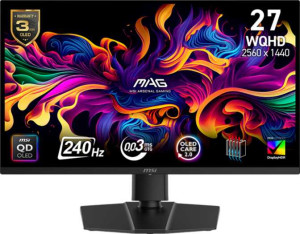
MSI MAG 271QP QD-OLED X24 27"
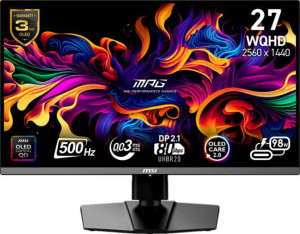
MSI MPG 272QR QD-OLED X50 27"

MSI MAG 271QP QD-OLED X24 27" MSI MPG 272QR QD-OLED X50 27"

Overview

Welcome to our in-depth specification comparison between the MSI MAG 271QP QD-OLED X24 27-inch and the MSI MPG 272QR QD-OLED X50 27-inch. Both monitors share the same stunning QD-OLED panel technology and 1440p resolution, yet they diverge in meaningful ways across refresh rate, brightness output, and connectivity options. Whether you prioritize flexibility or raw performance, this comparison will help you identify which panel truly fits your setup.

Common Features

  • Both monitors use a QD-OLED, OLED/AMOLED display type.
  • Both monitors have a response time of 0.03 ms.
  • Both monitors have a screen size of 26.5″.
  • Both monitors have a resolution of 2560 x 1440 px.
  • Both monitors have a pixel density of 110 ppi.
  • Both monitors support VESA Adaptive Sync.
  • Both monitors feature an anti-glare coating.
  • Both monitors have a maximum horizontal viewing angle of 178º.
  • Both monitors are classified as Gaming type.
  • Both monitors support tilt adjustment.
  • Both monitors have a swivel stand.
  • Both monitors support VESA mounting.
  • Both monitors display 1070 million colors.
  • Both monitors have a 10-bit color depth.
  • Both monitors have a contrast ratio of 1500000:1.
  • Both monitors cover 98% of the Adobe RGB color space.
  • Both monitors cover 138% of the sRGB color space.
  • Both monitors include 2 HDMI ports with HDMI 2.1 version.
  • Both monitors include 1 DisplayPort output.
  • Both monitors have a 3.5 mm audio jack, but neither supports Thunderbolt, Ethernet, Wi-Fi, or has a DVI connector.
  • Neither monitor has stereo speakers, a built-in smart TV, a remote control, Dolby Digital, Dolby Digital Plus, DTS Surround, an ambient light sensor, or a front camera.

Main Differences

  • Refresh rate is 240Hz on MSI MAG 271QP QD-OLED X24 27″ and 500Hz on MSI MPG 272QR QD-OLED X50 27″.
  • Portrait mode is supported on MSI MAG 271QP QD-OLED X24 27″ but not available on MSI MPG 272QR QD-OLED X50 27″.
  • Typical brightness is 250 nits on MSI MAG 271QP QD-OLED X24 27″ and 550 nits on MSI MPG 272QR QD-OLED X50 27″.
  • Color calibration support is present on MSI MAG 271QP QD-OLED X24 27″ but not available on MSI MPG 272QR QD-OLED X50 27″.
  • DisplayPort version is 1.4 on MSI MAG 271QP QD-OLED X24 27″ and 2.1 on MSI MPG 272QR QD-OLED X50 27″.
  • USB ports number 0 on MSI MAG 271QP QD-OLED X24 27″ and 4 on MSI MPG 272QR QD-OLED X50 27″.
  • USB Type-C connectivity is absent on MSI MAG 271QP QD-OLED X24 27″ but present on MSI MPG 272QR QD-OLED X50 27″.
  • Picture-in-Picture (PiP) is not available on MSI MAG 271QP QD-OLED X24 27″ but is present on MSI MPG 272QR QD-OLED X50 27″.
Specs Comparison
MSI MAG 271QP QD-OLED X24 27"

MSI MAG 271QP QD-OLED X24 27"

MSI MPG 272QR QD-OLED X50 27"

MSI MPG 272QR QD-OLED X50 27"

Display:
Display type QD-OLED, OLED/AMOLED QD-OLED, OLED/AMOLED
response time 0.03 ms 0.03 ms
screen size 26.5" 26.5"
resolution 2560 x 1440 px 2560 x 1440 px
pixel density 110 ppi 110 ppi
Adaptive synchronization VESA Adaptive Sync VESA Adaptive Sync
has anti-glare coating
refresh rate 240Hz 500Hz
maximum horizontal viewing angle 178º 178º
maximum vertical viewing angle 178º 178º
has a matte panel
has a glossy panel
has a touch screen

Both the MSI MAG 271QP QD-OLED X24 and the MSI MPG 272QR QD-OLED X50 share the same core display foundation: a QD-OLED panel at 2560 x 1440 resolution on a 26.5″ screen, delivering 110 ppi pixel density, an ultra-fast 0.03 ms response time, and wide 178° viewing angles in both directions. Both also feature a matte anti-glare coating and VESA Adaptive Sync, meaning the surface finish and variable refresh rate experience are essentially identical between the two.

The sole but significant differentiator in this group is the refresh rate: the MAG 271QP tops out at 240Hz, while the MPG 272QR reaches an exceptional 500Hz. In practice, the jump from 240Hz to 500Hz cuts the time between frames from roughly 4.2 ms down to 2 ms. For the vast majority of users — including competitive gamers — 240Hz already delivers an extremely fluid, low-latency experience. However, at 500Hz, elite esports players can perceive meaningfully reduced motion blur and input lag in fast-paced titles, provided their system can consistently push frame rates into that range.

For this display group, the MPG 272QR QD-OLED X50 has a clear edge purely on refresh rate. Every other display characteristic is a dead tie. Whether that advantage is meaningful depends entirely on the user's use case: casual and even most competitive gamers will find 240Hz more than sufficient, but those specifically chasing the lowest possible latency and motion clarity in esports will find 500Hz a genuine, if demanding, upgrade.
General info:
Type Gaming Gaming
release date February 2025 January 2025
supports total tilt
Has a swivel stand
Supports VESA mount
supports portrait mode

As gaming monitors, both the MAG 271QP and the MPG 272QR offer a solid and nearly identical ergonomic package: tilt, swivel, and VESA mount support are present on both, giving users good flexibility when it comes to positioning the display comfortably on a desk or mounting it on an arm.

The one point of divergence is portrait mode support. The MAG 271QP supports it; the MPG 272QR does not. Portrait mode — rotating the panel 90° to a vertical orientation — is a niche but genuinely useful feature for developers reading long code files, users monitoring dashboards, or multi-monitor setups where one screen serves as a secondary vertical display. Its absence on the MPG 272QR is a real limitation for anyone who needs that flexibility.

In this group, the MAG 271QP holds a narrow edge thanks solely to its portrait mode capability. Users who have no interest in rotating their display will find both monitors functionally equivalent in terms of ergonomics and mounting options.

Colors:
brightness (typical) 250 nits 550 nits
supports color calibration
display colors 1070 million 1070 million
bit depth 10-bit 10-bit
contrast ratio 1500000:1 1500000:1
Adobe RGB coverage 98% 98%
sRGB coverage 138% 138%

On color reproduction, the two monitors are remarkably well-matched at their core: both deliver 10-bit color depth covering 1.07 billion colors, a 1,500,000:1 contrast ratio, and identical 98% Adobe RGB and 138% sRGB coverage. That sRGB figure in particular is exceptional, meaning both panels reproduce colors well beyond the standard gamut — a direct benefit of the QD-OLED technology they share.

Where they diverge is on brightness and calibration. The MPG 272QR specifies a typical brightness of 550 nits versus the MAG 271QP's 250 nits — more than double. In practice, higher peak brightness makes a meaningful difference in brightly lit rooms and enhances the perceived punch of HDR content, where highlights need to stand out against deep OLED blacks. The MAG 271QP, on the other hand, supports color calibration, which the MPG 272QR lacks. For content creators or color-critical workflows, the ability to hardware-calibrate a display to a known standard is a significant professional advantage.

This group presents a genuine trade-off rather than a clear overall winner. The MPG 272QR has the edge for gaming and HDR use thanks to its substantially higher brightness, while the MAG 271QP is better suited for color-accurate work owing to its calibration support. The right choice depends directly on the user's primary workload.

Connectivity:
HDMI ports 2 2
supports Thunderbolt
DisplayPort outputs 1 1
DisplayPort version DisplayPort 1.4 DisplayPort 2.1
has a socket for a 3.5 mm audio jack
has a DVI connector
USB ports 0 4
Has USB Type-C
HDMI version HDMI 2.1 HDMI 2.1
supports Ethernet
supports Wi-Fi
has AirPlay
mini DisplayPort outputs 0 0
has a VGA connector

Video input options are largely shared between the two: both carry dual HDMI 2.1 ports and a single DisplayPort output, plus a 3.5 mm audio jack. HDMI 2.1 on both ensures compatibility with current-gen consoles and GPUs at high resolutions and refresh rates without bottlenecking the signal.

The DisplayPort versions differ, however. The MAG 271QP uses DisplayPort 1.4, while the MPG 272QR steps up to DisplayPort 2.1. Given that the MPG 272QR targets 500Hz, the higher bandwidth of DP 2.1 is not incidental — it is effectively a prerequisite for driving that refresh rate at 1440p without compression. Beyond that, the MPG 272QR adds 4 USB ports and a USB-C port, turning the monitor into a peripheral hub. The MAG 271QP has no USB connectivity at all, meaning every device must connect directly to the PC.

The MPG 272QR has a clear connectivity advantage. The combination of DisplayPort 2.1, USB-C, and four additional USB ports makes it a considerably more versatile centerpiece for a modern desk setup, whereas the MAG 271QP is a more straightforward display-only device.

Features:
has PiP
has stereo speakers
has built-in smart TV
has a remote control
supports Dolby Digital
supports Dolby Digital Plus
has DTS Surround
has an ambient light sensor
has a front camera

Across this feature set, both monitors are stripped down to their essentials — no built-in speakers, no smart TV functionality, no ambient light sensor, and no camera. For gaming-focused displays, none of these omissions are surprising or particularly consequential.

The only differentiator is Picture-in-Picture (PiP), which the MPG 272QR supports and the MAG 271QP does not. PiP allows a second video source to be displayed simultaneously within a small inset window — useful for users who want to monitor a secondary device, such as a console or a second PC, without switching inputs or adding a second monitor.

This is a slim group overall, but the MPG 272QR edges ahead on the strength of its PiP support. It is a niche feature, and most dedicated gamers will never use it — but for multi-source workflows, it adds genuine practical value that the MAG 271QP simply cannot offer.

Comparison Summary & Verdict

After examining every specification, both monitors deliver the same premium QD-OLED foundation with identical resolution, response time, and color coverage. However, they target distinctly different users. The MSI MAG 271QP QD-OLED X24 27-inch stands out for those who value color calibration support, portrait mode rotation, and a clean, minimal connectivity setup. The MSI MPG 272QR QD-OLED X50 27-inch, on the other hand, is built for demanding users who want a blazing 500Hz refresh rate, significantly higher 550-nit brightness, a full USB hub with four ports, USB Type-C, DisplayPort 2.1, and Picture-in-Picture functionality. In short, the X24 suits creative professionals and versatile desktop users, while the X50 is purpose-built for competitive gaming and feature-rich workstation use.

MSI MAG 271QP QD-OLED X24 27
Buy MSI MAG 271QP QD-OLED X24 27" if...

Buy the MSI MAG 271QP QD-OLED X24 27-inch if you need color calibration support and portrait mode rotation for a more versatile and creatively oriented desktop setup.

MSI MPG 272QR QD-OLED X50 27
Buy MSI MPG 272QR QD-OLED X50 27" if...

Buy the MSI MPG 272QR QD-OLED X50 27-inch if you demand the highest possible 500Hz refresh rate, greater brightness, and a richer connectivity suite including USB Type-C, four USB ports, and DisplayPort 2.1.