MSI MAG B850 Tomahawk Max WiFi
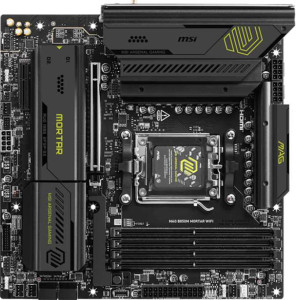
MSI MAG B850M Mortar WiFI

MSI MAG B850 Tomahawk Max WiFi MSI MAG B850M Mortar WiFI

Overview

When choosing between the MSI MAG B850 Tomahawk Max WiFi and the MSI MAG B850M Mortar WiFi, builders face a compelling decision rooted in form factor, connectivity, and expandability. Both boards share the AM5 socket, B850 chipset, and Wi-Fi 7 support, yet they diverge in meaningful ways around PCIe slot configuration, USB port layout, M.2 storage options, and fan header count — making the choice far from trivial for enthusiasts and system integrators alike.

Common Features

  • Both boards use the AM5 CPU socket.
  • Both boards are built on the B850 chipset.
  • Wi-Fi is available on both products, supporting Wi-Fi 4 (802.11n), Wi-Fi 5 (802.11ac), Wi-Fi 6 (802.11ax), Wi-Fi 6E (802.11ax), and Wi-Fi 7 (802.11be).
  • Bluetooth 5.4 is present on both products.
  • Both boards feature an HDMI 2.1 output.
  • Overclocking is supported on both products.
  • Both boards support a maximum memory capacity of 256 GB.
  • The maximum native RAM speed is 5600 MHz on both products.
  • Both boards have 4 memory slots and support dual-channel (2-channel) memory.
  • Both boards use DDR5 memory.
  • ECC memory is not supported on either product.
  • Neither product includes USB 3.2 Gen 1 USB-C ports, USB 4 ports, Thunderbolt 3, or Thunderbolt 4 ports.
  • Both boards provide 1 RJ45 (ethernet) port.
  • DisplayPort outputs are not available on either product.
  • Both boards offer 4 USB 2.0 ports through internal expansion headers.
  • Both boards include 4 SATA 3 connectors and no SATA 2 connectors.
  • A TPM connector is present on both products.
  • Neither product includes a U.2 socket or an mSATA connector.
  • Both boards have 1 PCIe 5.0 x16 slot and no PCIe 3.0 x16, PCIe 2.0 x16, PCIe x8, or legacy PCI slots.
  • Both boards deliver 7.1-channel audio with a 120 dB signal-to-noise ratio (DAC), an S/PDIF Out port, and 2 audio connectors.
  • RAID 0, RAID 1, and RAID 10 (1+0) are supported on both boards, while RAID 0+1 is not supported on either.

Main Differences

  • The form factor is ATX on the MSI MAG B850 Tomahawk Max WiFi and Micro-ATX on the MSI MAG B850M Mortar WiFi.
  • The board height is 243.8 mm on the MSI MAG B850 Tomahawk Max WiFi and 244 mm on the MSI MAG B850M Mortar WiFi.
  • The board width is 304.8 mm on the MSI MAG B850 Tomahawk Max WiFi and 244 mm on the MSI MAG B850M Mortar WiFi.
  • The maximum overclocked RAM speed is 8400 MHz on the MSI MAG B850 Tomahawk Max WiFi and 8200 MHz on the MSI MAG B850M Mortar WiFi.
  • There are 2 USB 3.2 Gen 2 Type-A ports on the MSI MAG B850 Tomahawk Max WiFi and 3 on the MSI MAG B850M Mortar WiFi.
  • There is 1 USB 3.2 Gen 1 Type-A port on the MSI MAG B850 Tomahawk Max WiFi and 4 on the MSI MAG B850M Mortar WiFi.
  • There are 3 USB 3.2 Gen 2 Type-C ports on the MSI MAG B850 Tomahawk Max WiFi and 1 on the MSI MAG B850M Mortar WiFi.
  • There are 4 USB 2.0 Type-A ports on the MSI MAG B850 Tomahawk Max WiFi, while the MSI MAG B850M Mortar WiFi has none.
  • A USB 3.2 Gen 2x2 port is present on the MSI MAG B850M Mortar WiFi but not available on the MSI MAG B850 Tomahawk Max WiFi.
  • There are 4 USB 3.2 Gen 1 headers (through expansion) on the MSI MAG B850 Tomahawk Max WiFi and 2 on the MSI MAG B850M Mortar WiFi.
  • There are 4 USB 3.0 headers (through expansion) on the MSI MAG B850 Tomahawk Max WiFi and 2 on the MSI MAG B850M Mortar WiFi.
  • The MSI MAG B850 Tomahawk Max WiFi has 8 fan headers, while the MSI MAG B850M Mortar WiFi has 6.
  • There are 4 M.2 sockets on the MSI MAG B850 Tomahawk Max WiFi and 3 on the MSI MAG B850M Mortar WiFi.
  • A PCIe 4.0 x16 slot is present on the MSI MAG B850 Tomahawk Max WiFi but not available on the MSI MAG B850M Mortar WiFi.
  • A PCIe x1 slot is present on the MSI MAG B850 Tomahawk Max WiFi but not available on the MSI MAG B850M Mortar WiFi.
  • A PCIe x4 slot is present on the MSI MAG B850M Mortar WiFi but not available on the MSI MAG B850 Tomahawk Max WiFi.
  • RAID 5 support is available on the MSI MAG B850M Mortar WiFi but not on the MSI MAG B850 Tomahawk Max WiFi.
Specs Comparison
MSI MAG B850 Tomahawk Max WiFi

MSI MAG B850 Tomahawk Max WiFi

MSI MAG B850M Mortar WiFI

MSI MAG B850M Mortar WiFI

General info:
CPU socket AM5 AM5
chipset B850 B850
form factor ATX Micro-ATX
release date January 2025 March 2025
supports Wi-Fi
Wi-Fi version Wi-Fi 4 (802.11n), Wi-Fi 5 (802.11ac), Wi-Fi 6 (802.11ax), Wi-Fi 6E (802.11ax), Wi-Fi 7 (802.11be) Wi-Fi 4 (802.11n), Wi-Fi 5 (802.11ac), Wi-Fi 6 (802.11ax), Wi-Fi 6E (802.11ax), Wi-Fi 7 (802.11be)
Has Bluetooth
Bluetooth version 5.4 5.4
HDMI version HDMI 2.1 HDMI 2.1
Easy to overclock
has RGB lighting
Easy to reset BIOS
Has dual BIOS
has aptX
CPU sockets 1 1
Has integrated graphics
warranty period 3 years 3 years
height 243.8 mm 244 mm
width 304.8 mm 244 mm
Has integrated CPU

The MSI MAG B850 Tomahawk Max WiFi and the MSI MAG B850M Mortar WiFi share a remarkably identical foundation: both use the AM5 socket with a B850 chipset, support the same Wi-Fi 7 standard (backward-compatible down to Wi-Fi 4), carry Bluetooth 5.4, an HDMI 2.1 output, dual BIOS, RGB lighting, and a 3-year warranty. For a buyer focused purely on feature parity, these two boards are essentially twins on paper.

The single meaningful differentiator in this group is form factor. The Tomahawk Max is a full-size ATX board at 304.8 × 243.8 mm, while the Mortar is a compact Micro-ATX at 244 × 244 mm — roughly 40% less PCB area. In practice, this means the Tomahawk Max requires a mid-tower or full-tower case, but gains more physical space for additional expansion slots, VRM cooling headroom, and component layout breathing room. The Mortar, by contrast, fits in smaller Micro-ATX or compatible mid-tower cases, making it the better choice for space-constrained or compact builds.

For general-info specs, neither board holds a feature advantage — both are equally capable on connectivity and platform support. The edge goes to the Tomahawk Max if build space is not a constraint, as the larger ATX footprint typically allows for more robust designs; however, if a smaller chassis is a priority, the Mortar's Micro-ATX form factor is the decisive advantage with no sacrifice in the features covered by this group.

Memory:
maximum memory amount 256GB 256GB
RAM speed (max) 5600 MHz 5600 MHz
overclocked RAM speed 8400 MHz 8200 MHz
memory slots 4 4
DDR memory version 5 5
memory channels 2 2
Supports ECC memory

On memory fundamentals, the two boards are nearly identical: both support DDR5 with 4 slots, dual-channel configuration, a 256GB maximum capacity, and a native rated speed of 5600 MHz. For most users — gaming, content creation, or general workstation use — this shared baseline means no practical difference in day-to-day memory performance or upgrade ceiling.

The only distinction lies in overclocked memory headroom. The Tomahawk Max tops out at 8400 MHz via EXPO/XMP profiles, while the Mortar's ceiling is 8200 MHz — a 200 MHz gap. In real-world terms, the performance delta at these frequencies is negligible for virtually all workloads; memory scaling returns diminish sharply above 6000–6400 MHz on the AM5 platform, so the extra headroom on the Tomahawk Max is largely theoretical for typical users.

For memory specs, this category is effectively a tie. The Tomahawk Max holds a marginal edge in peak overclocking ceiling, but only extreme enthusiasts chasing benchmark records would ever notice. Everyday builders and even serious overclockers will find both boards equally capable here.

Ports:
USB 3.2 Gen 2 ports (USB-A) 2 3
USB 3.2 Gen 1 ports (USB-A) 1 4
USB 3.2 Gen 2 ports (USB-C) 3 1
USB 3.2 Gen 1 ports (USB-C) 0 0
USB 2.0 ports 4 0
USB 3.2 Gen 2x2 ports 0 1
USB 4 40Gbps ports 0 0
USB 4 20Gbps ports 0 0
Thunderbolt 4 ports 0 0
Thunderbolt 3 ports 0 0
has an HDMI output
DisplayPort outputs 0 0
RJ45 ports 1 1
Has USB Type-C
eSATA ports 0 0
DVI outputs 0 0
has a VGA connector
PS/2 ports 0 0

Port selection is where these two boards diverge most noticeably, and the differences reflect genuinely different connectivity philosophies. The Tomahawk Max makes a strong push toward modern USB-C adoption, offering 3 USB 3.2 Gen 2 Type-C rear ports — ideal for connecting current-gen peripherals, displays, and fast external storage. The Mortar counters with just 1 USB-C Gen 2 port but compensates with a USB 3.2 Gen 2x2 port running at 20Gbps, which is actually the fastest single rear port either board offers, making it well-suited for high-speed NVMe enclosures or pro-grade storage devices.

On the USB-A front, the Mortar is notably more generous, offering a combined 7 Type-A ports (3× Gen 2 + 4× Gen 1) with no legacy USB 2.0 at all — a forward-looking choice that keeps all rear USB-A slots at USB 3.x speeds. The Tomahawk Max, by contrast, includes 4 USB 2.0 ports alongside its 3 higher-speed Type-A ports. Those 2.0 ports are fine for mice, keyboards, and dongles, but represent older technology some builders would rather not see occupying rear I/O space.

Neither board is objectively superior here — it comes down to use case. The Tomahawk Max has the edge for USB-C-heavy setups, while the Mortar edges ahead for raw USB-A count and peak single-port transfer speed via its Gen 2x2 port. Users with multiple modern USB-C devices will prefer the Tomahawk Max; those relying on many traditional USB-A peripherals or external high-speed storage will find the Mortar's layout more practical.

Connectors:
USB 3.2 Gen 1 ports (through expansion) 4 2
USB 2.0 ports (through expansion) 4 4
SATA 3 connectors 4 4
fan headers 8 6
USB 3.0 ports (through expansion) 4 2
M.2 sockets 4 3
Has TPM connector
U.2 sockets 0 0
Has mSATA connector
SATA 2 connectors 0 0

Internal connectivity tells a clear story about each board's target audience. The Tomahawk Max pulls ahead with 4 M.2 sockets versus the Mortar's 3 — a meaningful difference for builders who want to run multiple NVMe SSDs simultaneously without touching the SATA ports. Both boards offer the same 4 SATA 3 connectors, so traditional drive arrays are equally supported, but the extra M.2 slot on the Tomahawk Max adds valuable flexibility for high-capacity or tiered storage setups.

Fan and cooling header count is another area where the Tomahawk Max has a tangible advantage: 8 fan headers compared to the Mortar's 6. In a heavily cooled build — think multiple case fans, a 360mm AIO, and additional radiator fans — having two extra headers eliminates the need for fan splitters or hubs, simplifying cable management and giving more granular control over individual fan zones. The Mortar's 6 headers are sufficient for most standard builds, but enthusiast cooling configurations will feel the constraint sooner.

Internal USB expansion follows the same pattern: the Tomahawk Max offers 4 USB 3.0 internal ports (via headers) to the Mortar's 2, useful for front-panel USB hubs or internal devices. USB 2.0 expansion is equal at 4 each. Overall, the Tomahawk Max holds a clear edge in this group — more M.2 slots, more fan headers, and more internal USB bandwidth make it the stronger choice for complex, feature-rich builds, while the Mortar remains adequate for straightforward configurations.

Expansion slots:
PCIe 4.0 x16 slots 1 0
PCIe 5.0 x16 slots 1 1
PCIe 3.0 x16 slots 0 0
PCIe x1 slots 1 0
PCI slots 0 0
PCIe 2.0 x16 slots 0 0
PCIe x4 slots 0 1
PCIe x8 slots 0 0

Both boards lead with a single PCIe 5.0 x16 slot for the primary GPU — the current gold standard for graphics card connectivity, offering double the bandwidth of PCIe 4.0 and ensuring full compatibility with current and next-generation GPUs. That shared foundation means neither board constrains graphics performance at the primary slot.

Beyond that top slot, the two diverge. The Tomahawk Max adds a PCIe 4.0 x16 slot and a PCIe x1 slot, giving it three expansion slots total. The second x16-sized slot is useful for multi-GPU setups (where supported), capture cards, or high-bandwidth add-in cards that benefit from x16 physical spacing, while the x1 slot accommodates smaller cards like network adapters or sound cards. The Mortar, constrained by its Micro-ATX footprint, offers only a PCIe x4 slot as its secondary option — sufficient for NVMe add-in cards or modest expansion cards, but less versatile than a full x16 physical slot.

The Tomahawk Max has a clear edge here. Its additional PCIe 4.0 x16 slot and x1 slot meaningfully expand what can be installed alongside a GPU, making it the stronger platform for multi-card or accessory-heavy builds. The Mortar's single secondary x4 slot is adequate for basic expansion needs but leaves less room to grow — an expected trade-off for the Micro-ATX form factor.

Audio:
Signal-to-Noise ratio (DAC) 120 dB 120 dB
audio channels 7.1 7.1
Has S/PDIF Out port
audio connectors 2 2

Audio is the rare category where these two boards are in complete lockstep. Both deliver a 120 dB signal-to-noise ratio from their onboard DAC — a figure that represents clean, low-noise output well above the threshold where most listeners can perceive distortion, making both suitable for quality headphones and speakers without an external DAC. They also share 7.1 surround channel support, S/PDIF optical output for connecting to external receivers or soundbars, and an identical count of 2 analog audio connectors on the rear I/O.

This is a straight tie — there is no differentiator to analyze. Buyers who prioritize onboard audio quality will find both boards equally equipped, and those who plan to use an external DAC or discrete sound card will be unaffected by this category entirely either way.

Storage:
Supports RAID 1
Supports RAID 10 (1+0)
Supports RAID 5
Supports RAID 0
Supports RAID 0+1

RAID support between these two boards is nearly identical, with both covering the most commonly used configurations: RAID 0 for pure performance striping, RAID 1 for mirrored redundancy, and RAID 10 for a combined stripe-and-mirror setup favored in workstation and small server environments. For the vast majority of users, this shared support covers every practical RAID use case.

The single differentiator is that the Mortar additionally supports RAID 5, which the Tomahawk Max lacks. RAID 5 distributes parity data across three or more drives, offering a balance of usable capacity, read performance, and fault tolerance — it can survive a single drive failure without data loss, while providing more usable storage than a pure RAID 1 mirror. This makes it a meaningful option for NAS-style or data-intensive workstation builds where storage efficiency matters alongside redundancy.

For storage configurations, the Mortar holds a narrow edge by virtue of its RAID 5 support. That said, this advantage is relevant only to a specific subset of users — those building multi-drive redundant arrays. Anyone running RAID 0, 1, or 10 will find both boards perfectly equal.

Comparison Summary & Verdict

After a thorough side-by-side review, both boards prove to be capable AM5 platforms with strong shared foundations — including Wi-Fi 7, Bluetooth 5.4, DDR5 support up to 256 GB, and 7.1-channel audio. However, their differences reveal distinct target audiences. The MSI MAG B850 Tomahawk Max WiFi stands out for builders who demand maximum expandability: it offers 4 M.2 sockets, 8 fan headers, an additional PCIe 4.0 x16 slot, and a higher overclocked RAM ceiling of 8400 MHz — all in a full ATX footprint. By contrast, the MSI MAG B850M Mortar WiFi excels in compact builds, delivering a USB 3.2 Gen 2x2 port, more USB-A connectivity on the rear panel, and RAID 5 support within a space-efficient Micro-ATX form factor. Choose accordingly based on your case size and expansion priorities.

MSI MAG B850 Tomahawk Max WiFi
Buy MSI MAG B850 Tomahawk Max WiFi if...

Buy the MSI MAG B850 Tomahawk Max WiFi if you want maximum expandability in a full ATX build, with 4 M.2 sockets, 8 fan headers, an extra PCIe 4.0 x16 slot, and the highest overclocked RAM speeds.

MSI MAG B850M Mortar WiFI
Buy MSI MAG B850M Mortar WiFI if...

Buy the MSI MAG B850M Mortar WiFi if you are building a compact Micro-ATX system and value more USB-A rear ports, a USB 3.2 Gen 2x2 connection, and RAID 5 storage support.