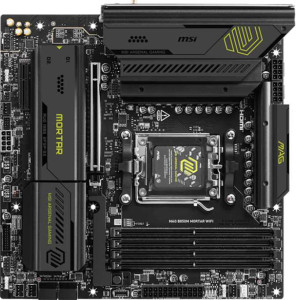
MSI MAG B850M Mortar WiFI
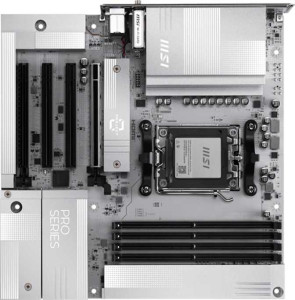
MSI Pro B850M-A Wi-Fi PZ

MSI MAG B850M Mortar WiFI MSI Pro B850M-A Wi-Fi PZ

Overview

Welcome to our in-depth comparison between the MSI MAG B850M Mortar WiFi and the MSI Pro B850M-A Wi-Fi PZ, two Micro-ATX motherboards sharing the AM5 socket and B850 chipset. While both boards offer Wi-Fi 7, DDR5 support, and a PCIe 5.0 x16 slot, they diverge in meaningful ways across storage expansion, USB connectivity, audio output options, and cooling headers. Read on to discover which board best matches your build requirements.

Common Features

  • Both motherboards use the AM5 CPU socket.
  • Both motherboards feature the B850 chipset.
  • Both boards use the Micro-ATX form factor.
  • Wi-Fi is supported on both boards, covering Wi-Fi 4, Wi-Fi 5, Wi-Fi 6, Wi-Fi 6E, and Wi-Fi 7.
  • Bluetooth 5.4 is available on both boards.
  • Both boards have an HDMI 2.1 output.
  • Both boards support a maximum of 256GB of RAM.
  • Both boards support a maximum native RAM speed of 5600 MHz and an overclocked RAM speed of 8200 MHz.
  • Both boards have 4 memory slots and use DDR5 memory across 2 channels.
  • ECC memory is not supported on either board.
  • Both boards have 3 USB 3.2 Gen 1 ports via expansion, 1 USB-C 3.2 Gen 2 port via expansion, 4 USB 2.0 ports via expansion, and 4 SATA 3 connectors.
  • Both boards include a TPM connector.
  • mSATA connectors are not present on either board.
  • Both boards have 3 USB 3.2 Gen 2 Type-A ports and no USB 3.2 Gen 1 Type-C ports.
  • Neither board has USB 4, Thunderbolt 3, or Thunderbolt 4 ports.
  • Both boards feature one PCIe 5.0 x16 slot and one PCIe x4 slot, with no PCIe 4.0 x16, 3.0 x16, 2.0 x16, or PCI slots.
  • Both boards support 7.1 audio channels.
  • Both boards support RAID 0, RAID 1, and RAID 10, but neither supports RAID 0+1.

Main Differences

  • Dual BIOS is available on MSI MAG B850M Mortar WiFI but not on MSI Pro B850M-A Wi-Fi PZ.
  • The height is 244 mm on MSI MAG B850M Mortar WiFI and 243.8 mm on MSI Pro B850M-A Wi-Fi PZ.
  • The width is 244 mm on MSI MAG B850M Mortar WiFI and 243.8 mm on MSI Pro B850M-A Wi-Fi PZ.
  • USB 3.2 Gen 1 Type-A ports number 4 on MSI MAG B850M Mortar WiFI and 3 on MSI Pro B850M-A Wi-Fi PZ.
  • USB 3.2 Gen 2 Type-C ports number 1 on MSI MAG B850M Mortar WiFI and 2 on MSI Pro B850M-A Wi-Fi PZ.
  • A USB 3.2 Gen 2x2 port is present on MSI MAG B850M Mortar WiFI but not available on MSI Pro B850M-A Wi-Fi PZ.
  • A DisplayPort output is available on MSI Pro B850M-A Wi-Fi PZ but not on MSI MAG B850M Mortar WiFI.
  • Fan headers number 6 on MSI MAG B850M Mortar WiFI and 5 on MSI Pro B850M-A Wi-Fi PZ.
  • M.2 sockets number 3 on MSI MAG B850M Mortar WiFI and 2 on MSI Pro B850M-A Wi-Fi PZ.
  • PCIe x1 slots number 0 on MSI MAG B850M Mortar WiFI and 2 on MSI Pro B850M-A Wi-Fi PZ.
  • An S/PDIF Out port is present on MSI MAG B850M Mortar WiFI but not on MSI Pro B850M-A Wi-Fi PZ.
  • Audio connectors number 2 on MSI MAG B850M Mortar WiFI and 3 on MSI Pro B850M-A Wi-Fi PZ.
  • RAID 5 support is present on MSI MAG B850M Mortar WiFI but not available on MSI Pro B850M-A Wi-Fi PZ.
Specs Comparison
MSI MAG B850M Mortar WiFI

MSI MAG B850M Mortar WiFI

MSI Pro B850M-A Wi-Fi PZ

MSI Pro B850M-A Wi-Fi PZ

General info:
CPU socket AM5 AM5
chipset B850 B850
form factor Micro-ATX Micro-ATX
release date March 2025 September 2025
supports Wi-Fi
Wi-Fi version Wi-Fi 4 (802.11n), Wi-Fi 5 (802.11ac), Wi-Fi 6 (802.11ax), Wi-Fi 6E (802.11ax), Wi-Fi 7 (802.11be) Wi-Fi 4 (802.11n), Wi-Fi 5 (802.11ac), Wi-Fi 6 (802.11ax), Wi-Fi 6E (802.11ax), Wi-Fi 7 (802.11be)
Has Bluetooth
Bluetooth version 5.4 5.4
HDMI version HDMI 2.1 HDMI 2.1
Easy to overclock
has RGB lighting
Easy to reset BIOS
Has dual BIOS
has aptX
CPU sockets 1 1
Has integrated graphics
warranty period 3 years 3 years
height 244 mm 243.8 mm
width 244 mm 243.8 mm
Has integrated CPU

At a high level, the MSI MAG B850M Mortar WiFi and the MSI Pro B850M-A Wi-Fi PZ are remarkably similar boards. Both use the AM5 socket with a B850 chipset in a Micro-ATX form factor, support the same full Wi-Fi 7 stack down to Wi-Fi 4, carry Bluetooth 5.4, output via HDMI 2.1, and share a 3-year warranty. For a user scanning the general feature set, these two boards occupy essentially the same tier.

The one meaningful differentiator in this group is dual BIOS: the Mortar WiFi includes it, while the Pro B850M-A does not. In practice, dual BIOS acts as a hardware-level safety net — if a firmware flash goes wrong or the primary BIOS becomes corrupted, the board can automatically fall back to a known-good backup. Both boards are rated easy to reset BIOS, but that process still requires the system to be partially functional. Dual BIOS protects against deeper failures that a simple reset cannot recover from, which is a tangible advantage for anyone who frequently updates firmware or pushes overclocks.

The physical dimensions differ by a negligible 0.2 mm on each side, which has no real-world impact on compatibility. Overall, the MAG B850M Mortar WiFi holds a clear edge in this group purely due to its dual BIOS — a small but genuinely useful reliability feature that the Pro B850M-A simply lacks.

Memory:
maximum memory amount 256GB 256GB
RAM speed (max) 5600 MHz 5600 MHz
overclocked RAM speed 8200 MHz 8200 MHz
memory slots 4 4
DDR memory version 5 5
memory channels 2 2
Supports ECC memory

When it comes to memory, both boards are a perfect mirror of each other. The Mortar WiFi and the Pro B850M-A share every single spec in this category: 4 slots of DDR5 in a dual-channel configuration, a native ceiling of 5600 MHz, and an overclocked ceiling of 8200 MHz, with a maximum capacity of 256 GB.

The practical implications are worth unpacking. The 8200 MHz overclocked ceiling is notably high for a B850 platform — sufficient for enthusiast-grade memory kits that push bandwidth-sensitive workloads like content creation and high-framerate gaming. The dual-channel setup with four slots also means users can start with two sticks and expand later without sacrificing any performance configuration. Neither board supports ECC memory, which is expected at this tier and only relevant for workstation or server use cases.

This group is a straightforward tie — there is not a single data point separating these two boards on memory capability. A buyer's choice here will hinge entirely on other specification groups.

Ports:
USB 3.2 Gen 2 ports (USB-A) 3 3
USB 3.2 Gen 1 ports (USB-A) 4 3
USB 3.2 Gen 2 ports (USB-C) 1 2
USB 3.2 Gen 1 ports (USB-C) 0 0
USB 2.0 ports 0 0
USB 3.2 Gen 2x2 ports 1 0
USB 4 40Gbps ports 0 0
USB 4 20Gbps ports 0 0
Thunderbolt 4 ports 0 0
Thunderbolt 3 ports 0 0
has an HDMI output
DisplayPort outputs 0 1
RJ45 ports 1 1
Has USB Type-C
eSATA ports 0 0
DVI outputs 0 0
has a VGA connector
PS/2 ports 0 0

The total rear USB count lands at eight ports on each board, but the way those ports are distributed reveals meaningfully different priorities. The Mortar WiFi trades one USB-A Gen 1 port (giving it 4 vs 3 on the Pro) for a USB 3.2 Gen 2x2 port — a 20 Gbps connection that is genuinely useful for the latest high-speed external SSDs and NVMe enclosures. The Pro B850M-A, by contrast, drops Gen 2x2 entirely but counters with two USB-C Gen 2 ports versus the Mortar's one, making it friendlier for users with multiple modern peripherals or mobile devices that rely on USB-C.

On the display output side, the Pro B850M-A adds a DisplayPort 1.x output alongside the shared HDMI 2.1, enabling a dual-monitor setup directly from the board's rear I/O — a meaningful advantage for users relying on integrated graphics or building a compact productivity system. The Mortar WiFi offers only the single HDMI output, which limits it to one display without a discrete GPU.

Neither board is outright superior here — they serve different user profiles. The Mortar WiFi edges ahead for high-speed storage connectivity thanks to its Gen 2x2 port, while the Pro B850M-A is the stronger pick for multi-display or USB-C-heavy setups due to its extra USB-C port and dedicated DisplayPort output. The right choice depends squarely on how you plan to use your rear I/O.

Connectors:
USB 3.2 Gen 1 ports (through expansion) 2 2
USB-C 3.2 Gen 2 ports (through expansion) 1 1
USB 2.0 ports (through expansion) 4 4
SATA 3 connectors 4 4
fan headers 6 5
USB 3.0 ports (through expansion) 2 2
M.2 sockets 3 2
Has TPM connector
U.2 sockets 0 0
Has mSATA connector
SATA 2 connectors 0 0

Internal connectivity is where the Mortar WiFi pulls ahead in two concrete ways. It offers 3 M.2 sockets versus 2 on the Pro B850M-A — a difference that matters more than it might initially appear. A third M.2 slot means users can run a dedicated boot drive, a secondary high-speed storage drive, and still have a slot free for future expansion, all without touching the 4 SATA 3 ports that both boards share. On the Pro B850M-A, that third workload would require falling back to a SATA drive, which is a meaningful bandwidth step down.

The Mortar WiFi also carries 6 fan headers compared to the Pro's 5. In a compact Micro-ATX build where thermals can be tight, that extra header provides more flexibility to run dedicated headers for CPU cooler, case fans, and optionally a pump header for liquid cooling — without needing a fan hub splitter.

Everything else in this group — expansion USB, SATA count, TPM connector — is identical across both boards. The Mortar WiFi has a clear edge here, offering more storage scalability and slightly greater cooling headroom, both of which are practical advantages in a small form factor chassis.

Expansion slots:
PCIe 4.0 x16 slots 0 0
PCIe 5.0 x16 slots 1 1
PCIe 3.0 x16 slots 0 0
PCIe x1 slots 0 2
PCI slots 0 0
PCIe 2.0 x16 slots 0 0
PCIe x4 slots 1 1
PCIe x8 slots 0 0

Both boards lead with a single PCIe 5.0 x16 slot — the full-bandwidth primary slot intended for a discrete GPU or a top-tier NVMe add-in card. This is the correct configuration for a B850 platform and ensures neither board bottlenecks current-generation graphics cards. A shared PCIe x4 slot rounds out the common ground, typically used for NVMe expansion cards or capture cards.

The one differentiator in this group is the Pro B850M-A's two additional PCIe x1 slots, which the Mortar WiFi entirely lacks. In practice, x1 slots serve a niche but real purpose: they accommodate low-profile expansion cards such as dedicated sound cards, USB controllers, 10GbE network cards, or legacy peripherals. For users building a more utilitarian or feature-dense system who don't need those slots to be filled by larger cards, this is a tangible bonus.

For the majority of users whose expansion needs begin and end with a GPU, this difference is inconsequential. But for anyone planning to install one or more small add-in cards alongside their graphics card, the Pro B850M-A holds a clear edge in this group thanks to its two x1 slots — flexibility that the Mortar WiFi simply cannot offer.

Audio:
audio channels 7.1 7.1
Has S/PDIF Out port
audio connectors 2 3

Both boards deliver 7.1-channel onboard audio, which is the standard ceiling for motherboard-integrated sound and sufficient for surround sound headsets and speaker setups alike. Beyond that shared baseline, the two boards diverge in ways that cater to different types of audio users.

The Mortar WiFi includes an S/PDIF optical output, which the Pro B850M-A omits. This is a meaningful feature for anyone routing audio to an AV receiver, a DAC, or a home theater system via optical cable — it passes a clean digital signal that bypasses the motherboard's analog circuitry entirely, avoiding any potential interference from other components. The Pro B850M-A, meanwhile, compensates with 3 analog audio connectors versus the Mortar's 2, giving users more simultaneous analog output options for multi-speaker or headphone-plus-microphone configurations without an audio hub.

Neither board is strictly superior here — they reflect different use cases. The Mortar WiFi is the better pick for home theater or external DAC users who rely on digital optical output, while the Pro B850M-A suits those who prefer more analog flexibility at the rear panel. Users with no specific need for either feature will find the shared 7.1-channel foundation more than adequate for everyday use.

Storage:
Supports RAID 1
Supports RAID 10 (1+0)
Supports RAID 5
Supports RAID 0
Supports RAID 0+1

RAID support is nearly identical across these two boards, with both handling RAID 0, 1, and 10 — covering the most common consumer use cases of pure performance striping, mirrored redundancy, and the combined stripe-plus-mirror configuration. The single point of divergence is RAID 5, which only the Mortar WiFi supports.

RAID 5 distributes both data and parity information across three or more drives, offering a balance of usable capacity, read performance, and fault tolerance against a single drive failure. It is a configuration more commonly associated with NAS devices and small workstation setups than typical gaming builds, but for a user managing a multi-drive array who wants redundancy without sacrificing as much capacity as RAID 1 demands, its absence on the Pro B850M-A is a genuine limitation.

For the vast majority of users, this distinction will never come into play — RAID 0, 1, and 10 cover nearly all consumer and prosumer needs. But for those specifically planning a RAID 5 array, the Mortar WiFi holds a clear and exclusive advantage in this group.

Comparison Summary & Verdict

Both boards are highly capable AM5 platforms with strong shared foundations, but their differences reveal distinct target audiences. The MSI MAG B850M Mortar WiFi stands out with its dual BIOS, three M.2 sockets, six fan headers, a USB 3.2 Gen 2x2 port, S/PDIF Out, and RAID 5 support, making it the stronger choice for enthusiasts who want resilience, richer storage options, and broader feature coverage. The MSI Pro B850M-A Wi-Fi PZ, on the other hand, offers a DisplayPort output, two PCIe x1 expansion slots, two USB-C 3.2 Gen 2 ports, and three audio connectors, appealing to users who prioritize display flexibility, more analogue audio connections, and greater PCIe slot variety for add-in cards. Neither board is strictly superior; your ideal pick depends entirely on the specific features your build demands.

MSI MAG B850M Mortar WiFI
Buy MSI MAG B850M Mortar WiFI if...

Buy the MSI MAG B850M Mortar WiFi if you want dual BIOS protection, three M.2 slots for ample NVMe storage, RAID 5 support, and a richer set of cooling and audio output options including S/PDIF Out.

MSI Pro B850M-A Wi-Fi PZ
Buy MSI Pro B850M-A Wi-Fi PZ if...

Buy the MSI Pro B850M-A Wi-Fi PZ if you need a DisplayPort output alongside HDMI, two USB-C 3.2 Gen 2 ports, additional PCIe x1 slots for expansion cards, and more analogue audio connectors.