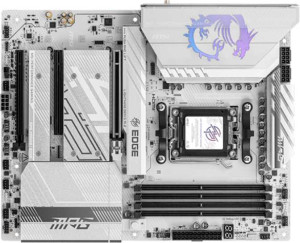
MSI MPG B850 Edge Ti WiFi
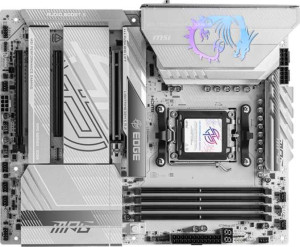
MSI MPG X870E Edge TI WiFi

MSI MPG B850 Edge Ti WiFi MSI MPG X870E Edge TI WiFi

Overview

Welcome to our in-depth specification comparison between the MSI MPG B850 Edge Ti WiFi and the MSI MPG X870E Edge TI WiFi — two powerful AM5-platform motherboards that share a strong foundation yet diverge in meaningful ways. Both boards target enthusiast builders with DDR5 memory support, PCIe 5.0, and Wi-Fi 7, but key battlegrounds emerge around chipset tier, rear panel USB connectivity, and premium audio and port features. Read on to see which board best fits your build.

Common Features

  • Both boards use the AM5 CPU socket.
  • Both feature an ATX form factor.
  • Wi-Fi is supported on both, covering Wi-Fi 4 (802.11n), Wi-Fi 5 (802.11ac), Wi-Fi 6 (802.11ax), Wi-Fi 6E (802.11ax), and Wi-Fi 7 (802.11be).
  • Bluetooth 5.4 is present on both products.
  • Both support HDMI 2.1 output.
  • Overclocking is supported on both products.
  • Both support a maximum of 256GB of RAM.
  • The maximum standard RAM speed is 5600 MHz on both boards.
  • Overclocked RAM speed reaches up to 8400 MHz on both products.
  • Both boards have 4 memory slots.
  • Both use DDR5 memory.
  • Both operate with 2 memory channels.
  • ECC memory is not supported on either product.
  • Neither board has USB 3.2 Gen 1 ports (USB-C) on the rear panel.
  • Both boards provide 4 USB 2.0 ports on the rear panel.
  • Neither board includes USB 3.2 Gen 2x2, USB 4 20Gbps, or Thunderbolt 3 ports on the rear panel.
  • Both boards have an HDMI output and no DisplayPort outputs.
  • Each board includes 1 RJ45 port.
  • Both provide 4 USB 3.2 Gen 1 ports, 1 USB 3.2 Gen 2x2 port, and 4 USB 2.0 ports through expansion headers.
  • Both boards have 4 SATA 3 connectors, 4 M.2 sockets, and 8 fan headers.
  • A TPM connector is present on both products.
  • Both boards feature 1 PCIe 5.0 x16 slot and 1 PCIe 4.0 x16 slot, along with 1 PCIe x1 slot.
  • Both boards offer 7.1 audio channels with a 120 dB signal-to-noise ratio.
  • An S/PDIF Out port is available on both products.
  • Both boards have 2 audio connectors.
  • RAID 0, RAID 1, and RAID 10 are supported on both boards.
  • RAID 5 and RAID 0+1 are not supported on either board.

Main Differences

  • The chipset is B850 on MSI MPG B850 Edge Ti WiFi and X870 on MSI MPG X870E Edge TI WiFi.
  • aptX support is present on MSI MPG X870E Edge TI WiFi but not available on MSI MPG B850 Edge Ti WiFi.
  • USB 3.2 Gen 2 ports (USB-A) number 2 on MSI MPG B850 Edge Ti WiFi and 5 on MSI MPG X870E Edge TI WiFi.
  • USB 3.2 Gen 1 ports (USB-A) number 1 on MSI MPG B850 Edge Ti WiFi and 0 on MSI MPG X870E Edge TI WiFi.
  • USB 3.2 Gen 2 ports (USB-C) number 3 on MSI MPG B850 Edge Ti WiFi and 1 on MSI MPG X870E Edge TI WiFi.
  • USB 4 40Gbps ports are absent on MSI MPG B850 Edge Ti WiFi but 2 are present on MSI MPG X870E Edge TI WiFi.
  • Thunderbolt 4 ports are absent on MSI MPG B850 Edge Ti WiFi but 2 are present on MSI MPG X870E Edge TI WiFi.
Specs Comparison
MSI MPG B850 Edge Ti WiFi

MSI MPG B850 Edge Ti WiFi

MSI MPG X870E Edge TI WiFi

MSI MPG X870E Edge TI WiFi

General info:
CPU socket AM5 AM5
chipset B850 X870
form factor ATX ATX
release date January 2025 January 2025
supports Wi-Fi
Wi-Fi version Wi-Fi 4 (802.11n), Wi-Fi 5 (802.11ac), Wi-Fi 6 (802.11ax), Wi-Fi 6E (802.11ax), Wi-Fi 7 (802.11be) Wi-Fi 4 (802.11n), Wi-Fi 5 (802.11ac), Wi-Fi 6 (802.11ax), Wi-Fi 6E (802.11ax), Wi-Fi 7 (802.11be)
Has Bluetooth
Bluetooth version 5.4 5.4
HDMI version HDMI 2.1 HDMI 2.1
Easy to overclock
has RGB lighting
Easy to reset BIOS
Has dual BIOS
has aptX
CPU sockets 1 1
Has integrated graphics
warranty period 3 years 3 years
height 243.8 mm 243.8 mm
width 304.8 mm 304.8 mm
Has integrated CPU

At their core, both boards share the same fundamental platform: the AM5 socket, an ATX form factor, and identical physical dimensions (304.8 × 243.8 mm). They support the same modern connectivity stack — Wi-Fi 7 (802.11be), Bluetooth 5.4, and HDMI 2.1 — along with RGB lighting, easy BIOS reset, and a 3-year warranty. For the vast majority of general-use criteria, these two boards are effectively twins.

The meaningful distinctions lie in two areas. First, the chipset: the B850 Edge Ti runs on AMD's B850 chipset, while the X870E Edge Ti uses the X870 chipset. In practice, X870 is AMD's flagship chipset tier, typically unlocking more PCIe lanes, greater USB bandwidth headroom, and broader overclocking support — making it the more future-proof and expandable platform, even if day-to-day tasks feel identical. Second, only the X870E model supports aptX audio codec over Bluetooth, which delivers higher-quality wireless audio to compatible headphones and speakers — a meaningful perk for audiophiles or content creators who rely on Bluetooth audio.

For general specs, the X870E Edge Ti has a clear edge: its higher-tier chipset offers more platform headroom, and aptX support adds a real-world audio quality advantage absent on the B850 model. If neither of those factors matters to your use case, the B850 Edge Ti covers all the essentials at what is typically a lower price point.

Memory:
maximum memory amount 256GB 256GB
RAM speed (max) 5600 MHz 5600 MHz
overclocked RAM speed 8400 MHz 8400 MHz
memory slots 4 4
DDR memory version 5 5
memory channels 2 2
Supports ECC memory

When it comes to memory, both boards are a perfect match — every single specification is identical. Each supports DDR5 RAM across 4 DIMM slots in a dual-channel configuration, with a maximum capacity of 256GB. That ceiling is generous enough for even the most demanding workstation tasks, including large-scale video editing, virtualization, and data-intensive applications.

The native RAM speed tops out at 5600 MHz, which aligns with AMD's EXPO standard for DDR5, but the more exciting figure is the overclocked ceiling of 8400 MHz. Pushing RAM to those speeds can meaningfully reduce latency and improve throughput in memory-bandwidth-sensitive workloads like 3D rendering or simulation software — though real-world gains depend heavily on the specific kit used and system tuning. Neither board supports ECC memory, which rules them both out for professional server or mission-critical reliability use cases, but that is expected at this consumer-enthusiast tier.

This category is a straightforward tie. There is no memory-related reason to choose one board over the other — both offer the same headroom, speed potential, and slot count.

Ports:
USB 3.2 Gen 2 ports (USB-A) 2 5
USB 3.2 Gen 1 ports (USB-A) 1 0
USB 3.2 Gen 2 ports (USB-C) 3 1
USB 3.2 Gen 1 ports (USB-C) 0 0
USB 2.0 ports 4 4
USB 3.2 Gen 2x2 ports 0 0
USB 4 40Gbps ports 0 2
USB 4 20Gbps ports 0 0
Thunderbolt 4 ports 0 2
Thunderbolt 3 ports 0 0
has an HDMI output
DisplayPort outputs 0 0
RJ45 ports 1 1
Has USB Type-C
eSATA ports 0 0
DVI outputs 0 0
has a VGA connector
PS/2 ports 0 0

This is where the two boards diverge most dramatically. The B850 Edge Ti leans heavily on USB-C connectivity, offering 3× USB 3.2 Gen 2 Type-C ports alongside 2 Type-A Gen 2 ports — a layout that suits users with modern peripherals and external SSDs that favor the Type-C form factor. The X870E Edge Ti takes the opposite approach: it loads up on 5× USB 3.2 Gen 2 Type-A ports for broad legacy-device compatibility, but pairs that with only a single Type-C at the same speed tier.

The decisive difference, however, is what sits above those mid-range ports. The X870E adds 2× Thunderbolt 4 ports, which also function as USB4 40Gbps interfaces. Thunderbolt 4 delivers up to 40Gbps bandwidth — four times that of USB 3.2 Gen 2 — and supports daisy-chaining, external GPU enclosures, high-resolution displays, and ultra-fast NVMe docks. This is a capability the B850 Edge Ti simply does not have, with zero USB4 or Thunderbolt ports of any generation. For power users who work with high-throughput external storage, professional audio/video interfaces, or eGPU setups, this gap is substantial.

The X870E Edge Ti wins this category decisively. Its Thunderbolt 4 / USB4 40Gbps ports represent a generational leap in connectivity that the B850 cannot match, making it the stronger choice for anyone who pushes the limits of external device bandwidth.

Connectors:
USB 3.2 Gen 1 ports (through expansion) 4 4
USB 3.2 Gen 2x2 ports (through expansion) 1 1
USB 2.0 ports (through expansion) 4 4
SATA 3 connectors 4 4
fan headers 8 8
USB 3.0 ports (through expansion) 4 4
M.2 sockets 4 4
Has TPM connector
U.2 sockets 0 0
Has mSATA connector
SATA 2 connectors 0 0

Internal connectors tell the story of how a board scales inside the case, and here the two boards are completely identical across every data point. Both offer 4× M.2 sockets for NVMe storage — enough to run a primary boot drive alongside multiple high-speed secondary drives without touching a single SATA port. The additional 4× SATA 3 connectors further accommodate traditional SSDs or HDDs for bulk storage, giving builders a well-rounded internal storage ecosystem.

Thermal management is equally matched, with 8 fan headers on each board — a count that comfortably supports complex cooling setups including multiple case fans, AIO pumps, and dedicated heatsink fans, all manageable through the board's firmware without the need for an external fan controller. Both also include a TPM connector, satisfying Windows 11's security requirements and enterprise-adjacent use cases without any additional hardware.

This category is a complete tie. Every internal connector — storage, cooling, expansion, and security — is spec-for-spec identical. Connector layout should not factor into the decision between these two boards.

Expansion slots:
PCIe 4.0 x16 slots 1 1
PCIe 5.0 x16 slots 1 1
PCIe 3.0 x16 slots 0 0
PCIe x1 slots 1 1
PCI slots 0 0
PCIe 2.0 x16 slots 0 0
PCIe x4 slots 0 0
PCIe x8 slots 0 0

Expansion slot configurations are identical across both boards. Each provides one PCIe 5.0 x16 slot as the primary GPU lane — the current gold standard for discrete graphics, offering double the bandwidth of PCIe 4.0 and ensuring full compatibility with the latest and next-generation graphics cards and NVMe add-in cards. A secondary PCIe 4.0 x16 slot rounds out the high-speed options, useful for capture cards, high-bandwidth networking cards, or additional storage controllers.

A single PCIe x1 slot handles lower-bandwidth add-ins like sound cards or USB expansion cards. The absence of any legacy PCIe 3.0 or PCI slots is a deliberate, forward-looking design choice that reflects the modern platform both boards are built on — and is unlikely to be a limitation for any current-generation build.

This is another straightforward tie. Both boards offer the same expansion slot topology, so this category provides no differentiation between the two.

Audio:
Signal-to-Noise ratio (DAC) 120 dB 120 dB
audio channels 7.1 7.1
Has S/PDIF Out port
audio connectors 2 2

Both boards deliver an identical onboard audio implementation. A 120 dB signal-to-noise ratio on the DAC is a strong result for integrated audio, sitting comfortably in the range where most listeners — even critical ones — would struggle to justify a discrete sound card for everyday listening. Combined with 7.1 channel surround support, both boards are well-equipped for immersive gaming audio and home theater setups without any additional hardware.

The inclusion of an S/PDIF optical output on both boards is a practical bonus, enabling a clean digital handoff to external DACs, AV receivers, or soundbars — effectively bypassing the motherboard's analog circuitry entirely for users who want the best possible signal path to dedicated audio equipment. With 2 analog audio connectors each, the rear I/O is intentionally lean, which is typical for modern boards that assume most multi-channel routing happens digitally.

Audio is a tie across the board — every metric is identical. Neither board holds an audio advantage over the other.

Storage:
Supports RAID 1
Supports RAID 10 (1+0)
Supports RAID 5
Supports RAID 0
Supports RAID 0+1

RAID support is identical on both boards, covering the three configurations most relevant to consumer and prosumer use: RAID 0 for striping (maximum throughput at the cost of redundancy), RAID 1 for mirroring (data protection with a 1:1 storage overhead), and RAID 10 for a combined stripe-and-mirror setup that balances speed with fault tolerance across four drives. These three modes address the vast majority of real-world use cases, from content creators seeking faster scratch disk performance to users wanting a basic safety net against drive failure.

Neither board supports RAID 5 or RAID 0+1, though the absence of RAID 5 is the more notable omission — it offers parity-based redundancy across three or more drives with better storage efficiency than RAID 1. That said, RAID 5 is rarely a priority at the consumer-enthusiast level and is more at home in dedicated NAS or server environments.

Storage configuration is a complete tie. Both boards support the same RAID modes and share the same limitations, giving neither an advantage in this category.

Comparison Summary & Verdict

After examining all the specifications, both boards prove to be highly capable AM5 motherboards with identical memory support up to 256GB DDR5 at 8400 MHz overclocked, the same expansion slot layout, and shared storage and audio credentials. However, the MSI MPG X870E Edge TI WiFi pulls ahead for power users who demand the most from their connectivity, offering 2 Thunderbolt 4 and 2 USB 4 40Gbps ports, more USB 3.2 Gen 2 Type-A outputs, and aptX Bluetooth audio support. The MSI MPG B850 Edge Ti WiFi, on the other hand, counters with more USB 3.2 Gen 2 Type-C ports on the rear panel, making it well-suited for builders who rely heavily on modern USB-C peripherals without needing Thunderbolt. Choose according to your connectivity priorities.

MSI MPG B850 Edge Ti WiFi
Buy MSI MPG B850 Edge Ti WiFi if...

Buy the MSI MPG B850 Edge Ti WiFi if you prioritize a higher number of rear USB 3.2 Gen 2 Type-C ports and do not require Thunderbolt 4 or USB 4 40Gbps connectivity.

MSI MPG X870E Edge TI WiFi
Buy MSI MPG X870E Edge TI WiFi if...

Buy the MSI MPG X870E Edge TI WiFi if you need Thunderbolt 4 ports, USB 4 40Gbps connectivity, more rear USB 3.2 Gen 2 Type-A outputs, or aptX Bluetooth audio support for a premium, feature-rich build.