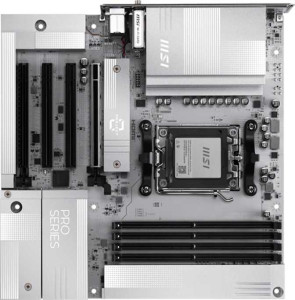
MSI Pro B850M-A Wi-Fi PZ
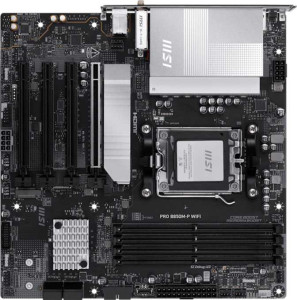
MSI Pro B850M-P Wi-Fi

MSI Pro B850M-A Wi-Fi PZ MSI Pro B850M-P Wi-Fi

Overview

Welcome to this detailed specification face-off between the MSI Pro B850M-A Wi-Fi PZ and the MSI Pro B850M-P Wi-Fi, two Micro-ATX motherboards built on the AM5 platform with the B850 chipset. While both boards share a strong common foundation, key battlegrounds emerge around USB connectivity, storage expansion, and a handful of feature-level distinctions that could tip the scales depending on your build priorities.

Common Features

  • Both products use the AM5 CPU socket.
  • Both products feature the B850 chipset.
  • Both products have a Micro-ATX form factor.
  • Wi-Fi is supported on both products, covering Wi-Fi 4, Wi-Fi 5, Wi-Fi 6, Wi-Fi 6E, and Wi-Fi 7.
  • Bluetooth 5.4 is available on both products.
  • Both products have an HDMI 2.1 output.
  • Both products support a maximum memory amount of 256GB.
  • Both products support a maximum RAM speed of 5600 MHz and an overclocked RAM speed of 8200 MHz.
  • Both products have 4 memory slots across 2 memory channels using DDR5.
  • ECC memory is not supported on either product.
  • Neither product has USB 3.2 Gen 1 USB-C ports, USB 3.2 Gen 2x2 ports, USB 4 ports, Thunderbolt 3, or Thunderbolt 4 ports.
  • Both products have one DisplayPort output.
  • Both products include 1 USB-C 3.2 Gen 2 port and 4 USB 2.0 ports through expansion connectors.
  • Both products have 4 SATA 3 connectors, no SATA 2 connectors, and no mSATA connector.
  • Both products provide 5 fan headers and a TPM connector.
  • Both products feature 1 PCIe 5.0 x16 slot and no PCIe 4.0, 3.0, 2.0, or PCI slots.
  • Both products deliver 7.1 audio channels with 3 audio connectors and no S/PDIF Out port.
  • RAID 0, RAID 1, and RAID 10 are supported on both products, while RAID 0+1 is not supported on either.

Main Differences

  • Dual BIOS is present on MSI Pro B850M-P Wi-Fi but not available on MSI Pro B850M-A Wi-Fi PZ.
  • USB 3.2 Gen 2 USB-A ports number 3 on MSI Pro B850M-A Wi-Fi PZ and 1 on MSI Pro B850M-P Wi-Fi.
  • USB 3.2 Gen 1 USB-A ports number 3 on MSI Pro B850M-A Wi-Fi PZ and 2 on MSI Pro B850M-P Wi-Fi.
  • USB 3.2 Gen 2 USB-C ports number 2 on MSI Pro B850M-A Wi-Fi PZ and 1 on MSI Pro B850M-P Wi-Fi.
  • USB 2.0 ports number 0 on MSI Pro B850M-A Wi-Fi PZ and 4 on MSI Pro B850M-P Wi-Fi.
  • USB 3.2 Gen 1 ports through expansion number 2 on MSI Pro B850M-A Wi-Fi PZ and 4 on MSI Pro B850M-P Wi-Fi.
  • USB 3.0 ports through expansion number 2 on MSI Pro B850M-A Wi-Fi PZ and 4 on MSI Pro B850M-P Wi-Fi.
  • M.2 sockets number 2 on MSI Pro B850M-A Wi-Fi PZ and 3 on MSI Pro B850M-P Wi-Fi.
  • PCIe x1 slots number 2 on MSI Pro B850M-A Wi-Fi PZ and 3 on MSI Pro B850M-P Wi-Fi.
  • PCIe x4 slots number 1 on MSI Pro B850M-A Wi-Fi PZ and 0 on MSI Pro B850M-P Wi-Fi.
  • RAID 5 support is present on MSI Pro B850M-P Wi-Fi but not available on MSI Pro B850M-A Wi-Fi PZ.
Specs Comparison
MSI Pro B850M-A Wi-Fi PZ

MSI Pro B850M-A Wi-Fi PZ

MSI Pro B850M-P Wi-Fi

MSI Pro B850M-P Wi-Fi

General info:
CPU socket AM5 AM5
chipset B850 B850
form factor Micro-ATX Micro-ATX
release date September 2025 January 2025
supports Wi-Fi
Wi-Fi version Wi-Fi 4 (802.11n), Wi-Fi 5 (802.11ac), Wi-Fi 6 (802.11ax), Wi-Fi 6E (802.11ax), Wi-Fi 7 (802.11be) Wi-Fi 4 (802.11n), Wi-Fi 5 (802.11ac), Wi-Fi 6 (802.11ax), Wi-Fi 6E (802.11ax), Wi-Fi 7 (802.11be)
Has Bluetooth
Bluetooth version 5.4 5.4
HDMI version HDMI 2.1 HDMI 2.1
Easy to overclock
has RGB lighting
Easy to reset BIOS
Has dual BIOS
has aptX
CPU sockets 1 1
Has integrated graphics
warranty period 3 years 3 years
height 243.8 mm 243.8 mm
width 243.8 mm 243.8 mm
Has integrated CPU

The MSI Pro B850M-A Wi-Fi PZ and MSI Pro B850M-P Wi-Fi share an identical foundation in this category: both use the AM5 socket with the B850 chipset, adopt a Micro-ATX (243.8 × 243.8 mm) form factor, and support the same wireless stack — Wi-Fi 7 (802.11be) down through Wi-Fi 4, plus Bluetooth 5.4. Both also offer HDMI 2.1 output, RGB lighting, easy overclock and BIOS reset features, and carry identical 3-year warranties. For the vast majority of general-use criteria, these two boards are functionally indistinguishable.

The one meaningful differentiator in this group is that the Pro B850M-P Wi-Fi includes dual BIOS, while the Pro B850M-A Wi-Fi PZ does not. In practice, dual BIOS means a physical backup chip stores a second copy of the firmware — so if a BIOS update goes wrong or the primary chip becomes corrupted, the board can automatically recover without any user intervention or additional hardware. For users who frequently update firmware or push overclocking limits, this is a genuine reliability safety net rather than a marketing checkbox.

Overall, the two boards are nearly tied on general specifications, but the Pro B850M-P Wi-Fi holds a clear edge in this group solely due to its dual BIOS feature, which adds a meaningful layer of resilience that the Pro B850M-A Wi-Fi PZ simply lacks.

Memory:
maximum memory amount 256GB 256GB
RAM speed (max) 5600 MHz 5600 MHz
overclocked RAM speed 8200 MHz 8200 MHz
memory slots 4 4
DDR memory version 5 5
memory channels 2 2
Supports ECC memory

On memory, these two boards are completely identical across every specification provided. Both support DDR5 RAM with 4 slots across 2 channels, a maximum capacity of 256GB, a native rated speed of 5600 MHz, and an overclocked ceiling of 8200 MHz.

Those figures are worth contextualizing. A 5600 MHz native ceiling aligns with standard DDR5 JEDEC profiles, meaning out-of-the-box compatibility is broad. The 8200 MHz overclocked cap is notably high — headroom that benefits content creators, competitive gamers, and anyone running memory-bandwidth-sensitive workloads like video encoding or large dataset processing. The dual-channel configuration ensures that bandwidth scales efficiently when two or more sticks are installed, which is the recommended setup for either board. The 256GB maximum capacity is more than sufficient for even the most demanding prosumer and workstation use cases today.

With no differences whatsoever across this group, the verdict here is a complete tie. Memory configuration should play no role in choosing between these two boards.

Ports:
USB 3.2 Gen 2 ports (USB-A) 3 1
USB 3.2 Gen 1 ports (USB-A) 3 2
USB 3.2 Gen 2 ports (USB-C) 2 1
USB 3.2 Gen 1 ports (USB-C) 0 0
USB 2.0 ports 0 4
USB 3.2 Gen 2x2 ports 0 0
USB 4 40Gbps ports 0 0
USB 4 20Gbps ports 0 0
Thunderbolt 4 ports 0 0
Thunderbolt 3 ports 0 0
has an HDMI output
DisplayPort outputs 1 1
RJ45 ports 1 1
Has USB Type-C
eSATA ports 0 0
DVI outputs 0 0
has a VGA connector
PS/2 ports 0 0

This is where a meaningful gap emerges between the two boards. Both share the same video output setup — HDMI plus a DisplayPort — and identical networking with a single RJ45 port. But their USB configurations tell very different stories. The Pro B850M-A Wi-Fi PZ equips all of its rear USB ports with Gen 1 speeds or faster: 3× USB 3.2 Gen 2 Type-A, 3× USB 3.2 Gen 1 Type-A, and 2× USB 3.2 Gen 2 Type-C. The Pro B850M-P Wi-Fi, by contrast, offers only 1× Gen 2 Type-A, 2× Gen 1 Type-A, 1× Gen 2 Type-C, and fills the remaining slots with 4× USB 2.0 ports.

That USB 2.0 presence on the P Wi-Fi is the critical downside here. USB 2.0 caps at 480 Mbps — roughly 40× slower than USB 3.2 Gen 2's 10 Gbps ceiling. For keyboards and mice this is irrelevant, but anyone plugging in fast external SSDs, high-resolution webcams, or modern audio interfaces into those ports will feel the bottleneck immediately. The A Wi-Fi PZ avoids this entirely, and its second Gen 2 Type-C port is particularly valuable as USB-C peripherals — docks, displays, fast storage — continue to proliferate.

The Pro B850M-A Wi-Fi PZ holds a clear advantage in this group. It offers more high-speed ports across both Type-A and Type-C, with zero USB 2.0 legacy compromise — a meaningfully better rear I/O panel for anyone building a modern, peripheral-rich system.

Connectors:
USB 3.2 Gen 1 ports (through expansion) 2 4
USB-C 3.2 Gen 2 ports (through expansion) 1 1
USB 2.0 ports (through expansion) 4 4
SATA 3 connectors 4 4
fan headers 5 5
USB 3.0 ports (through expansion) 2 4
M.2 sockets 2 3
Has TPM connector
Has mSATA connector
SATA 2 connectors 0 0

Internally, the two boards share a solid common baseline: both provide 4× SATA 3 connectors, 5 fan headers, a TPM connector, and a USB-C 3.2 Gen 2 expansion header — all equally useful for a well-rounded build. The divergence lies in two areas that matter for storage and front-panel flexibility.

Most significantly, the Pro B850M-P Wi-Fi includes 3 M.2 sockets versus just 2 on the Pro B850M-A Wi-Fi PZ. That third M.2 slot is a genuine advantage for storage-hungry builds — it allows a user to run, for example, a primary NVMe OS drive, a secondary high-capacity NVMe data drive, and a third drive for backups or dedicated scratch storage, all without touching the SATA ports. The P Wi-Fi also doubles the internal USB 3.0/3.2 Gen 1 expansion headers to 4 (versus 2 on the PZ), giving more flexibility for front-panel connections or internal USB hubs in larger chassis.

Taken together, the Pro B850M-P Wi-Fi has a clear edge in this group, driven primarily by its extra M.2 slot — a tangible, future-proof advantage for anyone planning a multi-drive NVMe setup within a Micro-ATX footprint.

Expansion slots:
PCIe 4.0 x16 slots 0 0
PCIe 5.0 x16 slots 1 1
PCIe 3.0 x16 slots 0 0
PCIe x1 slots 2 3
PCI slots 0 0
PCIe 2.0 x16 slots 0 0
PCIe x4 slots 1 0
PCIe x8 slots 0 0

Both boards anchor their expansion around a single PCIe 5.0 x16 slot — the right call for a modern Micro-ATX platform, delivering the full bandwidth headroom that current and near-future discrete GPUs demand. Beyond that primary slot, the layouts diverge in a subtle but meaningful way.

The Pro B850M-A Wi-Fi PZ pairs its x16 slot with 2× PCIe x1 and a PCIe x4 slot, while the Pro B850M-P Wi-Fi trades that x4 slot for a third PCIe x1, totaling 3× x1 with no x4. In practice, a PCIe x4 slot is notably more versatile than an x1 — it can physically accept x1 cards while also accommodating x4 devices such as NVMe add-in cards, 10GbE network adapters, or high-bandwidth capture cards that require more than a single lane. The P Wi-Fi's extra x1 slot is useful for adding multiple low-bandwidth cards simultaneously (sound cards, simple USB controllers), but all three are bandwidth-limited to a single PCIe lane each.

Neither configuration is universally superior — the right choice depends on the build. For users who need a high-bandwidth secondary card alongside their GPU, the Pro B850M-A Wi-Fi PZ has the edge thanks to its PCIe x4 slot. For builds that prioritize quantity of low-bandwidth expansion cards, the P Wi-Fi's three x1 slots offer marginally more slots to fill.

Audio:
audio channels 7.1 7.1
Has S/PDIF Out port
audio connectors 3 3

Audio is another area where these two boards are completely identical. Both deliver 7.1-channel audio support via 3 analog audio connectors, and neither includes an S/PDIF optical output. For most users, this configuration covers the full range of typical desktop audio needs — headsets, stereo speakers, and multi-channel surround setups all fall within its scope.

The absence of S/PDIF is worth noting for anyone with a home theater receiver or DAC that relies on optical or coaxial digital input, as they would need a dedicated sound card or USB audio interface to bridge that gap. However, since both boards omit it equally, it is not a differentiator — just a shared limitation to be aware of.

With every provided audio spec matching exactly, this group is a complete tie. Audio capability offers no basis for choosing one board over the other.

Storage:
Supports RAID 1
Supports RAID 10 (1+0)
Supports RAID 5
Supports RAID 0
Supports RAID 0+1

RAID support between these two boards is nearly identical, with one exception worth examining. Both handle RAID 0 (striping for performance), RAID 1 (mirroring for redundancy), and RAID 10 (a combined stripe-and-mirror array) — covering the configurations most commonly used in consumer and prosumer desktop builds. The single differentiator is that the Pro B850M-P Wi-Fi also supports RAID 5, which the Pro B850M-A Wi-Fi PZ does not.

RAID 5 distributes parity data across three or more drives, offering a balance of usable capacity, read performance, and fault tolerance that RAID 1 and RAID 10 cannot match at the same drive count. For a user running, say, three or four drives and wanting to maximize usable storage while retaining the ability to survive a single drive failure, RAID 5 is a meaningful option. That said, it is a relatively niche requirement in typical desktop environments — most home and enthusiast users gravitate toward RAID 0 or RAID 1 setups, where both boards are equally capable.

For mainstream storage configurations this group is effectively a tie, but the Pro B850M-P Wi-Fi holds a narrow edge for users who specifically need RAID 5 — a capability that pairs naturally with its extra M.2 slot noted in the connectors comparison, giving it a more complete multi-drive storage story overall.

Comparison Summary & Verdict

Both the MSI Pro B850M-A Wi-Fi PZ and the MSI Pro B850M-P Wi-Fi are well-matched B850 Micro-ATX boards sharing DDR5 support, Wi-Fi 7, Bluetooth 5.4, and HDMI 2.1. However, their differences reveal distinct personalities. The MSI Pro B850M-A Wi-Fi PZ stands out with a higher count of USB 3.2 Gen 2 ports — including two USB-C and three USB-A — plus a dedicated PCIe x4 slot, making it a stronger pick for users who demand fast, high-bandwidth connectivity. The MSI Pro B850M-P Wi-Fi counters with an extra M.2 socket (three total), RAID 5 support, a dual BIOS for added reliability, and more PCIe x1 slots, making it the better choice for storage-focused builds or users who value system resilience and expandability.

MSI Pro B850M-A Wi-Fi PZ
Buy MSI Pro B850M-A Wi-Fi PZ if...

Buy the MSI Pro B850M-A Wi-Fi PZ if you need maximum USB connectivity, particularly more USB 3.2 Gen 2 ports across both USB-A and USB-C, and want a dedicated PCIe x4 slot for additional expansion.

MSI Pro B850M-P Wi-Fi
Buy MSI Pro B850M-P Wi-Fi if...

Buy the MSI Pro B850M-P Wi-Fi if you prioritize storage expandability with three M.2 sockets, RAID 5 support, and the added peace of mind that comes with a dual BIOS.