MSI Pro B850M-A Wi-Fi PZ
MSI Pro B860-P

MSI Pro B850M-A Wi-Fi PZ MSI Pro B860-P

Overview

Welcome to our in-depth spec comparison between the MSI Pro B850M-A Wi-Fi PZ and the MSI Pro B860-P — two capable motherboards that share a common foundation but diverge in meaningful ways. From their CPU socket compatibility and form factors to connectivity options and expansion potential, each board targets a distinct type of builder. Read on to see exactly where they align and where they part ways.

Common Features

  • Both products support HDMI 2.1.
  • Overclocking is supported on both products.
  • RGB lighting is present on both products.
  • Easy BIOS reset is available on both products.
  • Both products have a single CPU socket.
  • Neither product has integrated graphics.
  • Neither product has an integrated CPU.
  • Both products share a height of 243.8 mm.
  • Both products support a maximum memory amount of 256GB.
  • Both products have 4 memory slots.
  • Both products use DDR5 memory.
  • Both products support 2 memory channels.
  • Neither product supports ECC memory.
  • Neither product has USB 3.2 Gen 1 USB-C ports on the rear.
  • Neither product has USB 3.2 Gen 2x2 ports.
  • Neither product has USB 4 20Gbps ports.
  • Neither product has Thunderbolt 3 ports.
  • Both products have an HDMI output.
  • Both products have 1 DisplayPort output.
  • Both products have 1 RJ45 port.
  • USB Type-C is present on both products.
  • Both products share 1 USB-C 3.2 Gen 2 port through expansion.
  • Both products have 4 USB 2.0 ports through expansion.
  • Both products have 4 SATA 3 connectors.
  • Both products have a TPM connector.
  • Neither product has a U.2 socket.
  • Neither product has an mSATA connector.
  • Neither product has SATA 2 connectors.
  • Both products have 1 PCIe 5.0 x16 slot.
  • Neither product has PCIe 3.0 x16 slots.
  • Neither product has PCI slots.
  • Neither product has PCIe 2.0 x16 slots.
  • Neither product has PCIe x8 slots.
  • Both products support 7.1 audio channels.
  • Neither product has an S/PDIF Out port.
  • Both products have 3 audio connectors.
  • Both products support RAID 0, RAID 1, and RAID 10.
  • Neither product supports RAID 0+1.

Main Differences

  • The CPU socket is AM5 on MSI Pro B850M-A Wi-Fi PZ and LGA 1851 on MSI Pro B860-P.
  • The chipset is B850 on MSI Pro B850M-A Wi-Fi PZ and B860 on MSI Pro B860-P.
  • The form factor is Micro-ATX on MSI Pro B850M-A Wi-Fi PZ and ATX on MSI Pro B860-P.
  • Wi-Fi support is present on MSI Pro B850M-A Wi-Fi PZ but not available on MSI Pro B860-P.
  • Bluetooth is present on MSI Pro B850M-A Wi-Fi PZ but not available on MSI Pro B860-P.
  • Dual BIOS is present on MSI Pro B860-P but not available on MSI Pro B850M-A Wi-Fi PZ.
  • The warranty period is 3 years on MSI Pro B850M-A Wi-Fi PZ and 2 years on MSI Pro B860-P.
  • The width is 243.8 mm on MSI Pro B850M-A Wi-Fi PZ and 304.8 mm on MSI Pro B860-P.
  • The maximum RAM speed is 5600 MHz on MSI Pro B850M-A Wi-Fi PZ and 6400 MHz on MSI Pro B860-P.
  • The overclocked RAM speed is 8200 MHz on MSI Pro B850M-A Wi-Fi PZ and 8600 MHz on MSI Pro B860-P.
  • USB 3.2 Gen 2 USB-A ports number 3 on MSI Pro B850M-A Wi-Fi PZ and 2 on MSI Pro B860-P.
  • USB 3.2 Gen 1 USB-A ports number 3 on MSI Pro B850M-A Wi-Fi PZ and 2 on MSI Pro B860-P.
  • USB 3.2 Gen 2 USB-C ports number 2 on MSI Pro B850M-A Wi-Fi PZ and are absent on MSI Pro B860-P.
  • USB 2.0 rear ports are absent on MSI Pro B850M-A Wi-Fi PZ and number 4 on MSI Pro B860-P.
  • USB 4 40Gbps port support is present on MSI Pro B860-P but not available on MSI Pro B850M-A Wi-Fi PZ.
  • Thunderbolt 4 port support is present on MSI Pro B860-P but not available on MSI Pro B850M-A Wi-Fi PZ.
  • USB 3.2 Gen 1 expansion ports number 2 on MSI Pro B850M-A Wi-Fi PZ and 4 on MSI Pro B860-P.
  • Fan headers number 5 on MSI Pro B850M-A Wi-Fi PZ and 6 on MSI Pro B860-P.
  • M.2 sockets number 2 on MSI Pro B850M-A Wi-Fi PZ and 3 on MSI Pro B860-P.
  • PCIe 4.0 x16 slots are absent on MSI Pro B850M-A Wi-Fi PZ and number 1 on MSI Pro B860-P.
  • PCIe x1 slots number 2 on MSI Pro B850M-A Wi-Fi PZ and 1 on MSI Pro B860-P.
  • PCIe x4 slots number 1 on MSI Pro B850M-A Wi-Fi PZ and are absent on MSI Pro B860-P.
  • RAID 5 support is present on MSI Pro B860-P but not available on MSI Pro B850M-A Wi-Fi PZ.
Specs Comparison
MSI Pro B850M-A Wi-Fi PZ

MSI Pro B850M-A Wi-Fi PZ

MSI Pro B860-P

MSI Pro B860-P

General info:
CPU socket AM5 LGA 1851
chipset B850 B860
form factor Micro-ATX ATX
release date September 2025 January 2025
supports Wi-Fi
Has Bluetooth
HDMI version HDMI 2.1 HDMI 2.1
Easy to overclock
has RGB lighting
Easy to reset BIOS
Has dual BIOS
CPU sockets 1 1
Has integrated graphics
warranty period 3 years 2 years
height 243.8 mm 243.8 mm
width 243.8 mm 304.8 mm
Has integrated CPU

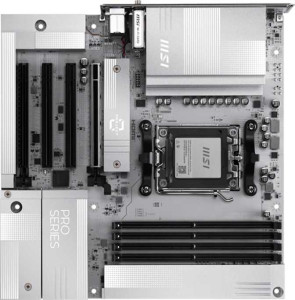
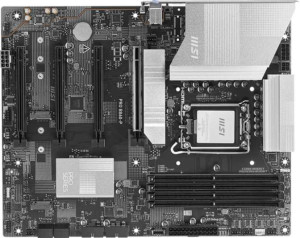
The most fundamental difference between these two boards is their CPU platform: the MSI Pro B850M-A Wi-Fi PZ targets AMD AM5 processors, while the MSI Pro B860-P is built for Intel LGA 1851. This alone makes them non-interchangeable — your CPU choice determines which board is even relevant to you. Beyond the socket, their form factors diverge as well: the B850M-A is a Micro-ATX board (243.8 × 243.8 mm), making it a better fit for compact builds, while the B860-P is a full ATX board (243.8 × 304.8 mm), offering more physical space for additional slots and components.

In terms of connectivity, the B850M-A Wi-Fi PZ holds a meaningful advantage for users building a clean desktop setup, as it includes integrated Wi-Fi and Bluetooth — the B860-P offers neither, meaning wireless connectivity would require an add-in card or USB adapter. Conversely, the B860-P counters with dual BIOS, a reliability feature the B850M-A lacks; this provides a hardware-level recovery path if a firmware update corrupts the primary BIOS. Both boards share HDMI 2.1 output, easy BIOS reset, overclocking support, and RGB lighting, so neither has an edge on those fronts.

On warranty, the B850M-A edges ahead with a 3-year coverage period versus the B860-P's 2 years, which is a tangible long-term ownership difference. Overall, the B850M-A Wi-Fi PZ has the edge for users prioritizing a compact footprint, built-in wireless, and longer warranty — while the B860-P is the better pick for Intel platform builders who value full ATX expandability and the added firmware resilience of dual BIOS.
Memory:
maximum memory amount 256GB 256GB
RAM speed (max) 5600 MHz 6400 MHz
overclocked RAM speed 8200 MHz 8600 MHz
memory slots 4 4
DDR memory version 5 5
memory channels 2 2
Supports ECC memory

Both boards share the same memory foundation: 4 slots, dual-channel DDR5, and a 256 GB maximum capacity. For the vast majority of users — even those running memory-intensive workloads like video editing or large virtual machines — this ceiling is more than sufficient, and neither board presents a limitation here.

Where they diverge is in raw memory speed. The B860-P supports a native 6400 MHz ceiling versus the B850M-A's 5600 MHz, and that gap widens further when overclocked: 8600 MHz versus 8200 MHz. In practice, the native speed difference matters most for users running JEDEC-spec kits without XMP/EXPO profiles — the B860-P simply reaches higher out of the box. The overclocked ceiling gap is narrower and only relevant to enthusiasts pushing the absolute limits of their RAM, where the real-world performance difference between 8200 and 8600 MHz would be marginal in most applications.

The B860-P holds a modest edge in this category, primarily due to its higher native RAM speed ceiling — a meaningful advantage for users who prefer plug-and-play memory configurations without relying on overclocking profiles. For users planning to run XMP/EXPO kits or who simply need stable, high-capacity DDR5, the gap is less impactful, but the B860-P remains the stronger performer on paper.

Ports:
USB 3.2 Gen 2 ports (USB-A) 3 2
USB 3.2 Gen 1 ports (USB-A) 3 2
USB 3.2 Gen 2 ports (USB-C) 2 0
USB 3.2 Gen 1 ports (USB-C) 0 0
USB 2.0 ports 0 4
USB 3.2 Gen 2x2 ports 0 0
USB 4 40Gbps ports 0 1
USB 4 20Gbps ports 0 0
Thunderbolt 4 ports 0 1
Thunderbolt 3 ports 0 0
has an HDMI output
DisplayPort outputs 1 1
RJ45 ports 1 1
Has USB Type-C
eSATA ports 0 0
DVI outputs 0 0
has a VGA connector
PS/2 ports 0 0

At first glance, the B850M-A Wi-Fi PZ wins on sheer USB port count — it fields 8 high-speed USB-A/C ports (a mix of Gen 1 and Gen 2), including 2 USB-C Gen 2 connectors, with no legacy USB 2.0 in sight. The B860-P is more restrained on everyday USB bandwidth, offering fewer Gen 1 and Gen 2 USB-A ports and no USB-C at that tier, while also including 4 USB 2.0 ports — useful for mice, keyboards, and dongles, but a sign that part of its port count is allocated to legacy peripherals rather than high-throughput devices.

Where the B860-P dramatically shifts the calculus is with its Thunderbolt 4 and USB4 40 Gbps port — features entirely absent on the B850M-A. Thunderbolt 4 enables daisy-chaining of high-bandwidth peripherals, external GPU enclosures, and ultra-fast storage arrays at up to 40 Gbps, making it a premium capability that enthusiasts and creative professionals will find genuinely valuable. The B850M-A simply cannot match this for users whose workflows depend on Thunderbolt ecosystems.

The right answer here depends entirely on use case. For users who need maximum USB device flexibility and fast USB-C connectivity for day-to-day use, the B850M-A holds an edge. But for anyone who relies on Thunderbolt peripherals or next-gen storage, the B860-P's Thunderbolt 4 port is a decisive advantage that no amount of additional USB-A ports can substitute.

Connectors:
USB 3.2 Gen 1 ports (through expansion) 2 4
USB-C 3.2 Gen 2 ports (through expansion) 1 1
USB 2.0 ports (through expansion) 4 4
SATA 3 connectors 4 4
fan headers 5 6
USB 3.0 ports (through expansion) 2 4
M.2 sockets 2 3
Has TPM connector
U.2 sockets 0 0
Has mSATA connector
SATA 2 connectors 0 0

Storage expansion is where these two boards part ways most meaningfully. The B860-P offers 3 M.2 sockets compared to the B850M-A's 2 — a difference that matters for builders who want to run multiple NVMe drives simultaneously without touching the SATA ports. Both boards provide 4 SATA 3 connectors, so traditional drive arrays are equally supported, but the extra M.2 slot on the B860-P gives it a genuine edge for high-speed storage configurations.

Fan and thermal management also tips in the B860-P's favor, with 6 fan headers versus 5 on the B850M-A. The practical impact is modest for most users, but in a full ATX build with multiple case fans, a CPU cooler, and an AIO pump, that extra header can eliminate the need for a splitter. Internal USB expansion follows a similar pattern — the B860-P provides more front-panel USB 3.0 and Gen 1 pass-through capacity, which benefits cases with richer front-panel I/O.

Shared features — 4 USB 2.0 expansion ports, a single USB-C 3.2 Gen 2 internal header, TPM connector support, and no legacy SATA 2 — keep the two boards on equal footing for standard build requirements. Still, the B860-P holds a clear overall edge in this category, with its additional M.2 socket and extra fan header making it the more capable board for storage-heavy or thermally demanding builds.

Expansion slots:
PCIe 4.0 x16 slots 0 1
PCIe 5.0 x16 slots 1 1
PCIe 3.0 x16 slots 0 0
PCIe x1 slots 2 1
PCI slots 0 0
PCIe 2.0 x16 slots 0 0
PCIe x4 slots 1 0
PCIe x8 slots 0 0

Both boards lead with a PCIe 5.0 x16 slot as the primary GPU interface — the current gold standard for discrete graphics cards, ensuring full bandwidth compatibility with present and near-future GPUs. For most single-GPU builds, this shared feature means neither board has an inherent graphics performance advantage over the other.

The divergence lies in secondary expansion. The B860-P adds a PCIe 4.0 x16 slot, which is a significant asset for users who want to install a second discrete GPU, a high-bandwidth capture card, or a 10GbE network card without bandwidth compromises. The B850M-A counters differently, offering 2 PCIe x1 slots and a PCIe x4 slot instead — better suited for adding multiple lower-bandwidth cards such as sound cards, USB expansion cards, or SATA controllers simultaneously.

The B860-P holds the edge for power users who need a second high-throughput PCIe slot, as the PCIe 4.0 x16 lane is a meaningfully more capable expansion option than anything on the B850M-A's secondary roster. However, builders who specifically need multiple add-in cards of the lower-bandwidth variety will find the B850M-A's combination of x1 and x4 slots more accommodating in that niche scenario.

Audio:
audio channels 7.1 7.1
Has S/PDIF Out port
audio connectors 3 3

Audio is the rare category where these two boards are in complete lockstep. Both offer 7.1-channel surround sound support with 3 analog audio connectors and no S/PDIF optical output — an identical configuration that gives users the same onboard audio capabilities regardless of which board they choose.

The absence of S/PDIF on both boards is worth noting for audiophiles who prefer passing a digital signal to an external DAC or AV receiver via optical cable — neither board accommodates that without an add-in card. For the majority of users running stereo headsets or standard 7.1 speaker setups directly from the rear panel jacks, however, this is a non-issue.

This category is a dead tie. Audio quality and output capability offer no basis for differentiation between the two boards, and this spec group should carry no weight in a purchasing decision between them.

Storage:
Supports RAID 1
Supports RAID 10 (1+0)
Supports RAID 5
Supports RAID 0
Supports RAID 0+1

RAID support is nearly identical across these two boards, with both covering the essentials: RAID 0 for pure performance striping, RAID 1 for mirroring and redundancy, and RAID 10 for the combined benefits of both. For the overwhelming majority of home and prosumer users, these three modes represent everything they would practically need from a multi-drive array.

The single differentiator here is RAID 5 support on the B860-P, which the B850M-A lacks. RAID 5 distributes parity data across three or more drives, offering a balance of storage efficiency, read performance, and fault tolerance — one drive can fail without data loss. This makes it a meaningful feature for small workstation or NAS-adjacent builds where maximizing usable capacity while retaining redundancy is a priority.

For casual storage users, this distinction is inconsequential. But for anyone planning a three-or-more-drive array with an eye on data protection, the B860-P holds a narrow but clear edge by virtue of its RAID 5 capability — a feature the B850M-A simply cannot offer.

Comparison Summary & Verdict

After examining every specification, both boards prove to be solid mid-range options, but they clearly serve different audiences. The MSI Pro B850M-A Wi-Fi PZ is the stronger pick for AMD platform builders who need a compact Micro-ATX footprint, built-in Wi-Fi and Bluetooth, more USB-C rear ports, and a longer three-year warranty — all in a smaller chassis. The MSI Pro B860-P, on the other hand, is purpose-built for Intel LGA 1851 systems and rewards those who need more room to grow, thanks to its full ATX form factor, an extra M.2 slot, a Thunderbolt 4 port, dual BIOS, higher peak RAM speeds, and RAID 5 support. Choose the B850M-A Wi-Fi PZ for a wireless-ready, space-efficient AMD build; choose the B860-P for a feature-rich, expandable Intel workstation.

MSI Pro B850M-A Wi-Fi PZ
Buy MSI Pro B850M-A Wi-Fi PZ if...

Buy the MSI Pro B850M-A Wi-Fi PZ if you are building an AMD AM5 system in a compact Micro-ATX case and want built-in Wi-Fi, Bluetooth, more USB-C ports, and a three-year warranty.

MSI Pro B860-P
Buy MSI Pro B860-P if...

Buy the MSI Pro B860-P if you need a full ATX Intel LGA 1851 motherboard with Thunderbolt 4, an extra M.2 slot, dual BIOS, higher maximum RAM speeds, and RAID 5 support.