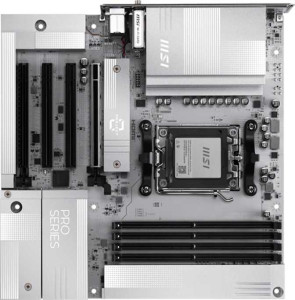
MSI Pro B850M-A Wi-Fi PZ
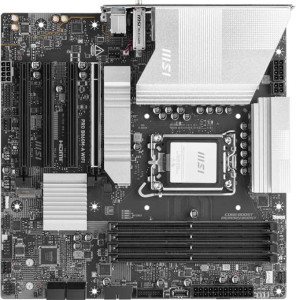
MSI Pro B860M-A WiFi

MSI Pro B850M-A Wi-Fi PZ MSI Pro B860M-A WiFi

Overview

Welcome to our in-depth specification comparison between the MSI Pro B850M-A Wi-Fi PZ and the MSI Pro B860M-A WiFi. Both share the compact Micro-ATX form factor and an impressive Wi-Fi 7 feature set, yet they target distinctly different CPU ecosystems and offer contrasting approaches to USB connectivity, storage expansion, and memory performance. Read on to discover which board best fits your next build.

Common Features

  • Both boards use the Micro-ATX form factor.
  • Wi-Fi is supported on both products, covering Wi-Fi 4, Wi-Fi 5, Wi-Fi 6, Wi-Fi 6E, and Wi-Fi 7.
  • Bluetooth 5.4 is present on both products.
  • Both products include an HDMI 2.1 output.
  • Overclocking capability is available on both products.
  • RGB lighting is present on both products.
  • Both products support a maximum of 256 GB of RAM.
  • Both products have 4 memory slots.
  • Both products use DDR5 memory.
  • Both products support dual-channel memory.
  • ECC memory is not supported on either product.
  • Neither product has USB 3.2 Gen 2x2 ports.
  • Neither product has USB 4 20 Gbps ports.
  • Neither product has Thunderbolt 3 ports.
  • Both products have a DisplayPort output.
  • Both products have one RJ45 port.
  • USB Type-C connectivity is available on both products.
  • Neither product has eSATA ports.
  • Both products have 1 USB-C 3.2 Gen 2 port through expansion.
  • Both products have 4 USB 2.0 ports through expansion.
  • Both products have 4 SATA 3 connectors.
  • Both products have 5 fan headers.
  • A TPM connector is present on both products.
  • Neither product has a U.2 socket.
  • An mSATA connector is not available on either product.
  • Neither product has SATA 2 connectors.
  • Both products have 1 PCIe 5.0 x16 slot.
  • Neither product has PCIe 3.0 x16 slots.
  • Both products have 2 PCIe x1 slots.
  • Neither product has PCI slots, PCIe 2.0 x16 slots, or PCIe x8 slots.
  • Both products support 7.1 audio channels.
  • An S/PDIF Out port is not available on either product.
  • Both products have 3 audio connectors.
  • RAID 0, RAID 1, and RAID 10 support is available on both products.
  • RAID 0+1 is not supported on either product.

Main Differences

  • The CPU socket is AM5 on MSI Pro B850M-A Wi-Fi PZ and LGA 1851 on MSI Pro B860M-A WiFi.
  • The chipset is B850 on MSI Pro B850M-A Wi-Fi PZ and B860 on MSI Pro B860M-A WiFi.
  • Dual BIOS is not available on MSI Pro B850M-A Wi-Fi PZ but is present on MSI Pro B860M-A WiFi.
  • Maximum RAM speed is 5600 MHz on MSI Pro B850M-A Wi-Fi PZ and 6400 MHz on MSI Pro B860M-A WiFi.
  • Maximum overclocked RAM speed is 8200 MHz on MSI Pro B850M-A Wi-Fi PZ and 8600 MHz on MSI Pro B860M-A WiFi.
  • USB 3.2 Gen 2 ports (USB-A) count is 3 on MSI Pro B850M-A Wi-Fi PZ and 1 on MSI Pro B860M-A WiFi.
  • USB 3.2 Gen 1 ports (USB-A) count is 3 on MSI Pro B850M-A Wi-Fi PZ and 2 on MSI Pro B860M-A WiFi.
  • USB 3.2 Gen 2 ports (USB-C) count is 2 on MSI Pro B850M-A Wi-Fi PZ and 0 on MSI Pro B860M-A WiFi.
  • USB 3.2 Gen 1 ports (USB-C) count is 0 on MSI Pro B850M-A Wi-Fi PZ and 1 on MSI Pro B860M-A WiFi.
  • USB 2.0 ports count is 0 on MSI Pro B850M-A Wi-Fi PZ and 2 on MSI Pro B860M-A WiFi.
  • USB 4 40 Gbps ports are absent on MSI Pro B850M-A Wi-Fi PZ but 1 is present on MSI Pro B860M-A WiFi.
  • Thunderbolt 4 ports are absent on MSI Pro B850M-A Wi-Fi PZ but 1 is present on MSI Pro B860M-A WiFi.
  • A PS/2 port is not present on MSI Pro B850M-A Wi-Fi PZ but is available on MSI Pro B860M-A WiFi.
  • USB 3.2 Gen 1 ports through expansion number 2 on MSI Pro B850M-A Wi-Fi PZ and 4 on MSI Pro B860M-A WiFi.
  • USB 3.0 ports through expansion number 2 on MSI Pro B850M-A Wi-Fi PZ and 4 on MSI Pro B860M-A WiFi.
  • M.2 sockets count is 2 on MSI Pro B850M-A Wi-Fi PZ and 3 on MSI Pro B860M-A WiFi.
  • PCIe 4.0 x16 slots number 0 on MSI Pro B850M-A Wi-Fi PZ and 1 on MSI Pro B860M-A WiFi.
  • PCIe x4 slots number 1 on MSI Pro B850M-A Wi-Fi PZ and 0 on MSI Pro B860M-A WiFi.
  • RAID 5 support is not available on MSI Pro B850M-A Wi-Fi PZ but is present on MSI Pro B860M-A WiFi.
Specs Comparison
MSI Pro B850M-A Wi-Fi PZ

MSI Pro B850M-A Wi-Fi PZ

MSI Pro B860M-A WiFi

MSI Pro B860M-A WiFi

General info:
CPU socket AM5 LGA 1851
chipset B850 B860
form factor Micro-ATX Micro-ATX
release date September 2025 January 2025
supports Wi-Fi
Wi-Fi version Wi-Fi 4 (802.11n), Wi-Fi 5 (802.11ac), Wi-Fi 6 (802.11ax), Wi-Fi 6E (802.11ax), Wi-Fi 7 (802.11be) Wi-Fi 4 (802.11n), Wi-Fi 5 (802.11ac), Wi-Fi 6 (802.11ax), Wi-Fi 6E (802.11ax), Wi-Fi 7 (802.11be)
Has Bluetooth
Bluetooth version 5.4 5.4
HDMI version HDMI 2.1 HDMI 2.1
Easy to overclock
has RGB lighting
Easy to reset BIOS
Has dual BIOS
has aptX
CPU sockets 1 1
Has integrated graphics
warranty period 3 years 3 years
height 243.8 mm 243.8 mm
width 243.8 mm 243.8 mm
Has integrated CPU

The MSI Pro B850M-A Wi-Fi PZ and MSI Pro B860M-A WiFi are strikingly similar boards at the general level — both share the same Micro-ATX form factor (243.8 × 243.8 mm), Wi-Fi 7 with full backward compatibility, Bluetooth 5.4, HDMI 2.1, RGB lighting, easy BIOS reset, and a 3-year warranty. The most fundamental difference, however, is platform: the B850M-A targets AMD users with an AM5 socket and B850 chipset, while the B860M-A is built for Intel with an LGA 1851 socket and B860 chipset. This means the two boards are not cross-platform alternatives — your CPU choice determines which board is even relevant to you.

Within those platform constraints, one meaningful differentiator emerges: the B860M-A includes dual BIOS, while the B850M-A does not. Dual BIOS provides a backup firmware chip that automatically takes over if the primary BIOS becomes corrupted — a genuine safety net during failed updates or overclocking experiments. Both boards are listed as easy to overclock, but the B860M-A′s dual BIOS gives it a more forgiving recovery path if something goes wrong.

In summary, platform compatibility makes these boards non-competing for most buyers. If you are on Team AMD, the B850M-A is your only option here; if you are on Intel, the B860M-A is the pick — and it carries a slight edge in resilience thanks to its dual BIOS, making it marginally the safer board for users who plan to push their system.

Memory:
maximum memory amount 256GB 256GB
RAM speed (max) 5600 MHz 6400 MHz
overclocked RAM speed 8200 MHz 8600 MHz
memory slots 4 4
DDR memory version 5 5
memory channels 2 2
Supports ECC memory

Both boards share the same memory foundation: 4 slots, DDR5, dual-channel configuration, and a 256GB maximum capacity — enough headroom for even the most memory-hungry workstations. Where they diverge is in raw speed ceilings. The B850M-A tops out at 5600 MHz natively and 8200 MHz overclocked, while the B860M-A pushes to 6400 MHz native and 8600 MHz overclocked.

The native speed gap is the more practically significant of the two differences. Running memory at its rated JEDEC speed without any manual tuning, the B860M-A sustains a noticeably higher baseline — 800 MHz faster out of the box. For bandwidth-sensitive tasks like video editing, 3D rendering, or large dataset processing, that headroom translates into tangible throughput gains without touching a single BIOS setting. The overclocked ceiling gap is narrower (400 MHz), meaning enthusiasts on either platform can reach similar peaks, but the B860M-A starts from a stronger foundation before any tuning begins.

On memory, the B860M-A WiFi holds a clear advantage. Its higher native and overclocked speed ceilings give it an edge for performance-focused builds, particularly those pairing fast DDR5 kits out of the box. The B850M-A is by no means limited, but users prioritizing memory bandwidth will find more room to grow on the Intel side.

Ports:
USB 3.2 Gen 2 ports (USB-A) 3 1
USB 3.2 Gen 1 ports (USB-A) 3 2
USB 3.2 Gen 2 ports (USB-C) 2 0
USB 3.2 Gen 1 ports (USB-C) 0 1
USB 2.0 ports 0 2
USB 3.2 Gen 2x2 ports 0 0
USB 4 40Gbps ports 0 1
USB 4 20Gbps ports 0 0
Thunderbolt 4 ports 0 1
Thunderbolt 3 ports 0 0
has an HDMI output
DisplayPort outputs 1 1
RJ45 ports 1 1
Has USB Type-C
eSATA ports 0 0
DVI outputs 0 0
has a VGA connector
PS/2 ports 0 1

Port selection is where these two boards reveal very different design philosophies. The B850M-A prioritizes sheer USB density and consistent speed — it offers 8 USB ports in total (all Gen 1 or Gen 2), including two USB 3.2 Gen 2 Type-C connectors, with zero legacy USB 2.0 ports in the mix. That makes it an excellent fit for users who regularly plug in multiple high-speed peripherals simultaneously, like external SSDs, audio interfaces, or docking stations, without having to think about which port is ″slow.″

The B860M-A takes a narrower but higher-ceiling approach. Its standout features are a Thunderbolt 4 port and a USB4 40Gbps port — two technologies the B850M-A lacks entirely. Thunderbolt 4 in particular is a game-changer for creative professionals: it enables daisy-chaining up to six devices, supports external GPU enclosures, and delivers up to 40Gbps throughput with rock-solid compatibility guarantees. The tradeoff is that the B860M-A's remaining USB roster is less impressive — it includes 2 USB 2.0 ports and only one mid-speed USB-C, plus a legacy PS/2 port that few modern users will ever need.

For most mainstream users who simply want fast, plentiful USB connectivity, the B850M-A has the more practical port layout. But for professionals who need Thunderbolt 4 for high-end peripherals or eGPU setups, the B860M-A is the clear winner — that single Thunderbolt 4 port punches well above its weight and is a capability the AMD board simply cannot match.

Connectors:
USB 3.2 Gen 1 ports (through expansion) 2 4
USB-C 3.2 Gen 2 ports (through expansion) 1 1
USB 2.0 ports (through expansion) 4 4
SATA 3 connectors 4 4
fan headers 5 5
USB 3.0 ports (through expansion) 2 4
M.2 sockets 2 3
Has TPM connector
U.2 sockets 0 0
Has mSATA connector
SATA 2 connectors 0 0

Internal connectivity is largely a tie between these two boards, but two differences stand out. The most impactful is M.2 socket count: the B860M-A offers 3 M.2 sockets versus the B850M-A's 2. In practical terms, that extra slot means the B860M-A can accommodate an additional NVMe SSD without displacing any SATA storage — a meaningful advantage for content creators, editors, or power users who want to separate OS, scratch disk, and archive drives across fast NVMe storage simultaneously.

The second difference is in front-panel USB expansion. The B860M-A provides 4 USB 3.0 internal headers (Gen 1 through expansion) compared to the B850M-A's 2, giving case builders more flexibility to populate front-panel USB ports without sacrificing connectivity. Everything else — SATA 3 connectors, fan headers, USB 2.0 expansion, USB-C expansion, and TPM support — is identical across both boards, so neither has an advantage in cooling headroom or legacy storage.

The B860M-A WiFi earns a clear edge in internal connectors. The extra M.2 slot alone is a compelling differentiator for storage-heavy builds, and the doubled USB 3.0 expansion capacity adds practical flexibility for full-tower or multi-drive setups. The B850M-A is adequate for mainstream configurations, but users planning to run multiple NVMe drives will quickly feel the constraint of having one fewer slot.

Expansion slots:
PCIe 4.0 x16 slots 0 1
PCIe 5.0 x16 slots 1 1
PCIe 3.0 x16 slots 0 0
PCIe x1 slots 2 2
PCI slots 0 0
PCIe 2.0 x16 slots 0 0
PCIe x4 slots 1 0
PCIe x8 slots 0 0

Expansion slot layouts tell an interesting story here. Both boards lead with a single PCIe 5.0 x16 slot — the current gold standard for discrete GPUs, delivering up to 128GB/s of bandwidth and full future-proofing for next-generation graphics cards. That shared foundation means neither board limits your GPU options. The divergence comes in secondary slots: the B860M-A adds a PCIe 4.0 x16 slot, while the B850M-A instead offers a PCIe x4 slot.

The practical implication depends entirely on what you plan to plug in. A second PCIe 4.0 x16 slot — even if it electrically runs at x4 bandwidth in practice on a mid-range chipset — is still physically compatible with a much wider range of expansion cards: capture cards, 10GbE NICs, RAID controllers, or even a secondary GPU for compute workloads. A PCIe x4 slot is more limited in physical compatibility. Users building a multi-card or heavily expanded system will find the B860M-A's secondary slot more versatile.

For single-GPU mainstream builds, both boards are evenly matched at the primary slot level. But the B860M-A WiFi holds the advantage for users who anticipate adding a high-bandwidth expansion card alongside their GPU — its secondary PCIe 4.0 x16 slot simply accommodates more card types than the B850M-A's x4 slot.

Audio:
audio channels 7.1 7.1
Has S/PDIF Out port
audio connectors 3 3

Audio is a clean draw between these two boards — every spec is identical. Both deliver 7.1 surround sound support via 3 analog audio connectors, and neither includes an S/PDIF optical output. The 7.1 channel capability means both boards can drive a full surround sound speaker setup for home theater or immersive gaming audio, which is a respectable offering for mid-range motherboards in this class.

The absence of S/PDIF on both boards is worth noting for users who rely on optical connections to pass audio to an AV receiver or DAC. Neither board offers that path, so users with S/PDIF-dependent equipment would need an external USB audio solution regardless of which board they choose. That said, this is a shared limitation, not a differentiator.

For this specification group, the verdict is a complete tie. Audio capability plays no role in distinguishing these two boards, and buyers with advanced audio requirements — such as optical output or dedicated DAC connectivity — will need to look beyond onboard audio on either option.

Storage:
Supports RAID 1
Supports RAID 10 (1+0)
Supports RAID 5
Supports RAID 0
Supports RAID 0+1

RAID support is nearly identical across both boards, with one exception that matters specifically to prosumer and small business users. Both the B850M-A and B860M-A support RAID 0 (striping for speed), RAID 1 (mirroring for redundancy), and RAID 10 (a combined stripe-and-mirror array for both performance and fault tolerance). These three modes cover the vast majority of home and enthusiast use cases comfortably.

The sole differentiator is RAID 5 support, which is exclusive to the B860M-A. RAID 5 distributes parity data across three or more drives, allowing the array to survive a single drive failure while making more efficient use of raw storage capacity than RAID 1 or RAID 10. It is a common choice in workstation and entry-level server environments where storage efficiency and redundancy need to be balanced — for example, getting usable capacity from three drives rather than sacrificing half to pure mirroring.

For typical desktop and gaming builds, this distinction is irrelevant — RAID 0, 1, and 10 are more than sufficient. But for users running multi-drive arrays in a professional or data-sensitive context, the B860M-A WiFi holds a clear edge by virtue of its RAID 5 capability, offering a more flexible and storage-efficient redundancy option that the B850M-A simply cannot provide.

Comparison Summary & Verdict

After examining every specification, both boards prove to be capable Micro-ATX platforms with shared strengths such as Wi-Fi 7, DDR5 support up to 256 GB, and a PCIe 5.0 x16 slot. However, their differences draw a clear line between two audiences. The MSI Pro B850M-A Wi-Fi PZ is the stronger pick for AMD AM5 builders who need a richer rear USB layout, including multiple USB 3.2 Gen 2 Type-A and Type-C ports, making it ideal for content creators and power users with many high-speed peripherals. The MSI Pro B860M-A WiFi, on the other hand, caters to Intel LGA 1851 builders who benefit from a Thunderbolt 4 port, a third M.2 slot, faster peak RAM speeds of 6400 MHz, RAID 5 support, and the added reliability of a dual BIOS. Choose the B850M-A if you are on Team AMD and value USB versatility; choose the B860M-A WiFi if you are on Intel and want maximum storage flexibility and connectivity future-proofing.

MSI Pro B850M-A Wi-Fi PZ
Buy MSI Pro B850M-A Wi-Fi PZ if...

Buy the MSI Pro B850M-A Wi-Fi PZ if you are building on an AMD AM5 platform and need a generous high-speed USB layout, including multiple USB 3.2 Gen 2 Type-A and Type-C rear ports.

MSI Pro B860M-A WiFi
Buy MSI Pro B860M-A WiFi if...

Buy the MSI Pro B860M-A WiFi if you are building on Intel LGA 1851 and want the added benefits of a Thunderbolt 4 port, three M.2 slots, faster RAM support, RAID 5, and dual BIOS protection.