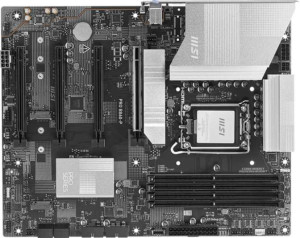
MSI Pro B860-P
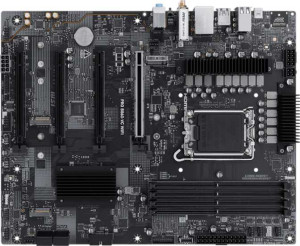
MSI Pro B860-VC Wi-Fi

MSI Pro B860-P MSI Pro B860-VC Wi-Fi

Overview

Welcome to our in-depth spec comparison of the MSI Pro B860-P and the MSI Pro B860-VC Wi-Fi, two B860-chipset ATX motherboards targeting builders who want a capable Intel LGA 1851 platform. While they share a strong common foundation, key battlegrounds emerge around wireless connectivity, display output options, overclocking headroom, and warranty coverage. Read on to see which board aligns best with your build priorities.

Common Features

  • Both boards use the LGA 1851 CPU socket.
  • Both boards use the B860 chipset.
  • Both boards have an ATX form factor.
  • Easy overclocking is supported on both boards.
  • Easy BIOS reset is available on both boards.
  • Dual BIOS is present on both boards.
  • Neither board has integrated graphics.
  • Both boards support a maximum memory amount of 256GB.
  • Both boards support a maximum RAM speed of 6400 MHz.
  • Both boards have 4 memory slots.
  • Both boards use DDR5 memory.
  • Both boards have 2 memory channels.
  • ECC memory is not supported on either board.
  • Both boards have 2 USB 3.2 Gen 2 Type-A ports.
  • Both boards have 2 USB 3.2 Gen 1 Type-A ports.
  • Both boards have no USB 3.2 Gen 2 Type-C ports.
  • Both boards have 4 USB 2.0 ports.
  • Both boards have 1 USB 4 40Gbps port.
  • Both boards have 4 SATA 3 connectors.
  • Both boards have 3 M.2 sockets.
  • Both boards have 6 fan headers.
  • A TPM connector is present on both boards.
  • Both boards have 1 PCIe 5.0 x16 slot and 1 PCIe 4.0 x16 slot.
  • Both boards support 7.1 audio channels.
  • Both boards have 3 audio connectors.
  • S/PDIF Out is not available on either board.
  • Both boards support RAID 0, RAID 1, RAID 5, and RAID 10.
  • Neither board supports RAID 0+1.

Main Differences

  • Wi-Fi support is present on MSI Pro B860-VC Wi-Fi but not available on MSI Pro B860-P.
  • Bluetooth support is present on MSI Pro B860-VC Wi-Fi but not available on MSI Pro B860-P.
  • RGB lighting is present on MSI Pro B860-P but not available on MSI Pro B860-VC Wi-Fi.
  • The warranty period is 2 years on MSI Pro B860-P and 3 years on MSI Pro B860-VC Wi-Fi.
  • The maximum overclocked RAM speed is 8600 MHz on MSI Pro B860-P and 8800 MHz on MSI Pro B860-VC Wi-Fi.
  • An HDMI output is present on MSI Pro B860-P but not available on MSI Pro B860-VC Wi-Fi.
  • DisplayPort outputs number 1 on MSI Pro B860-P and 0 on MSI Pro B860-VC Wi-Fi.
  • PCIe x1 slots number 1 on MSI Pro B860-P and 2 on MSI Pro B860-VC Wi-Fi.
Specs Comparison
MSI Pro B860-P

MSI Pro B860-P

MSI Pro B860-VC Wi-Fi

MSI Pro B860-VC Wi-Fi

General info:
CPU socket LGA 1851 LGA 1851
chipset B860 B860
form factor ATX ATX
release date January 2025 February 2025
supports Wi-Fi
Has Bluetooth
Easy to overclock
has RGB lighting
Easy to reset BIOS
Has dual BIOS
CPU sockets 1 1
Has integrated graphics
warranty period 2 years 3 years
height 243.8 mm 243.8 mm
width 304.8 mm 304.8 mm
Has integrated CPU

At their core, the MSI Pro B860-P and MSI Pro B860-VC Wi-Fi share the same fundamental DNA: both use the LGA 1851 socket with a B860 chipset, adopt a standard ATX form factor with identical dimensions, and offer the same ease-of-use features like easy overclocking, easy BIOS reset, and a dual BIOS — a meaningful safety net that lets you recover from a failed firmware update without professional help. For a builder focused on platform fundamentals, either board starts from the same solid foundation.

The real divergence lies in connectivity and aesthetics. The B860-VC Wi-Fi adds integrated Wi-Fi and Bluetooth, which is a significant practical advantage for builds in locations where running an Ethernet cable is inconvenient, or for users who want wireless peripherals without a separate USB dongle. The B860-P, by contrast, skips wireless entirely — meaning users who need it must budget for a separate PCIe or USB Wi-Fi adapter. On the flip side, the B860-P includes RGB lighting, which the B860-VC Wi-Fi omits; a minor point for most, but relevant for enthusiasts building a themed system.

The B860-VC Wi-Fi also carries a 3-year warranty versus the B860-P's 2-year warranty, offering a longer coverage window that adds tangible long-term value. Overall, the B860-VC Wi-Fi holds a clear edge for most users: the built-in wireless connectivity alone removes the need for additional hardware, and the extended warranty sweetens the deal — unless RGB aesthetics are a priority, in which case the B860-P is the only option of the two.
Memory:
maximum memory amount 256GB 256GB
RAM speed (max) 6400 MHz 6400 MHz
overclocked RAM speed 8600 MHz 8800 MHz
memory slots 4 4
DDR memory version 5 5
memory channels 2 2
Supports ECC memory

Memory compatibility is essentially a wash between these two boards — both support DDR5 RAM across 4 slots in a dual-channel configuration, with a maximum capacity of 256GB and a native speed ceiling of 6400 MHz. For the vast majority of users, this shared foundation means identical day-to-day memory performance and the same upgrade headroom.

Where a small but measurable gap opens up is in overclocked memory support. The B860-VC Wi-Fi tops out at 8800 MHz via XMP/EXPO profiles, compared to 8600 MHz on the B860-P. In practical terms, the real-world performance difference between these two figures is negligible for gaming or general productivity — memory bandwidth gains at those speeds are marginal and rarely translate into noticeable application improvements. This is a spec that matters almost exclusively to dedicated memory overclocking enthusiasts chasing benchmark numbers.

On balance, the memory specs for this group are essentially a tie for most users. The B860-VC Wi-Fi technically holds a razor-thin edge due to its higher overclocked ceiling, but only those specifically pushing RAM to its absolute limits will ever notice it. Builders prioritizing memory performance should not let this difference drive their purchasing decision.

Ports:
USB 3.2 Gen 2 ports (USB-A) 2 2
USB 3.2 Gen 1 ports (USB-A) 2 2
USB 3.2 Gen 2 ports (USB-C) 0 0
USB 3.2 Gen 1 ports (USB-C) 0 0
USB 2.0 ports 4 4
USB 3.2 Gen 2x2 ports 0 0
USB 4 40Gbps ports 1 1
USB 4 20Gbps ports 0 0
Thunderbolt 4 ports 1 1
Thunderbolt 3 ports 0 0
has an HDMI output
DisplayPort outputs 1 0
RJ45 ports 1 1
Has USB Type-C
eSATA ports 0 0
DVI outputs 0 0
has a VGA connector
PS/2 ports 0 0

Across the USB lineup, these two boards are identical — both offer the same mix of USB 2.0, USB 3.2 Gen 1, and Gen 2 Type-A ports, plus a high-value USB 4 40Gbps port and a Thunderbolt 4 port. That Thunderbolt 4 connection is particularly noteworthy, enabling 40Gbps data transfers, external GPU enclosures, and daisy-chaining of high-bandwidth peripherals — capabilities that punch well above what you'd typically expect at this price tier.

The defining difference in this group comes down to display output. The B860-P includes both an HDMI output and a DisplayPort output, while the B860-VC Wi-Fi has neither. This matters in a specific scenario: if you're using a processor with integrated graphics and want to drive a monitor directly from the motherboard without a discrete GPU, the B860-P supports that use case and the B860-VC Wi-Fi simply does not. For builds that always include a dedicated graphics card, this distinction is irrelevant — but for budget or office builds, it's a meaningful gap.

The B860-P holds a clear edge in this category. The shared USB and Thunderbolt 4 parity means neither board is lacking in modern connectivity, but the addition of video outputs on the B860-P provides genuine flexibility that the B860-VC Wi-Fi cannot match.

Connectors:
USB 3.2 Gen 1 ports (through expansion) 4 4
USB-C 3.2 Gen 2 ports (through expansion) 1 1
USB 2.0 ports (through expansion) 4 4
SATA 3 connectors 4 4
fan headers 6 6
USB 3.0 ports (through expansion) 4 4
M.2 sockets 3 3
Has TPM connector
U.2 sockets 0 0
Has mSATA connector
SATA 2 connectors 0 0

Internal connectors are a complete mirror image between these two boards — every spec in this category is identical. Both provide 3 M.2 sockets for NVMe storage, 4 SATA 3 connectors for traditional drives, and 6 fan headers for cooling management, alongside matching expansion USB headers and a TPM connector. There is nothing to separate them here.

The highlights worth noting for either board are the 3 M.2 sockets, which allow a fully solid-state storage configuration without occupying any SATA ports — a practical advantage for clean, high-performance builds. The 6 fan headers also provide meaningful headroom for users building systems with active cooling across multiple case fans and radiators, supporting proper thermal management without relying on splitters.

This group is a straightforward tie. Builders evaluating these two boards purely on internal connector options will find no reason to prefer one over the other — the storage, cooling, and expansion capabilities are functionally identical on both.

Expansion slots:
PCIe 4.0 x16 slots 1 1
PCIe 5.0 x16 slots 1 1
PCIe 3.0 x16 slots 0 0
PCIe x1 slots 1 2
PCI slots 0 0
PCIe 2.0 x16 slots 0 0
PCIe x4 slots 0 0
PCIe x8 slots 0 0

For primary GPU and high-bandwidth expansion, both boards are identical — each offers one PCIe 5.0 x16 slot for the main graphics card and one PCIe 4.0 x16 slot for secondary expansion. The PCIe 5.0 primary slot is future-proofing worth noting, as next-generation GPUs increasingly leverage that bandwidth ceiling, meaning neither board will become a bottleneck for current or near-future discrete graphics cards.

The only divergence in this group is the number of PCIe x1 slots: the B860-VC Wi-Fi provides two, while the B860-P offers just one. PCIe x1 slots serve lower-bandwidth add-in cards — think sound cards, additional USB controllers, or capture cards. For most single-GPU builds this rarely matters, but users planning to install multiple such expansion cards will find the extra slot on the B860-VC Wi-Fi genuinely useful.

The B860-VC Wi-Fi edges ahead in this category, though narrowly. The shared PCIe 5.0 and 4.0 x16 configuration keeps the primary expansion capabilities equal, but the additional x1 slot gives the B860-VC Wi-Fi slightly more flexibility for accessory cards in more complex builds.

Audio:
audio channels 7.1 7.1
Has S/PDIF Out port
audio connectors 3 3

Audio is the simplest category to evaluate in this comparison — both boards are completely identical, offering 7.1 surround sound support across 3 analog audio connectors with no S/PDIF digital output on either. The 7.1-channel capability is sufficient for a full surround sound speaker setup or high-quality stereo headphone use, covering the needs of most gamers and casual listeners without requiring a dedicated sound card.

The absence of S/PDIF output on both boards is worth flagging for users who rely on digital audio passthrough to an AV receiver or DAC — that use case would require a discrete audio solution regardless of which board is chosen. For everyone else, the onboard audio provision is functionally equivalent between the two.

This group is an unambiguous tie. No matter which board you choose, you get the same audio capabilities, and neither holds any advantage over the other in this category.

Storage:
Supports RAID 1
Supports RAID 10 (1+0)
Supports RAID 5
Supports RAID 0
Supports RAID 0+1

Storage configuration support is identical across both boards. Each offers RAID 0, 1, 5, and 10 — a well-rounded set that covers the most practical use cases, from pure performance striping (RAID 0) to fault-tolerant mirroring (RAID 1) and the more advanced parity-based (RAID 5) and combined redundancy-performance (RAID 10) configurations. Neither board supports RAID 0+1, but that omission is inconsequential in practice, as RAID 10 delivers equivalent functionality with generally better performance characteristics.

The presence of RAID 5 support is particularly relevant for users building small NAS-style or workstation setups, as it allows efficient use of multiple drives with single-drive redundancy — a meaningful capability at this board tier. That said, both boards offer this equally, so it informs the platform's value without differentiating between them.

Another clean tie. Storage RAID capabilities are a non-factor in choosing between the B860-P and the B860-VC Wi-Fi — both support the same configurations and share the same limitation.

Comparison Summary & Verdict

Both the MSI Pro B860-P and the MSI Pro B860-VC Wi-Fi deliver a solid B860 ATX foundation with identical memory capacity, the same USB port lineup, three M.2 sockets, and comprehensive RAID support. Where they diverge is meaningful: the MSI Pro B860-VC Wi-Fi is the stronger long-term investment for users who need built-in Wi-Fi and Bluetooth, a slightly higher overclocked RAM ceiling of 8800 MHz, an extra PCIe x1 slot, and the reassurance of a 3-year warranty. The MSI Pro B860-P, on the other hand, suits builders who rely on a wired network and need dedicated display outputs — its HDMI port and DisplayPort make it ideal for setups using integrated or low-profile graphics, and its RGB lighting adds aesthetic flexibility. Choose accordingly based on your connectivity needs and build goals.

MSI Pro B860-P
Buy MSI Pro B860-P if...

Buy the MSI Pro B860-P if you use a wired network connection and need onboard display outputs such as HDMI and DisplayPort, or if RGB lighting is important to your build aesthetic.

MSI Pro B860-VC Wi-Fi
Buy MSI Pro B860-VC Wi-Fi if...

Buy the MSI Pro B860-VC Wi-Fi if you want built-in Wi-Fi and Bluetooth, a higher overclocked RAM speed of 8800 MHz, an extra PCIe x1 slot, and the added peace of mind from a 3-year warranty.