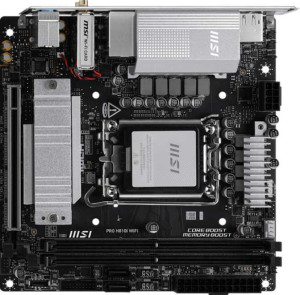
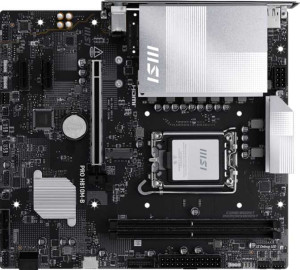
MSI Pro H810I Wi-Fi
MSI Pro H810M-B

MSI Pro H810I Wi-Fi MSI Pro H810M-B

Overview

Welcome to our detailed specification comparison between the MSI Pro H810I Wi-Fi and the MSI Pro H810M-B, two motherboards built on the same LGA 1851 platform but designed with very different priorities in mind. While both boards share a solid DDR5 memory foundation and PCIe 5.0 support, their distinct form factors, connectivity options, and expansion capabilities set them apart in meaningful ways. Whether you are building a compact system or need a more versatile setup, understanding these key differences will help you make the right choice.

Common Features

  • Both products use the LGA 1851 CPU socket.
  • Both products support Wi-Fi.
  • Both products feature HDMI 2.1.
  • Neither product is easy to overclock.
  • Both products have RGB lighting.
  • Neither product offers an easy BIOS reset.
  • Both products have 1 CPU socket.
  • Neither product has integrated graphics.
  • Both products support a maximum memory amount of 128GB.
  • Both products have a maximum RAM speed of 6400 MHz.
  • Both products have 2 memory slots.
  • Both products use DDR5 memory.
  • Both products have 2 memory channels.
  • Neither product supports ECC memory.
  • Neither product has USB 3.2 Gen 2 ports (USB-A).
  • Both products have 2 USB 3.2 Gen 1 ports (USB-A).
  • Neither product has USB 3.2 Gen 2 ports (USB-C).
  • Neither product has USB 3.2 Gen 1 ports (USB-C).
  • Neither product has USB 4 40Gbps, USB 4 20Gbps, Thunderbolt 4, or Thunderbolt 3 ports.
  • Both products have 2 USB 3.2 Gen 1 ports through expansion.
  • Both products have 1 USB-C 3.2 Gen 2 port through expansion.
  • Both products have 4 USB 2.0 ports through expansion.
  • Both products have 3 fan headers.
  • Both products have 1 M.2 socket.
  • Both products include a TPM connector.
  • Neither product has U.2 sockets.
  • Both products have 1 PCIe 5.0 x16 slot.
  • Neither product has PCIe 4.0 x16, PCIe 3.0 x16, PCIe 2.0 x16, PCIe x4, PCIe x8, or PCI slots.
  • Both products support 7.1 audio channels.
  • Neither product has an S/PDIF Out port.
  • Both products have 3 audio connectors.
  • Neither product supports RAID 0+1.

Main Differences

  • Form factor is Mini-ITX on MSI Pro H810I Wi-Fi and Micro-ATX on MSI Pro H810M-B.
  • Bluetooth is present on MSI Pro H810I Wi-Fi but not available on MSI Pro H810M-B.
  • Dual BIOS is available on MSI Pro H810M-B but not present on MSI Pro H810I Wi-Fi.
  • Height is 170 mm on MSI Pro H810I Wi-Fi and 220 mm on MSI Pro H810M-B.
  • Width is 170 mm on MSI Pro H810I Wi-Fi and 243.8 mm on MSI Pro H810M-B.
  • USB 2.0 ports count is 2 on MSI Pro H810I Wi-Fi and 4 on MSI Pro H810M-B.
  • USB 3.2 Gen 2x2 port is present on MSI Pro H810I Wi-Fi but not available on MSI Pro H810M-B.
  • USB Type-C is present on MSI Pro H810I Wi-Fi but not available on MSI Pro H810M-B.
  • SATA 3 connectors count is 2 on MSI Pro H810I Wi-Fi and 4 on MSI Pro H810M-B.
  • PCIe x1 slots count is 0 on MSI Pro H810I Wi-Fi and 2 on MSI Pro H810M-B.
Specs Comparison
MSI Pro H810I Wi-Fi

MSI Pro H810I Wi-Fi

MSI Pro H810M-B

MSI Pro H810M-B

General info:
CPU socket LGA 1851 LGA 1851
form factor Mini-ITX Micro-ATX
release date June 2025 May 2025
supports Wi-Fi
Has Bluetooth
HDMI version HDMI 2.1 HDMI 2.1
Easy to overclock
has RGB lighting
Easy to reset BIOS
Has dual BIOS
CPU sockets 1 1
Has integrated graphics
warranty period 3 years 3 years
height 170 mm 220 mm
width 170 mm 243.8 mm
Has integrated CPU

Both the MSI Pro H810I Wi-Fi and the MSI Pro H810M-B share the same LGA 1851 CPU socket, single-socket configuration, HDMI 2.1 output, RGB lighting, and a 3-year warranty — meaning neither holds an edge on platform compatibility or long-term support. The most immediate differentiator is form factor: the H810I Wi-Fi is a Mini-ITX board (170 × 170 mm), while the H810M-B is a Micro-ATX board (220 × 243.8 mm). In practice, this means the H810I Wi-Fi is purpose-built for compact, space-constrained builds, whereas the H810M-B offers a larger PCB that typically translates to more expansion slots and layout flexibility.

On connectivity, the H810I Wi-Fi includes both Wi-Fi and Bluetooth, while the H810M-B supports Wi-Fi but omits Bluetooth entirely. For a small-form-factor system where cable management is already a challenge, having built-in Bluetooth on the H810I Wi-Fi is a meaningful convenience for peripherals. The H810M-B compensates with dual BIOS, a hardware redundancy feature that protects against failed firmware updates — a practical reliability advantage the H810I Wi-Fi lacks.

In summary, neither board can be overclocked or has an integrated CPU or graphics solution, so they are evenly matched on those fronts. The H810I Wi-Fi has a clear edge for compact builds that need Bluetooth, while the H810M-B is the stronger pick for users who prioritize BIOS resilience and the expansion headroom of a larger chassis. The choice ultimately comes down to build size and whether Bluetooth or dual BIOS matters more to the user.

Memory:
maximum memory amount 128GB 128GB
RAM speed (max) 6400 MHz 6400 MHz
memory slots 2 2
DDR memory version 5 5
memory channels 2 2
Supports ECC memory

Across every memory specification provided, the MSI Pro H810I Wi-Fi and the MSI Pro H810M-B are identical: both support up to 128GB of DDR5 RAM across 2 slots in a dual-channel configuration, with a maximum rated speed of 6400 MHz. DDR5 at this frequency offers substantially higher bandwidth and improved power efficiency compared to the previous DDR4 generation, which benefits memory-intensive workloads like video editing, large dataset processing, and modern gaming.

The dual-channel setup means both boards can fully leverage the bandwidth of two matched sticks — a practical reminder that populating both slots with equal-capacity modules will yield noticeably better real-world performance than a single-stick configuration. The 128GB ceiling is generous for a mainstream platform and leaves ample headroom for future upgrades. Neither board supports ECC memory, so error-correcting workloads typical of servers or high-reliability workstations are off the table for both.

This group is a complete tie. There is no memory-related reason to choose one board over the other — any decision should rest entirely on the differentiators found in other specification groups.

Ports:
USB 3.2 Gen 2 ports (USB-A) 0 0
USB 3.2 Gen 1 ports (USB-A) 2 2
USB 3.2 Gen 2 ports (USB-C) 0 0
USB 3.2 Gen 1 ports (USB-C) 0 0
USB 2.0 ports 2 4
USB 3.2 Gen 2x2 ports 1 0
USB 4 40Gbps ports 0 0
USB 4 20Gbps ports 0 0
Thunderbolt 4 ports 0 0
Thunderbolt 3 ports 0 0
has an HDMI output
DisplayPort outputs 1 1
RJ45 ports 1 1
Has USB Type-C
eSATA ports 0 0
DVI outputs 0 0
has a VGA connector
PS/2 ports 0 0

The rear I/O of these two boards shares a solid common foundation: both offer 2x USB 3.2 Gen 1 (USB-A), an HDMI output, one DisplayPort, and a single RJ45 Ethernet jack. Neither board includes legacy connectors like VGA, DVI, eSATA, or PS/2, which is expected for a modern platform and keeps the rear panel clean. Where things diverge, however, is in two meaningful areas.

The H810I Wi-Fi stands out with a USB 3.2 Gen 2x2 port — a 20Gbps connection that is particularly useful for high-speed external SSDs or fast docking stations, and a capability the H810M-B entirely lacks. It also includes a USB Type-C connector, adding compatibility with modern peripherals and cables. The H810M-B counters with 4x USB 2.0 ports versus the H810I Wi-Fi's 2, which matters for users with several low-bandwidth USB devices like mice, keyboards, or dongles who want to avoid using a hub.

For most users, the H810I Wi-Fi holds a clear edge in port quality: the Gen 2x2 and USB-C combination is far more future-relevant than two additional USB 2.0 ports, which offer no speed advantage over decade-old standards. The H810M-B's extra USB 2.0 count is a convenience, not a capability upgrade, making the H810I Wi-Fi the stronger performer in this category.

Connectors:
USB 3.2 Gen 1 ports (through expansion) 2 2
USB-C 3.2 Gen 2 ports (through expansion) 1 1
USB 2.0 ports (through expansion) 4 4
SATA 3 connectors 2 4
fan headers 3 3
USB 3.0 ports (through expansion) 2 2
M.2 sockets 1 1
Has TPM connector
U.2 sockets 0 0
Has mSATA connector
SATA 2 connectors 0 0

Internal connector parity between these two boards is remarkably high. Both share identical expansion-facing USB headers, a single M.2 socket, three fan headers, and a TPM connector — meaning neither has an advantage in USB expandability, cooling control, or security module support. The one spec that breaks the symmetry is SATA 3 connectors: the H810M-B provides 4, while the H810I Wi-Fi offers only 2.

In practical terms, SATA 3 ports determine how many traditional hard drives or SATA SSDs can be connected directly to the motherboard. For a compact Mini-ITX build, two SATA ports are often sufficient — most small-form-factor cases physically cannot accommodate more than one or two 2.5″ or 3.5″ drives anyway. The H810M-B's four SATA ports, by contrast, align naturally with its larger Micro-ATX footprint, where cases typically support more drive bays and storage-heavy configurations are more viable.

The H810M-B holds the edge here, but context matters: the advantage is only meaningful if the user actually needs more than two SATA devices. Given that both boards include an M.2 slot for a primary NVMe SSD, the H810I Wi-Fi's two SATA ports will satisfy the majority of compact-build use cases without compromise. Users building a NAS-adjacent or multi-drive storage system should favor the H810M-B; everyone else is unlikely to feel the difference.

Expansion slots:
PCIe 4.0 x16 slots 0 0
PCIe 5.0 x16 slots 1 1
PCIe 3.0 x16 slots 0 0
PCIe x1 slots 0 2
PCI slots 0 0
PCIe 2.0 x16 slots 0 0
PCIe x4 slots 0 0
PCIe x8 slots 0 0

At the heart of both boards sits a single PCIe 5.0 x16 slot — the current-generation standard for discrete graphics cards and high-bandwidth add-in cards. PCIe 5.0 doubles the bandwidth of PCIe 4.0, so both boards are equally equipped to support the latest GPUs without creating a bottleneck at the slot level. On this front, neither has an advantage.

The meaningful split comes from the H810M-B's two additional PCIe x1 slots, which the H810I Wi-Fi entirely lacks. These smaller slots are typically used for add-in cards such as sound cards, additional USB controllers, capture cards, or network adapters. For a Mini-ITX build like the H810I Wi-Fi, this absence is largely a consequence of physical board size — there simply isn't room — and is consistent with the form factor's inherent trade-off of expansion capacity for compactness.

The H810M-B holds a clear edge in expansion flexibility. Users who anticipate needing to add specialized PCIe peripherals beyond a GPU will find the two extra x1 slots genuinely useful. For the H810I Wi-Fi, the single x16 slot covers the primary use case, but leaves no room to grow — a limitation that should factor into any build where multi-card expansion is a possibility.

Audio:
audio channels 7.1 7.1
Has S/PDIF Out port
audio connectors 3 3

Audio is another category where the two boards are in lockstep. Both the MSI Pro H810I Wi-Fi and the MSI Pro H810M-B deliver 7.1-channel surround sound support through 3 analog audio connectors, and neither includes an S/PDIF optical output. The 7.1 configuration is the current standard for immersive surround setups, covering everything from gaming headsets to full home-theater speaker arrays when used with the onboard codec.

The absence of S/PDIF Out on both boards is worth noting for audiophiles or home-theater users who rely on optical connections to pass digital audio to an external DAC or AV receiver. Anyone in that camp would need to route audio digitally through HDMI instead — an option both boards support via their shared HDMI output. For the vast majority of users connecting standard analog speakers or a headset, this omission is inconsequential.

This group is a complete tie. The audio subsystem offers no basis for differentiation between the two boards, and the decision should hinge entirely on specs from other categories.

Storage:
Supports RAID 0+1

The only storage-specific data point available for this comparison is RAID 0+1 support, and both the MSI Pro H810I Wi-Fi and the MSI Pro H810M-B come up the same: neither supports it. RAID 0+1 combines striping and mirroring across multiple drives to deliver both speed and redundancy simultaneously — a feature more commonly associated with workstation or server-grade platforms than mainstream consumer motherboards.

For the target audience of both boards, this omission is unlikely to matter. Consumer builds typically rely on a single fast NVMe SSD as the primary drive, with redundancy handled through software solutions or external backups rather than hardware RAID. The absence of RAID 0+1 is consistent with the mainstream positioning of both products.

With only one shared data point and an identical outcome, this group is a complete tie. Neither board offers a storage configuration advantage over the other based on the available data.

Comparison Summary & Verdict

After a thorough review of the specifications, it is clear that the MSI Pro H810I Wi-Fi and the MSI Pro H810M-B serve distinctly different builder profiles. Both boards share a strong common foundation — LGA 1851 socket, DDR5 memory support up to 128GB at 6400 MHz, a PCIe 5.0 x16 slot, and built-in Wi-Fi — making either a capable choice for a modern build. However, the H810I Wi-Fi stands out with its Mini-ITX form factor, onboard Bluetooth, a USB 3.2 Gen 2x2 port, and USB Type-C, making it the ideal pick for compact, connectivity-rich builds. The MSI Pro H810M-B, on the other hand, offers dual BIOS, more SATA 3 connectors, additional USB 2.0 ports, and two PCIe x1 slots in a Micro-ATX footprint, appealing to those who need greater storage and expansion flexibility in a more traditional mid-size chassis.

MSI Pro H810I Wi-Fi
Buy MSI Pro H810I Wi-Fi if...

Buy the MSI Pro H810I Wi-Fi if you are planning a compact Mini-ITX build and want Bluetooth connectivity, a USB Type-C port, and a USB 3.2 Gen 2x2 connection onboard.

MSI Pro H810M-B
Buy MSI Pro H810M-B if...

Buy the MSI Pro H810M-B if you need more storage connectivity with 4 SATA 3 ports, additional PCIe x1 expansion slots, dual BIOS protection, and a roomier Micro-ATX layout.