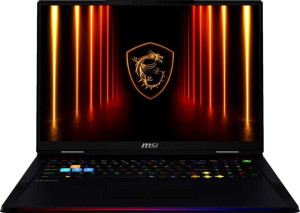
MSI Raider A18 HX A9W (2025) 18"
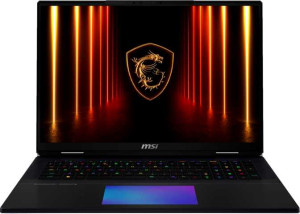
MSI Titan 18 HX AI A2XW (2025) 18"

MSI Raider A18 HX A9W (2025) 18" MSI Titan 18 HX AI A2XW (2025) 18"

Common Features

  • Both products are designed for gaming.
  • Both products weigh 3600 g.
  • Both products use a fan design.
  • Both products have a backlit keyboard.
  • Both products have a volume of 2976.672 cm³.
  • Both products have a screen size of 18″.
  • Both products have a resolution of 3840 x 2400 px.
  • Both products have a pixel density of 251 ppi.
  • Both products do not have a touch screen.
  • Both products have a refresh rate of 120Hz.
  • Both products support four displays.
  • Both products use flash storage.
  • Both products have 24GB of VRAM.
  • Both products have a floating-point performance of 31.8 TFLOPS.
  • Both products use GDDR7 for VRAM.
  • Both products have a texture rate of 496.9 GTexels/s.
  • Both products have a pixel rate of 193.9 GPixel/s.
  • Both products use NVMe SSDs for storage.
  • Both products support DirectX 12 Ultimate.
  • Both products have a 99 Wh battery size.

Main Differences

  • RAM is 64GB on MSI Raider A18 HX A9W (2025) 18″ and 96GB on MSI Titan 18 HX AI A2XW (2025) 18″.
  • RAM speed is 5600 MHz on MSI Raider A18 HX A9W (2025) 18″ and 6400 MHz on MSI Titan 18 HX AI A2XW (2025) 18″.
  • Internal storage is 2048GB on MSI Raider A18 HX A9W (2025) 18″ and 6144GB on MSI Titan 18 HX AI A2XW (2025) 18″.
  • CPU speed is 16 x 2.5 GHz on MSI Raider A18 HX A9W (2025) 18″ and 8 x 2.8 & 16 x 2.1 GHz on MSI Titan 18 HX AI A2XW (2025) 18″.
  • CPU threads are 32 on MSI Raider A18 HX A9W (2025) 18″ and 24 on MSI Titan 18 HX AI A2XW (2025) 18″.
  • Turbo clock speed is 5.4GHz on MSI Raider A18 HX A9W (2025) 18″ and 5.5GHz on MSI Titan 18 HX AI A2XW (2025) 18″.
  • PassMark result is 61356 on MSI Raider A18 HX A9W (2025) 18″ and 62297 on MSI Titan 18 HX AI A2XW (2025) 18″.
  • PassMark result (single) is 4491 on MSI Raider A18 HX A9W (2025) 18″ and 4784 on MSI Titan 18 HX AI A2XW (2025) 18″.
  • USB 3.2 Gen 2 ports (USB-A) are 1 on MSI Raider A18 HX A9W (2025) 18″ and 3 on MSI Titan 18 HX AI A2XW (2025) 18″.
  • Thunderbolt 4 ports are 2 on MSI Raider A18 HX A9W (2025) 18″ and 0 on MSI Titan 18 HX AI A2XW (2025) 18″.
  • USB 3.2 Gen 1 ports (USB-C) are 2 on MSI Raider A18 HX A9W (2025) 18″ and 0 on MSI Titan 18 HX AI A2XW (2025) 18″.
  • RJ45 ports are absent on MSI Raider A18 HX A9W (2025) 18″ but present on MSI Titan 18 HX AI A2XW (2025) 18″.
  • Fingerprint scanner is available on MSI Raider A18 HX A9W (2025) 18″ but not available on MSI Titan 18 HX AI A2XW (2025) 18″.
  • 3D facial recognition is available on MSI Raider A18 HX A9W (2025) 18″ but not available on MSI Titan 18 HX AI A2XW (2025) 18″.
  • CPU temperature is 100 °C on MSI Raider A18 HX A9W (2025) 18″ and 105 °C on MSI Titan 18 HX AI A2XW (2025) 18″.
  • Clock multiplier is 25 on MSI Raider A18 HX A9W (2025) 18″ and 28 on MSI Titan 18 HX AI A2XW (2025) 18″.
  • L3 cache is 128 MB on MSI Raider A18 HX A9W (2025) 18″ and 36 MB on MSI Titan 18 HX AI A2XW (2025) 18″.
  • L2 cache is 16 MB on MSI Raider A18 HX A9W (2025) 18″ and 40 MB on MSI Titan 18 HX AI A2XW (2025) 18″.
  • Uses big.LITTLE technology on MSI Titan 18 HX AI A2XW (2025) 18″ but not on MSI Raider A18 HX A9W (2025) 18″.
  • Has an unlocked multiplier on MSI Titan 18 HX AI A2XW (2025) 18″ but not on MSI Raider A18 HX A9W (2025) 18″.
Specs Comparison
MSI Raider A18 HX A9W (2025) 18"

MSI Raider A18 HX A9W (2025) 18"

MSI Titan 18 HX AI A2XW (2025) 18"

MSI Titan 18 HX AI A2XW (2025) 18"

Design:
Type Gaming Gaming
weight 3600 g 3600 g
Uses a fanless design
Has a backlit keyboard
volume 2976.672 cm³ 2976.672 cm³
width 404 mm 404 mm
height 307 mm 307 mm
thickness 24 mm 24 mm
is weather-sealed (splashproof)
has a rugged build

In terms of design, the MSI Raider A18 HX A9W and the MSI Titan 18 HX AI A2XW are, by every measurable dimension, identical twins. Both share the same 404 × 307 × 24 mm footprint, the same 3600 g weight, and the same calculated volume of 2976.672 cm³. For 18-inch gaming laptops, this profile is substantial but expected — portability is not the primary selling point of either machine, and at 3.6 kg, both will demand a dedicated bag and a nearby power outlet in most usage scenarios.

Both are classified as Gaming type laptops, feature a backlit keyboard, and lack a fanless design, weather sealing, or a rugged build. None of these absences are surprising or disadvantageous for the category — actively cooled, desk-oriented gaming rigs rarely prioritize environmental hardening over thermal performance and aesthetics.

On design alone, these two laptops are in a dead tie. There is no differentiator within this spec group that would steer a buyer toward one over the other. Any meaningful distinction between the Raider A18 and the Titan 18 will have to come from other specification categories such as display, performance hardware, or connectivity.

Display:
screen size 18" 18"
resolution 3840 x 2400 px 3840 x 2400 px
pixel density 251 ppi 251 ppi
Display type Mini-LED, LCD LCD, Mini-LED
has a touch screen
refresh rate 120Hz 120Hz
has anti-reflection coating
supported displays 4 4

Both the Raider A18 and the Titan 18 ship with an identical display panel: an 18-inch Mini-LED LCD at a resolution of 3840 × 2400, yielding a pixel density of 251 ppi. At this screen size, that resolution is genuinely sharp — fine text, intricate game environments, and color grading work all benefit from the added pixel count compared to a standard 1080p or 1440p panel. Mini-LED backlighting further raises the ceiling, enabling more precise local dimming zones and higher contrast ratios than traditional LCD backlights, which matters for dark gaming scenes and HDR content.

The shared 120Hz refresh rate is capable but sits on the conservative side for a flagship-tier gaming laptop in 2025 — competitive titles and fast-paced action games would ideally benefit from 144Hz or higher. The absence of an anti-reflection coating on both screens is a practical drawback worth noting: in brightly lit environments, glare can become a genuine nuisance on a screen this large. Neither machine supports touch input, which is a non-issue for the gaming audience these are built for.

With support for up to 4 external displays on both models, the multi-monitor potential is identical and generous for a workstation-style setup. As with the Design category, this group yields a complete tie — every display specification is mirrored exactly between the two laptops, so the display alone gives no grounds for choosing one over the other.

Performance:
RAM 64GB 96GB
RAM speed 5600 MHz 6400 MHz
Uses flash storage
internal storage 2048GB 6144GB
CPU speed 16 x 2.5 GHz 8 x 2.8 & 16 x 2.1 GHz
CPU threads 32 threads 24 threads
VRAM 24GB 24GB
floating-point performance 31.8 TFLOPS 31.8 TFLOPS
GDDR version GDDR7 GDDR7
texture rate 496.9 GTexels/s 496.9 GTexels/s
pixel rate 193.9 GPixel/s 193.9 GPixel/s
Is an NVMe SSD
DirectX version DirectX 12 Ultimate DirectX 12 Ultimate
GPU clock speed 990 MHz 990 MHz
uses multithreading
maximum memory amount 96GB 96GB
DDR memory version 5 5
turbo clock speed 5.4GHz 5.5GHz
GPU turbo 1515 MHz 1515 MHz
memory slots 2 2
PCI Express (PCIe) version 4 4
semiconductor size 4 nm 4 nm
has XeSS (XMX)
Supports 64-bit

The GPU side of this comparison is a non-event — both laptops carry identical graphics hardware, with 24GB GDDR7 VRAM, 31.8 TFLOPS of floating-point performance, and matching clock speeds. Where things get genuinely interesting is the CPU and system memory. The Raider A18 fields a 16-core, 32-thread processor running at 2.5 GHz base with a 5.4 GHz turbo, while the Titan 18 opts for a hybrid 24-core design — 8 performance cores at 2.8 GHz and 16 efficiency cores at 2.1 GHz — totaling only 24 threads with a 5.5 GHz turbo peak. The Raider′s higher thread count gives it a structural edge in heavily parallelized workloads like video encoding or simulation, whereas the Titan′s hybrid architecture prioritizes a higher peak clock on its performance cores, which can benefit single-threaded tasks and gaming frame rates at the margins.

The memory story firmly favors the Titan 18. It ships with 96GB of DDR5 RAM at 6400 MHz versus the Raider′s 64GB at 5600 MHz — both use the same number of slots, meaning the Titan arrives fully maxed out while the Raider leaves headroom for an upgrade. Faster RAM at 6400 MHz also reduces latency in memory-bound workloads, a tangible benefit for large datasets, AI inference, and complex game world streaming. Storage is even more lopsided: the Titan offers 6144GB of NVMe SSD space compared to the Raider′s 2048GB — three times the capacity, which is a significant practical difference for users managing large game libraries, raw video footage, or professional datasets.

Taken together, the Titan 18 holds a clear performance edge in this category. Its advantages in RAM capacity, RAM speed, and storage are substantial and immediate out of the box, while the CPU trade-off — fewer threads but a marginally higher turbo — is a nuanced architectural difference rather than a straightforward loss. For power users who demand headroom in memory and storage, the Titan 18 is the stronger platform; the Raider A18 remains competitive primarily for thread-heavy CPU workloads.

Benchmarks:
PassMark result 61356 62297
PassMark result (single) 4491 4784

PassMark scores offer a standardized, reproducible way to compare CPU throughput, and here the data echoes what the raw specs already suggested. The Titan 18 posts a multi-core score of 62,297 against the Raider A18′s 61,356 — a gap of roughly 1.5%, which is negligible in day-to-day use and unlikely to be perceptible in any real-world task. Both machines sit at the extreme high end of laptop CPU performance, and either score would place them among the fastest portable systems available.

The more telling number is the single-core result. The Titan 18 scores 4,784 versus the Raider A18′s 4,491 — a difference of about 6.5%. Single-core performance governs how snappy a system feels in tasks that cannot be parallelized: game engine logic, UI responsiveness, lightly threaded productivity applications, and per-frame CPU work in gaming. A 6.5% lead here is meaningful and aligns directly with the Titan′s marginally higher turbo clock on its performance cores noted in the specifications.

The Titan 18 holds the edge in this category, with a more convincing lead in single-core performance than in multi-core. That said, the multi-core gap is so narrow as to be practically irrelevant, and only the single-core advantage carries real-world weight. Users whose workloads are heavily threaded will find both machines functionally equivalent; those prioritizing peak responsiveness and per-core speed will find the Titan 18 the marginally stronger performer.

Connectivity:
USB 3.2 Gen 2 ports (USB-C) 0 0
USB 3.2 Gen 2 ports (USB-A) 1 3
USB 4 20Gbps ports 0 0
USB 4 40Gbps ports 2 2
Thunderbolt 4 ports 2 0
USB 3.2 Gen 1 ports (USB-C) 2 0
USB 3.2 Gen 1 ports (USB-A) 0 0
Thunderbolt 3 ports 0 0
has an HDMI output
Has USB Type-C
supports Wi-Fi
Wi-Fi version Wi-Fi 7 (802.11be), Wi-Fi 6E (802.11ax), Wi-Fi 6 (802.11ax), Wi-Fi 5 (802.11ac), Wi-Fi 4 (802.11n) Wi-Fi 7 (802.11be), Wi-Fi 6E (802.11ax), Wi-Fi 6 (802.11ax), Wi-Fi 5 (802.11ac), Wi-Fi 4 (802.11n)
has an external memory slot
Bluetooth version 5.4 5.4
RJ45 ports 0 1
HDMI ports 1 1
HDMI version HDMI 2.1 HDMI 2.1
DisplayPort outputs 0 0
has AirPlay
mini DisplayPort outputs 0 0
has a VGA connector

Wireless connectivity is a wash — both the Raider A18 and the Titan 18 support Wi-Fi 7 and Bluetooth 5.4, placing them at the current leading edge of wireless standards. Wi-Fi 7 brings meaningfully higher throughput and lower latency over Wi-Fi 6E, which matters for online gaming and large file transfers over a capable router. Where the two machines diverge is in their wired and USB port configurations, and those differences are worth unpacking carefully.

The Raider A18 leans into high-bandwidth, high-flexibility connectivity with 2 Thunderbolt 4 ports and 2 USB 4 40Gbps ports, plus 2 USB 3.2 Gen 1 Type-C ports — a setup well-suited to daisy-chaining external GPUs, high-speed docks, or multiple Thunderbolt peripherals. However, it has no RJ45 port, meaning wired Ethernet requires a dongle or dock, which is a notable omission for a desktop-replacement gaming machine. The Titan 18 takes the opposite approach: it trades the Thunderbolt 4 ports entirely, offering instead 3 USB 3.2 Gen 2 Type-A ports alongside its 2 USB 4 40Gbps ports, and critically, it includes a dedicated RJ45 Ethernet port — an advantage that serious gamers and LAN-goers will appreciate immediately.

The verdict here depends on use case. The Raider A18 is the stronger choice for users deeply embedded in the Thunderbolt ecosystem — professional peripherals, eGPUs, and high-speed docks all benefit from TB4′s capabilities. The Titan 18, however, is more pragmatically equipped for gaming-first users: native Ethernet, more legacy-compatible Type-A ports, and no dependency on adapters for standard wired networking give it a practical edge in that context. Neither layout is strictly superior, but the Titan 18′s inclusion of RJ45 and its broader Type-A port count make it the more self-contained, plug-and-play option.
Battery:
battery size 99 Wh 99 Wh
Has sleep-and-charge USB ports
Has a MagSafe power adapter

Battery is the shortest chapter in this comparison. Both the Raider A18 and the Titan 18 carry a 99 Wh cell — the practical ceiling for commercial air travel compliance, and a capacity that reflects the physical and regulatory limits of what manufacturers can fit into a laptop without triggering airline restrictions. For machines packing this level of CPU and GPU hardware, battery runtime will inevitably be constrained regardless of cell size; high-performance gaming laptops of this class are fundamentally tethered devices, and 99 Wh is as good as it gets within those boundaries.

Both models support sleep-and-charge USB ports, allowing connected devices like phones or earbuds to charge even when the laptop is powered down — a small but genuinely useful convenience feature for users on the move. Neither includes a MagSafe-style magnetic power connector, which is expected for Windows gaming laptops and carries no meaningful implication for this category.

This group is a complete tie. Every battery-related specification is identical across both machines, and no advantage can be drawn for either product here. Battery life in practice will be determined by factors outside this spec group — power management, workload intensity, and display brightness — rather than any hardware difference between the two.

Features:
release date March 2025 February 2025
has stereo speakers
has a socket for a 3.5 mm audio jack
supports ray tracing
supports DLSS
has Dolby Atmos
Stylus included
Has a fingerprint scanner
number of microphones 1 1
Uses 3D facial recognition
video recording (main camera) 1080 x 30 fps 1080 x 30 fps
has voice commands
has a front camera
Has S/PDIF Out port
has a gyroscope
has GPS
has an accelerometer
has a compass
Has an optical disc drive

Across most of the features in this category, the two laptops are in lockstep — both support ray tracing and DLSS, carry stereo speakers, a 3.5mm audio jack, a single microphone, and a front camera capable of 1080p at 30fps. For a gaming-focused machine, ray tracing and DLSS support are table-stakes at this tier, enabling realistic lighting in compatible titles and AI-driven upscaling that recovers frame rates at higher resolutions. Neither machine includes Dolby Atmos, a stylus, or an optical drive — all expected omissions for this category of laptop.

The only meaningful split in this group comes down to biometric authentication. The Raider A18 includes both a fingerprint scanner and 3D facial recognition, offering two independent, hardware-level login methods. The Titan 18 has neither. For users who frequently lock and unlock their machine — whether in an office, at a LAN event, or while traveling — the Raider′s dual biometric stack is a genuine quality-of-life advantage, reducing reliance on PIN or password entry. 3D facial recognition in particular is more secure than a standard 2D camera-based approach, as it is harder to spoof.

The Raider A18 takes a clear edge in this category solely on the strength of its biometric feature set. It is a narrowly scoped advantage that will not affect gaming performance in any way, but for users who value fast, secure, and convenient authentication as part of their daily workflow, the Raider A18 is the more capable machine here.

Miscellaneous:
clock multiplier 25 28
AMD SAM / Intel Resizable BAR Intel Resizable BAR Intel Resizable BAR
GPU architecture Blackwell Blackwell
has LHR
Thermal Design Power (TDP) 95W 95W
Supports 3D
Supports multi-display technology
OpenCL version 3 3
OpenGL version 4.6 4.6
Supports ECC memory
memory bus width 256-bit 256-bit
effective memory speed 25400 MHz 25400 MHz
maximum memory bandwidth 811.5 GB/s 811.5 GB/s
render output units (ROPs) 128 128
texture mapping units (TMUs) 328 328
shading units 10496 10496
Has Double Precision Floating Point (DPFP)
GPU memory speed 2000 MHz 2000 MHz
Type Desktop, Laptop Laptop
Uses big.LITTLE technology
instruction sets MMX, F16C, FMA3, AES, AVX, AVX2, SSE 4.1, SSE 4.2 MMX, F16C, FMA3, AES, AVX, AVX2, SSE 4.1, SSE 4.2
Has an unlocked multiplier
Has NX bit
L3 cache 128 MB 36 MB
L2 cache 16 MB 40 MB
Has integrated graphics
memory channels 2 2
RAM speed (max) 5600 MHz 6400 MHz
CPU temperature 100 °C 105 °C

On the GPU side, this category reinforces what earlier spec groups already established — both laptops use the Blackwell architecture with identical shader counts, memory bus width, bandwidth, and rendering units. The shared 95W TDP confirms they operate within the same thermal envelope at the graphics level. The more revealing contrasts are on the CPU side, where the architectural differences between the two processors come into sharper relief.

The Raider A18 stands out with a remarkable 128 MB L3 cache — more than three times the Titan 18′s 36 MB. A larger L3 cache reduces how often the CPU must fetch data from slower system RAM, which benefits latency-sensitive workloads, large dataset operations, and certain gaming scenarios where game world data fits within cache. The Titan 18 counters with a larger L2 cache at 40 MB versus the Raider′s 16 MB, a higher maximum RAM speed of 6400 MHz, an unlocked clock multiplier for overclocking headroom, and a higher CPU thermal ceiling of 105°C versus 100°C — meaning it can sustain boost clocks under thermal pressure for slightly longer before throttling. The Titan also employs big.LITTLE technology, confirming its hybrid core architecture noted in the Performance group.

This category does not yield a clean winner — it highlights a genuine architectural trade-off. The Raider A18′s massive L3 cache advantage is significant for cache-sensitive workloads, while the Titan 18 offers more flexibility through its unlocked multiplier, higher RAM ceiling, and greater thermal headroom. Enthusiasts who want to push the hardware further will lean toward the Titan 18; those whose workloads reward large cache capacity will find the Raider A18′s CPU architecture more naturally suited to their needs.

Comparison Summary & Verdict

This is a specification comparison between MSI Raider A18 HX A9W (2025) 18″ and MSI Titan 18 HX AI A2XW (2025) 18″. Both products feature a screen size of 18″, a resolution of 3840 x 2400 px, and VRAM of 24GB. However, the MSI Raider A18 HX A9W has 64GB of RAM with a speed of 5600 MHz, while the MSI Titan 18 HX AI A2XW offers 96GB of RAM at 6400 MHz. The MSI Raider A18 HX A9W also has 1 USB 3.2 Gen 2 port (USB-A), compared to the 3 ports available on the MSI Titan 18 HX AI A2XW. Additionally, the MSI Raider A18 HX A9W features a CPU speed of 16 x 2.5 GHz, whereas the MSI Titan 18 HX AI A2XW offers a combination of 8 x 2.8 GHz and 16 x 2.1 GHz cores. The PassMark result is higher on the MSI Titan 18 HX AI A2XW at 62297, compared to 61356 on the MSI Raider A18 HX A9W.